
Pack · #91 trending skills repo · ↗ +287 stars this week
Linkedin Skills
sergebulaev/linkedin-skills
Claude skills for LinkedIn. 12 Claude Code and Codex skills that write human-sounding LinkedIn posts, craft comments that get noticed, analyze your feed, and build a publishing cadence, all from your terminal. Content engineering by Creative Content Crafts. MIT.
- Stars
- 5.7k
- This week
- +287
- Forks
- 927
- Open issues
- 3
- Skills inside
- 26
Get started
Install the skills
npx skills add sergebulaev/linkedin-skillsInstalls into Claude Code, Codex, Cursor, OpenCode and the other agents it finds on your machine.
/plugin marketplace add sergebulaev/linkedin-skills
/plugin install linkedin-skills@linkedin-skillsRun inside Claude Code, then pick what to install from /plugin.
git clone --depth 1 https://github.com/sergebulaev/linkedin-skills.git /tmp/linkedin-skills
cp -r /tmp/linkedin-skills ~/.claude/skills/linkedin-skillsClaude Code reads ~/.claude/skills/ (or .claude/skills/ in a project). Other agents read the same SKILL.md format from their own skills folder.
Inside this repo
26 skills
.codex-marketplace/linkedin-skillslinkedin-comment-drafterDraft a LinkedIn comment on someone else's post from its URL, or reshare (repost) it to your feed with optional commentary. Use when the user pastes a post URL and asks to comment, engage, be first commenter, or repost with their thoughts. Produces 1-3 variants in the user's voice, picks a reaction,.codex-marketplace/linkedin-skills/skills/linkedin-comment-drafterlinkedin-content-plannerGenerate a 7-day LinkedIn content plan from a theme, audience, and pillars. Produces per-day post pillar, format, hook type, CTA, posting time, daily comment targets, and a weekly inbound-readiness check. Use when the user wants to plan a week or month of content, not draft a single post (use linked.codex-marketplace/linkedin-skills/skills/linkedin-content-plannerlinkedin-employee-advocacyStand up and run a LinkedIn employee advocacy program for a marketing or sales team. Covers 14-day launch playbook, brand-guideline governance, per-post time budget, cadence benchmarks, and team ROI (reach, engagement, pipeline). Triggers on \"employee advocacy\", \"get the team posting\", \"scale L.codex-marketplace/linkedin-skills/skills/linkedin-employee-advocacylinkedin-engager-analyticsPull the people who liked or commented on any LinkedIn post and segment them by ICP fit (peer / aspirational / prospect / other). Produces an engager roster, tier breakdown, and outbound action lists (follow back, comment-drop, DM-able with one-line openers). Powered by Apify, no LinkedIn login. Tri.codex-marketplace/linkedin-skills/skills/linkedin-engager-analyticslinkedin-hook-extractorReverse-engineer the hook formula from a viral LinkedIn post URL. Returns which of the 20 canonical 2026 formulas it uses (anaphora, R.I.P., year-pivot, time-anchor, curiosity-gap, contrarian, comment-gate, emotional cold-open, named-gratitude, and 11 more), why it worked, and a blank template. Use .codex-marketplace/linkedin-skills/skills/linkedin-hook-extractorlinkedin-humanizerRemove AI tells from LinkedIn posts/comments: 2026 vocabulary density, reveal bridges, staccato fragments, stacked triads, performed sincerity. Tiered rewriter plus `--mode audit` LinkedIn post auditor and `--mode profile` voice builder. Not for drafting from scratch (use linkedin-post-writer) or be.codex-marketplace/linkedin-skills/skills/linkedin-humanizerlinkedin-interviewerInterview the user for the raw material their posts are made of. Builds a lasting Story Bank of roles, numbers, turning points, scars and positions, or runs a focused interview that turns one topic into a post spine. Use when a draft has nothing concrete to draw on, or the user says interview me. No.codex-marketplace/linkedin-skills/skills/linkedin-interviewerlinkedin-post-writerDraft a new LinkedIn post from scratch using one of 20 2026 hook formulas (anaphora, R.I.P., time-anchor, curiosity-gap, contrarian, controlled A/B, false-binary, and more) plus a founders-edition angle library, picked by engagement goal (comments, reposts, likes, saves). Runs the humanizer pass and.codex-marketplace/linkedin-skills/skills/linkedin-post-writerlinkedin-profile-optimizerAudit and rewrite a LinkedIn profile end-to-end for 2026: headline, About 7-step, Featured, banner, photo, Experience metrics, Skills, custom URL, recommendations. Triggers on \"review my profile\", \"rewrite my headline\", \"fix my About\", \"optimize banner\", \"profile audit\", \"LinkedIn bio\". .codex-marketplace/linkedin-skills/skills/linkedin-profile-optimizerlinkedin-reply-handlerDraft a reply to one LinkedIn comment from its URL, or sweep a whole thread from just the post URL and draft a reply to every comment worth answering, in one batch. Use for replying to a comment, following an author reply, or clearing all comments on a post. Resolves the correct parentComment (Linke.codex-marketplace/linkedin-skills/skills/linkedin-reply-handlerlinkedin-repurposerRepurpose existing content into a native LinkedIn post. Take a tweet, thread, YouTube video, blog, or newsletter and rebuild it for LinkedIn: re-hook before the fold, expand to the 900 to 1300 char sweet spot, add whitespace and a CTA, move links to the first comment, run the humanizer, publish via .codex-marketplace/linkedin-skills/skills/linkedin-repurposerlinkedin-thread-monitorTrack which of your LinkedIn comments earned author replies. Flags the 6-24h warm-reply window where thread momentum peaks, classifies threads as hot/warm/cool/dormant, and routes warm ones to linkedin-reply-handler for follow-up drafts. Powered by Apify, no LinkedIn login. Triggers on \"what thread.codex-marketplace/linkedin-skills/skills/linkedin-thread-monitorlinkedin-marketingPlan, draft, audit, and publish LinkedIn posts and comments. Use when the user wants to write a viral LinkedIn post, draft a comment or reply on any LinkedIn post URL, audit a draft against 2026 algorithm heuristics, remove AI tells, extract hook formulas from viral posts, or plan a week of content./linkedin-comment-drafterDraft a LinkedIn comment on someone else's post from its URL, or reshare (repost) it to your feed with optional commentary. Use when the user pastes a post URL and asks to comment, engage, be first commenter, or repost with their thoughts. Produces 1-3 variants in the user's voice, picks a reaction,skills/linkedin-comment-drafterlinkedin-content-plannerGenerate a 7-day LinkedIn content plan from a theme, audience, and pillars. Produces per-day post pillar, format, hook type, CTA, posting time, daily comment targets, and a weekly inbound-readiness check. Use when the user wants to plan a week or month of content, not draft a single post (use linkedskills/linkedin-content-plannerlinkedin-employee-advocacyStand up and run a LinkedIn employee advocacy program for a marketing or sales team. Covers 14-day launch playbook, brand-guideline governance, per-post time budget, cadence benchmarks, and team ROI (reach, engagement, pipeline). Triggers on \"employee advocacy\", \"get the team posting\", \"scale Lskills/linkedin-employee-advocacylinkedin-engager-analyticsPull the people who liked or commented on any LinkedIn post and segment them by ICP fit (peer / aspirational / prospect / other). Produces an engager roster, tier breakdown, and outbound action lists (follow back, comment-drop, DM-able with one-line openers). Powered by Apify, no LinkedIn login. Triskills/linkedin-engager-analyticslinkedin-hook-extractorReverse-engineer the hook formula from a viral LinkedIn post URL. Returns which of the 20 canonical 2026 formulas it uses (anaphora, R.I.P., year-pivot, time-anchor, curiosity-gap, contrarian, comment-gate, emotional cold-open, named-gratitude, and 11 more), why it worked, and a blank template. Use skills/linkedin-hook-extractorlinkedin-humanizerRemove AI tells from LinkedIn posts/comments: 2026 vocabulary density, reveal bridges, staccato fragments, stacked triads, performed sincerity. Tiered rewriter plus `--mode audit` LinkedIn post auditor and `--mode profile` voice builder. Not for drafting from scratch (use linkedin-post-writer) or beskills/linkedin-humanizerlinkedin-interviewerInterview the user for the raw material their posts are made of. Builds a lasting Story Bank of roles, numbers, turning points, scars and positions, or runs a focused interview that turns one topic into a post spine. Use when a draft has nothing concrete to draw on, or the user says interview me. Noskills/linkedin-interviewerlinkedin-post-writerDraft a new LinkedIn post from scratch using one of 20 2026 hook formulas (anaphora, R.I.P., time-anchor, curiosity-gap, contrarian, controlled A/B, false-binary, and more) plus a founders-edition angle library, picked by engagement goal (comments, reposts, likes, saves). Runs the humanizer pass andskills/linkedin-post-writerlinkedin-profile-optimizerAudit and rewrite a LinkedIn profile end-to-end for 2026: headline, About 7-step, Featured, banner, photo, Experience metrics, Skills, custom URL, recommendations. Triggers on \"review my profile\", \"rewrite my headline\", \"fix my About\", \"optimize banner\", \"profile audit\", \"LinkedIn bio\". skills/linkedin-profile-optimizerlinkedin-reply-handlerDraft a reply to one LinkedIn comment from its URL, or sweep a whole thread from just the post URL and draft a reply to every comment worth answering, in one batch. Use for replying to a comment, following an author reply, or clearing all comments on a post. Resolves the correct parentComment (Linkeskills/linkedin-reply-handlerlinkedin-repurposerRepurpose existing content into a native LinkedIn post. Take a tweet, thread, YouTube video, blog, or newsletter and rebuild it for LinkedIn: re-hook before the fold, expand to the 900 to 1300 char sweet spot, add whitespace and a CTA, move links to the first comment, run the humanizer, publish via skills/linkedin-repurposerlinkedin-thread-monitorTrack which of your LinkedIn comments earned author replies. Flags the 6-24h warm-reply window where thread momentum peaks, classifies threads as hot/warm/cool/dormant, and routes warm ones to linkedin-reply-handler for follow-up drafts. Powered by Apify, no LinkedIn login. Triggers on \"what threadskills/linkedin-thread-monitorDocumentation
README
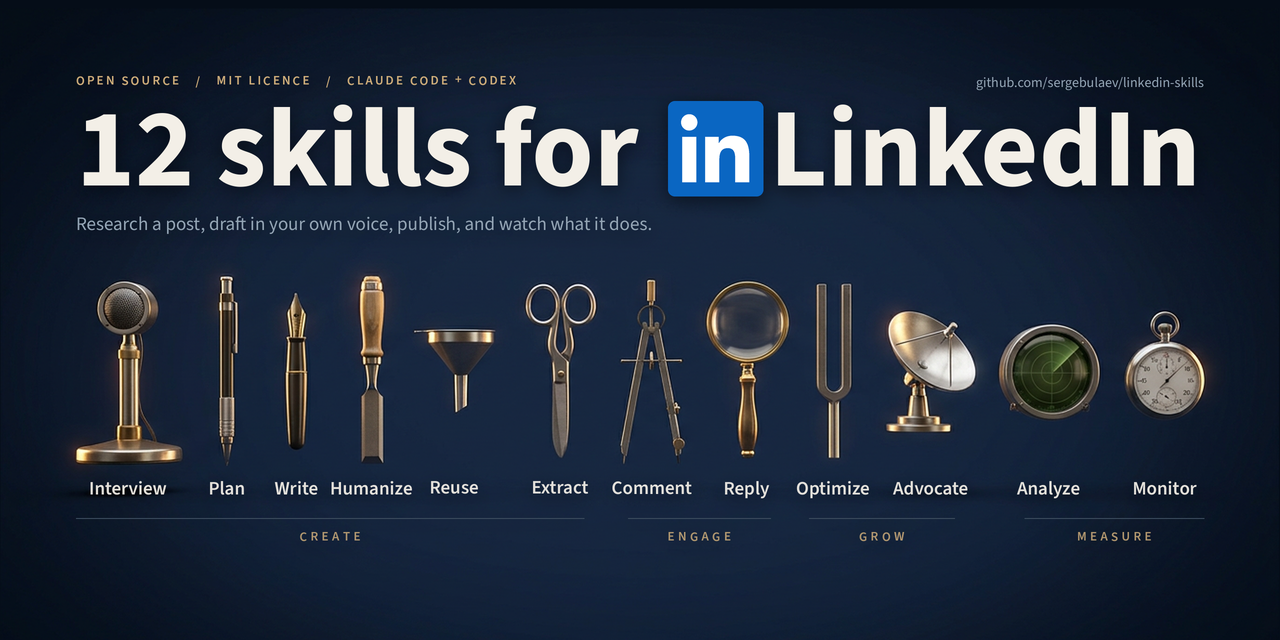
LinkedIn Marketing Skills for Claude Code and Codex






Claude skills for LinkedIn. 12 Claude Code and Codex skills that write LinkedIn posts, comments, and replies in your voice. They draft content, strip AI tells, and wait for your approval before anything gets published. No coding required.
On another platform too? The same team ships matching marketing skill bundles for X (Twitter) · Instagram · YouTube · TikTok · Threads · Facebook. Same voice engine, same approve-before-publish flow.
Install
Pick whichever way you use Claude Code or Codex:
Codex CLI
codex plugin marketplace add sergebulaev/linkedin-skills
codex plugin add linkedin-skills@linkedin-skills
To test a local clone before publishing changes:
git clone https://github.com/sergebulaev/linkedin-skills.git
cd linkedin-skills
codex plugin marketplace add .
codex plugin add linkedin-skills@linkedin-skills
claude.ai (web)
- Open claude.ai and click Customize in the sidebar
- Open the Plugins tab
- Click Add
- Choose Add marketplace → Add from a repository
- Paste
sergebulaev/linkedin-skillsthere and sync - Find the plugin under Discover, then click Add
- Done. The skills activate automatically when you ask about LinkedIn.
Note: Skills/Plugins require a paid Claude plan (Pro, Max, Team, or Enterprise) with code execution enabled.
Claude Desktop (Mac / Windows)
- Open Claude Desktop
- Click Customize in the left sidebar, then open the Plugins tab
- Click the Add dropdown at the top right and choose Add marketplace
- Select Add from a repository, paste
sergebulaev/linkedin-skills, and sync - Switch to the Discover tab and find the plugin in the list
- Click the + on the plugin card to install it
- Switch back to Yours to confirm it is listed and enabled
- Done. Start a new conversation and ask Claude to write a LinkedIn post.
The tab switch in steps 5 and 7 is the part that trips people: syncing a marketplace puts the plugin in the catalog (Discover), not in your installed list (Yours). The + in step 6 sits on the plugin card itself, not beside a section heading.
OpenClaw
- Open your OpenClaw working directory
- Clone the skills into it:
git clone https://github.com/sergebulaev/linkedin-skills.git - In OpenClaw settings, add this to your system prompt:
You have LinkedIn marketing skills in ./linkedin-skills/. For any LinkedIn task, read the relevant skills/*/SKILL.md first. Use lib/url_parser.py for URL parsing, lib/apify_client.py for reading posts / comments / engagers, lib/publora_client.py for publishing actions. - Done. Ask OpenClaw to write a LinkedIn post or comment.
Claude Code (CLI / VS Code / JetBrains)
/plugin marketplace add sergebulaev/linkedin-skills
/plugin install linkedin-skills@linkedin-skills
Or clone the repo and open it as your working directory — the skills activate with no plugin install, which is the route to use where /plugin is unavailable:
git clone https://github.com/sergebulaev/linkedin-skills.git
cd linkedin-skills
The repo ships a .claude/skills/ mirror of symlinks, so Claude Code finds all 12 skills on its own.
On Windows those symlinks check out as twelve one-line text files unless git can create
them, which needs Developer Mode or an elevated shell plus git config core.symlinks true.
Without that, a plain clone loads no skills at all. Either clone with symlinks enabled, or
replace the mirror with directory junctions, which need no admin rights:
for /d %s in (skills\*) do mklink /J .claude\skills\%~nxs ..\..\%s
Hermes Agent
Hermes Agent (Nous Research) follows the agentskills.io open standard and loads skills/*/SKILL.md directly. Clone the bundle into your Hermes skills folder:
git clone https://github.com/sergebulaev/linkedin-skills.git ~/.hermes/skills/linkedin-skills
Coming from OpenClaw? hermes claw migrate imports these skills automatically. Then call /<skill-name> from any of your Hermes chat surfaces.
Any agent (skills CLI)
One command that works across Claude Code, Codex, Cursor, and any other agent that reads SKILL.md files:
npx skills add sergebulaev/linkedin-skills
Found this useful? Star the repo. Curated Claude Code and Codex directories rank and gate by star count, so a star is what makes these skills findable for the next person. It is the only thing we ask. No signup, no email.
What you can do
Once installed, just ask Claude Code or Codex for help with LinkedIn. The right skill activates automatically.
Write a post:
"Write me a LinkedIn post about why AI agencies are replacing traditional ones. Make it viral."
Comment on someone's post:
"Comment on this post: https://linkedin.com/posts/... — I want to add a thoughtful take."
Check a draft before publishing:
"Audit this post draft for AI tells and algorithm issues: [paste your text]"
Reverse-engineer a viral post:
"What hook formula does this post use? https://linkedin.com/posts/..."
Plan your week:
"Create a 7-day LinkedIn content plan. I'm a B2B SaaS founder targeting VPs of Marketing."
Rewrite your profile:
"Optimize my LinkedIn profile for inbound leads: https://linkedin.com/in/yourname"
Remove AI tells from any text:
"Humanize this text: [paste AI-generated draft]"
Every skill shows you a draft first and waits for your OK before doing anything. Nothing gets posted without your approval.
The 12 skills
| Skill | What it does |
|---|---|
| Post Writer | Drafts viral-ready posts using 20 proven 2026 hook formulas (anaphora, R.I.P. obituary, year-over-year pivot, curiosity gap, emotional cold-open, controlled A/B, false-binary, and 13 more) plus a founders-edition angle library, picked by engagement goal |
| Comment Drafter | Drafts a comment on any LinkedIn post from its URL |
| Reply Handler | Drafts a reply to any comment, correctly handling LinkedIn's 2-level thread flattening. Or give it just a post URL and it sweeps the whole thread — every top-level comment and reply — filters out low-value ones, and drafts the rest in one batch |
| Post Audit | Checks your draft against 2026 algorithm rules and AI-detection patterns before you publish |
| Humanizer | Removes the AI tells human readers and LinkedIn's slop filter react to: 2026 AI vocabulary scored by paragraph density, reveal bridges, staccato fragment stacks, stacked triads, performed sincerity; caps em dashes instead of banning them. Does not promise to beat detectors (no edit reliably does). Bundles three sub-tools: AI-emoji density scorer, multi-detector spread tester (GPTZero, Originality.ai, ZeroGPT, Sapling, Copyleaks) that documents how much they disagree, and a rule-explainer reference for defending stylistic choices. |
| Hook Extractor | Reverse-engineers the hook formula from any viral post. Returns a blank template you can fill with your own topic |
| Content Planner | Creates a 7-day plan with daily post topics, formats, hooks, posting times, and comment targets |
| Engagement Monitor | Two read-side workflows: (1) tracks your comment threads for author replies and drafts follow-ups in the 6-24h window; (2) pulls likers and commenters on any post and groups them by ICP fit (peer / aspirational / prospect). |
| Profile Optimizer | Rewrites your headline, About section, Featured section, and Experience for 2026 conversion patterns |
| Employee Advocacy | Plans a team LinkedIn program: 14-day launch, posting cadence, brand governance, ROI tracking |
| Repurposer | Turns content from another platform (tweet, thread, YouTube video, blog, newsletter) into a native LinkedIn post: re-hooks for the fold, expands to the 900-1300 char sweet spot, moves links to the first comment, runs the humanizer |
| Interviewer | Interviews you and keeps the answers in a Story Bank: roles, receipts with real numbers, turning points, scars, positions you would defend. Every other skill reads it, so drafts stop asking you for a specific number mid-request. Also runs a focused interview that turns one topic into a post spine. The only skill that works when you have never posted before, since it needs a career rather than an archive |
Built for founders
If you are a founder, the bundle ships a dedicated founder layer. Your real constraint is rarely reach. It is a small number of high-stakes readers: the next investor, the next hire, the design partner who becomes a case study. The founder layer optimizes for trust with that narrow audience instead of impressions.
- 10 founder angles (
references/founder-topics.md) as fill-in templates: reprice the category, content-to-pipeline, audience of one, the scarce-shots math, the unglamorous bet, the limit of delegation, designed serendipity, the evasive-sentence test, the delegation line, the learning gate. Each maps to an engagement goal and a hook formula. - 4 structural hook formulas (F17-F20) that shape a post's logic: controlled A/B anecdote, false-binary dissolve, anecdote-meets-evidence bridge, diverging-curves close.
- A founders-edition content plan (Conviction / Building in public / The math / Proof) in the Content Planner.
Just tell the Post Writer you are a founder, or ask the Content Planner for a "founder plan," and the skills reach for these first.
Community skills
Standalone skills built by other people on this bundle's conventions (same voice rules, same approval-card flow, same Not for X (use Y) disambiguation). They live in their authors' repos, so the core stays at 12 skills and one read/write pipeline. Install them next to this bundle the same way.
- linkedin-outreach by @smfardeen7 - drafts 300-character connection-request notes (10 scenario templates) and post-accept follow-up sequences with day offsets and stop rules. Draft-only: LinkedIn has no invite or DM API, you paste and send.
Built one? Open a PR that adds a single line here.
Optional: read LinkedIn data with Apify
Four of the skills (Comment Drafter, Reply Handler, Hook Extractor, Engagement Monitor) can read post bodies, comment threads, your own recent comments, and the people who liked or commented on any post. Without an Apify token they fall back to asking you to paste the relevant text. With one, they fetch automatically.
Apify free tier ships with $5/month of credit, which goes a long way at $1-$5 per 1,000 results. The skills use four no-cookies actors:
| Use case | Actor | Cost |
|---|---|---|
| Post body by URL | apimaestro/linkedin-post-detail |
$1 / 1,000 |
| Comments + replies on a post | apimaestro/linkedin-post-comments-replies-engagements-scraper-no-cookies |
$5 / 1,000 |
| Your own recent comments | apimaestro/linkedin-profile-comments |
$5 / 1,000 |
| Likers + commenters on any post | scraping_solutions/linkedin-posts-engagers-likers-and-commenters-no-cookies |
$5 / 1,000 |
Setup: drop APIFY_TOKEN=apify_api_... into your .env. The thin client at lib/apify_client.py exposes fetch_post, fetch_post_comments, fetch_user_recent_comments, and fetch_post_engagers.
On claude.ai, use the Apify MCP connector instead of a token. The Python client reads
APIFY_TOKEN from the environment and runs a process, and claude.ai gives a skill neither.
Apify now publishes an MCP server, so the reads work there too. Add this as a custom
connector:
https://mcp.apify.com?actors=apimaestro/linkedin-post-detail,apimaestro/linkedin-post-comments-replies-engagements-scraper-no-cookies,apimaestro/linkedin-profile-comments,scraping_solutions/linkedin-posts-engagers-likers-and-commenters-no-cookies
Sign in with OAuth on first use; no key on disk. Keep the ?actors= filter: the bare
https://mcp.apify.com also hands the agent search-actors and call-actor, which can
run anything in the Apify Store at whatever that actor charges. The filtered URL exposes
only these four and nothing that picks an actor on its own.
The skills use it automatically when it is there, and still fall back to asking you to
paste when it is not. Details and the field mapping: references/mcp-read-layer.md.
A typical creator running daily comment ops + a weekly engager-analytics sweep stays under $2/month, well inside the free tier.
Optional: auto-post with Publora
By default, skills draft content for you to copy-paste into LinkedIn. If you want Claude Code or Codex to publish directly to your LinkedIn (and optionally to X, Threads, Instagram), connect Publora. It takes about 2 minutes.
What is Publora?
Publora is a publishing API that handles LinkedIn's quirks (3 different URL formats, reaction type mismatches, thread flattening bugs). The free tier gives you 15 posts/month.
Publora also ships official MCP skills (npx skills add publora/skills): one skill per platform, covering the publish side only. This bundle is the layer above them, adding the reading, the writing craft and the approval flow.
Setup (2 minutes)
Before or after any of it, one command tells you where you stand:
python3 scripts/selftest.py          # install, accounts, tests, and which skills work right now
python3 scripts/selftest.py --fresh  # clone to a temp dir and check a genuinely clean install
It reports each of Apify, Publora and Pixfaro separately, using free endpoints that verify a key without doing any work, and it names what is missing rather than only that something is. Skills that need a layer you have not connected still work, by drafting for you to paste, and the report says which ones those are.
Two ways to connect, pick either
A connector, if you are on claude.ai or Claude Code. Publora and Pixfaro both publish one. Authorize it once in your connector settings and the skills use it: no key on disk, no .env, nothing to rotate. Publora's connector also carries post_stats and profile_stats, which the REST path below does not have.
An API key, if you are anywhere else — a plain terminal, CI, a script, or you would rather the credential lived in a file you control. That is the seven steps below.
They are not exclusive and neither is second-class. One caveat worth knowing: scripts/check_config.py and scripts/selftest.py read .env and the shell, so a connector is invisible to them. If they say "manual" while your posts are going out, the connector is doing the work and nothing is wrong.
Step 1. Sign up at https://app.publora.com/signup?utm_source=github&utm_medium=readme&utm_campaign=linkedin-skills (free)
Step 2. Connect LinkedIn: click Channels in the left sidebar, then Add Channel, pick LinkedIn, authorize.
Step 3. Find your Platform ID: go to Channels, click your LinkedIn account. The ID looks like linkedin-ABC123DEF. Copy the whole thing including linkedin-.
Step 4. Get your API key: click Settings (gear icon, bottom-left), then API, then Create Key. Copy the sk_... string.
Step 5. Create a file called .env in the linkedin-skills folder:
PUBLORA_API_KEY=sk_paste_your_key_here
LINKEDIN_PLATFORM_ID=linkedin-paste_your_id_here
If you cloned the repo, you can copy the template instead:
cp .env.example .env
Then open .env and replace the placeholders with your real values.
Step 6. Install two small Python packages:
pip install requests python-dotenv
Step 7. Test it. Ask Claude Code or Codex:
"Schedule a test LinkedIn post via Publora 24 hours from now: 'testing the API connection — will cancel in dashboard'."
If Publora returns a scheduled-post ID, you're set. Cancel the post in the Publora dashboard before the scheduled time. If you get HTTP 401, your API key is wrong. If you get HTTP 400 about a missing platformId, your LINKEDIN_PLATFORM_ID isn't set. See Troubleshooting.
Optional: generate illustrations with Pixfaro
Posts with a visual get more dwell time. The Post Writer can generate an illustration for a draft (a feed image, a carousel slide, or a quote-card of your hook) and attach it automatically when publishing. Without a key it drafts the image prompt and asks you to generate it yourself, so nothing breaks.
Pixfaro is a single image API over multiple models (from flux-schnell at $0.004 to gpt-5-image). It composites your handle, brand color, or logo onto the image as a pixel-exact overlay, so a cheap base model still renders crisp text on a quote-card or thumbnail. Pull those brand fields from your Voice & Brand Profile (section 6) and every asset stays on-brand.
Setup: sign up at api.pixfaro.com/signup, create a key (name it linkedin, scope Generate), and put PIXFARO_TOKEN=pf_live_... in .env at the root of the linkedin-skills folder (next to this README; keys are shown once). Then python3 scripts/check_config.py calls Pixfaro's GET /v1/key and prints the key's name and scope when it is right. The thin client at lib/pixfaro_client.py and the wrappers lib.illustrate(prompt, kind=...) / lib.refine(image_id, instruction) return a hosted URL that flows straight into lib.publish(..., media_urls=[url]). refine edits a prior image by its id (cheaper than regenerating); results carry cost, balance_after, and a premium flag so the skills never quietly spend on a pricey model.
For text-led visuals (a quote-card of your hook), the skills skip the image model entirely and use Pixfaro's design templates: lib.quote_card("<hook>", handle="@you", style="brand") typesets the card server-side (POST /v1/renders), so the line is crisp at any length — same hosted-URL flow. lib.available_templates() lists templates and live prices. A brand logo can be uploaded once with lib.brand_logo("logo.png") (full-scope key); the returned logo_id goes into Voice & Brand Profile §6 and every overlay from then on stamps the real mark.
Voice rules
Every skill follows these rules automatically:
- Em dashes capped at about 1 per 100 words. The character stopped being a tell in 2026; the density is.
- Capitalize names. Always. Lowercase reads as disrespectful.
- No AI vocabulary: "leverage", "fundamentally", "streamline", "harness", "delve", "unlock", "foster".
- Specific numbers beat adjectives. "$14,200" beats "significant savings".
- One sharp insight per comment beats three vague ones.
- 200-350 chars for comments, 900-1,300 chars for posts.
Troubleshooting
| Problem | Fix |
|---|---|
| Skills don't activate when I ask about LinkedIn | Make sure you installed via the Skills panel, /plugin install, or codex plugin add. Try starting a new conversation. |
| "Publora API key not provided" | Your .env file is missing or in the wrong folder. It should be in the linkedin-skills/ root. |
| "401 Unauthorized" from Publora | Your API key expired. Go to Publora Settings > API > Create a new key. |
| Image skills keep saying "No Pixfaro key set" although you added one | The key was not loaded: .env must be at the linkedin-skills/ root and python-dotenv installed. python3 scripts/check_config.py now says exactly which — and, with a key, whether Pixfaro accepts it (GET /v1/key). |
| "401" from Pixfaro | The key was copied short or revoked. Keys are shown once — mint a new one in the Pixfaro dashboard and paste the whole pf_live_... string. |
| "404 on comment/post" | Your LINKEDIN_PLATFORM_ID is wrong. Go to Publora Channels and copy the full linkedin-... string. |
| "400 reactionType" error | Known Publora quirk. The skills handle this automatically. If you're calling the API manually, use PRAISE (not CELEBRATE), INTEREST (not INSIGHTFUL). |
pip install fails |
Use a virtual environment: python -m venv venv && source venv/bin/activate && pip install requests python-dotenv |
Cross-cutting references
references/industry-benchmarks.md— engagement rates, time-per-post, reach multipliers across industriesreferences/engagement-metrics-taxonomy.md— what to measure at post / account / team / business level
For developers: runtime compatibility, URL parsing, and internals
Runtime compatibility
linkedin-skills/
├── skills/          ← SKILL.md frontmatter; native to Claude Code and Codex, others read as markdown
├── .codex-marketplace/ ← generated nested Codex package (run scripts/sync_codex_marketplace.py)
├── lib/             ← pure Python, works in any agent runtime
├── references/      ← pure markdown, works anywhere
└── scripts/         ← pure Python CLI, works anywhere
| Runtime | Auto-discovers skills? | Setup |
|---|---|---|
| Claude Code (CLI, Desktop, Web, IDE) | Yes | Install via plugin or clone. Skills activate on matching prompts. |
| Codex CLI | Yes | Install via codex plugin marketplace add sergebulaev/linkedin-skills and codex plugin add linkedin-skills@linkedin-skills. |
Anthropic Managed Agents (/v1/agents) |
Yes | Pass skill files in the agent context. |
| OpenClaw | Manual | Mount the repo, add system prompt pointing to skills/*/SKILL.md. |
| Cursor / Cline / Aider | Manual | Read SKILL.md files as prompt context; import lib/ as Python. |
| Manus | No | Upload references/ as knowledge base. Call Publora API directly. |
| LangChain / AutoGen | No | Use lib/ as a package; feed references/ as prompt context. |
OpenClaw quickstart
git clone git@github.com:sergebulaev/linkedin-skills.git

# Add to OpenClaw system prompt:
# "You have LinkedIn marketing skills in ./linkedin-skills/.
#  Read the relevant skills/*/SKILL.md before any LinkedIn task.
#  Use lib/url_parser.py for URL parsing,
#      lib/apify_client.py for reading posts / comments / engagers,
#      lib/publora_client.py for publishing."
Generic Python agent quickstart
import sys; sys.path.insert(0, "path/to/linkedin-skills")
from lib import parse_linkedin_url, PubloraClient, ApifyClient

parsed = parse_linkedin_url("https://www.linkedin.com/posts/slug-activity-7448808898326654978-iW20")
print(parsed["post_urn"])  # urn:li:activity:7448808898326654978

# Read side (Apify)
apify = ApifyClient()  # reads APIFY_TOKEN from env
post = apify.fetch_post(post_url="https://www.linkedin.com/posts/...")
engagers = apify.fetch_post_engagers(post_url="https://www.linkedin.com/posts/...", max_items=50)

# Write side (Publora)
client = PubloraClient()  # reads PUBLORA_API_KEY from env
client.create_comment(post_urn=parsed["post_urn"], message="draft", platform_id="linkedin-xxx")

# Image side (Pixfaro) — optional, reads PIXFARO_TOKEN from env
from lib import illustrate
img = illustrate("Minimal flat-vector lighthouse, calm blue palette", kind="wide")
# img["url"] -> pass to publish(..., media_urls=[img["url"]])
URL handling
LinkedIn has three post URN types. The lib/url_parser.py handles all of them:
| URL fragment | URN |
|---|---|
/posts/slug-activity-7448... |
urn:li:activity:7448... |
/posts/slug-share-7449... |
urn:li:share:7449... |
/feed/update/urn:li:ugcPost:7447... |
urn:li:ugcPost:7447... |
Comment URLs include a commentUrn query param. The parser extracts both post_urn and comment_id.
Thread flattening
LinkedIn flattens reply threads to 2 levels. When replying to a reply, parentComment must point to the top-level comment URN, not the reply's URN. The linkedin-reply-handler skill handles this correctly.
Testing the parser
python lib/url_parser.py "https://www.linkedin.com/posts/<author-handle>_activity-<id>"
References
- Publora API docs — endpoint reference for the publishing layer
- Apify console — manage actors, tokens, and usage for the read layer
- 360Brew paper — LinkedIn's ranking foundation model
- AuthoredUp 2026 reach data — format-level reach benchmarks
Who builds this
These skills come out of Creative Content Crafts, an engineering company. We build the machinery underneath a company's public voice: ICP parsing, engagement systems, content guardrails, and posting infrastructure. We do not sell the words themselves.
We call that layer content engineering. Writing collapsed to the price of a chat subscription. What stayed valuable is everything below it: pulling every post your market wrote this week, keeping a live list of the people who matter, engaging on it daily with judgment in the loop, and catching the risky drafts before the platform does.
On LinkedIn specifically, that is the whole job. We are engineers of LinkedIn growth, not a ghostwriting agency.
This repo is the thin top layer of that stack, open-sourced. The engine underneath is what we build for clients.
License
MIT. Powered by Publora.
Related open-source skill bundles
Part of a family of AI social-media marketing skill bundles for Claude Code and Codex:
- linkedin-skills - LinkedIn (this repo)
- x-skills - X (Twitter)
- instagram-skills - Instagram
- youtube-skills - YouTube
- threads-skills - Threads
- tiktok-skills - TikTok
- facebook-skills - Facebook Pages
Also: Anthropic Skills repo, the awesome-claude-skills directory.
Releases