
Skill · #61 trending skills repo · ↗ +466 stars this week
Genoffice
genspark-ai/genoffice
Free, open-source AI Office suite: Docs, Sheets, Slides, PDF, Markdown and HTML editors with a built-in AI agent, plus a `genoffice` CLI and agent skill so Claude Code, Codex and Cursor can create and edit real .docx/.xlsx/.pptx files locally. Bring your own key. macOS, Windows & Linux.
- Stars
- 12k
- This week
- +466
- Forks
- 1.7k
- Open issues
- 68
- Skills inside
- 43
Get started
Install the skills
npx skills add genspark-ai/genofficeInstalls into Claude Code, Codex, Cursor, OpenCode and the other agents it finds on your machine.
git clone --depth 1 https://github.com/genspark-ai/genoffice.git /tmp/genoffice
cp -r /tmp/genoffice ~/.claude/skills/genofficeClaude Code reads ~/.claude/skills/ (or .claude/skills/ in a project). Other agents read the same SKILL.md format from their own skills folder.
Inside this repo
43 skills
skills/genofficebrand-copyTurn product and audience information into multiple versions of taglines, selling points and brand story, delivered as Markdownskills/recommended/brand-copybudget-plannerTurn a business plan into an annual or project budget with account lines, monthly spread, summaries and a separate assumptions sheet, delivered as an Excel workbookskills/recommended/budget-plannerbusiness-planTurn a project idea into a full business plan covering market, product, model, competition, financial projections and team, delivered as a Word documentskills/recommended/business-planbusiness-reportWrite a business report in Word with a fixed structure (executive summary, background, analysis, recommendations, appendix), sourced numbers and a consistent voice. Use when the user asks for a report, memo, review, assessment or analysis document, or to turn notes or data into one.skills/recommended/business-reportcampaign-plannerTurn campaign goals and a budget into a complete campaign plan with run-of-show, materials, budget, KPIs and a retrospective template, delivered as a Word documentskills/recommended/campaign-plannercontract-drafterDraft a complete contract or agreement with a pre-signing risk checklist, not legal advice, delivered as a Word documentskills/recommended/contract-draftercourse-slidesTurn a handout or lesson plan into a slide outline, then after confirmation build the full courseware deck with key points on every slide and a teaching script in the notes, delivered as a PowerPoint deckskills/recommended/course-slidesdata-analystTake raw data through cleaning, formulas and charts to plain-language conclusions, delivered as an Excel workbookskills/recommended/data-analystdata-cleaningDefine cleaning rules, then deduplicate and standardise dirty data into a clean table with a line-by-line cleaning log, delivered as an Excel workbookskills/recommended/data-cleaningdeep-researchRun multi-round searches with cross-checking and produce a research report with cited sources, delivered as a Word documentskills/recommended/deep-researchemail-drafterDraft business e-mails and follow-up sequences in several tones from the intent, recipient and context, in the user's language and English, delivered as Markdownskills/recommended/email-drafterexecutive-deckBuild a reporting or executive presentation where every slide title states a conclusion and the deck follows a pyramid, answer-first structure. Use when the user asks for a management update, board deck, status report, business review or a presentation that argues for a decision, including turning askills/recommended/executive-deckexpense-reportTurn a pile of receipts into an expense claim summary that flags missing receipts, over-limit items and duplicates, delivered as an Excel workbookskills/recommended/expense-reportfinancial-statement-analysisAnalyse the three financial statements for profitability, solvency, efficiency and cash-flow ratios and write an interpretation report, delivered as a Word documentskills/recommended/financial-statement-analysisinterview-coachPrepare likely interview questions, STAR answer scripts and mock follow-ups from a resume and target role, delivered as Markdownskills/recommended/interview-coachinvoice-tax-checklistTurn a transaction into an invoicing and tax checklist with rates left as placeholders and a reminder for professional review, delivered as a Word documentskills/recommended/invoice-tax-checklistjob-descriptionTurn a hiring need into a complete job description with responsibilities, requirements, nice-to-haves and a resume screening rubric, delivered as a Word documentskills/recommended/job-descriptionkpi-dashboardTurn operating data into a KPI dashboard workbook with metric definitions, target vs actual, attainment rates and trend charts, delivered as an Excel workbookskills/recommended/kpi-dashboardlabor-contractDraft an employment contract or offer letter for a given role and engagement type, with a signing checklist, not legal advice, delivered as a Word documentskills/recommended/labor-contractlesson-planDesign a complete lesson plan from the topic and the class profile, with objectives, timed stages, activities, assessment and differentiated tasks, delivered as a Word documentskills/recommended/lesson-planmeeting-minutesTurn a transcript, chat log or loose notes into structured meeting minutes with decisions and action items, delivered as a Word documentskills/recommended/meeting-minutesnda-drafterDraft a one-way or mutual NDA from the cooperation background, with clause notes and risk points, not legal advice, delivered as a Word documentskills/recommended/nda-drafterokr-plannerBreak team goals into a measurable Objectives and Key Results table with a review note, delivered as an Excel workbookskills/recommended/okr-planneronboarding-planBuild a 30/60/90-day onboarding plan with milestones, resources and role-by-role guidance from the role and team situation, delivered as an Excel workbookskills/recommended/onboarding-planperformance-reviewTurn a period's goals and results into a quantified, evidence-based performance self-assessment or manager review, delivered as a Word documentskills/recommended/performance-reviewpersonal-financeTurn income, spending and goals into a monthly budget and savings plan with actionable adjustments, delivered as an Excel workbookskills/recommended/personal-financepolicy-complianceDraft an internal compliance policy or privacy policy for a business scenario plus a tick-box compliance checklist, not legal advice, delivered as a Word document with an Excel workbookskills/recommended/policy-complianceproduct-launchTurn new-product information into a launch plan with timeline, channel checklist, press release and FAQ, delivered as a Word documentskills/recommended/product-launchproposal-writerTurn a requirement or idea into a reviewable project or solution proposal covering goals, design, milestones, budget and risks, delivered as a Word documentskills/recommended/proposal-writerquiz-makerWrite a complete test paper by knowledge point and difficulty with an answer key and explanations, optionally with a question-type distribution table, delivered as a Word documentskills/recommended/quiz-makerresume-polisherRewrite a resume for a target role with quantified results and keyword alignment, delivered as a Word documentskills/recommended/resume-polishersales-forecastForecast sales from historical data using trend and seasonality, with confidence bands, scenarios, sensitivity analysis and an assumptions note, delivered as an Excel workbookskills/recommended/sales-forecastseo-contentBuild a keyword-cluster table around a topic and write a search-friendly long-form article outline and body, delivered as an Excel workbook plus a Markdown documentskills/recommended/seo-contentslide-plannerPlan a presentation from a narrative outline first, then after confirmation build the full presentation, delivered as a PowerPoint deckskills/recommended/slide-plannersocial-mediaProduce a content calendar and a week of platform-specific copy from the account positioning, delivered as an Excel workbook plus a Markdown documentskills/recommended/social-mediasop-writerTurn existing practice into an SOP or policy document with roles, steps, checkpoints, exception handling and version history, delivered as a Word documentskills/recommended/sop-writerstudy-planBuild a weekly and daily study schedule from the goal and the available time, with method notes and adjustment rules, delivered as an Excel workbookskills/recommended/study-plansurvey-analystClean raw survey responses, run cross-tabulations and charts, and produce an analysis workbook plus a findings report, delivered as an Excel workbook and a Word documentskills/recommended/survey-analystswot-strategyRun SWOT, PEST and competitive-landscape analysis on a company or product and turn it into actionable recommendations, delivered as a Word documentskills/recommended/swot-strategyterms-of-serviceDraft terms of service and a companion privacy notice matched to the product's form and feature modules, not legal advice, delivered as a Word documentskills/recommended/terms-of-servicethesis-advisorBuild a thesis outline, chapter drafts and a literature-review framework from the topic and the user's own material, without writing data or conclusions for them, delivered as a Word documentskills/recommended/thesis-advisorweekly-reportTurn scattered work progress into a structured weekly or monthly report with results, data, risks and next week's plan, delivered as a Word documentskills/recommended/weekly-reportDocumentation
README
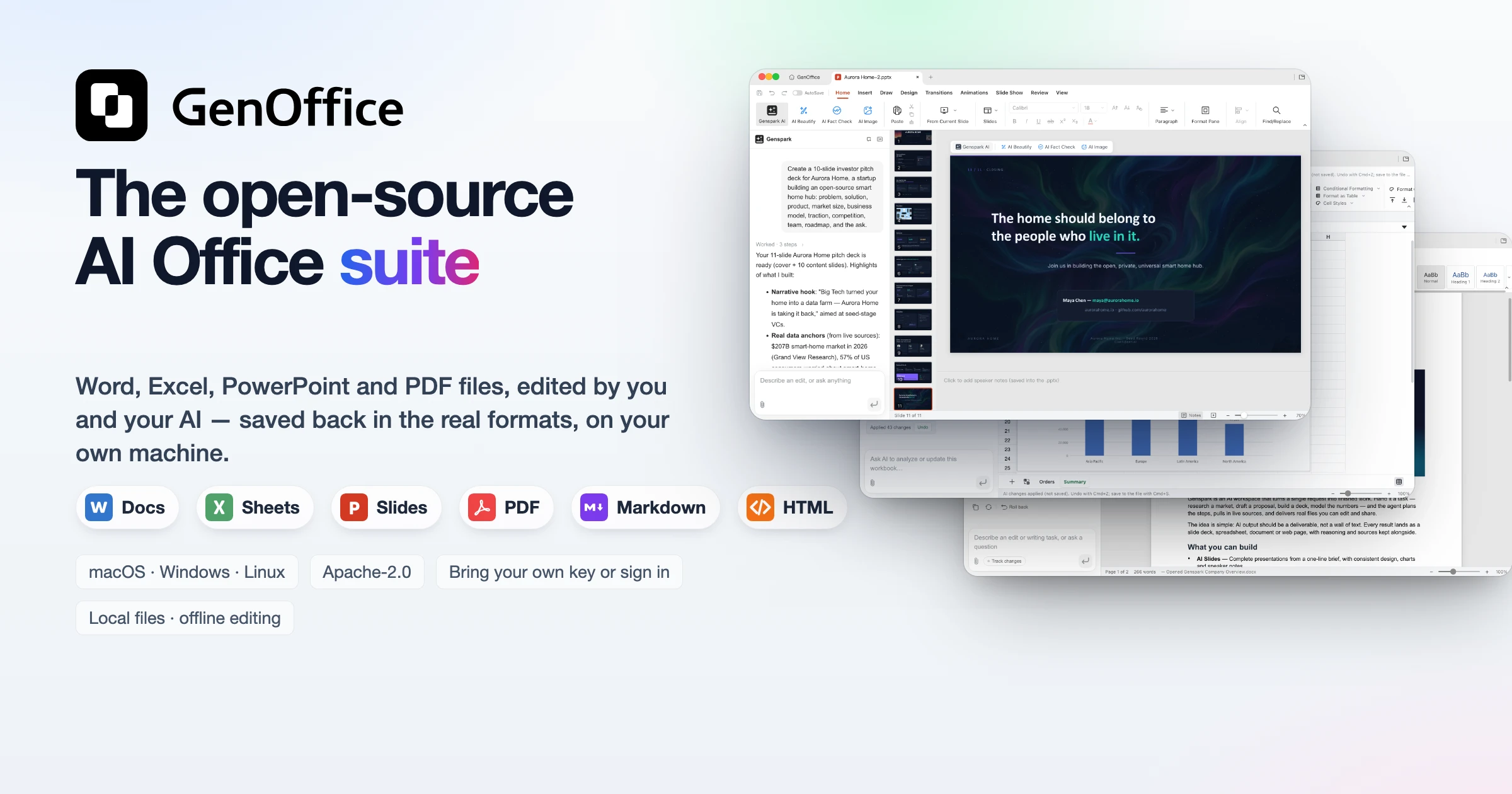
GenOffice
The world's first full-featured open-source AI Office suite.
Word, Excel, PowerPoint and PDF files, edited by you and your AI, saved back in the real formats.





English · Español · Português · Deutsch · Français · 简体中文 · 繁體中文 · 한국어 · 日本語 · العربية · Русский · Italiano · Nederlands · Polski · Čeština · Bahasa Indonesia · Bahasa Melayu · ไทย · हिन्दी · עברית · Tiếng Việt · Türkçe
Download · Skills · CLI · MCP · Website · Community · X · Privacy
GenOffice is a free, open-source alternative to Microsoft Office for macOS,
Windows and Linux. It opens and saves native .docx, .xlsx and .pptx
files, edits PDF, Markdown and HTML, and puts an AI agent next to every
document — not a chat box bolted on the side, but an editor that reads the
file, makes the change, and shows you exactly what it touched. ODF files
(.odt, .ods, .odp and the .ott/.ots/.otp templates) open as
editable OOXML copies, and so do legacy Word .doc/.dot files and Hancom
documents (.hwp, .hwpx); the imports are open-only — saving writes OOXML,
never the source format.
- Real formats, byte-preserving. Only what you edit is rewritten. Everything else in the file survives byte-for-byte, so documents keep working in Word, Excel and PowerPoint.
- AI you can review. Edits land as tracked changes and diffs with one-click rollback. Spreadsheets get live formulas, not pasted numbers. Decks and pages are generated onto the canvas and stay fully editable. Hide a Docs selection or a Sheets cell range from the model and the AI sees only a named placeholder; the original words stay in the file and come back. Hiding covers this app's AI — the CLI, MCP tools and headless export read the file directly and still see these words.
- Local by design. Files open, edit, save and convert on your machine. PDF → Word / Excel / PowerPoint, Markdown → Word and HTML → Word all run on-device. Only the AI calls leave the machine, to the provider you choose.
- Find files by what they say. The home screen searches the names,
folders and full text of your
.docx,.xlsx,.pptx, PDF, Markdown and HTML files from a local SQLite index, CJK included. Optionally, the top hits are reranked by TypeSafe Jev, the System One judgment model, so the file that answers your question comes first. - Ask your files, with sources. Star a set of documents and Ask AI on the home screen answers questions across them, citing the file behind every claim so you can open it and check.
- Your keys or none. Sign in with Genspark and skip keys, or bring your own key for Claude, OpenAI, Gemini, DeepSeek, Kimi, GLM, Qwen, Doubao, MiniMax, Grok, Mistral, OpenRouter, Requesty, Opper, Cheaper Inference, Atlas Cloud, or any OpenAI-compatible endpoint, local servers included.
- Scriptable and agent-ready. The app ships a
genofficecommand line and a skill for Claude Code, Codex, Cursor, Gemini CLI, GitHub Copilot, OpenCode and Windsurf, so a coding agent can create, convert, read and edit real Office files on your machine without opening a window.
Get it: macOS (Apple Silicon and Intel) · Windows (x64 and Arm) · Linux (deb, rpm, AppImage) — details and requirements in Download.
Demo
Six apps, one AI panel, a file search reranked by TypeSafe Jev, an Ask AI that answers from your starred files with sources, and a command line for your coding agent. Every screenshot is the real app on macOS, with the AI driven from the prompt you can read in the panel.
1 · Docs — open and edit .docx with an AI you can review
 |
 |
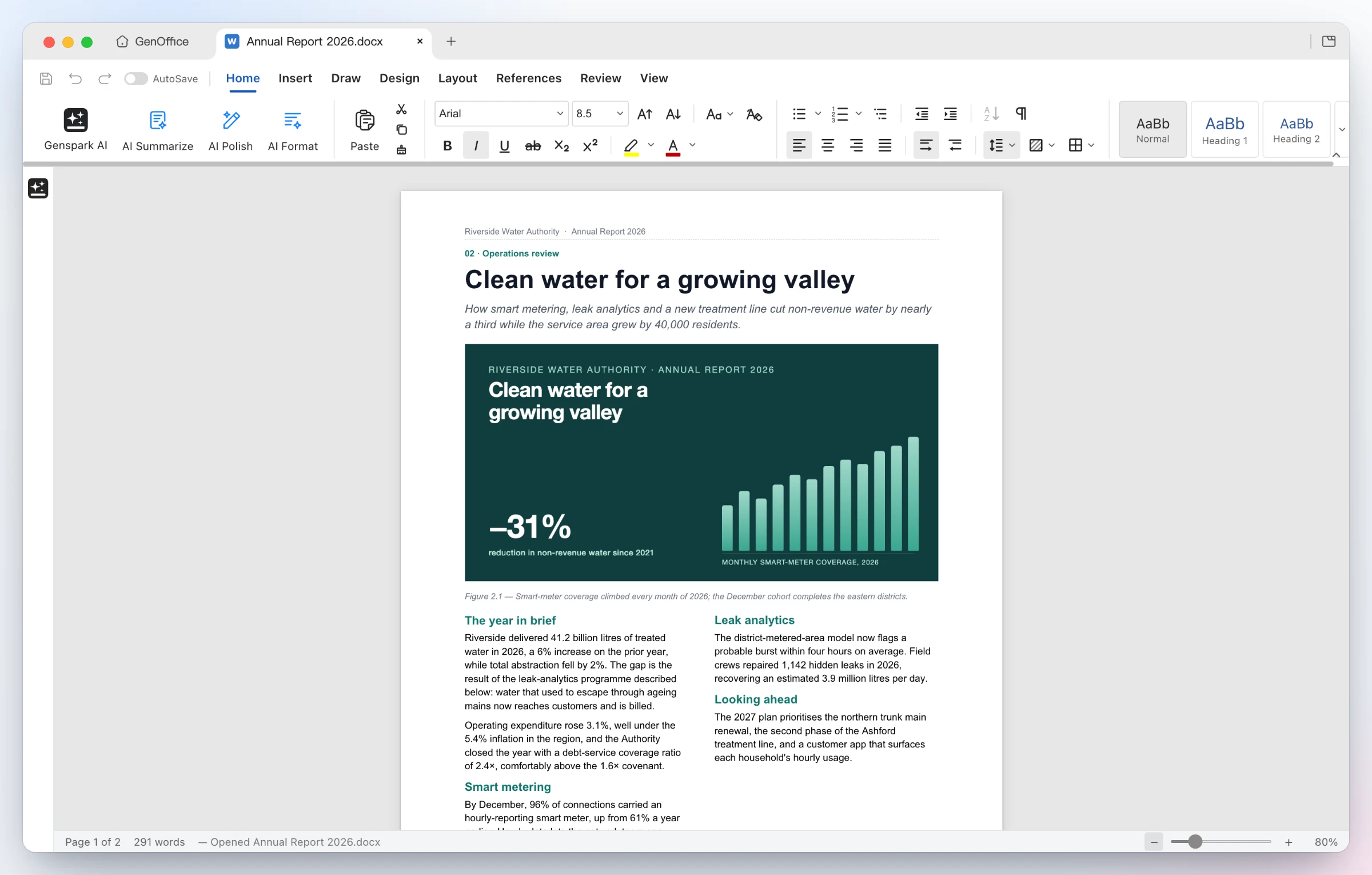
Opens the file as Word lays it out — two-column sections, full-bleed images, shaded tables, headers and footers, pagination on Word's line metrics. Styles, comments, tracked changes, equations, ink and content controls round-trip untouched. A Mailings tab turns the document into a merge template: pick a .xlsx or .csv recipient list, insert real MERGEFIELDs, preview record by record, and merge to one document or one .docx per record. |
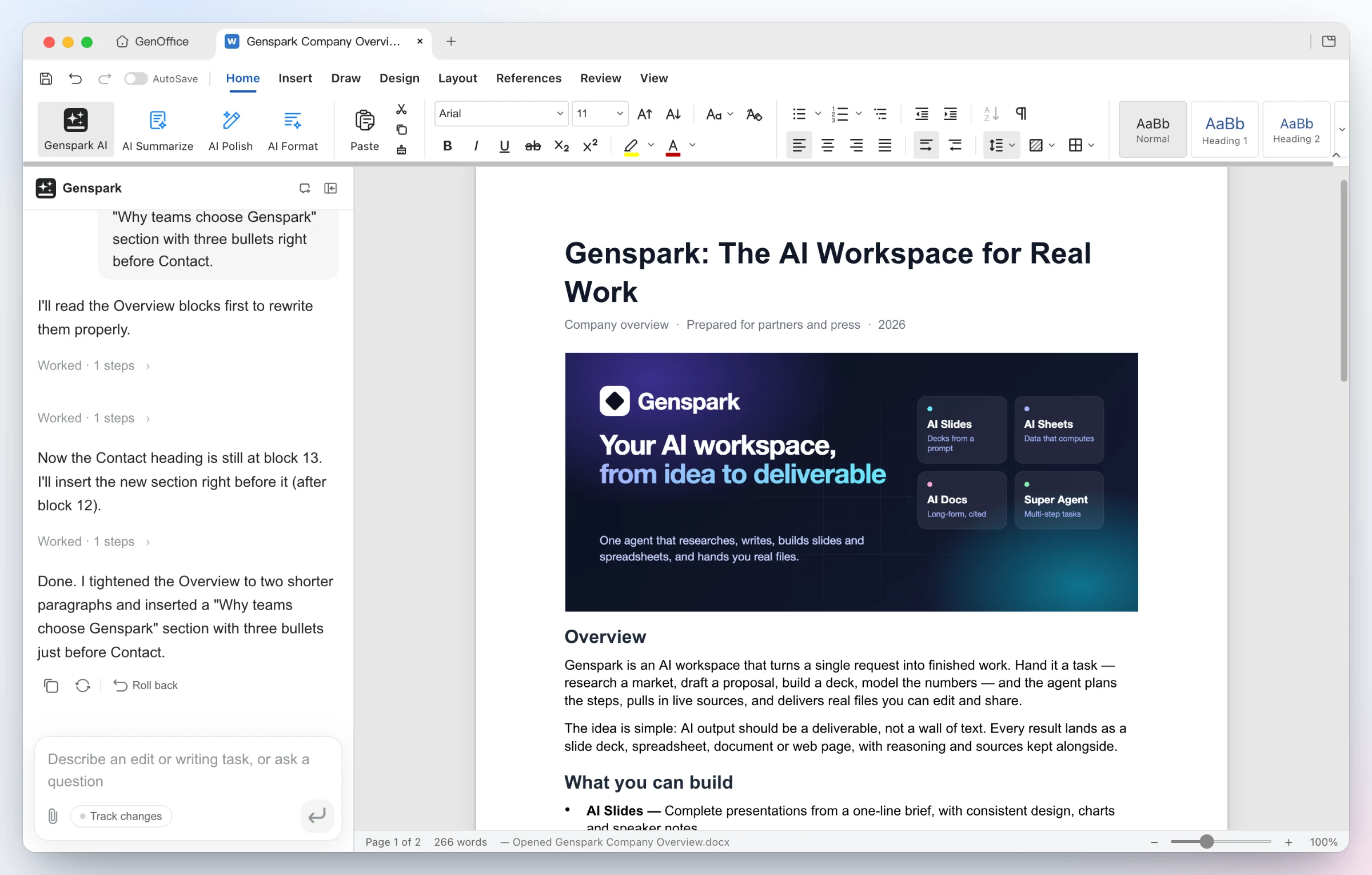
Ask for the edit — the AI reads the blocks it needs, rewrites the Overview and inserts a new bulleted section. Every AI turn is a snapshot you can roll back; with Track changes on, edits arrive as Word-style revisions. Ask for a mind map instead and the answer is an interactive diagram of the whole document: collapsible branches, zoom and pan, a node click asks a follow-up, and citations jump back to the block they came from. |
2 · Sheets — .xlsx with live formulas and charts, not pasted numbers
 |
 |
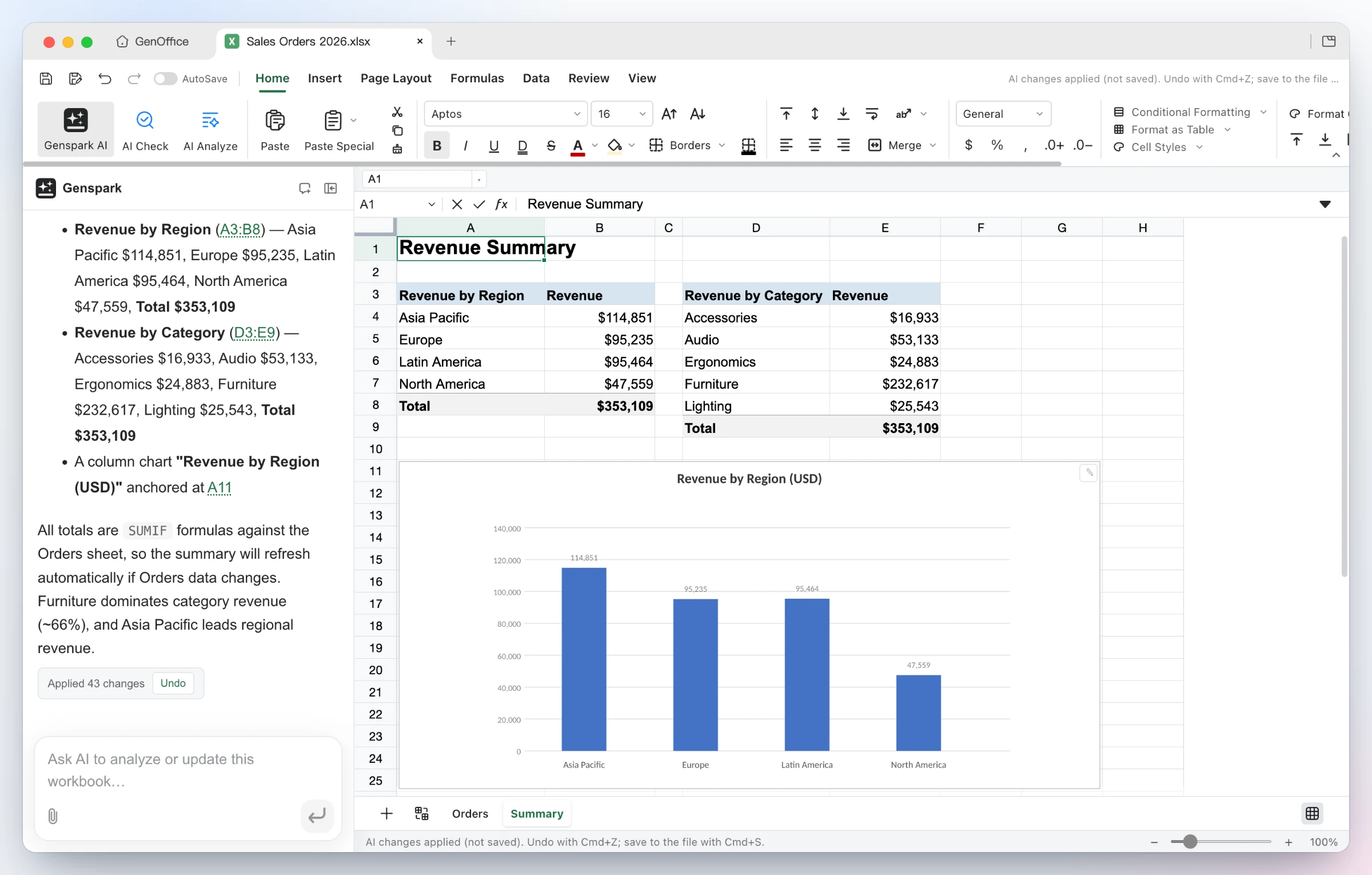
Build it — from one sentence the agent adds a Summary sheet with real SUMIFs by region and category, inserts a column chart, and applies the 43 changes as a single undoable batch. |
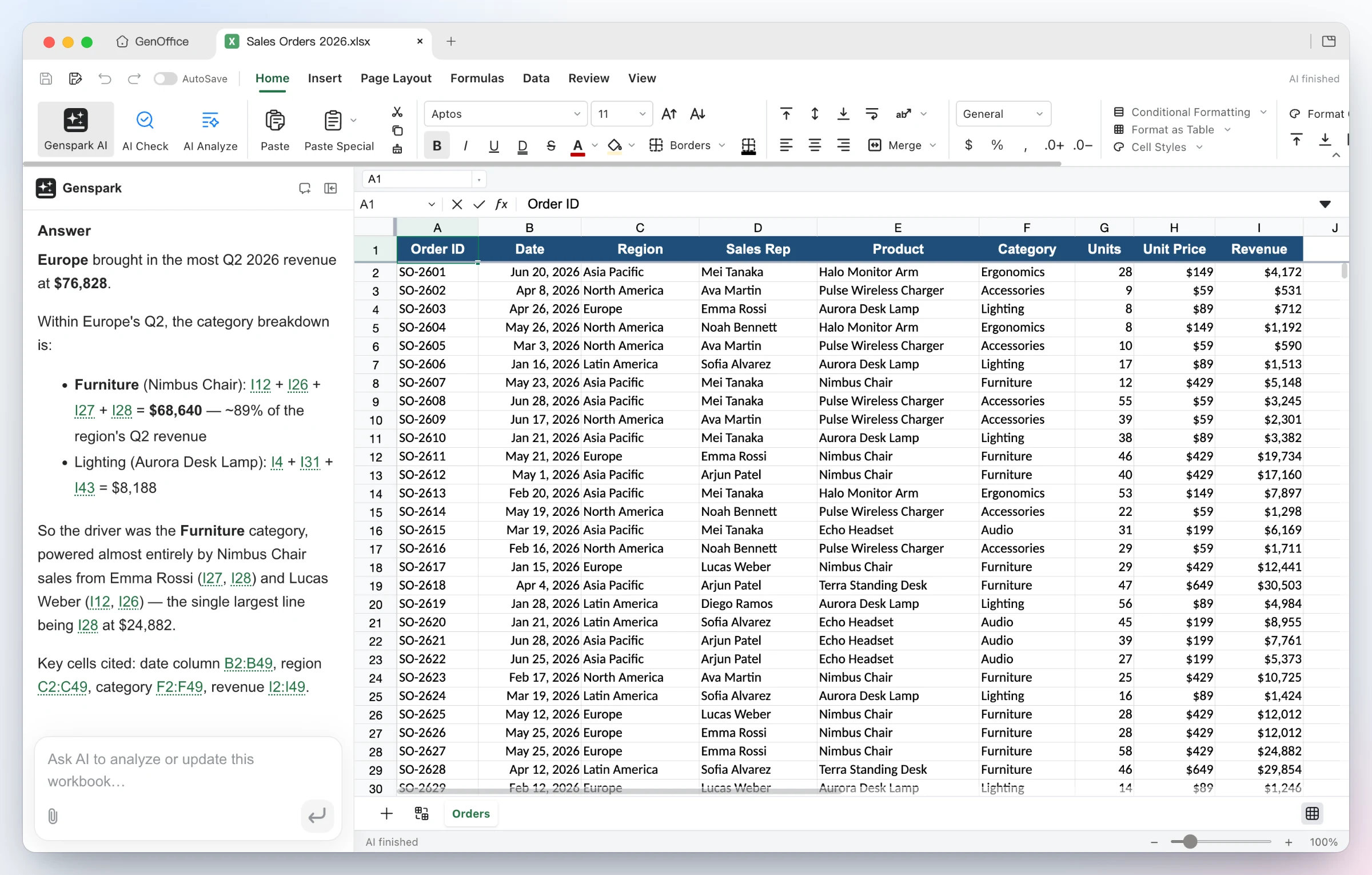
Ask it — questions about the workbook come back with the reasoning and the exact cells used as clickable citations. Under the hood: an in-house Rust .xlsx engine, pivot tables, slicers, conditional formatting, formula tracing, and pictures embedded in cells as Excel's native rich values — Excel reopens them still in the cell. Cell notes can carry a picture, shown under the note's popup. |
3 · Slides — from a prompt to a .pptx deck
 |
 |
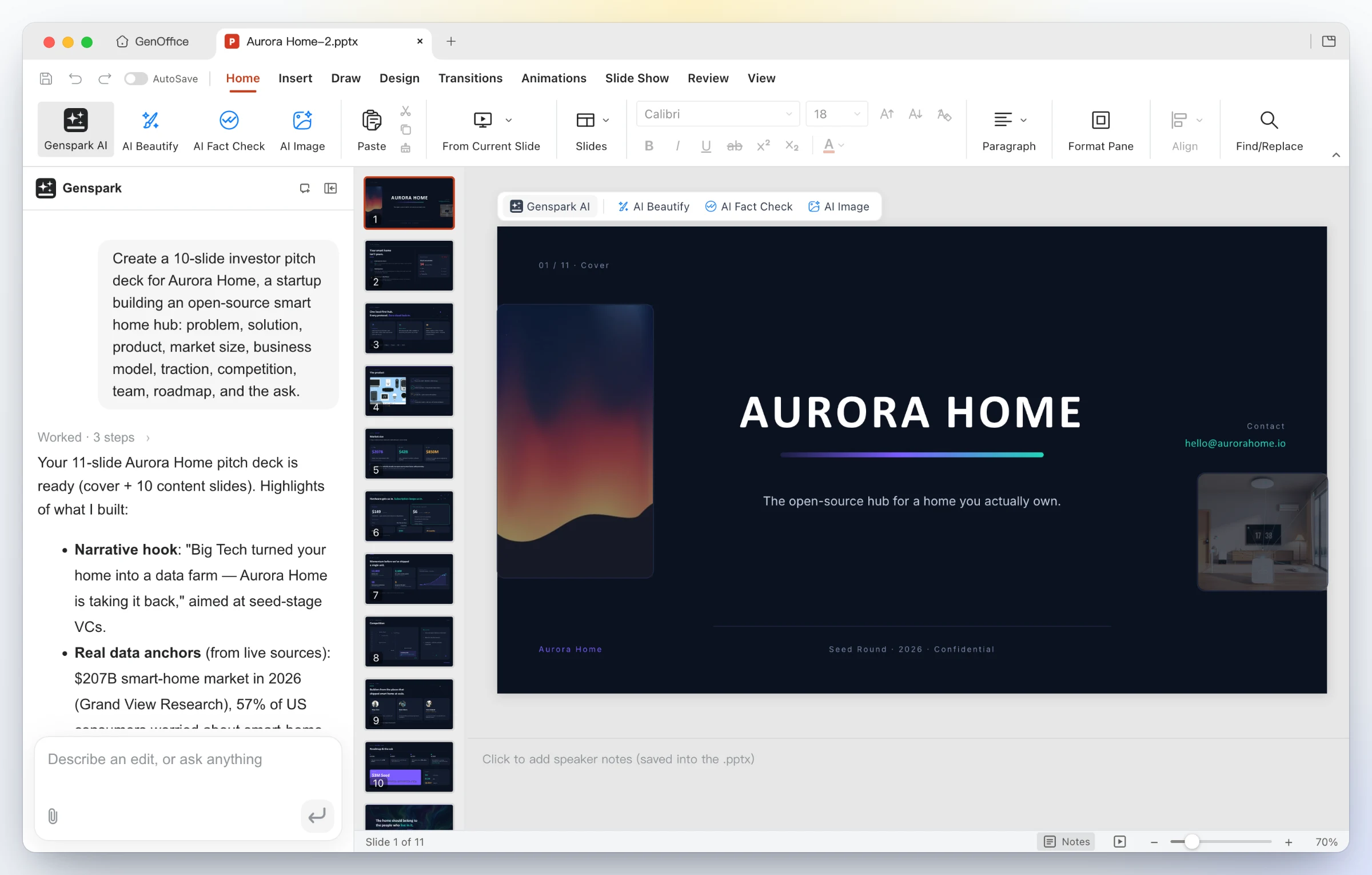
One line in — "Create a 10-slide investor pitch deck for Aurora Home…". GenOffice plans the storyline, researches the numbers, and drafts every slide onto the canvas as a real .pptx. |
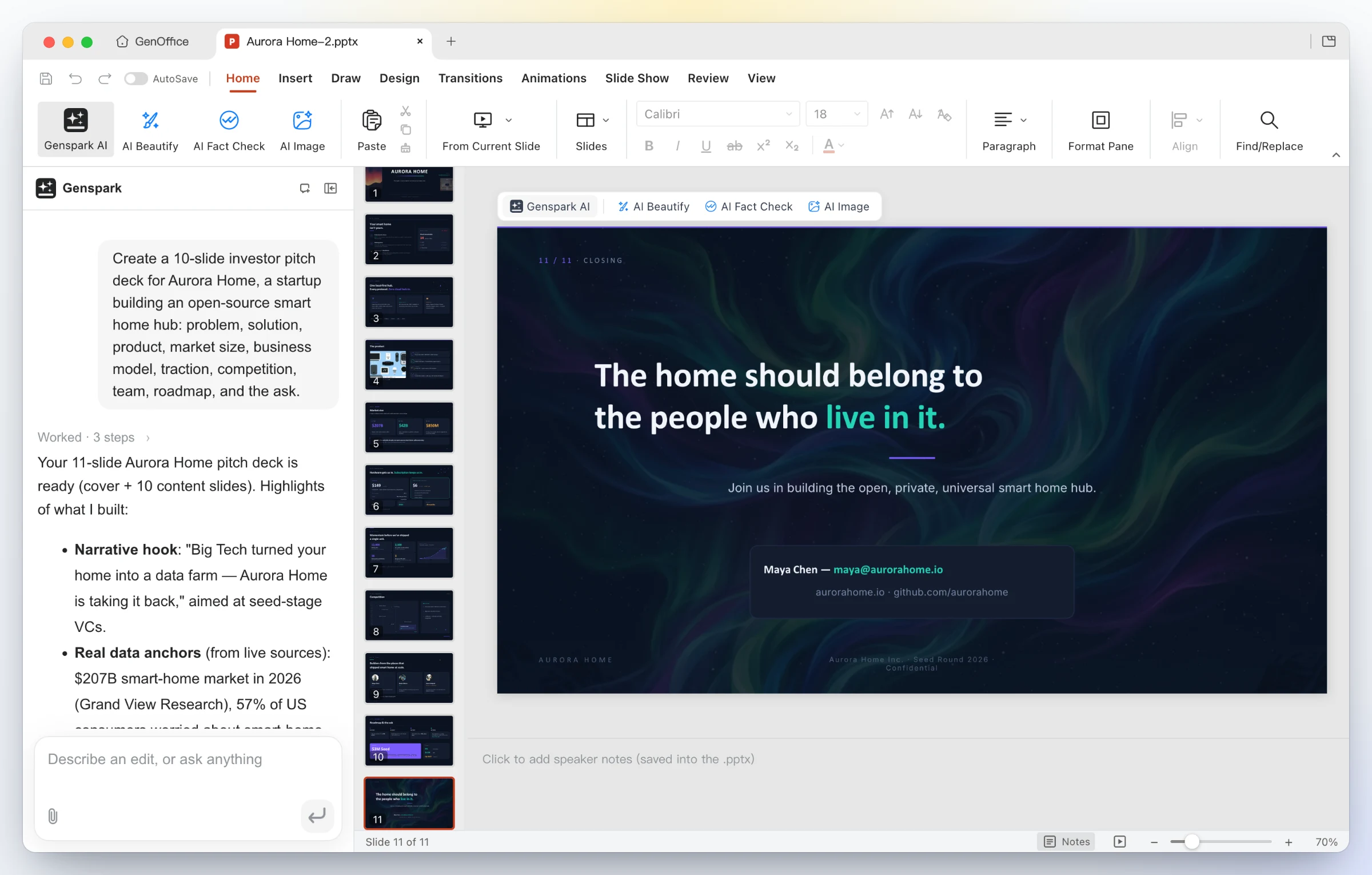
A finished deck out — eleven designed slides with consistent typography, imagery and a closing call to action; keep editing with masters, layouts, smart guides and non-destructive cropping, or ask the panel to restyle, rewrite and reorder. Insert a .glb and it is a real 3D model: turn it by dragging in the editor, stored the way PowerPoint stores 3D, still 3D in PowerPoint. |
Slide Show → Record narrates the deck slide by slide, with pause and
resume. The narration and the auto-advance timings it measures are saved into
the .pptx, and PowerPoint plays them back the same way.
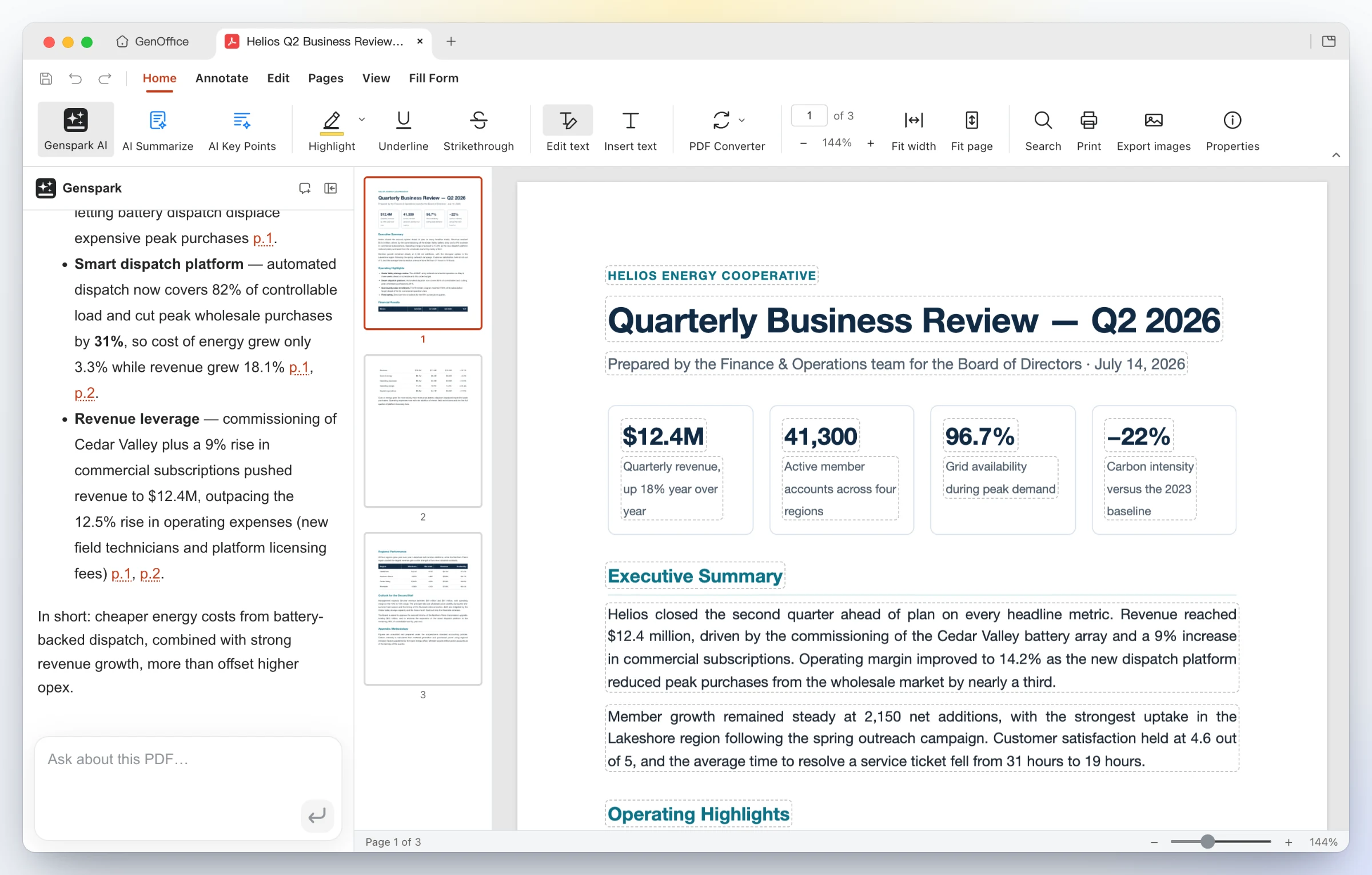
4 · PDF — edit PDF text in place, convert PDF to Word on-device
 |
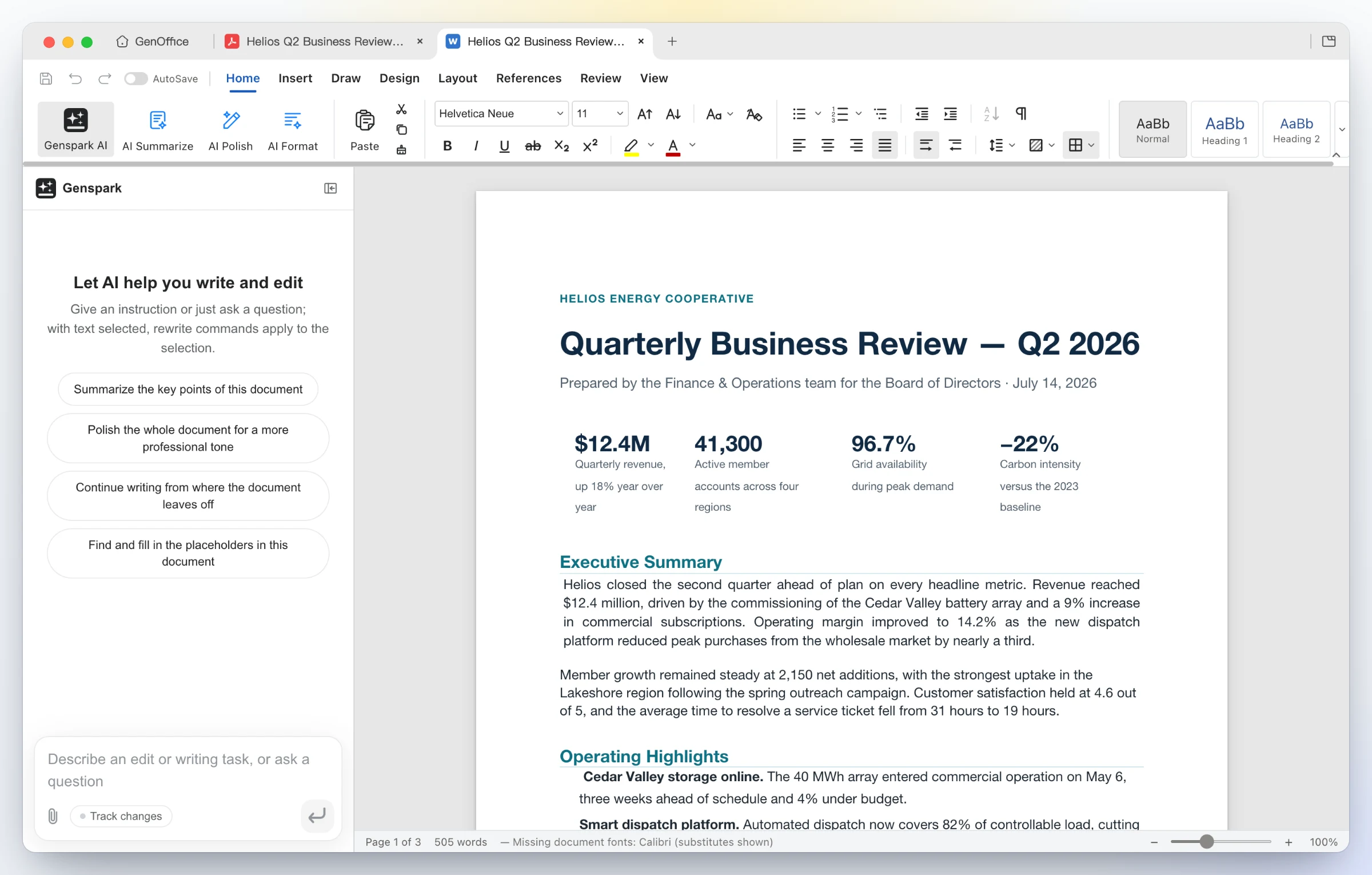 |
| Edit inside the page — Edit text mode outlines every text block for in-place retyping; the content stream is rewritten through PDFium with the original fonts, not a cover-up annotation. Ask the AI about a long report and get answers with page citations. | Convert on-device — PDF Converter → PDF to Word produces an editable .docx that opens in Docs next to the source, headings, stat rows and paragraphs intact. Excel and PowerPoint targets work the same way; scanned pages go through the system OCR. |
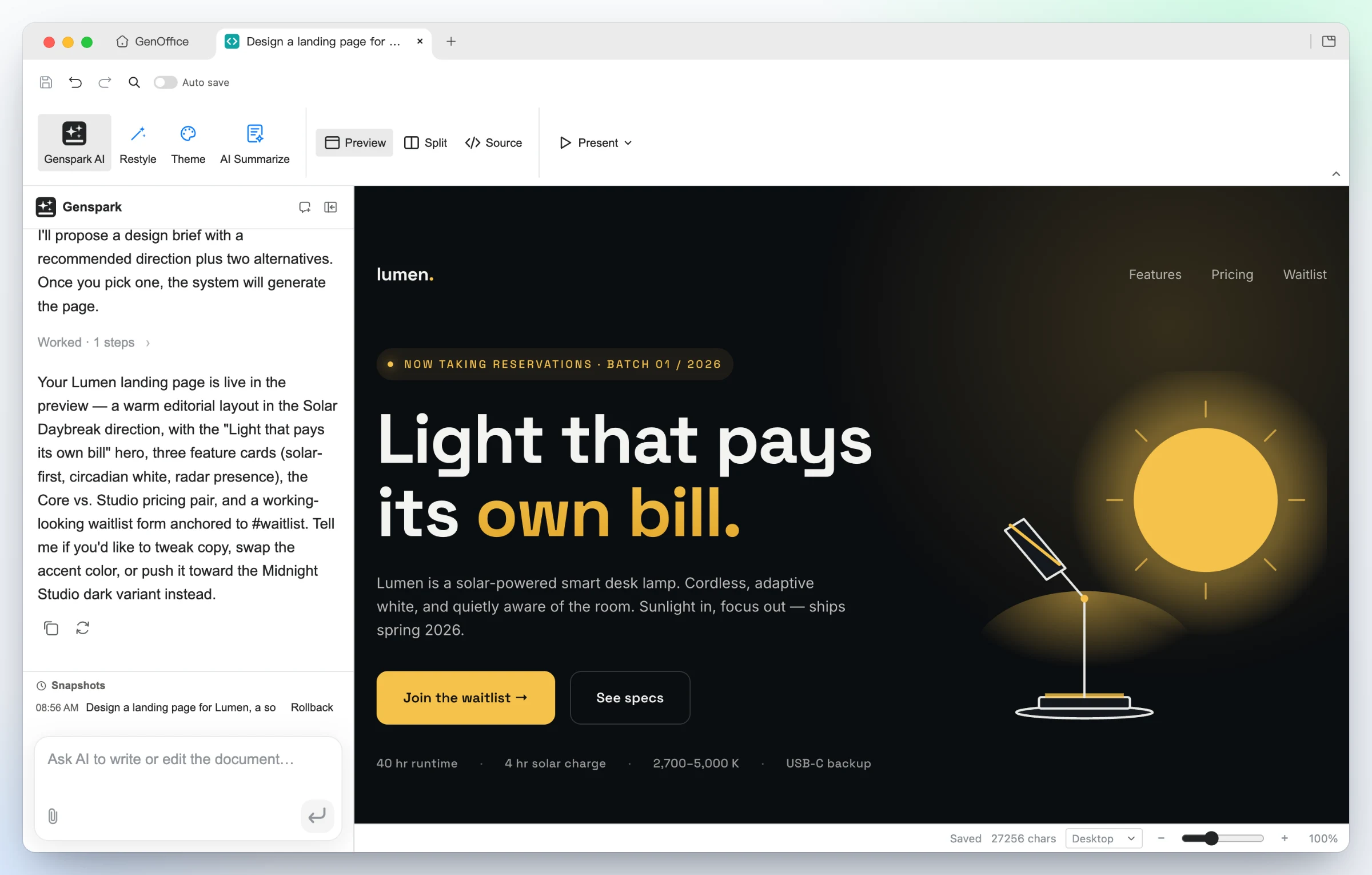
5 · HTML — an AI page and UI builder, design brief first
Say what the page is for and who it is for. The AI proposes a design brief
first — hook, palette, typography and style directions — then builds a single
self-contained .html file against those tokens.
 |
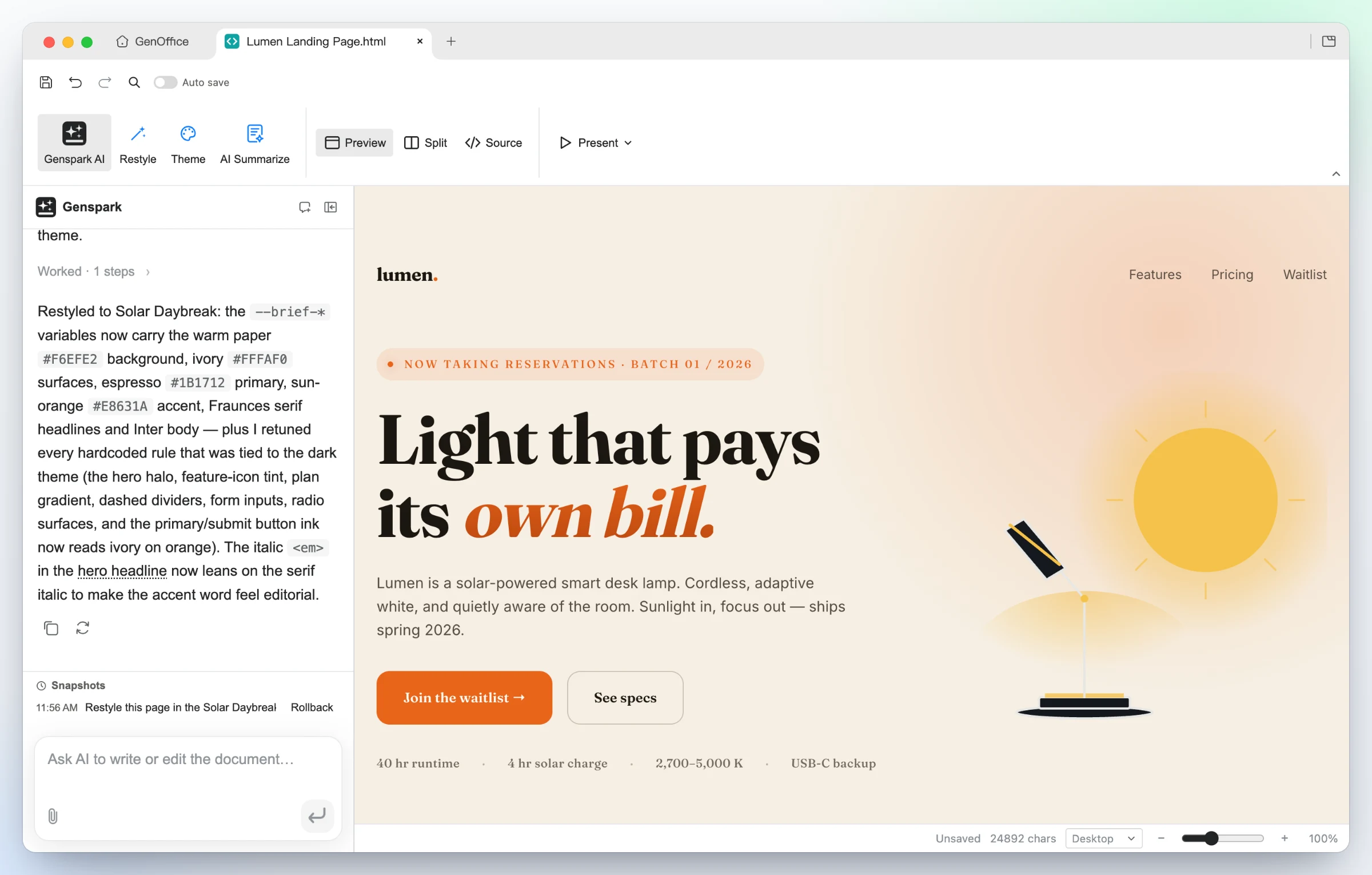 |
| Generated from one prompt — a bold hero, feature cards, pricing and a waitlist form for Lumen, built in the Midnight Studio direction. Click any element to restyle it, double-click to edit text, or switch to the CodeMirror source view. | Same design, new direction — one Restyle request swaps the brief's tokens and the page follows: warm paper, editorial serif, sun-orange accent, nothing rewritten. Present fullscreen, or export as PDF or a native editable Word document. |
 |
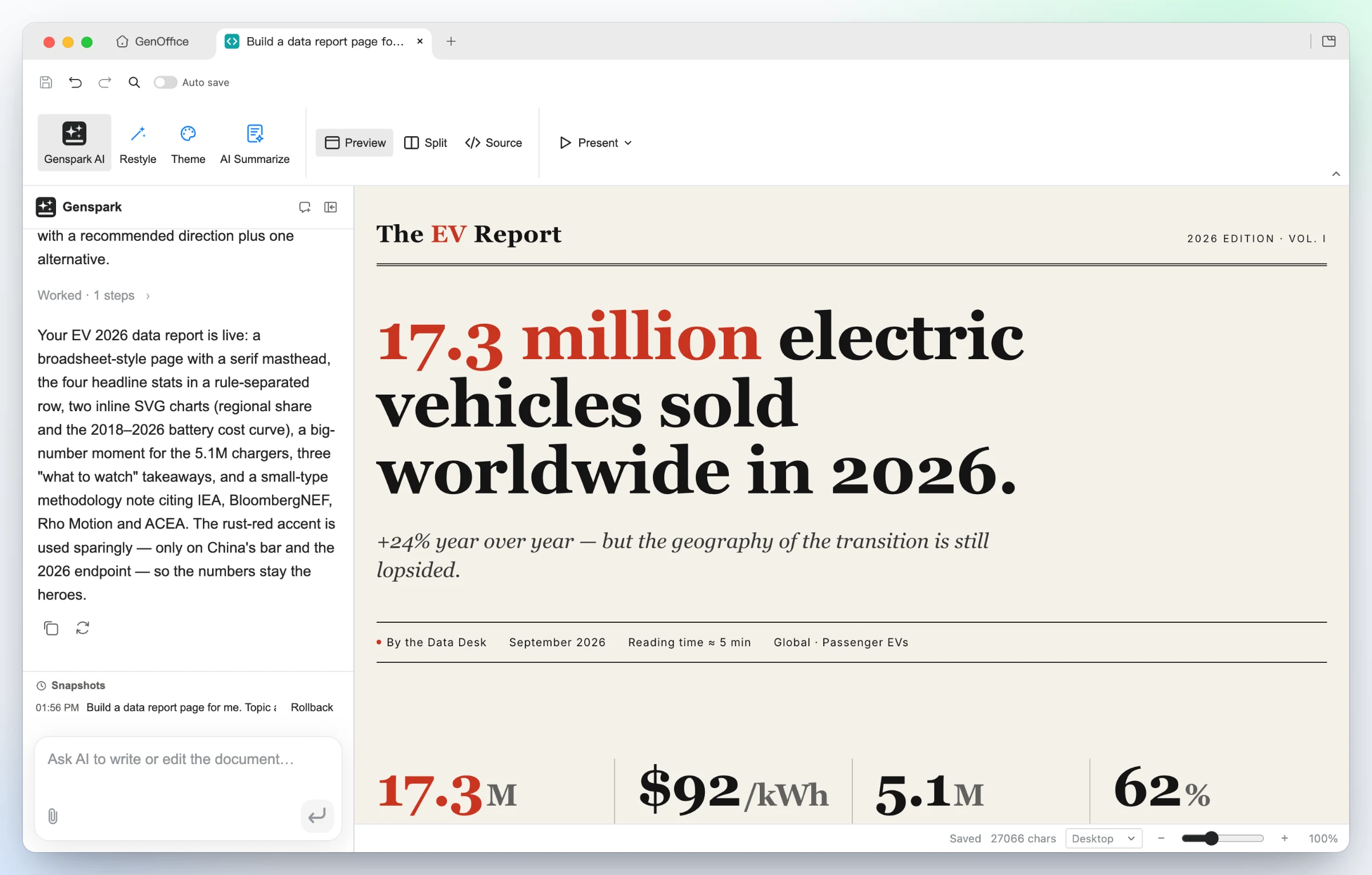 |
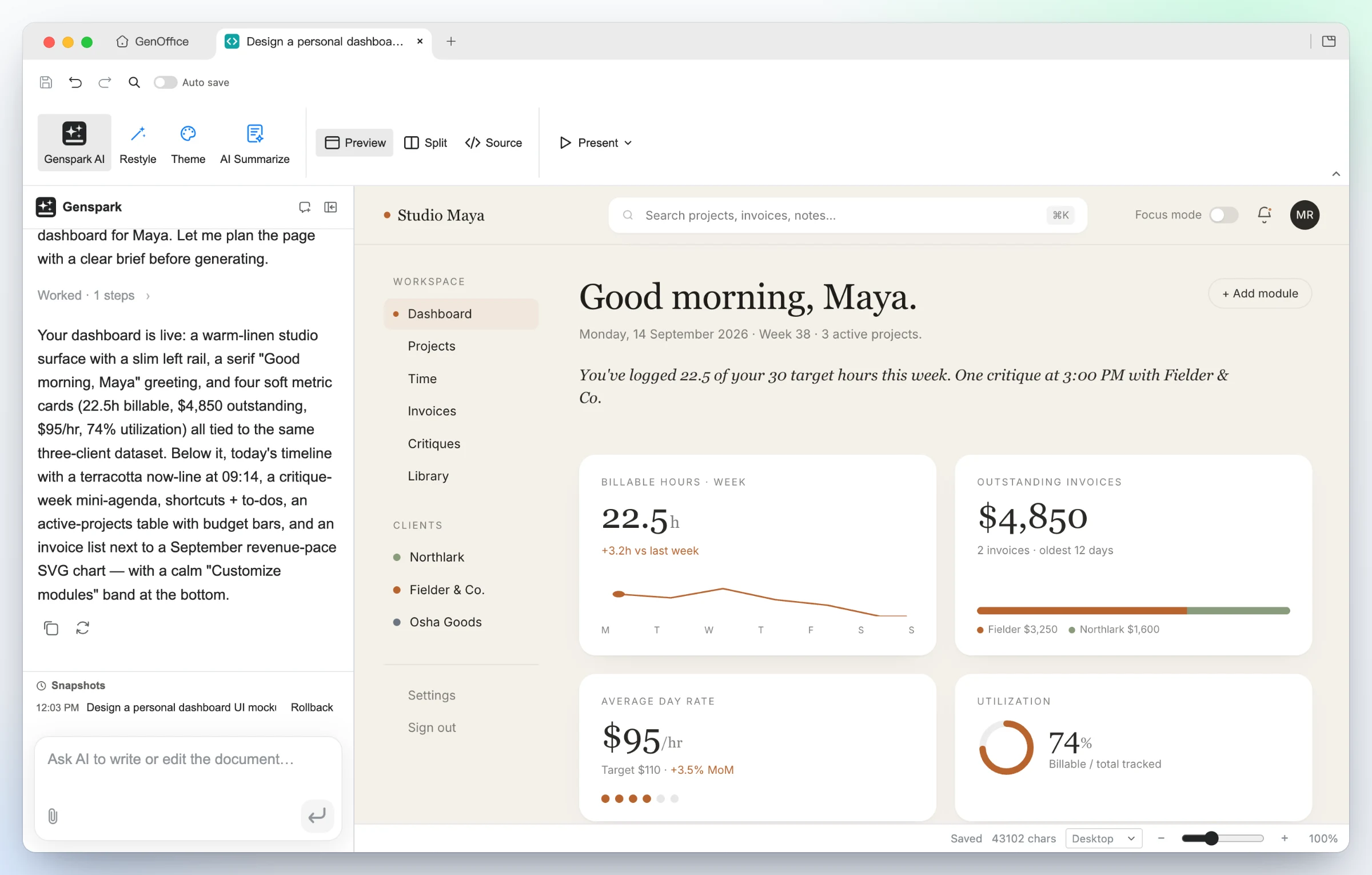
| UI mockups — the "personal dashboard" starter turns a persona into a working layout: left rail, greeting, billable-hours sparkline, invoice and utilization cards, all real HTML you can hand to a developer. | Data stories — the "data report" starter builds an editorial broadsheet: serif masthead, one headline number, a rule-separated stat row, inline SVG charts and a methodology note. |
6 · Markdown — a block editor over plain .md, with Ask AI
 |
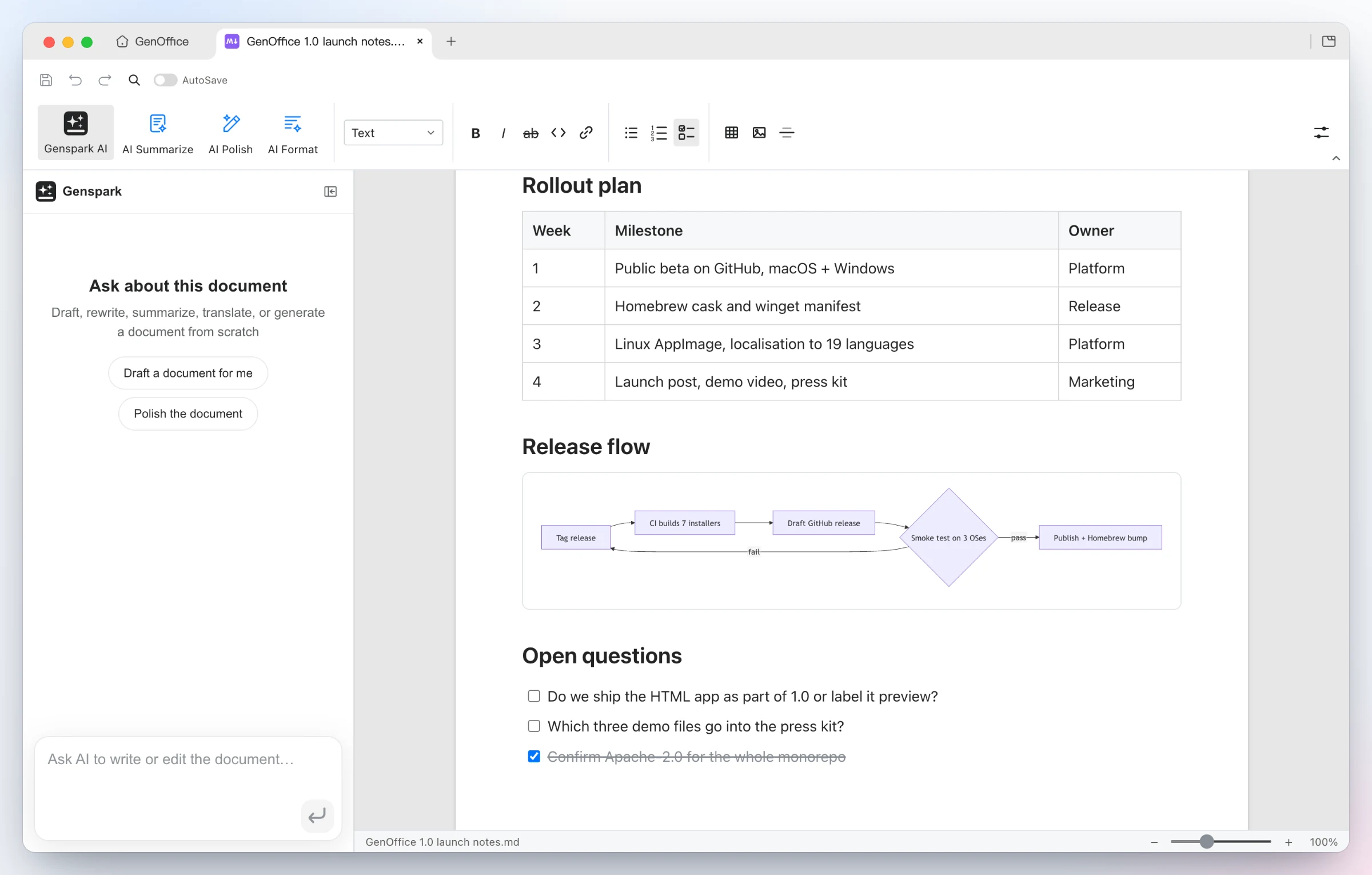 |
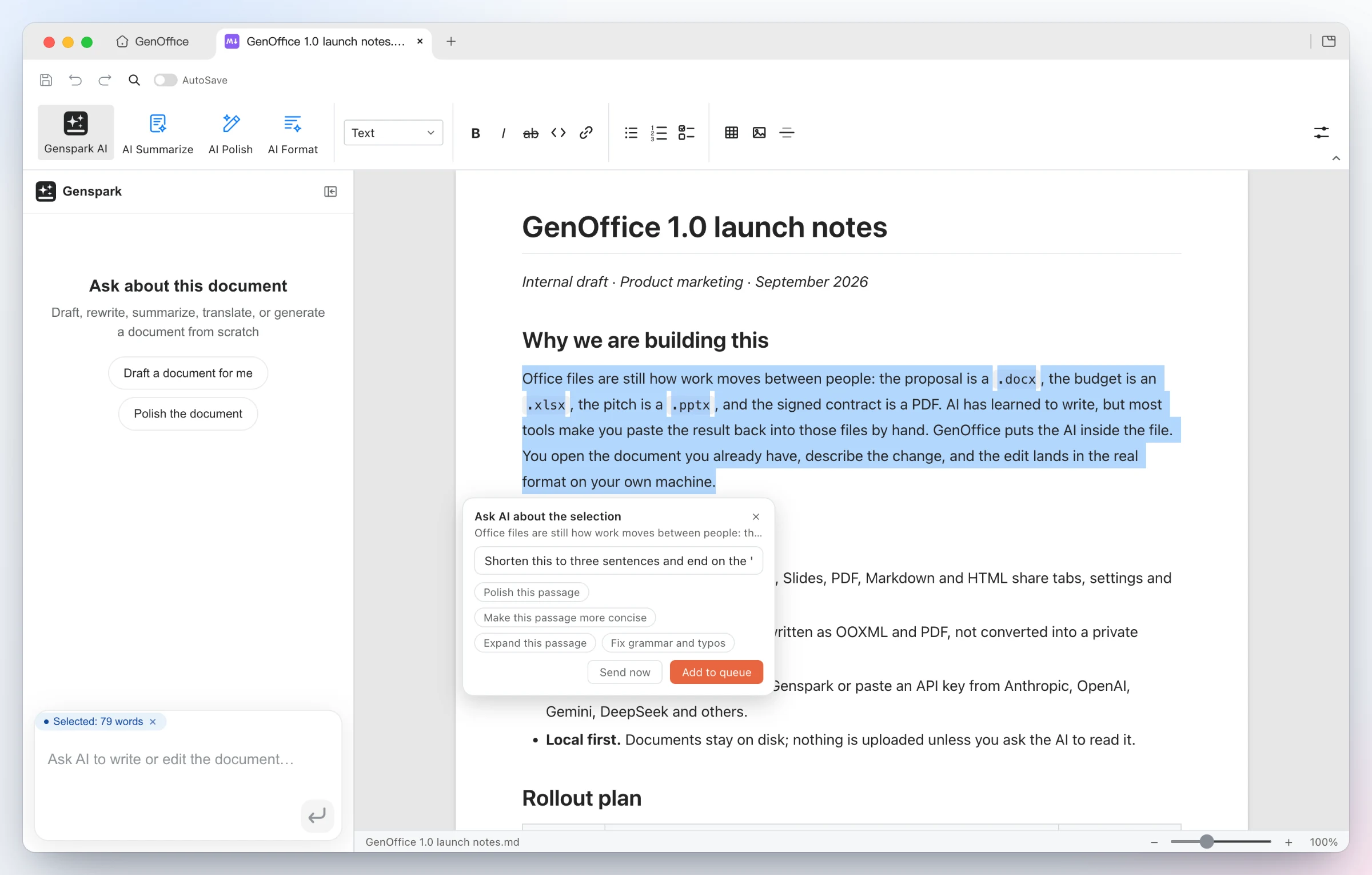
| Ask AI about a selection — select any passage and an Ask AI chip appears: type an instruction or pick a suggestion, send it now, or queue several anchored edits and run them in one pass. The same entry exists in every app. | Rendered, saved as plain Markdown — headings, lists, tables, images, code blocks and Mermaid diagrams in a Tiptap block editor, written back as plain .md, with a fully local Markdown → Word export. |
Linked notes, the way Obsidian does it. [[wiki links]] click through to
the note they name, typing [[ offers note-name completion, and ![[…]]
embeds a note or a picture inline. A Backlinks panel lists every note that
points at the open one, and the Graph view maps the links of the whole
vault.
7 · Search — find the file that answers the question, with TypeSafe Jev
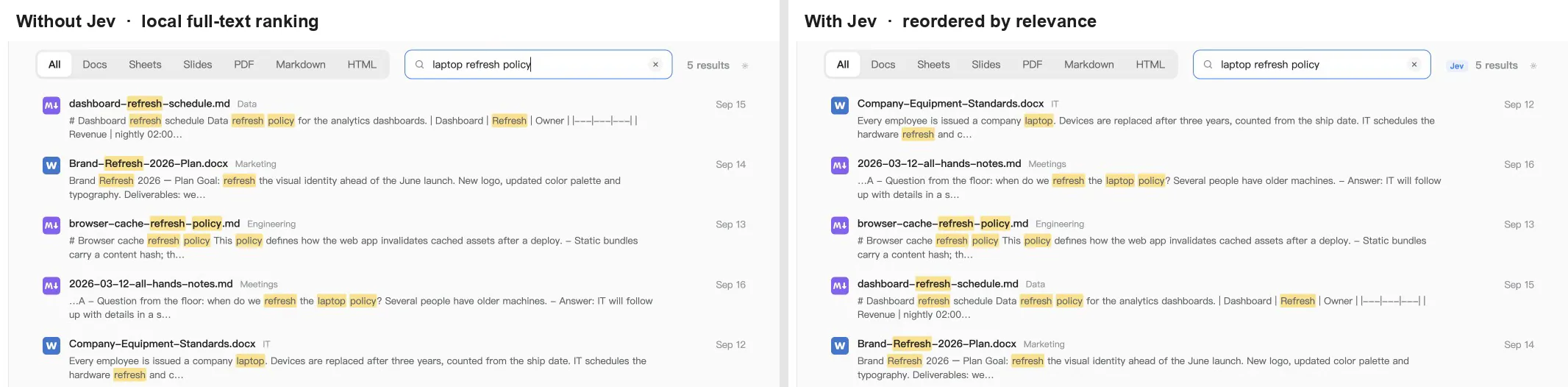
Every file in your work folder is indexed on-device: names, folders and the extracted text of Word, Excel, PowerPoint, PDF, Markdown and HTML files, in a SQLite full-text index with CJK-aware tokenizing. Switch on Jev search reranking and the top 20 local hits are judged by TypeSafe Jev, the System One model that returns one calibrated relevance score per document in a single call instead of generating text. The list is reordered by that score; if the call fails or times out, the local order stays.

 |
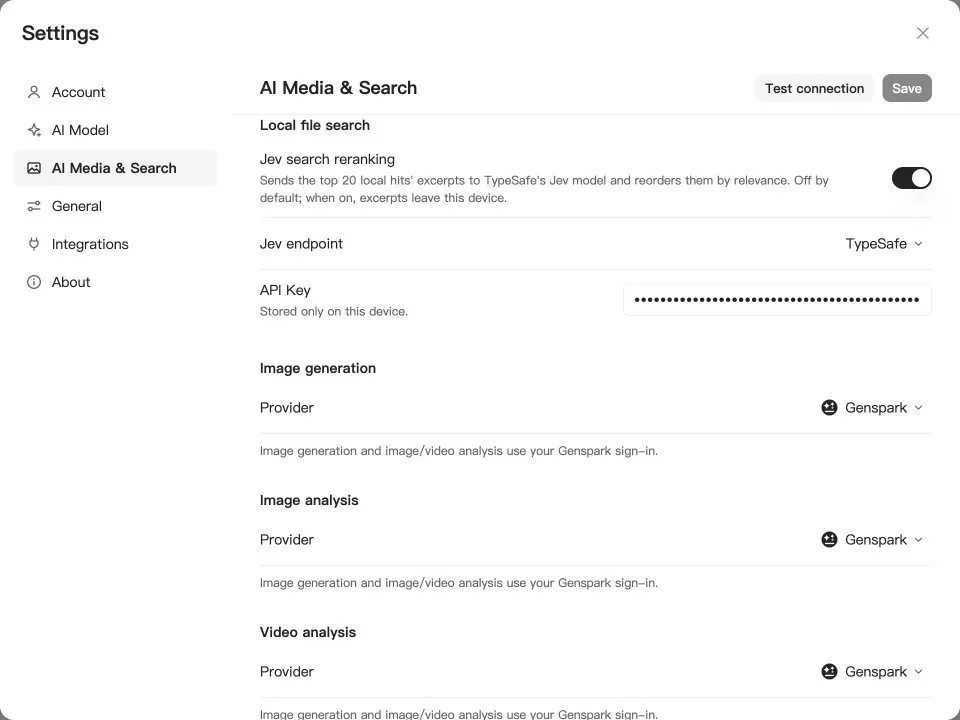 |
| Same words, different answers — "laptop refresh policy" matches a browser-cache refresh policy, a brand-refresh plan and a dashboard-refresh schedule word for word, so full-text ranking puts them first. Jev reads the excerpts and moves the equipment standards document, the one that states the three-year replacement cycle, to the top. The Jev badge next to the result count shows when the order came from the model. | Off by default, one switch to turn on — Settings → AI Media & Search → Local file search. Pick OpenRouter or TypeSafe direct, paste a key, hit Test connection. Only when the switch is on do excerpts of the top hits leave the device; the index itself never does. |
8 · Ask AI — your starred files, answered with sources
Star the files you work with and the home screen's Ask AI treats them as a knowledge base. Ask a question in plain language; the agent searches the starred files, reads the ones it needs and answers with a citation after every claim. Click a citation and the file opens in the right app. Attach files to the question by dragging, pasting or from the + menu — images go to the model as visual input — and every question is kept as its own conversation: switch between them, start a new one, delete one, the list survives a restart.
Ask AI searches the same on-device full-text index as
Search
and reads files in pages, so the model only sees the hits and the passages it
asked for, through the provider you chose. It can also call the built-in
genoffice CLI to build files outright; each one appears as an artifact card
under the answer, and a click opens it.
9 · CLI — your coding agent drives GenOffice, on your machine
GenOffice ships a genoffice command line and an agent skill. Install the
skill and Claude Code, Codex, Cursor, Gemini CLI, GitHub Copilot, OpenCode or
Windsurf can create, convert, read and edit real Office files through the
same engines as the apps, without opening a window.
 |
 |
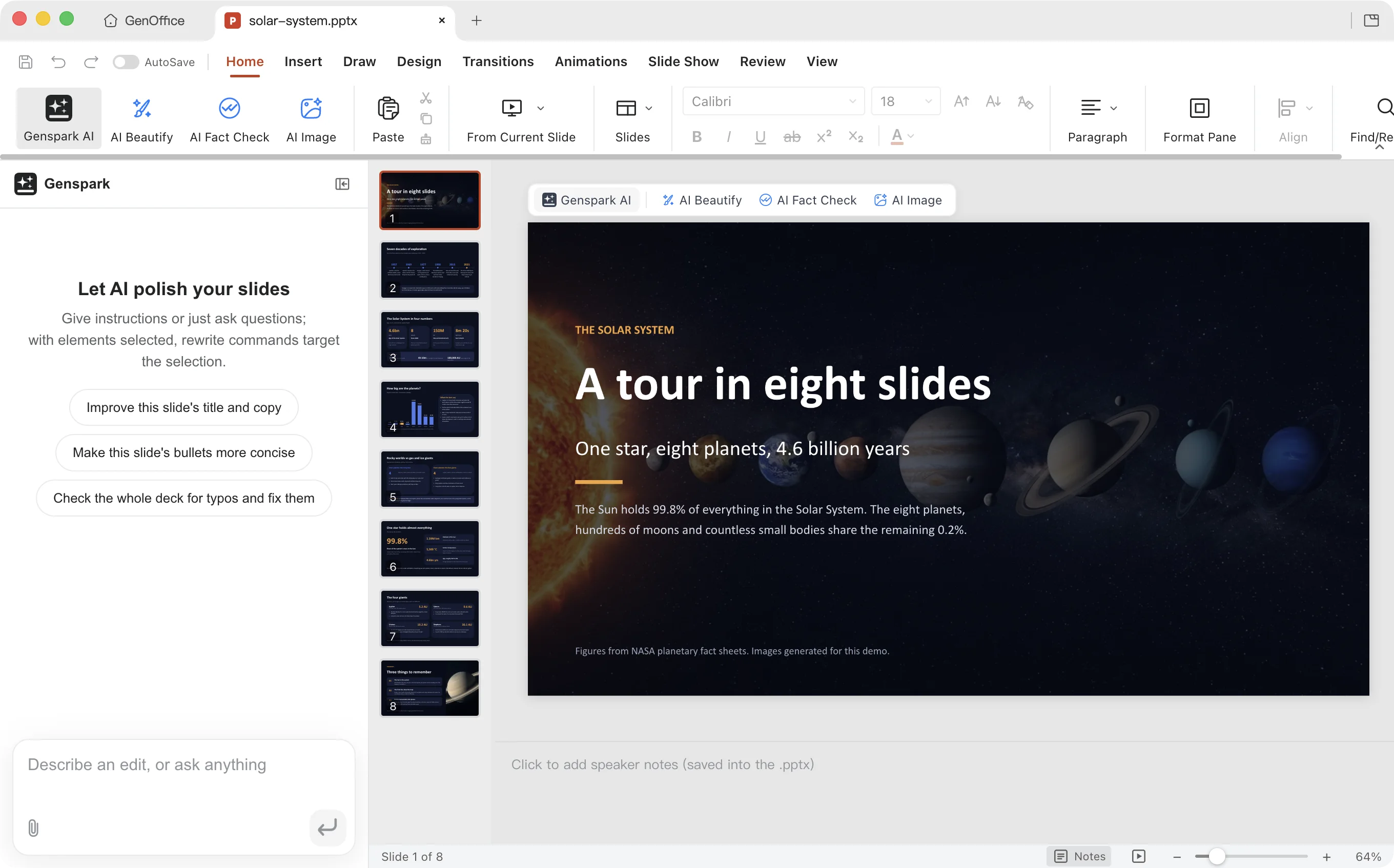
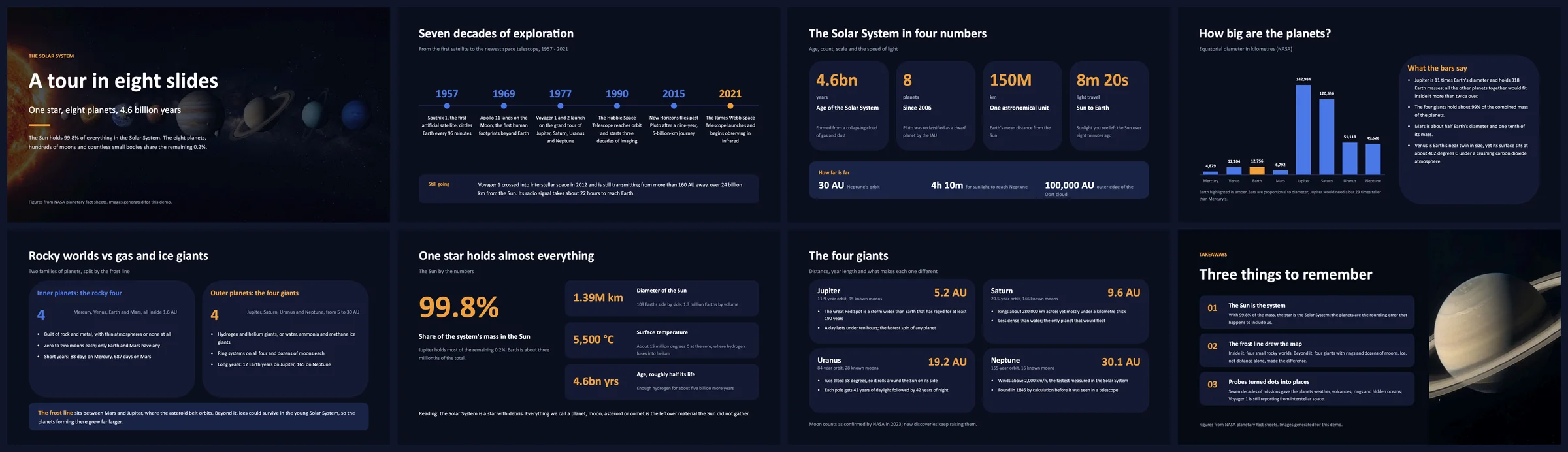
One prompt to your agent — "Build an eight-slide deck about the Solar System." The agent reads the skill, writes a style sheet, an outline and one page spec per slide, generates the two photos with genoffice image, and lets genoffice slides check reject anything that overflows or overlaps before genoffice create assembles the .pptx and slides render hands back a PNG per slide to look at. |
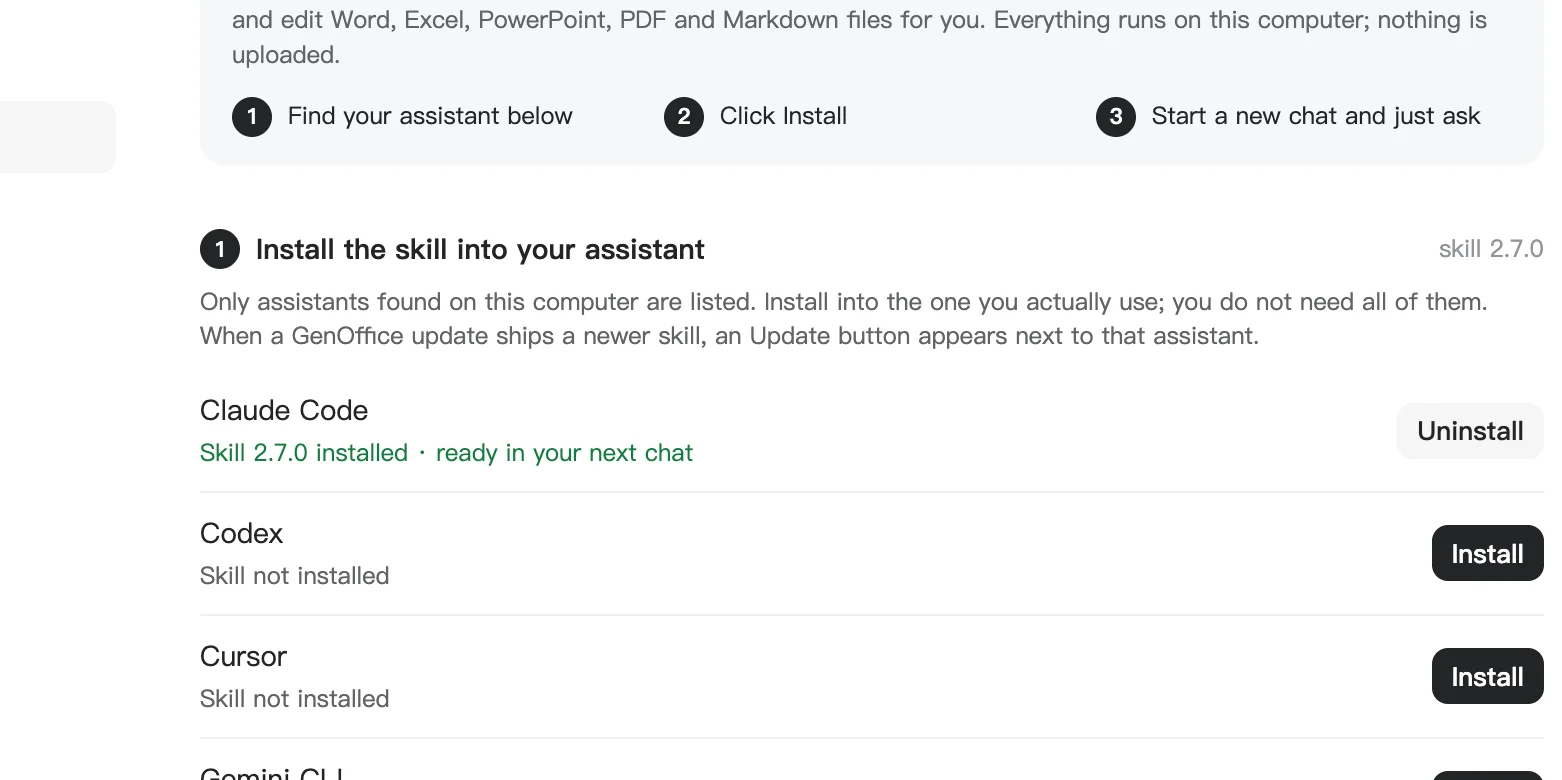
Install once, from Settings → Integrations — GenOffice lists the coding agents it finds on this computer and writes the skill into each one you pick. Or download the skill as a zip, or run npx skills add genspark-ai/genoffice. Commands and the full workflow are in Command line and agent skill. |
10 · MCP — the same tools over the Model Context Protocol
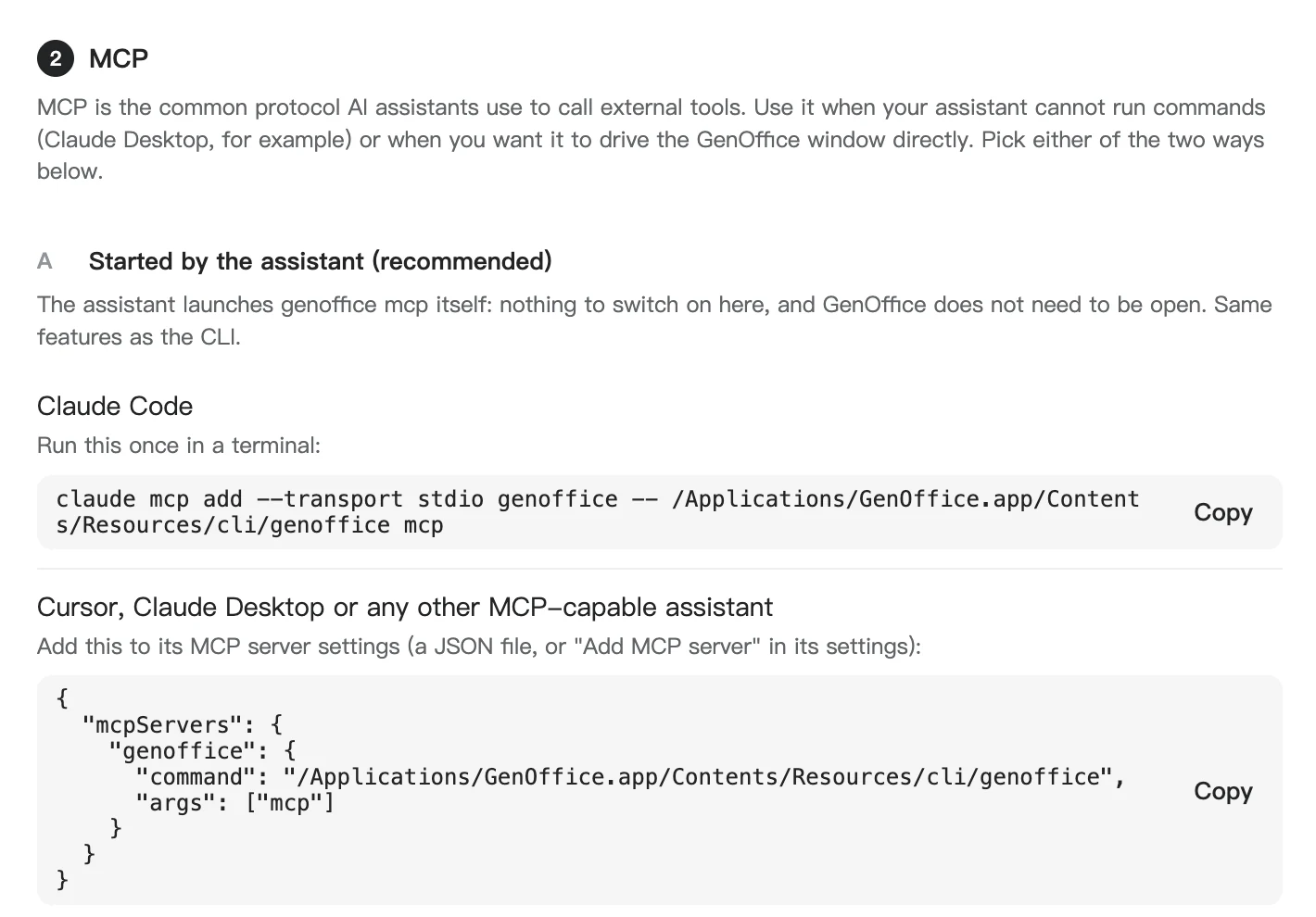
Every genoffice command is also an MCP tool. Claude Code, Claude Desktop,
Cursor and any other MCP client can start genoffice mcp themselves, with no
skill to install and no window open, and get 29 tools plus the op references
as resources. A second, HTTP server inside the app lets an agent build a Word
document in a visible editor tab while you watch.
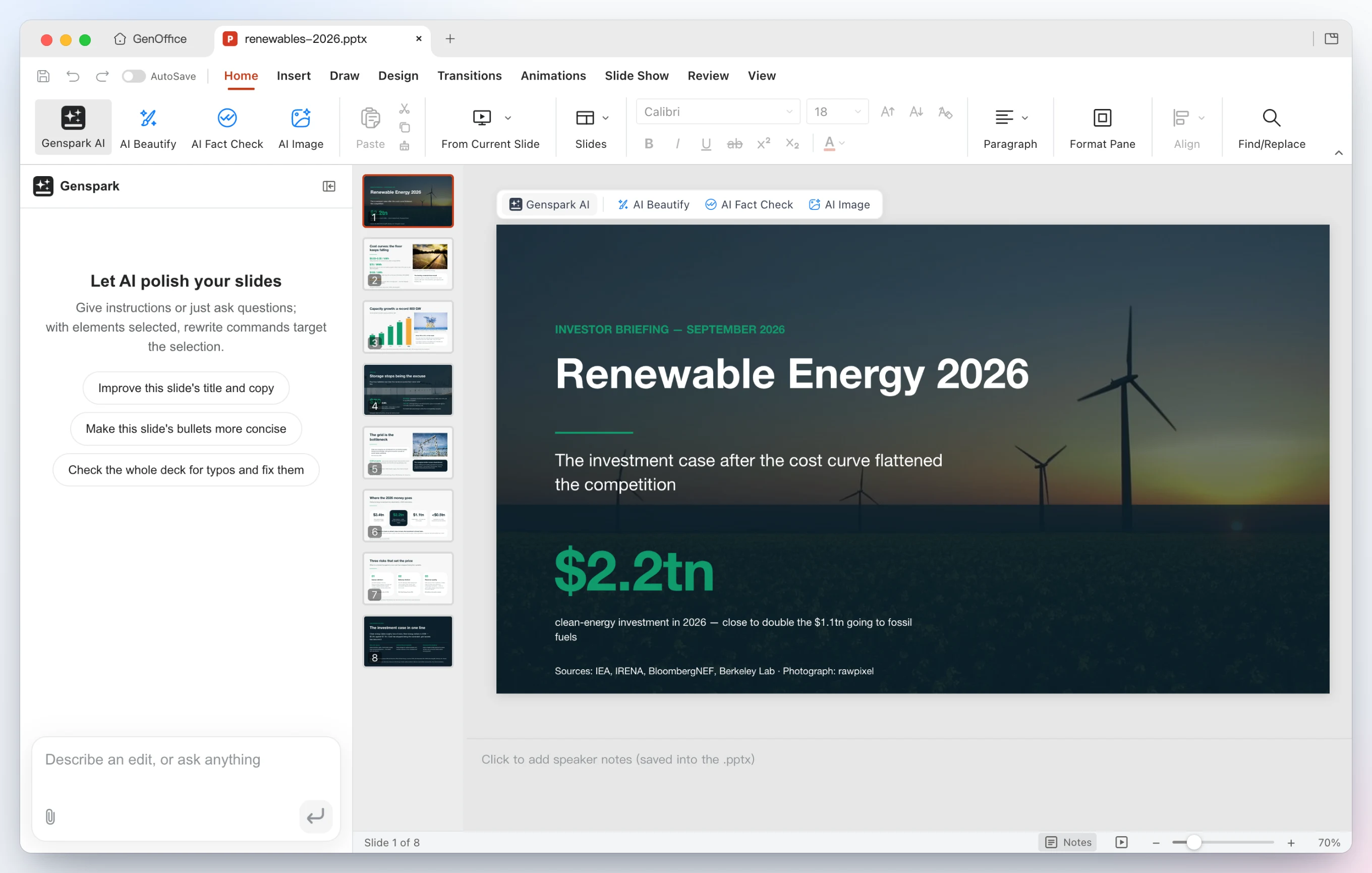 |
 |
One prompt, 38 tool calls, no shell — "Build an eight-slide investor briefing about renewable energy in 2026, with a real photo on the cover and wherever a photo helps." The agent pulls the figures and the photos with search, asks media whether each candidate picture is a real photograph, calls deck_start with a style sheet and an outline, then deck_page once per slide; every page is checked against the outline and the palette before it is kept, deck_build assembles the .pptx, slides_audit looks for overflow, slides_render hands back a PNG per slide as image content the model can look at, and deck_replace fixes the three pages it did not like. |
Connect once, from Settings → Integrations — copy the claude mcp add line for Claude Code, or the JSON block into Cursor, Claude Desktop or any other MCP client. Option B switches on the local HTTP server for the visible Word editor. Both are described in MCP server. |
Why GenOffice
- Open source, Apache-2.0, built in the open on GitHub.
- Yours to run. Native apps for macOS, Windows and Linux; files stay on your disk and every edit, save and conversion happens on your machine.
- Real Office files. Native
.docx,.xlsxand.pptx, byte-preserving: the parts of a file you did not touch are copied exactly as they were. - An AI that edits the document itself. Tracked changes in Docs, live formulas and charts in Sheets, slides drawn onto the canvas, every AI turn a snapshot you can roll back.
- Your model, your key. Sign in with Genspark, or bring a key for Claude, OpenAI, Gemini, DeepSeek and more, local servers and any OpenAI-compatible endpoint included.
- PDF done properly. Edit text inside the page, and convert PDF to Word, Excel or PowerPoint on-device, with system OCR for scans.
- Markdown and HTML too, with the same AI panel and local export to Word.
- Search that finds the answer, not the keyword. Full-text search over every document in your folders, indexed on-device, with optional reranking by TypeSafe Jev, the System One judgment model.
- Ask AI across your files. Star the files that matter and ask questions in plain language; every answer cites the file it came from, one click away.
- Skills. Ready-made skills, or your own
SKILL.md, attached from the + menu of any AI panel. - Scriptable. A
genofficecommand line, an agent skill and an MCP server put every engine at the service of Claude Code, Claude Desktop, Codex, Cursor and other agents, still on-device. - Free, for individuals and teams alike.
AI backends
Sign in with Genspark and there is nothing to configure: model calls route through the Genspark proxy (Claude, GPT and Gemini families) and the agents get web and image search, image generation, and image/audio/video analysis.
Or bring your own key. Settings → AI lists Claude, OpenAI, Gemini, DeepSeek, Kimi, GLM, Qwen, Doubao, MiniMax, Grok, Mistral, OpenRouter, Requesty, Opper, Cheaper Inference, Atlas Cloud, SiliconFlow, PPIO, Command Code and OpenCode Zen/Go, plus a custom slot for any OpenAI-compatible endpoint (base URL + key), including local model servers. Search and media have their own per-capability providers under AI Media & Search: Serper, Serply, SearchApi, Tavily, Parallel, Keenable, Exa or Firecrawl for web search, and OpenAI, Gemini, Doubao/Seedream, GLM, Grok, Qwen, MiniMax, Stability, FLUX or any OpenAI-compatible images endpoint for image generation and image/video analysis, plus DeepSeek V4.1 Flash for image analysis.
TypeSafe Jev reranks the home screen's file search. Under AI Media & Search →
Local file search, switch on Jev search reranking and pick an endpoint:
OpenRouter (model typesafe/jev-1.13) or
TypeSafe's own API. The key is stored only on this device. It is off by
default; when on, the excerpts of the top 20 local hits are sent for judgment
and nothing else leaves the machine.
Parallel works without an account: its free Search MCP (rate-limited) is the default web search whenever no Genspark login or search key is configured, and it runs ahead of the DuckDuckGo scrape. Select Parallel under Web search and enter a Parallel key to use the Search API instead. Keenable is keyless too; a key only raises the rate limits.
The whole suite ships light, dark and system themes. Themes only change what is on screen: exports, prints and saved files always keep the document's own colors.
Skills
A skill is a SKILL.md that tells the AI how to do one job well: a weekly
report, an NDA, a lesson plan. GenOffice ships a set of them and takes your own,
in the same format coding agents use.
- Settings → Skills. Install a recommended skill, or Import a
folder, a zip or a single
SKILL.md. Nothing runs on import. The All tab lists the whole recommended catalog in one place, with descriptions that follow the app language. - In a chat. Open the + menu next to the composer of any AI panel, pick Skills, tick one, send. The skill goes along with that message only.
Command line and agent skill
Everything the apps can do to a file, the genoffice command line can do from
a terminal: inspect, convert, create, read and edit Word, Excel, PowerPoint,
PDF, Markdown and HTML on the same engines, headless. It installs with
GenOffice, needs no runtime of its own, and never sends a document anywhere.
Paired with the bundled agent skill, it turns a coding agent into a
document worker that produces real Office files instead of Markdown
approximations.
Works with: Claude Code, Codex, Cursor, Gemini CLI, GitHub Copilot, OpenCode and Windsurf out of the box, any other agent that reads skills, and, through the MCP server, Claude Desktop and every MCP client.
Install the skill
| How | What happens |
|---|---|
| Settings → Integrations in the app | Lists the agents found on this computer; one click writes the skill into each one you choose. An Update button appears when a GenOffice release ships a newer skill. |
| Download as zip on the same page | The layout claude.ai, the Claude desktop apps and other assistants accept as an uploaded skill. |
npx skills add genspark-ai/genoffice |
Installs from this repository into any skills-compatible agent. |
Then start a new chat and ask for a document. The skill teaches the agent when
to reach for genoffice, how to read a file before editing it, and how to
check its own work.
Quickstart from the terminal
genoffice --version
genoffice info report.docx --json                  # headings and blocks; or sheets, slides, pages
genoffice convert report.md --to pdf               # md/html/docx/xlsx/pptx → pdf, pdf → docx/xlsx/pptx/md/html, odt/ods/odp → docx/xlsx/pptx, doc/dot → docx, …
genoffice create --type docx --from notes.md --out notes.docx
genoffice create --type xlsx --from table.json --out sales.xlsx   # "=SUM(B2:B9)" cells stay live formulas
genoffice docs read report.docx --range 0-9 --json # then `docs apply --ops edits.json` edits in place
genoffice docs compare original.docx revised.docx --out redline.docx   # the differences as tracked Word revisions
genoffice render report.docx --out shots/          # one PNG per page, to look at what you made
genoffice open sales.xlsx                          # hand the result to the editor
Every command prints a one-line summary, or a single JSON object with
--json. Edits are atomic: a rejected op leaves the file untouched and comes
back with a guided error. genoffice help lists the current command surface;
the full reference is packages/cli/README.md.
What the agent actually runs
The Solar System deck in the demo took one prompt in Claude Code. Behind it, the agent followed the skill's staged workflow and the CLI checked every stage before the next one started:
genoffice capabilities --json                        # which cloud tools GenOffice has configured
genoffice guide slides design                        # the deck workflow and layout library
genoffice image "the eight planets in a row …" --aspect 16:9 --out deck/assets/cover.jpg
genoffice slides check deck/outline.json --json      # 8 pages, no findings
genoffice slides check deck/pages/01.json --json     # builds one slide, audits overflow and overlap
…                                                    # one page file per slide, fixed until each check is clean
genoffice create --type pptx --spec deck/pages --outline deck/outline.json --out deck/solar-system.pptx --json
genoffice slides render deck/solar-system.pptx --out deck/shots --json
genoffice slides audit deck/solar-system.pptx --json    # 8 slides, no layout issues
genoffice slides replace deck/solar-system.pptx --slide 4 --spec deck/pages/05.json --json
genoffice open deck/solar-system.pptx
No model call happens inside genoffice: the agent does the thinking, the CLI
does the building and the checking, and the result opens in GenOffice or
PowerPoint as an ordinary .pptx.
MCP server
The same commands are available as Model Context Protocol tools, for assistants that cannot run a terminal or that you would rather not give one. There are two ways in, both shown with copy-ready snippets in Settings → Integrations → MCP:
| Way | What it is |
|---|---|
A · genoffice mcp (recommended) |
A stdio server the assistant starts itself; GenOffice does not need to be open. One tool per command (info, convert, create_docx, create_xlsx, create_pptx, create_pdf, docs_read / docs_apply / docs_check, sheet_*, slides_*, render, guide, search, image, media, open) plus the staged deck flow deck_start → deck_page → deck_build → deck_replace. Ops, specs and Markdown are passed inline, so a client without a file system still works. |
| B · Local HTTP server | Runs inside the GenOffice app on http://127.0.0.1:3093/mcp (Streamable HTTP, with legacy SSE). Its tools drive a visible Word editor tab: create_session, insert_content, replace_blocks, apply_ops, read_document, save_session, and you watch the document take shape. Off by default; switch it on in the same settings pane. |
C · genoffice mcp --http |
The stdio tool set as a Streamable HTTP server for clients on other machines: a container, a sandbox, a shared box on your network. Files travel with the calls: PUT /files/<name> uploads one and returns a URL, every file parameter takes an http(s) URL, and a tool that writes a file hands it back as a download URL plus, when small, the bytes as an MCP resource. --host 0.0.0.0 opens it to the network, --token protects it. |
# Claude Code
claude mcp add --transport stdio genoffice -- genoffice mcp
// Cursor, Claude Desktop or any other MCP client
{ "mcpServers": { "genoffice": { "command": "genoffice", "args": ["mcp"] } } }
# On the machine that has GenOffice (private network; add --token for a shared box)
genoffice mcp --http 3093 --host 0.0.0.0 --token "$GENOFFICE_MCP_TOKEN"

# From the client: upload, then use the URL wherever a tool takes a file
curl -T report.docx -H "Authorization: Bearer $GENOFFICE_MCP_TOKEN" http://server:3093/files/
#   → { "url": "http://server:3093/files/<id>/report.docx", ... }
#   docs_read({ "file": "http://server:3093/files/<id>/report.docx" })
#   docs_apply(...) → output_url, downloadable with curl -o
…
Releases