
Skill · #163 trending skills repo
Comet
rpamis/comet
Comet: agent skill harness for turning ideas into evaluated workflows
- Stars
- 3.3k
- This week
- —
- Forks
- 313
- Open issues
- 25
- Skills inside
- 85
Get started
Install the skills
npx skills add rpamis/cometInstalls into Claude Code, Codex, Cursor, OpenCode and the other agents it finds on your machine.
git clone --depth 1 https://github.com/rpamis/comet.git /tmp/comet
cp -r /tmp/comet ~/.claude/skills/cometClaude Code reads ~/.claude/skills/ (or .claude/skills/ in a project). Other agents read the same SKILL.md format from their own skills folder.
Inside this repo
48 of 85 skills
assets/skills-maintainer/comet-bilingual-docscomet-github-ci-triage使用 PR 当前准确 head、失败 job 日志、本地复现边界和可合并状态,诊断 Comet PR 的 GitHub Actions 与覆盖率检查。PR 出现 CI 报错、Codecov 问题、过期检查或无法解释的红色 job 时使用。assets/skills-maintainer/comet-github-ci-triagecomet-github-idea-to-issue基于当前代码库,将本地 Comet 想法、观察到的回归或改进提案整理为聚焦的 GitHub Issue 草稿。用户要求把本地调查转换为 Issue、后续 Issue、Bug、Feature 或维护任务时使用。assets/skills-maintainer/comet-github-idea-to-issuecomet-github-issue-fix在隔离范围内,通过所属 Native 或 Classic workflow、匹配风险的测试、生成 Runtime 检查和谨慎交付,实施已确认的 Comet GitHub Issue 或 review 阻塞项。用户明确要求修复已验证的 Issue 或 PR 问题时使用。assets/skills-maintainer/comet-github-issue-fixcomet-github-issue-triage对照当前仓库契约、源码、Runtime、测试和安装行为,验证并分类 Comet GitHub Issue。用户询问 Issue 是否真实、可复现、重复、已实现、属于配置问题,或是否适合后续处理时使用。assets/skills-maintainer/comet-github-issue-triagecomet-github-pr-review以只读、证据优先的方式审阅 Comet 社区 PR,包括最新 diff、关联 Issue、review thread 状态、可合并性和 CI。用户要求审阅 PR、判断评论是否仍然有效,或准备简洁的合并阻塞评论时使用。assets/skills-maintainer/comet-github-pr-reviewcomet-github将 Comet GitHub 维护请求路由到基于证据的 PR 审阅、Issue 分诊、本地想法收集、CI 诊断或 Issue 实施流程。用户提到 Comet GitHub Issue/PR 但未指定流程,或询问下一步如何处理时使用。assets/skills-maintainer/comet-githubcomet-release根据真实版本和分支范围准备 Comet 发布或发布说明更新,保持 Changelog 面向用户、双语网站文档一致、生成资产已验证,并明确 Git 交付边界。Beta、hotfix、版本检查、发布说明或发布就绪检查时使用。assets/skills-maintainer/comet-releasecomet-runtime-diagnose通过区分过期配置与源码缺陷,并执行真实打包 Runtime 路径,诊断 Comet Hook、安装、路由、平台、生成 Runtime 或生命周期行为。Hook 或安装报告可能涉及配置、生成资产漂移、不支持的平台或跨项目归属问题时使用。assets/skills-maintainer/comet-runtime-diagnosecomet-safe-delivery在保护无关脏改动、关联 worktree、子模块和用户明确边界的前提下,提交、推送、合并或完成范围明确的 Comet 变更。用户要求提交、推送、合并回目标分支、清理 worktree 或交付已准备好的改动时使用。assets/skills-maintainer/comet-safe-deliverycomet-any根据目标调查 Skills,创作 Native 扩展、Classic 编排或独立应用的完整入口 Skill 与业务 Rule;确认后由 SDK 装配 Runtime、接入 Hook 并预览安装。不用于一般 Skill 的整理或评审。assets/skills-zh/comet-anycomet-archive归档并交付 Classic change。在用户调用 /comet-archive,或 Classic Runtime 进入 Archive、恢复交付时使用。assets/skills-zh/comet-archivecomet-build制定计划、实施并验收 Classic 任务。在用户调用 /comet-build,或 Classic Runtime 进入 Build、返回 Build 修复时使用。assets/skills-zh/comet-buildcomet-classicComet Classic 工作流入口。当用户明确调用 /comet-classic、要求启动或恢复 Classic,或 resume-probe 返回 auto_resume、确认唯一可恢复的未归档 Classic change 时使用。assets/skills-zh/comet-classiccomet-design完成 Classic 技术设计并请用户确认。在用户调用 /comet-design,或 Classic Runtime 进入 Design 时使用。assets/skills-zh/comet-designcomet-hotfix使用 Classic 预设流程修复局部缺陷。在用户明确调用 /comet-hotfix、选择 hotfix,或恢复 workflow: hotfix 时使用。assets/skills-zh/comet-hotfixcomet-memory使用于 Comet 需要根据有界语义评审包判断是否值得保存个人记忆、候选、更新、遗忘或跳过时。assets/skills-zh/comet-memorycomet-nativeComet Native 工作流。当用户明确调用 /comet-native、要求启动或恢复 Native change,或入口路由到 Native 时使用。assets/skills-zh/comet-nativecomet-open创建 Classic change,整理需求并请用户确认。在用户调用 /comet-open,或 Classic 进入 Open、恢复初始化时使用。assets/skills-zh/comet-opencomet-review手动审查当前 Comet change 的实现差异,只报告正确性、安全和边界问题,不推进工作流。assets/skills-zh/comet-reviewcomet-tweak使用 Classic 预设流程完成单个 change 的轻量调整。在用户明确调用 /comet-tweak、选择 tweak,或恢复 workflow: tweak 时使用。assets/skills-zh/comet-tweakcomet-verify验证 Classic change 并记录结果。在用户调用 /comet-verify,或 Classic Runtime 进入 Verify 时使用。assets/skills-zh/comet-verifycometComet 工作流入口。当用户明确调用 /comet,或明确要求使用 Comet 但未指定 Native/Classic 时使用;按项目配置加载 Native 或 Classic。assets/skills-zh/cometcomet-anyInspect Skills for a goal and author the complete entry Skill and business Rule for Native extensions, Classic compositions, or standalone applications; after confirmation, the SDK assembles Runtime, connects Hooks, and previews installation. Not for general Skill cleanup or review.assets/skills/comet-anycomet-archiveArchive and deliver a Classic change. Use when the user invokes /comet-archive or Classic Runtime enters Archive or resumes delivery.assets/skills/comet-archivecomet-buildPlan, implement, and accept Classic tasks. Use when the user invokes /comet-build or Classic Runtime enters Build or returns to Build for repairs.assets/skills/comet-buildcomet-classicComet Classic workflow entry. Use when the user explicitly invokes /comet-classic, asks to start or resume Classic, or resume-probe returns auto_resume for one unambiguously recoverable active Classic change.assets/skills/comet-classiccomet-designComplete the Classic technical design and obtain user confirmation. Use when the user invokes /comet-design or Classic Runtime enters Design.assets/skills/comet-designcomet-hotfixUse the Classic preset to repair a localized defect. Use when the user explicitly invokes /comet-hotfix, selects hotfix, or resumes workflow: hotfix.assets/skills/comet-hotfixcomet-memoryUse when Comet must decide whether a bounded semantic review packet contains a personal memory worth creating, updating, forgetting, or skipping.assets/skills/comet-memorycomet-nativeComet Native workflow. Use when the user explicitly invokes /comet-native, asks to start or resume a Native change, or the entry routes to Native.assets/skills/comet-nativecomet-openCreate a Classic change, clarify its requirements, and obtain user confirmation. Use when the user invokes /comet-open or Classic enters Open or resumes initialization.assets/skills/comet-opencomet-reviewManually review the implementation diff for the current Comet change. Report correctness, security, and edge-case issues without advancing the workflow.assets/skills/comet-reviewcomet-tweakUse the Classic preset for a lightweight adjustment within one change. Use when the user explicitly invokes /comet-tweak, selects tweak, or resumes workflow: tweak.assets/skills/comet-tweakcomet-verifyVerify a Classic change and record the results. Use when the user invokes /comet-verify or Classic Runtime enters Verify.assets/skills/comet-verifycometComet workflow entry. Use when the user invokes /comet or asks to use Comet without choosing Native or Classic; load Native or Classic from project configuration.assets/skills/cometgrill-test依次执行原始 grill、to-spec、to-tickets、implement Skill,通过真实会话、审批和实际测试完成代码任务。eval/archives/grill-test-20261013/applicationcode-reviewReview the changes since a fixed point (commit, branch, tag, or merge-base) along two axes — Standards (does the code follow this repo's documented coding standards?) and Spec (does the code match what the originating issue/spec asked for?). Runs both reviews in parallel sub-agents and reports them eval/archives/grill-test-20261013/application/skills/code-reviewgrill-meA relentless interview to sharpen a plan or design.eval/archives/grill-test-20261013/application/skills/grill-megrillingGrill the user relentlessly about a plan, decision, or idea. Use when the user wants to stress-test their thinking, or uses any 'grill' trigger phrases.eval/archives/grill-test-20261013/application/skills/grillingimplementImplement a piece of work based on a spec or set of tickets.eval/archives/grill-test-20261013/application/skills/implementsetup-matt-pocock-skillsConfigure this repo for the engineering skills — set up its issue tracker, triage label vocabulary, and domain doc layout. Run once before first use of the other engineering skills.eval/archives/grill-test-20261013/application/skills/setup-matt-pocock-skillstddTest-driven development. Use when the user wants to build features or fix bugs test-first, mentions "red-green-refactor", or wants integration tests.eval/archives/grill-test-20261013/application/skills/tddto-specTurn the current conversation into a spec and publish it to the project issue tracker — no interview, just synthesis of what you've already discussed.eval/archives/grill-test-20261013/application/skills/to-specto-ticketsBreak a plan, spec, or the current conversation into a set of tracer-bullet tickets, each declaring its blocking edges, published to the configured tracker — edges as text in one file per ticket locally, or native blocking links on a real tracker.eval/archives/grill-test-20261013/application/skills/to-ticketscomet-archiveComet Phase 5: Archive. Invoke with /comet-archive. Merge delta specs into main specs with OpenSpec semantics, archive change.eval/local/skills/benchmarks/039-release/comet-classic-039-archivecomet-buildComet Phase 3: Plan and Build. Invoke with /comet-build. Create plans and select execution method (subagent or direct) for implementation.eval/local/skills/benchmarks/039-release/comet-classic-039-buildcomet-designComet Phase 2: Deep Design. Invoke with /comet-design. Produce Design Doc and delta spec through brainstorming.eval/local/skills/benchmarks/039-release/comet-classic-039-designDocumentation
README









💎 Sponsorship
This project is supported by sponsors including PackyCode、RunAPI、Cubence.
Click to collapse
|
Access leading AI models through PackyCode with one API endpoint and one API key. Enjoy fast, reliable access with automatic failover and dedicated high-speed routes for Codex and Claude Code. Get started with $1 in free credits, a discount on your first top-up, and savings of up to 80% on eligible routes. Pay in RMB with no currency conversion markups or extra top-up fees. |

|
RunAPI is a fast, reliable AI model API gateway. Access over 150 leading models, including OpenAI, Claude, Gemini, DeepSeek, and Grok, with a single API key and discounts of up to 90%. It works seamlessly with tools such as Claude Code and OpenClaw. |
|
Cubence is a stable and efficient model aggregation gateway that supports API calls to mainstream large models, as well as dedicated groups for popular development tools such as Claude Code and Codex. It offers affordable pricing and stable, efficient service. |
What is Comet ?
 ██████╗ ██████╗ ███╗   ███╗███████╗████████╗
██╔════╝██╔═══██╗████╗ ████║██╔════╝╚══██╔══╝
██║     ██║   ██║██╔████╔██║█████╗     ██║
██║     ██║   ██║██║╚██╔╝██║██╔══╝     ██║
╚██████╗╚██████╔╝██║ ╚═╝ ██║███████╗   ██║
 ╚═════╝ ╚═════╝ ╚═╝     ╚═╝╚══════╝   ╚═╝
Comet is a resumable long-running task workflow and Skill platform for agents.
It provides two independent requirements workflows: Native for strong models, powered only by Comet's own runtime, and Classic, which preserves the full OpenSpec + Superpowers phase-governance model.
Use Native or Classic directly to complete development tasks from requirements through acceptance and archive.
Use Comet Any or the SDK to combine existing Skills and tools into workflows with user confirmation, outcome validation, and interruption recovery. Give your Skills the same workflow capabilities as Comet, while Comet SDK handles state, execution records, and recovery.
Use Comet Eval to evolve your Skills with scientific Rubric, Pass@k, and Pass^k scoring.
Use Personal Memory and Project Knowledge to learn your preferences over time and retain project knowledge that helps with future tasks.
[!IMPORTANT] Comet 0.5.0: Create, run, and evaluate Skill workflows with the SDK.
- Comet SDK: Combine tools, Skills, user confirmation, parallel tasks, and subflows through public JavaScript / TypeScript APIs, with persistent execution progress. See SDK getting started.
- Comet Any: Describe your goal and the Skills you need, confirm the complete plan, and create a Native extension, Classic composition, or standalone workflow application. See the creation and delivery guide.
- Full-application evaluation: Evaluate the workflow and its pinned dependencies, reuse the same cases to compare revisions, and inspect actual execution coverage. See application Eval.
- Application distribution: Preview and confirm local exports, project or user installation, and upgrades. Active runs retain their pinned application version. See application distribution.
- Dashboard: Inspect creation progress, application runs, artifacts, and execution traces; start and manage Eval; and preview installation or export for ready applications. See the Dashboard guide.
Comet 0.4.0 — Building on 0.3.9, this release adds Native workflows, multi-agent collaboration, memory and knowledge management, and a complete toolchain for creating, distributing, and evaluating Skills.
- Native workflows for strong models: After requirements are confirmed, the Agent chooses how to plan, implement, test, and review. Comet handles state checks, acceptance, and resumable archive. Native runs independently of Classic, which retains the OpenSpec + Superpowers five-phase methodology; both share configuration, status, Dashboard, and Eval entry points.
- Parallel delivery for complex requirements: Supervisor Changes split a goal into dependency-aware child changes. Independent Codex sessions or Claude Code Agent Teams implement and verify them in isolated worktrees, then integrate them in dependency order before the parent change's final acceptance.
- Manageable Personal Memory and Project Knowledge: Retain collaboration preferences and reusable experience across tasks, and progressively supply context relevant to the current task. You can inspect, correct, forget, or pause it; new lessons start in trial and gain supporting evidence through actual adoption and verification.
- Skill creation, delivery, and evaluation: Create workflows owned by SDK Runs through
/comet-any, approve a plan, and install or export locally; usecomet evalto record evidence for the evaluated scope.- A unified three-pane Dashboard: Inspect Native and Classic progress, Git worktrees, acceptance results, and archives in your browser, and manage Personal Memory, Project Knowledge, and plugin settings.
- Cross-platform execution and recovery: A pure Node.js Runtime supports Windows, macOS, and Linux without Bash or WSL. Task state stays in the project so work can resume after interruptions or session changes; CLI output identifies the next step and decisions that need your input.
In the existing aligned Native vs. 0.4.0 Classic experiment (16 tasks, 48 runs per treatment), the 41 paired samples where both passed showed 76.8% fewer total tokens, 57.4% fewer Agent rounds, and 47.4% less time for Native. Across the full sample, Native achieved 87.5% pass^3 (+12.5 percentage points), while both treatments reached 100% pass@3. See the evaluation report for conditions and limitations, and the Changelog for all changes.
Why Comet
- Native workflow for strong models —
/comet-nativeuses a detailed brief with a directory-structure outline of the change scope, complete target specifications, phase checks, and recoverable archive to constrain outcomes while leaving planning, implementation, testing, and review methods to the model. User-readable artifacts live underdocs/comet/by default, fully separate from Classic. See the Native workflow guide. - One-way, resumable Native archive — Archive first returns a single dry-run continuation command, with explicit isolated-workspace finish choices and blocker paths; continuing the workflow lets Runtime own the archive commit without repeated status queries or manual runtime-file commits.
- Supervisor Changes for complex requirements — Native can split work along real delivery boundaries, manage dependencies and readiness as a DAG, let multiple agents implement and verify in Runtime-created worktrees, and then integrate the results before the parent change's final acceptance.
- The stable core for long-running tasks — Comet's Classic Spec mode combines OpenSpec and Superpowers into a five-phase flow with a state machine, phase checks, and scripts. It suits work that needs an explicit method and strong constraints; its permanent entry point is
/comet-classic. - A configuration-driven shared entry point —
/cometreads only the project's.comet/config.yamland deterministically forwards to/comet-nativeor/comet-classic. It does not guess from task size or mix changes, state, or directories across workflows.comet resume-probeuses the same configuration to resume through the correct permanent entry point. - Personal Memory, with less repetition — Retain your language, output preferences, and stable collaboration habits across tasks, and supply context relevant to the current task so you spend less time repeating instructions in new sessions. Inspect, correct, forget, or pause memory in Dashboard. See the Personal Memory guide.
- Project Knowledge for reusable experience — Retain project structure, module dependencies, confirmed decisions, and verified solutions so agents can understand the project and locate the scope of changes faster in future tasks, with less repeated exploration and fewer recurring mistakes. Knowledge retains sources and verification details; check it against current code and tests when applying it. See the Project Knowledge guide.
- Skill platform —
/comet-anyturns a goal and real Skills into Native extensions, Classic compositions, or standalone SDK workflows, with plan confirmation, complete local exports, and project or user installation. See the creation and delivery guide. - Composable Skill Runtime SDK —
@rpamis/comet/runtimeorchestrates Skill/tool steps, approval, outcome validation, and interruption recovery as persistent workflows. Native and Classic are two built-in applications: new changes use SDK Runs by default, while existing changes keep their original Runtime. The Agent platform still provides model, MCP, Hooks, Rules, and tool calls. See the Runtime SDK guide. - Eval platform — Comet assesses your skills using scientific Rubric, Pass@k, and Pass^k scoring, ensuring skill evolution is based on scientific evidence rather than intuition. It supports integration with LangSmith assessments, bringing evaluation to real-world enterprise production environments. Its dual-agent architecture automates the assessment process in your production environment.
Supervisor Change: coordinated delivery across multiple agents
When a requirement contains multiple deliverables that can be implemented and verified independently, a Supervisor Change confirms the child changes and their dependencies before coordinating independent Codex sessions or Claude Code Agent Teams. The Runtime remains responsible for worktrees, task identity, verification, ordered integration, and the parent change's final Verify.
Complex goal → child-change DAG → isolated worktrees → independent implementation and verification → ordered integration → final parent Verify
Codex multi-session execution
https://github.com/user-attachments/assets/96114cb0-f542-4f58-aa27-256f32adc46e
Claude Code Agent Teams execution
https://github.com/user-attachments/assets/41428669-a49a-46e3-a0ae-0775e4f4bb6f
Extremely low memory threshold
With Comet, you only need to remember two Skills and one command to turn ideas into results, create Skills, and evaluate them:
- Use
/cometto enter the project's configured Native or Classic workflow - Use
/comet-anyto create workflow applications - Use
comet evalto evaluate any Skill
Historical Comet 0.4.0 Baseline Comparison
The following charts are from 16 Comet workflow tasks, with 5 samples per treatment, comparing no Comet, Comet 0.3.9, and Comet 0.4.0.
The core observations were the differences in Pass@5, Pass^5, and Rubric scores. The baseline without Comet Skills only validated business behavior.


From Industry-Frontier Practice
Many Comet capabilities have parallels in current industry practice.
To compare Comet with those patterns, see Comet Docs.
What You Can Learn
- How to reliably trigger nested Skills — not by making an agent perform something that merely looks like a Skill trigger, such as writing files based on a Skill description, but by actually triggering the Skill. Comet invokes many OpenSpec and Superpowers capabilities, with trigger prompts refined through broad real-world practice.
- How to make composed Skills advance through multiple phases automatically — not through manual intervention. Aside from necessary user choices, Comet's five-phase flow can trigger core Skills automatically while the state machine keeps transitions reliable.
- How to make a Spec lifecycle resumable — Comet links OpenSpec change/spec artifacts with Superpowers design and
plan documents, then records phase, execution mode, verification result, and archive status in each change's
state file so an agent can continue after interruption. New Classic changes use
comet-state.yaml; existing.comet.yamlfiles remain supported in place. - How to turn doc synchronization from reminders into automation — Comet scripts handoff, state updates, validation, and archive sync, reducing repeated prompts such as "remember to update the design doc" or "remember to archive the change."
- How to design guard conditions that agents can execute — phase exits do not rely on an agent saying "done." Scripts
such as
comet-guard.mjs,comet-yaml-validate.mjs, andcomet-state.mjscheck tasks, state fields, verification evidence, and archive conditions before the workflow advances. - How to distribute and install Skills across platforms — Comet supports many AI coding platforms, project/global install scopes, Chinese/English Skill variants, and platform-specific directories such as Antigravity's different project/global paths.
- How to turn scripts into agent workflow infrastructure — Comet scripts handle hashes, YAML fields, state machines, and archive flow, showing how workflow control that is easy to scatter across prompts can become testable, reusable tooling.
- How to evolve Skills through scientific evaluation — Comet Eval supports structured rubric scoring plus Pass@k and Pass^k metrics, with both local and LangSmith evaluation paths for production use.
- How to create recoverable workflow applications —
/comet-anyinvestigates real Skills, fixes dependencies and execution contracts, compiles approved plans, and records local checks separately from real host acceptance.
Install
Requirements:
- Node.js 22.16+ (22.x), or 24+
- npm/npx
- Git
npm install -g @rpamis/comet
Quick Start
Initialize Comet in the project where you want to use it:
cd your-project
comet init
# Invoke /comet in the host
Interactive setup explains and offers Native, Classic, or both. Native is for strong models that can implement and verify autonomously; Classic is for tasks that need full Spec/TDD phase constraints; Both installs two independent entries while keeping /comet on Native by default. Non-interactive new projects default to Native, and project configuration is unified at .comet/config.yaml:
comet init --workflow classic
comet init --workflow both
Support for OpenClaw and Hermes, and other AI platforms
For platforms that use the generic skills CLI directly, you can install the Comet skill package with:
npx skills add rpamis/comet
Screenshots
Comet Dashboard
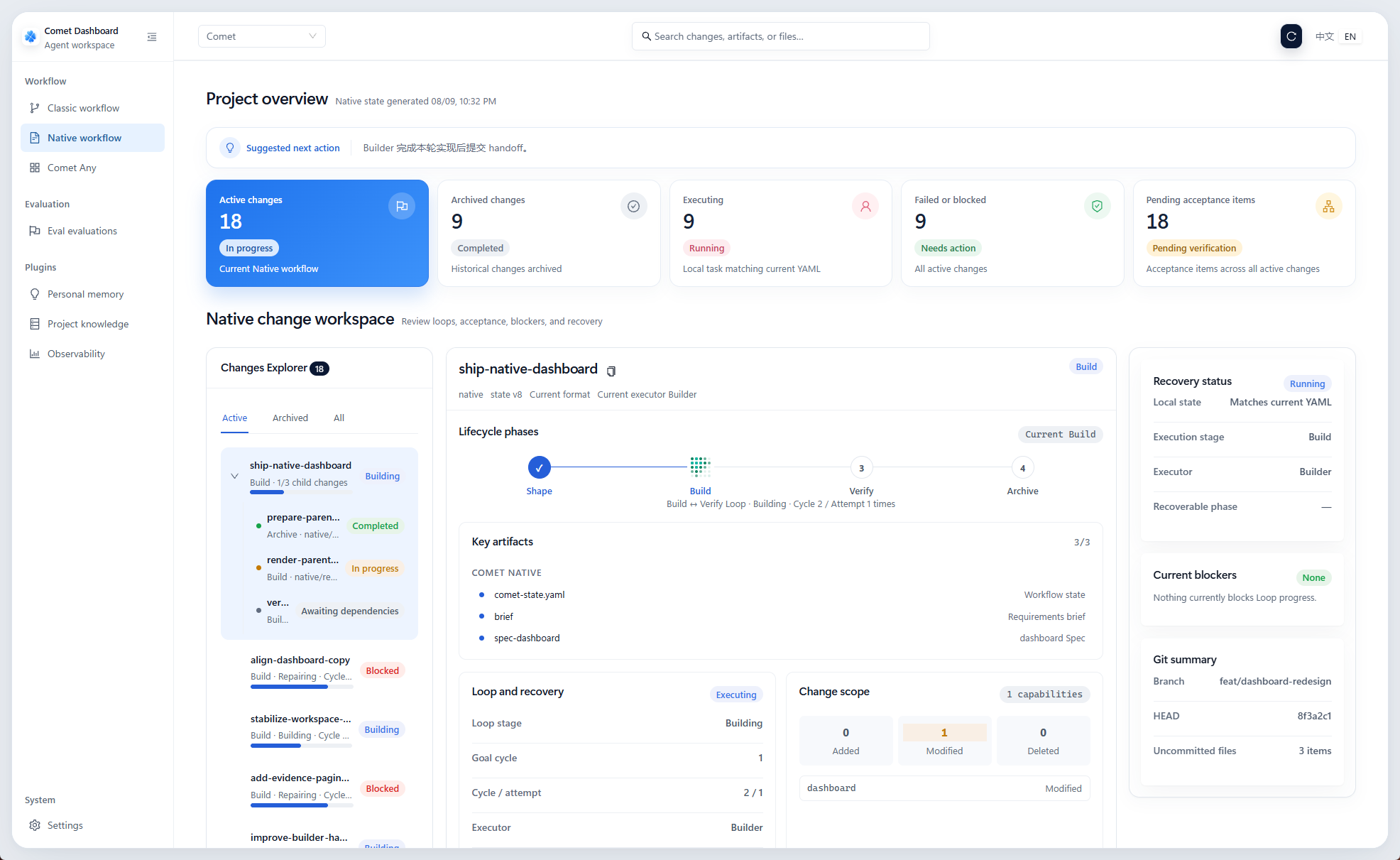
Explore more live demos in the Docs.
Integration with LangSmith/LangFuse
Comet Eval's automated dual-agent architecture can integrate online with LangSmith/LangFuse environments, making experiments traceable and skills evolvable.

Manage your Skill baseline in LangSmith and view detailed performance metrics, latency, and token consumption

Trace your Claude Code in LangSmith

Trace custom Rubric metrics with Pytest in LangSmith
Supported Platforms
comet init supports 39 AI coding platforms:
View full platform list
| Platform | Skills Dir | Platform | Skills Dir |
|---|---|---|---|
| Claude Code | .claude/ |
Cursor | .cursor/ |
| Codex | .codex/ |
OpenCode | .opencode/ |
| Devin Desktop (formerly Windsurf) | .devin/ |
Cline | .cline/ |
| RooCode | .roo/ |
Continue | .continue/ |
| GitHub Copilot | .github/ |
Gemini CLI | .gemini/ |
| Amazon Q Developer | .amazonq/ |
Qwen Code | .qwen/ |
| Kilo Code | .kilocode/ |
Auggie | .augment/ |
| Kimi Code | .kimi-code/ |
Kiro | .kiro/ |
| Lingma | .lingma/ |
Junie | .junie/ |
| CodeBuddy | .codebuddy/ |
WorkBuddy | .workbuddy/ |
| Crush | .crush/ |
Factory Droid | .factory/ |
| iFlow | .iflow/ |
Pi | .pi/ |
| Qoder | .qoder/ |
Antigravity | .agents/ |
| Antigravity 2.0 | .agents/ |
Bob Shell | .bob/ |
| ForgeCode | .forge/ |
Trae | .trae/ |
| Trae CN | .trae-cn/ |
ZCode | .zcode/ |
| MimoCode | .mimocode/ |
CoStrict | .cospec/ |
| Grok | .grok/ |
Prime Agent | .prime/agent/ |
| Oh My Pi | .omp/ |
DeepSeek Harness | .dsh/ |
| MiniMax Code | .minimax/ |
Development
See CONTRIBUTING.md | 中文版 for development setup, commit conventions, PR process, branch workflow, and guidance for adding platforms, skills, scripts, or changelog entries.
See CHANGELOG.md for version history and updates.
Roadmap
Track our development progress and upcoming features on the Comet Roadmap.
Star History
Contributors
License
Community
 DouYin (Recommended) |
 |
 |
Reference
Releases