
SDK / infra · #94 trending MCP repo · ↗ +61 stars this week
Redamon
samugit83/redamon
Open-source, self-hosted AI penetration testing framework: maps your attack surface into a graph, autonomously exploits it from a Kali sandbox with human approval gates, and opens PRs that fix what it finds. MCP both ways: plug in any MCP server as a tool, or drive RedAmon from Claude Code or your own agent.
- Stars
- 3.3k
- This week
- +61
- Forks
- 700
- Open issues
- 18
- Skills inside
- 17
Inside this repo
17 skills
skills/add-community-skilladd-partial-reconAdding partial-recon support for a tool: running a single pipeline phase on demand from the workflow graph, reading its inputs from the existing Neo4j graph and merging results back. The input-node map decides the modal UI, and some input types must never be manually entered. Trigger: adding a tool skills/add-partial-reconagent-in-the-loopAgent in the Loop: the pseudo-model loop/mcp makes every model call of a chat run a step that an external MCP client (Claude Code, Codex) answers over the inbound MCP server. A loop model must answer only inside its own run scope, never wait outside one, never be retried, and never let the outside bskills/agent-in-the-loopagentic-tool-integrationWiring a new tool the AI agent can call (not the recon pipeline): the tool registry, the phase map, the hardcoded dispatch chokepoint, and the duplicated execution paths that make a tool work in single mode but silently break in parallel plans. Trigger: adding or editing a tool the agent invokes; edskills/agentic-tool-integrationbuiltin-agent-skillAdding a built-in Agent Skill (an attack technique like ssrf, xxe, rce) that ships hardcoded in RedAmon: classified by the Intent Router, injected into the agent prompt, toggled per project, badged in the chat drawer. Ten layers across agentic and webapp, two of which fail with no error. Trigger: adskills/builtin-agent-skillgraph-db-writesWriting to the Neo4j attack-surface graph in RedAmon: the tenant-isolation MERGE key every entity node must carry, where graph methods live (mixins, not the client), and the schema places that must be updated together. A MERGE missing the tenant key silently merges one project's data into another's.skills/graph-db-writesllm-provider-integrationAdding an LLM provider to RedAmon: the credential boundary (keys must never reach scan containers), prefix-routed model ids, and the provider registry. A misrouted model id or a leaked key are the two failures this guards. Trigger: adding or editing an LLM provider; editing parse_model_provider in askills/llm-provider-integrationmcp-server-toolsAdding, removing or changing a tool on RedAmon's INBOUND MCP server, where external agents connect in with a personal access token. The wiki API reference is generated from the server's live tools/list and goes stale silently, and each tool's annotations and declared scopes are published to connecteskills/mcp-server-toolsorchestrator-container-spawnSpawning and hardening scan containers from the recon orchestrator: the security flags that look correct and break the container, and the sibling bind-mount path handling. cap_drop and no-new-privileges were each reverted after breaking real scans. Trigger: editing recon_orchestrator/container_managskills/orchestrator-container-spawnplugin-platformThe plugin platform, always on: third-party plugin code runs isolated in the plugin runner, reaches RedAmon only through the Gateway, and changes agent behaviour only through text a person approved in core UI. The base repository holds no plugin logic, and a host that cannot run the platform is refuskills/plugin-platformpriority-board-triageThe Priority Board's three-layer score model (rules BASE, REVIEW by the built-in AI or an MCP agent, a person's DECISION) and who may write which layer. A writer that sets a final score itself, or touches another layer, silently undoes a review or a person's verdict at the next run. Trigger: editingskills/priority-board-triageproject-settings-cascadeChanging or adding a project setting / default value in RedAmon. A single setting is duplicated across Prisma, two separate Python settings modules, the orchestrator defaults endpoint, and the frontend fallback; miss a layer and the UI shows one value while the backend uses another, and existing proskills/project-settings-cascaderecon-ai-enrichmentWiring an LLM into a recon tool's decisions ("let AI pick {feature} for {tool}"): the never-raise contract, the per-target cache, the full+partial coverage, and the two UI toggles bound to one field. A raising AI helper or an empty fallback silently breaks or disables a live scan. Trigger: adding orskills/recon-ai-enrichmentrecon-tool-integrationAdding a new tool to the recon pipeline: the enrichment-module contract and its isolated wrapper (the actual fan-out and test call path), graph completeness, and the preset catalog that silently strips unknown settings. Miss the isolated wrapper and the tool never runs in parallel; miss the catalog skills/recon-tool-integrationredamon-testingHow RedAmon tests actually run and how to author them: the per-file Docker gate, the unit/integration/live tiers, and the failure modes that make a green run a lie. Trigger: editing any test_*.py, *.test.ts(x) or tests/*.sh; a test that is red, skipped or xfailed; a request to "run the tests", "makeskills/redamon-testingsupply-chain-scanWorking on RedAmon's supply-chain scanner (offline OSV + GuardDog + retire + trufflehog): the offline OSV database that the scan path does not bootstrap, the world-readable requirement for the hardened scanner, and the soft-error markers that record what was never analysed. Trigger: editing scannersskills/supply-chain-scantraffic-captureWorking on the HTTP capture proxy and its replay/fuzz path: the egress guard that stops the proxy becoming an SSRF pivot, why it checks the resolved IP, and keeping capture off the scan's critical path. Trigger: editing scanners/capture_proxy/ (capture_addon.py, egress.py, ingest_worker.py); adding skills/traffic-captureDocumentation
README


Unmask the hidden before the world does
RedAmon is an open-source, self-hosted AI penetration testing framework that maps your attack surface into a graph, autonomously exploits it from a Kali sandbox with human approval gates, and opens pull requests that fix what it finds. From first packet to merged patch, with human oversight at every critical step.


















LEGAL DISCLAIMER: This tool is intended for authorized security testing, educational purposes, and research only. Never use this system to scan, probe, or attack any system you do not own or have explicit written permission to test. Unauthorized access is illegal and punishable by law. By using this tool, you accept full responsibility for your actions. Read Full Disclaimer
🏆 Flagship result: RedAmon solves 101 / 104 (97.1%) of the XBOW web-security benchmark fully black-box. Every solve ships a complete, unedited raw agent session and a reproducible, step-by-step walkthrough: open any row and read exactly how the flag fell, tool call by tool call. Auditable, line by line. See the XBOW Validation Benchmark scorecard.
📊 Coverage, measured and self-scored: the Bug Bounty Coverage — The Full Taxonomy Audit (PDF, 124 pages) audits RedAmon against all 397 classes of web bug-bounty finding, one line at a time, naming the exact module, skill or scanner behind every verdict, and scoring the recon pipeline and the agentic system separately against their own remit. It is deliberately self-critical, it records what is missing as plainly as what is covered: 134 classes complete, 210 in the build backlog, 44 deliberately excluded, with one explicit decision for every class.



Dynamic Multi-Tool Parallel Recon Pipeline
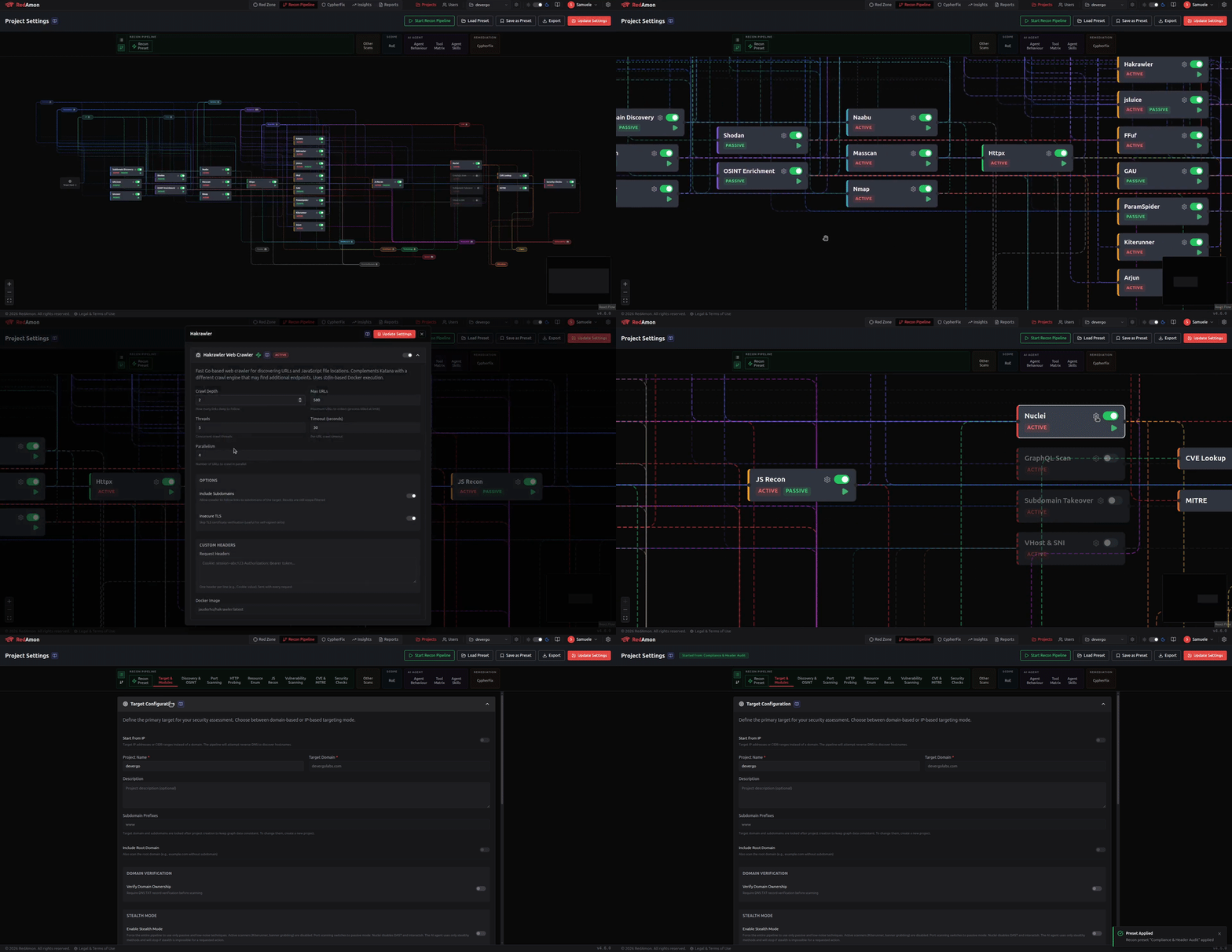
RedAmon launches multiple reconnaissance tools in parallel, each feeding results into a shared knowledge graph in real time. Tools spin up, adapt their scope based on live discoveries, and coordinate without manual intervention. The entire attack surface -- subdomains, ports, endpoints, parameters -- materializes in minutes, not hours.
Recon as a Living Knowledge Graph
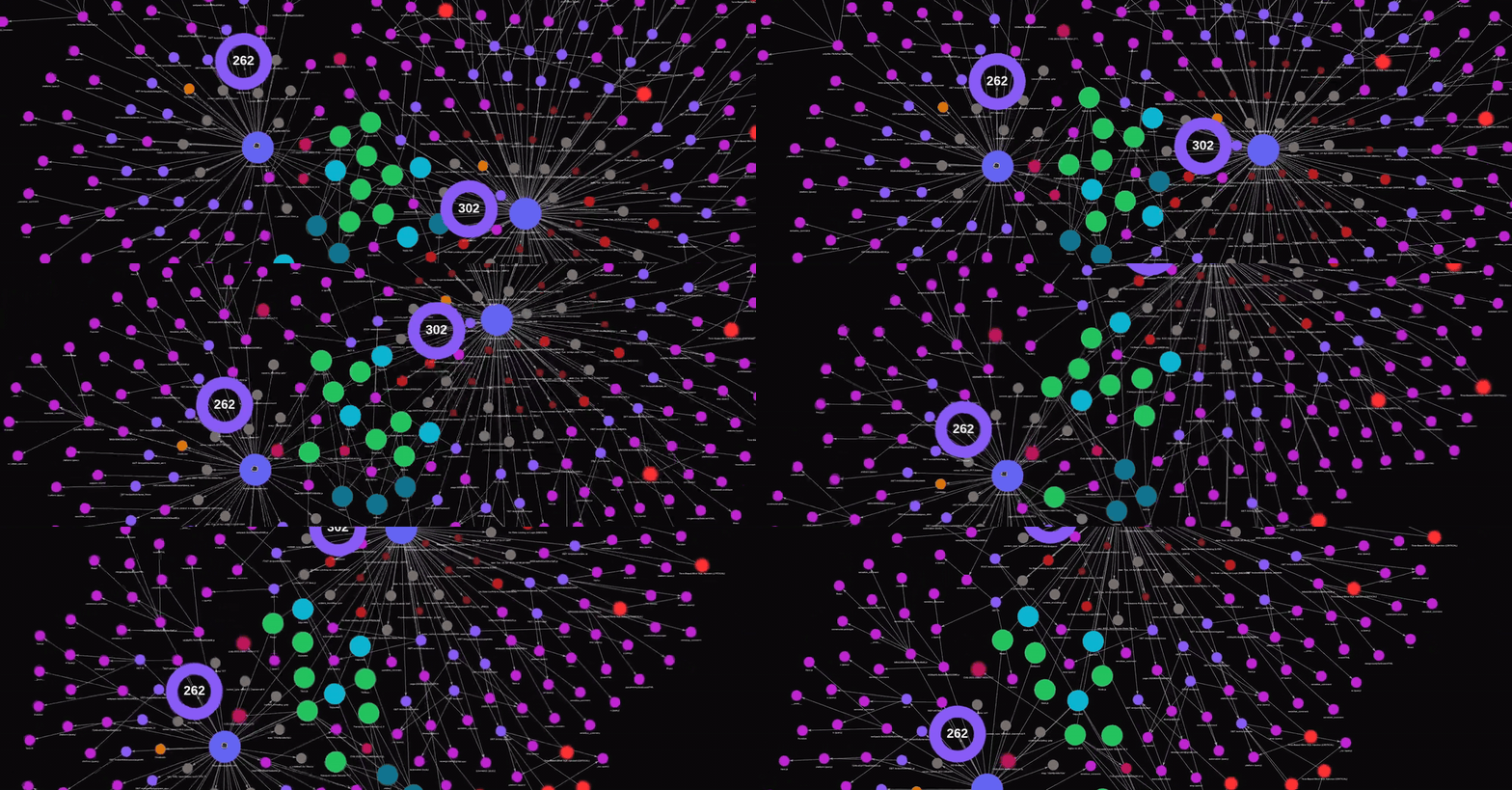
Industry-standard scanners chained so each tool's output feeds the next, then merged into a single Neo4j knowledge graph. Findings are deduplicated, relationships are explicit, and the agent inherits a structured, fully connected attack surface ready to query in natural language.
Offense meets defense. One pipeline, full visibility.
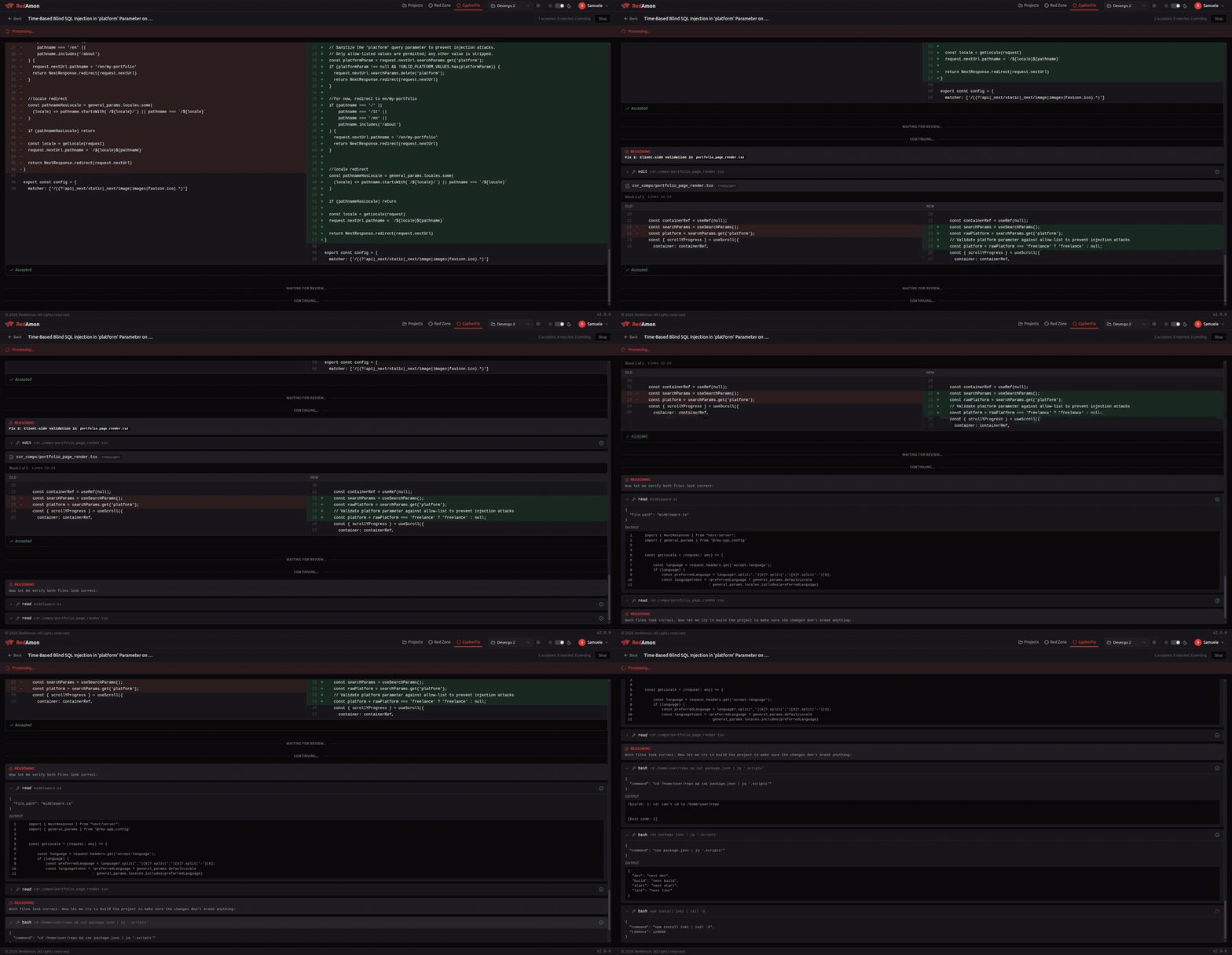
Reconnaissance ➜ Exploitation ➜ Post-Exploitation ➜ AI Triage ➜ CodeFix Agent ➜ GitHub PR
RedAmon doesn't stop at finding vulnerabilities, it fixes them. The pipeline starts with a 6-phase reconnaissance engine that maps your target's entire attack surface, then hands control to an autonomous AI agent that validates CVE exploitability, tests credential policies, and maps lateral movement paths. Every finding is recorded in a Neo4j knowledge graph. When the offensive phase completes, CypherFix takes over: an AI triage agent correlates hundreds of findings, deduplicates them, and ranks them by exploitability. Then a CodeFix agent clones your repository, navigates the codebase with 11 code-aware tools, implements targeted fixes, and opens a GitHub pull request, ready for review and merge.
Roadmap & Community Contributions
We maintain a public Project Board with upcoming features open for community contributions. Pick a task and submit a PR!
Want to contribute? See CONTRIBUTING.md for how to get started.
Maintainers
 Samuele Giampieri: Creator, Maintainer & AI Platform Architect AI Platform Architect & Full-Stack Lead with 15+ years of freelancing experience and more than 30 projects shipped to production, including enterprise-scale AI agentic systems. AWS-certified (DevOps Engineer, ML Specialty) and IBM-certified AI Engineer. Designs end-to-end ML solutions spanning deep learning, NLP, Computer Vision, and AI Agent systems with LangChain/LangGraph. LinkedIn · GitHub · Devergo Labs  From the same creator: Pathbreak - Agentic Cloud Security See the attack path. Then break it. Pathbreak is an agentic cloud security platform that discovers and validates the real attack paths a threat actor would exploit across your cloud. It catches the control-plane chains most tools miss. Pathbreak - agentic cloud security pathbreak.io |
 Ritesh Gohil: Maintainer & Lead Security Researcher Cyber Security Engineer at Workday with over 7 years of experience in Web, API, Mobile, Network, and Cloud penetration testing. Published 11 CVEs in MITRE, with security acknowledgements from Google (4×) and Apple (6×). Secured 200+ web and mobile applications and contributed to Exploit Database, Google Hacking Database, and the AWS Community. Holds AWS Security Specialty, eWPTXv2, eCPPTv2, CRTP, and CEH certifications with expertise in red teaming, cloud security, CVE research, and security architecture review. LinkedIn · GitHub |
Anthropic Cyber Verification Program: the team behind RedAmon is approved under Anthropic's Cyber Verification Program.
Quick Start
Prerequisites
- Docker Engine 28.0.0 or newer & Docker Compose v2+ (check with
docker version --format '{{.Server.Version}}')- macOS: Docker Desktop, with Memory raised to at least 4 GB (8 GB with
--gvm) in Settings → Resources. Clone under~/so the path is inside the default File Sharing list. - Windows: Docker Desktop with the WSL2 backend, run from inside the WSL2 filesystem (
~/), not/mnt/c/.
- macOS: Docker Desktop, with Memory raised to at least 4 GB (8 GB with
That's it. No Node.js, Python, or security tools needed on your host.
Minimum System Requirements
| Resource | Without OpenVAS | With OpenVAS (full stack) |
|---|---|---|
| CPU | 2 cores | 4 cores |
| RAM | 7 GB | 10 GB (16 GB recommended) |
| Disk | 80 GB free | 110 GB free |
RAM is checked at start.
./redamon.shrefuses to start when the memory Docker can use does not cover the minimum of every service the profile runs (the memory allocator's per-service floors, see README.MEMORY_GOVERNOR.md). With the default reserves that is about 6.5 GB for the core stack and about 9.6 GB with OpenVAS.REDAMON_SKIP_RAM_GATE=1skips the check.
Without OpenVAS runs 9 containers: webapp, postgres, neo4j, agent, kali-sandbox, recon-orchestrator, docker-broker (a filtering Docker-socket proxy that the recon orchestrator's spawned scan containers go through, so they can only launch the known tool images), and the plugin platform's plugin-runner and plugin-gateway. With OpenVAS adds 4 more runtime containers (gvmd, ospd-openvas, gvm-postgres, gvm-redis) plus ~8 one-shot data-init containers for vulnerability feeds (~170K+ NVTs). First launch takes ~30 minutes for GVM feed synchronization. Dynamic recon and scan containers are spawned on-demand during operations and require additional resources.
Disk sizing for a real deployment. The figures above are bare minimums to build and run the stack (fixed platform footprint: ~70 GB without OpenVAS, ~95 GB with - measured by true on-disk image size after deduplicating the shared Kali base layers). For an always-on server running real engagements, add ~100 GB of free space for operational data - the Neo4j attack graph, scan artifacts/outputs, Postgres, and container logs all grow with use. That means 200 GB without OpenVAS, 250 GB with OpenVAS, each leaving well over 100 GB free for operations. See the deployment guide for the full breakdown.
1. Clone & Install
git clone https://github.com/samugit83/redamon.git
cd redamon

# Without GVM (lighter, faster startup):
./redamon.sh install

# With GVM / OpenVAS (full stack, ~30 min first run):
./redamon.sh install --gvm
The script builds all images and starts the services.
2. Create Admin Account
At the end of the install (and on every ./redamon.sh up or ./redamon.sh update if no admin exists), you will be prompted in the terminal:
[WARN] No admin user found. Let's create one.

  Admin name: Your Name
  Admin email: admin@example.com
  Admin password: ********
  Confirm password: ********
- Admin name -- display name shown in the UI (e.g.
Admin, your name, anything you want). - Admin email -- used to log in at
http://localhost:3000/login. - Admin password -- minimum 12 characters.
After creation, open http://localhost:3000 and sign in with the email and password you just set.
No prompt appeared? On a heavy first boot (especially
--gvm, or a small VM) the webapp can take a while to come up, so the automatic prompt may be skipped. Create the admin at any time with:./redamon.sh create-adminIt waits for the webapp, then prompts for the same details. It is safe to re-run: reusing an existing admin's email resets that password, a new email adds another admin.
What the admin can do:
- Switch between all users via the user dropdown in the header (including users without a password).
- Create new users (with or without a password) and assign them
adminorstandardroles. - Set or change any user's password.
- Delete users (except themselves).
- Access the Users management page from the header navigation.
Standard users can only log in (if they have a password set by an admin), change their own password, and use the app within their own scope. They cannot switch users, create users, or access user management.
If you forget the admin password, reset it from the terminal:
./redamon.sh reset-password   # reset an EXISTING user's password
./redamon.sh create-admin     # create the first admin, or reset an admin by re-entering its email
Use create-admin when no admin exists yet (it upserts on email); reset-password only updates a user that already exists.
3. Configure
Open http://localhost:3000/settings (gear icon in the header) to configure everything. No .env file is needed.
- LLM Providers -- add API keys for OpenAI, Anthropic, OpenRouter, AWS Bedrock, or any OpenAI-compatible endpoint (Ollama, vLLM, Groq, etc.). Each provider can be tested before saving. The model selector in project settings dynamically fetches available models from configured providers.
- API Keys -- Tavily, Shodan, SerpAPI, NVD, Vulners, URLScan, and threat intelligence keys (Censys, FOFA, OTX, Netlas, VirusTotal, ZoomEye, CriminalIP) to enable extended agent capabilities (web search, OSINT, CVE lookups, passive threat intel). Uncover multi-engine search keys (Quake, Hunter, PublicWWW, HunterHow, Google, Onyphe, Driftnet) expand target discovery across 13 search engines -- shared keys (Shodan, Censys, FOFA, etc.) are automatically reused. Supports key rotation -- configure multiple keys per tool with automatic round-robin rotation to avoid rate limits.
- Tunneling -- configure ngrok or chisel for reverse shell tunneling. Changes apply immediately without container restarts.
All settings are stored per-user in the database. See the AI Model Providers wiki page for detailed setup instructions.
4. Open the Webapp
Go to http://localhost:3000 -- create a project, configure your target, and start scanning.
For a detailed walkthrough of every feature, check the Wiki.
Prefer video? Watch the Product Demos playlist on YouTube for step-by-step tutorials.
Having issues? See the Troubleshooting guide or the Wiki Troubleshooting page.
Management Commands
All lifecycle management is handled by a single script:
| Command | Description |
|---|---|
./redamon.sh install |
Build + start lightweight (no GVM, no Knowledge Base, Tavily-only web search) |
./redamon.sh install --kbase |
Build + start with the local Knowledge Base (~4.4 GB heavier) |
./redamon.sh install --gvm |
Build + start with GVM/OpenVAS |
Flags can be combined:
./redamon.sh install --gvm --kbase
| Command | Description |
|---|---|
./redamon.sh update |
Pull latest version, smart-rebuild only changed services (preserves your install-time GVM/KB choice), and apply a changed .env to the running services |
./redamon.sh up |
Start services (auto-detects GVM and KB mode from install) |
./redamon.sh up dev |
Start in dev mode with hot-reload (auto-detects GVM and KB mode) |
./redamon.sh down |
Stop services (preserves data) |
./redamon.sh status |
Show running services, version, GVM mode, KB state, plugin platform state (and why it cannot run on this host, when it cannot) |
./redamon.sh clean |
Remove containers + images, keep data |
./redamon.sh create-admin |
Create the admin login (or reset it) -- use if no prompt appeared at install |
./redamon.sh reset-password |
Reset an existing user's password from the terminal |
./redamon.sh supply-chain-sync [ecosystems] |
Populate the offline OSV database for the supply-chain feature (default: npm; e.g. npm PyPI Go) |
./redamon.sh purge |
Remove everything including all data |
Updating to a New Version
Just run:
./redamon.sh update
The script pulls the latest code from GitHub, detects which Dockerfiles and source files changed, rebuilds only the affected images, and restarts the updated services. Your databases, scan results, and reports are preserved -- volumes are never deleted.
One-time note when a release adds a new background service.
updatere-execs the freshly-pulled script so new build/start rules apply automatically -- but only for the script version you are updating from. When updating from a version that predates this self-heal (i.e. your first update onto it), run./redamon.sh uponce right afterupdateso any newly added core service is started:./redamon.sh update && ./redamon.sh up
upis idempotent -- it starts only what is missing and leaves running containers untouched. After this one-time step, plain./redamon.sh updatehandles everything on its own.
Upgrading across 6.9 (repository reorganization). 6.9 grouped the top-level directories under
scanners/,services/,testing/,tooling/anddocs/.git pullmoves only tracked files, so data that git does not track -- the knowledge-base index, past scan outputs, and the single-host deploy.envand TLS material -- would otherwise be left behind at the old paths.update(andup/status) migrate it for you automatically and print what moved. If any file was written by a container as root and could not be moved, finish it with:sudo ./redamon.sh migrate-layout
The webapp also checks for updates automatically and shows a notification in the UI when a new version is available.
Deploy to a Server (Production)
The Quick Start above runs RedAmon locally on localhost. To run a shared, internet-reachable instance on a Linux server (EC2, DigitalOcean, Hetzner, or bare metal), use the single-host deploy in tooling/deploy/single-host/. It drives redamon.sh over SSH from your laptop and wraps the stack in the internet-facing security layer RedAmon omits by default: nginx + TLS (Let's Encrypt), a host firewall, SSH hardening, and fail2ban, with a single public HTTPS origin so only the login page is reachable and everything else stays bound to loopback.
cd tooling/deploy/single-host
cp .env.example .env      # set HOST_IP, DOMAIN, SSH_KEY_PATH, OPERATOR_ALLOW_CIDRS,
                          # LETSENCRYPT_EMAIL, ADMIN_* ...
./deploy.sh init          # first build takes 30-60 min, then log in at https://<domain>/
Full walkthrough: Wiki: Deploying to a Server. Complete reference: tooling/deploy/single-host/README.md.
Development Mode
For contributors and active development with Next.js fast refresh:
./redamon.sh up dev # auto-detects GVM mode from install
Tool images are built automatically on first run if they don't exist yet. The dev override swaps the production webapp image for a dev container with your source code volume-mounted. Every file save triggers instant hot-reload in the browser.
When to Rebuild vs Restart
| What changed | Action needed |
|---|---|
webapp/src/ (frontend code) |
Nothing -- Next.js hot-reload handles it in dev mode |
agentic/*.py (agent Python code) |
docker compose build agent && docker compose up -d agent (source is baked into the image, so restart alone won't pick up .py changes) |
recon_orchestrator/*.py |
docker compose restart recon-orchestrator |
mcp/servers/*.py (MCP servers) |
docker compose restart kali-sandbox |
agentic/Dockerfile or agentic/requirements.txt |
docker compose build agent && docker compose up -d agent |
recon_orchestrator/Dockerfile or its requirements.txt |
docker compose build recon-orchestrator && docker compose up -d recon-orchestrator |
mcp/kali-sandbox/Dockerfile |
docker compose build kali-sandbox && docker compose up -d kali-sandbox |
webapp/Dockerfile or webapp/package.json |
docker compose build webapp && docker compose up -d webapp |
recon/Dockerfile |
docker compose --profile tools build recon |
scanners/gvm_scan/Dockerfile |
docker compose --profile tools build vuln-scanner |
scanners/github_secret_hunt/Dockerfile |
docker compose --profile tools build github-secret-hunter |
scanners/trufflehog_scan/Dockerfile (Secret Multiscanner) |
docker compose --profile tools build trufflehog-scanner |
scanners/baddns_scan/Dockerfile or scanners/baddns_scan/entrypoint.sh |
docker compose --profile tools build baddns-scanner |
scanners/wcvs/Dockerfile (web cache poisoning engine) |
docker compose --profile tools build wcvs |
scanners/supply_chain_scan/Dockerfile (L1 scanner) |
docker compose --profile tools build supply-chain |
scanners/supply_chain_analyzer/ (DIRTY analyzer; entrypoint is baked) |
docker compose --profile tools build supply-chain-analyzer |
docker-compose.yml |
docker compose up -d (re-creates affected containers) |
prisma/schema.prisma |
docker compose exec webapp npx prisma db push |
Rebuild a single service:
docker compose build <service>                    # Rebuild one image
docker compose up -d --no-deps <service>          # Restart only that service
Common dev commands:
docker compose ps                                 # Check service status
docker compose logs -f <service>                  # Follow logs for a service
docker compose down                               # Stop all (preserves volumes)
docker compose --profile tools down --rmi local   # Remove built images
docker compose --profile tools down --rmi local --volumes --remove-orphans  # Full cleanup
Reclaim disk space:
docker system df                                  # Show Docker disk usage (add -v for per-image breakdown)
docker image prune -f                             # Remove dangling images (auto-run by `./redamon.sh install` and `update`)
docker builder prune -f                           # Drop unused build cache (auto-run after every successful build; opt out with REDAMON_NO_AUTO_PRUNE=1)
docker builder prune -af                          # Drop ALL build cache, including what the current images reuse -- frees no extra disk and makes the next rebuild cold
docker container prune -f                         # Remove stopped containers
For a complete development reference -- hot-reload rules, common commands, important rules, and AI-assisted coding guidelines -- see the Developer Guide.
Knowledge Base (RAG-Enhanced Web Search)
The agent's web_search tool includes a local Knowledge Base -- a RAG pipeline that searches curated security datasets (GTFOBins, LOLBAS, OWASP WSTG, NVD CVEs, ExploitDB, Nuclei templates, and agent skill docs) before falling back to Tavily web search. When the KB returns a high-confidence match, Tavily is skipped entirely for faster, offline-capable results.
How it works: When the KB is enabled, install / up / update builds a lightweight KB index (~1,200 chunks in 10-15 min on CPU). At query time, the agent runs a hybrid retrieval pipeline (FAISS vector search + Neo4j fulltext), reranks with a cross-encoder, and checks a confidence threshold. If the score is high enough, results come from the local KB. Otherwise, it falls back to Tavily or merges both.
Default behavior: The KB is opt-in. ./redamon.sh install produces a lightweight install (~4.4 GB lighter, Tavily-only web search). To enable the local KB, pass --kbase:
./redamon.sh install --kbase
On first install with --kbase, RedAmon detects your hardware (GPU / CPU / API) and offers a quick-start profile. The choice is persisted, so subsequent update / up commands respect it without re-passing the flag.
Speed up ingestion with API embeddings: By default, embeddings run locally on CPU/GPU. On CPU-only machines, large datasets (ExploitDB, NVD) can take hours. You can offload embedding to an external API by creating a .env file from the template:
cp .env.example .env
Then configure the embedding API in .env:
| Variable | Default | Description |
|---|---|---|
KB_EMBEDDING_USE_API |
false |
Set to true to use API-based embeddings instead of local model |
KB_EMBEDDING_API_BASE_URL |
(empty = OpenAI) | Any OpenAI-compatible endpoint (Ollama, vLLM, LiteLLM, Together AI, Azure) |
KB_EMBEDDING_API_KEY |
(empty) | API key for the embedding provider |
KB_EMBEDDING_API_MODEL |
text-embedding-3-small |
Model name (provider-specific) |
NVD_API_KEY |
(empty) | Free NVD API key for 10x faster CVE ingestion |
Example with Ollama (free, local, no API key cost):
KB_EMBEDDING_USE_API=true
KB_EMBEDDING_API_BASE_URL=http://host.docker.internal:11434/v1
KB_EMBEDDING_API_KEY=ollama
KB_EMBEDDING_API_MODEL=nomic-embed-text
Important: Ingestion and query must use the same model. If you switch models, rebuild the index:
make -C services/knowledge_base kb-rebuild-lite MODE=docker
Manage the KB:
./redamon.sh kb build lite          # Build with lite profile (~30-60s with API)
./redamon.sh kb build standard      # Add NVD CVEs
./redamon.sh kb update nvd          # Incremental NVD refresh
./redamon.sh kb stats               # Show index statistics
./redamon.sh kb rebuild lite        # Wipe and rebuild from scratch
For full technical documentation -- query pipeline, data sources, ingestion profiles, scoring, security model -- see the Knowledge Base Technical Reference or the Wiki: Knowledge Base & Web Search.
Table of Contents
- Full Wiki Documentation
- Overview
- Built for Enterprise, Secure by Design
- Security & Threat Model
- Feature Highlights
- System Architecture
- Components
- Documentation
- Troubleshooting
- RedAmon HackLab
- Community Showcase
- Legal
Overview
RedAmon is a modular, containerized penetration testing framework that chains automated reconnaissance, AI-driven exploitation, and graph-powered intelligence into a single, end-to-end offensive security pipeline. Every component runs inside Docker (no tools installed on your host) and communicates through well-defined APIs so each layer can evolve independently.
The platform is built around six pillars:
| Pillar | What it does |
|---|---|
| Reconnaissance Pipeline | A parallelized fan-out / fan-in scanning pipeline that maps your target's entire attack surface (starting from a single domain, IP addresses / CIDR ranges, or a Domain batch of many domains scanned in turn) from subdomain discovery (5 concurrent tools) through port scanning, Nmap service detection and NSE vulnerability scripts, HTTP probing, resource enumeration, and vulnerability detection. Independent modules run concurrently via ThreadPoolExecutor, graph DB updates happen in a background thread, and results are stored as a rich, queryable graph. Complemented by standalone GVM network scanning, GitHub secret hunting, and Secret Multiscanner deep secret scanning modules. |
| AI Agent Orchestrator | A LangGraph-based autonomous agent that reasons about the graph, selects security tools via MCP, transitions through informational / exploitation / post-exploitation phases, and can be steered in real-time via chat. |
| Attack Surface Graph | A Neo4j knowledge graph (every node type and relationship is declared once, in graph_db/schema_sections.md) that serves as the single source of truth for every finding, and the primary data source the AI agent queries before every decision. |
| EvoGraph | A persistent, evolutionary attack chain graph in Neo4j that tracks every step, finding, decision, and failure across the attack lifecycle, bridging the recon graph and enabling cross-session intelligence accumulation. |
| CypherFix | Automated vulnerability remediation pipeline: one triage run scores every finding from the graph with a fixed risk model, groups the ones that share a fix, has an LLM check the evidence behind each, and writes one fix item per group. A CodeFix agent then clones the target repository, implements a fix using a ReAct loop with 11 code tools, and opens a GitHub pull request. |
| Project Settings Engine | Hundreds of per-project parameters (exposed through the webapp UI, each one listed in the generated Project Settings Registry) that control every tool's behavior, from Naabu thread counts to Nuclei severity filters to agent approval gates. |
Built for Enterprise, Secure by Design
…
Releases