
Server · #35 trending MCP repo
Squadra
dagoSte/squadra
Coordinate Claude, Codex and Cursor windows with shared tasks, acknowledgements, prechecks, parallel tests, source-bound proofs and independent review. Built-in skills recall lessons, simplify code and forecast work. Track progress, decisions and evidence in a bilingual local dashboard, with MCP plugins. Browse skills and verified security audits.
- Stars
- 1.2k
- This week
- —
- Forks
- 99
- Open issues
- 1
- Skills inside
- 2
Inside this repo
2 skills
/miglioraImprove a project's development workflow from observed failures, repeated work and avoidable waits. Apply scoped, verified remedies and useful project instructions, then automatically commit owned changes when the project's required checks and reviews are complete. Use after recurring development frmiglioraDocumentation
README

Squadra 3+
Your coding agents, one team — and proof for every step.
Coordinate Claude Code, Codex and Cursor with shared tasks, independent reviews and a local dashboard.
Free and open source — MIT licence, no account, everything runs on your machine.
Version 3.14.0 · Python 3.12+ · macOS / POSIX
Overview · Install · First steps · Prompts · Dashboard · Plugins · Commands · Guides · What's new · Community










What the security scan covers.
What Squadra does
Squadra helps several windows of coding agents work on one project as a team: one coordinates, others build, and a window that did not write the code reviews it. Assignments, decisions, executed checks and review reports stay in one shared registry on your computer.
Use it when work spans several agent sessions and you need to see who owns each task, which code was checked and what still needs a decision. Each window can work in its own checkout while sharing the same record.
| Part | What it does |
|---|---|
| Skill | Gives the agents the coordination workflow to follow. |
| CLI | Records tasks, messages, checks and decisions. |
| Dashboard | Shows progress, evidence and requests for your input. |
Team setup: start with a Claude coordinator, then join your Codex, Claude or interactive Cursor windows. The team rules explain the roles and limits.
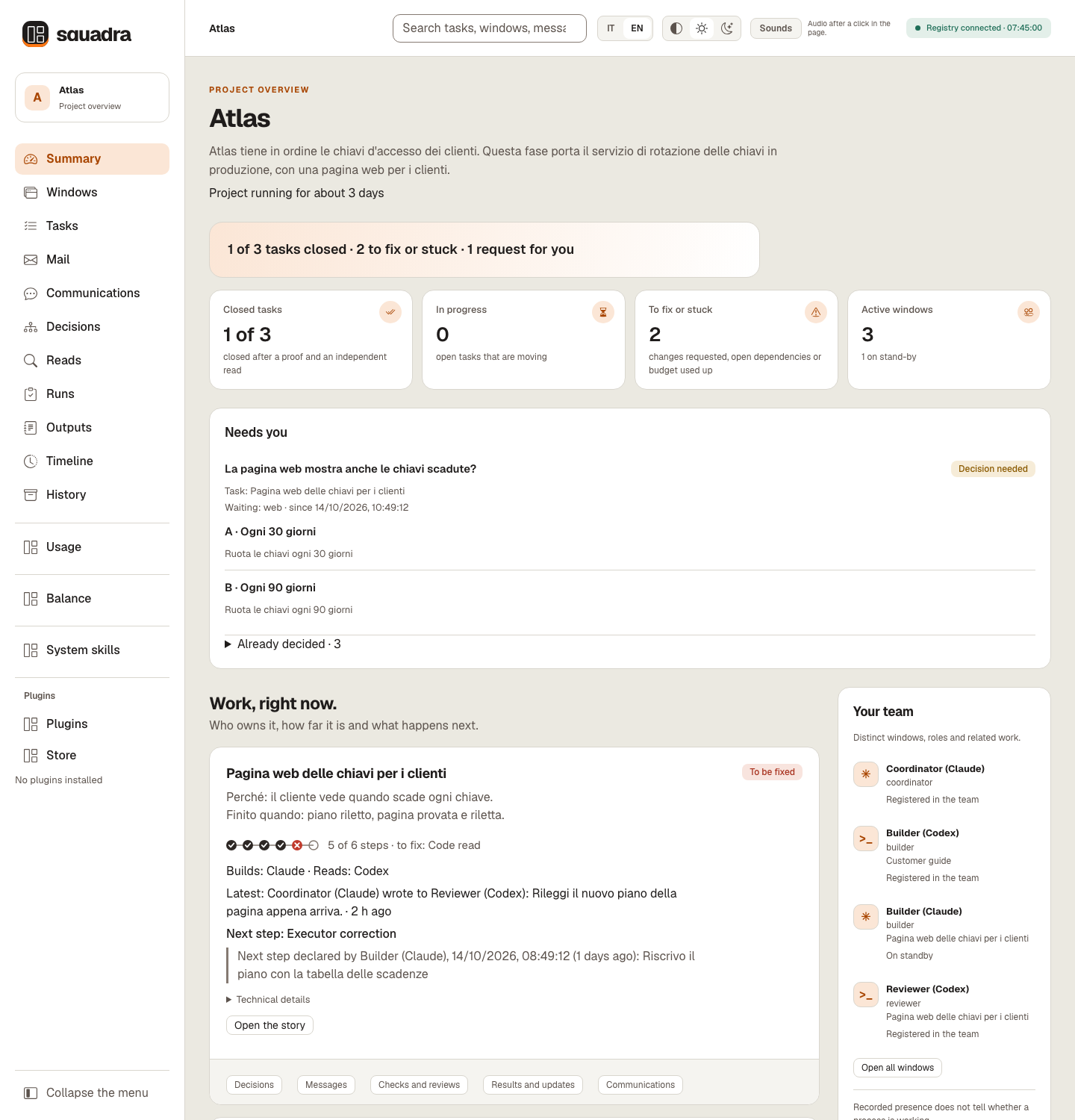
The Summary on a synthetic Atlas registry (Italian, dark theme). Recorded texts such as briefs, the owner's words and messages stay as written, here in Italian. The examples contain no customer data and do not measure model quality.


Watch the 80-second tour — turn the sound on in the player:
https://github.com/user-attachments/assets/69f512be-775c-40ae-95c2-e1e403b3f5d1
Why use Squadra
- One registry for every window. Assignments, proofs and decisions stay on your computer, not in a chat's memory.
- Whoever writes it does not review it. Every change is checked by a window that did not write it.
- Proof bound to the exact code. If the code changes after the proof, proof and review no longer count.
- Confirmed before work starts. A task starts only when its recipient confirms receiving it.
- Questions with the sentence ready. When a decision is yours, you get the options, a recommendation and the exact words to answer.
- A dashboard in plain words, in Italian or English, to follow everything live.
- Claude, Codex and Cursor together, and open to community plugins.
- One view of what every AI window spends. Tokens per window, model and task across Claude Code and Codex, with advice on which window or model should take the next task, computed on your computer.
Installation
Requirements: Python 3.12+, Git and a browser for the dashboard. The runtime uses the Python standard library; Node.js is required for selftest. macOS / POSIX is the tested environment. Full requirements and platform limits.
Recommended: install with one sentence
Install it with one sentence. Paste this into Claude Code, Codex or Cursor:
Install Squadra by following https://github.com/dagoSte/squadra/blob/main/SETUP.md: show me the plan first, wait for my yes, then install it and check that it works.
The agent checks what you already have, shows each command with what it changes and how to undo it, waits for your yes, installs and runs a one-second check.
One act stays with you: /reload-plugins in Claude Code, or a new session in Codex or Cursor.
Other installation methods: plugin or standalone command
With /plugin
In Claude Code:
/plugin marketplace add dagoSte/squadra
/plugin install squadra@squadra
In a terminal, for Codex:
codex plugin marketplace add dagoSte/squadra
codex plugin add squadra@squadra
The plugin brings the skill, its scripts, references and dashboard. It does not put the squadra shell command on your PATH: agents run python3 <skill folder>/scripts/squadra.py, also for the instructions Squadra prints, such as squadra ack …. To have the squadra command itself, use the standalone installer below instead of the plugin. Use either the plugin or the standalone installer, not both, so the skill is not registered twice.
Standalone installer (adds the squadra command)
git clone https://github.com/dagoSte/squadra.git
cd squadra
python3 -B scripts/install.py \
  --backup "$HOME/.local/state/squadra/install-backup-001"
export PATH="$HOME/.local/bin:$PATH"
squadra --version
Install from a clean, committed checkout with a new backup directory each time; the installer keeps your previous skills and launcher, so you can roll back: python3 -B scripts/install.py --undo <backup folder> restores the earlier skills and keeps the backup. The export PATH line lasts for that terminal only: add it to your shell profile (for example ~/.zshrc or ~/.bashrc) so new terminals find squadra. Without installing, run python3 -B scripts/squadra.py <command>. Details and rollback.
Updating an existing installation
Updating
With /plugin. In Claude Code, run /plugin marketplace update squadra, then /plugin update squadra@squadra, then restart Claude Code. For Codex, run codex plugin marketplace upgrade, then codex plugin add squadra@squadra again.
With the standalone installer. From 3.6.1 on, releases keep their history: run git pull, then the installer again, with a new backup folder each time. A checkout of 3.6.0 or earlier needs git fetch origin and git reset --hard origin/main instead, which discards any local edit in that checkout.
git pull
python3 -B scripts/install.py \
  --backup "$HOME/.local/state/squadra/install-backup-002"
squadra --version
Every release raises the version number, except a refresh that adds to a release under the same number, as 3.10.2 did on 17 October 2026. Plugins installed from the Store keep their version until squadra plugin install <name> runs again from the new release (Plugins bundled in your release). Open windows keep the version they read until they restart, and a running squad keeps its protocol until you switch it explicitly.
Updating to 3.13.x: reclaim the space you already have. Nothing is compacted or deleted at update or at opening. After updating every window, tell the coordinator «Use squadra to compact the storage of the registry at /path/to/registry»: it previews storage adopt (checkpoints and saves made before 3.13), storage compact (shared bytes, legacy candidates sealed read-only, nothing deleted) and storage purge --dry-run, and applies each step only on your word. doctor --resume proposes the same sentence when there is space to reclaim.
Updating to 3.11.1: upgrade every window together and reinstall bundled plugins. replace, wait, access probe, ready and onboarding settings write journal format 4, which 3.11.0 and older clients refuse instead of ignoring it.
Updating to 3.11.0: upgrade every window and reinstall bundled plugins before creating new tasks or reassigning reads. New tasks use frozen delivery and journal format 3; older clients refuse it. Historical tasks retain their previous behavior. The installer also adds the migliora skill.
Updating from 3.10.3 or 3.10.2 to 3.10.4: the registry stays as it is.
- Windows can move one at a time. 3.10.2, 3.10.3 and 3.10.4 windows share the same registry; nothing is converted.
- Update the coordinator first. The rule that the other model reads binds the tasks a 3.10.4 window records, and an older window does not check it at
checkorclose. Tasks recorded before the update keep closing as before. - Plugins from the Store: run
squadra plugin install <name>again, as after every release.
Updating from 3.10.1 to 3.10.2: the registry stays as it is.
- Windows can move one at a time. 3.10.1 and 3.10.2 windows share the same registry while you update them; nothing is converted.
- Two things wait for the last window. A settings change made from a 3.10.1 window puts the two new wait thresholds (
to-forwardandplan) back to their defaults. And removing a leaked file with a recorded decision makes a 3.10.1 window's full audit and dashboard fail on the missing file, so update every window before you remove one. - Plugins from the Store: run
squadra plugin install <name>again, as after every release.
Updating from 3.10.0 or earlier to 3.10.1: less repeated history work, and every window must move together.
- Before you update, the coordinator saves the squad:
squadra save --actor <coordinator> --to <a new folder>. It is your way back. - Your registry is read as it is. Nothing is converted and the history already written is not touched. From the first command on 3.10.1, new events are written in the lighter format.
- Update every window at once, Claude Code and Codex. A window still on 3.10.0 stops at the first new event with
Event integrity failure at sequence N. That is on purpose: an old version stops rather than accept events it cannot read. Nothing is lost: update that window and it carries on. - No way back on the same registry. After the update, 3.10.0 cannot use that registry. To go back, restore the save you made before updating, with either version, then keep using the old version on the restored copy: the first command of 3.10.1 or later on it writes the newer format again.
- If in doubt, run
squadra doctoron 3.10.1: it says when a registry needs 3.10.1 or later. - Plugins from the Store: run
squadra plugin install <name>again, as after every release. - If you installed Squadra from the Claude directory, you get the version the directory lists until it moves to 3.10.1.
The first window to write an older or moved registry builds its cache; other windows wait. If a command says registry busy, retry, retry after that first write finishes.
Full requirements: self-test, native runners and platform limits
Requirements: Python 3.12+, Git and the Python standard library. Node.js runs the dashboard's JavaScript checks in the test suite and in selftest: without it they fail, they are never skipped. A browser for the dashboard; the Codex or Claude CLI only for the native runners. macOS/POSIX is the tested process environment; Windows process controls and recovery with submodules, LFS or sparse checkouts are not qualified.
First steps
After installation, give instructions in plain words; the agents run the commands. A window is one working session. All windows in the squad use the same registry.
- Start the coordinator. Tell a Claude window: “Use squadra for this project. Use the registry at
/path/to/registry. Find the other windows and introduce yourself; describe the work in plain words.” A Codex window called first does not coordinate: it gives you the sentence to type in a Claude window. - Open the other windows on that registry. The Claude window coordinates; each window confirms its assignment before starting.
- Give the coordinator a first task. Describe the result you want and how to check it. The coordinator assigns the work and its independent review; the example prompts give you ready-to-copy instructions.
- Open the dashboard with
squadra dash --root /path/to/registry --open(with the plugin install, ask the agent to open it) and follow each task: confirmation → work → executed check → another window's review → coordinator closure.
When Needs you asks for your input, answer the coordinator; elapsed time is not an answer. Closed work is never published automatically.
Complete walkthrough: twelve steps and commands
New to Squadra? Try these twelve steps once, end to end, on a test project. A window is one working session: a Codex, Claude or Cursor agent, or a person. Every window uses the same registry.
- Install and set
export SQUADRA_ROOT=...in every window. - Create the registry and register each window with
initandagent. - Find the windows and introduce yourself:
censuslists them without writing;sendandtransportdeliver the introduction; each window answers withack. - Say what the project is in plain words with
brief --project. - Assign and explain the first task with
taskandbrief --task. - The builder confirms and starts:
ack, thenstart. - The builder proves and delivers:
proveruns the agreed check on the exact files;deliverhands them over. - Someone else reads: a reader who did not write the work records a verdict with
review. - The coordinator closes:
check, thenclose. - Check who still answers: the coordinator runs
ping --all;ping --sweepputs an unanswered window in stand-by, which stops nothing it runs. - Open the dashboard with
dash --open; «How to read this page» explains every term. - Record what the owner says with
decision,--owner-words,--channeland--task.
Each step in more detail: startup and presentation.
The twelve steps as commands
squadra census --project /path/to/project
squadra send --actor coord --to builder --id HELLO-builder --body-file /evidence/introduction.md
squadra transport --actor coord --message HELLO-builder --via manual
squadra ack --actor builder --message HELLO-builder
squadra brief --actor coord --project --file /evidence/project.md
squadra task --actor coord --id T1 --owner builder --reviewer reader \
  --title "Key rotation" --repo /path/to/builder-checkout \
  --scope-file /evidence/scope.md --proof-file /evidence/argv.json
squadra brief --actor coord --task T1 --file /evidence/t1.md
squadra ack --actor builder --message assign-T1
squadra start --actor builder --task T1
squadra prove --actor builder --task T1 -- python3 -B -m unittest discover -s tests -v
squadra deliver --actor builder --task T1
squadra ack --actor reader --message "review-ID-RETURNED-BY-DELIVER"
squadra review --actor reader --task T1 --verdict accepted --report /evidence/code-read.md
squadra check --actor coord --task T1
squadra close --actor coord --task T1
squadra ping --actor coord --all
squadra ack --actor builder --message "PING-ID-RETURNED-BY-PING"
squadra ping --actor coord --sweep
squadra decision --actor coord --reason "Owner instruction" --task T1 \
  --owner-words "Keep the old keys readable for a month" --channel typed-here
squadra dash --open
Example prompts
You talk to the agents in plain words; they run the commands. Copy a prompt into the window it is meant for and replace the paths and names. Every prompt works in Codex, Claude and interactive Cursor windows that have the squadra skill installed; a squad starts from a Claude window.
Start a squad (in a Claude window, which becomes the coordinator)
Use the squadra skill for this project. Shared registry: ~/.local/state/squadra/atlas.
Read the project mandate first. Find the other Codex, Claude and Cursor windows working on it,
introduce yourself to each one and wait for their confirmations.
Then write a plain-words brief of the project and show me the progress table.
Join an existing squad
Use the squadra skill. Shared registry: ~/.local/state/squadra/atlas.
Register this window, introduce yourself to the coordinator and wait for a role.
Do not take any task or resource until your assignment is confirmed.
Reclaim disk space (coordinator, from 3.13)
Use squadra to compact the storage of the registry at ~/.local/state/squadra/atlas.
Adopt the old checkpoints, compact and preview the purge; show me each preview
and apply nothing without my word.
Assign work (coordinator)
Create a task "Key rotation service" for the builder window, with the checkout at
/path/to/builder-checkout and the reviewer window as independent reader.
The proof is the whole test suite. Write a brief that says why the task exists,
for whom, and when it is finished. Then hand it over and wait for the builder's ACK.
Where are we?
Show me the progress table from the registry: in progress, to do and done, with who is doing what.
Tell me in one sentence what is blocked and whether anything needs my decision.
More prompts: build, review and close, dashboard, decisions, pause and resume, context handover, plugins, worth remembering, the rules in practice
Build and deliver (builder window)
Confirm your assignment, then build it in your own checkout.
When the change is ready, freeze it, run the agreed proof on the exact files and deliver it
to the reviewer. Record one output with the result and the next step, then stop.
Ask for an independent review (reviewer window)
Confirm the review handoff you received, then read the frozen candidate on a private copy.
Run your own probes, write the report first, and record your verdict with the requirements
it covers. Only grave findings block; list the rest as follow-ups with an owner.
Close a task (coordinator)
Check that the proof and the review concern the same candidate, then close task T1.
Take a checkpoint and show me the progress table. Do not publish anything.
Open the dashboard
Open the squadra dashboard for this registry in my browser.
A Codex window whose sandbox blocks network access cannot open the dashboard's local port: ask a Claude window.
Record a decision (coordinator)
Record my decision in the registry, linked to task T1, as typed here:
"Keep the old keys readable for a month." Then tell the builder.
Pause and resume (coordinator)
Pause the squad: stop only the processes you own, save the registry and the code, and prove
the save with a real restore check. I will tell you when to resume.
Resume the squad: re-read the mandate and the registry, reconcile sources and resources,
record the resume and tell me the next step.
Before a session change or a full context
Your context is getting full. Save a checkpoint and a complete handover with task, identity,
branch, open findings and the exact next step, so a fresh session can continue.
Plugins (the second prompt is for the coordinator)
Show me the plugin page for "memo" in the dashboard: what it is, its settings and its drafts.
I selected drafts and pressed "Send for review" in the dashboard. Read the plugin's AGENTS.md
and run only its consumer for the pending request, within your existing permissions.
Then tell me the outcome.
Worth remembering at close
Before closing T1, answer the "worth remembering" question. Write da-ricordare.json with one
sentence per decision, constraint or trap, each with its evidence and how sure you are,
and no secrets, personal data or private paths. Attach it to your closing output.
The rules in practice (coordinator)
We just closed T4. Look at where its time went in the dashboard and tell me, in one line,
how the next task can go faster. Then apply it when you assign the next one.
Work in parallel: give every free window an independent task now, each with its own tree
and its own files, and merge the lanes yourself when they deliver.
Show me the progress table with the time column: the board's measured times, plus your
estimate of what remains for each task, marked as an estimate.
Before you report a number, an id or a path, read it from a command's output, not from memory.
If a test pins something I asked to change, record my decision first, then change the test
and the code together.
Before any paid call (models, voice, images), tell me the expected cost and a cap, and stop at the cap.
Use the default final block: settle the seams, merge proven deliveries and freeze a
candidate. Claude and Codex non-authors read every delta; make one fix round and
re-read its deltas together. Keep non-grave carry-overs for the next milestone.
Dashboard: the work at a glance
squadra dash --open opens on the Summary: one sentence and four tiles say where the work stands, Needs you appears only when something waits for the owner, and one card per task shows its steps, who builds and who reads, and the next step. Each card opens the task's story in time order.
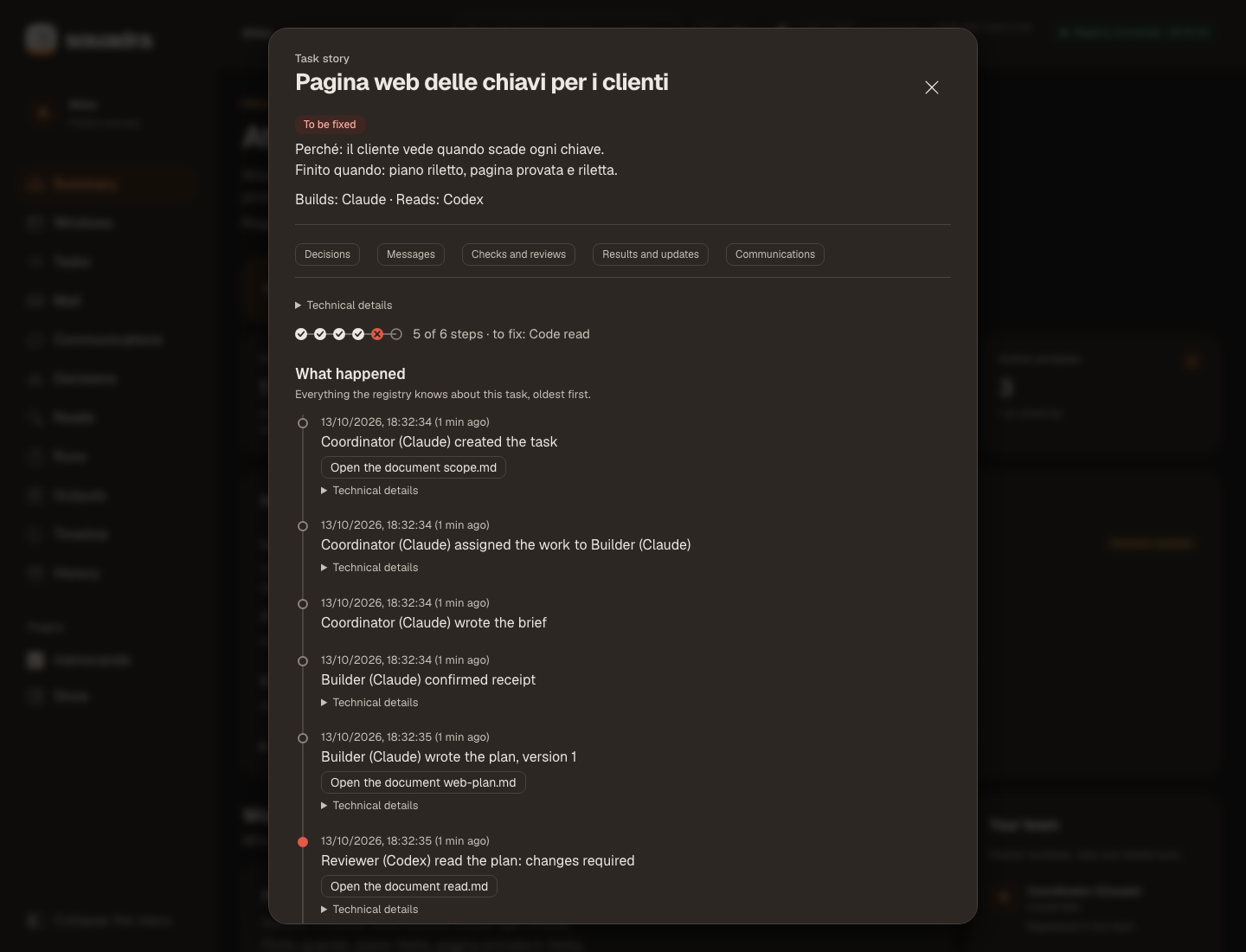
Charts, sortable tables, a «Read» dialog for long texts, sounds and notices when a step closes, IT / EN and light / dark: every part of the page, view by view, with every screenshot in both languages.
Views: Summary, Windows, Tasks, Mail, Communications, Decisions, Runs, Outputs, Timeline and History; what each one shows is in the page guide. Usage, Balance and System skills have their own menu entries, shown below.
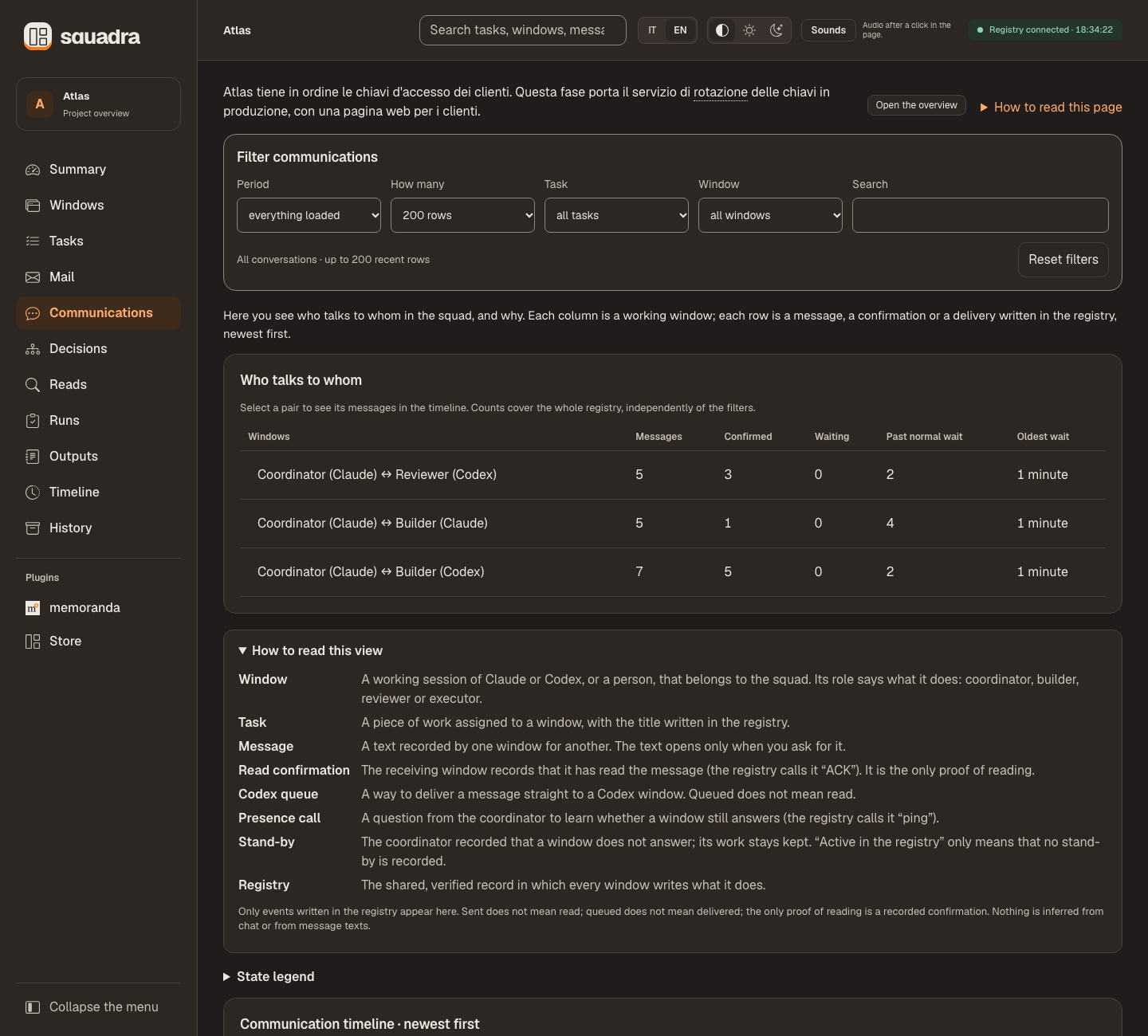
Communications shows who talks to whom, in plain sentences. Sent is not read: only a recorded confirmation proves reading.
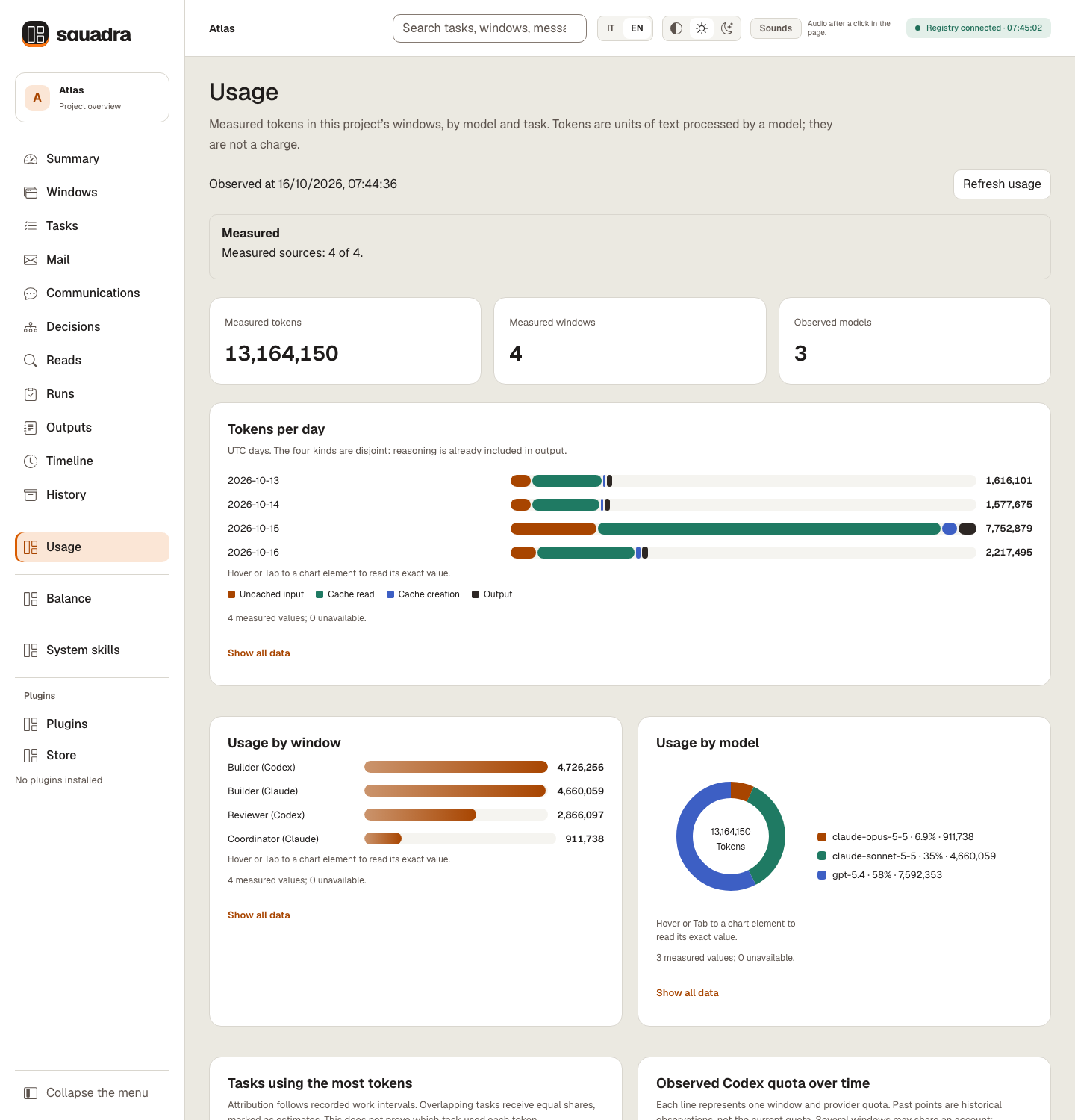
Usage shows the tokens each window spent, by day, window, model and task, read from the session files Claude Code and Codex already keep; it keeps the token counts, with the model, time and the session and message identifiers needed to count each message once, and never stores, shows or sends the text of the conversations (details).
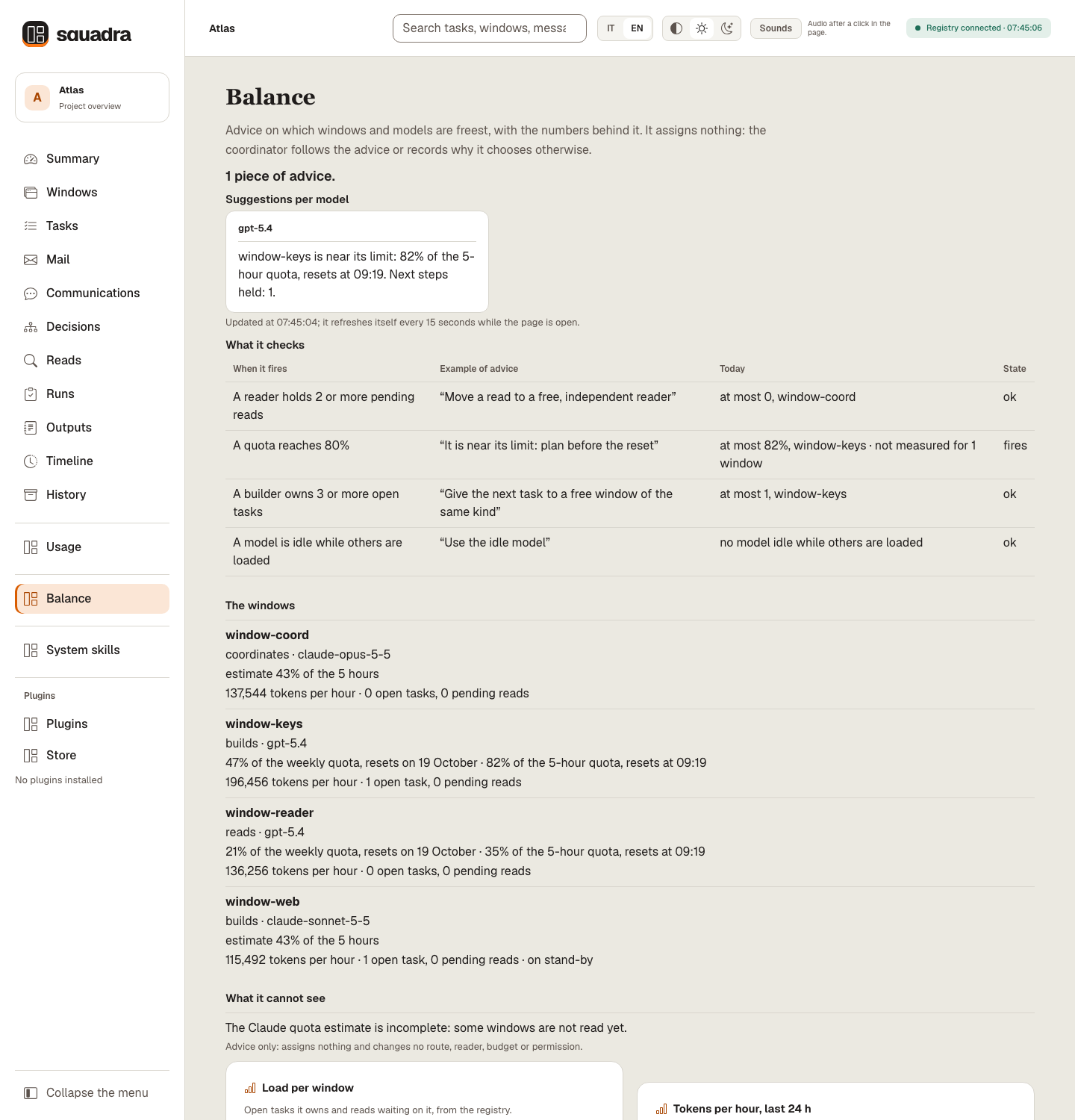
Balance suggests which window or model should take the next task, by load, quota and similar work, with the numbers behind each suggestion; it assigns nothing (details).
System skills lists the five built-in skills (errata, previsione, rasoio, bilanciamento, migliora), with what each does, its recorded activity and the security scan result for its files.
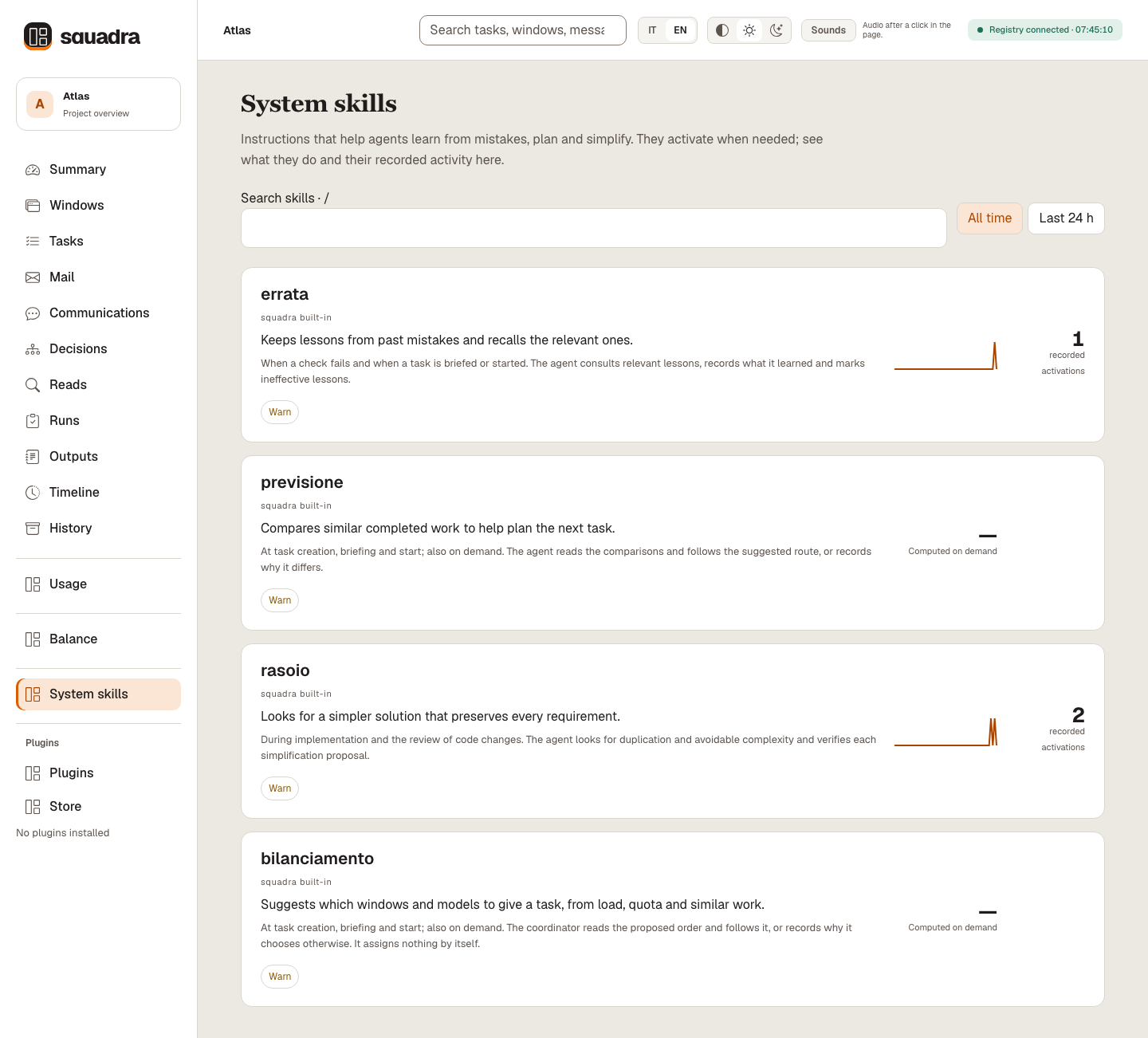
The Usage, Balance and System skills pages on the same synthetic Atlas registry, with synthetic session files that contain no conversation text (Italian, Balance in Italian, System skills in Italian).


What the reads caught
Open Reads in the dashboard to see recorded plan and code verdicts, in total and by task, and changed versions submitted after a request for changes, each linked to its report and task story. These are counts of reads and later versions, not of prevented defects or successful fixes; repeated reads stay separate records, and closed and replaced tasks stay included.
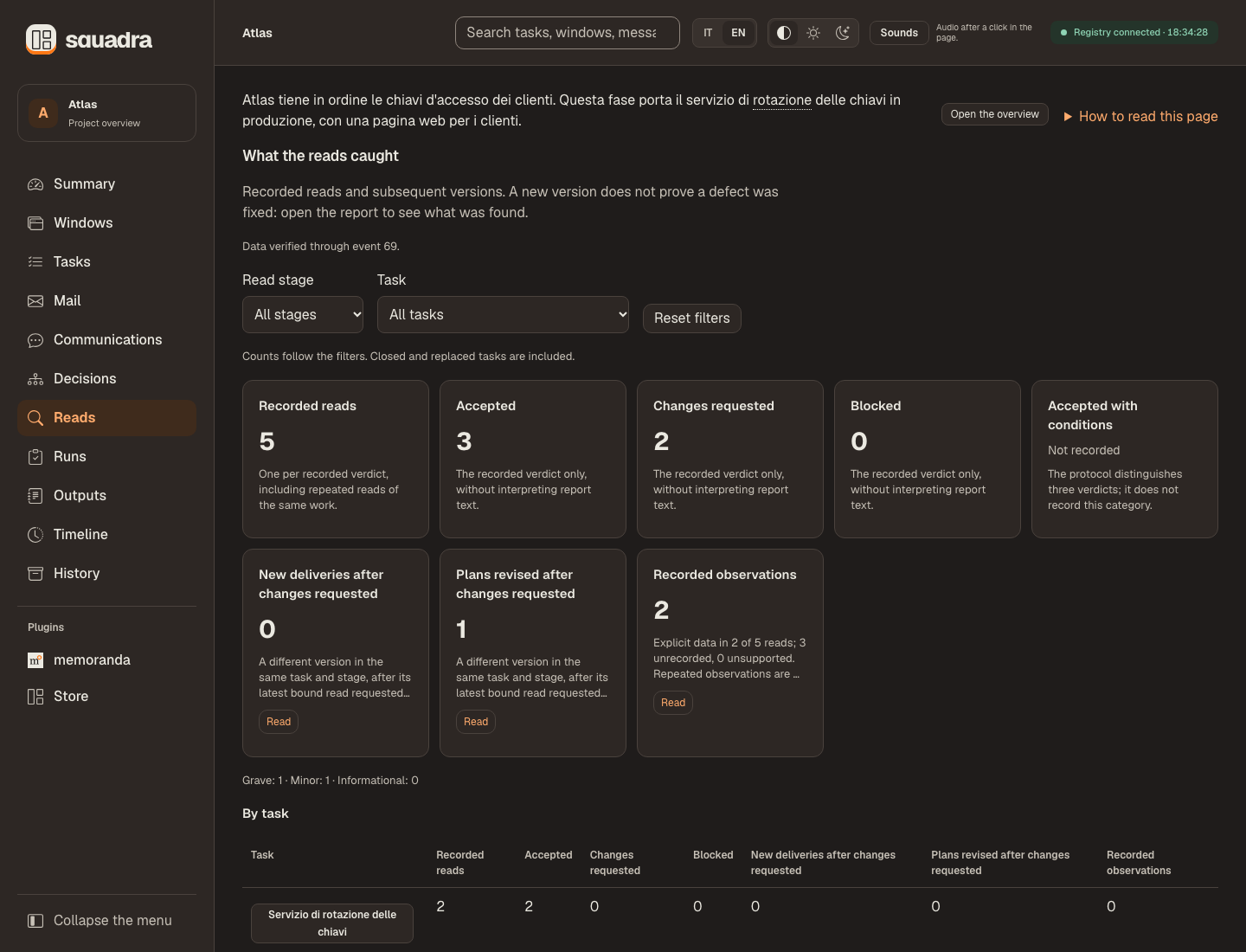
Readers can add bounded observations with review --findings-file; see the details.
Decisions and their history
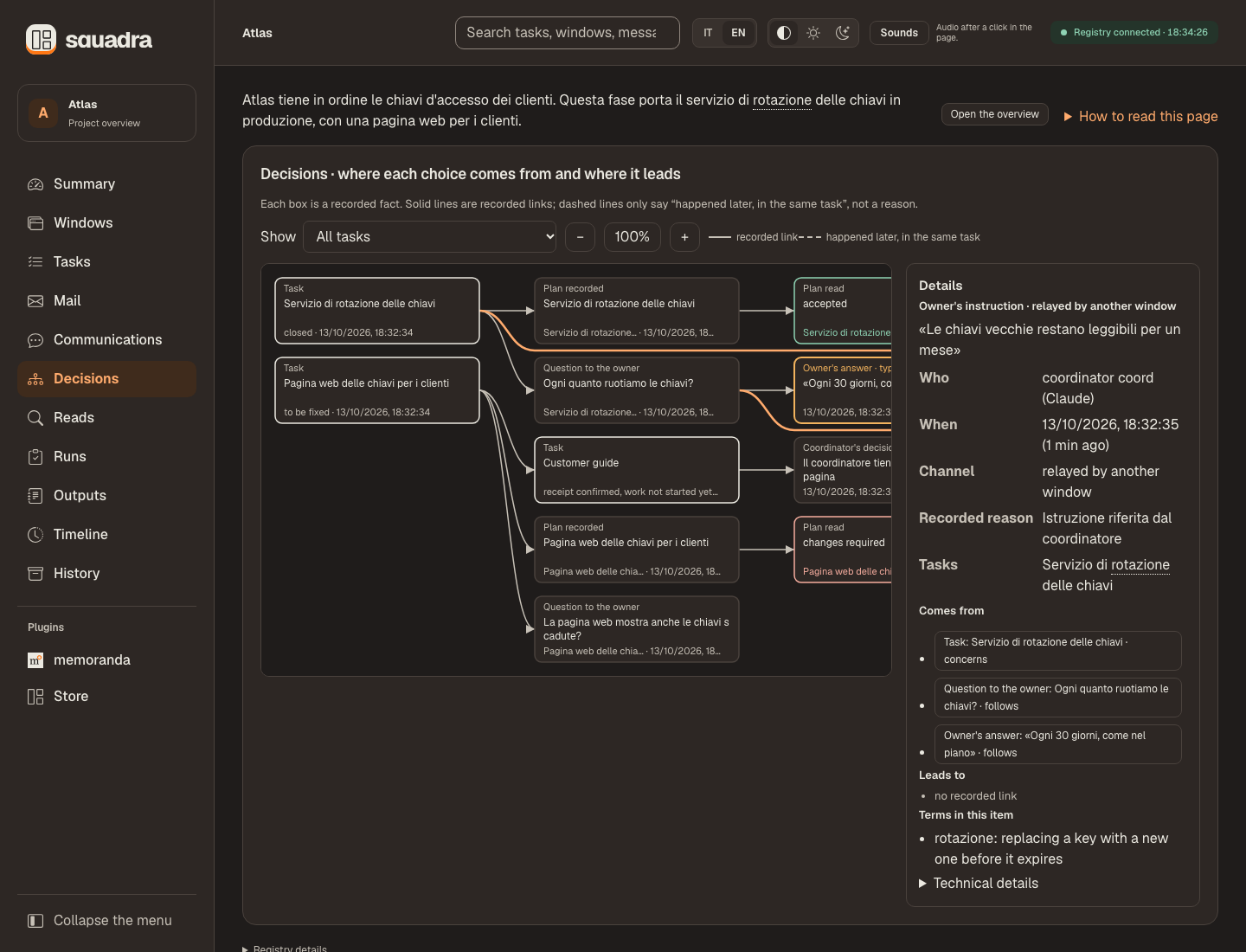
The selected box is an owner instruction relayed by the coordinator: who, when, the exact words, the channel and the recorded links.
Follow an owner answer back to its question and task. Briefs and recorded links explain how the record is built.
Dashboard refresh, search and local access
Refresh and safety. The page refreshes every two seconds, pauses while the tab is hidden, and refreshes immediately when you return. Search finds recorded tasks, runs, messages, outputs, decisions, questions and reads by word prefix, ignoring accents; its dropdown shows the newest first and offers a prompt to copy for your agent. Registered artifacts open in a dialog. It is read-only except declared settings and selections of installed plugins; registry actions use the CLI. It listens on 127.0.0.1, checks Host and token, checks Origin for settings and selection writes, and loads no remote scripts or CDN. --port picks a port (by default a free one); Ctrl-C closes the dashboard server, not the agents; a disconnected page keeps its last view with a warning.
Plugins
Plugins bring data from other tools into the dashboard. Open Plugins to see the installed integrations and their data for the current registry.
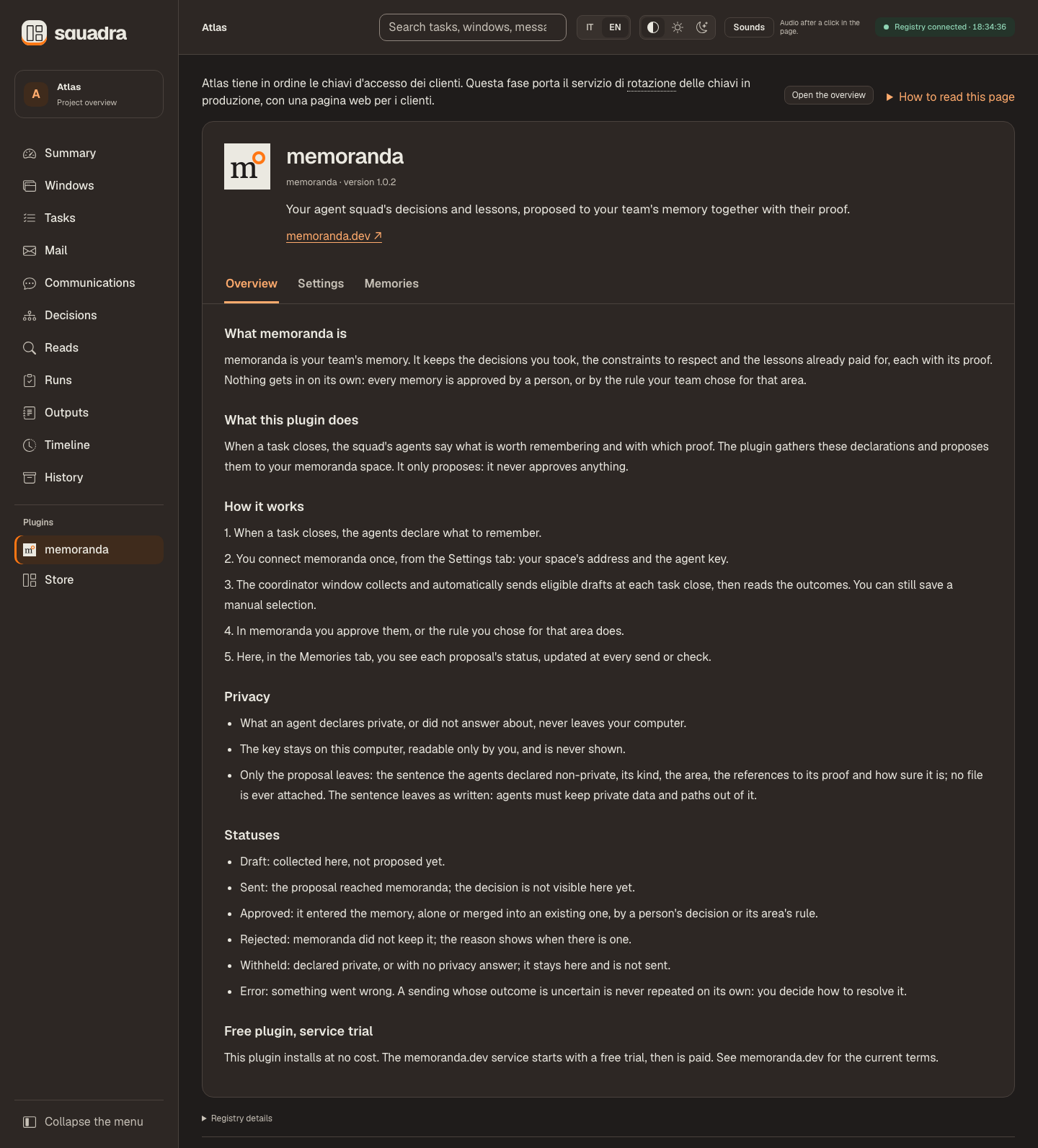
Settings, results for each service, selecting drafts and the Store's update rules: the plugin page in detail.
Plugins bundled in your release
Open Plugins → Store to see the running release's catalogue, its install commands and local installation status. It refreshes only when opened or when you choose Refresh catalogue; there is no install button. Homepage links open on a click in a new tab. Ask the coordinator to run the displayed command, which targets this installation of Squadra.
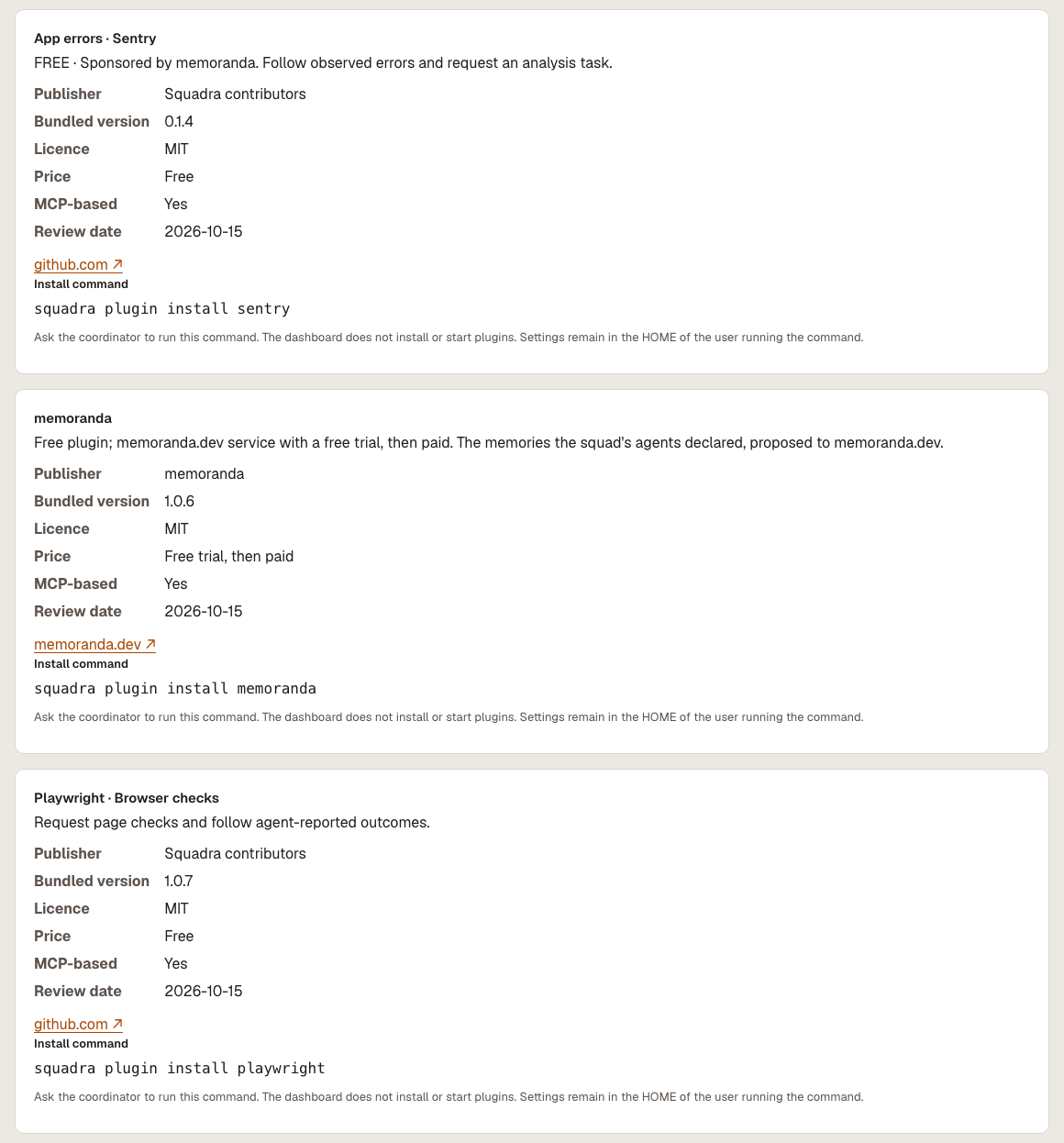
squadra plugin list shows the release's catalogue and squadra plugin install <name> copies a bundled plugin; nothing is downloaded or run. With a /plugin installation, ask the coordinator to run them through python3 <release root>/scripts/squadra.py.
Submit plugins by PR or the maintainer's contact email for analysis; MCP plugins come first. Inclusion and its review date refer only to the accepted version. This is a release-local catalogue, not a remote marketplace or automatic execution service.
The memoranda Store plugin collects declared lessons and proposes them to memoranda.dev; it never approves them. Installation is free; the connected service starts with a free trial, then is paid.
Try browser checks: the optional Playwright MCP plugin prepares checks for a task, saves your selection and lets an authorized agent use its connected browser tools and report the outcome. Installing the data plugin does not install or activate MCP.
Bring app errors in (preview): the optional Sentry plugin brings sanitised summaries of errors from your authorised Sentry connection into Squadra, so you can select issues for analysis and follow their tasks. FREE · Sponsored by memoranda: development funded by memoranda, free for all users. Tested with a synthetic connection only; a live Sentry connection is not yet verified.
Plugin files, execution and permissions
Local data plugins
A plugin brings another tool's data into the dashboard: a folder $HOME/.squadra/plugins/<name>/ with a plugin.json manifest, where a separate program, the plugin's producer, writes data panels. The Plugins menu group lists every installed manifest, or says «No plugins installed» and explains where plugins go; select one to see its data for the open registry.
Plugin folders must belong to you and must not be writable by group or others; the Store creates private ones.
Who runs the request? An installed plugin may ship $HOME/.squadra/plugins/<name>/AGENTS.md with instructions for agents. The coordinator window reads it at start and resume and runs only the commands it specifies, within existing permissions and only while squadra plugin list reports that plugin with instructions: valid and files: verified: the producer after a close, the consumer when the dashboard shows a pending request, then reports the outcome. This requires a regular file owned by the user, not group- or other-writable and not a symlink. Without a valid file, the request stays pending and the coordinator says so; you have no command to run. The dashboard never reads, writes or runs this file. This file never widens permissions and never authorizes installation, push, publication or decisions reserved for the user; for anything beyond running that plugin’s producer or consumer, stop and report.
Exact schemas, sizes, limits and refusal codes: plugin contract, about metadata, homepage and icon.
Build and publish a plugin
Build a plugin
Build your own. The contract is open: anyone in the community can publish a squadra plugin, free or paid. A plugin is data plus a separate program. The dashboard and CLI never run plugin code; agents run it only as its AGENTS.md says, under the file's trust conditions and the user's existing permissions. Start from the plugin contract.
Step by step: the plugin authoring guide builds a working plugin, tests it with the dashboard and explains how to publish it, free or paid.
Publish your own plugin: follow the authoring and distribution guide for a working example, tests, permissions and version compatibility. These data plugins are separate from installing Squadra itself with /plugin; publishing a package does not automatically list, install or approve it.
Workflow and reference
The sections below keep the full working examples. Open the topic you need; the linked guides define the complete protocol.
| You want to… | Open |
|---|---|
| Set up windows or understand the rules | Team rules and manual setup |
…
Releases