
Skill · #335 trending skills repo · ↗ +5 stars this week
Chemdraw Skill
ZiChenWang114514/chemdraw-skill
Editable ChemDraw (.cdxml/.cdx) figures for Claude Code, Codex & any AI agent: 28 journal & group house styles (JACS, Angew, Nature, Science, Baran, MacMillan), paper & Markush rebuilds (DECIMER OCSR), Excel SAR & substrate tables, stoichiometry calculator, and live ChemDraw OLE in Word & PowerPoint.
- Stars
- 61
- This week
- +5
- Forks
- 4
- Open issues
- 0
- Skills inside
- 1
Get started
Install the skills
npx skills add ZiChenWang114514/chemdraw-skillInstalls into Claude Code, Codex, Cursor, OpenCode and the other agents it finds on your machine.
git clone --depth 1 https://github.com/ZiChenWang114514/chemdraw-skill.git /tmp/chemdraw-skill
cp -r /tmp/chemdraw-skill ~/.claude/skills/chemdraw-skillClaude Code reads ~/.claude/skills/ (or .claude/skills/ in a project). Other agents read the same SKILL.md format from their own skills folder.
Inside this repo
1 skill
Documentation
README





English / 简体中文 Quick start, What it handles, Gallery, 28 house styles, Calculator, Engines, Platforms, FAQ, Guide, Website
ChemDraw Skill lets an AI coding agent produce editable native ChemDraw documents (.cdxml and .cdx) and live Word or PowerPoint objects, not static images or guessed SMILES. It works with Claude Code, Codex, Gemini CLI, GitHub Copilot, Cursor, OpenCode and any other agent that runs shell commands or speaks MCP.
Give it a reaction in plain words, a CSV or Excel substrate table, a crop of a published scheme or a patent Markush claim. It returns a checked figure in one of 28 empirical journal and research-group house styles (JACS, Angew. Chem., Nature, Science, ACS Document 1996, Baran, MacMillan, Studer and more). It also runs ChemDraw's stoichiometry calculator, writes ACS characterization text, and can call 15 opt-in local engines for structure recognition (OCSR), retrosynthesis and NMR prediction.
What you need: 64-bit Python 3.10 to 3.13. Desktop ChemDraw is optional: without it you still get editable CDXML, structure checks and reports; native PNG rendering,
.cdxfiles and Office objects need it.Why not let the model write SMILES and draw them with RDKit? A SMILES recalled from memory is often a different compound (a missing counter-ion, a lost stereocentre), and an RDKit picture cannot be edited in ChemDraw or Word. Here every structure comes from a resolver, a parser or your file and is read back after drawing, and the result is a native ChemDraw document.
Quick start
Three steps: install, check the machine, send a first request.
Prerequisites and optional flags (64-bit Python 3.10 to 3.13, about 760 MB of disk, desktop ChemDraw optional)
| Item | What to know |
|---|---|
| Desktop ChemDraw (optional) | An activated ChemDraw on Windows or macOS adds native 300 dpi PNG rendering, .cdx conversion, the interactive stoichiometry grid and Word/PowerPoint objects. Without it the Skill still builds, edits, recognises and checks .cdxml files and runs the batch calculators on Windows, macOS and Linux (what changes without ChemDraw). |
| Runtime and disk | One shared virtual environment of about 760 MB on 64-bit Python 3.10 to 3.13. --extras alone installs the minimal core; --extras publication office installs selected groups. |
| Optional flags | --opsin adds offline IUPAC name-to-structure (it fetches Java on first use on Windows; install Java yourself on macOS and Linux). --mapping installs RXNMapper and LocalMapper in their own environments. OCR in the image group uses Tesseract. |
| Offline smoke test | cdx.py py $HOME/.claude/skills/chemdraw/scripts/smoke_all_tools.py --output-dir NEW_DIR calls every tool once on this machine (add --network to include the online endpoints). |
1. Install. The installer runs on Python 3.9+ and finds a 64-bit Python 3.10 to 3.13 for the runtime by itself.
git clone https://github.com/ZiChenWang114514/chemdraw-skill.git
cd chemdraw-skill
python scripts/install.py --agent claude agents --runtime --apply
Leave out --apply to preview the target folders first. If Python 3.14+ is your only interpreter, install 3.12 (for example uv python install 3.12) or pass --python <interpreter>.
2. Check your machine. The doctor reports desktop ChemDraw, Office, the Python extras and the installed engines.
python $HOME/.claude/skills/chemdraw/scripts/cdx.py doctor
3. Send a first request. Paste one of these into your agent.
Use the ChemDraw Skill to draw salicylic acid + Ac2O -> aspirin (H2SO4 cat., rt, 2 h, 85%) in acs_jacs style as editable CDXML and render a 300 dpi PNG.
Use the ChemDraw Skill to reproduce ./scheme.png as editable CDXML, match the original orientation, verify structures side by side, and render a native preview.
Use the ChemDraw Skill to run ChemDraw's stoichiometry grid on "OCc1ccccc1.CC(=O)Cl>CCN(CC)CC.ClCCl>CC(=O)OCc1ccccc1" and read back the amounts as JSON.
No agent at hand? The same entry point works from a terminal:
python $HOME/.claude/skills/chemdraw/scripts/cdx.py resolve aspirin Cs2CO3 --offline   # needs no ChemDraw
python $HOME/.claude/skills/chemdraw/scripts/cdx.py draw --name aspirin aspirin.cdxml --style acs_jacs --render
python $HOME/.claude/skills/chemdraw/scripts/cdx.py calc "OCc1ccccc1.CC(=O)Cl>>CC(=O)OCc1ccccc1"
Other agents, project installs, the plugin archive and MCP
--agent |
Skill folder | Discovered by |
|---|---|---|
claude |
~/.claude/skills/ |
Claude Code (also read by GitHub Copilot and OpenCode) |
agents |
~/.agents/skills/ |
The shared Agent Skills root: Codex, Gemini CLI, GitHub Copilot, Cursor, OpenCode and others |
gemini, copilot, cursor, opencode, kimi, pi |
Agent-specific folder | Use when you want each client kept apart |
codex, zcode, dsh, qoder, codebuddy, lingma, comate, bailian, qwen, trae, windsurf, cline, roo, goose, kiro, aider, amp, continue, zed, openhands, antigravity |
Client-specific folder | More clients (add --mcp to register the cdxml-toolkit server as well) |
- Project or custom location.
--project <repo>installs project-scoped copies (.claude/skills/,.agents/skills/,.github/skills/, ...);--destination <folder>installs anywhere. - One runtime for every copy.
python scripts/install.py --runtime-only --applyupgrades it in place and rolls back if the upgrade fails. - Claude Code plugin. Each release carries the Skill as a plugin archive with
SHA256SUMS(built byscripts/build_plugin.py). The plugin holds the Skill only, so run the installer once with--runtime-only --applyfor the runtime. - Editors.
python vscode/scripts/build_vsix.py --install-allinstalls the companion extension for VS Code, Cursor, Windsurf, Qoder, Trae, Kiro, Cline and Roo Code: visual editors for.cdxmland.mol, a 2D structure and substructure query pad, and a 3D Mol* viewer. - Agents that do not discover
SKILL.mdneed one line in their instruction file that points to it. MCP setup and the full command reference are in agent integration.
cdx.py command cheat sheet
Agents and people call one entry point, cdx.py. Any Python can start it; it re-runs itself inside the toolkit runtime.
# Resolve and draw
python <skill>/scripts/cdx.py resolve aspirin                             # name/SMILES/CAS -> SMILES, formula, MW
python <skill>/scripts/cdx.py draw --name aspirin aspirin.cdxml --style acs_jacs --render
python <skill>/scripts/cdx.py draw --smiles "c1ccccc1,CC(=O)O" grid.cdxml --columns 2 --number --properties mw,formula --render
python <skill>/scripts/cdx.py draw --reaction "CC(=O)O.CCO>O=S(=O)(O)O>CCOC(C)=O" --yield "88%" rxn.cdxml --render

# Styles, inspection and stoichiometry
python <skill>/scripts/cdx.py styles                                      # list 16 presets + 28 house styles
python <skill>/scripts/cdx.py inspect rxn.cdxml                           # structures, formulas, MW, topology
python <skill>/scripts/cdx.py report "OCc1ccccc1.CC(=O)Cl>>CC(=O)OCc1ccccc1" --balance
python <skill>/scripts/cdx.py calc "OCc1ccccc1.CC(=O)Cl>>CC(=O)OCc1ccccc1"

# Recognition, Office and diagnostics
python <skill>/scripts/cdx.py ocsr figure_crop.png                        # structure recognition (or decimer)
python <skill>/scripts/cdx.py render figure.cdxml                         # native 300 dpi PNG
python <skill>/scripts/cdx.py office-edit deck.pptx                       # embed or update live ChemDraw objects
python <skill>/scripts/cdx.py call resolve_name -a query=aspirin          # any registered tool, key=value arguments
python <skill>/scripts/cdx.py studio                                      # 2D structure and query studio
python <skill>/scripts/cdx.py molstar aspirin                             # 3D Mol* conformer and PDB viewer
python <skill>/scripts/cdx.py tools                                       # list the registered tools
python <skill>/scripts/cdx.py doctor --text                               # capability check and run log (--log latest)
What it handles
Every request goes through the same four stages: take the request or data, ground each structure in a resolver, parser or file, build native CDXML, then read the saved file back with RDKit and ChemScript. Five workflows sit on top of them:
| Workflow | Start from | You get |
|---|---|---|
| Draw a new figure | One request, 28 house styles, ACS 1996 specs, CSV or Excel | A .cdxml checked by read-back and a native 300 dpi .png |
| Rebuild an existing figure | A paper scheme, a patent Markush claim | Editable .cdxml, .cxsmiles and a side-by-side comparison |
| Run chemistry arithmetic | Stoichiometry, SI tables, characterization and mapping | ChemDraw's grid as JSON, ACS paragraphs, PMI and atom maps |
| Predict and recognise | 15 opt-in engines | OCSR, retrosynthesis, product and NMR candidates, each labelled as a prediction |
| Publish into Office | cdx.py office-edit |
Live ChemDraw objects in Word and PowerPoint, with a PDF preview |
Full capability list by area
| Area | What you get |
|---|---|
| Structures and reactions | Resolve names, CAS numbers and SMILES; draw, edit, clean, merge, segment, convert and render CDXML or CDX without disturbing open ChemDraw windows. |
| New figures from a request | Single reactions, linear, convergent and divergent routes, catalytic cycles, substrate-scope panels and mechanisms, drawn and checked in one pass. |
| Journal and group styles | 28 empirical house styles measured from 179 openly licensed figures across 23 figure types, on top of 16 stock ChemDraw presets. |
| Exam, lecture and paper figures | ACS Document 1996 drawings from compact JSON: GenericNickname abbreviations, CJK notes, boxed codes, orbital lobes, TS brackets and 3D templates (chair, Newman, Haworth, Fischer). |
| Data-driven figures | Substrate-scope and SAR panels bound to CSV or XLSX by compound ID, so later data updates keep manual ChemDraw edits. |
| Reaction mechanisms | Curved full- and half-headed arrows routed from the electron moves you list, with exact coordinates, charges and counterions. |
| Patent Markush structures | Generic structures from a patent figure and its claims (R groups, variable rings, multicentre bonds, repeat counts), exported as CDXML, CXSMILES and V3000 MOL. |
| Image recognition | Candidate structures with confidence scores and bounding boxes, from the DECIMER API or local weights. |
| Engines and predictions | 15 opt-in engines in their own environments: 6 OCSR readers, PDF segmentation, retrosynthesis, forward products, reaction conditions and 1H/13C shifts. |
| Calculators and reports | ChemDraw stoichiometry grids with JSON read-back, batch SI materials tables with PMI, HRMS and ACS characterization text, 138-entry GHS safety reminders, route yield and atom mapping. |
| TLC and apparatus | Native TLC plates (lanes, spots, Rf, co-spots, stains, 2D plates) and laboratory apparatus assembled from ChemDraw templates. |
| Spectra and plots | Processed 1D NMR (Bruker, JCAMP-DX, JEOL, Varian/Agilent) with peak picking, integration, solvent flags, zoom insets and stacked plots; numerical data as curves. |
| Experimental records | LCMS plate and chromatogram reports (Waters, OpenLynx, Shimadzu, Agilent, mzML/mzXML) with Cl/Br M+2 checks, internal-standard ratios and 24- and 96-well heatmaps; SciFinder RDF. |
| Molecule comparison | RDKit fingerprint similarity everywhere; exact stereochemical identity through ChemScript (Windows) or ChemDraw (macOS). |
| Office documents | Live editable ChemDraw objects in desktop Word and PowerPoint on Windows and macOS. |
| ChemScript and ChemDraw interfaces | A bridge to the Windows ChemScript SDK and an audited catalog of ChemDraw 22.2 COM objects, CDXML elements and menu commands (details). |
| Remote workstation access | An optional authenticated Streamable HTTP server for a Windows ChemDraw host, with health and Prometheus endpoints. |
cdx.py tools prints the registered tools; the generated public inventory lists the audited symbols of the bundled toolkit.
Gallery
Every card is a native ChemDraw render of an editable .cdxml file in this repository. Click a card for its workflow, source data and verification record.
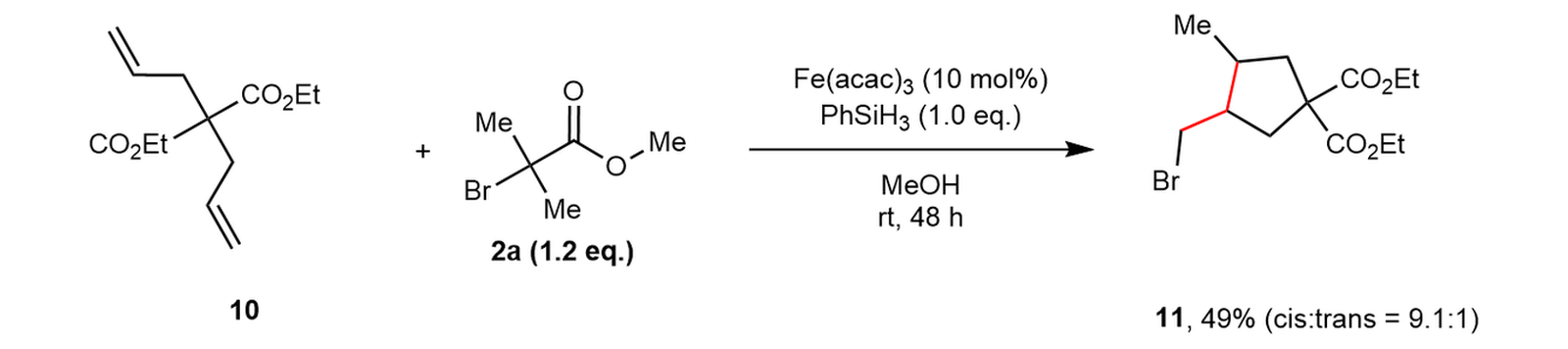
28 empirical journal & group house styles + 16 ChemDraw presets Measured from 179 openly licensed figures across 23 figure types; 47 literature replicas record what each style reproduces and where it differs |
||

Original paper figure 
Paper reaction scheme → editable ChemDraw Five structures, conditions, yields and compound labels rebuilt from the image |
||
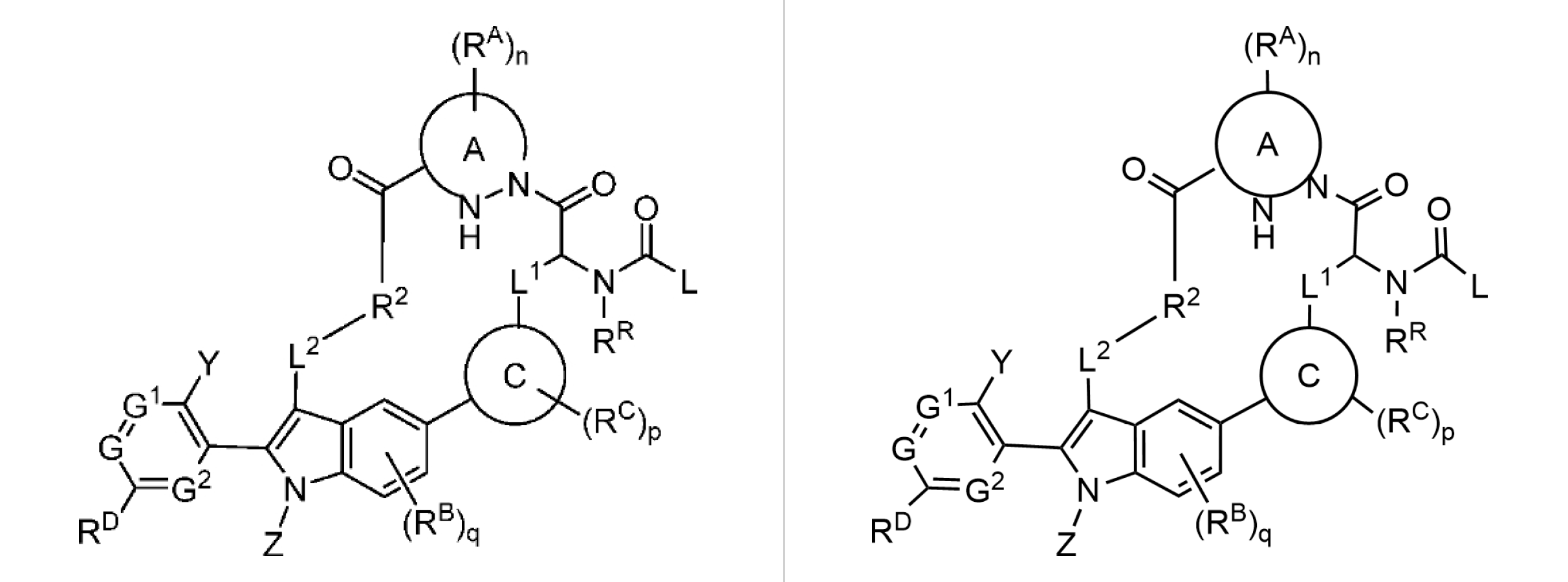
Patent Markush structure → editable ChemDraw Patent figure (left) and native rebuild (right): R groups, variable rings, a multicentre bond and repeat counts |
||
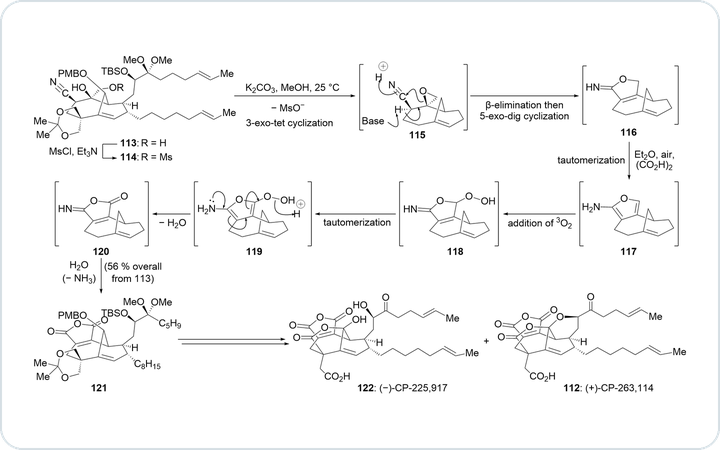
Complex synthesis Full multi-step scheme with mechanism arrows |
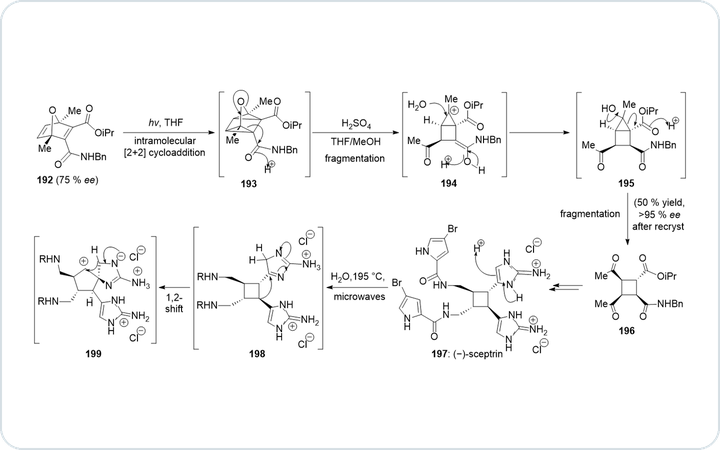
Reaction mechanism Electron arrows, charges and counterions |
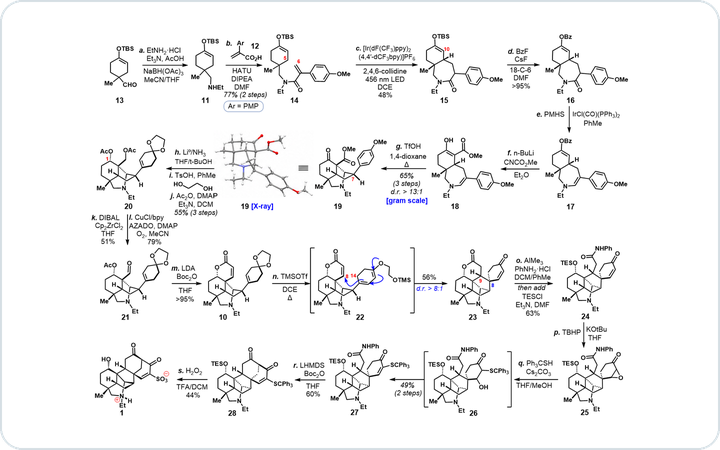
Twenty-structure synthesis Stereo agreement across chemistry readers: 20/20 |
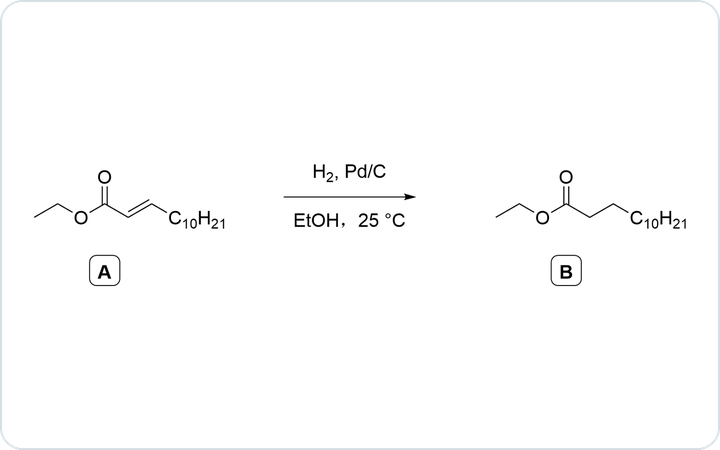
Exam and lecture figures ACS Document 1996 style from a compact JSON spec |
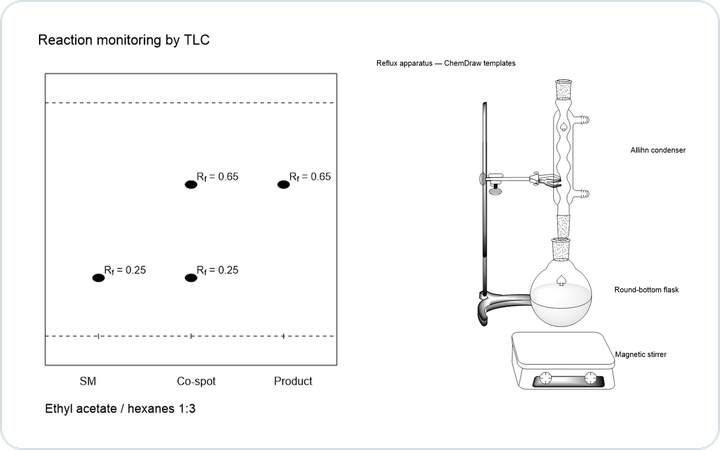
TLC and apparatus Native plates, Rf values and ChemDraw templates |
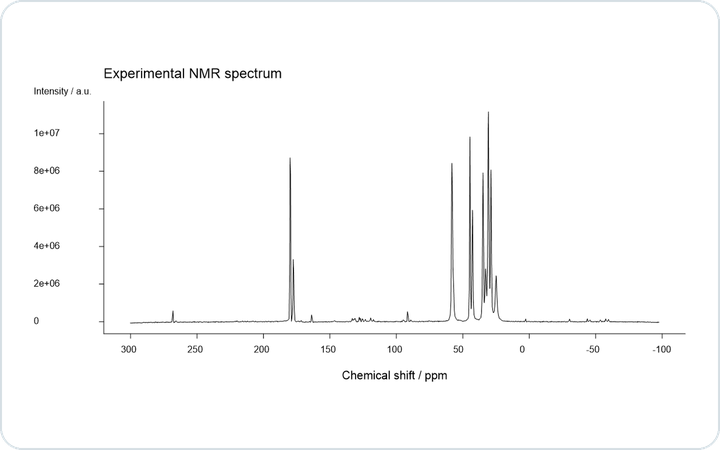
Spectra and plots Processed 1D NMR and numerical data as curves |
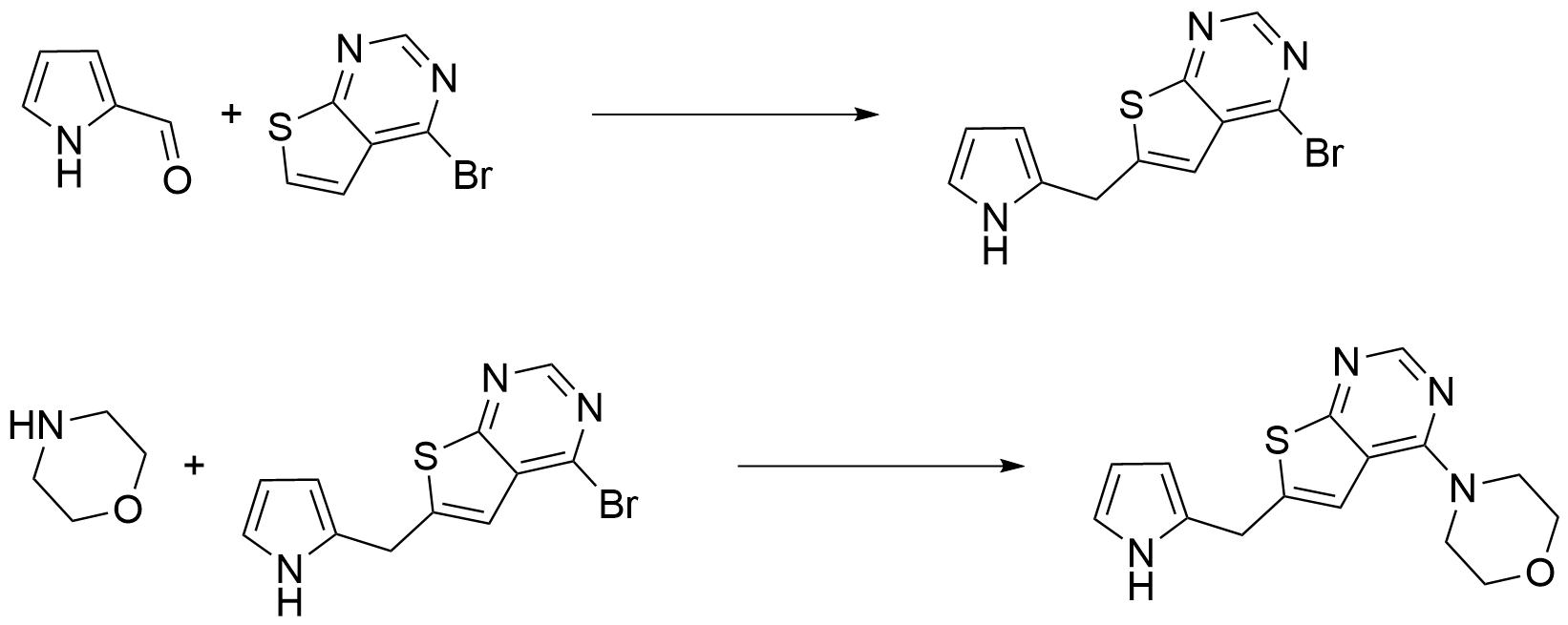
Predictions from opt-in engines Retrosynthesis, products and NMR shifts, checked against recorded lab routes and measured spectra, misses kept |
Draw and style new figures
When the structures are known and the figure does not exist yet, one request draws it, styles it and checks it.
A new figure from one request
Ask in one sentence, such as "Draw aspirin from salicylic acid and acetic anhydride, H2SO4 (cat.), rt, 2 h, 85%." The agent writes a short JSON brief, and one command builds, renders and checks the figure:
{
  "species": [
    {"id": "SA", "smiles": "OC(=O)c1ccccc1O", "label": "1"},
    {"id": "Ac2O", "name": "Ac2O"},
    {"id": "ASP", "smiles": "CC(=O)Oc1ccccc1C(=O)O", "label": "2"}
  ],
  "steps": [
    {"substrates": ["SA", "Ac2O"], "products": ["ASP"],
     "above": ["H2SO4 (cat.)"], "below": ["rt, 2 h"], "yield": "85%"}
  ]
}
python skill/chemdraw/scripts/cdx.py draw brief.json aspirin.cdxml --render
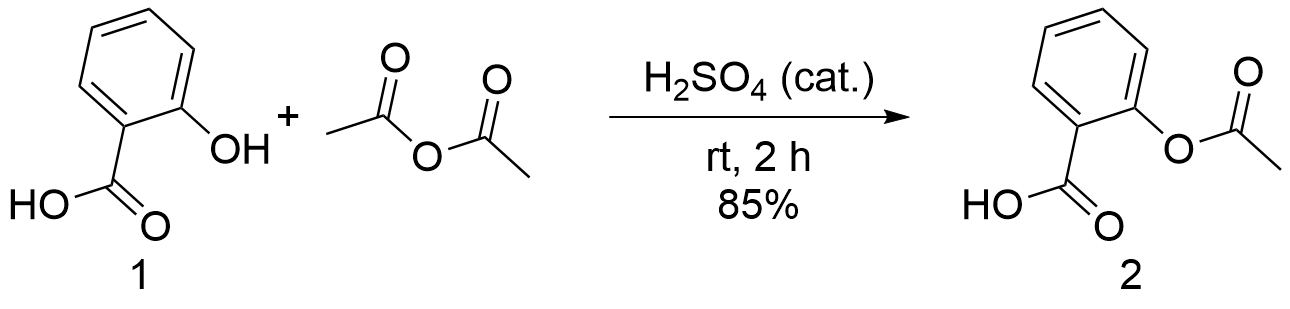
For a single step you can skip the file: cdx.py draw --reaction "A.B>reagent>C" out.cdxml (add --compact for tight multi-step or narrow-column layouts). The same command draws four kinds of figure:
| Figure | The brief lists | You get |
|---|---|---|
| Reaction or route | Species, steps, conditions, yields | Single reactions, linear, convergent and divergent routes or catalytic cycles, with row wrapping, reversible and resonance arrows, dative bonds and radicals |
| Substrate scope | Compounds with labels, groups and measured values | Multi-page grids that keep each label and value under its structure; a value you did not give prints as a dash, never 0 |
| Mechanism | Species, steps and the electron moves | Full- or half-headed curved arrows placed from the drawn coordinates and routed around atoms and labels |
| Molecule or structure panel | One or more structures | Single molecules or multi-column grids with numbering, formula and MW captions, ring fills and highlighted substituents |
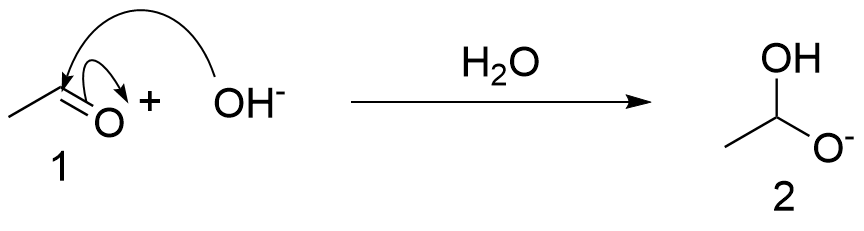 Mechanism: two curved arrows for a hydroxide addition |
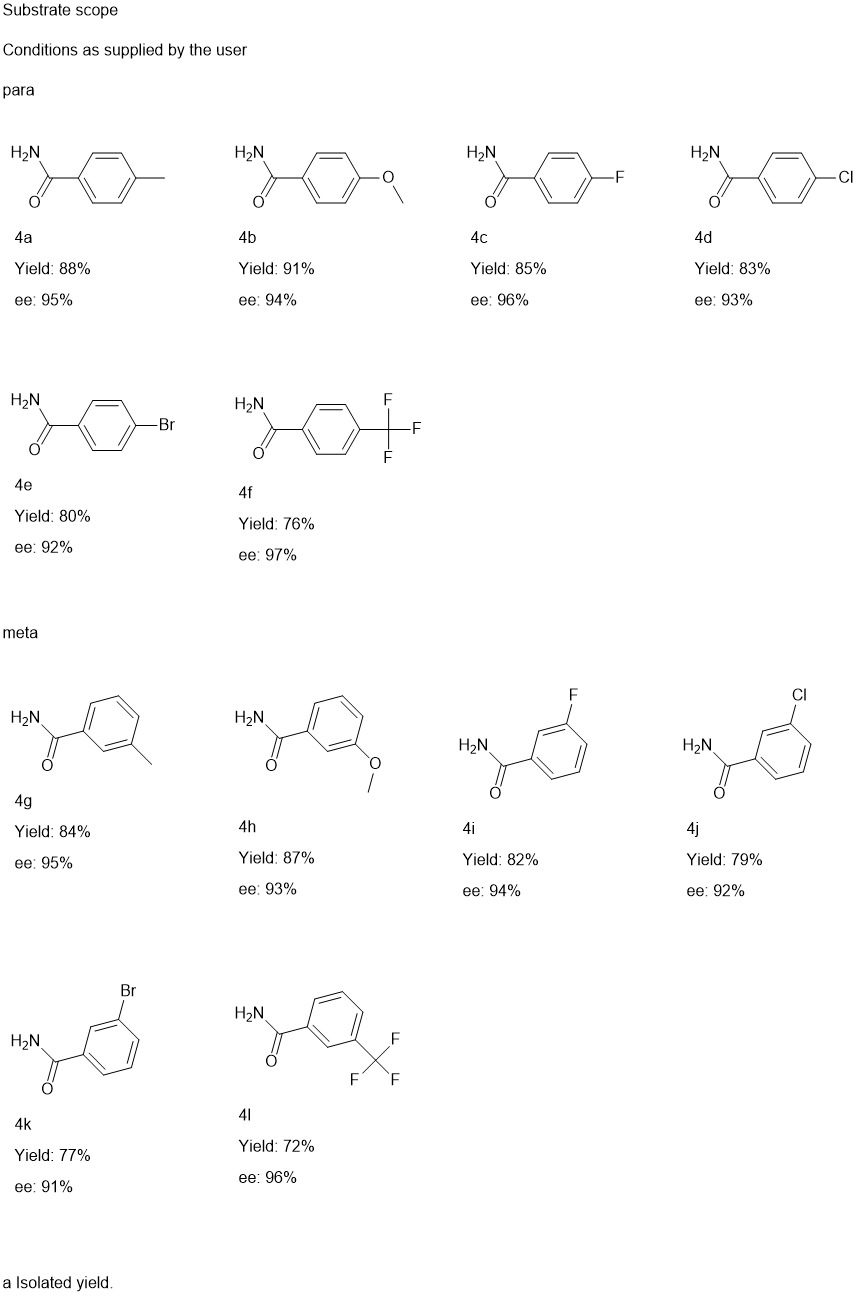 Substrate scope: twelve compounds on one page |
Every brief passes the same checks:
- Structures are grounded. A SMILES you give is used as written; a name goes through the built-in reagent table and then PubChem (not under
CHEMDRAW_OFFLINE=1). A name that does not resolve stops the run. - Nothing is invented. Conditions you left out stay blank and are noted in the report. A mechanism step without electron moves is refused.
- Atoms and charges balance. Each step is checked, a missing by-product is named in the report and never drawn silently, and the saved structures are read back against the brief.
- Layout is measured. Overlaps, small text and page overflow trigger one roomier re-layout, which the report records.
- Files are safe. Existing files are never overwritten. Without desktop ChemDraw the result is marked as an unrendered draft; look at the native PNG before you publish.
The brief schema and the report fields are in drawing a new reaction scheme.
Journal and group house styles
One style parameter selects from two layers:
- 16 measurement presets read from ChemDraw's stock style sheets (
acs1996by default, pluswiley,rsc,nature,synthesisand 11 others). They set bond length, line width and fonts only. - 28 empirical house-style cards for 13 journals, 7 publishers, patents and textbooks, and 8 research groups, measured from 179 figure crops in 81 openly licensed papers and textbooks. A convention is recorded only when at least two crops agree.
Each card covers 23 figure types. Layout, numbering, abbreviations, arrow and line geometry and colours are applied automatically; conventions the tool cannot draw yet come back as finishing guidance.
python skill/chemdraw/scripts/cdx.py styles                 # presets and house styles
python skill/chemdraw/scripts/cdx.py styles studer_group    # one card with its evidence
python skill/chemdraw/scripts/cdx.py draw brief.json out.cdxml --style studer_group --render
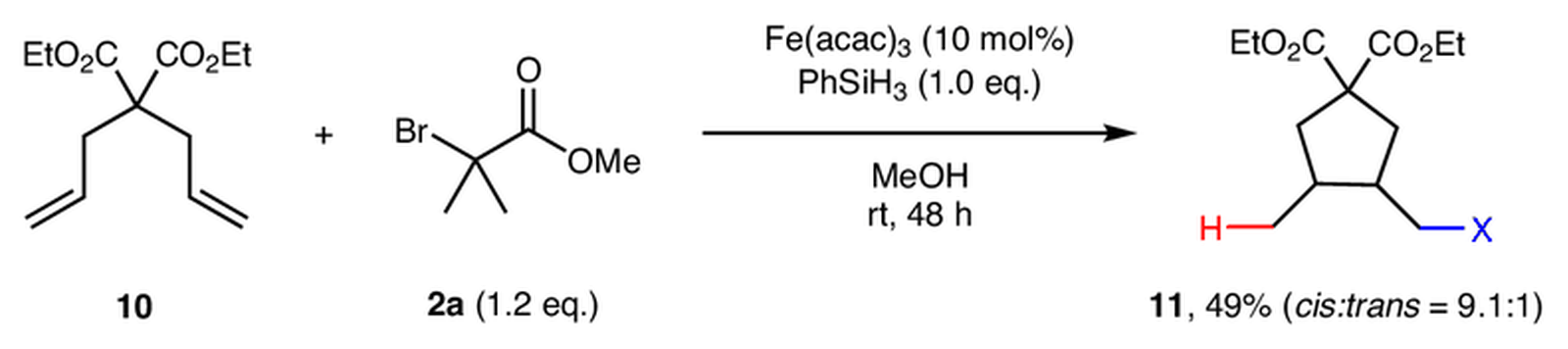 Published scheme (Studer group, Nat. Commun. 2024, CC BY 4.0) |
Drawn with "style": "studer_group" and rendered by ChemDraw |
One Suzuki coupling, one brief, six house styles:
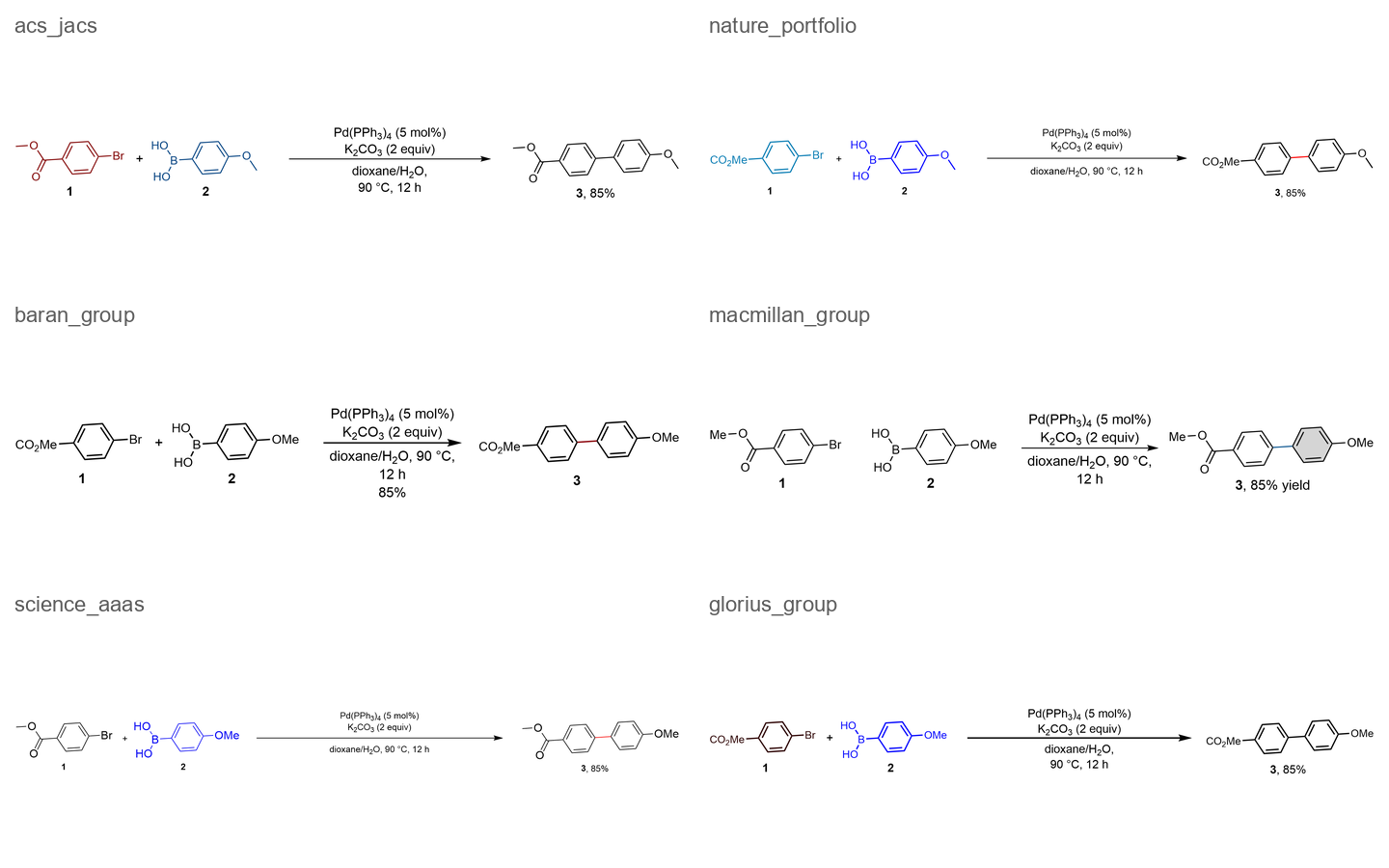
All 28 styles at a glance
Publishers, patents and textbooks
| Style | Base preset | Draws like |
|---|---|---|
nature_portfolio |
nature |
Nature, Nat. Chem.: bold number with the yield on its line (3a, 85%), new bond in red, substrates in teal and blue |
science_aaas |
nature |
Science, Sci. Adv.: yield on the label line, new bond in red, incoming component in blue |
wiley_angew |
wiley |
Angew. Chem., Chem. Eur. J.: bold numbers, reagents above and solvent below, substrates side by side |
rsc_journals |
rsc |
Chem. Sci., Chem. Commun.: bold numbers, yield in parentheses after the number |
cell_press_chem |
wiley |
Chem, Chem Catalysis: bold numbers, yield under the arrow, lettered panels |
openstax_chemistry |
chemdraw_slide |
Textbook figures: unnumbered species, short open-headed arrows, changing atoms in dark red |
uspto_patents |
j_mol_mod |
US patents: black line art, Times labels, plain compound numbers, Markush formulas |
Journals
| Style | Base preset | Draws like |
|---|---|---|
acs_jacs |
acs1996 |
JACS, Org. Lett., J. Org. Chem.: bold numbers, yield after the number, substrates in maroon and navy |
org_lett |
acs1996 |
Org. Lett.: yield under the product number, scope grids, optimisation tables |
jmed_chem |
acs1996 |
J. Med. Chem.: a step letter above each arrow, short arrows, SAR tables |
acs_chem_biol |
acs1996 |
ACS Chem. Biol.: multi-panel figures, PROTAC linkers in pink, structure panels |
jacs_au |
acs1996 |
JACS Au: concept panels, photophysical diagrams, flow set-ups |
oprd_process |
acs1996 |
Org. Process Res. Dev.: equivalents and volumes, yields under the arrow, scale stated |
jchem_educ |
acs1996 |
J. Chem. Educ.: teaching mechanisms, assignment panels, plain thin arrows |
mdpi_molecules |
acs1996 |
Molecules: new bond in bold red, introduced group in blue |
beilstein_joc |
nature |
Beilstein J. Org. Chem.: general reaction over a product grid, 2a: 69% |
chemeurj |
wiley |
Chem. Eur. J.: ChemDraw palette colours, grey boxes behind products |
dalton_transactions |
rsc |
Dalton Trans.: metal precursors as formulas, heteroatoms coloured by element |
natural_product_reports |
rsc |
Nat. Prod. Rep.: bold yields under the arrow, the target named in a rounded box |
polymer_chemistry |
rsc |
Polymer Chem.: repeat units in brackets with subscript n, catalysts above the arrow |
Research groups
| Style | Base preset | Draws like |
|---|---|---|
baran_group |
acs1996 |
Baran (Scripps): new bonds in dark red, many abbreviated groups |
macmillan_group |
acs1996 |
MacMillan (Princeton): new bond in dark blue, grey highlight, 6, 76% yield, no plus sign |
lipshutz_group |
acs1996 |
Lipshutz (UCSB): yield under the number, surfactant and water below the arrow |
glorius_group |
acs1996 |
Glorius (Münster): reagent fragments colour-coded, photocatalysis concept panels |
houk_group |
acs1996 |
Houk (UCLA): free-energy profiles, transition-state panels, pathway maps |
list_group |
nature |
List (MPI Mülheim): yield and e.r. stacked under the product, IDPi catalysts |
sarpong_group |
nature |
Sarpong (Berkeley): caged polycycles with bold front bonds, skeletal editing |
studer_group |
nature |
Studer (Münster): transferred H and new bonds in red, ratios after the yield |
- 47 literature replicas. 47 published figures were redrawn from briefs and archived with their reference crop, brief and native render. Each
CASE.mdlists what is reproduced and every difference from the paper; no case is a complete match (style gallery and replica index). - Evidence is kept. Each style folder stores its CC BY evidence crops and source DOIs, and every draw report says which conventions were applied or skipped and why. The styles are measured conventions, not official publisher templates, and copy no source artwork.
- One figure, one-off styling. A brief can set
title,panel_label, per-species colours, abbreviations, orientation, captions and boxes without changing the card. MCP clients read a card atchemdraw://style-guide/{name}. - Known ChemDraw limit. A left-attached abbreviation sits at the right coordinates, but ChemDraw spells some of them right-flowing (
CO2Me, notMeO2C) until Clean Up Structure runs.
SAR and substrate-scope figures from CSV or Excel
Build substrate-scope and SAR panels from a CSV or XLSX table (XLSX needs the publication extra) and trusted structures. Compound IDs bind each measurement to its ChemDraw object, so a later data update or structure swap keeps your manual layout and annotations, and an ambiguous match produces a conflict draft instead of a guess (workflow and examples).
Exam and lecture drawings in ACS Document 1996 style
Write the figure as a compact JSON spec (SMILES with abbreviation nodes such as C10H21, conditions, arrows, bold compound codes and Chinese notes) and get editable ACS 1996 CDXML with a native PNG:
python skill/chemdraw/scripts/cdx.py build skill/chemdraw/assets/acs1996/example.json example.cdxml --render

Abbreviations stay real GenericNickname nodes with subscripts and the right attachment side; CJK text uses a Chinese font while Latin text, digits and symbols stay in Arial (ACS 1996 drawing guide).
Reproduce a paper figure
Start from the whole figure and work through eight steps, each of which leaves something you can inspect:
Inspect → Crop structures → DECIMER → Match orientation → Side-by-side review → Correct chemistry → Assemble layout → Native preview
Use the ChemDraw Skill to reproduce this paper figure. Read the whole scheme,
crop each complete structure, and obtain DECIMER candidates. Match the original
orientation, inspect actual side-by-side previews, and correct only the affected
structures. Transcribe the conditions, then deliver editable CDXML and a
native preview.
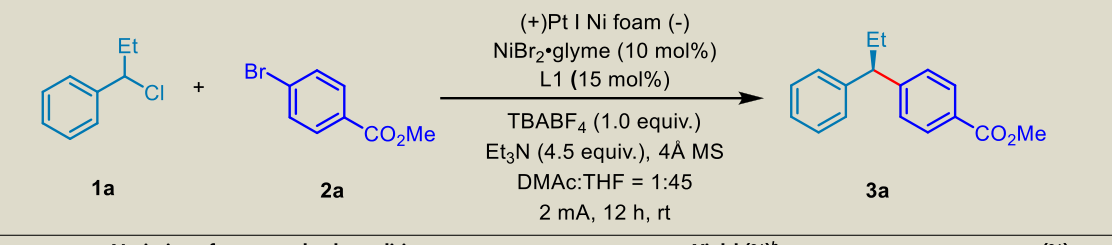 Published scheme (CC BY 4.0) |
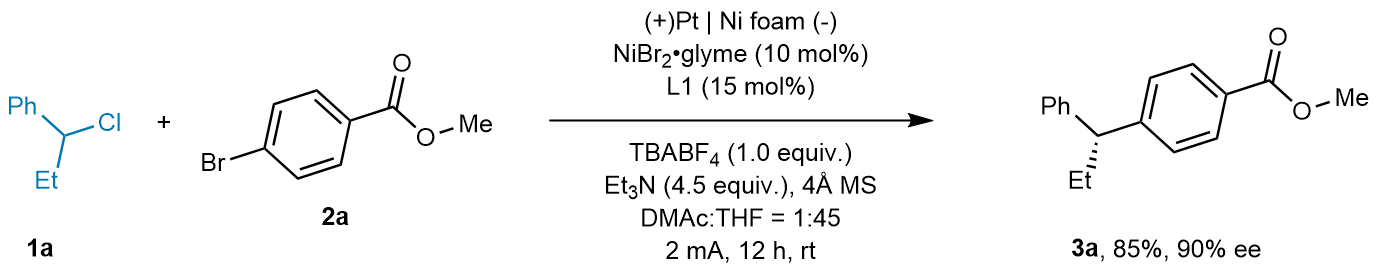 Drawn from brief.json with "style": "nature_portfolio" |
Three openly licensed schemes are rebuilt end to end, each with its reference crop, brief and native render:
| Case | House style | Files |
|---|---|---|
| Pd-catalysed amination in water, JACS Au 2024 | lipshutz_group |
CASE.md |
| DPDTC synthesis for amide coupling, Chem. Sci. 2023 | rsc_journals |
CASE.md |
…
Releases