
Skill · #321 trending skills repo · ↗ +8 stars this week
Vuln Report Skill
v-yun/vuln-report-skill
AI-agent skill: turn confirmed vulnerabilities into submission-ready DOCX reports | 漏洞报告成稿 skill(SRC/0day 提交稿、分层验证门、Step 式 PoC、截图铁律)
- Stars
- 96
- This week
- +8
- Forks
- 7
- Open issues
- 0
- Skills inside
- 1
Get started
Install the skills
npx skills add v-yun/vuln-report-skillInstalls into Claude Code, Codex, Cursor, OpenCode and the other agents it finds on your machine.
git clone --depth 1 https://github.com/v-yun/vuln-report-skill.git /tmp/vuln-report-skill
cp -r /tmp/vuln-report-skill ~/.claude/skills/vuln-report-skillClaude Code reads ~/.claude/skills/ (or .claude/skills/ in a project). Other agents read the same SKILL.md format from their own skills folder.
Inside this repo
1 skill
Documentation
README
report — Submission-Ready Vulnerability Reports (AI Agent Skill)
工作流程 / Workflow
flowchart TD
    A0["挖掘中遇到信号"] --> A1{"⓪ 信号快筛<br/>止损 / 待验证 / 候选"}
    A1 -->|"明显不够格"| A2["当场止损,不烧 token 深挖"]
    A1 -->|"候选漏洞"| A["验证确认(有 PoC、打到真实危害)"]
    A --> B["触发:/report 或「写报告」"]
    B --> C{"① 查重<br/>同资产+同根因+同接口+同影响面?"}
    C -->|"撞车"| C1["不新写 → 补强旧报告 / 换资产"]
    C -->|"无重复"| D{"② 分层验证门<br/>硬门 + 类型命门"}
    D -->|"硬门缺一"| D1["打回继续验证,不允许开写"]
    D -->|"全过"| E["③ 生成 DOCX<br/>章节骨架 + Step 式 PoC + 真实截图"]
    E --> F["④ 语义化命名 + 归档"]
    F --> G{"平台审核"}
    G -->|"驳回"| H["⑤ 底部追加申诉证据(不重写)"]
    G -->|"通过"| I["收录 ✓"]
效果预览 / Demo
演示对象为虚构靶标
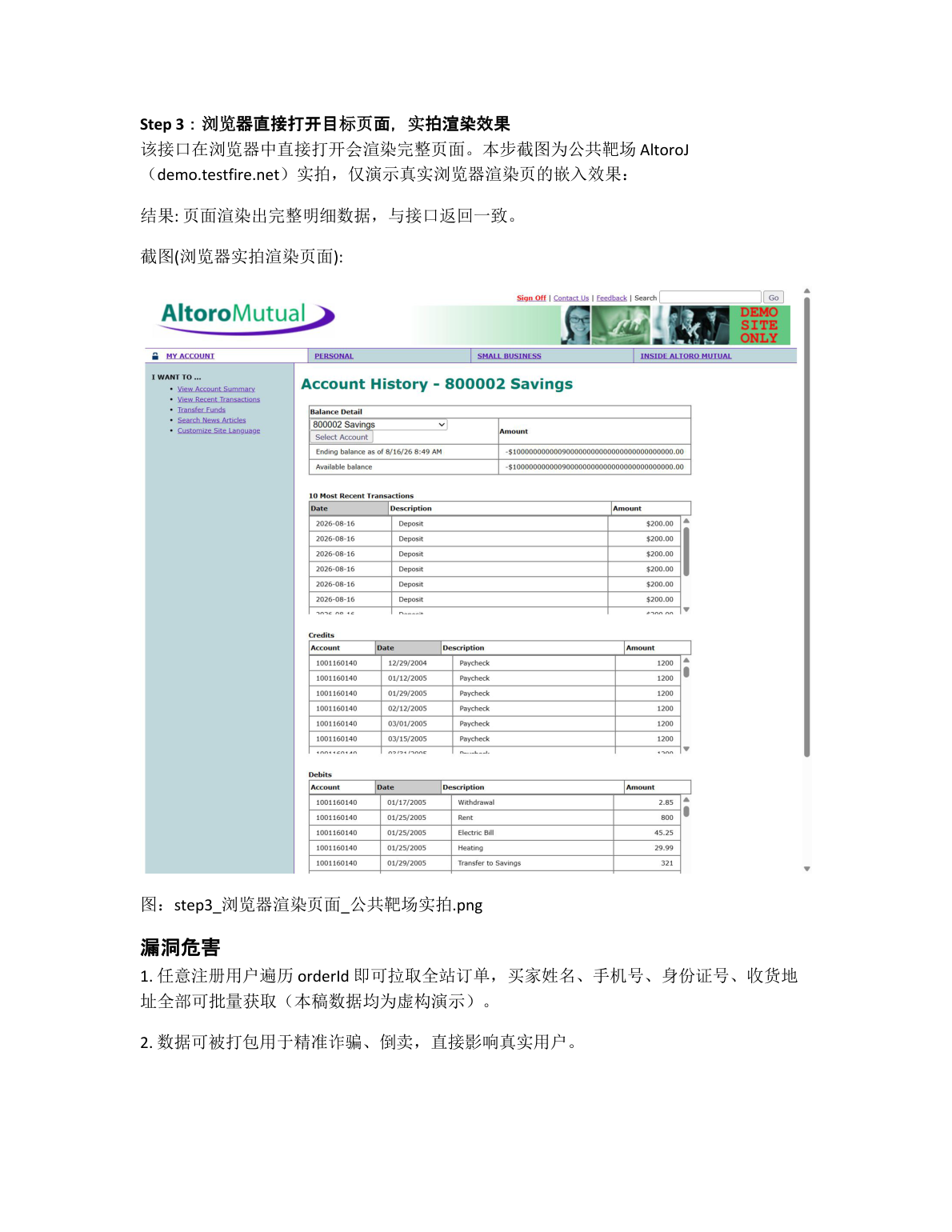
demo-shop.example,仅展示生成报告的版式与结构;第 3 张为公共靶场(AltoroJ / demo.testfire.net)实拍,演示真实浏览器渲染页的嵌入效果。 Demo uses a fictional target to showcase the layout of generated reports; page 3 is a real browser capture from a public practice target, showing how rendered pages are embedded.
| 报告首页(章节骨架) | PoC 步骤页(Step + 请求块 + JSON 截图) | PoC 步骤页(真实浏览器渲染截图) |
|---|---|---|
 |
 |
 |
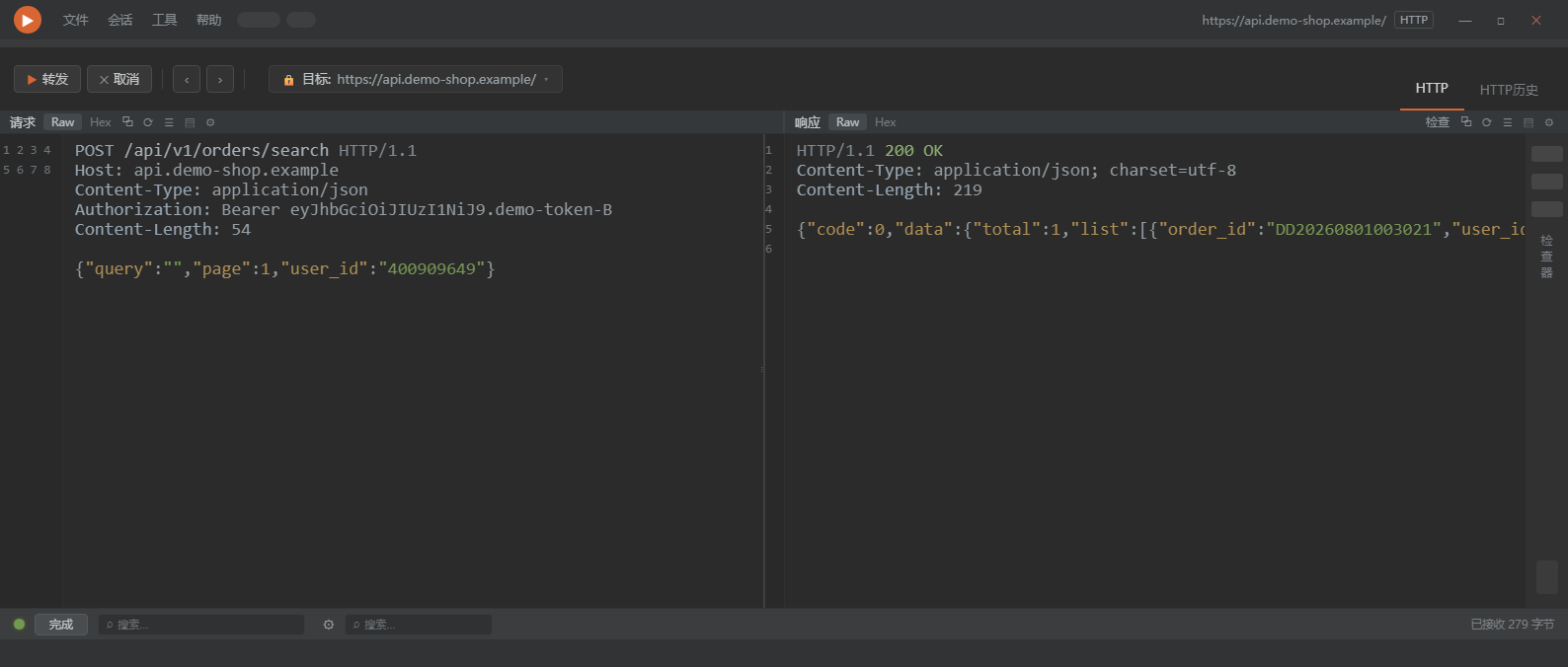
数据包 PoC 截图(tools/burp_shot 渲染:输入 = 真实抓包字节,输出 = 调试工具式双栏截图,字节级忠实——着色只包字不改字):
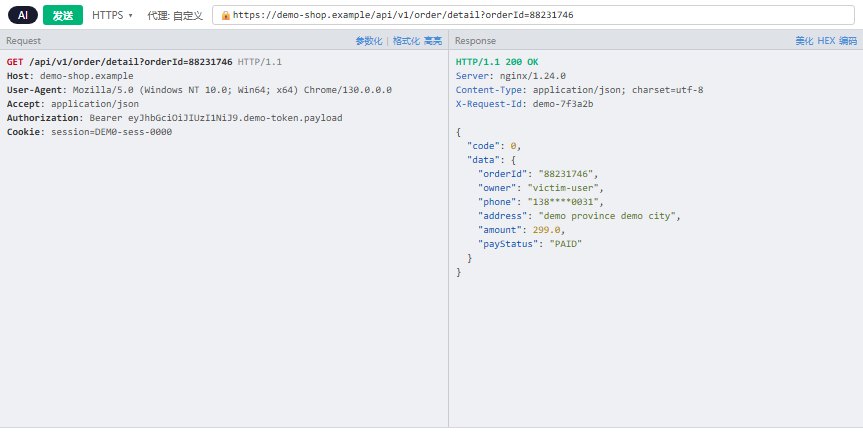
国内平台风格数据包截图(tools/yakit_shot 渲染:Yakit Web Fuzzer 风格 863×435,同样字节级忠实;按平台审核习惯在 burp_shot / yakit_shot 间选形):
English
A skill for AI coding agents (Claude Code, Codex CLI, Cursor, or any agent that reads markdown instructions) that turns confirmed vulnerabilities into submission-ready DOCX reports for SRC (Security Response Center) and 0day platforms.
It doesn't find vulnerabilities — it makes sure the report is good enough to survive review.
What it enforces
- Two-stage review: a lightweight signal triage runs while digging (stop-loss on dead ends before burning tokens on verification) + full layered verification gates before writing (hard gates: reproducible PoC / impact driven to the final harm / server-side confirmation / falsification tests; per-type criteria for data leak, IDOR, RCE, SSRF, injection; 0day acceptance gates). No gate, no report — this filters out "signal ≠ vulnerability" garbage at the source.
- Dual readability standard: a product manager can reproduce it step by step; a security engineer finds it technically solid. Both or rework.
- Fixed DOCX layout:
template.docxships all styles (Heading 2 sections, uniform black, linear plain document), generated section by section with python-docx. - Step-style PoC spec: every step = one-line title + context + raw HTTP request block copied from any proxy tool (Burp / Yakit / mitmproxy — no curl) + conclusion + real screenshot.
- Screenshot ironclad rule: every step needs a real screenshot from the live target; fabricated renders are forbidden. Captures run fully in the background (headless / CDP) — no browser or proxy window is ever yanked to the foreground. Packet evidence is embedded as raw text blocks; if the proxy UI is screenshotted, it must be the request/response detail pane, never the history list.
- Anti-AI-tone rules + machine audit: kills template phrasing, filler words, and boilerplate — platform reviewers use AI detection plus human intuition, and template-tone reports get downgraded. Enforced by a zero-LLM counter (
tools/ai_taste_check.py): paren-annotation quota, "attacker"-subject quota, textbook-"该X" quota, nominalized verbs, section-tail summaries, triple parallelism, repeated long IDs, empty severity phrases, EN model-isms. All green before the DOCX is generated. - Packet screenshot renderer (
tools/burp_shot/render.py): turns real captured bytes (req/resp) into a dark-theme two-pane HTTP debugger screenshot (1588×676, line-number gutters, syntax palette) — byte-faithful, styling wraps bytes without altering them; changing one byte = fabricated evidence. A Yakit-style variant (tools/yakit_shot/render.py, 863×435) ships for CN-platform reviewers — pick the shape your platform's triagers actually use. - Production economics (quality > speed > token): the report is assembled from a cached skeleton + evidence archived at discovery time + ~15 sentences unique to this bug — the model never re-generates boilerplate. Edits are whole-file rewrites (never docx patching), ≤2 full read-write rounds, second report on the same platform targets 15 minutes. A cold-read gate (9 rules from a real triage pain round) makes a zero-context reviewer understand every paragraph, every mystery value sourced, zero placeholders.
- Capture rigs (
rigs/): battle-hardened helpers — Excel row screenshot (COM + ASCII-path pitfall), console run capture, CDP browser capture, screen capture, OCR fallback. Paths parameterized; nothing campaign-specific inside. - Severity discipline + submission gate: rating anchors to the platform's own system (VRT / outcomes / precedent bands) — CVSS only as fallback; full reasoning lives in a
<report>.gate.mdsidecar (template bundled), never in the report body.tools/submit_gate.pyreads the sidecar and physically blocks submission until every check passes. - Acceptance gate: before submitting — policy-word mapping + out-of-scope list + precedent + settled-class check + independent red-team review (spawned via the Agent tool as an adversarial triager whose KPI is rejection), answered as verdict + basis + residual risk.
- Full workflow: dedup check → gates → humanize rewrite pass + machine audit → DOCX generation → semantic naming → archiving → update-vs-appeal handling → cleanup.
Install
Install = make SKILL.md reachable as an instruction file by your agent. Examples:
# Claude Code: project-level skills directory
cp -r vuln-report-skill <your-project>/.claude/skills/report
# Claude Code: user-level (global)
cp -r vuln-report-skill ~/.claude/skills/report

# other agents: copy SKILL.md content into your rules/instructions file,
# or point the agent at SKILL.md when a report is needed
SKILL.md and template.docx must stay in the same directory.
Package layout (tools are bundled — nothing extra to fetch):
vuln-report-skill/
├── SKILL.md                                  # skill 本体(总纲三指标+验证门+冷读门+版式+流程)
├── 0day.md                                   # 0day/通用产品收录审查门 A-D + 通用型模板(成稿前必读)
├── README.md / LICENSE
├── template.docx                             # 版式基准(与 SKILL.md 同级,勿分离)
├── templates/submission_scope_gate_template.md   # .gate.md 侧栏模板(定级推导+受理门三查)
├── rigs/                                     # 截图 rig(Excel行/终端/CDP浏览器/全屏/OCR降级)
├── tools/
│   ├── dedup_check.py                        # 查重(语料 = 你自己的报告库)
│   ├── ai_taste_check.py                     # 去AI味机器审计(零 LLM 计数器)
│   ├── submit_gate.py                        # 交单物理闸(读 .gate.md 侧栏逐项校验,不过闸不出稿)
│   ├── burp_shot/                            # 数据包截图渲染 Burp 风格(render.py + template.html)
│   └── yakit_shot/                           # 数据包截图渲染 Yakit 风格(国内平台形)
└── docs/                                     # 本 README 效果图
Usage
Once a vulnerability is verified, just say:
/report
or "写报告 / 出报告 / 成稿 / 生成漏洞报告". The skill triggers automatically and runs gates → layout → workflow end to end.
Requirements
python-docx:pip install python-docx- Bundled tools —
tools/ships with the skill (dedup / AI-tone audit / submission gate / packet-shot renderer). No extra install; commands in SKILL.md refer to<skill directory>/tools/.... burp_shotneeds a local Chrome or Edge for headless rendering — auto-detected from common install paths; override with theBURP_SHOT_CHROMEenv var if yours lives elsewhere.- Dedup corpus is your own report library (default
漏洞报告/under the working directory; point theDEDUP_CORPUSenv var at your report library). An empty library gets an explicit warning and no verdict — the protection grows as you accumulate reports. - Screenshots — the AI can only capture screenshots if it has a browser tool. At startup the skill auto-detects available browser MCPs (Playwright / chrome-devtools / Puppeteer / etc.) and uses whatever it finds, capturing in the background without stealing window focus. If none:
- Auto (recommended): give your agent a browser tool — e.g. the Playwright MCP (
claude mcp add playwright -- npx @playwright/mcp@lateston Claude Code, or the equivalent hook-up for your agent). The AI then opens original URLs and captures each step itself. - Manual fallback: if you don't install one, the skill switches to asking you to save each step's screenshot into
shots/— it embeds them for you. It will never fabricate a render or silently skip a screenshot. shots/is temporary: images are embedded into the DOCX, and the folder is deleted when the report is finished.
- Auto (recommended): give your agent a browser tool — e.g. the Playwright MCP (
Notes
- The skill body (
SKILL.md) is written in Chinese because the target platforms (Chinese SRCs, CNVD/CNNVD, EDUSRC) require Chinese reports. The methodology — verification gates, per-type criteria, PoC structure, anti-AI-tone rules — is language-agnostic. - What it refuses to write: signals without proven end-to-end harm, your-own-test-account data, below-P3 findings, CORS/security-header non-issues. The gate blocks them and tells you why.
中文
一个给 AI 编码代理用的 skill(Claude Code / Codex CLI / Cursor 等任何能读 markdown 指令的 agent 通用):把已确认的漏洞写成可直接提交 SRC / 0day 平台审核方的 DOCX 提交稿。
它不教你怎么挖漏洞,只解决一件事:报告写得够不够好。
它约束什么
- 双重审查机制:第一道在挖掘过程中跑——遇到信号先快筛(明显不够格的当场止损,不浪费 token 深挖);第二道在成稿前跑——完整分层验证门(硬门 / 按类型命门表 / 0day 收录审查门)。不过门不成稿,从源头挡掉"信号当漏洞"的垃圾报告。
- 双重可读写作标准:产品经理照着 Step 能复现,安全工程师看完觉得技术扎实——两个维度缺一返工。
- 固定 DOCX 版式:
template.docx内置全部样式(微软雅黑、Heading 2 章节、全文统一黑色),python-docx 逐节生成,朴素线性文档,不堆表格卡片。 - Step 式 PoC 规格:每步 = 一句话标题 + 操作上下文 + 原始请求块(从 Burp/Yakit 等任意抓包工具原文复制,不放 curl)+ 结果结论 + 真实截图。
- 截图铁律:每步必须配真实目标截图,严禁自造渲染。截图全程后台完成(headless/CDP),不把浏览器或抓包工具窗口弹到前台;数据包以原始文本块入报告,截工具界面时只截请求/响应详情面板,不截历史列表。
- 简洁硬规 + 去 AI 腔硬规 + 机器审计:消灭八股标签、填充语、形容词渲染、模板化句式——平台 AI 检测和人工直觉都会筛掉模板腔报告。配套零 LLM 计数器
tools/ai_taste_check.py(括号注解/主语复读/教科书腔/名词化动词/节尾总结/三连排比/ID 复现/空话/英文 model-isms 逐项计数),全绿才进 DOCX 生成。 - 数据包截图渲染(
tools/burp_shot/render.py):真实抓包字节 → 暗色双栏 HTTP 调试工具截图(1588×676,行号/语法着色),字节级忠实,渲染只做外壳。国内平台另有 Yakit Web Fuzzer 风格变体(tools/yakit_shot/render.py,863×435)——按审核习惯选形。 - 生产三指标(质量 > 速度 > 省 token):报告 = 缓存骨架 + 挖掘期已归档证据 + 约 15 句本洞独特内容,模型不现场生成套话;改 = 整体重写(禁 docx 补丁),全文读写 ≤2 轮,同平台第二份起目标 15 分钟出稿。冷读门九条(零背景审核逐段读到底:占位符禁令/证据禁自造/神秘值溯源/整节重写律/一致性清单)管呈现层不死在最后一米。
- 截图 rig(
rigs/):实战固化件——Excel 原表行截图(COM+ASCII 路径坑已防)、终端跑脚本截图、CDP 浏览器截图、全屏截图、OCR 降级;路径已参数化,不含任何战役残留。 - 定级纪律 + 交单物理闸:定级锚目标平台自己的体系(VRT / outcomes / 判例带),CVSS 只兜底;完整推导写
<报告名>.gate.md侧栏(模板随包),禁入报告正文;tools/submit_gate.py读侧栏逐项校验,不过闸不进提交流程。 - 完整成稿流程:查重 → 过验证门 → 人化改写 pass + 机器审计 → 生成 DOCX → 语义化命名 → 归档 → 更新/驳回两种处理 → 收尾清理。
安装
安装 = 让你的 agent 能把 SKILL.md 当指令文件读到,按你所用 agent 的方式接入:
# Claude Code:项目级 skills 目录
cp -r vuln-report-skill <your-project>/.claude/skills/report
# Claude Code:用户级(全局)
cp -r vuln-report-skill ~/.claude/skills/report

# 其他 agent:把 SKILL.md 内容并入你的 rules/指令文件,
# 或在需要写报告时让 agent 直接读 SKILL.md
目录内需保持 SKILL.md 与 template.docx 同级。工具随包分发,SKILL.md 里的命令以 <skill目录>/tools/... 引用,无需另装。
使用
漏洞验证到位后直接说:
/report
或"写报告 / 出报告 / 成稿 / 生成漏洞报告",skill 会自动触发,按验证门 → 版式 → 流程走完全程。
依赖
python-docx(生成 DOCX):pip install python-docx- 工具随包自带:
tools/目录(查重 / 去AI味审计 / 交单物理闸 / 数据包截图渲染)随 skill 分发,无需另装 - burp_shot 需要本机有 Chrome 或 Edge 做 headless 截图渲染——自动检测常见安装路径,找不到时设环境变量
BURP_SHOT_CHROME指向浏览器可执行文件 - 查重语料 = 你自己的历史报告库(默认当前目录
漏洞报告/,环境变量DEDUP_CORPUS可指向你的报告库)。空库会明确告警且不给出判定——保护力随你的报告库积累而增长 - 截图——AI 手里有浏览器工具才能自动截图。skill 开工时会自动检测当前环境里可用的浏览器类 MCP(Playwright / chrome-devtools / Puppeteer 等),检测到什么就用什么,全程后台截图不抢窗口焦点。都没有则:
- 自动(推荐):给你的 agent 配一个浏览器工具,例如 Playwright MCP(Claude Code 用
claude mcp add playwright -- npx @playwright/mcp@latest,其他 agent 按各自方式接入),AI 就能自己打开原始 URL 逐步截图。 - 手动降级:不装工具时,skill 会改成"你把每步截图存进
shots/目录,我来嵌入"。绝不会自造渲染图,也不会静默跳过截图。 shots/是临时目录:图片已内嵌 DOCX,报告成稿后该目录自动清除。
- 自动(推荐):给你的 agent 配一个浏览器工具,例如 Playwright MCP(Claude Code 用
快速上手(完整流程示例)
前提:你已经验证确认了一个漏洞(有可用 PoC、打到真实危害)。这个 skill 不负责挖漏洞,只负责成稿。
你:   我刚确认了 api.example.com 的订单接口越权,B 的 token 能读 A 的订单,
      手机号/地址/身份证都拿到了,Burp 抓包和截图都在。写报告。

Claude:(自动触发本 skill)
  1. 查重 —— 翻你历史报告目录,确认没写过同根因的
  2. 过验证门 —— 逐条核对硬门/类型命门,不够格会直接告诉你缺什么
  3. 生成 DOCX —— 按固定版式:章节骨架 + Step 式 PoC + 内嵌截图
  4. 语义化命名 ——「api.example.com 存在订单接口越权读取他人敏感信息漏洞.docx」
  5. 归档到 reports/<单位>src/;shots/ 截图目录成稿后自动清除(图片已内嵌 DOCX)
产物只有一份 DOCX,可以直接交平台。被驳回后说"报告被驳回了,补充申诉证据",会走底部追加模式而不是重写。
它会拒绝写什么:只有信号没到终局危害的、自己测试账号的数据、P3 以下、CORS/安全头类——验证门会直接拦下并说明原因,不会硬凑一份垃圾报告。
适用场景
- 企业 SRC 漏洞提交稿(各厂商 SRC 通用版式)
- EDUSRC 教育行业漏洞报告
- 0day / 通用产品漏洞报告(内置通用型模板章节骨架 + 收录审查门)
License
MIT — 详见 LICENSE。