
Pack · #409 trending skills repo
ComfyUI-omni-llm
Qo-qiao/ComfyUI-omni-llm
一款本地、API双模式,skills、系统提示词模板双预设,图像、视频多类型,提示词生成、反推多功能综合性ComfyUI插件
- Stars
- 41
- This week
- -1
- Forks
- 4
- Open issues
- 1
- Skills inside
- 18
Get started
Install the skills
npx skills add Qo-qiao/ComfyUI-omni-llmInstalls into Claude Code, Codex, Cursor, OpenCode and the other agents it finds on your machine.
git clone --depth 1 https://github.com/Qo-qiao/ComfyUI-omni-llm.git /tmp/comfyui-omni-llm
cp -r /tmp/comfyui-omni-llm ~/.claude/skills/comfyui-omni-llmClaude Code reads ~/.claude/skills/ (or .claude/skills/ in a project). Other agents read the same SKILL.md format from their own skills folder.
Inside this repo
18 skills
skills/3d-animation-short-generatorACE-Step-1.5ACE-Step 1.5 prompt writing guide. Turns a song request into the inputs the ComfyUI ACE-Step nodes read: task_type, caption, lyrics, music metadata, and audio-conditioning notes. Works in five stages — music brief, constraint resolution, style routing, rendering, validation — extracting supported vaskills/ACE-Step-1.5brand-promo-video-generatorFor marketers and creators producing promotional content for brands, products, websites, apps, shops, or personal projects. Users provide logos, product images, interface screenshots, official links, or other verifiable assets and confirm duration, aspect ratio, audience, and campaign focus. The Skiskills/brand-promo-video-generatorco-op-game-intro-generatorFor users creating a two-player co-op game menu or opening animation. Users provide two player names, a game title, a target visual style, and optional character reference images. The Skill locks identity cues, generates an approval image from a fixed menu framework with coordinated color, buttons, skills/co-op-game-intro-generatorh3-prompt-writingWrite MiniMax H3 video generation prompts for T2VA, I2VA, FL2VA, L2VA, and Ref2VA. Use when rewriting multimodal requests into H3 prompt structures, composing integrated_multimodal_description, overall_soundscape, and non_diegetic_music, aligning keyframes, or defining reference labels for images, vskills/h3-prompt-writinghanddrawn-live-video-generatorFor creators making surreal short videos that blend rough glowing hand-drawn animation with live-action spaces. Users provide a scene idea, contact object or hand, desired mood, and optional language or style constraints. The Skill clarifies the physical contact, designs continuous morphing, escape skills/handdrawn-live-video-generatorImage Prompt ReverseAI image prompt reverse engineering tool. Analyze uploaded images and generate precise descriptive prompts, supporting output for 19+ mainstream AI drawing models (SD1.5, SDXL, Flux1, Flux2-Klein, Midjourney, Pony Diffusion, GPT-Image2, HunyuanImage_2.1, etc.), with positive quality prompts and negaskills/image-prompt-reverseltx2.5-videoLTX 2.5 prompt optimizer. Rewrites a video idea into a production-ready LTX-2.5 generation prompt — single flowing paragraph, present tense, 4-8 descriptive sentences, physical emotion cues, quoted dialogue, single-shot or multi-shot structure with named cuts, and audio direction. Use when the user skills/ltx2.5-videominimalist-product-ad-generatorTurn product images and ad requirements into minimalist product ad shorts for e-commerce promotion and product launches. The Skill confirms format and product variants, extracts selling points, writes concise English ad copy, builds product anchors, plans beat-synced typography/storyboards, and geneskills/minimalist-product-ad-generatormoss-imageMOSS-Image prompt enhancer. Expand an image-generation request into a detailed MOSS-Image caption or pixel Layout, and compile a local JSON draft into a ready-to-paste positive prompt. Use for prompt enhancement, image composition, poster/panel text placement, bounding-box layout, or MOSS-Image 提示词扩skills/moss-imagemusic-caption-rewriterTurn a brief music description and optional tagged lyrics into a professional MiniMax Music 3 structured caption with Global Metadata, Vocal Details, and a section-aware Arrangement. Use when users ask to enhance a music-generation prompt, preserve lyric-section directives, retrieve a similar style skills/music-caption-rewritermusic-video-subtitle-generatorFor musicians, video creators, and social-media editors producing AI music videos or emotional short films with lyric typography. Users provide music, lyrics, references, characters, typography direction, mood, or target platform. The Skill analyzes beat and vocal timing, separates character, scene,skills/music-video-subtitle-generatorpaper-collage-explainer-generatorFor creators, educators, and social-video editors who need a tactile paper-collage language for narration, knowledge points, opinions, or abstract topics. Users provide source copy, story beats, or a core concept and may specify aspect ratio, duration, palette, and audio needs. The Skill extracts meskills/paper-collage-explainer-generatorpapercraft-stop-motion-explainerFor creators explaining science, education, or general knowledge through tactile handmade papercraft visuals. Users provide a topic, core knowledge points, or source material and may specify audience, duration, aspect ratio, and deliverable type. The Skill extracts the learning goal and visual metapskills/papercraft-stop-motion-explainerPortrait PhotographyProfessional portrait photography prompt writer with lighting design, lens language, pose guidance, and anti-AI realism techniques. Optimized for Z-Image, Krea 2 and next-gen models. When users need portrait photos, realistic candid images, or professional photography prompts.skills/portrait-photographyqwen-image2.1Qwen-Image-2.1 prompt rewriter. Routes by input: text-to-image follows the official PE-T2I rules (compact or long observational style), image editing follows the official PE-I2I rules. Supports text-heavy images/posters/infographics, transparent RGBA output, common failure-pattern fixes. Use when reskills/qwen-image2.1wan2.2-videoWan video prompt optimizer. Rewrites a video idea into Tongyi Wan (Wan2.2–2.7) ready prompts using the official formulas — basic, advanced, image-to-video, sound, reference-generation, and multi-shot — plus video-editing instruction techniques, image/video reference notation, and a cinematic aesthetskills/wan2.2-videoyue2-musicGenerate, cover, transcribe, and edit songs with YuE2 and SheetSage2/MERT2. Use for YuE2 full/melody/off generation, audio-to-ABC covers, style or lyric changes, score editing, agentic reharmonization, melody preservation, singable lyric adaptation, and reproducible listening comparisons; also for Yskills/yue2-musicDocumentation
README
ComfyUI-omni-llm
Run LLM/VLM models natively in ComfyUI based on llama.cpp, supporting multimodal inference, visual language understanding, and full-stack audio processing capabilities.
Project Overview
ComfyUI-omni-llm is a fully-featured ComfyUI plugin, deeply rebuilt and enhanced based on ComfyUI-llama-cpp-vlm. It focuses on providing localized, efficient image and video prompt backtracking and content optimization/expansion (Image generation supports popular models like Z-Image, Krea2, Flux2-Klein, and Qwen-Image. Video generation supports prompt optimization and expansion for mainstream models like Wan2.2, LTX-2.5, and MiniMax-H3, and generates text optimization for models like IndexTTS-2.5, Ace-Step1.5, and MiniMax-Music3.).Dedicated to addressing pain points like not knowing how to write prompts and content restrictions, helping beginners quickly get started with content creation. The plugin supports over 40 VLM models, more than 200 LLM models, and over 30 preset templates.
Core Advantages
- Full-Stack Multimodal: Seamlessly integrates text, image, video, and audio processing capabilities
- Smart Hardware Adaptation: Automatic parameter tuning, supports NVIDIA, AMD, and other mainstream GPUs
- Rich Model Ecosystem: Supports multiple mainstream VLM/LLM models, automatically adapts to new models
- Efficient Inference Performance: Introduces parallel processing and caching mechanisms, significantly improving runtime efficiency
- Professional Prompt System: Built-in rich scenario-based preset templates, supports custom prompts
- Content Optimization Expansion: Provides content optimization expansion features, supporting optimization and expansion of multimodal content
- Multi-Turn Chat: Supports multi-turn chat, providing more choices for text generation
- Skill Loading: Supports skill loading, providing more choices for text generation
- API Support: Supports calling external APIs, providing more choices for text generation
Recommended Companion Plugins
Due to the different functional positioning of preset templates, some preset templates and prompts have been updated to ComfyUI-prompt-storage, which can be used with this plugin to increase extensibility.
SDXL models limit prompt length, to address this issue and improve control, you can use the optimized version of the plugin sdxl_long_prompt_pipeline.
Installation Instructions
If you are not familiar with installing dependencies, it is recommended to use the ComfyNexus Launcher. The launcher provides a more intuitive installation method, making it easier to view installed dependency files and resolve dependency conflicts.
1. Basic Installation
Install dependencies:
- Install:
# Run in ComfyUI root directory
pip install -r custom_nodes/ComfyUI-omni-llm/requirements.txt
- Install:
Install llama-cpp-python (Required):
- You must download the latest version and install it manually. Please download from llama_cpp_python_wheels
Wheel Selection Guide:
- Python Version Match:
cp312in the filename indicates Python 3.12, select the file matching your Python version - CUDA Version Match:
cu128in the filename indicates CUDA 12.8, select the file compatible with your CUDA version (available variants:cu124/cu126/cu128/cu130/cu131) - OS Match:
win_amd64indicates Windows 64-bit system, ensure you select the file suitable for your operating system - Function Version:
basicindicates basic version,fullincludes more features (such as OpenCL)
Installation Command:
- Install using:
pip install downloaded_filename.whl - Example:
pip install llama_cpp_python-0.4.3+cu128-cp312-cp312-win_amd64.whl
Version Selection Recommendations:
- CUDA 12.8: Select
cu128version for best performance - CUDA 13.x: Select
cu131/cu130version - CUDA 12.x: Select
cu124/cu126version for backward compatibility
2. Model Preparation
Create Model Directory:
- Create an
LLMfolder underComfyUI/models/directory - Place downloaded model files in this directory
- Create an
Model File Format:
- LLM/VLM models support
.ggufformat - Visual models require corresponding
mmprojfiles - ASR/TTS models require downloading full model files
- LLM/VLM models support
Workflow Examples (Reference examples, please modify parameters according to actual situation)
Workflow Files
Workflow Example Images
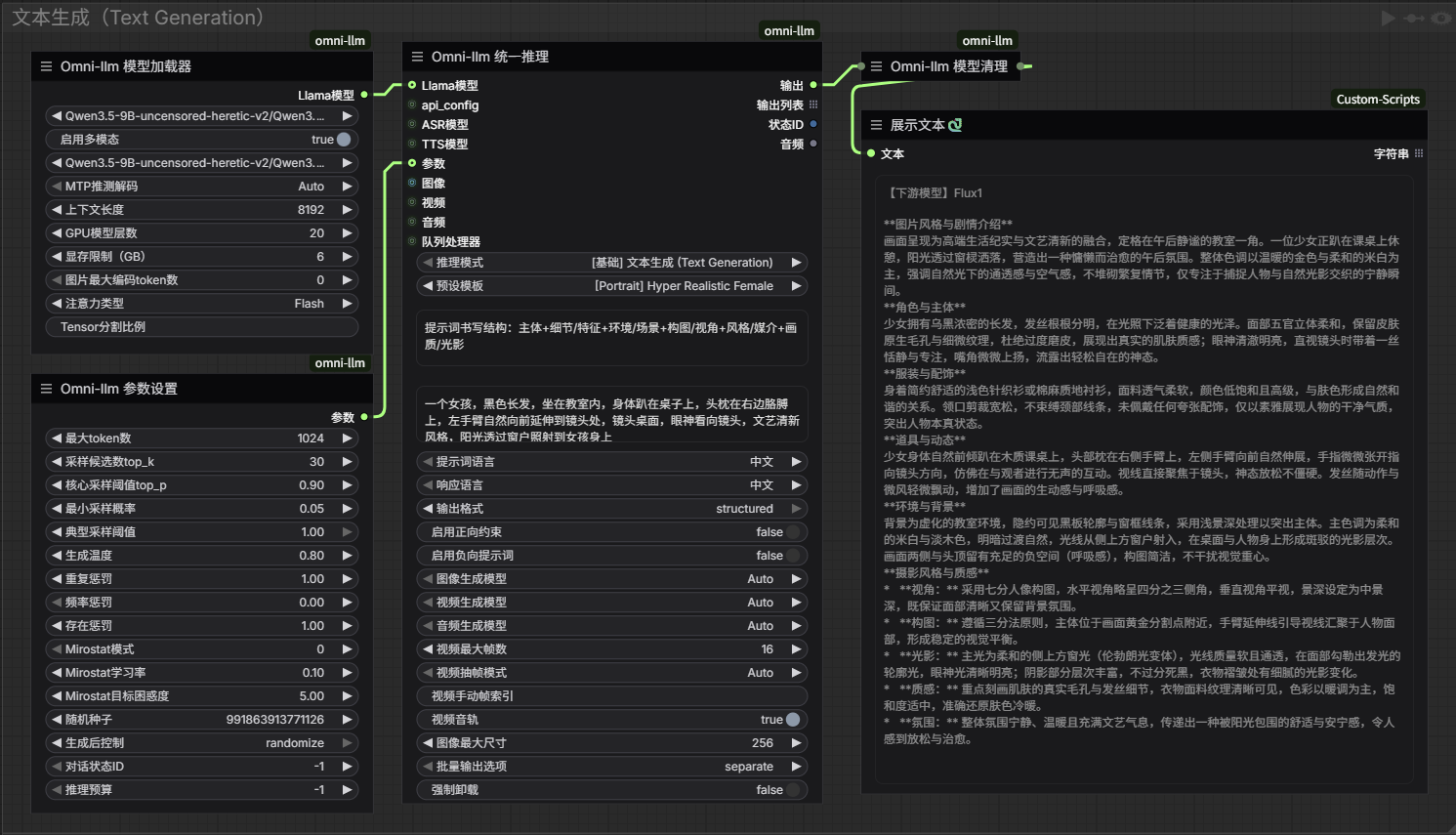
Text Generation
Multi-Turn Chat
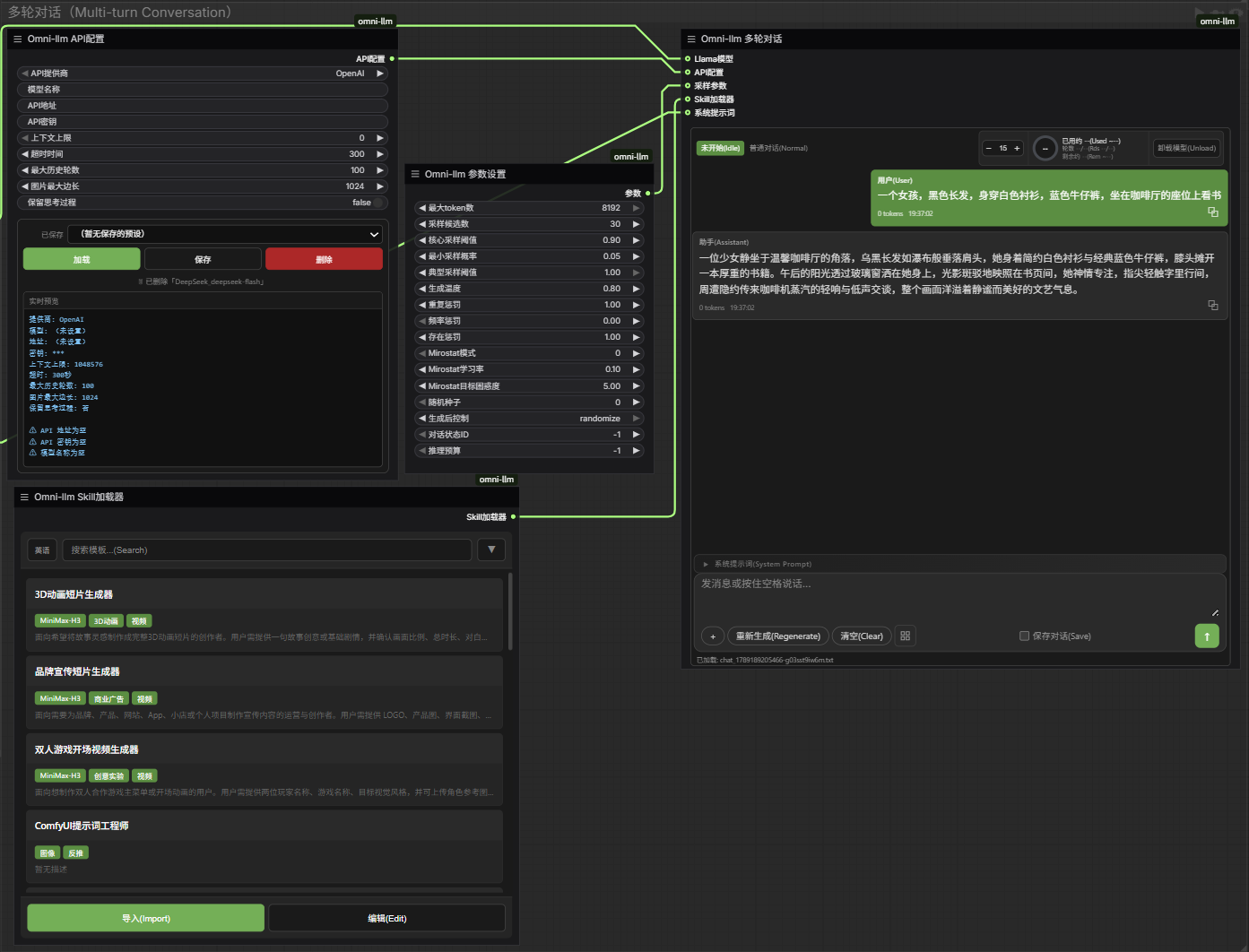
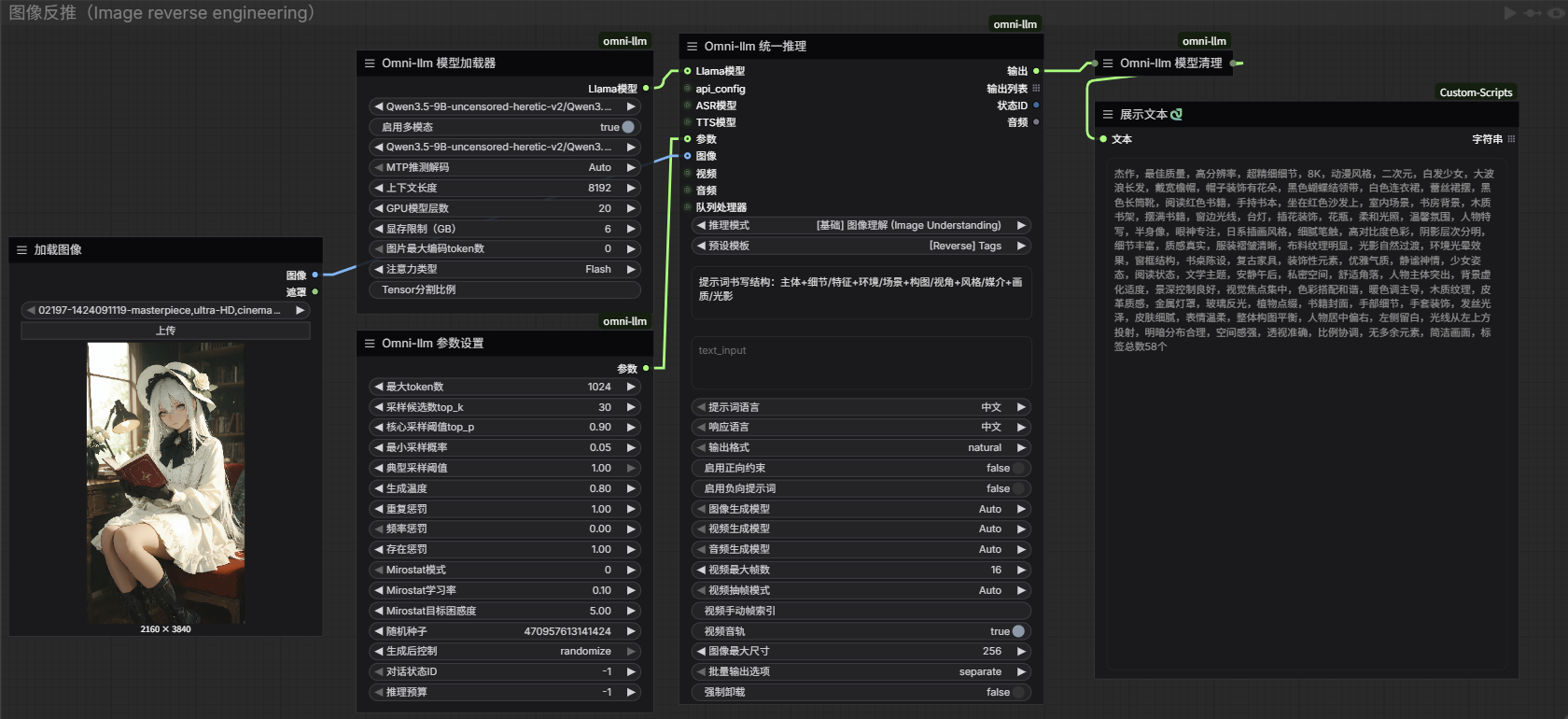
Image Processing
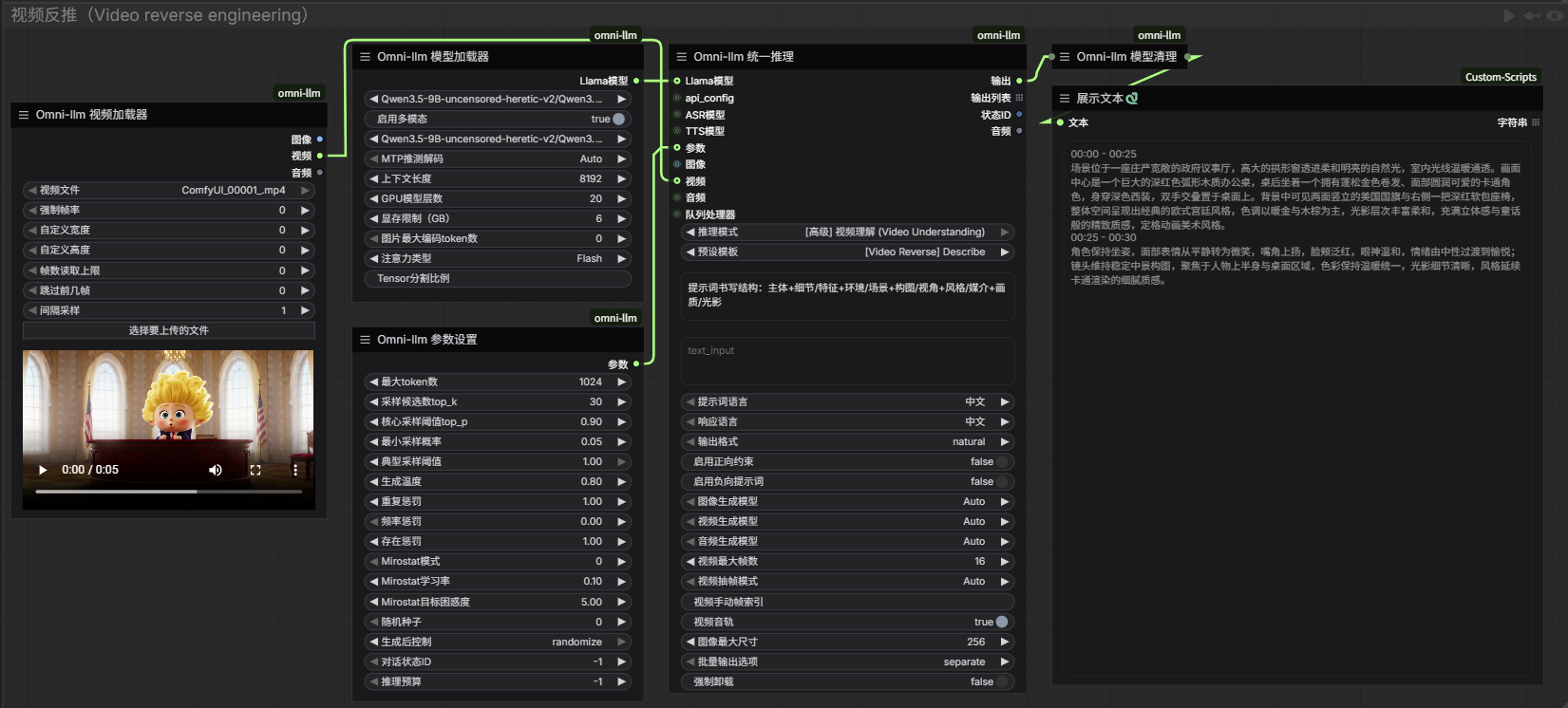
Video Processing
Audio Processing
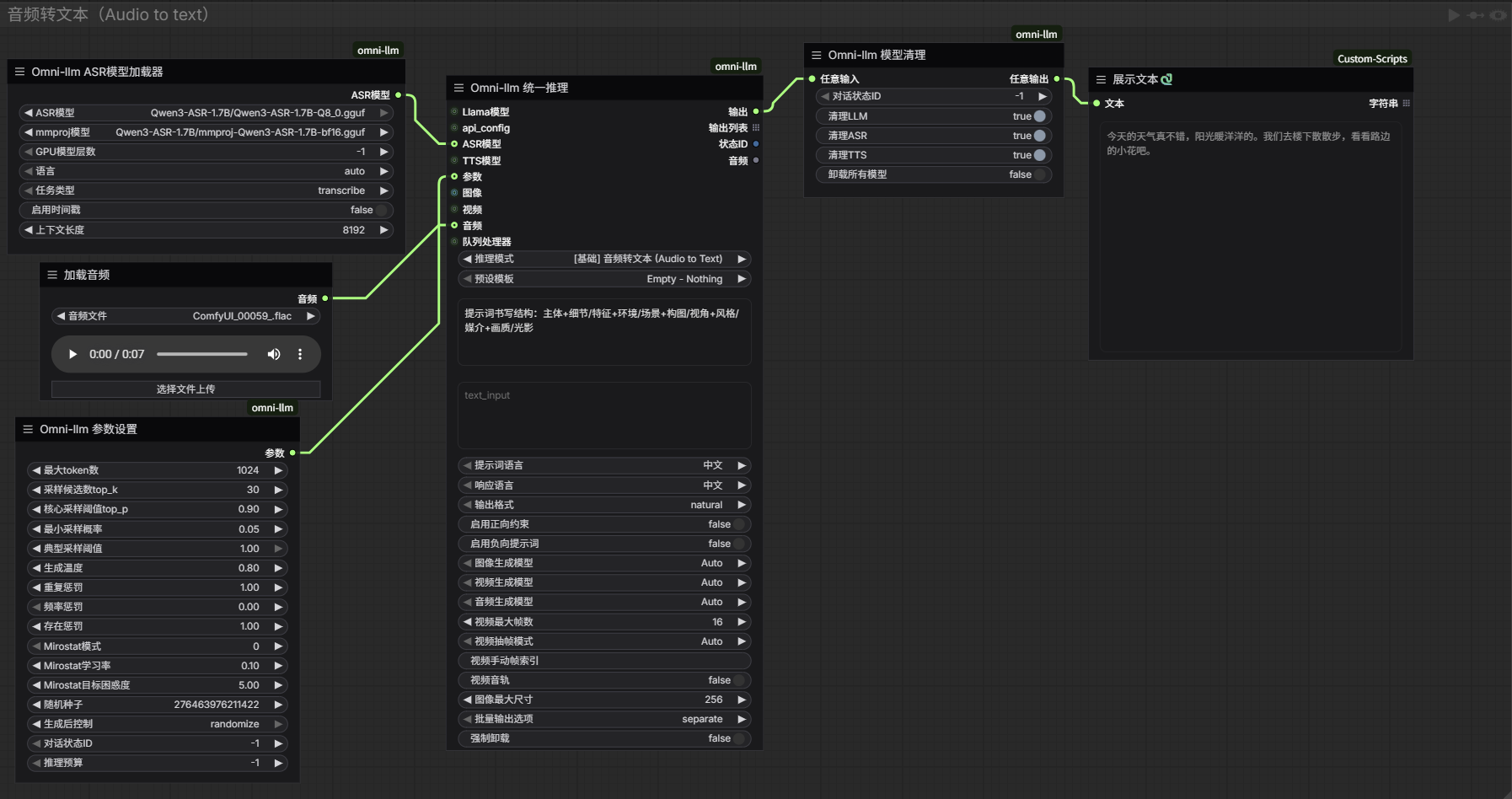
Documentation (For reference only)
Please check Model Download Links Please check Node Parameter Guide
Changelog
The following updates are based on llama-cpp-python version 0.4.3, so please install this version first
v3.5.2 (2026-10-19)
- Node Optimization: Added support for MTP multi-token speculative decoding and multimodal (mmproj) image input combination, adapted to the new version of llama-cpp-python, and optimized some model interfaces
- New Skill: Added moss-image model skill
v3.5.1 (2026-10-05)
- Node Optimization: Added json format output, users can customize the json output format, optimized and removed invalid code.
- Preset Template Optimization: Added ACE-Step-1.5, ltx2.5-video, wan2.2-video skill templates based on official documentation.
v3.5.0 (2026-09-26)
- ASR Node Overhaul: ASR no longer runs inference through qwen3-asr, now uses llama-cpp-python for inference. Only GGUF format is supported, and the mmproj model must be loaded at the same time.
- New TTS Node: Added a TTS model loader (based on llama-cpp MTMD), supporting Qwen3-TTS and Pocket TTS models (only basic synthesis is supported, voice modulation isn’t available yet. Currently just functional support, due to dependency issues, it’s recommended to use the official pipeline).
- Node Optimization: Optimized inference and audio support for omni-type models (improved joint inference capabilities for images and audio).
📋 Older Versions
v3.4.0 (2026-09-12)
- Node Optimization and Adjustments: Added API loading nodes (expanding model support types to meet different user scenario needs), added multi-turn conversation nodes (for skill usage, making it easier to generate more professional prompt content), added skill loading nodes (expanding text generation capabilities, providing more options for prompt generation), optimized and adjusted parameter node options, adapted for multi-turn conversation node usage.
- Preset Template Optimization: Optimized and adjusted preset template content, added Skill-related files.
v3.3.4 (2026-08-22)
- Node Optimization Adjustments: Added support for VoxCPM2 model, optimized flashattention processing.
- Preset Template Optimization: Optimized anime preset templates negative prompt content.
v3.3.3 (2026-08-16)
- Node Optimization Adjustments: Added support for more raw image models to meet a wider range of user needs, and fixed the issue where model labels wouldn’t show when forward constraint options were not enabled.
- Preset Template Optimization: Optimized raw image preset templates. Natural Paragraph: doesn’t output camera parameter info. Structured: outputs camera parameter info. You can choose based on your own needs (it’s recommended to add a facial optimization node when generating real natural portraits to enhance the effect).
v3.3.2 (2026-08-15)
- Node Optimization and Adjustments: 1. Optimized internal code, adapted parameters for llama-cpp-python 0.3.46, added support for the Qwen3.8 model (untested), and improved MTP processing.
- Added audio model options, supporting IndexTTS-2.5, Ace-Step1.5, and MiniMax-Music3 models.
- Added output model labels to help users confirm results.
- Preset Template Optimization: The multi-person chat template now aligns with the output of the IndexTTS-2.5 model, the music template aligns with Ace-Step1.5 and MiniMax-Music3 outputs, the video generation template aligns with LTX-2.5 and MiniMax-H3 outputs, and the image creation template hasn't been fully aligned yet due to the volume of content (feedback or co-creation is welcome).
v3.3.1 (2026-08-12)
- Node Optimization Adjustments: The multi-image input node interface has been adjusted to 9 inputs, LTX2.3 updated to LTX2.5
- Preset Template Optimization: Optimized video preset templates to fit LTX-2.5 model prompt generation
v3.3.0 (2026-08-08)
- Node Optimization & Adjustment:
- Unified node name prefixes to avoid node name conflicts
- To support transformers-5.0 and above, removed TTS-related nodes. Text-to-audio is no longer supported; for TTS-related features please use a dedicated plugin. Only the ASR node is retained
- To improve image generation controllability, added a model selection feature to adapt to the prompt requirements of different models
- Refactored inference logic to fit the new preset template requirements
- Preset Template Optimization: Reconstructed the preset template format to adapt to the prompt requirements of different models, integrated Chinese and English templates (functionality unchanged), optimized thinking logic, improved generation speed and quality, and enhanced the controllability of generated content Specific adjustments: illustrious, anime, audio templates, and prompt_expander do not support model selection output; other text generation preset templates support model selection output; reverse engineering templates support inputting text content as a reference to reduce incorrect style judgment in reverse engineering (generally no need to add)
- Dependency Installation Optimization: Simplified dependency installation steps, lowering plugin installation difficulty
v3.2.3 (2026-07-25)
- Preset Template Optimization: Optimize and adjust the image reverse engineering preset templates, add more reverse reasoning dimensions, introduce prompt weighting to enhance reverse engineering results, include a figure art category, reduce forced clothing generation that conflicts with user requests (non-NSFW), and refine the logical guidance for inference thinking
- Dependency Detection Optimization: Optimized the dependency check logic for llama-cpp-python, mainly for the first time setting up this plugin environment
v3.2.2 (2026-07-13)
- Node Optimization & Adjustment: Add pre-constraint options and negative prompt options (built-in fixed content that does not participate in model inference and only applies to text generation preset templates) to enhance controllability of generated content. Example outputs are adjusted to display randomly, and example information for corresponding categories will pop up when key categories are triggered. (If unified inference nodes report errors, re-add them to the interface for execution)
- Model Optimization & Adjustment: Add support for the variant model Qwen3.5-DeepSeek-V4-Flash, which delivers stronger context comprehension; adjust parameters according to actual usage scenarios.
- temperature (temperature parameter): 0.7-1.0 (lower values for coding tasks, higher values for creative reasoning)
- top_p (core sampling threshold): 0.95
- For complex reasoning tasks, it is recommended to increase the value of the max_tokens parameter to obtain more detailed generated content
- Preset Template Optimization: Rename the all-round portrait template to ultra-realistic portrait template, and add thick painting and CG character templates.
v3.2.1 (2026-07-05)
- Node Optimization Adjustments:Integrate cleanup, uninstall nodes, and simplify some parameter options by setting them to auto in the background
- Model Optimization Adjustments:Add MiMo-VL series model support (due to preset templates adding thinking prompts, MiMo-VL models require custom templates, as built-in templates generate undesirable content)
v3.2.0 (2026-07-04)
- Code Optimization: Removed redundant processing code and streamlined the inference logic (please re-add any nodes that throw errors and run them in the interface, otherwise they won't work properly).
- Node Optimization Adjustments:
- ASR: Removed unnecessary code, keeping only Qwen ASR support.
- Model Unload Node: Added forced alignment, ASR, and TTS model unload functionality.
- Node Grouping Adjustments: All node groups have been changed from llama-cpp-llm to omni-llm, aligning with plugin names.
- Preset Template Optimization:
- Added templates for building exterior/garden rendering.
- Optimized natural paragraphs to 2-3 sections.
- Improved portrait composition and poses, emphasizing a realistic natural feel, reducing AI-like stiffness or awkwardness.
- Enhanced storytelling feel for videos.
- Strengthened breathing sense in audio.
- Optimized prompt professional descriptions to better match open-source model understanding, allowing for better content control {generated content may include some irrelevant information {uncontrollable}, please selectively refine it yourself}.
- To improve content quality, generated texts will be lengthy, increasing inference time and memory usage. Please adjust based on actual needs to avoid program crashes from excessively long text. Larger models also provide higher-quality text generation.
v3.1.6 (2026-06-27)
- Preset Template Optimization: Optimized preset templates to improve out-image quality and user experience. Added detailed preset templates examples for different categories (portrait, design, video, etc.).
- Rewrite Prompt Style preset information
v3.1.5 (2026-06-18)
- Optimized Node Parameters: Improved Qwen3 series inference logic. For Qwen3.5, Qwen3.6 and other thinking models using text generation mode, mmproj model must be enabled. Some preset templates may not work, please test and adjust or use non-thinking models
- Fixed Inference Issues: Fixed inference failures or content mismatch issues caused by preset template function modifications. Added example guidance to reduce the chance of generated content deviating from expected results
- Preset Template Optimization: Improved preset template examples (different preset templates have different optimization directions, e.g., use zimage preset template for portraits, use other models for generation, please adjust according to actual needs)
v3.1.4 (2026-06-13)
I. Node Optimization
- Optimized Node Parameters: Removed redundant optional parameters from ASR and TTS nodes, streamlined code to retain only qwen-tts model parameters to avoid parameter errors during use
- Reasoning Budget Parameter: Added
reasoning_budgetparameter to support thinking mode control for Qwen3.5-Thinking and similar models (-1=unlimited, 0=disable thinking, N=limit to N tokens), thinking models can now use text generation mode normally
II. Dependency Management Optimization
- Multi-Platform Support: Optimized
requirements.txtto automatically select precompiled wheels for Windows/Linux/macOS (manual installation recommended to avoid automatic installation failures)
III. Code Quality Improvement
- Exception Handling Optimization: Replaced
exit(1)forced exit with custom exception classesLlamaCppDependencyErrorandComfyUINotFoundErrorto prevent program crashes - Complete Parameter Passing: Improved parameter passing for
create_chat_completion(), supportingpresence_penalty,typical_p,mirostatand other parameters
IV. Preset Template Optimization
- Template Optimization: Based on Seedance2.0 model prompts, added emotion and expression-related prompt content. Note: wan and other open-source models may not be suitable, generated content may not achieve expected results, please test and adjust yourself. (Same applies to previously adjusted image and audio preset templates)
v3.1.3 (2026-06-06)
I. Model Support Optimization
- Qwen3.6 Model Support: Added Qwen3.6 series model support, including Qwen3.6-27B and Qwen3.6-35B-A3B large VRAM models, optimized context length configuration (default 8192) and GPU layer allocation (not tested due to limited personal hardware, please understand if runtime errors occur)
- Gemma4 Model Support: Improved Gemma-4 series model support, including Gemma-4-E2B, Gemma-4-E4B, and Gemma4-26B-A4B model automatic recognition and loading
II. Preset Template Adjustment
- Template Optimization: 1.Optimized repetitive instruction content, resolved text generation content confusion caused by logic disorder 2.Restructured output callback to JSON output format for precise image generation control 3.Preset templates now feature intelligent category processing. Please add relevant keyword information such as poster, illustration, photography to prompts for model-based generation and reduced errors 4.Illustrious preset template added ToriiGate model exclusive optimization, ToriiGate model recommended
- Template Addition: Added Ideogram-4 model exclusive preset template (usage according to model requirements, generated results may not be ideal, please test yourself, recommended to use qwen3 series models)
v3.1.2 (2026-05-31)
I. Node Optimization
- Enhanced MoE Model Support: Optimized tensor split logic for Mixture of Experts models, improved expert layer allocation for better performance
- Added Example Output Interface: New example output interface to help users write better prompts based on preset template examples, improving generated text quality
II. Dependency Optimization
- Dependency Detection Prompt: New dependency detection feature to notify users if required dependencies are installed, avoiding missing dependency issues during use
III. Preset Template Adjustment
- Template Optimization: Image templates optimized for shot descriptions and AI-compatible logic descriptions; video templates optimized for content coherence and character expression descriptions; audio templates optimized for emotional expression of audio content (not yet tested, feedback welcome, templates continuously optimized)
v3.1.1 (2026-05-10)
I. Template Optimization
- Template Content Adjustment: Add frame sequence analysis template, optimize video reverse prompt template, enhance facial expression and detail descriptions for all templates involving characters, optimize ERNIE_IMAGE and QWEN_IMAGE_2512 output text classification confusion problem, and adjust some templates to be more suitable for European and American audiences (currently still updating, not completed yet, please understand if the generated results are not ideal)
- Inference Time Increase: To achieve more comprehensive prompt generation, the templates output more text content, which will increase the inference time (the amount of text content determines the inference time), please adjust parameters or use custom templates according to actual situation.
II. Code Maintenance
- Bug Fixes: Fix known issues found in multi-image transmission and video processing
- Template Optimization: Optimize template output format, fix output content mismatch problem (some templates only have one output format, switching after output results are consistent)
v3.1 (2026-04-30)
I. Streamlining and Optimization
- Node Streamlining: Remove all nodes that did not meet expectations, remove impractical templates, remove acceleration modules with unsatisfactory results
- Completion Optimization: Add parameter optimization for Intel graphics cards
II. Code Optimization
- Code Simplification: Optimize code structure, reduce redundancy and complexity, improve runtime efficiency, fix TTS voice mismatch and qwen3.5 output issues
III. Template Enhancement
- New Optimized Templates: Add Illustrious, Anima, ERNIE-Image dedicated preset templates, strengthen video-related template content, adjust qwen-image2512 template positioning
IV. Documentation Simplification
- Documentation Simplification: Simplify supporting documentation content, improve practicality, remove redundant and unnecessary explanatory content
v3.0 (2026-04-19)
I. Prompt Format Optimization
- JSON Format Output: Multi-image input node prompt output changed to JSON format, including complete task type, theme, narrative style, content focus, target audience, story length, video model type, and specific content fields
II. Preset Template Adjustment and Optimization
- Streamlining Optimization: Remove impractical templates, retain frequently used and stable templates
- Classification Reorganization: Optimize template positioning, reintegrate into a clearer classification system
- Portrait Template Enhancement: Add portrait-specific templates, optimize portrait feature capture, expression depiction, pose description and other functions
- Poster Template Enhancement: Strengthen poster template's layout, font style, color matching and other design element support
III. New Model Support
- Gemma4 Model Support: Add Google Gemma 4 series multimodal model support (quantized versions only). Non-quantized Gemma 4 versions cannot be compatible due to dependency limitations and have unsatisfactory performance, so support is not added
- LFM2.5-VL Model Support: Add LFM 2.5 Vision series model support (quantized versions only), expand visual understanding capabilities
IV. Conflict Dependency Handling
- Conflict Dependency Handling: Conflict dependencies embedded in the plugin to avoid conflicts with other user plugins, ensuring stable plugin operation
v2.0 (2026-04-03)
I. Modular Inference Architecture
- Smart Hardware Adaptation: Improve NVIDIA/AMD/CPU three-end adaptation, automatically adjust parameters based on VRAM size
- Error Recovery Mechanism: Enhance error handling and recovery capabilities to ensure inference continuity and stability
II. Image Inference Node Optimization and Adjustment
- Unified Inference Node: Integrate text, image, and audio processing capabilities, support 5 inference modes (text generation, image understanding, audio to text, text to audio, video understanding), achieve cross-modal understanding and generation
- API Model Node System: Including API configuration management node, API configuration selector, API configuration manager, and API model switcher, supports multiple API providers including online OpenAI, offline Ollama, llms-py, vllm-omni (requires Linux), enabling remote deployment and distributed inference
- Parameter Configuration Node: Add more efficient inference parameter configurations such as Flash Attention and KV Cache to improve inference speed
III. ASR+TTS Audio Processing System
- ASR Model Loader: Supports Qwen3-ASR speech recognition model, supports multilingual recognition, audio reverse engineering, and timestamp generation
- TTS Model Loader: Supports Qwen3-TTS speech synthesis model, supports multiple voice selection and emotion control
- Forced Aligner Model Loader: Supports Qwen3-ForcedAligner model, achieves high-precision audio-text alignment and timestamp generation
- Forced Aligner Inference Node: Processes audio-text alignment, generates precise timestamp information
- Multi-Model TTS Node: Supports multi-role dialogue synthesis, can assign different voices to different roles
- TTS Alignment Node: Optimizes audio alignment effect of TTS output
IV. Video Processing System
- Video Loader Node: Supports video file input, extracts video frame sequence for analysis
- Video Frame Sampling: Supports two modes: automatic uniform sampling and manual frame index specification
- Video Understanding Mode: Supports video content analysis, storyboard decomposition, video reverse engineering, and subtitle generation
- Video to Audio and Subtitles: Extract audio from video and generate synchronized subtitles
V. New Audio Preset Templates
- Audio Subtitle Conversion: Convert audio content to standard format subtitles, including time codes and synchronized text
- Video Audio Subtitle Generation: Generate complete subtitles with audio descriptions based on video content
- Text to Audio: Convert text to natural speech, supports multi-person dialogue synthesis and voice selection
- Audio Analysis: Analyze audio content, extract key information and emotional features
VI. Multi-Image Input Node Interface Expansion
- Double the multi-image input node interfaces, support more image inputs to meet the creation of richer and more coherent story content
v1.4.0 (2026-02-23)
- Add Multi-Image Input node with the following features:
- Dual-mode operation: Image mode analyzes multiple images and creates stories, Text mode generates prompts through option settings
- Multi-image input support: Supports 1-6 images input, automatic preprocessing and encoding
- Rich content creation types: Supports 10 types including coherent story, storyboard description, scene analysis, character development, emotional progression, creative writing, script writing, advertising copy, product introduction, educational content
- Flexible length control: Supports four length options - Short (200 words), Medium (400 words), Detailed (600 words), Complete (1000 words)
- Multilingual support: Supports Chinese and English output
- Rich theme selection: Supports 12 themes including Adventure, Romance, Mystery, Sci-Fi, Fantasy, Daily Life, History, Future Technology, Business Marketing, Educational Popular Science, Entertainment Comedy
- Diverse narrative styles: Supports 4 styles including First Person, Third Person, Omniscient Perspective, Multiple Perspectives Switching
- Content focus control: Supports 6 focuses including Balanced Development, Emphasize Plot, Emphasize Characters, Emphasize Emotion, Emphasize Visual, Emphasize Dialogue
- Target audience customization: Supports 5 audiences including General Public, Teenagers, Children, Professionals, Specific Groups
- Video model optimization: Optimize prompt format for different video generation models such as WAN2.2, LTX2, General Video, Custom
- Custom prompts: Supports adding custom prompts to guide content creation
- Image description control: Option to include description of each image before the story
- Add Multi-Image Input node usage documentation link
v1.3.0 (2026-02-08)
- Add multiple preset prompt templates: Chinese-English bilingual prompt generation, ultra-high definition image prompt reverse engineering
- Optimize model loading and inference process, improve runtime efficiency
- Improve Chinese translation, enhance localization support
- Add video interface, support video input, add templates for video reverse engineering function
- Add OCR enhancement function, support poster text recognition and style restoration, adapt to prompt reverse engineering needs
- Implement intelligent model detection system, automatically discover and support new VL models added by llama_cpp_python
- Optimize model name inference logic, automatically generate model names according to ChatHandler naming rules
- Expand model support list to ensure backward compatibility with all previously supported models
- Implement model list deduplication function, keep interface clean and organized
- Add support for multiple models
- Add dynamic support function, llama_cpp_python updates and releases support for new model versions, models can be downloaded and used immediately
- Fix known bugs
v1.2.0 (2026-01-29)
- Refactor file directory, delete old version files during installation, do not overwrite
- Add comprehensive preset prompt templates for professional AI models:
- ZIMAGE - Turbo: Optimized for Z-Image-Turbo model, supports 8-step Turbo inference to quickly generate 1080P HD images
- FLUX2 - Klein: Designed for FLUX.2 Klein model, creates concise and expressive prompts
- LTX-2: Customized for LTX-2 video generation model, supports dynamic video prompts, can generate high-quality, audio-visual synchronized 4K videos
- Qwen - Image Layered: Created for Qwen-Image-Layered model, supports detailed layered prompts, handles complex compositions and multiple elements
- Qwen - Image Edit Combined: Edit prompt enhancer for image editing tasks
- Qwen - Image Dual: Designed for Qwen Image 2512 model, supports high-resolution generation capabilities
- Video - Reverse Prompt: Video reverse prompt generator, creates detailed video descriptions based on video content (600-1000 words)
- WAN - T2V: Film director style template, adds film elements (time, light source, light intensity, light angle, color tone, shooting angle, lens size, composition)
- WAN - I2V: Video description prompt rewriting expert, emphasizes dynamic content
- WAN - FLF2V: Prompt optimizer, optimizes prompts based on first and last frame images of video, emphasizes motion information and camera movement
- Optimize Chinese-English switching function, improve language adaptability
- Provide bilingual preset templates (English and Chinese), better compatibility for different language models (exclusive presets have word limits to meet model generation requirements while ensuring efficient results. If not meeting requirements, please input in preset box or use external custom)
- Add Chinese-English switching function for generation results
v1.1.0 (2026-01-24)
- Refactor node file directory
- Add parameter recommendation settings documentation to help users understand the impact of each parameter on generation results
- Add support types for MiniCPM-V-4.5, LFM2.5-VL-1.6B, GLM-4.6V models
- Add Chinese-English switching function for easy switching between different types of reverse engineering models
- Model loading only supports .gguf format model files
v1.0.0 (2026-01-17)
- Add support type for llama-joycaption reverse engineering model
- Add mmproj model switch to support text-only generation
- Add session cleanup node (releases resources occupied by current conversation, reduces occurrence of no results)
- Add model unload node (reduces VRAM usage)
- Add hardware optimization module, adapts to different performance hardware, improves inference speed, ensures smooth use on different hardware
Acknowledgments
- ComfyUI-llama-cpp_vlm @lihaoyun6
- comfyUI-llama-TE @tl2012tl
- llama-cpp-python @JamePeng
- ComfyUI @comfyanonymous
Releases