
Pack · #65 trending skills repo · ↗ +428 stars this week
Shuohao Skills
eternityspring/shuohao-skills
AI 短剧制作的 skill 集合:拆角色、排大纲、出场景与道具设定、写剧本、切分镜 | Agent skills for AI short-drama production — character bibles, adaptation outlines, art bibles, screenplays, storyboards. Runs in Claude Code & codex.
- Stars
- 6.2k
- This week
- +428
- Forks
- 877
- Open issues
- 1
- Skills inside
- 7
Get started
Install the skills
npx skills add eternityspring/shuohao-skillsInstalls into Claude Code, Codex, Cursor, OpenCode and the other agents it finds on your machine.
git clone --depth 1 https://github.com/eternityspring/shuohao-skills.git /tmp/shuohao-skills
cp -r /tmp/shuohao-skills ~/.claude/skills/shuohao-skillsClaude Code reads ~/.claude/skills/ (or .claude/skills/ in a project). Other agents read the same SKILL.md format from their own skills folder.
Inside this repo
7 skills
skills/character-refsnovel-art给 AI 短剧出美术设定集(场景 + 叙事道具):场景的设计意图、一致性锚点、光照时段变体、 空景提示词;道具的戏剧功能、状态变体、尺度参照、白底无手提示词。 产出 art.json + Markdown + 单页评审报告(含导出 JSON)。 为 AI 生成而设计,不是实拍——环境和道具都是生成资产,交付的是让它们跨集长一样的一致性方案; 10 道质量门全部由脚本确定性检查(锚点 3–5、无人无手、白底可抠、尺度短语、提示词英文……)。 有 novel-outline 的 outline.json 就用 seed 预填场景清单与出现集。 零依赖、零 API key、不出图——交付的是提示词,skills/novel-artnovel-characters从小说或短故事里拆出角色表、人物画像、形象提示词、音色提示词, 其中形象提示词含一张角色设定图的完整版面指令(左半身像 + 右全身三视图 + 细节条), 产出 JSON + Markdown + 可交互的 report.html。 报告语言可指定(--lang),默认中文,任意语言都支持;零依赖、零 API key、不出图。 Use when asked to 拆小说角色、分析人物、生成角色卡、character sheets from a novel。skills/novel-charactersnovel-outline把一本小说改编成短剧大纲五件套:改编说明、人物表、爽点表、分集梗概、资产清单, 产出 outline.json + Markdown + 单页评审报告(KPI 带、关键决策、爽点时间轴、调度矩阵、场景概览、质量门)。 14 道质量门全部由脚本确定性检查(角色分档上限、主场景上限随集数动态、爽点间隔≤3集、每集钩子悬念必填……),不靠模型自觉; 支持体检模式:贴一份现成大纲进来,只跑质量门给诊断。 零依赖、零 API key,用当前会话额度。 Use when asked to 改编大纲、短剧大纲、拆大纲、小说转短剧、adaptation outline。skills/novel-outlinenovel-script给 AI 短剧写剧本:把 novel-outline 的分集梗概落成结构化的场次 + 节拍流(动作节拍与台词行交替), 台词逐句带说话人与语气,时长逐集按语速确定性折算。产出 script.json + Markdown + 单页评审报告 (时长仪表 / 分集剧本 / 场次总表 / 按角色聚合的台词本,含导出 JSON)。 剧本管戏,分镜管拍——本 skill 不分镜头、无镜号、不写生成提示词,那些是下一层分镜 skill 的活。 10 道质量门全部由脚本确定性检查(每集时长 ±15%、单句 ≤35 字、说话人合法、钩子悬念落纸、 钩子具象前 3 拍内兑现(hookBeat 认领冷开场)、每场skills/novel-scriptnovel-staging给 AI 短剧的每一场排开场站位:先从场景图里认出能站能坐的东西(推算到俯视平面上), 再按剧本给每一场排谁在哪件东西的哪一侧、坐还是站、面朝哪、有没有群演, 程序写出每一场的开场走位句,分镜这一场第一段照抄它。 默认交付能拖动调整站位的 HTML 工具报告,页面内可导出 staging.json;JSON 同时作为工作数据保存,Markdown 按需导出。 8 道质量门全部由脚本确定性检查(认图件数、东西在图上、出场人物不多不少、在场的人落在认出来的东西上、 同一侧不叠人、群演写明在哪……)。吃 novel-script 的 script.json 和 novel-art 的 art.jsoskills/novel-stagingnovel-storyboard给 AI 短剧出分镜:三层结构——段(一次视频生成,≤15 秒)→ 分镜(段内 2–5 秒的剪切,认领剧本节拍) → 分镜图(每切一张关键帧:主分镜图钉 0.00 秒,子分镜图钉各自切点)。 每段自带一条 MiniMax H3 视频提示词(官方口径默认英文、逐镜换行,promptLang 可切中文):对齐指令和 [Shot k] 切点时刻由分镜结构推导、逐字对账,台词逐字进 <d> 块(写法规范已内化为 references/h3-prompt.md,不依赖外部 skill)。 产出 storyboard.json + Markdown + 单页评审报告(分镜节奏带 / 分集分镜表 / 生成批skills/novel-storyboardDocumentation
README
shuohao-skills
Agent-agnostic skills for AI short-drama production
English | 中文 | X @eternityspring
Skills · Install · Requirements · Repository conventions
👋 Open to work / collaboration — I'm between jobs right now, and this repo is what I build in that spare time. Happy to hear from anyone this resonates with. Besides remote work, I'm also open to a half-collaboration: a few thousand RMB a month for living costs plus a profit share. On-site trips are possible where the work genuinely needs them. What I'm really after is finding people on the same wavelength to build something in this AI wave. Email: eternityspring@gmail.com · Résumé: resume.79px.com · WeChat
hao_dev(please mentiongithubwhen you add me)These skills are free and open source, built and battle-tested on real AI short-drama production. If they save you an afternoon, consider buying me a coffee on Ko-fi ☕ — it keeps the updates coming.
❤️ Sponsor
Click to collapse
 |
Thanks to APIMart for sponsoring this project! APIMart is a low-cost API platform for AI image & video generation — GPT-Image-2 from $0.006/image, 160+ images per dollar. One async API covers both image and video: submit a task, get an ID, fetch results via polling or callback. Batch tens of thousands of images without timeouts, switch models without changing code. Pay-as-you-go with no monthly fee — sign up here to get started. |
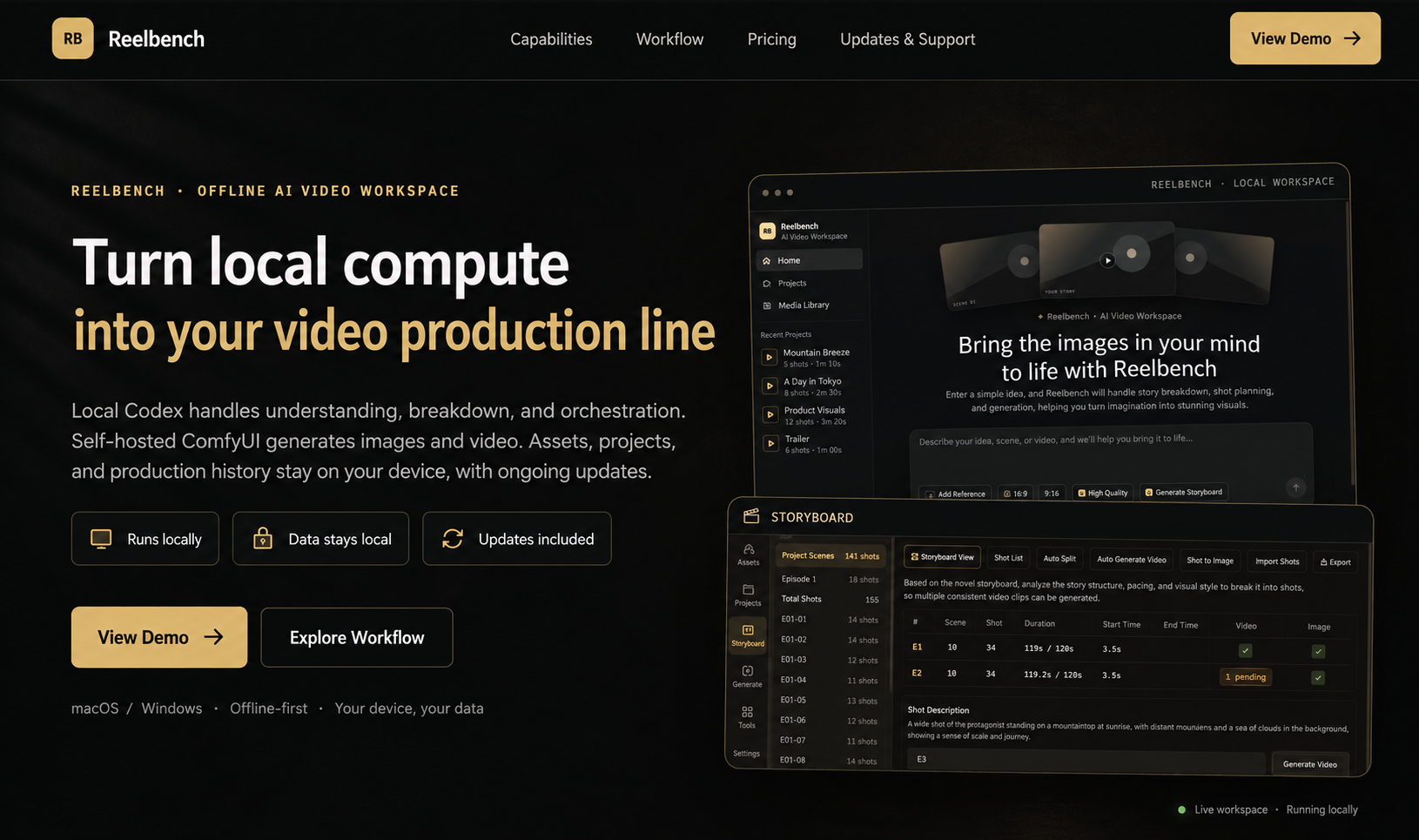 |
Reelbench Studio is a paid AI video workspace built by the author of these skills, delivered as source code that runs offline. Local Codex handles understanding, breakdown and orchestration, a self-hosted ComfyUI generates the images and video, and your assets and projects stay on your own machine. |
Skills
Agent-agnostic skills for AI short-drama production — from a novel to shoot-ready material: character bibles, adaptation outlines, scene & prop bibles, screenplays, opening staging, and storyboards. Each skill is self-contained and works with any Agent that can read SKILL.md and run the bundled scripts; Claude Code and Codex are two supported examples, not requirements.
The repository now contains seven skills: six production stages plus standalone character reference generation. The outline settles the adaptation; characters, art, and screenplay iterate together; staging fixes each scene's opening positions before storyboarding.
flowchart TD
    novel[Source novel] --> outline[novel-outline]
    outline --> characters[novel-characters]
    outline --> art[novel-art]
    outline --> script[novel-script]
    characters <--> art
    art <--> script
    script <--> characters
    characters -. Character designs .-> refs[character-refs]
    art --> staging[novel-staging]
    script --> staging
    staging -->|Copy opening blocking| storyboard[novel-storyboard]
    refs -. Reference images .-> storyboard
    storyboard --> production[Video production packs]
| Skill | What it does |
|---|---|
| novel-outline | Adapts a novel into a five-piece short-drama outline: adaptation notes, cast, beats, per-episode synopses, asset list (including a narrative-prop table). All 14 quality gates are script-checked; includes a checkup mode for existing outlines |
| novel-characters | Turns the cast the outline settled on into a character bible: profiles, design prompts, voice prompts, model sheets. Seeds the roster from outline.json; report language is configurable |
| character-refs | Actually generates reference images for characters from any story (not just novels — your own original story works too): describe a character in one message; it is split into fields, gaps filled and confirmed, then a front full-body anchor is generated and every other view (headshot, 90° profile, back, details) references only that anchor, in on-demand tiers. Every image is labeled and individually regenerable, with staleness tracked. Works with Qwen Image (ComfyUI), codex image generation, the GPT Image 2 API, or a custom command |
| novel-art | Art bibles for AI production (scenes + narrative props): consistency anchors, lighting & state variants, scale references, no-people/no-hands white plates. Seeds from outline.json; all 10 quality gates script-checked |
| novel-script | Screenwriting for AI short drama: scenes + beat flow (action beats alternating with dialogue lines), per-episode duration deterministically estimated from reading speed, a gated cold-open hook in the first 3 beats, a per-character line book with voice prompts that feeds straight into TTS. All 10 quality gates script-checked |
| novel-staging | Plans opening positions from the screenplay and scene images: each character’s seat or standing position, facing direction, opening presence, and extras. Produces staging.json, an editable top-view report, and opening blocking sentences for the storyboard. All 8 quality gates script-checked |
| novel-storyboard | Storyboarding for AI short drama: segments (one generation, ≤15s) → cuts (2–5s hard gate) → keyframes (master pinned at 0.00s, sub-frames at their cut marks), with MiniMax H3 prompt alignment and cut times audited verbatim; frames actually generated with the design sheets as references, plus one-command H3 / Seedance production packs. All 18 quality gates script-checked |
All six pipeline skills render their reports in English too — reports default to a Chinese UI; pass --lang en to render for a fully English report (data content stays as authored). character-refs ships Chinese, English and Japanese UIs too, and translates on the spot for other languages.
Scene Staging: inputs, outputs, and handoff
novel-staging runs after the screenplay and before the storyboard. It reads script.json for scenes and cast; art.json supplies locations, outline.json supplies character names, and scene images show the objects people can stand beside or sit on. The screenplay is required; the other inputs improve the result. Without scene images, positions inferred from the art specification are marked provisional. These files can come from any producer; no other skill installation is required.
| Output | What it provides |
|---|---|
staging.json |
Opening presence, anchor object, side, position, posture, facing, and extras for every scene |
staging.md (optional) |
Text export with inventories, position tables, and opening blocking sentences |
staging-report.html (default) |
Interactive tool report with a draggable top view and live checks; export edits back to JSON |
blocking command output |
One opening blocking sentence per scene, ready to copy into its first storyboard segment |
An Agent reads the scene images and plans the staging; the bundled Node.js tools seed the data, check the eight gates, render reports, and generate the blocking sentences. The HTML tool report is the default user-facing result and opens locally in a browser. JSON is working data; Markdown is generated only on request. To try the completed sample from the repository root:
node skills/novel-staging/scripts/novel-staging.mjs validate skills/novel-staging/examples/渡口-staging.json --script skills/novel-staging/references/test-fixtures/upstream/渡口-script.json --art skills/novel-staging/references/test-fixtures/upstream/渡口-art.json
node skills/novel-staging/scripts/novel-staging.mjs render skills/novel-staging/examples/渡口-staging.json --lang en > staging-report.html
node skills/novel-staging/scripts/novel-staging.mjs blocking skills/novel-staging/examples/渡口-staging.json --lang en
The storyboard does not automatically import staging.json yet. Give the Agent the accepted opening blocking sentences and ask it to copy each one into the first segment of its scene. This stage outputs staging data and reports; it does not generate images or video. See the skill guide for authoring a new staging plan.
One page for five stage reports
The assembler currently supports outline, characters, art, screenplay, and storyboard. It does not include the staging report or character-refs gallery. These five supported reports can be merged into a single page with a left-hand nav — you get a pane for every supported stage you actually have:
node scripts/report.mjs --from <demo-dir> --out report.html
--from discovers the five json files using the working-directory convention; you can also point at each one directly (--outline --cast --art --script --storyboard). Ran only the character pass? You get one pane, no error.
It is an assembler, not a separate skill: it imports no skill code, it shells out to each skill's own render --html and stitches the results. So the five skills stay untouched, still run standalone, and are still copyable on their own — and when a skill changes its rendering, this picks it up for free.
Merging solves three problems, all of them inside the assembler, none inside the skills:
- Style bleed. The five reports share 57 class names, 13 of which mean different things in different reports (
.copy,.kpis,.badge,.chip…), so every selector gets a scope prefix - Script bleed. Each report's script does document-wide lookups like
document.querySelector('.expo'). Merged, that only ever finds the first one — all five export buttons would break. Each script gets wrapped in a scoping proxy - Asset paths. Each report's images are relative to its own json directory (
images/…,E01-01/f1.png) and get rebased against the output file
One pane shows at a time by default (the five together run to roughly 600k characters). "Show all" in the bottom-left expands every pane so Cmd+F reaches the whole document. Number keys 1–5 switch panes, and #pane-script deep-links straight to one.
node scripts/report-selftest.mjs # 92 assertions, no browser needed
Reports from the six production stages:
novel-outline · short-drama adaptation outline
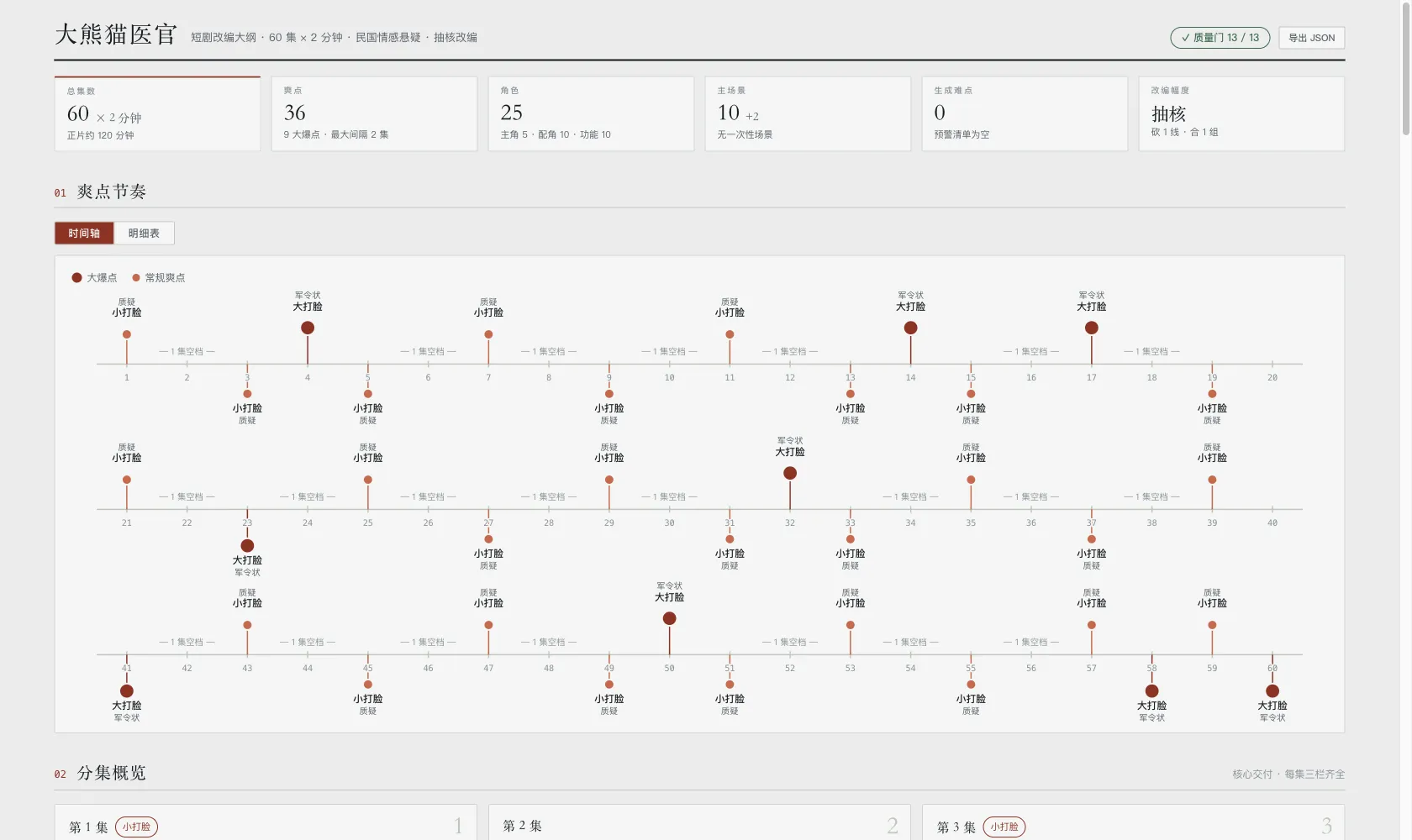
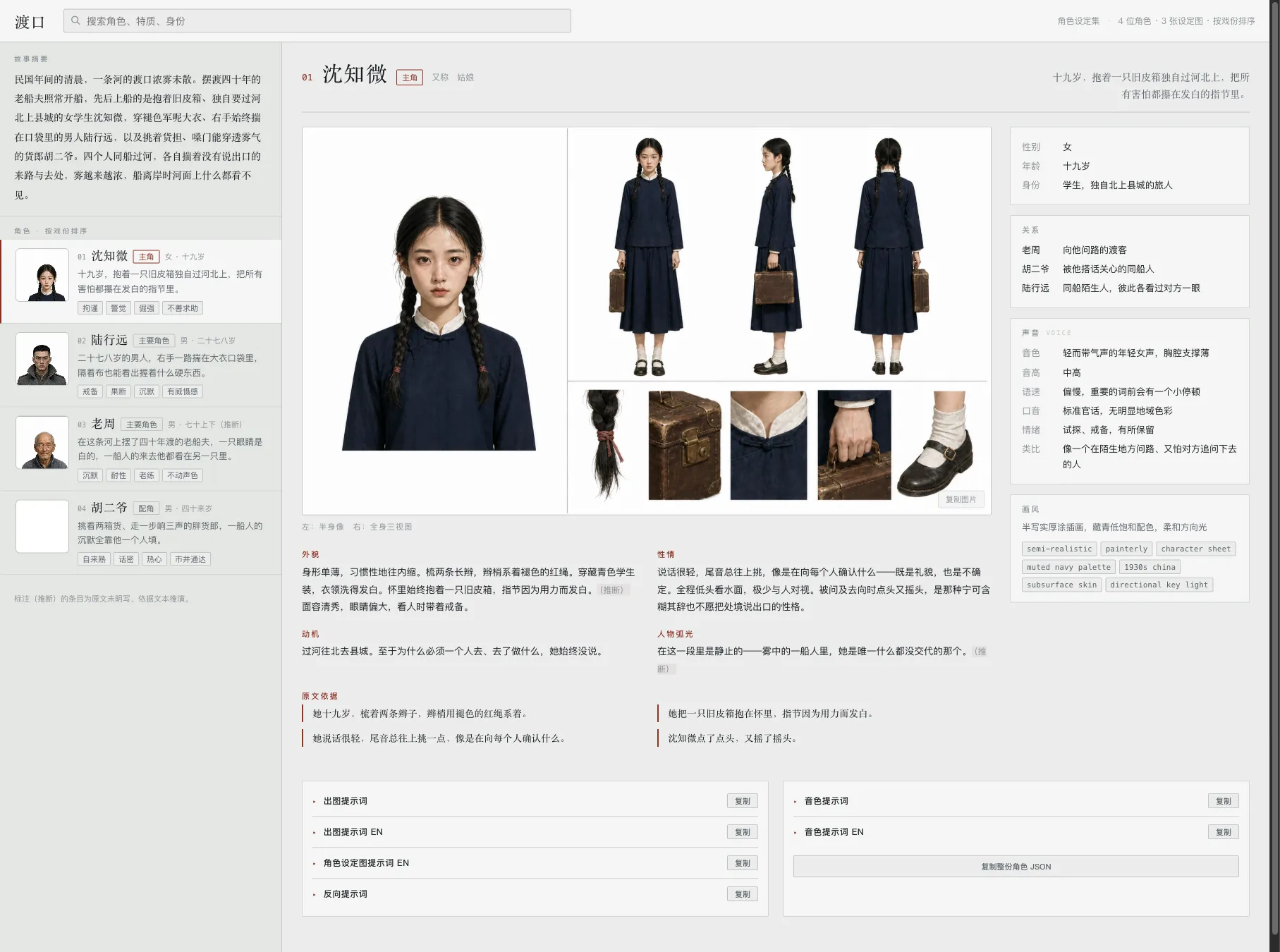
novel-characters · character bible
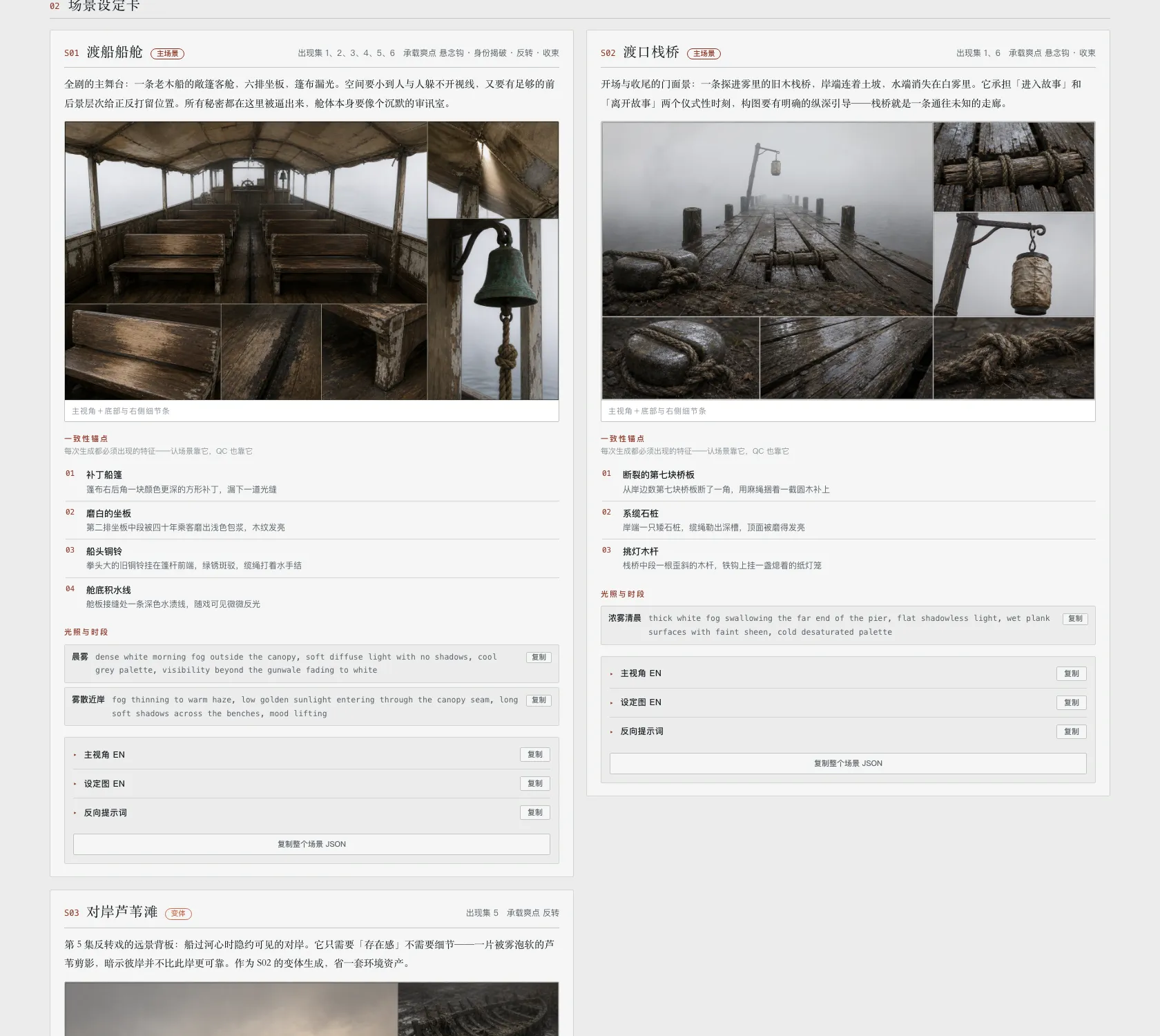
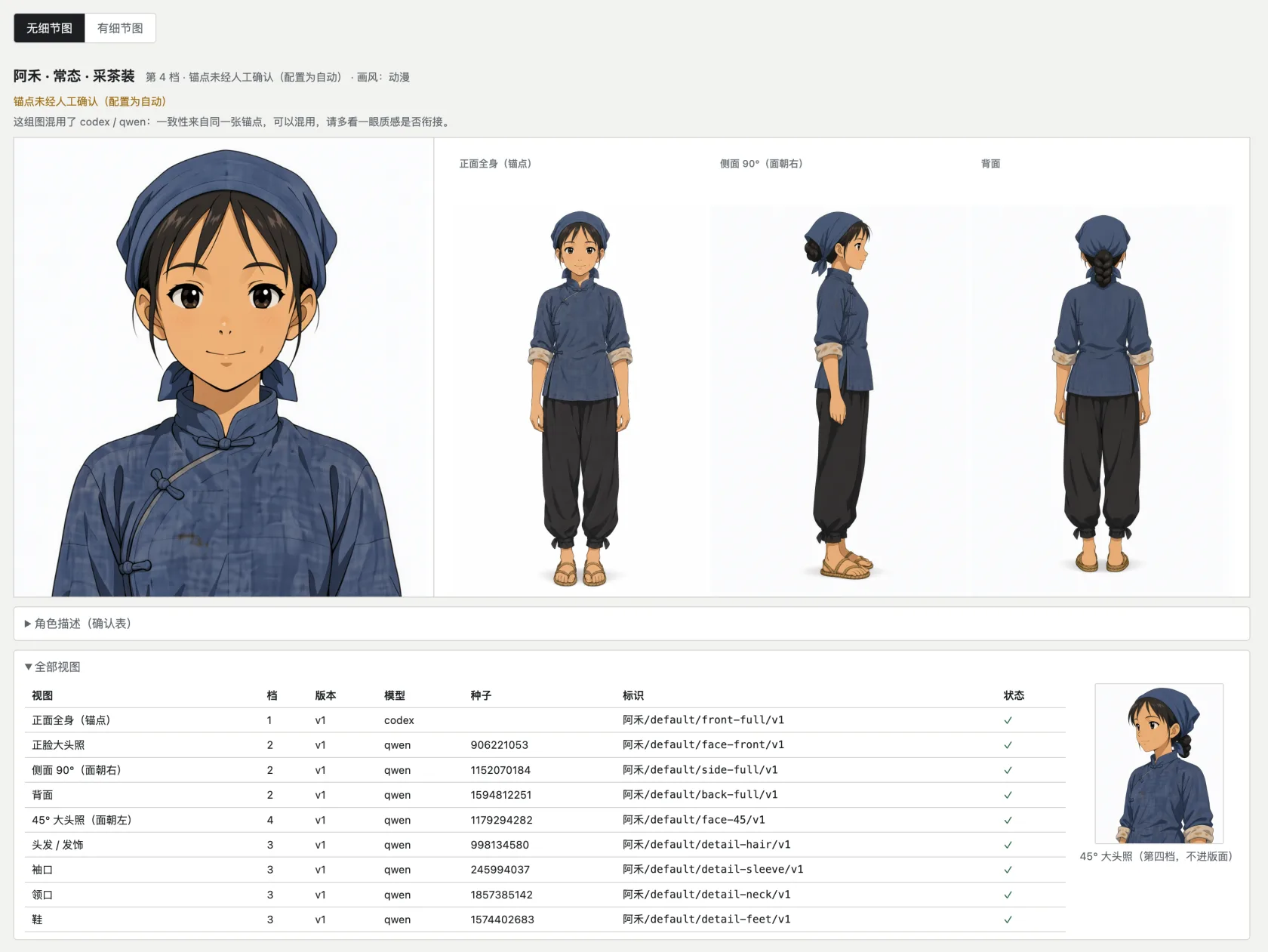
novel-art · art bible (scenes + props, sheets actually generated by the skill)
novel-script · screenplay (duration gauge + episode scripts + line book)
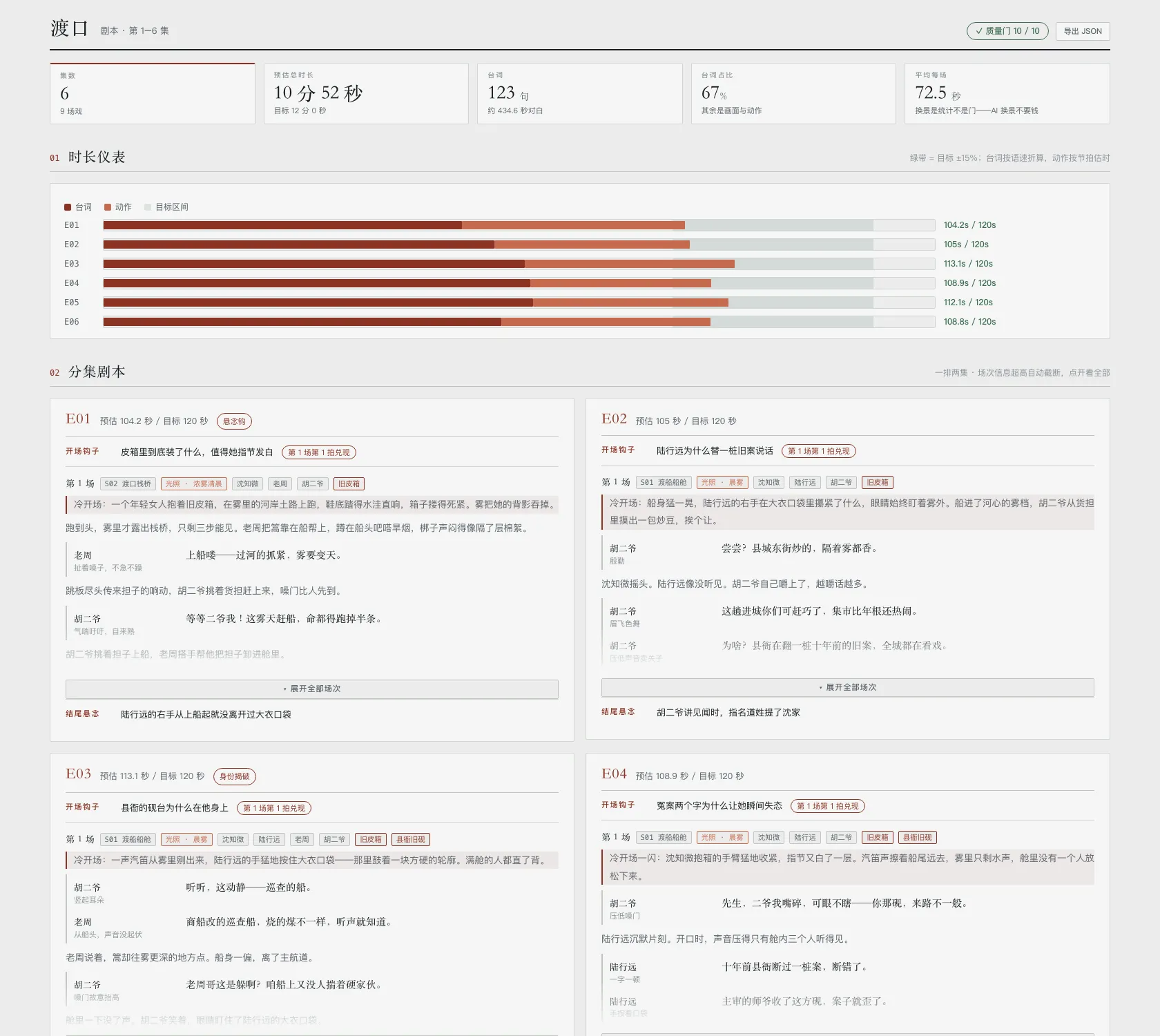
novel-staging · opening staging (a top view you drag people on, then export)
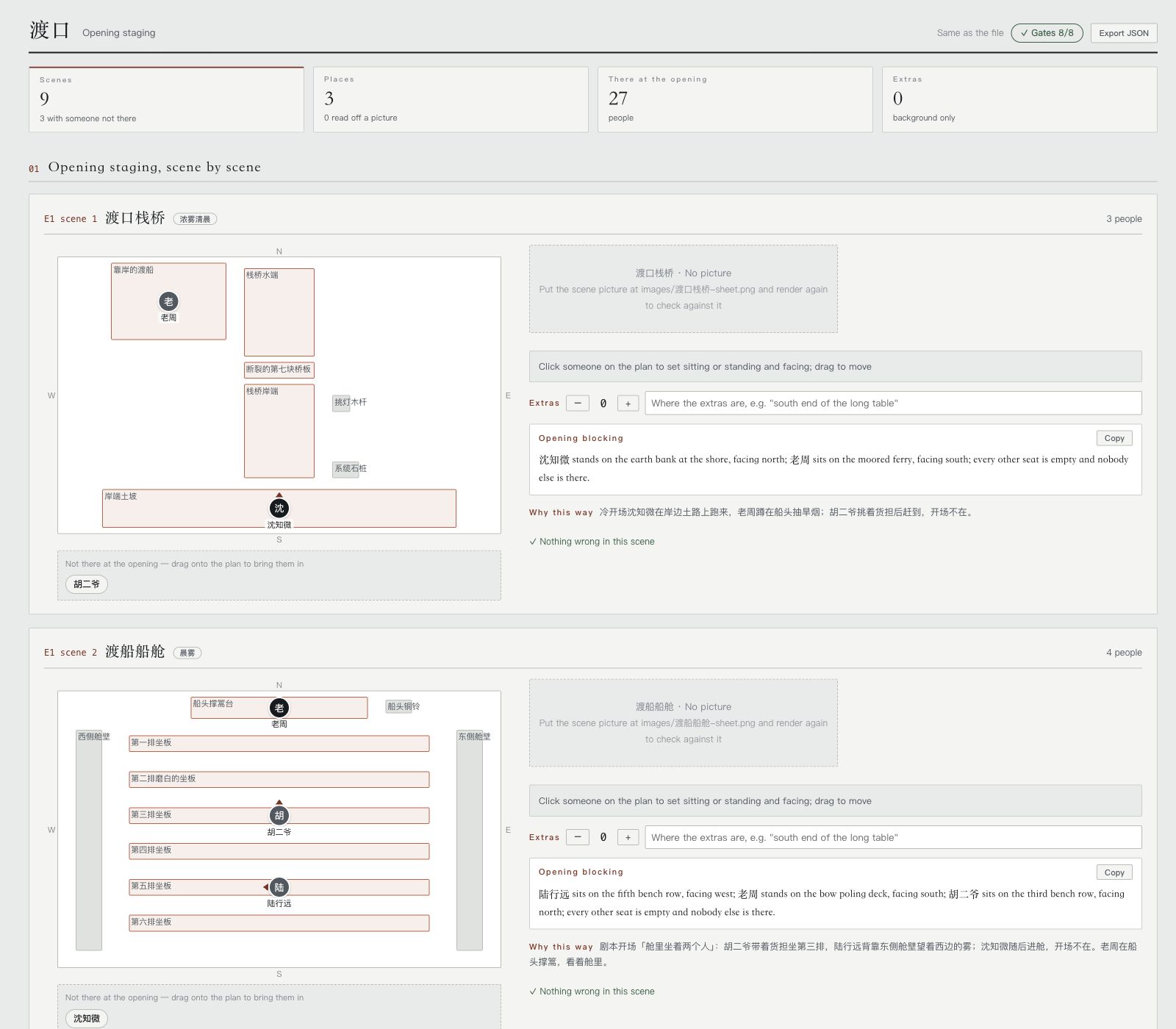
novel-storyboard · storyboard (cut rhythm strip + master/sub keyframes actually generated by the skill + H3 prompts)
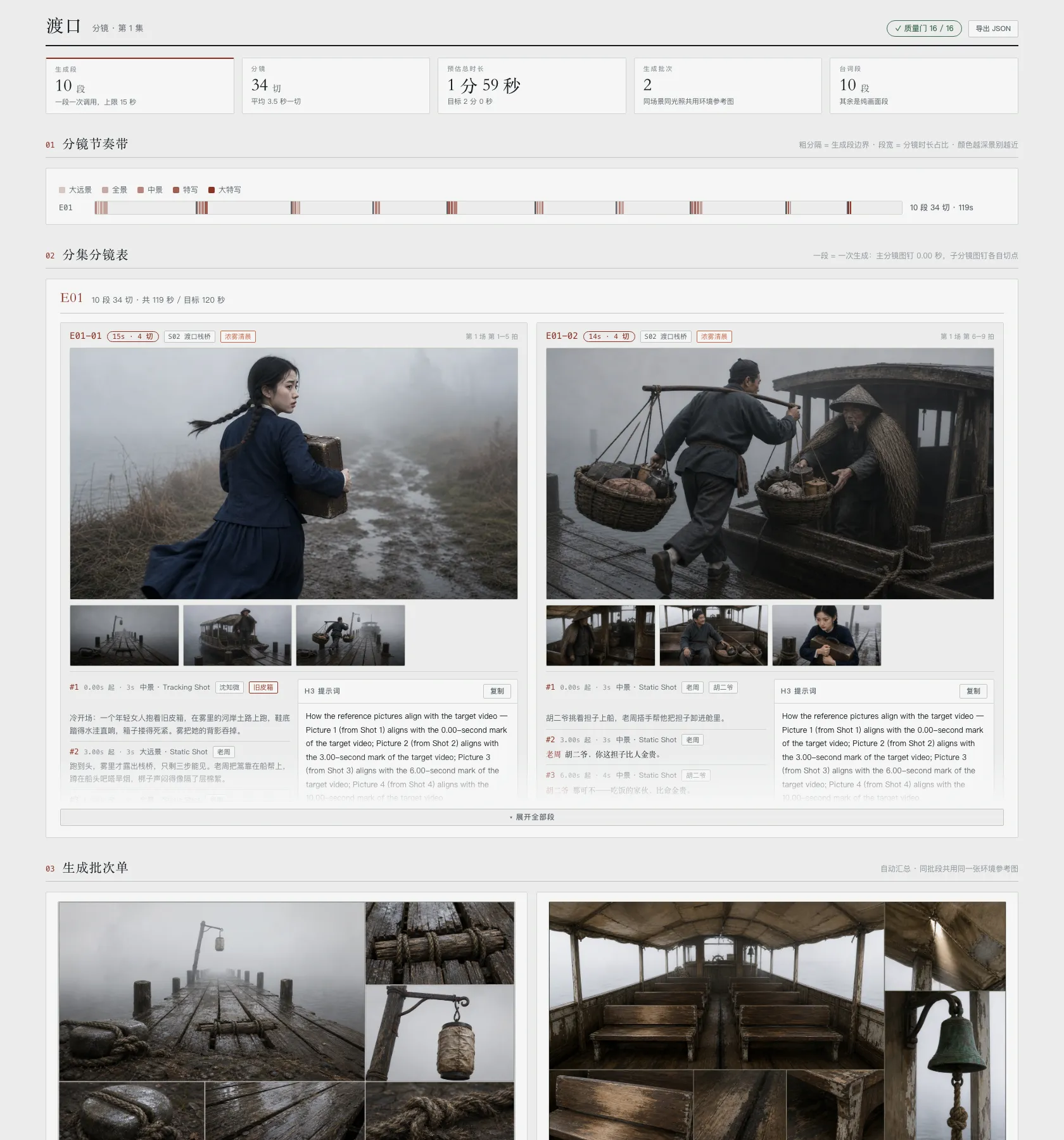
No novel needed for this one — real reference images for any character:
character-refs · character references (anchor by GPT, the rest by Qwen, all actually generated by the skill)
Install
git clone https://github.com/eternityspring/shuohao-skills.git
cd shuohao-skills
./scripts/install.sh
The installer currently detects Claude Code and Codex and symlinks every skill into place — so git pull takes effect immediately, with no reinstall. The skills themselves are not tied to either runtime. For any other Agent, copy or symlink the skill directory into its skills directory, or load its SKILL.md directly.
./scripts/install.sh novel-characters   # just one skill
./scripts/install.sh --codex            # only into codex
./scripts/install.sh --uninstall        # remove the symlinks
Prefer to do it by hand:
AGENT_SKILLS_DIR=/path/to/your-agent/skills
ln -s "$PWD/skills/novel-characters" "$AGENT_SKILLS_DIR/novel-characters"
ln -s "$PWD/skills/novel-characters" ~/.claude/skills/novel-characters
ln -s "$PWD/skills/novel-characters" ~/.codex/skills/novel-characters
Requirements
| Required? | Notes | |
|---|---|---|
| Node | Yes | ≥ 18. The skill scripts use only the standard library — no npm dependencies, nothing to install |
| Model quota | Yes | Uses your current session's quota. No API key needed |
| Agent runtime | Yes | Any Agent that can read SKILL.md and run the bundled Node.js scripts. Claude Code and Codex are supported examples |
| Image model | Only for character-refs | One of: your own ComfyUI (Qwen Image), local codex image generation (uses your ChatGPT plan quota), an OpenAI API key (GPT Image 2), or a custom command. Chosen on first use |
Note on output language. These skills are Chinese-first.
novel-charactersproduces Chinese character profiles even for an English source novel, and its validator actively rejects English in those fields. See that skill's README for what it would take to change.
Repository conventions
One directory per skill, self-contained and copyable on its own:
skills/<skill-name>/
├── SKILL.md          the workflow the agent reads (required)
├── README.md         the docs a human reads
├── scripts/
│   ├── <name>.mjs    deterministic helpers, zero dependencies
│   └── selftest.mjs  self-test, never calls a model (required)
├── references/       detailed instructions, loaded on demand
├── examples/         bundled samples that double as test fixtures
└── assets/           screenshots
Two hard requirements:
- Every skill must have a
SKILL.md - Every skill must have a
scripts/selftest.mjsthat calls no model and costs no quota, covering all deterministic logic
Run every self-test before adding a skill:
for f in skills/*/scripts/selftest.mjs; do node "$f"; done
There is no CI — the self-tests run in about a second, so running them locally beats waiting on a pipeline. Only tested on macOS with Node 24; there is no platform-specific code, so Linux and older Node releases should be fine, but that is unverified.