
Skill · #391 trending skills repo
Trade Pipeline Skill
Dangooy/trade-pipeline-skill
Foreign trade document automation: one inquiry Excel → Quotation / PI / CI / Packing List, all linked. 一份询价单,四单联动。Works with Claude Code, Codex, Kimi Code & other SKILL.md agents.
- Stars
- 38
- This week
- +0
- Forks
- 7
- Open issues
- 0
- Skills inside
- 2
Get started
Install the skills
npx skills add Dangooy/trade-pipeline-skillInstalls into Claude Code, Codex, Cursor, OpenCode and the other agents it finds on your machine.
git clone --depth 1 https://github.com/Dangooy/trade-pipeline-skill.git /tmp/trade-pipeline-skill
cp -r /tmp/trade-pipeline-skill ~/.claude/skills/trade-pipeline-skillClaude Code reads ~/.claude/skills/ (or .claude/skills/ in a project). Other agents read the same SKILL.md format from their own skills folder.
Inside this repo
2 skills
Documentation
README
Trade Pipeline — Trade Documentation Automation Tool
English | 中文 | Русский | Technical Deep-Dive
📖 中文用户请点这里:完整中文文档 → README_CN.md —— 一份询价单,自动生成报价单 / PI / CI / 装箱单,改一处四单联动。
One set of data, auto-generates your Quotation, PI, CI, and Packing List.
No more copy-pasting between a dozen Excel files.
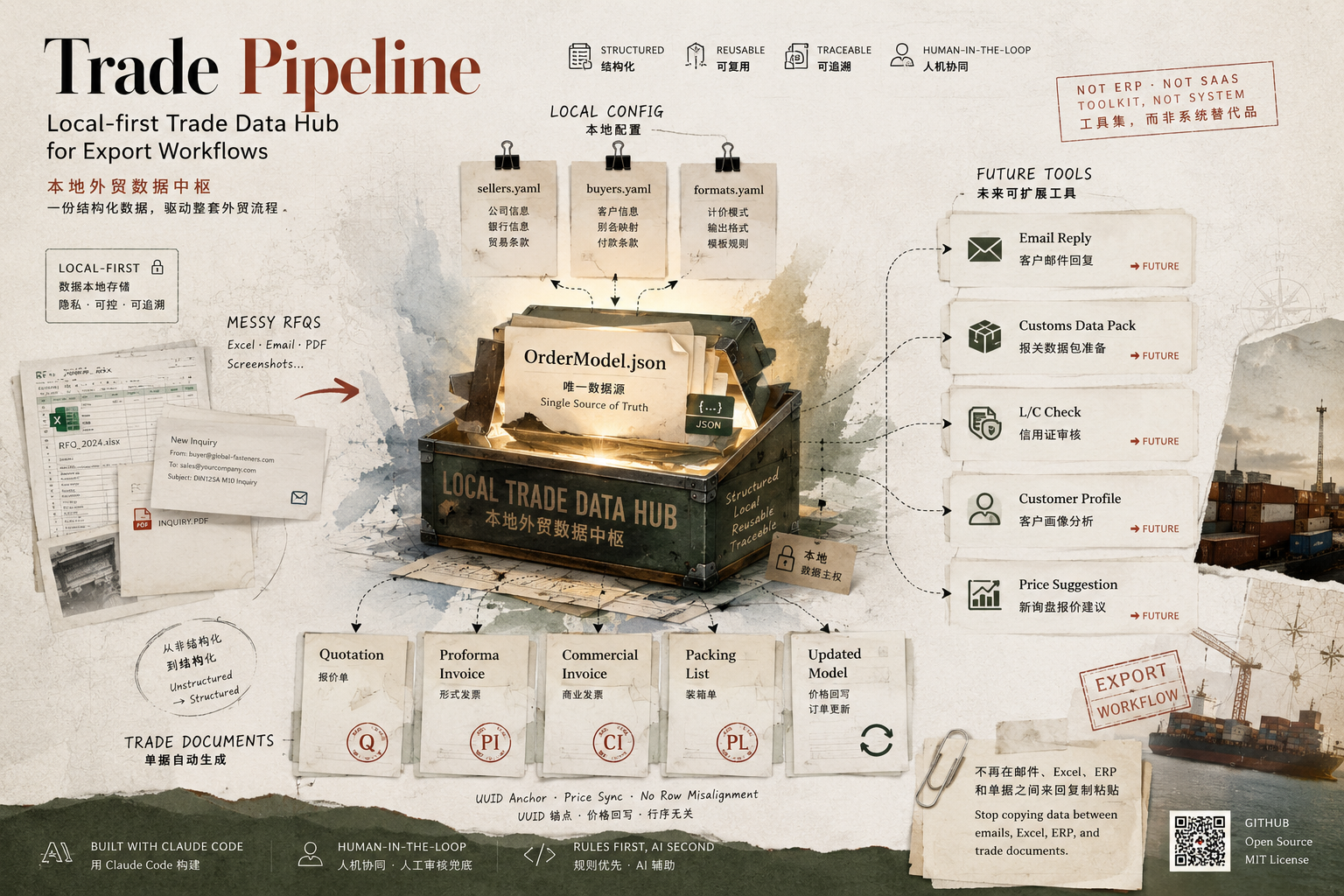
How to use it: an AI Skill
This is an AI Agent Skill (in SKILL.md format). Once installed, you just talk to it in plain language — "Turn this inquiry into a Quotation," "The customer confirmed, generate the PI/CI/PL" — and the AI handles the whole process. No commands to memorize. SKILL.md is a cross-agent standard — besides Claude Code and WorkBuddy, agents like Codex, Kimi Code, and DeepSeek Harness can load it too.
👉 Install and use it: with Claude Code · with Tencent WorkBuddy · other agents
Does this sound like your week?
- Customer sends an inquiry Excel → you manually copy product names, specs, and quantities into a Quotation
- Customer confirms → you manually copy the same data again to make a PI
- Goods are ready → you copy it all again to make the CI and Packing List
- A quantity typo in the PI → the CI, PL, and customs paperwork all inherit the error, and you have to hunt them down one by one
- Different customers need different PI formats (Russian customers want Russian, European customers want English) → you end up maintaining several template sets
Every document is essentially the same data in a different layout, but you rebuild it from scratch every single time.
Trade Pipeline's solution is simple: maintain a single order record, and generate every document from it automatically. Change one thing, and all four documents update together.
What it does for you
Automatically turns a customer's inquiry Excel into the full set of documents:
| Document | Description |
|---|---|
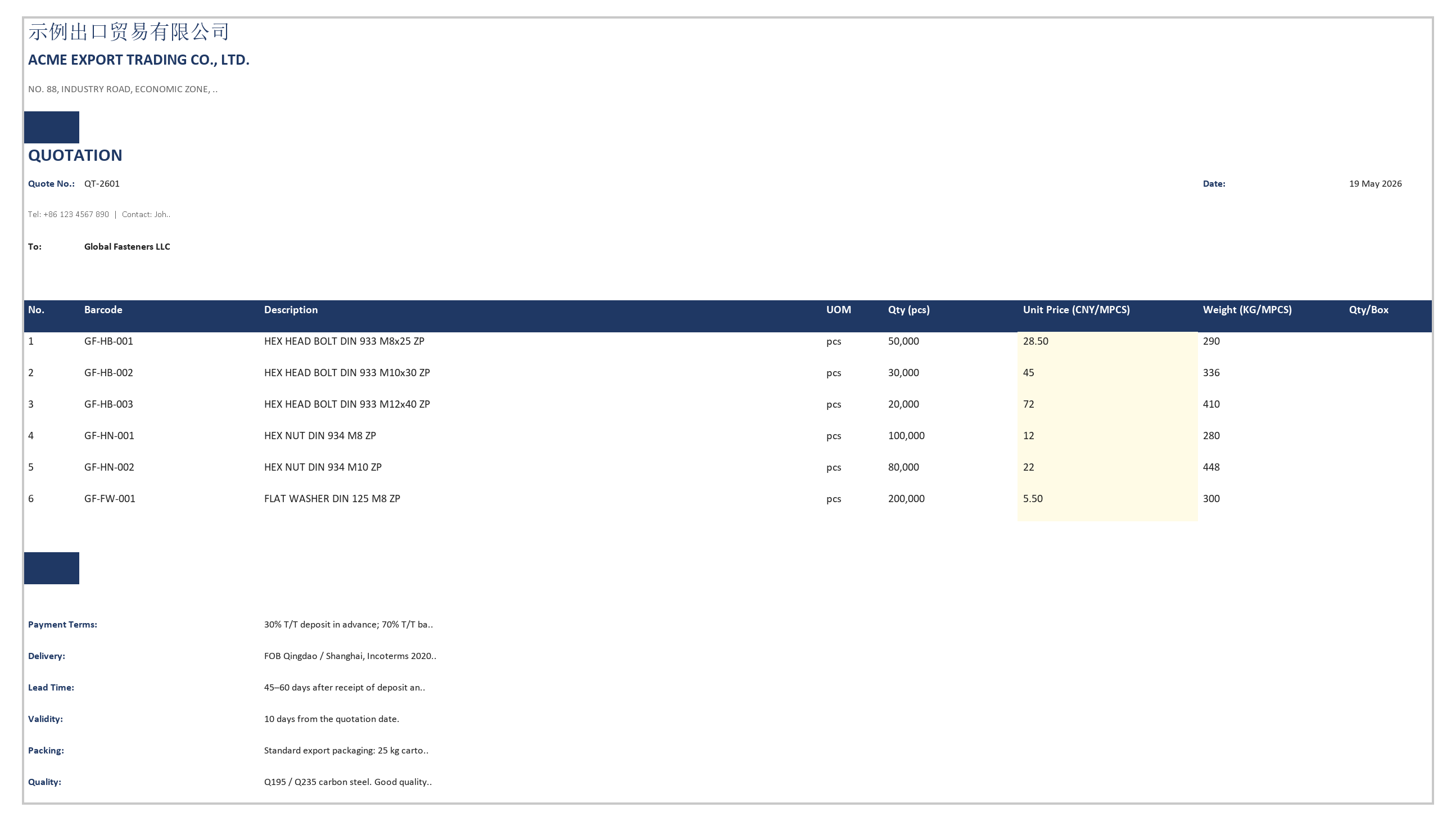
| 📋 Quotation | Company letterhead, product line items, unit price column left blank for you to fill in, amount column auto-calculates as you fill |
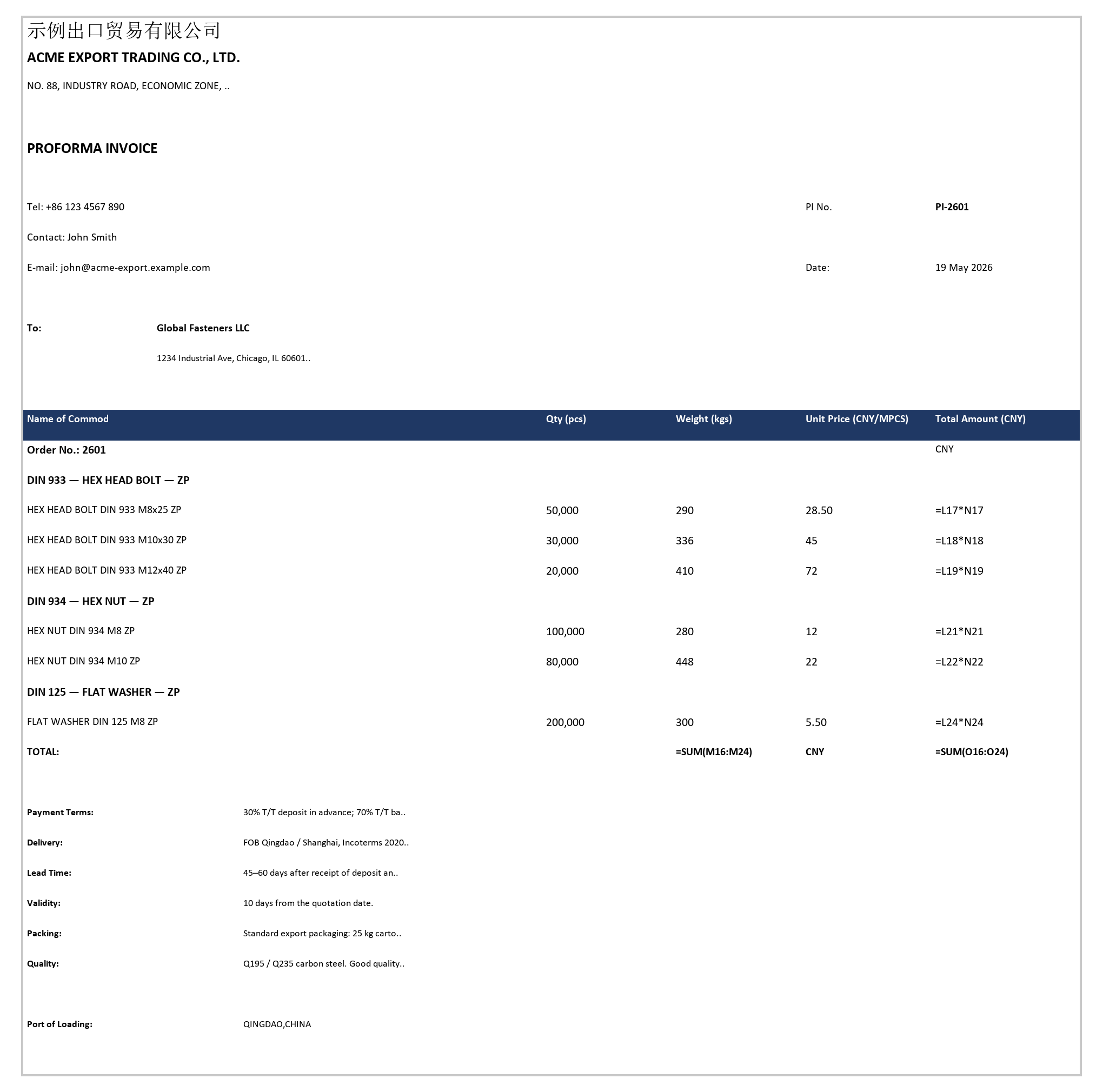
| 📄 Proforma Invoice (PI) | Seller/buyer information, payment terms, trade terms |
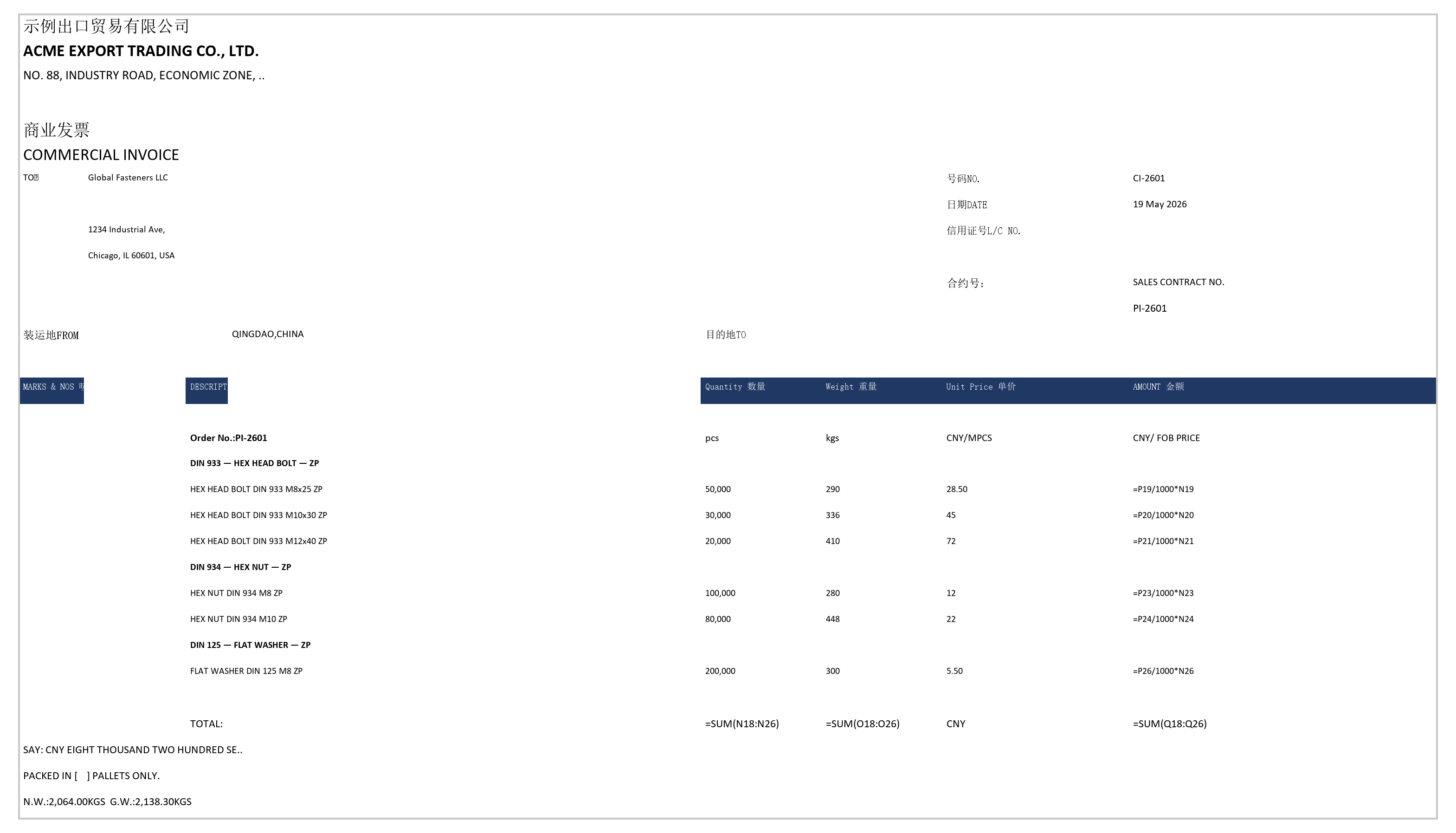
| 📄 Commercial Invoice (CI) | Bilingual (Chinese/English) header, shipping marks, shipment info, SAY amount |
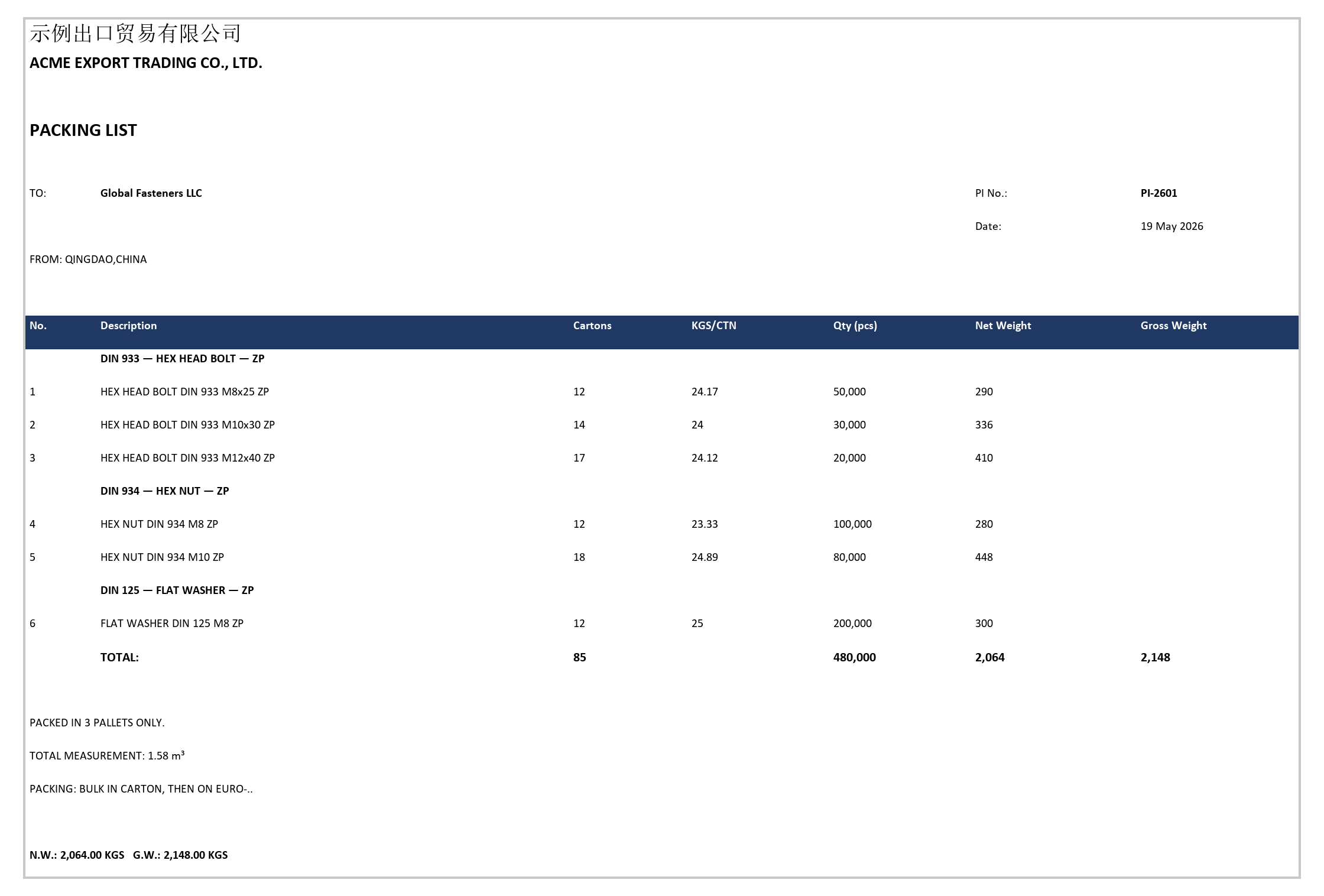
| 📦 Packing List (PL) | Per-carton breakdown, carton count/weight/quantity, pallet summary |
Quotation — fill in unit prices in the yellow-highlighted column (amounts calculate automatically); write them back to the order record with one click:
Proforma Invoice (PI) — seller/buyer header, grouped product rows, payment terms:
Commercial Invoice (CI) — bilingual Chinese/English, shipping marks, shipment info, SAY amount in words:
Packing List (PL) — grouped line items, carton count/weight/quantity, net/gross weight, pallet summary:
Who this is for
| Your situation | Good fit? |
|---|---|
| No ERP, running on Excel + email + WeChat | ✅ Core use case, use it directly |
| Have Yonyou/Kingdee/Wangdiantong, but weak trade-document support | ✅ Good fit, fills the gap on document input/output |
| Using an open-source ERP like Odoo / ERPNext | ✅ Can be integrated as an inquiry-parsing module |
| Using SAP B1 / NetSuite / Dynamics 365 with a mature setup | ⚠️ Not much added value |
| Tens of thousands of orders a year, already on EDI/API integration | ❌ Use an enterprise-grade solution instead |
Best-fit profile
- Annual order volume: 50–500 orders
- Product SKUs: < 5,000
- Primary markets: Russia / Eastern Europe / South America / Middle East
- Team size: 1–3 trade sales staff
No coding background at all? That's fine. Once you've read the sections above, you'll know whether this is for you. The install and setup steps involve a bit of command-line work, but no programming knowledge is required — just copy and paste as you go.
How it relates to your ERP
Trade Pipeline is not a replacement for your ERP. ERPs handle inventory, finance, receivables/payables, and tax — this tool doesn't do any of that, and isn't meant to.
What it fills in is the front and back ends that ERPs tend to handle poorly:
| Where ERPs fall short | How Trade Pipeline fills the gap |
|---|---|
| Customer inquiry Excels need to be manually entered | Automatically extracts product data |
| Inconsistent customer name spellings (especially common with Russian customers) that ERPs can't match | 4-layer fault-tolerant matching; if it can't match, it stops and lets you choose |
| Every customer wants a different PI/CI format, and changing ERP templates means calling a consultant | Just edit a config file — takes 5 minutes |
| Customer reorders rows after exporting the Quotation, and re-importing scrambles all the prices | Every row carries a hidden marker, so reordering rows never breaks anything |
| No dedicated field for DIN/ISO/GOST standard numbers | Automatically recognizes and normalizes standard numbers |
What it is not
- ❌ Not an ERP — doesn't manage inventory, finance, or tax
- ❌ Not an online system — no accounts, no customer support portal; all data stays on your own computer
- ❌ Not a multi-user collaboration platform — best suited for teams of 1–3 people
- ❌ Not "AI doing your trade business for you" — the AI only helps parse messily formatted inquiries; everything else is deterministic, rule-based logic
- ❌ Does not connect directly to customs — it can prepare the data your customs broker needs, but it cannot submit directly to the Single Window system
To be upfront: what industry this is built for
This tool was built for my own company, so it's shaped around the characteristics of the hardware / fastener industry:
- Pricing is primarily weight-based (KG / metric ton)
- Product specs are relatively fixed (the DIN / ISO / GOST standard-parts world)
- Packaging conventions are fairly standardized
If you're also in hardware / fasteners (bolts, nuts, washers, standard parts, wire products, pipe fittings, flanges, bearings, seals, etc.), you can probably get it running just by updating your company info and the translation tables.
If you're in a different industry, your specs, pricing basis (per piece / per set / per meter), and weight/packaging logic will all differ, so this tool won't work out of the box — you'd need to adapt it, mainly in these three places:
| What to change | Where |
|---|---|
| Product recognition / Chinese-English translation | understanding/canonicalizer.py + the translation tables |
| Pricing model (if not weight-based) | Pricing-detection logic in understanding/ |
| Document templates (headers, fields, layout) | The individual Writers under writers/ |
The framework itself is solid, but how much adaptation work you need depends on how complex your industry is.
In short: hardware / fasteners can use it as-is; other industries should treat it as an adaptable foundation.
Industries that would take more work: apparel (complex size matrices), electronic components (nested BOMs), bulk commodities (futures-based pricing), cross-border e-commerce (tens of thousands of SKUs) — these require substantial rework, so go in with that expectation.
What's planned for the future
| Direction | Description |
|---|---|
| 🔜 Email assistance | Read customer info and quote history to help draft replies |
| 🔜 Follow-up scripts | Generate WhatsApp / WeChat message drafts based on order status |
| 🔜 Customs data package | Automatically compile the cargo description, HS codes, package count, and net/gross weight your customs broker needs |
| 🔜 L/C review | Automatically cross-check key Letter of Credit terms against order data |
| 🔜 Customer profiling | Track each customer's order frequency, value, and product categories |
| 🔜 Pricing suggestions | When a new inquiry comes in, automatically reference historical closing prices to suggest a quote |
These are future directions — none of them exist in the current version yet. Items marked 🔜 are not coming immediately.
Want to try it? Click here for installation and usage
Prerequisites
You'll need two things installed on your computer (skip anything you already have):
| Software | Purpose | Install guide |
|---|---|---|
| Python 3.12 or later | Runs this tool | python.org/downloads |
| Git | Downloads the code | git-scm.com/downloads |
Not sure if you have them? Open a command line (Windows: press Win+R and type
cmd; Mac: open "Terminal"), then typegit --version, followed bypython --version(on Mac / Linux usepython3 --version— those systems have no barepythoncommand). If a version number shows up, you're good.
Installation
Install and use it with Claude Code
If you haven't used Claude Code before: it's Anthropic's official AI coding / automation tool. Install it once, and you can use it for documents, drafting emails, and organizing data going forward. Once the plugin is installed, just talk to it in plain language — no commands to memorize.
Step 1: Clone the repo and install the core engine
git clone https://github.com/Dangooy/trade-pipeline-skill.git
cd trade-pipeline-skill

# Create a virtual environment — don't skip this, see the note below
python3 -m venv .venv && source .venv/bin/activate    # Mac / Linux
# Windows PowerShell: py -m venv .venv; .\.venv\Scripts\Activate.ps1

pip install -e .
Why the virtual environment: modern macOS (Homebrew) and most Linux distros protect their system Python — a bare
pip installis refused withexternally-managed-environment. A venv is the officially recommended approach: everything stays inside the project folder and nothing pollutes your system.Once activated your prompt shows
(.venv), and bothpythonandpipresolve to that environment — no morepythonvspython3guessing. After closing the terminal, re-runsource .venv/bin/activate(Windows:.\.venv\Scripts\Activate.ps1) when you come back.
Step 2: Load the plugin in Claude Code
This repo ships with a Claude Code plugin (.claude-plugin/plugin.json) containing two Skills:
| Skill name | What it does |
|---|---|
trade-pipeline-init |
First-time setup wizard (company info, trade terms, first customer) |
trade-pipeline-run |
Runs the documentation pipeline / price write-back |
Launch Claude Code from within the repo directory, and use the /plugin command to load the local repo as a plugin (you'll need to trust this directory the first time). Once loaded, both Skills register automatically.
Step 3: Just talk to it
Initialize configuration                             → triggers trade-pipeline-init, walks you through your company info step by step
Turn examples/sample_inquiry.xlsx into a Quotation    → triggers trade-pipeline-run, runs the full pipeline automatically
The customer confirmed, write back prices and generate the PI/CI/PL   → automatically writes back prices + generates the formal documents
The Skill runs a deterministic engine behind the scenes to generate the documents — you never have to type parameters by hand. Just tell Claude what you need done, and it puts it together.
Install and use it with Tencent WorkBuddy
If you're in China and using WorkBuddy (Tencent's desktop AI agent), it works too — it's compatible with the SKILL.md skill format, so you just copy the skill directory over.
Prerequisite: Python 3.11+ and Git must already be installed on your computer. This skill calls the Python engine underneath, so this step can't be skipped.
Windows (PowerShell)
# 1. Download the project and install the engine
git clone https://github.com/Dangooy/trade-pipeline-skill.git
cd trade-pipeline-skill
py -m venv .venv; .\.venv\Scripts\Activate.ps1
pip install -e .

# 2. Copy both skills into the WorkBuddy skills directory
mkdir "$env:USERPROFILE\.workbuddy\skills" -Force
Copy-Item -Recurse -Force ".\.claude\skills\trade-pipeline-init" "$env:USERPROFILE\.workbuddy\skills\"
Copy-Item -Recurse -Force ".\.claude\skills\trade-pipeline-run"  "$env:USERPROFILE\.workbuddy\skills\"
Mac / Linux (Terminal)
# 1. Download the project and install the engine
git clone https://github.com/Dangooy/trade-pipeline-skill.git
cd trade-pipeline-skill
python3 -m venv .venv && source .venv/bin/activate
pip install -e .

# 2. Copy both skills into the WorkBuddy skills directory
mkdir -p ~/.workbuddy/skills
cp -r .claude/skills/trade-pipeline-init ~/.workbuddy/skills/
cp -r .claude/skills/trade-pipeline-run  ~/.workbuddy/skills/
Once installed, trigger it manually in a WorkBuddy conversation:
@trade-pipeline-run Turn this inquiry into a Quotation
Note: WorkBuddy runs on domestic models (Hunyuan / DeepSeek / GLM, etc.), not Claude. The skill's prompts are written for how Claude interprets instructions, so with a different model, triggering or step comprehension may occasionally be off — it's normal if it doesn't go smoothly the first time. Feel free to file an issue with feedback.
Other SKILL.md-compatible agents (Codex / Kimi Code / DeepSeek Harness / Pi…)
Any agent that supports the SKILL.md format can load these two skills — copy both directories from .claude/skills/ into your agent's skills directory:
| Agent | Skills directory |
|---|---|
| Claude Code | load via /plugin (recommended, see above) |
| Codex CLI | ~/.codex/skills/ |
| Kimi Code CLI | automatically reads .claude/skills/ and other agents' skill directories |
| DeepSeek Harness | .dsh/skills/ |
| Pi | ~/.pi/agent/skills/ |
| Tencent WorkBuddy | ~/.workbuddy/skills/ (see above) |
Two honest caveats: (1) the skill prompts are tuned for how Claude interprets instructions — other models may occasionally mis-trigger or misread a step; (2)
trade-pipeline-inituses Claude Code'sAskUserQuestioninteraction — other agents fall back to plain dialogue, which works but feels different. Check each agent's official docs for its exact skills directory.
First-time setup
Since your company information gets printed on the Quotation, PI, and CI, you'll need to fill in some basic details before first use.
Tell it "Initialize configuration" in Claude Code (this triggers trade-pipeline-init), and it will ask you for the following, one item at a time:
| Info | Used on | Required? |
|---|---|---|
| Company name (Chinese/English) | Header of every document | Yes |
| Address | PI/CI header | Yes |
| Contact person / email / phone | Quotation and PI | Yes |
| Bank details | PI payment info | No (can add later) |
| Trade terms | FOB / CIF / DDP / EXW / CFR | Yes |
| Currency | USD / CNY / EUR | Yes |
| Port of shipment | PI/CI footer | Yes |
| First customer | Buyer information | No (can start with a placeholder customer _new) |
This information is stored in a file called
config/config.yaml. YAML is a simple text format you can open and edit with any text editor — it reads like a shopping list, no programming knowledge required.
Day-to-day use: just talk to Claude
Once the plugin is installed, you don't need to memorize any commands — just tell Claude what you need in plain language. Common phrasings:
| What you say to Claude | What it does |
|---|---|
| "Turn this inquiry into a Quotation" (with the Excel attached) | Parses the inquiry → generates a Quotation (for price negotiation with the customer) |
| "The customer confirmed, write back prices and generate the PI/CI/PL" | Writes the filled-in unit prices back to the order record → generates the Proforma Invoice / Commercial Invoice / Packing List |
| "This is a new customer, use a placeholder identity for the Quotation for now" | Generates the Quotation under a placeholder buyer identity; fill in customer details later |
| "The customer name didn't match, help me confirm it" | Lists candidate customers for you to choose from, then continues generating |
Recommended workflow: generate the Quotation first to negotiate price, and only write back prices / generate the formal documents (PI/CI/PL) after the customer confirms. This way you don't have to redo the whole document set repeatedly during the quoting stage.
Developer reference: the underlying CLI commands (what the Skill calls behind the scenes)
# Phase 1: generate the Quotation only (for price negotiation with the customer)
python -m trade_pipeline --input inquiry.xlsx --order 2601 --buyer global_fasteners --quote-only

# Phase 2: after customer confirmation, write back prices + generate PI / CI / PL
python -m trade_pipeline --price-update output/2601/2601_quotation.xlsx --model output/2601/2601_model.json

# Generate everything in one go (for rush orders or demos):
python -m trade_pipeline --input inquiry.xlsx --order 2601 --buyer global_fasteners

# New customer (use a placeholder identity for now, fill in details later):
python -m trade_pipeline --input inquiry.xlsx --order 2601 --buyer _new --quote-only

# When the system can't match a customer name, it stops and generates review.json — confirm, then continue:
python -m trade_pipeline --input inquiry.xlsx --order 2601 --confirm output/2601/2601_review.json
Output files
output/2601/
├── 2601_rfq.json           # Data extracted from the inquiry
├── 2601_model.json         # Order record (every document is generated from this)
├── 2601_quotation.xlsx     # Quotation
├── 2601_pi.xlsx            # Proforma Invoice
├── 2601_ci.xlsx            # Commercial Invoice
└── 2601_pl.xlsx            # Packing List
Technical details (for developers and technical evaluators)
The architecture diagram, 8-step pipeline, key design decisions, full CLI reference, testing approach, and tech stack are all covered in the separate technical deep-dive:
How this tool came to be
I'm not a professional programmer — I work in trade sales at a manufacturing factory, or more precisely, I'm what's called a "second-generation factory owner's kid." Given the limited resources available to me, I really needed a powerful assistant-type tool: an AGENT.
The reason this tool exists is simple: I was spending several hours a week manually producing trade documents, and got sick of it. Claude Code helped me turn years of accumulated business experience into a working automated system.
Here's an example: the first version of the price write-back feature worked by row number — the price on row 3 got written back to row 3. Technically correct. Until one day a customer inserted a few group-header rows into the Quotation, and when I ran the write-back — every price got shifted out of place, and the PI inherited the same errors.
I told Claude about the bug, and its first instinct was "exclude header rows during parsing." I said that wouldn't work — there's no predicting how a customer will edit an Excel file. We went back and forth for three rounds, and I finally suggested, "What if every row carried a hidden ID card?" Claude implemented the hidden UUID column approach.
This kind of design doesn't show up in programming tutorials, because it came from a real production bug.
AI coding tools are at their most powerful when you bring deep domain knowledge — I know exactly what a PI should look like, because I've made hundreds of them by hand.
Where your data lives
All customer information, order data, and generated documents stay on your own computer — nothing gets uploaded to any server.
| File | What it stores |
|---|---|
config/config.yaml |
Your company info, customer info, trade terms (editable with any text editor) |
output/order-number/ |
Each order's record and its full set of generated documents |
This means:
- ✅ You have complete control over your data
- ✅ You can track every change with Git
- ⚠️ You're responsible for your own backups (recommend periodically copying to an external drive or encrypted cloud storage)
⚠️ One exception — optional LLM parsing (
--use-llm): the default parser runs entirely locally, with no network calls. Only when you explicitly enable--use-llmdoes the tool send the raw inquiry contents (including customer names, products, and quantities) to the Anthropic cloud API to help parse unusual formats. This switch is off by default and requires an explicit opt-in — for sensitive or confidential documents, stay on the default local mode.
About the author
Built by Yang Tian (Ethan Yang) — factory-side trade practitioner, not a professional programmer. More trade AI skills: tianji-skills (B2B lead research, RFQ intake, document verification). Public profile: @Dangooy.
License
MIT — free to use, free to modify.
Curious what changed in each release?
Release notes (full changelog in CHANGELOG.md)
Ran into a problem?
File an Issue (no technical background needed — just describe what you saw and what you expected)
Releases