
Pack · #138 trending skills repo · ↗ +156 stars this week
OpenChatCut
0xsline/OpenChatCut
Open-source, local-first conversational AI video editor with a professional multi-track timeline, Agent Skills, MCP integration, and Remotion rendering.
- Stars
- 3.0k
- This week
- +156
- Forks
- 445
- Open issues
- 20
- Skills inside
- 31
Get started
Install the skills
npx skills add 0xsline/OpenChatCutInstalls into Claude Code, Codex, Cursor, OpenCode and the other agents it finds on your machine.
git clone --depth 1 https://github.com/0xsline/OpenChatCut.git /tmp/openchatcut
cp -r /tmp/openchatcut ~/.claude/skills/openchatcutClaude Code reads ~/.claude/skills/ (or .claude/skills/ in a project). Other agents read the same SKILL.md format from their own skills folder.
Inside this repo
31 skills
skills/openchatcutai-cinematic-short-filmPlan AI short films with story, shots, prompts, and continuity.src/agent/skills/ai-cinematic-short-filmasset-importUse when acquiring or importing media into a OpenChatCut project asset library for video editing or creation, including local/attached videos, user-provided paths, public media URLs, web video/audio/image assets, upload fallback decisions, and deciding between import_media, download_media, or manualsrc/agent/skills/asset-importbatch-montage-variantsTurn one pool of existing project media into a batch of distinct, publishable montage cuts instead of a single hero edit. Use for batch montage, one-source-many-outputs, 一源多出, 批量混剪, 批量出片, 矩阵号, 多账号分发, variant batches, deduped cuts, 去重变体, 防搬运, or when the user asks for N different versions of the samesrc/agent/skills/batch-montage-variantsbeat-sync-montagePlan and build a finished beat-synced montage where cut placement serves the content, not just the metronome. Use for 卡点混剪, 卡点剪辑, 踩点视频, beat-sync montage, rhythm edit, 节奏剪辑, 音乐驱动剪辑, or when the user wants cuts that land on the beat.src/agent/skills/beat-sync-montagecreate-motion-graphicsUse whenever the agent needs to add, create, hand-author, patch, or place Motion Graphic JSX assets in a OpenChatCut project. This is the direct-authoring path: use create_motion_graphic_from_code / edit_asset / edit_item, not motion-graphic-gen or submit_motion_graphic. Covers project/timeline intasrc/agent/skills/create-motion-graphicsecommerce-product-montageAssemble product footage, UGC, and b-roll into a conversion-oriented montage with a hook → pain → demo → proof → CTA rhythm. Use for 带货混剪, 产品混剪, 商品短视频, 种草视频, ecommerce montage, product reel, UGC cutdown, or when the user wants selling footage cut into a short that converts.src/agent/skills/ecommerce-product-montageexplainer-videoCreate finished explainer videos from a topic, script, outline, voiceover, product logic, data, technical concept, course material, or reference assets. Use when the user wants narration, motion graphics, stock footage, generated visuals, or mixed visuals to explain an idea.src/agent/skills/explainer-videoexportUse when a OpenChatCut video editing or creation workflow needs export, render, download, share, final delivery, subtitle-file export, render choice, local-only asset handling, or export fallback explanation.src/agent/skills/exportimage-genAI image generation via Fal.ai, gpt-image-2, nano-banana, MiniMax image-01, xAI Grok Imagine, and Agnes Image. Use when the user wants to generate or create an image / picture / still.src/agent/skills/image-genknown-errorsUse when a OpenChatCut tool call fails or returns an unexpected shape.src/agent/skills/known-errorslivestream-to-clipsCut an imported livestream recording of any genre into evidence-backed, platform-ready clips by combining transcript, visual, audio, interaction, and domain-specific signals. Use for commerce, gaming, talk, interview, education, entertainment, sports, music, IRL, creative, news, or mixed livestream src/agent/skills/livestream-to-clipslong-video-to-shortsCut one long podcast, interview, course, livestream, or other source video into social-ready shorts, reels, highlights, or clip timelines from existing project media. Use when the user asks to cut a long video into Shorts, Reels, TikToks, Xiaohongshu posts, best moments, highlights, or multiple clipsrc/agent/skills/long-video-to-shortsmotion-graphic-placementAdd motion graphics at the right moments without blocking the story. Use when the user wants to enhance talking-head, lecture, tutorial, interview, podcast, or creator videos with motion graphics.src/agent/skills/motion-graphic-placementmulti-clips-to-reelsTurn multiple product shots, event footage, travel clips, gameplay moments, UGC/product footage, B-roll, or mixed media into social-ready reels, highlights, recaps, or montage-style short videos from existing project media.src/agent/skills/multi-clips-to-reelsmusic-intelligenceRun or inspect local music analysis and plan or apply beat-, downbeat-, or section-synced video cuts or photo placements. Use for BGM beat edits, rhythm cuts, 卡点剪辑, musical structure, BPM, mood, genre, or instrument questions.src/agent/skills/music-intelligencemusicMusic generation via Mureka, MiniMax, Atlas Cloud, and Sonilo. Use for instrumentals, songs, soundtracks, track/stem generation, covers, or video-conditioned scoring of the finished cut through `submit_music`.src/agent/skills/musicnews-rough-cut新闻素材智能粗剪——把新闻素材粗剪为一条内容完整、逻辑清晰、节奏紧凑的新闻短视频。Use when the user asks to 粗剪新闻、新闻剪辑、把新闻素材剪成短视频、智能粗剪、news rough cut、编辑新闻视频, or provides news footage (发布会/采访/现场/监控素材) to be cut into a factual news short. Never add music, voiceover, or sound effects.src/agent/skills/news-rough-cutopenchatcut-plugin-basicsUse for video editing or video creation work that should be editable in OpenChatCut, even when the user does not explicitly mention OpenChatCut. Covers local/attached video editing, captions/subtitles, transcription, trimming, talking-head cleanup, highlights, B-roll, overlays, generation, export, psrc/agent/skills/openchatcut-plugin-basicsproduct-ad-video-scriptTurn a product into ad angles, hooks, scenes, and CTA.src/agent/skills/product-ad-video-scriptproduct-helpOpenChatCut product knowledge — UI layout, editor features, and how generation providers are configured. Use when the user asks about the product interface, how to use a feature, where to find something, or needs GUI guidance for something the agent cannot do directly. Also use as fallback when a tasrc/agent/skills/product-helpshader-genAI shader generator for WebGL video effects, transitions, masks, and color grading (LUT / 调色 / 电影感 / film look). Use when the user wants a video effect (滤镜 / 特效), a transition (转场 / crossfade / wipe / cube / 3d), a mask (蒙版 / 遮罩 / reveal), a zoom / push-in (推近 / 推镜头), or a color grade — try the builsrc/agent/skills/shader-genskill-creatorCreate or improve OpenChatCut custom skills. Use whenever the user asks to create a skill, capture a workflow as a skill, write a SKILL.md, add a reusable workflow, 创建技能, 把流程做成技能, 写一个技能, or improve an existing custom skill. Pushy: treat any workflow the user repeats as a skill candidate, even if thesrc/agent/skills/skill-creatorstoryboard-shot-breakdownBreak down each shot and turn the analysis into a storyboard reference. Use when the user wants shot-by-shot film analysis, director logic, cinematography breakdown, or a storyboard-style reference from a video.src/agent/skills/storyboard-shot-breakdowntalking-head-guideGuide for editing videos where the primary content is people talking — talking-head / 口播, interview / 访谈, lecture, tutorial, podcast, course content, and similar talking-driven formats. Use when the user wants speech editing on a talking video (剪口播 / 口播剪辑 / 去口癖 / clean up fillers / smooth speech), msrc/agent/skills/talking-head-guidetranscriptionUse when a video/audio task needs OpenChatCut transcription, captions, subtitles, subtitle styling, transcript search, transcript readiness checks, or enabling captions, including local or attached videos where the user asks to add captions/subtitles, transcribe, create bilingual subtitles, clean tasrc/agent/skills/transcriptionverificationUse when checking whether agent edits are reflected in the OpenChatCut project and editor.src/agent/skills/verificationvideo-genAI video generation via Fal.ai, Seedance 2.0, Kling, MiniMax Hailuo, xAI Grok Imagine, Google Gemini Omni, OFox, and Agnes Video. Use when the user wants to generate a video clip — text-to-video, image-to-video, first/last-frame transitions, reference-guided generation, multi-shot, or generatively esrc/agent/skills/video-genvideo-thumbnail-generatorCreate platform-ready thumbnails from real video frames. Use when the user wants a thumbnail, cover image, YouTube cover, Shorts cover, Bilibili cover, Xiaohongshu cover, or other video poster image.src/agent/skills/video-thumbnail-generatorvoiceText-to-Speech (TTS), voiceover, narration placement/sync, and custom sound effects (SFX) generator. Use when the user wants generated speech from text, wants to add/replace/align narration or voiceover for an existing video/timeline, wants to keep existing voiceover synced after visual retiming edisrc/agent/skills/voicewidget-formsUse when the agent should ask the user for structured input with an in-chat form, including single-select, multi-select, text fields, style pickers, or voice audition choices.src/agent/skills/widget-formsDocumentation
README

OpenChatCut
简体中文 · English
Open-source ChatCut alternative · agent-native · local-first AI video editor
Let Codex, Claude Code, and the built-in agent read, edit, and export real video projects that remain fully editable. Website: openchatcut.com
OpenChatCut Pro · Desktop edition: install it and start cutting
Introduction · Product Tour · Quick Start · Agent / MCP · Community · Sponsors · Changelog · Star Growth · Contributing








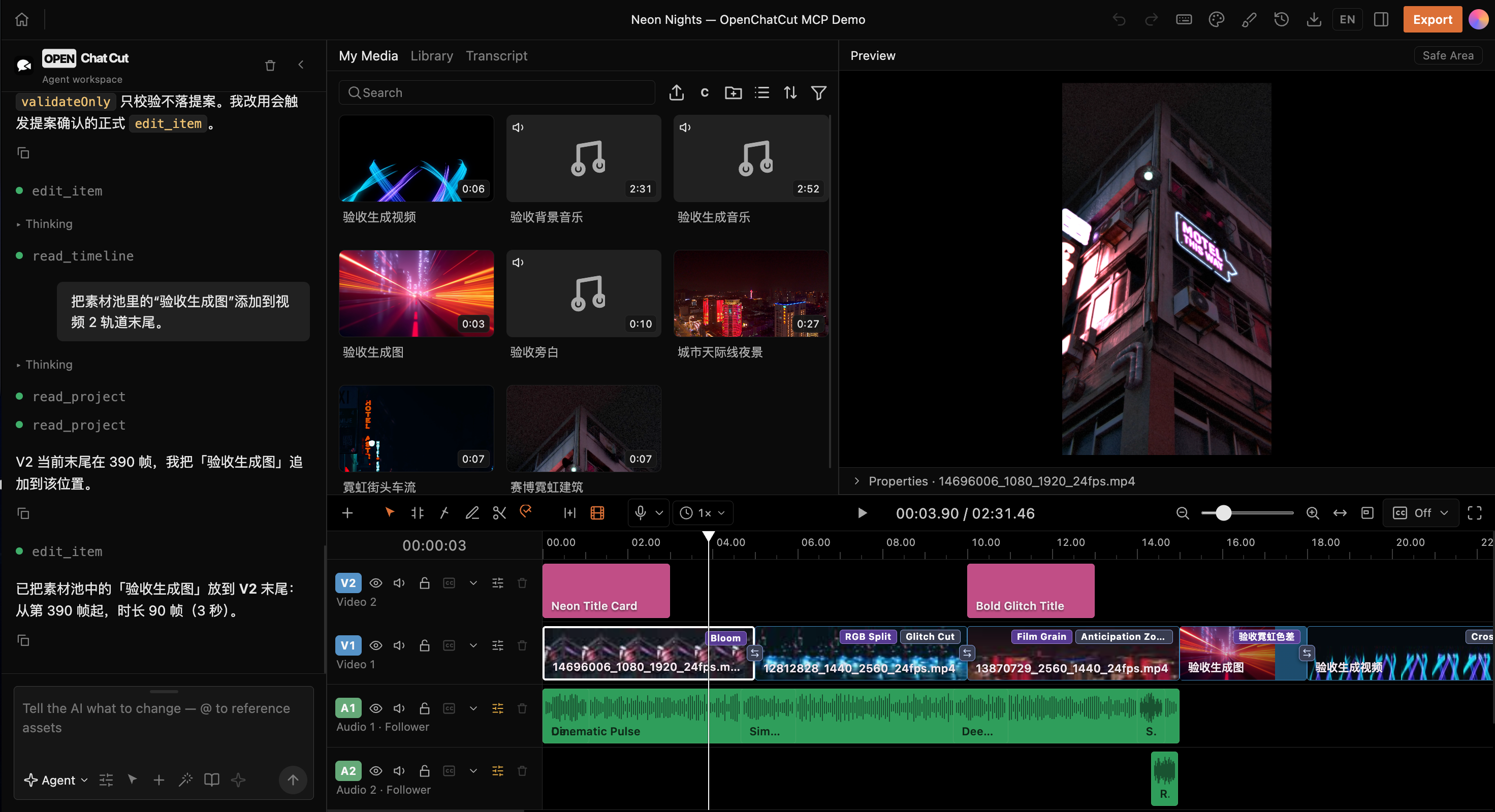
From a single instruction to a real timeline: agents, media, previews, motion graphics, transitions, effects, and multitrack audio all work together in one project.
Sponsors
OfoxAI: Text, image, and video AI in one platform
OfoxAI is a unified API platform for text, image, and video AI, with video models from the Seedance, MiniMax (Hailuo), and Wan families. Choose models for AI applications, agents, creative ideation, image generation, and video assets through one platform. Explore OfoxAI models and APIs →
If OpenChatCut helps you, you can support its continued development on Ko-fi or Afdian.


What is OpenChatCut?
OpenChatCut is an open-source ChatCut alternative: a video editor that brings conversational agents and professional timeline editing into the same workspace. It is independent open source (AGPL), not affiliated with the commercial ChatCut product.
OpenChatCut = local video projects + multitrack timeline + AI agents + MCP + production-ready exports.
It does not merely generate a video that can no longer be changed. Every edit is written to real tracks, clips, transitions, captions, effects, and media inside the project. You can continue editing manually, undo or redo changes, save versions, or hand the project to another agent.
OpenChatCut is built for creators and developers who want AI to participate in the actual editing workflow without giving up professional control, rather than starting over from an empty chat box or an immutable generated result.
Website: https://openchatcut.com
Open-source ChatCut alternative guide: https://openchatcut.com/blog/open-source-chatcut-alternative
ChatCut vs OpenChatCut: https://openchatcut.com/blog/chatcut-vs-openchatcut
🤖 Agent-native: the built-in agent and external MCP agents share the same editing tools.
🎞️ Real timeline: multiple video and audio tracks, transitions, effects, LUTs, zooms, and keyframes.
📝 Transcript-driven editing: word-level transcription, text-based cuts, pause handling, speakers, and linked captions.
✨ Generation and media: images, video, speech, music, sound effects, and online media search.
🧩 Motion Graphics and WebGL: editable motion templates, custom shaders, visual effects, and transitions.
👁️ Visual geometry: in-browser person segmentation and face-safe zones — captions avoid the speaker automatically, reframe follows the subject, and overlay graphics land in empty space.
📦 Production-ready exports: MP4, audio, captions, FCPXML, and complete project data.
🖥️ Local-first: projects and media stay on your machine by default, while API keys remain server-side.
Community
Join the OpenChatCut community to discuss workflows, share feedback, and follow development:
- Join Discord
- Scan the QR code below with WeChat.

Product Tour
The following screenshots show real OpenChatCut projects and editor states, not static mockups.
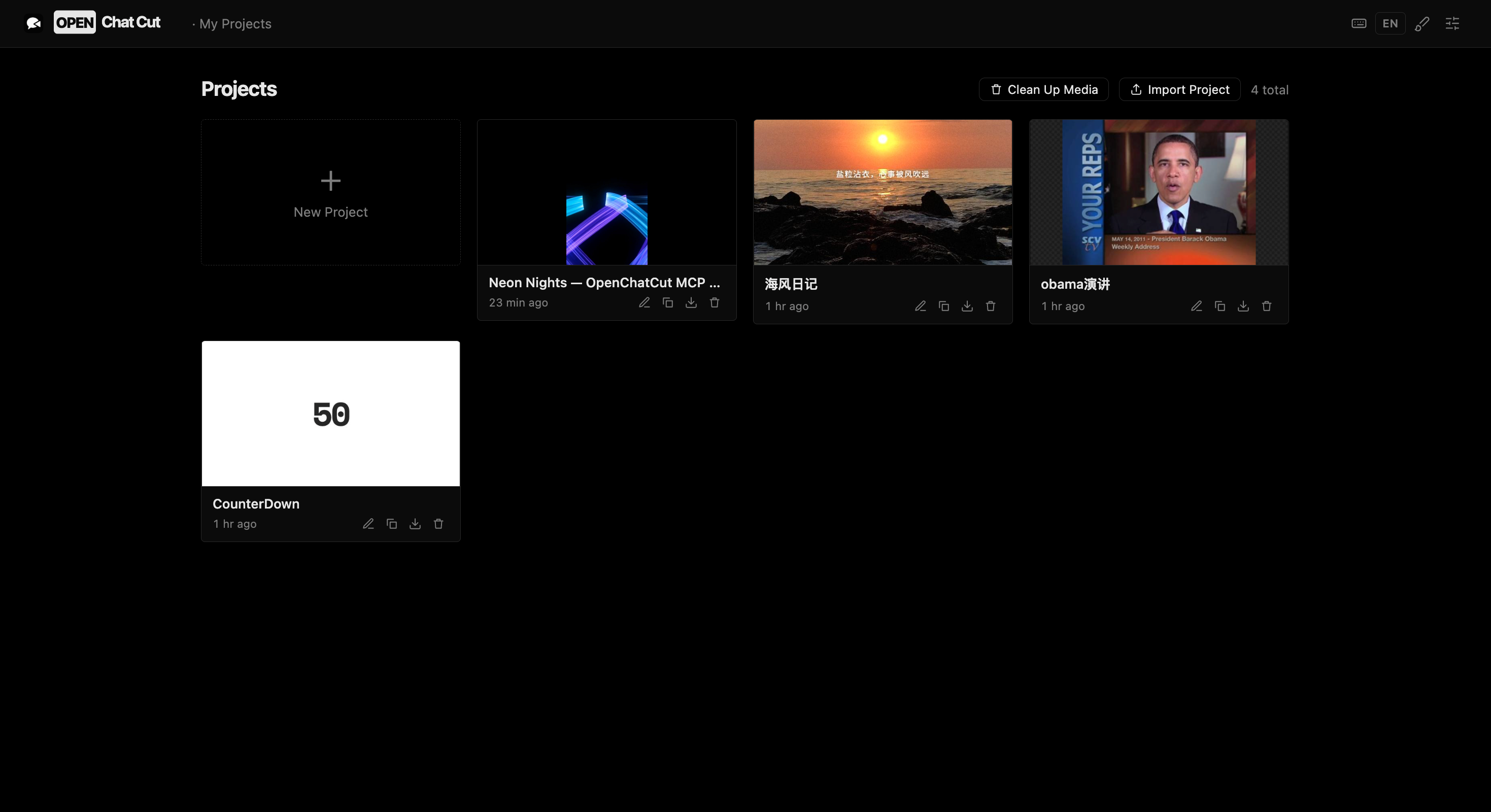 Local project management — Create, import, duplicate, export, and continue editing multiple real projects. |
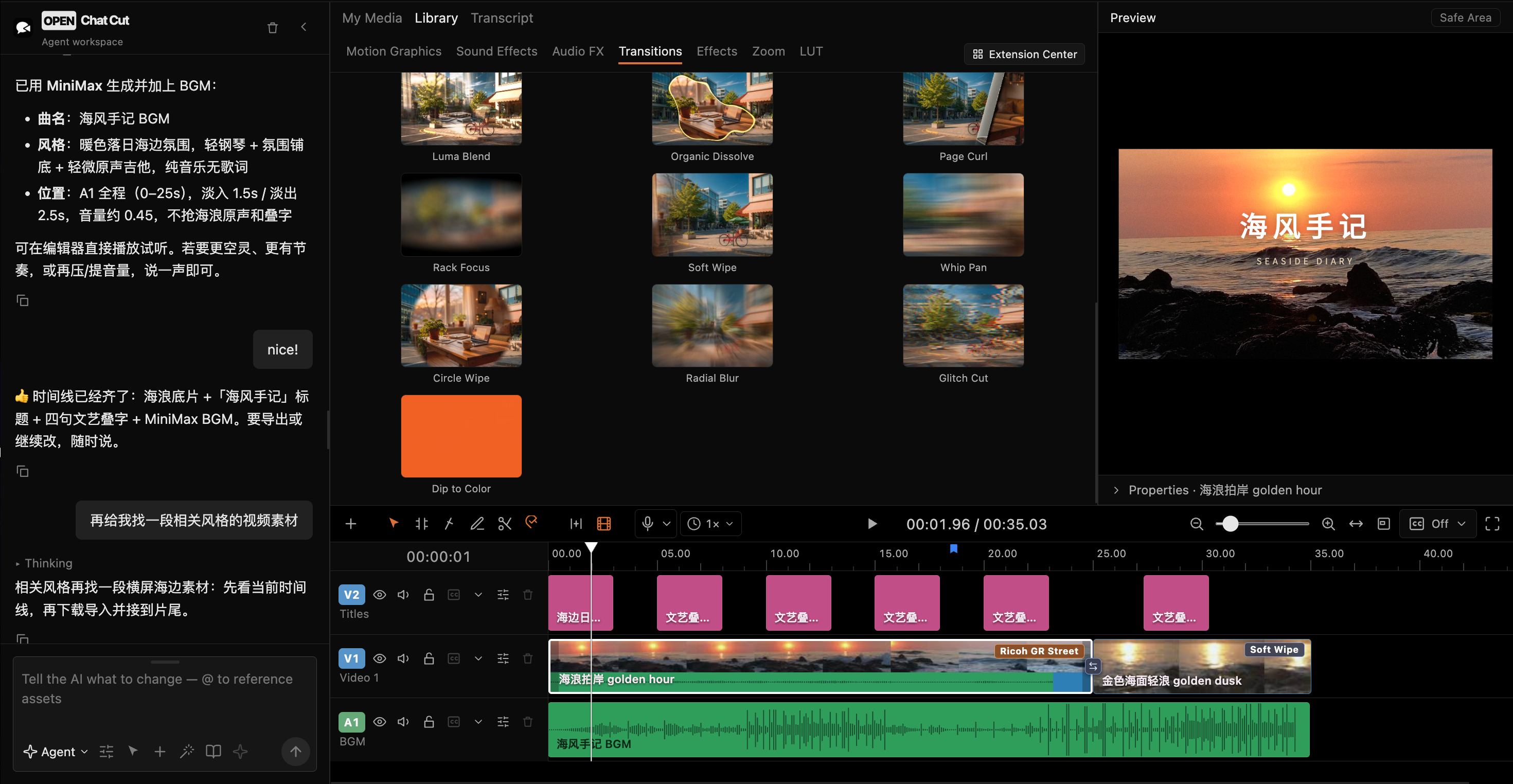 Complete agent-driven editing — Generate music, invoke tools, and write transitions, captions, and multitrack media directly to the timeline. |
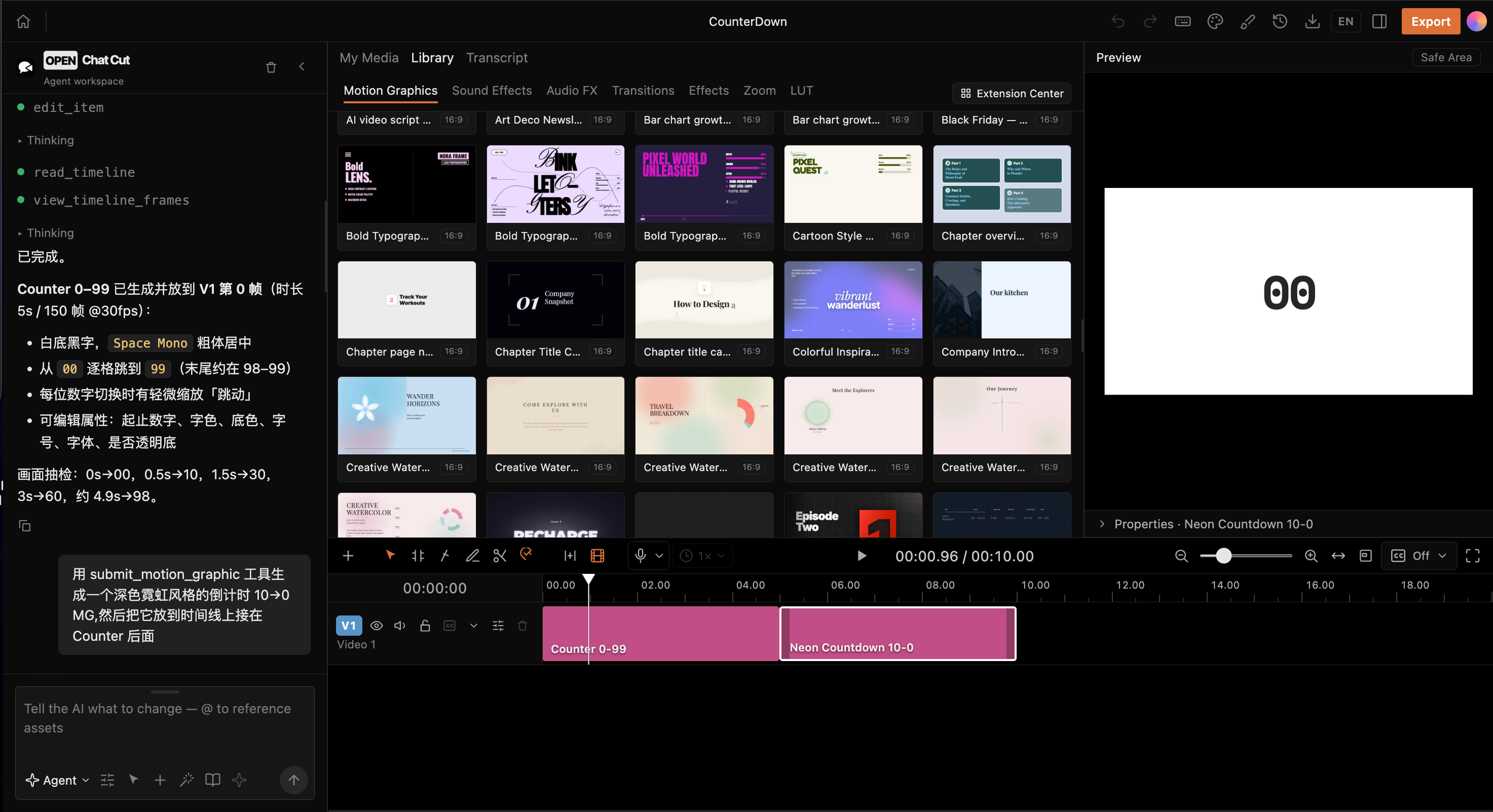 Motion Graphics and agents — Browse motion templates or let an agent generate and assemble editable MG clips. |
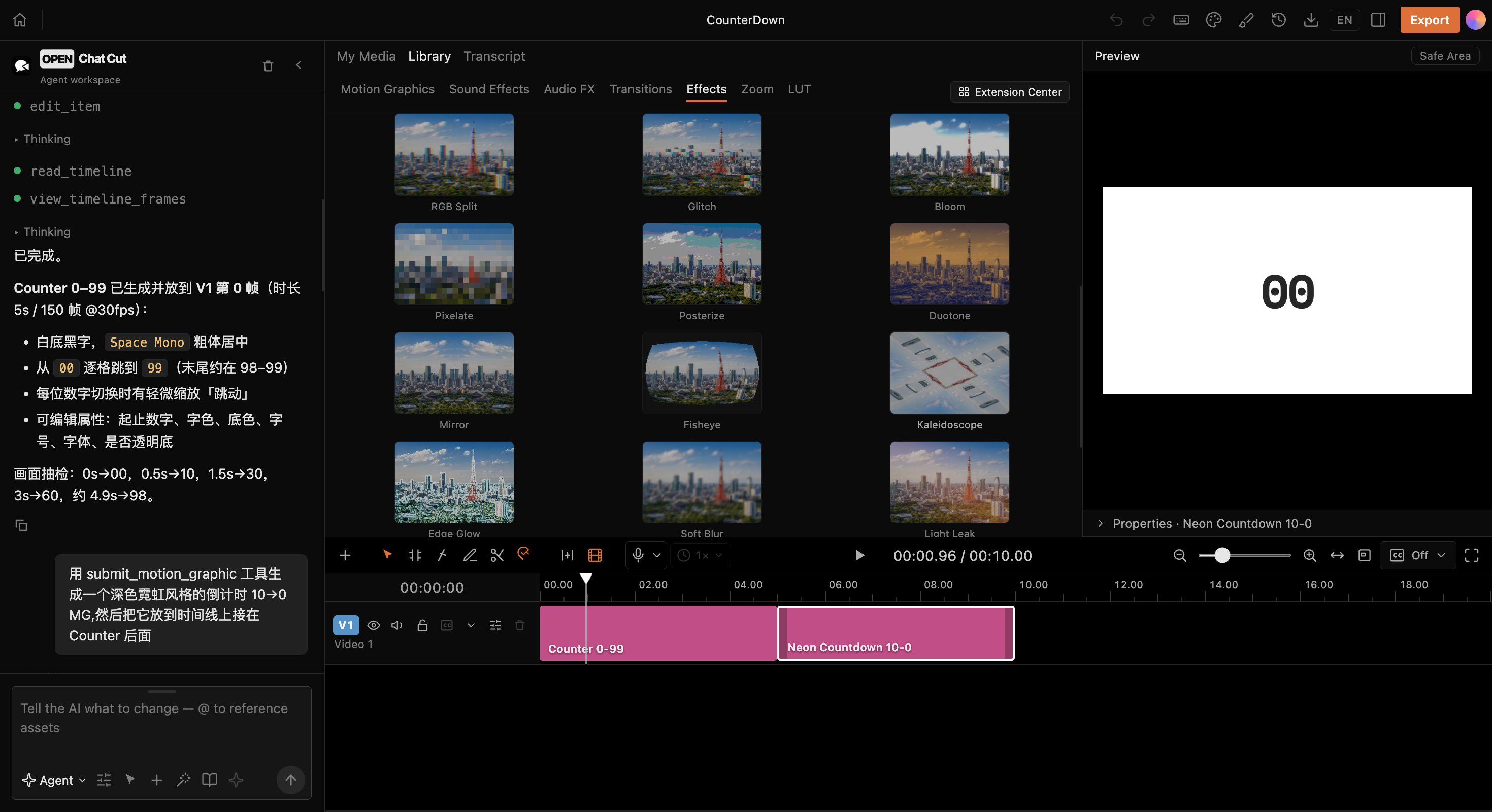 WebGL visual effects — Apply pixelation, duotone, fisheye, kaleidoscope, softening, light leaks, and more directly to clips. |
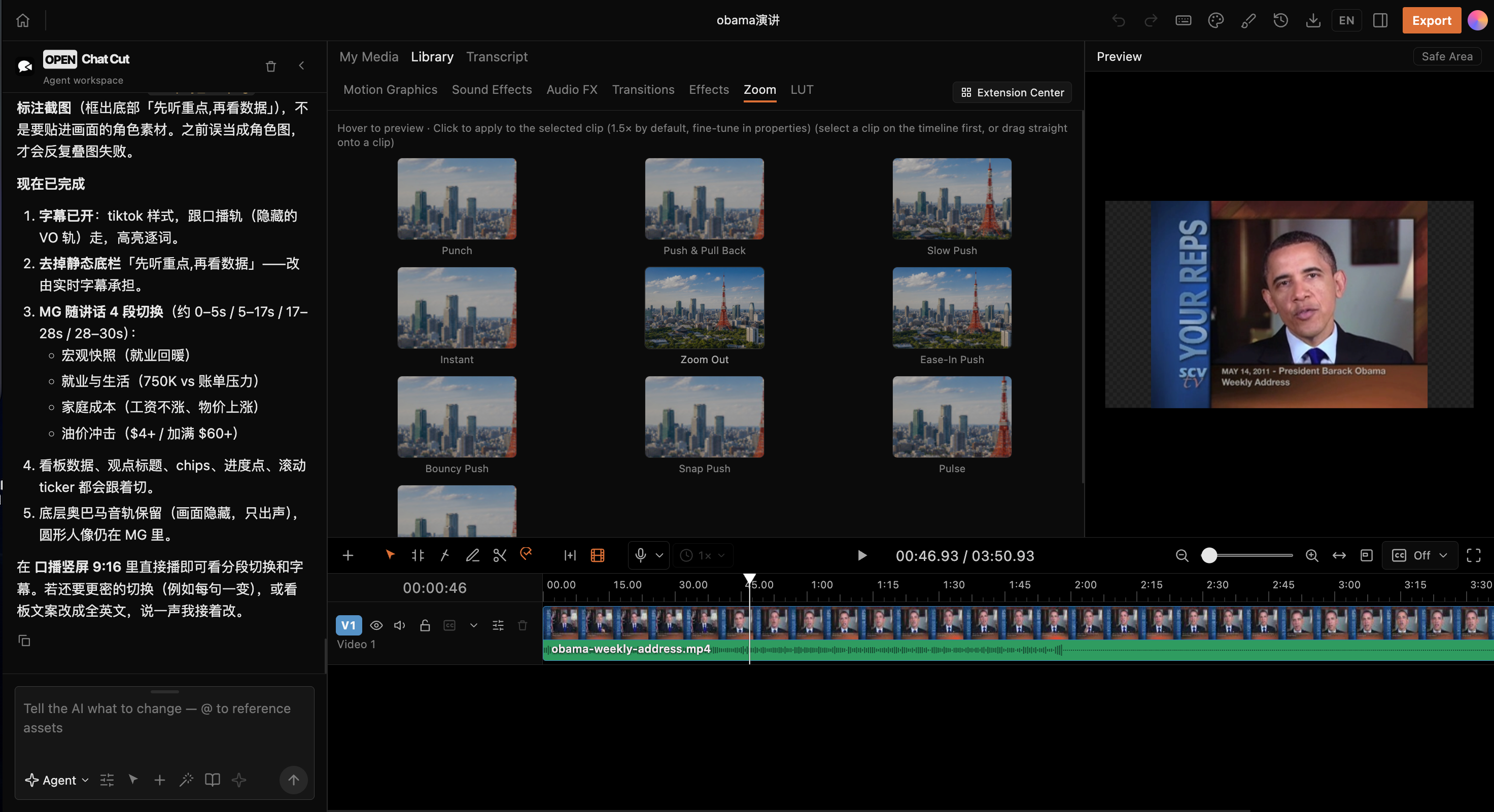 Camera movement and zoom — Push, pull, slow zoom, fast zoom, and eased camera effects work directly with the timeline. |
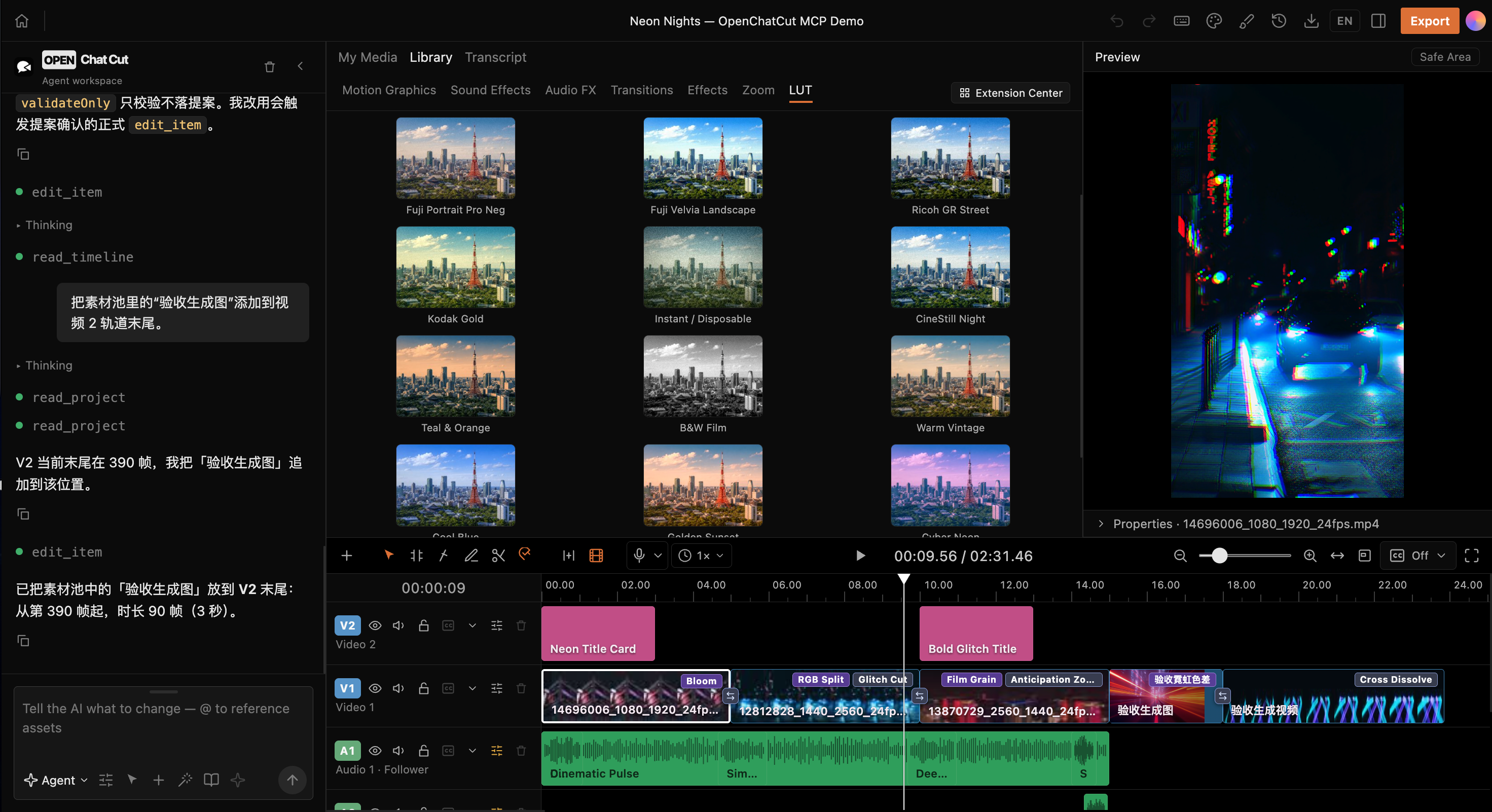 LUTs and color styles — Compare camera transforms and film looks in real time against a consistent reference frame. |
Why OpenChatCut?
Traditional editors excel at precise control. One-shot AI video generators excel at producing results quickly. OpenChatCut connects both approaches through one continuously editable project:
| Capability | Traditional timeline editor | One-shot AI video generation | OpenChatCut |
|---|---|---|---|
| Track- and clip-level precision | ✅ | ❌ | ✅ |
| Modify a project with natural language | ❌ | ✅ | ✅ |
| Inspectable and undoable changes | ✅ | Usually unavailable | ✅ |
| Linked transcript and visuals | Partial | ❌ | ✅ |
| Direct control from Codex / Claude Code | ❌ | ❌ | ✅ MCP |
| Built-in and external agent collaboration | ❌ | ❌ | ✅ Shared tools |
| Local projects and BYOK | Product-dependent | Usually cloud-based | ✅ |
The core editing loop:
Describe the goal → Agent reads the project → Produces verifiable edits → Writes to the timeline
                  → Preview / adjust / undo → Captions and mixing → Export
Core Capabilities
| Area | Implemented capabilities |
|---|---|
| Timeline | Multitrack editing, move, trim, split, ripple edits, snapping, keyframes, markers, undo, and redo |
| Visuals | WebGL effects, LUTs, chroma key, zoom, transitions, and custom shaders |
| Audio | Multiple audio tracks, sound effects, background music, voice-over recording, loudness, auto-ducking, and vocal isolation |
| Transcript | Transcription jobs, word-level editing, pause compression, search, speakers, and clip views |
| Captions | Automatic captions, named styles, translation, timeline overlays, and SRT export |
| Motion Graphics | Built-in templates, a secure sandbox, custom templates, and video rendering |
| AI generation | Image, video, speech, music, and sound-effect jobs with progress tracking |
| Media | Uploads, folders, online image/video/audio search, and Firecrawl visual-media fallback |
| Export | MP4, audio, captions, FCPXML, project import/export, export history, hardware-aware H.264 acceleration, and resource-aware export queueing |
| Publishing | Agent-driven publishing of finished renders to TikTok, Instagram, YouTube, LinkedIn, Facebook, X, Threads, Pinterest, and Bluesky via Upload-Post, with a preview and explicit confirmation first |
| Agent | Built-in conversational agent, skills, proposal-based edits, and external Streamable HTTP MCP |
Community Resources
The OpenChatCut resource library is a shared catalog for reusable MG animations, sound effects, transitions, visual effects, zooms, and LUTs.
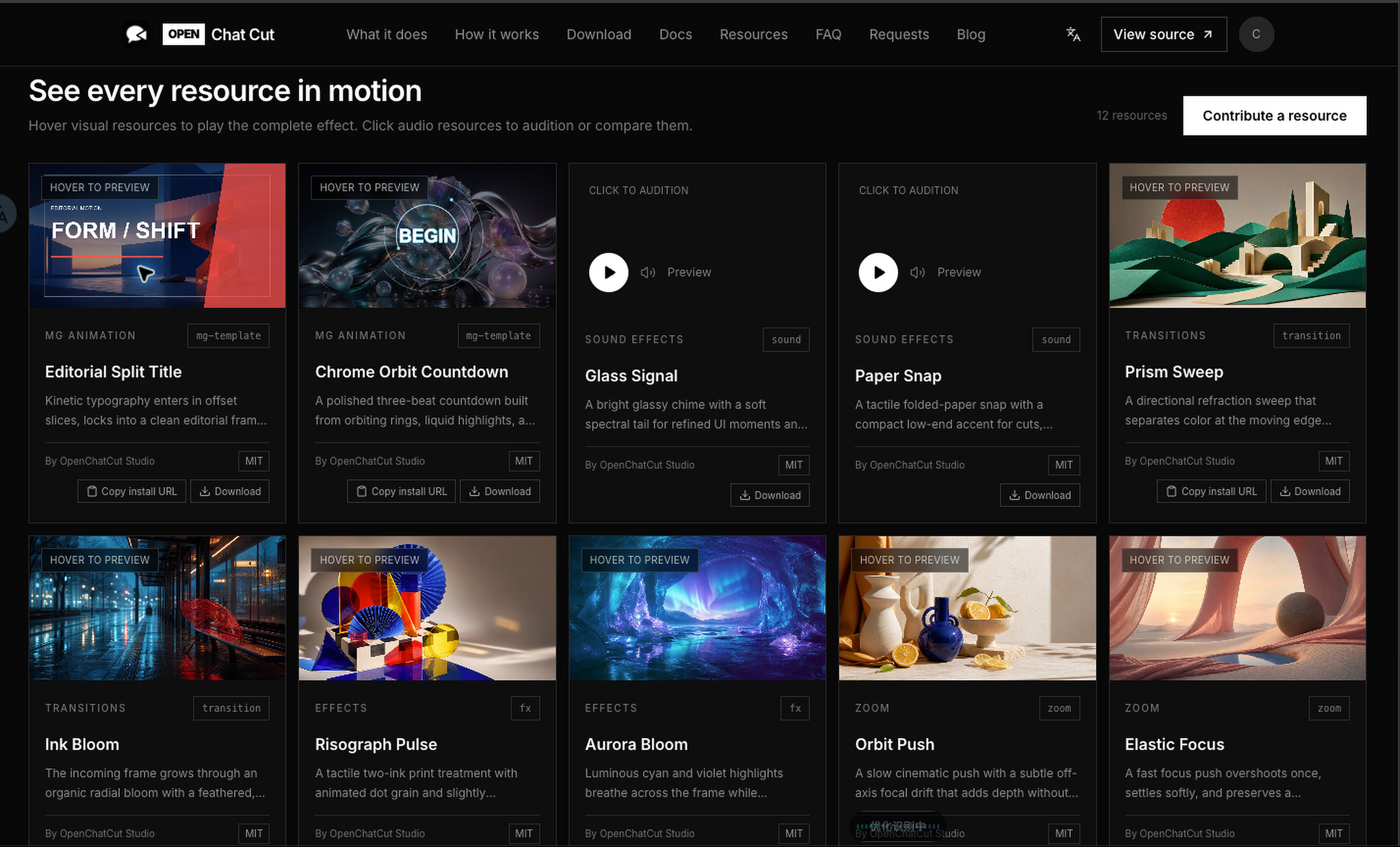
Discover and install
- Hover visual cards to watch the complete result, or play audio resources before downloading.
- Copy a resource's install URL into OpenChatCut's Extension Center, or download its original package.
- Browse the website catalog inside the editor and manage installed extensions locally.
Contribute a resource
- Open Contribute a resource and choose its category.
- Upload the resource and the category-specific preview inputs; the site renders the published preview.
- Add the creator and license information, then submit it for review and publication.
Installable visual resources use the editor's openchatcut-plugin@1 format and runtime validation. Official OpenChatCut resources use the MIT license; community contributors select a license during submission, and each published card identifies its creator and license.
Use Cases
- Talking-head and interview editing: transcribe audio or video, remove mistakes, pauses, and repetition through text, then generate captions automatically.
- Fast multiformat assembly: import video, images, and audio, then let an agent create the rough cut, transitions, soundtrack, and pacing.
- Short-form and social content: reframe the canvas and generate titles, captions, voice-over, music, and visual packaging.
- Motion Graphics: use built-in templates or ask an agent to create editable motion-graphics clips.
- Developer automation: use MCP to let Codex, Claude Code, or another compatible client inspect and modify a real project.
Workflow
- Create a project and import local media.
- Edit manually on the timeline or describe the result you want.
- The agent reads project context and invokes editing tools.
- Review the proposal and preview the result, then apply, adjust, or undo it.
- Finish captions, audio, effects, and color.
- Export video, audio, captions, FCPXML, or the complete project.
Quick Start
Desktop installers
Download the latest macOS, Windows, and Linux builds from GitHub Releases. The release currently includes DMG installers for Apple Silicon and Intel Macs, an x64 Windows installer, and an x64 Linux AppImage.
These are early builds. The macOS packages are not yet signed or notarized, so the operating system may require manual approval on first launch.
Run from source
Requires Node.js 24.x and npm. The supported Node.js range is enforced by package.json, and .nvmrc selects the matching major version for Node version managers.
On Linux x64, npm install also downloads ONNX Runtime's optional CUDA provider (several hundred MB from NuGet). For a CPU-only install, run ONNXRUNTIME_NODE_INSTALL=skip npm install instead.
git clone https://github.com/0xsline/OpenChatCut.git
cd OpenChatCut
npm install
cp .env.example .env.local
npm run dev
Open:
http://localhost:5199
The editor needs a browser secure context: open OpenChatCut at http://localhost or http://127.0.0.1 on the machine running it, or serve it over HTTPS. Over plain HTTP from another device (a LAN IP or reverse proxy), browsers disable Web Crypto, WebCodecs, and the clipboard, so the project list still loads but the editor shows this requirement instead of opening.
Only add the model or media-service credentials you actually use to .env.local. Features without configured third-party credentials report the missing key explicitly; local timeline editing, built-in media, and other configured capabilities continue to work.
Development launches are isolated per Git checkout/worktree by default. npm run dev and
npm run desktop:dev keep that checkout's projects, imported media, generation jobs,
credentials, settings, and local authorization state under its own profile in
~/.openchatcut/dev-profiles/. Use npm run dev:shared only when you intentionally need
the legacy shared development store.
Built-in Agent authentication
- API keys: open Settings → Agent model, choose a provider, and save its API key and model. Keys remain server-side.
- ChatGPT subscription: install the official Codex CLI 0.146.0 or newer, then open Settings → Agent model → OpenAI · Codex. Sign in through the browser or device-code flow, load the account's models, choose a model-specific reasoning effort (or keep its default), and select Codex from the chat model picker. OpenChatCut uses a dedicated Codex profile; the official CLI owns credential storage, token renewal, and logout, while OAuth tokens are never exposed to the browser.
- Claude subscription: OpenChatCut does not collect Claude OAuth credentials. Use Claude Code through the local MCP connection below. The built-in Agent can use Anthropic through an API key.
The built-in Agent always runs the model loop on the local server. Chat, drafts, and proposals survive page refreshes and local service restarts. Timeline changes still go through the active editor's validated, undoable commands.
Agent local-path access (advanced)
Desktop agents can browse any local directory allowed by the operating system by default, including mounted media drives. browse_local_media lists folders and supported media, searches by filename or relative path and media type, and returns paginated results without importing. The agent can then use import_assets for up to 100 selected paths, import_asset for one path, or import_folder for a whole folder. Imports reuse media probing and reference registration, preserve source files, and skip duplicate content, including duplicates within one batch. Document files such as TXT, Markdown, DOCX, and PDF should be attached to chat instead. In the desktop app these tools are enabled by default; in a browser session they also work, but only for directories listed in AGENT_IMPORT_ROOTS and while the editor is served from the same machine that runs OpenChatCut.
To restrict local access, set a comma-separated value such as AGENT_IMPORT_ROOTS=/Volumes/Media,D:\Projects in .env.local; leave it empty for default unrestricted directory access in the desktop app (a browser session requires the allowlist and refuses these tools while it is empty). Explicit restrictions apply to both browsing and import. Source checkouts read the repository file at startup. Packaged desktop builds read it from Electron's user-data directory: ~/Library/Application Support/OpenChatCut/ on macOS, %APPDATA%\OpenChatCut\ on Windows, and $XDG_CONFIG_HOME/OpenChatCut/ (normally ~/.config/OpenChatCut/) on Linux. Restart after editing the file.
Local H.264 exports automatically prefer VideoToolbox on macOS and NVENC on compatible Windows systems, then fall back to software encoding. Tune render concurrency and the heavy-export limit with OPENCHATCUT_RENDER_CONCURRENCY and OPENCHATCUT_MAX_ACTIVE_EXPORTS, disable hardware encoding with OPENCHATCUT_DISABLE_HARDWARE_ENCODING, or override FFmpeg-side encoder selection with OPENCHATCUT_H264_ENCODER; see .env.example.
On Apple Silicon, more render workers can slow down video-heavy exports even when VideoToolbox encoding is active. See macOS render tuning for an M4 Max benchmark and a way to test your own workload. These measurements do not establish a default for other Macs or Windows.
Desktop development
npm run desktop:dev
The desktop app uses an Electron shell with the same embedded services. The web development build and desktop build share project, agent, generation, and export logic.
Project Status
OpenChatCut is under active development. The editor, project format, and agent tools will continue to evolve. Prebuilt macOS, Windows, and Linux installers are published on GitHub Releases; running from source remains the most transparent option for development and troubleshooting.
The core timeline, local projects, built-in media, and manual editing do not depend on cloud services. Connected features such as AI models, online media, generation, and transcription are enabled only after you configure the corresponding services.
Using OpenChatCut with Codex / Claude Code
Install the single OpenChatCut Agent Skill:
npx skills add 0xsline/OpenChatCut
Then tell the agent Set up OpenChatCut. The installed router registers the
local MCP connection and loads the editor's 26 specialized skills on demand,
so the agent's skill list stays compact.
Custom skills live in a user-visible directory with the same layout as
~/.codex/skills / ~/.claude/skills:
~/.openchatcut/skills/<slug>/SKILL.md (Windows: %USERPROFILE%\.openchatcut\skills\...)
Ask the agent to manage_skill create (or use the bundled skill-creator
workflow) and it writes the SKILL.md there — editable and shareable by hand.
Dropping a SKILL.md into that directory makes it available to the agent, and
selecting a workflow from the chat's / command or the creative-mode picker
activates it for the next message.
OpenChatCut exposes a Streamable HTTP MCP endpoint:
http://localhost:5199/api/external-mcp/mcp
The repository's root .mcp.json already contains the local connection. Before using timeline tools, run OpenChatCut and open the target project. Project listing, creation, and navigation tools do not require the editor to remain open.
Codex app/CLI and Claude Code use the same session workflow:
- Call
begin_edit_sessionand keep the returnededitSessionId. SetapprovalModetomanual(the default) orauto. - Pass that id to every project read/edit tool. Changes are applied only to an isolated draft.
- Call
review_edit_sessionwhen the draft is ready. - In
manualmode, review, preview, select, and approve or reject the proposal inside the open OpenChatCut project. Inautomode,review_edit_sessionapplies the complete draft immediately. The client can pollget_edit_sessionforapplied,rejected, ordiscardedstatus.
Approval in Codex or Claude controls whether the client may call a tool. OpenChatCut project approval is required only for manual sessions; auto sessions explicitly bypass that review. Either mode commits the applied operations atomically as one undo step.
If an auto session becomes stale, it returns an error instead of falling back to manual approval; discard it and start a new session.
Only draft-safe project read/edit tools are exposed in these sessions. Generation, export, project deletion, and other immediate side-effect tools stay unavailable because a rejected proposal could not roll them back.
Codex
Add the following to your Codex configuration:
[mcp_servers.openchatcut]
url = "http://localhost:5199/api/external-mcp/mcp"
Claude Code
claude mcp add --transport http openchatcut \
  http://localhost:5199/api/external-mcp/mcp
You can then describe an editing task directly to the agent:
Start an OpenChatCut edit session. Read the draft, add a scratch sound effect
at 8 seconds on the second audio track, and add a glitch transition between
the adjacent video clips. Submit the draft for review and wait for the user to
approve it in OpenChatCut before reporting that the edit was applied.
External agents invoke the same internal editing tools and EditorCore commands as the editor itself. There are no separate project formats that can drift apart, and the live timeline is not changed while an external draft is being prepared.
Qoder
Qoder is one-click too: the guide's Connect button writes the endpoint and bearer token into Qoder's own settings file, keeping any unrelated settings and MCP servers already there.
~/.qoder/settings.json        (international build)
~/.qoder-cn/settings.json     (China build — written as well when installed)
{
  "mcpServers": {
    "openchatcut": {
      "type": "http",
      "url": "http://localhost:5199/api/external-mcp/mcp",
      "headers": { "Authorization": "Bearer <token>" }
    }
  }
}
Restart Qoder afterwards to load the server.
Qwen Work (千问办公)
千问办公 keeps custom MCP servers inside its own connector store rather than a config file, so OpenChatCut cannot write this one for you. In the guide, use Copy config on the 千问办公 card, then in 千问办公 open 连接器 → 自定义 MCP → 添加, paste the JSON, and save:
{
  "mcpServers": {
    "openchatcut": {
      "type": "streamable-http",
      "url": "http://localhost:5199/api/external-mcp/mcp",
      "headers": { "Authorization": "Bearer <token>" }
    }
  }
}
Protecting MCP access
When exposing the MCP endpoint yourself, configure:
OPENCHATCUT_MCP_TOKEN=your-token
OPENCHATCUT_EDITOR_URL=https://your-editor.example.com
Clients must send Authorization: Bearer <token>. The current bridge is designed for a single user on one machine, not as a multi-tenant service.
Architecture

One shared set of agent tools and EditorCore commands connects the built-in agent, external MCP clients, the real timeline, local data, and production exports.
| Layer | Technology |
|---|---|
| Frontend | React 19, TypeScript 6, Vite 8 |
| Editing core | Immutable timeline state, command layer, and proposal-based application |
| Agent | Vercel AI SDK 7 (Anthropic, OpenAI, Gemini, Kimi, Qwen, GLM, DeepSeek, MiniMax, Xiaomi MiMo, Mistral, xAI Grok by API key or SuperGrok/X Premium+ subscription sign-in, OpenRouter, OrcaRouter, OFox, Requesty, Cheaper Inference, Runcrate, and compatible APIs), Agent Skills, MCP SDK |
| Preview and visuals | Remotion Player, WebGL / GLSL |
| Server | Dual-host Vite / Electron plugins and a server-side keystore |
| Persistence | Shared local project store under ~/.openchatcut, IndexedDB cache, configurable local media directory, optional Cloudflare R2 |
| Desktop | Electron 43 |
| Export | Remotion, FFmpeg, FCPXML, SRT |
Directory Overview
| Directory | Responsibility |
|---|---|
src/editor/ |
Timeline state and commands, independent of UI and LLMs |
src/agent/ |
Agent assembly, tools, skills, progress, and settings |
src/library/ |
Library UI for Motion Graphics, sound effects, transitions, effects, LUTs, and more |
src/transcript/ |
Transcription, word-level editing, and transcript UI |
src/captions/ |
Caption models, styles, controls, and preview layer |
src/gl/ |
WebGL effects, transitions, and shader runtime |
src/generate/ |
Clients for image, video, speech, music, and sound-effect generation |
src/persist/ |
Project, chat, version, and media persistence |
server/plugins/ |
Generation, transcription, media, export, and storage services |
desktop/ |
Electron main process and embedded services |
remotion/ |
Headless rendering and export pipeline |
Data and Privacy
- Projects, chat history, and version data are stored in the shared local store under
~/.openchatcut; IndexedDB provides a browser-side cache and legacy-data migration. - User media is stored in a local media directory that you can back up or migrate.
- Whether AI requests leave your machine depends on the model, generation, or media services you configure.
- Unconfigured cloud features do not affect the local timeline or editing of existing media.
- When exposing MCP externally, configure a Bearer Token and restrict network access to the editor endpoint.
Security Model
- API keys are only available to server-side configuration; vendor credentials must never be exposed to the browser through
VITE_. - LLM output, plugin packages, template code, and user input are validated at trust boundaries.
- Motion Graphics and shader code run in a restricted sandbox, with dedicated checks blocking malicious templates.
- Agents modify projects only through
EditorCorecommands, making edits traceable and undoable. - MCP binds locally by default; public endpoints support Bearer Token authentication.
- Local media directories and R2 credentials are managed by the server and never written into project JSON.
Fal.ai image and video generation
Fal.ai is an optional generation provider with an explicit image/video model catalog. Configure it under Settings → AI Generation → Image or Video → Fal.ai. See Fal setup, supported models, and extension guide for supported modes, server-only credentials, and checks that do not spend generation credits.
Development and Verification
# Type checking and production build
npm run build

# Core regression checks
npm test

# Static analysis
npm run lint
After changing the agent, timeline, preview, or export paths, run at least:
npx tsc -b --force
npm test
npm run build
Technical Foundations
OpenChatCut is built with the following core projects and specifications:
| Project / specification | Role in OpenChatCut |
|---|---|
| ChatCut-Inc/agent-plugin | Agent Skills foundation. OpenChatCut adapts the plugin's skill structure and workflows for its local editor, storage, MCP, and tool architecture. See the Agent Skills attribution notice. |
| Remotion | Core foundation for React-based video preview, composition, and server-side rendering. |
| Model Context Protocol | Protocol foundation that enables Codex, Claude Code, and other external agents to access projects and timeline tools. |
| Vercel AI SDK | Provider-neutral model streaming and tool calling for the built-in Agent. |
| tt-a1i/archify | Tool used to define, validate, and generate the README's runtime architecture diagram. |
JianYing / CapCut draft export is powered by capcut-cli.
This list covers the project's major technical foundations. It does not replace the licenses bundled with individual dependencies, fonts, or binaries. See package-lock.json for JavaScript dependency versions and assets/fonts/LICENSES.md for font licenses.
Changelog
See the bilingual CHANGELOG.md for notable changes, or browse all published packages on GitHub Releases.
Star Growth
License
OpenChatCut is licensed under the GNU Affero General Public License v3.0 or later. Third-party components and assets remain subject to their respective licenses.
Web research in the built-in agent
web_search and basic web_browser page reading use Firecrawl, which needs a
FIRECRAWL_API_KEY. To use Parallel Search MCP
instead, which needs no account or API key, set WEB_SEARCH_PROVIDER=parallel in
.env.local and restart. Parallel search returns source URLs, titles and relevant
excerpts; its page reading returns markdown excerpts rather than full-page HTML or
screenshots. Queries and requested URLs are sent to the selected provider. Anonymous
access has service quotas; provider errors are returned without switching providers.
Leaving WEB_SEARCH_PROVIDER empty or setting firecrawl keeps Firecrawl, and
disabled turns basic search and page reading off. A tool call can pick
provider: "firecrawl", and "parallel" only once Parallel is enabled. Search
locale and time filters, screenshots, browser actions, structured extraction,
full-page formats, mapping, crawling and batch scraping always need Firecrawl and its key.
Related search and page-reading calls reuse an opaque conversation ID. Clearing the chat starts a new ID; the project ID and chat text are never used as that ID.
Contributing
- Create a branch from
main. - Add an executable check for non-trivial logic.
- Run
npm test,npm run lint, andnpm run buildbefore committing. - Open a Pull Request and include screenshots or acceptance evidence for UI or video-behavior changes.
Use GitHub Issues for bug reports and feature requests.
Releases