
Server · #297 trending MCP repo · ↗ +12 stars this week
Toolhive
stacklok/toolhive
ToolHive is an enterprise-grade platform for running and managing Model Context Protocol (MCP) servers.
- Stars
- 2.3k
- This week
- +12
- Forks
- 326
- Open issues
- 424
- Skills inside
- 13
Inside this repo
13 skills
.claude/skills/add-rulecheck-contributionValidates operator chart contribution practices (helm template, ct lint, docs generation) before committing changes..claude/skills/check-contributioncode-review-assistAugments human code review by summarizing changes, surfacing key review questions, assessing test coverage, and identifying low-risk sections. Use when reviewing a diff, PR, or code snippet as a senior review partner..claude/skills/code-review-assistdeflakeFinds flaky tests on the main branch by analyzing GitHub Actions failures, ranks them by frequency, and enters parallel plan mode to design deflake strategies. Use when you want to find and fix the flakiest tests..claude/skills/deflakedeploy-otelDeploy the OpenTelemetry observability stack (Prometheus, Grafana, OTEL Collector) to a Kind cluster for testing toolhive telemetry. Use when you need to set up monitoring, metrics collection, or observability infrastructure..claude/skills/deploy-oteldeploying-vmcp-locallyDeploys a VirtualMCPServer configuration locally for manual testing and verification.claude/skills/deploying-vmcp-locallydoc-reviewReviews documentation for factual accuracy.claude/skills/doc-reviewimplement-storyImplements a GitHub user story from planning through PR creation, with research, codebase analysis, and structured commits..claude/skills/implement-storyrelease-notesGenerates polished GitHub release notes for a ToolHive release by analyzing every merged PR, cross-referencing linked issues, dispatching expert agents to assess breaking changes, and producing a formatted release body. Use when the user provides a GitHub release URL, tag name, or says "release note.claude/skills/release-notessplit-prAnalyzes current changes and suggests how to split them into smaller, reviewable PRs.claude/skills/split-prtoolhive-releaseCreates ToolHive release PRs by analyzing commits since the last release, categorizing changes, recommending semantic version bump type (major/minor/patch), and triggering the release workflow. Use when cutting a release, preparing a new version, checking what changed since last release, or when the.claude/skills/toolhive-releasevmcp-reviewReviews vMCP code changes for known anti-patterns that make the codebase harder to understand or more brittle. Use when reviewing PRs, planning features, or refactoring vMCP code..claude/skills/vmcp-reviewtoolhive-cli-user- Guide for using ToolHive CLI (thv) to run and manage MCP servers, skills, and AI-client plugins. Use when managing `thv ai-plugin` installs, project sync or upgrades, or plugin publishing for Claude Code or Codex; also use for MCP server and skill lifecycle commands. Covers server lifecycle, regisskills/toolhive-cli-userDocumentation
README

The open source MCP platform trusted by developers and enterprises





Run any MCP server securely, instantly, anywhere.
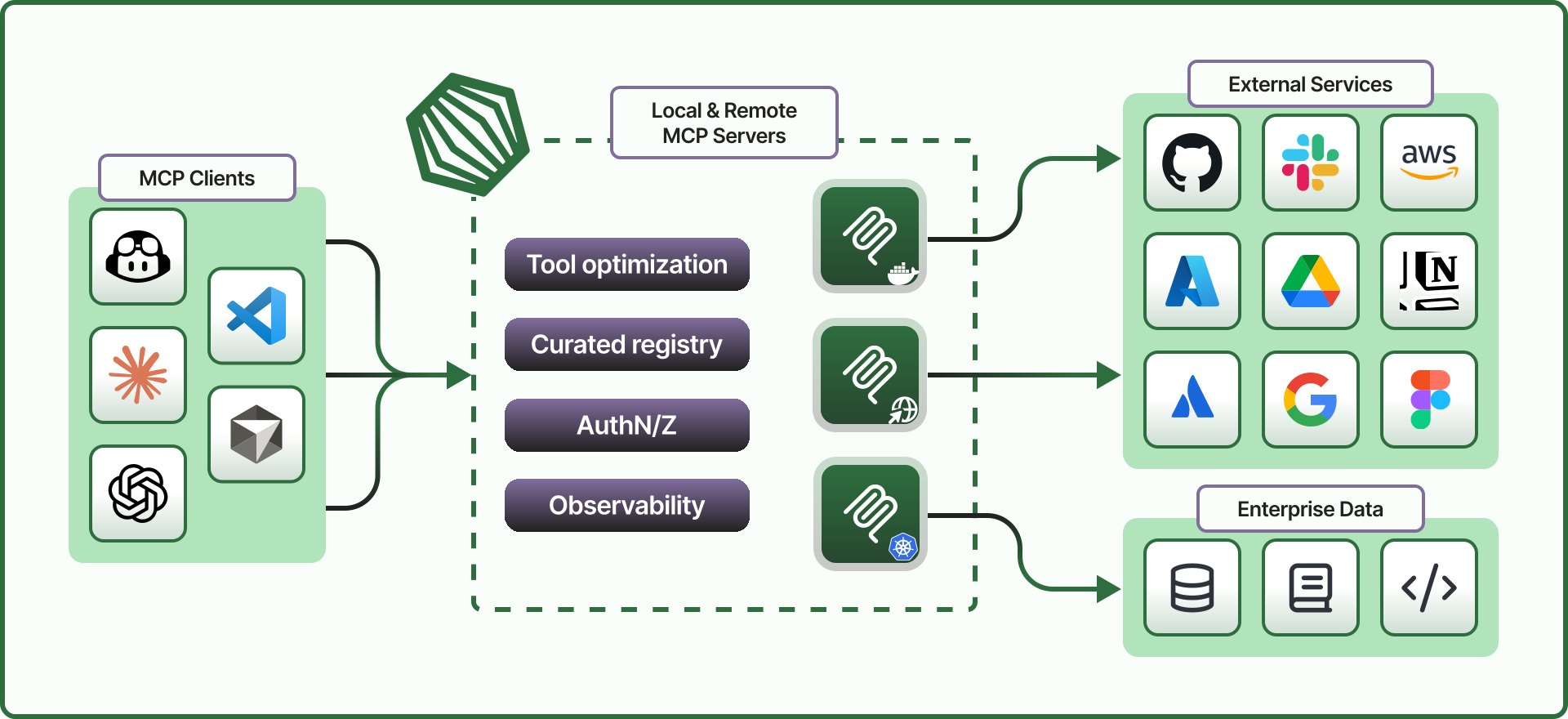
ToolHive runs every MCP server in an isolated container, enforces identity and access policy per request when configured with an authentication source, and gives platform teams the observability they need to put MCP in production.
Why ToolHive?
Here are some of the more common use cases for ToolHive:
| Developers. Run MCP servers with more security and more (token) savings | Platform Engineers. Run MCP on your existing Kubernetes infrastructure | Enterprises. Self-host MCP servers and stay in control of your data |
| Connect Claude Code, Cursor, GitHub Copilot, or your preferred client to MCP servers with a single click or command. ToolHive wraps every MCP server in an isolated container with a minimal permission file (no local credentials) and uses semantic tool search to reduce your token usage by up to 85%. |
Put an end to shadow MCP use by your developers, and give your security team the audit logs and configurable identity enforcement they require. ToolHive includes a Kubernetes operator, so you can declare policies, integrate with your IdP and observability stack, emit OTel traces, and more … all with familiar tools and patterns. |
Most MCP solutions are SaaS, but your compliance requirements prohibit sensitive info from being processed by SaaS providers. ToolHive is the exception that allows you to self-host your MCP registry, gateway, etc. You can pilot the entire platform, and when you’re ready to scale, Stacklok’s got the added capabilities and expert team ready! |
| Download ToolHive and get started | Explore the Kubernetes operator in our docs Read more about running MCP on Kubernetes |
Learn more about Stacklok’s platform Compare open source ToolHive and Stacklok Enterprise |
Quick links
- 📥 Downloads
- 📚 Documentation
- 🚀 Quickstart guides:
- 💬 Discord
- 🤝 Contributing
 Stacklok Enterprise
Core capabilities
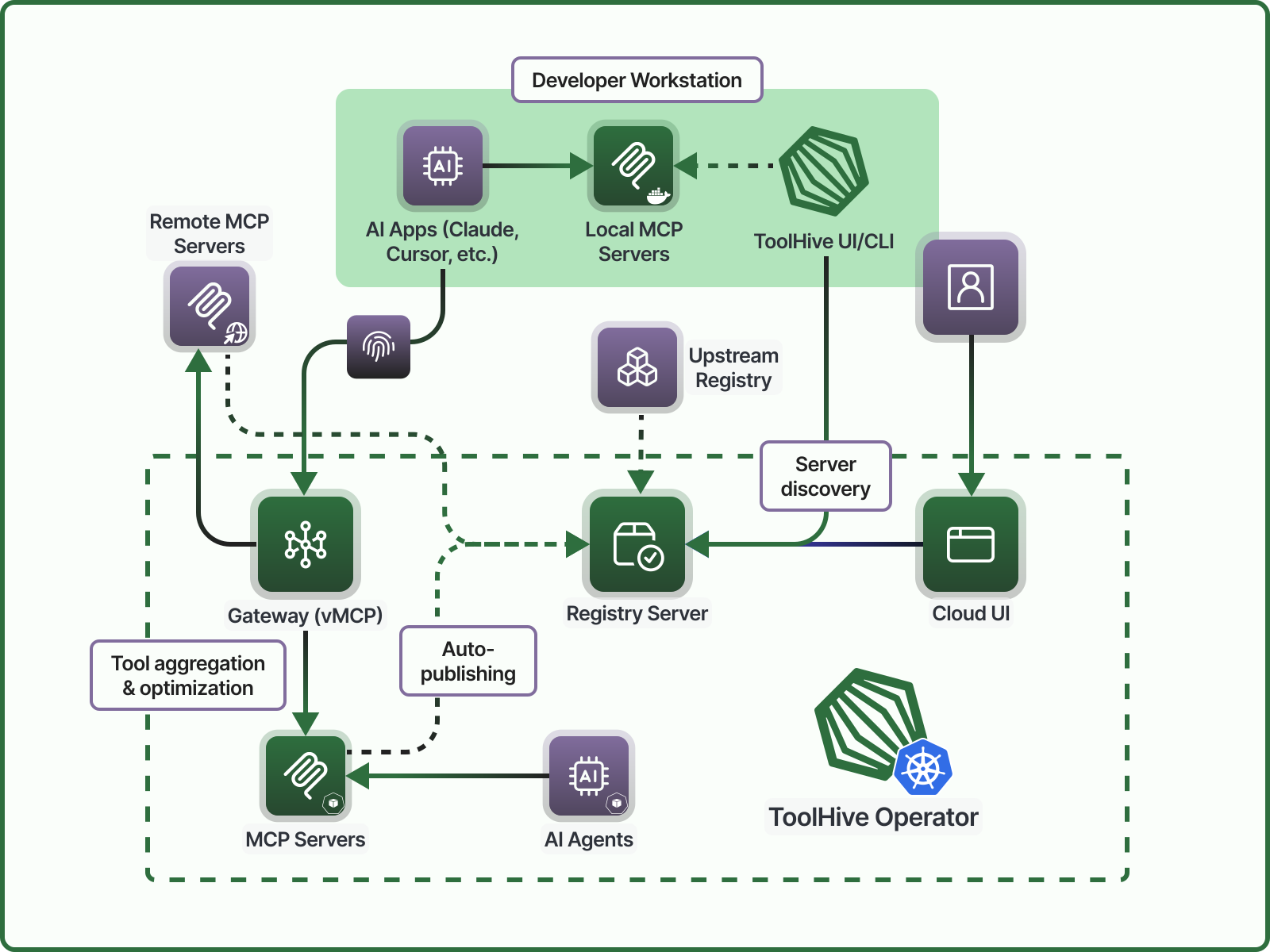
ToolHive architecture: Gateway, Registry Server, and Runtime, accessible through ToolHive UI and the CLI
ToolHive is built on a modular architecture to streamline secure MCP server management and integration. Here's how the main components work.
🔌 Gateway
Define dedicated endpoints from which your teams can securely and efficiently access tools.
- Orchestrate multiple tools into a virtual MCP with a deterministic workflow engine
- Define access policies and network endpoints
- Centralize control of security policy, authentication, authorization, auditing, etc.
- Integrate with your IdP for SSO (OIDC/OAuth compatible)
- Customize and filter tools and descriptions to improve performance and reduce token usage
- Connect with local clients like Claude Desktop, Cursor, VS Code, and VS Code Server
📦 Registry Server
Curate a catalog of trusted servers your teams can quickly discover and deploy.
- Integrate with the official MCP registry
- Add custom MCP servers
- Group servers based on role or use case
- Manage your registry with an API-driven interface (or embed in existing workflows for seamless integration and governance)
- Verify provenance and sign servers with built-in security controls
- Preset configurations and permissions for a frictionless user experience
⚙️ Runtime
Deploy, run, and manage MCP servers locally or in a Kubernetes cluster with security guardrails.
- Deploy MCP servers in the cloud via Kubernetes for enterprise scalability
- Run MCP servers locally via Docker or Podman
- Proxy remote MCP servers securely for unified management
- Kubernetes Operator for fleet and resource management
- Leverage OpenTelemetry and Prometheus for monitoring and audit logging
💻 Interfaces
Choose the interface that best fits your workflow.
- Use ToolHive UI for a cross-platform desktop experience
- Use the ToolHive CLI for terminal workflows and automation
- Discover, configure, and run MCP servers
- Automatically connect managed MCP servers to compatible AI clients
How it works together
- Admins curate and organize MCP servers in the Registry, configuring access and policies.
- Users discover, configure, and run MCP servers through ToolHive UI or the CLI, and ToolHive orchestrates deployment and access.
- Runtime securely deploys and manages MCP servers across local and cloud environments, integrating seamlessly with existing SDLC workflows, exporting analytics, and enforcing fine-grained access control.
- Gateway handles all inbound traffic, secures context and credentials, optimizes tool selection, and applies organizational policies.
Flexible deployment
Desktop experience
Individual developers can get started in minutes with the desktop UI or CLI, then apply the same concepts in enterprise environments.
Key features:
- Run any MCP server from a container image, or build one dynamically from common package managers
- Manage encrypted secrets and control network isolation with simple, local tooling
- Test and validate MCP servers using built-in tools like the official MCP Inspector
- Optimize token usage and tool execution with the MCP Optimizer
Get started with the UI: Quickstart, How-to guides
Get started with the CLI: Quickstart, How-to guides, Command reference
MCP guides: learn how to run common MCP servers with ToolHive
Kubernetes Operator
Teams and organizations manage MCP servers and registries centrally using familiar Kubernetes workflows.
Key features:
- Custom Resource Definitions for MCP servers, registries, and other ToolHive components
- Secure execution with container-based isolation and multi-namespace support
- Automated service creation and discovery, with ingress integration for secure access
- Enterprise-grade security and observability: OIDC/OAuth SSO, secure token exchange, audit logging, OpenTelemetry, and Prometheus metrics
- Hybrid registry server: curate from upstream registries, dynamically register local MCP servers, or proxy trusted remote services
Get started: Quickstart, How-to guides, CRD reference, Example manifests
Hybrid
ToolHive's complete solution for teams and enterprises supports MCP servers across all environments: on developer machines, inside your Kubernetes clusters, or hosted externally by trusted SaaS providers.
End users and developers manage approved MCP servers through ToolHive UI or the CLI, from guided desktop workflows to terminal-based automation and testing.
Enterprise teams can also leverage ToolHive to integrate MCP servers into custom internal tools, agentic workflows, or chat-based interfaces, using the same runtime and access controls.
Contributing
We welcome contributions and feedback from the community!
If you have ideas, suggestions, or want to get involved, check out our contributing guide or open an issue. Join us in making ToolHive even better!
Contribute to the CLI, API, and Kubernetes Operator (this repo): Contribute to the UI, registry, and docs: |

|
License
This project is licensed under the Apache 2.0 License.
Releases