
Server · #42 trending MCP repo · ↗ +168 stars this week
QuantDinger
OpenByteInc/QuantDinger
The most complete open-source, self-hosted Agentic Trading OS—AI research, Python strategies, factor discovery, backtesting, optimization, paper/live multi-asset execution, risk controls, monitoring, MCP, and multi-tenant SaaS in one auditable stack.
- Stars
- 14k
- This week
- +168
- Forks
- 2.8k
- Open issues
- 38
- Latest release
v5.8.4
Documentation
README
QuantDinger - Open-Source AI Quant Research Platform
Turn trading ideas into Python strategies, backtests, paper trading, live execution, and monitoring — all in one self-hosted stack.
QuantDinger is a product of Open Byte Inc.
AI research → Strategy code → Backtest → Paper/Live execution → Monitoring
English · 简体中文 · 繁體中文 · 日本語 · 한국어 · Deutsch · Français · Русский · العربية · ไทย · Tiếng Việt
Live App · Website · Deploy on AWS Marketplace · Video Demo · Official Support Email















SUPPORTED BY



 Open Byte Inc. has joined NVIDIA Inception.
Want to contribute? Explore the public roadmap or claim a scoped task from Ready for contributors.
QuantDinger can submit real orders when live trading is explicitly enabled. Start with paper trading, use restricted API keys, and review the risk and compliance requirements for your jurisdiction. This project does not provide investment advice.
Watch QuantDinger in action
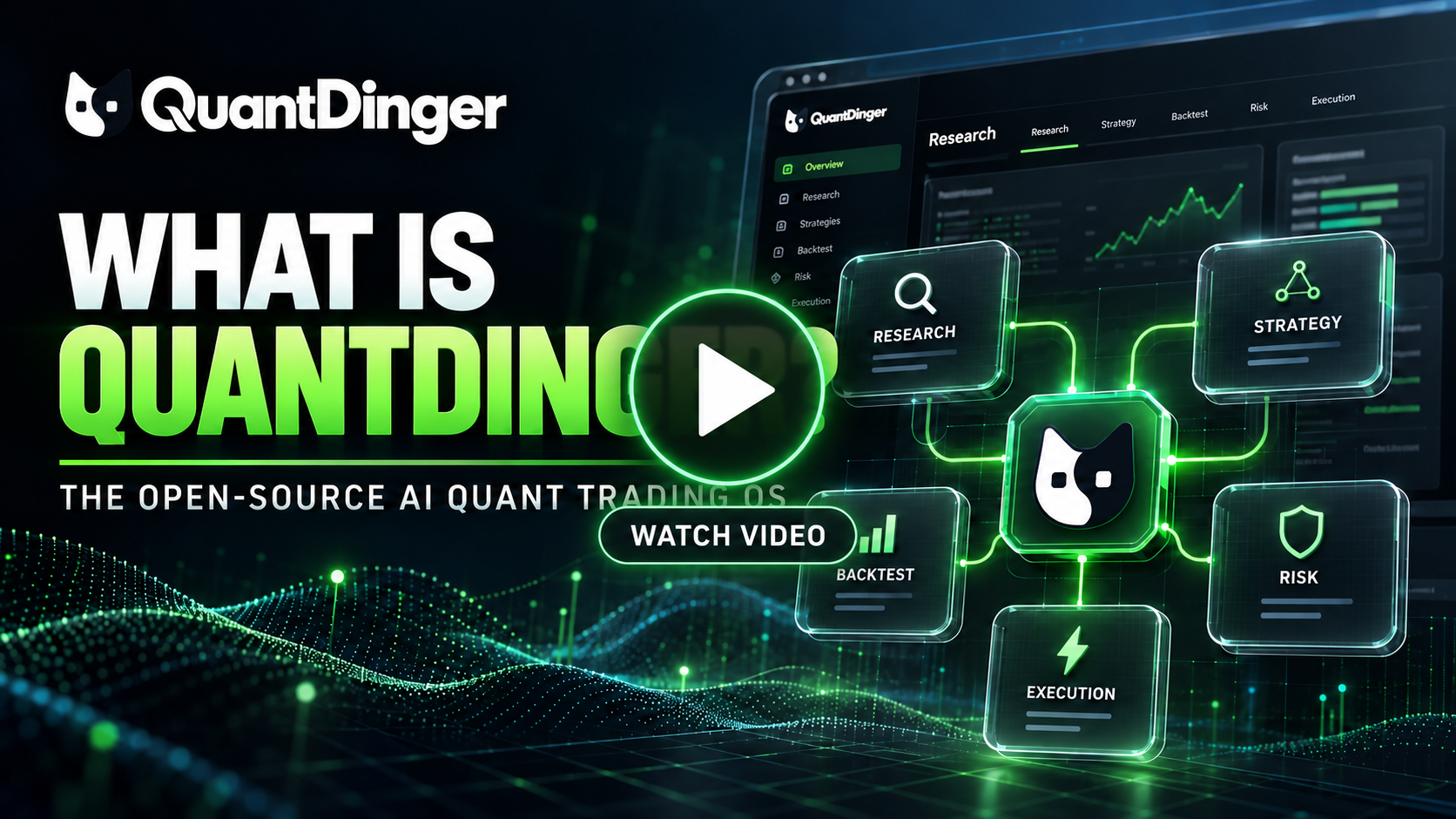
▶ Watch the latest QuantDinger product tour on YouTube
What QuantDinger is
QuantDinger is an open-source AI Trading OS for independent traders, Python strategy authors, and small teams. Its local-first, self-hosted design keeps market data, strategy code, broker credentials, and deployment under the operator's control.
The project combines:
- multi-provider AI market research and analysis;
- Python indicators and Strategy API V2 development;
- server-side backtesting and experiment workflows;
- paper and live execution across crypto exchanges and traditional brokers;
- web, mobile H5, human API, Agent Gateway, and MCP access;
- PostgreSQL-backed state, durable workers, audit logs, and optional monitoring.
It is not a black-box signal service. Strategy code, risk settings, credentials, and deployment remain under the operator's control.
Strategy evolution and signal-only virtual accounts
- Factor Lab loads one point-in-time universe panel once and benchmarks up to 40 registered technical, fundamental, TA-Lib, or Qlib factors. It uses a time-ordered holdout, out-of-sample IC retention, Benjamini-Hochberg false-discovery control, cost-aware scoring, factor-life-cycle labels, and cross-factor IC correlation. The same workflow is available from the web UI, Human API, Agent Gateway, and MCP.
- Strategy evolution searches declared tunable parameters with random, grid, or TPE optimization, using bar-count walk-forward validation and a final blind holdout. Jobs run asynchronously with per-strategy history, automatic pruning, composite scoring, PBO, Deflated Sharpe, block-bootstrap Monte Carlo, and transaction-cost stress tests. Results compare parameter robustness; they do not forecast future returns.
- Signal-only virtual accounts turn notification-mode signals into internal virtual orders, fills, positions, trade records, PnL, and an equity curve. They never connect to a broker or submit live orders. Each fill uses a fixed 0.05% commission on executed notional and 0.05% adverse slippage; leverage is not charged a second time in the commission calculation.
What changed in v5
The v5 backend is organized around explicit runtime and operational boundaries:
- the HTTP API no longer owns long-running trading or scheduler loops;
- trading, scheduling, Celery jobs, and migrations run as separate processes;
- Celery handles finite, retryable work while long-lived strategy runtimes stay in the trading worker;
- cache Redis and durable job Redis use separate instances and eviction policies;
- high-risk API contracts are represented in OpenAPI and protected by tests;
- JSON logs, request IDs, Prometheus metrics, dashboards, and alert rules are available through an optional observability overlay;
- the production overlay runs backend processes as a non-root user with a read-only root filesystem, dropped capabilities, and resource limits;
- CI checks syntax, lint, tests, release gates, Compose files, dependencies, source security, secrets, API compatibility, version drift, and text encoding.
The source version is declared in VERSION. Git release tags use the
same semantic version with a leading v, for example v5.0.1.
Architecture
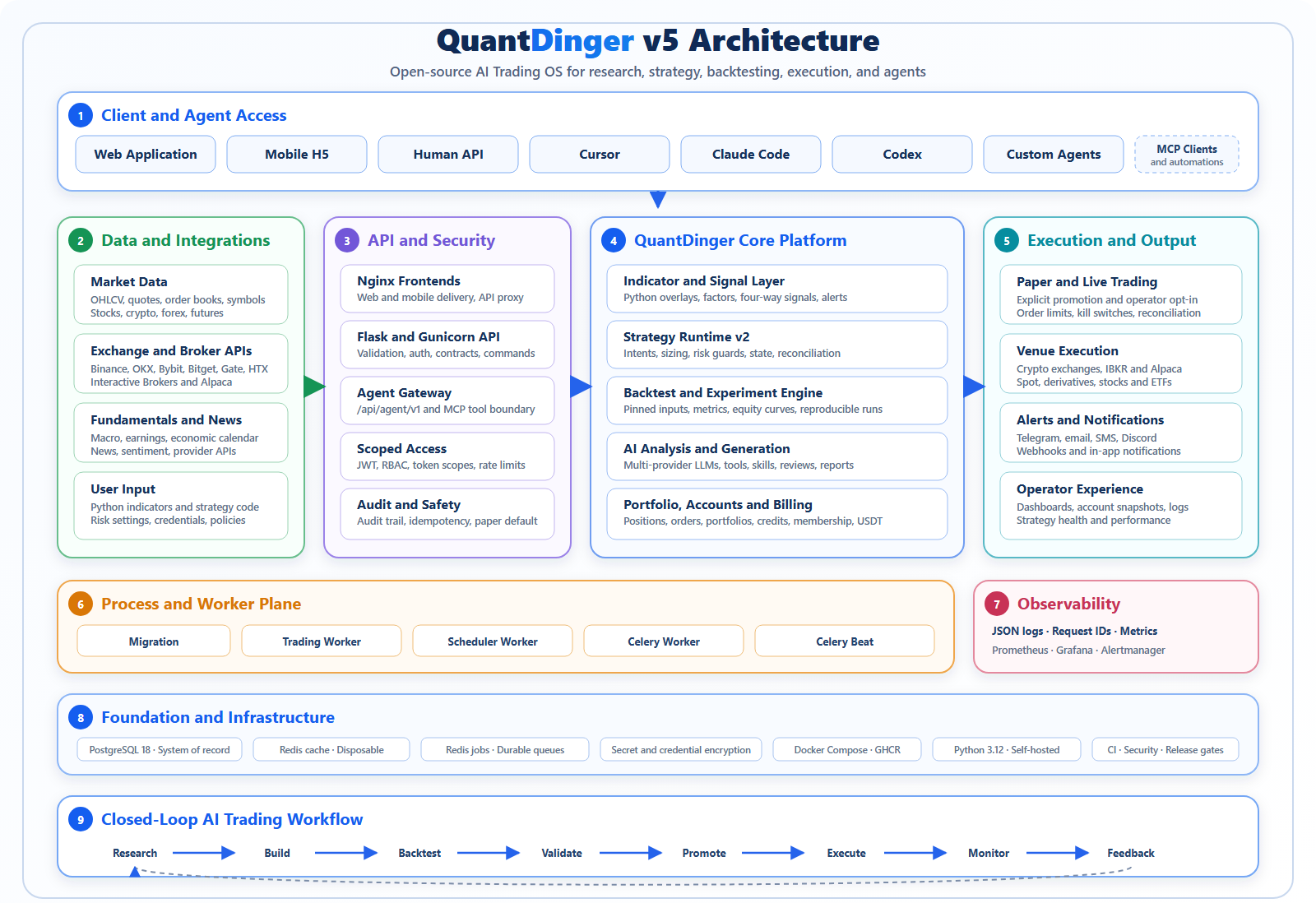
The editable source is architecture-v5.svg; the Mermaid topology below is the detailed runtime source of truth.

The static diagram above is the product-level view. The runtime topology below is the current source of truth for container ownership and event/data flow.
flowchart TB
    C["Web / Mobile / API / MCP clients"]
    FE["Nginx frontend services"]
    API["Flask + Gunicorn API"]
    PG[("PostgreSQL")]
    CACHE[("Redis cache")]
    JOBS[("Redis jobs")]
    KAFKA[("Kafka event backbone")]
    TW["Trading workers\ncontrol, realtime, execution, grid actors"]
    DISPATCH["Strategy dispatcher workers"]
    EVAL["Strategy evaluator workers\nhot bar runtimes"]
    AUDIT["Kafka audit worker"]
    SW["Scheduler worker"]
    CW["Celery worker"]
    BEAT["Celery beat"]
    PROM["Prometheus"]
    GRAF["Grafana"]
    ALERT["Alertmanager"]

    C --> FE --> API
    API --> PG
    API --> CACHE
    API -->|"durable commands"| PG
    TW -->|"leases, order intents, fills, grid actor state"| PG
    TW -->|"closed bars and lifecycle events"| KAFKA
    KAFKA --> DISPATCH --> KAFKA
    KAFKA --> EVAL
    EVAL -->|"inbox, leases, checkpoints, order intents"| PG
    KAFKA --> AUDIT --> PG
    PG -->|"owned pending orders"| TW
    SW -->|"schedules, monitoring, heartbeats"| PG
    API -->|"finite async jobs"| JOBS
    BEAT --> JOBS --> CW
    CW --> PG
    API -. metrics .-> PROM
    PG -. exporter .-> PROM
    CACHE -. exporter .-> PROM
    JOBS -. exporter .-> PROM
    PROM --> GRAF
    PROM --> ALERT
One backend image is reused by several containers with different commands:
| Process | Responsibility |
|---|---|
migration |
Applies the database schema and exits before application services start. |
kafka-init |
Creates the versioned runtime topics and exits before event consumers start. |
backend |
Handles HTTP, authentication, validation, and durable command submission. |
trading-worker |
Owns control/realtime runtimes, exchange sessions, the fenced order gateway, reconciliation, and durable grid actors. |
strategy-dispatcher-worker |
Converts closed-bar events into stable strategy-shard evaluation batches. |
strategy-evaluator-worker |
Owns hot distributed bar runtimes and evaluates fenced strategy inbox events. |
kafka-audit-worker |
Validates and records the versioned event stream independently of execution. |
scheduler-worker |
Runs portfolio, deployment, payment, and signal schedules. |
celery-worker |
Executes finite AI, report, and maintenance jobs. |
celery-backtest-worker |
Executes backtests, factor research, and experiments; recycles its child after every task. |
celery-beat |
Dispatches periodic Celery tasks. |
See Backend process roles, architecture, and concurrency model for the ownership rules. Use the distributed runtime deployment and scaling guide before changing replica counts or moving the stack to multiple hosts.
Quick start
If you are unsure whether to choose Windows, Linux/macOS, a cloud server, SaaS, or a mobile client, start with the installation and deployment overview. Each path covers installation, verification, upgrades, post-install setup, and troubleshooting.
Fastest cloud deployment: AWS Marketplace

Launch the free QuantDinger software from its public AWS Marketplace product page. The Marketplace delivery option provisions the single-node container stack and its required AWS infrastructure through CloudFormation. QuantDinger has no software fee; normal AWS infrastructure charges still apply. See the deployment and upgrade guide for first login, backups, upgrades, rollback, and cost notes.
Option A: prebuilt images
Prerequisites: Docker with Compose v2. Node.js and a local Python environment are not required.
Linux or macOS:
curl -fsSL https://raw.githubusercontent.com/OpenByteInc/QuantDinger/main/install.sh | bash
Windows PowerShell:
irm https://raw.githubusercontent.com/OpenByteInc/QuantDinger/main/install.ps1 | iex
The installer asks for the initial administrator credentials, generates the required secrets, downloads the GHCR Compose stack, and starts it.
Open:
- Web: http://127.0.0.1:8888
- Mobile H5: http://127.0.0.1:8889
- API health: http://127.0.0.1:5000/api/health
Docker administrator and settings notes
On a fresh database, the backend creates the initial administrator from
ADMIN_USER, ADMIN_PASSWORD, and optional ADMIN_EMAIL. Passwords are stored
as hashes, never as plaintext. An existing PostgreSQL volume is not overwritten:
the backend only replaces the untouched legacy quantdinger / 123456
administrator when a non-default administrator is explicitly configured. It
never overwrites an account whose password was already changed, and it refuses
to promote an existing account that already uses the requested username.
Manual Docker deployments retain quantdinger / 123456 only for backward
compatibility when the administrator variables are left at their defaults. This
credential is not suitable for an internet-facing deployment; change it before
first start or immediately after the first login. The one-command installer does
not accept 123456 as the chosen password.
The Settings UI writes runtime configuration to /app/.env, which is the
project-root .env on the host for both GHCR and source deployments. Current backend images automatically give runtime UID
10001 ownership and keep mode 600. Do not use chmod 755 or recursive 777:
these files contain passwords and API keys, and 755 still does not grant write
access to UID 10001 when root owns the file.
Verify write access with:
docker compose exec -u 10001:10001 -T backend \
  sh -c 'test -w /app/.env && echo writable=yes || echo writable=no'
The hardened production override intentionally mounts /app/.env read-only.
When using docker-compose.production.yml, manage configuration on the host and
recreate the services instead of saving it from the Settings UI. See the
English guide or
中文指南 for
legacy-image recovery and rootless/NFS notes.
Option B: source checkout
git clone https://github.com/OpenByteInc/QuantDinger.git
cd QuantDinger
python scripts/bootstrap_env.py
Before the first start, review the unified environment file. The bootstrap command already generates the PostgreSQL, session-signing, and credential-encryption secrets; set the administrator credentials and review any production-only integrations:
| File | Required production values |
|---|---|
.env |
Administrator credentials; optional Redis and Grafana credentials; deployment-specific URLs and integrations |
After pulling an update, initialize the unified environment before running any Compose command. This one-time step is required when upgrading from releases that relied on the former built-in PostgreSQL password:
git pull --ff-only
python3 scripts/bootstrap_env.py
docker compose up -d --build
The bootstrap command preserves existing credentials and can recover the former
PostgreSQL password from a legacy DATABASE_URL or the existing database
container. If it detects an existing data volume but cannot recover the password,
it stops instead of disconnecting the database. Do not invent a replacement
password and do not delete the volume.
After bootstrap, Compose runs the one-shot env-sync service before database and
Kafka initialization. It appends newly introduced settings, imports missing
values from legacy backend environment files, preserves existing values and
comments, and creates a timestamped backup only when the unified file changes.
The command below remains available for a manual preview or maintenance run:
python scripts/sync_env.py --env-file .env --template .env.example --backup
For a manual one-time migration from older releases, add
--legacy backend_api_python/.env (source deployment) or --legacy backend.env
(old GHCR deployment). The old file is not deleted.
The bootstrap command creates .env, preserves existing values during upgrades,
and generates independent PostgreSQL, session, and credential-encryption secrets.
To generate another independent secret manually:
python -c "import secrets; print(secrets.token_hex(32))"
Start the core stack from local backend source:
docker compose up -d --build
docker compose ps
The base stack does not start Prometheus, Grafana, or Alertmanager. This keeps the default open-source installation smaller.
For complete platform instructions, see Windows, Linux and macOS, cloud, SaaS, and mobile client deployment. Continue with post-installation setup; use the installation FAQ and installation troubleshooting when needed.
After the first login, follow the 30-minute quickstart to configure the core system and produce a first research result and backtest. Production administrators should also read the configuration reference, backup, restore, and migration guide, and upgrade and rollback guide.
For the free AWS Marketplace single-node delivery option, including first launch, upgrades, backup, rollback, and cost notes, see the AWS Marketplace deployment guide.
Production deployment
Validate secrets before starting a production stack:
python backend_api_python/scripts/check_production_config.py \
  --env-file .env
Start the hardened runtime with optional observability:
docker compose \
  -f docker-compose.yml \
  -f docker-compose.production.yml \
  -f docker-compose.observability.yml \
  up -d --build
Omit docker-compose.observability.yml when the host is resource-constrained or
monitoring is provided externally.
Production rules:
- expose only a TLS reverse proxy on ports 80/443;
- keep PostgreSQL, both Redis instances, Prometheus, Grafana, and Alertmanager off the public internet;
- do not deploy with example passwords or empty encryption keys;
- back up PostgreSQL and the durable
redis-jobsvolume; - keep cache Redis disposable and never use it as the Celery broker;
- review worker health and application readiness after every deployment.
The full checklist is in Production hardening.
Local endpoints
All published ports bind to loopback by default.
| Service | Default URL | Purpose |
|---|---|---|
| Web | http://127.0.0.1:8888 | Desktop web client and same-origin API proxy. |
| Mobile H5 | http://127.0.0.1:8889 | Mobile web client and same-origin API proxy. |
| Backend | http://127.0.0.1:5000 | Direct API access and health endpoints. |
| Grafana | http://127.0.0.1:3000 | Dashboards; available only with the observability overlay. |
| Prometheus | http://127.0.0.1:9090 | Metrics storage and queries; optional. |
| Alertmanager | http://127.0.0.1:9093 | Alert grouping, silencing, and delivery; optional. |
Container-only ports such as the job Redis and exporters are not published to the host.
Observability
The monitoring stack is optional by design:
- Prometheus collects API, worker, PostgreSQL, and Redis metrics.
- Grafana turns those metrics into operator dashboards.
- Alertmanager groups alerts, manages silences, and sends notifications once a receiver is configured.
Start it for local diagnostics without the production overlay:
docker compose \
  -f docker-compose.yml \
  -f docker-compose.observability.yml \
  up -d
Monitoring services stay on 127.0.0.1. Use a VPN, SSH tunnel, or authenticated
reverse proxy for remote administration. See
Observability for dashboards, alerts, retention, and
receiver configuration.
Security model
- Broker credentials and MFA secrets are encrypted with a stable
CREDENTIAL_ENCRYPTION_KEY. - Agent tokens are hashed, scoped, rate-limited, and audit-logged.
- Agent trading is paper-only by default; live access requires both token and server-side authorization.
- Long-running strategy ownership uses leases, heartbeats, and fencing tokens.
- Production containers run without root privileges or Linux capabilities.
- Host port defaults are loopback-only; public access should terminate at a TLS reverse proxy.
Report vulnerabilities privately according to SECURITY.md. Do not include credentials, account data, or exploitable details in public issues.
Strategy and integration surfaces
| Area | Current surface |
|---|---|
| Indicators | Python chart overlays, markers, bands, and signals. |
| Strategies | Strategy API V2 intents, sizing, risk, backtests, and live runtime. |
| Crypto | Binance, OKX, Bitget, Bybit, Gate, HTX, and adapter extensions. |
| Traditional brokers | IBKR and Alpaca workflows. |
| AI providers | OpenRouter, OpenAI-compatible APIs, Google, DeepSeek, Grok, MiniMax, and custom endpoints. |
| Automation | Human API, Agent Gateway, MCP server, Celery jobs, schedules, and notifications. |
Start with the Indicator guide, Strategy guide, and Extension guide.
JEV-powered pre-trade decisions
QuantDinger can place a structured AI decision gate directly in front of live entry orders. Enable AI Decision Filter when creating a regular live strategy. Before a strategy entry reaches the exchange, QuantDinger sends the order, strategy context, exposure, positions, and budget state to TypeSafe Jev. Jev returns typed Choice results, probabilities, and confidence instead of prose that must be parsed. The app shows the provider, checks, result, confidence, latency, and reason in an auditable decision timeline.
| Previous LLM-only gate | JEV decision gate |
|---|---|
| Generate prose or JSON and recover a decision through parsing | Receive a typed Choice with the selected outcome, full probabilities, and confidence |
| One opaque answer is difficult to inspect after execution | Independent entry and risk checks are stored with the order context and latency |
| Provider failure can accidentally block position management | Provider failure is audited and fails open, while every exit bypasses AI |
The execution policy stays in QuantDinger code: rejected entries never reach the exchange; exits, stop-loss, take-profit, and emergency actions bypass the filter. Grid, DCA, and martingale runtimes are excluded from this first version. When Jev is not configured, QuantDinger tries the configured LLM. If no AI provider is available, the order is allowed and the fail-open result is logged, so an AI outage cannot trap an existing position.
Decision flow
flowchart TD
    A["Strategy entry signal"] --> B["Deterministic risk and order budget checks"]
    B -->|"Basic checks fail"| R["Reject order"]
    B -->|"Basic checks pass"| C["Build Decision Context V2"]

    C --> C1["Strategy parameters and signal rationale"]
    C --> C2["Multi-timeframe market data and indicators"]
    C --> C3["Positions, exposure, equity, and drawdown"]
    C --> C4["Recent PnL and consecutive losses"]
    C --> C5["Take-profit, stop-loss, and execution conditions"]

    C1 --> D
    C2 --> D
    C3 --> D
    C4 --> D
    C5 --> D

    D{"JEV configured?"}

    D -->|"Yes"| E["JEV System One"]
    E --> E1["Evidence quality"]
    E --> E2["Signal consistency"]
    E --> E3["Market regime"]
    E --> E4["Account risk"]
    E --> E5["Execution quality"]
    E --> E6["Entry decision: pass/reject"]

    E1 --> F["Validate schema, probabilities, and confidence"]
    E2 --> F
    E3 --> F
    E4 --> F
    E5 --> F
    E6 --> F

    F -->|"Valid result and confidence threshold met"| G["Deterministic decision converger"]
    F -->|"Timeout, error, invalid format, or low confidence"| H

    D -->|"No"| H{"LLM configured?"}
    H -->|"Yes"| I["LLM reads the same context"]
    I --> J["Require strict JSON output"]
    J --> K{"decision"}

    H -->|"No"| O["Fail open and log the reason"]

    G -->|"PASS"| P["Enter pending order queue"]
    G -->|"REJECT"| R
    K -->|"pass"| P
    K -->|"reject"| R
    K -->|"Invalid output or provider failure"| O

    P --> Q["Submit to exchange asynchronously"]
    R --> S["Record ai_rejected and the decision trace"]
    O --> T["Place order normally and record provider unavailable"]
Configure JEV_ENABLED, JEV_API_KEY, JEV_BASE_URL, JEV_MODEL, and
JEV_TIMEOUT_SECONDS in System Settings → AI / LLM. When JEV is disabled,
the decision filter uses the configured LLM directly. TypeSafe documents the
HTTP contract at POST /v1/systemone.
AI agents and MCP
The Agent Gateway is exposed under /api/agent/v1. The included MCP server lets
clients such as Cursor, Claude Code, and Codex call approved tools without
receiving broker credentials or administrator JWTs.
Live trading through an agent requires all of the following:
- a token with trading scope;
paper_only=falseon that token;AGENT_LIVE_TRADING_ENABLED=trueon the server;- operator-configured limits and allowlists.
See MCP setup, Agent quick start, and the Agent OpenAPI document.
Development
Backend development uses Python 3.12:
cd backend_api_python
python -m venv .venv
python -m pip install -r requirements-dev.txt
python -m pytest -m "not integration and not stress" --ignore=tests/release_gate -q
ruff check app scripts tests
Useful repository checks:
python scripts/check_version.py
python scripts/check_mojibake.py
docker compose -f docker-compose.yml config -q
docker compose -f docker-compose.yml -f docker-compose.production.yml -f docker-compose.observability.yml config -q
API changes should follow API conventions, update the OpenAPI artifact when required, and pass the compatibility workflow.
Repository layout
This repository contains the backend, worker processes, deployment definitions, operations configuration, documentation, and MCP server. The desktop and mobile client source code live in separate repositories; this repository consumes their published images in the Compose stacks.
…
Releases