
Server · #266 trending MCP repo
Cubeplex
cubeplexai/cubeplex
CubePlex is a cloud-native platform for managed agents in team workspaces — skills, shared memory, MCP tools, persistent sandboxes, governed access, and self-hosted deploy on Docker Compose or Kubernetes.
- Stars
- 575
- This week
- —
- Forks
- 55
- Open issues
- 23
- Skills inside
- 18
Inside this repo
18 skills
.agents/skills/cubeplex-tdddebug-cubeplexUse when hitting a bug, test failure, or unexpected behavior in cubeplex — BEFORE proposing or writing a fix. Enforces reproduce-first, then routes to the right cubeplex diagnostic: agent-run traces (cubeloop-trace), alembic head conflicts, sandbox/reaper issues, SSE streaming, scope/RBAC 404-vs-403.agents/skills/debug-cubeplexfeature-workflowUse at the START of a large, unclear, or multi-subsystem cubeplex feature — before writing code — to isolate work, resolve the design, and write a spec/plan under docs/dev. Clearly specified, small, single-concern tasks skip spec, plan, clarification, and review and execute directly. Covers worktree.agents/skills/feature-workflowpr-codex-review-loopUse when a PR has been (or is about to be) pushed and needs the codex review loop — push → wait → fetch new comments via the bundled codex-poll.sh → fix actionable feedback → reply to every comment → re-tag @codex → repeat until clean. Triggers on phrases like "等 codex review", "看看 review", "@codex .agents/skills/pr-codex-review-loopreleasePrepare and publish cubeplex releases across backend, frontend, sandbox, Helm, Docker Compose, Git tags, and container registries. Use when cutting a release, bumping release versions, publishing Docker images, promoting image digests, updating deployment values, or troubleshooting release ordering..agents/skills/releasebrowserUse when the user wants to open or control a web browser — navigate to a site, click, fill forms, log in, search, scrape a page, or do any interactive web task that plain HTTP fetch can't (JS-rendered pages, logins, OAuth, CAPTCHA). The user watches this browser live and can take over for steps onlybackend/skills/preinstalled/browserdeep-researchUse when a question needs current multi-source research, multi-angle investigation, or iterative verification before producing a report or detailed answerbackend/skills/preinstalled/deep-researchdocxCreate polished, fully-editable Word (.docx) documents end to end — research or read the source, outline the structure, pick a style set, build native editable content (cover / headings / body / lists / three-line tables / figures / quote / TOC / page numbers), then self-check before delivering. Hanbackend/skills/preinstalled/docxgit-commitCreate well-formatted git commits following conventional commit standards (type/scope/subject, with body and footer).backend/skills/preinstalled/git-commitinternal-commsUse when writing internal communications such as status reports, leadership updates, 3P updates, company newsletters, FAQs, incident reports, and project updates.backend/skills/preinstalled/internal-commsjupyter-notebookUse when the user asks to create, scaffold, or edit Jupyter notebooks (`.ipynb`) for experiments, explorations, or tutorials; prefer the bundled templates and run the helper script `new_notebook.py` to generate a clean starting notebook.backend/skills/preinstalled/jupyter-notebookpdfUse this skill when visual quality and design identity matter for a PDF. CREATE (generate from scratch): "make a PDF", "generate a report", "write a proposal", "create a resume", "beautiful PDF", "professional document", "cover page", "polished PDF", "client-ready document". FILL (complete form fielbackend/skills/preinstalled/pdfpptxCreate polished, fully-editable PowerPoint (.pptx) decks end to end — research or read the source, outline a narrative, pick a theme, build native editable slides (cover / section / agenda / cards / steps / comparison table / metrics / native chart / statement / closing), then self-check for overflobackend/skills/preinstalled/pptxshow-widgetBuild inline interactive HTML widgets with show_widget — charts, diagrams, dashboards, sliders, side-by-side comparisons, or any visual explainer. Load before non-trivial widget work for design rules and scenario skeletons.backend/skills/preinstalled/show-widgetskill-creatorBuilds, edits, and publishes CubePlex skills (SKILL.md bundles) into the current workspace. Use when the user asks to create, build, write, design, package, or capture a reusable agent workflow as a skill; to edit, improve, fix, rename, or bump a skill; or to publish, upload, or share a skill in thibackend/skills/preinstalled/skill-creatorweb-artifacts-builderSuite of tools for creating elaborate, multi-component claude.ai HTML artifacts using modern frontend web technologies (React, Tailwind CSS, shadcn/ui). Use for complex artifacts requiring state management, routing, or shadcn/ui components - not for simple single-file HTML/JSX artifacts.backend/skills/preinstalled/web-artifacts-builderwide-researchBuilds comprehensive, evidence-backed lists or datasets by partitioning many independent research items across parallel subagents, then validating, deduplicating, and gap-filling the combined results. Use for requests to find all or many matching entities, map a market or literature set, enrich a knbackend/skills/preinstalled/wide-researchxlsxOpen, create, read, analyze, edit, or validate Excel/spreadsheet files (.xlsx, .xlsm, .csv, .tsv). Use when the user asks to create, build, modify, analyze, read, validate, or format any Excel spreadsheet, financial model, pivot table, or tabular data file. Covers: creating new xlsx from scratch, rebackend/skills/preinstalled/xlsxDocumentation
README

Cloud-native platform for managed agents in team workspaces






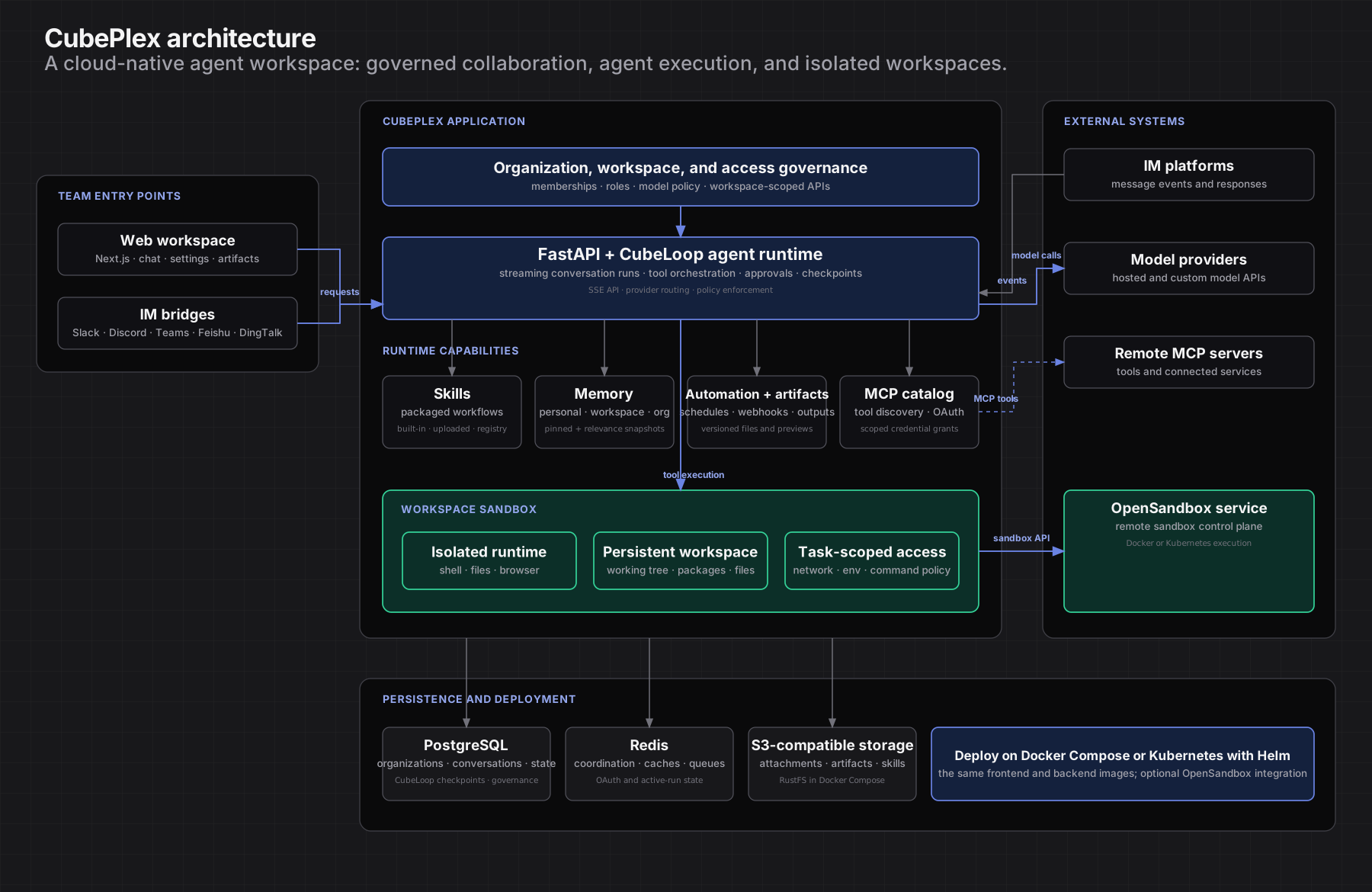
CubePlex is a cloud-native platform for long-lived, team-owned Agents. A Workspace gives a team one Agent with a stable role, shared knowledge, approved tools, and a persistent work environment—available from the web and the channels where the team already works.
Why CubePlex
- One long-lived Workspace Agent — The team returns to the same Agent across tasks, with its role, Skills, memory, MCP connections, and working state intact.
- Team-owned state, not personal state — Agent configuration, shared knowledge, approved tools, deliverables, and working state belong to the Workspace and remain with the team.
- One Agent across every entry point — Use the same Workspace Agent from the web, Slack, Discord, Teams, Feishu, DingTalk, WeCom, and more, while each conversation keeps its own participants and execution context.
- Durable, governed execution — Isolated persistent sandboxes and organization controls make ongoing Agent work inspectable, repeatable, and manageable.
CubePlex's Agent runtime is built on CubeLoop, an async-native agent framework for multi-provider model access, tool execution, streaming, middleware, and durable checkpoints. Workspace sandboxes are isolated execution environments with persistent working state; external model providers, MCP servers, and IM platforms remain outside CubePlex's trust boundary.
Demos
Build Interactive Website — a full product website generated from a single prompt.
More demos
Skills Workflow — find a skill, install it, and use it to build an agentic frontend end to end.
Data Analysis — transform raw tabular data into a formatted spreadsheet.
One-Page PDF — turn a one-page PDF into a polished, navigable page.
Browser Control — an Agent drives the browser to complete a task autonomously.
Platform capabilities
| Area | What you get |
|---|---|
| Long-lived Workspace Agents | Give each team a stable Agent role, shared configuration, approved capabilities, and a work environment that continues across tasks. |
| Team conversations | Use private chats, group chats, and Topics to keep participants, conversation context, and execution separate while the Workspace Agent keeps its shared role and knowledge. |
| Layered memory | Recall personal preferences, shared workspace facts and procedures, and organization policies at the appropriate scope. |
| Skills | Package reusable Agent workflows from built-in capabilities, organization-provided skills, or remote registries such as skills.sh, then make them available in the right workspace. |
| Governed MCP tools | Org admins curate a connector catalog; workspaces enable the tools they need. Credentials can be organization-, workspace-, or user-scoped, using OAuth or static credentials. |
| Workspace sandboxes | Per-workspace isolated runtimes with persistent storage — files, packages, and the working tree survive restarts so Agents resume the same work site. |
| Secrets and credential controls | Credentials are encrypted at rest. Kubernetes deployments can resolve approved sandbox secrets at request time rather than exposing them as plain environment variables. |
| Multi-model chat | Use hosted and custom providers including Anthropic, OpenAI, and more. Attach files, stream replies, and switch models mid-conversation. |
| Automation | Run scheduled tasks (cron, interval, or one-shot) and webhook event triggers. |
| Artifacts | Deliver versioned files, previews, code, images, and other outputs directly in the conversation. |
| IM bridges | Bring the same Workspace Agent to Slack, Discord, Teams, Feishu, DingTalk, WeCom, and more; configure shared or per-member conversations in group chats. |
| Organization and workspace governance | Manage organizations, workspaces, roles, model access policies, connector catalogs, credentials, and cost tracking. |
| Deploy anywhere | Use Docker Compose for a single host or Helm for Kubernetes. |
How CubePlex compares
- CubePlex vs DeerFlow — team-owned Workspace Agents versus personal Agent environments.
- CubePlex vs Dify — long-lived Agents versus scenario-specific Apps.
- CubePlex vs QM — a long-lived team Agent with entry-point-specific execution contexts versus Agent-computer scopes.
Get started
- Docker Compose (single host): installation guide
- Kubernetes with Helm: installation guide
Both modes use the same backend and frontend images. Guides cover image builds, configuration, secrets, and verification.
Develop locally
Prerequisites: Python 3.12+, Node.js 20+, pnpm 10+, and Docker (recommended for local services).
git clone https://github.com/cubeplexai/cubeplex.git
cd cubeplex
make install

# Terminal 1 — API
cd backend && python main.py

# Terminal 2 — web UI
cd frontend && pnpm dev
Backend: http://localhost:8000 · Frontend: http://localhost:3000.
Local setup also needs backend env/config files described in the contribution guide.
Repository layout
backend/    FastAPI API and Cubeloop-based agent runtime
frontend/   Next.js web app and shared TypeScript packages
deploy/     Docker Compose and Kubernetes/Helm assets
docs/       Product docs site and engineering reference
scripts/    Worktree provisioning and dev helpers
Documentation and contributing
Releases