
Server · #280 trending MCP repo · ↗ +14 stars this week
Gitlab MCP
zereight/gitlab-mcp
MCP server for GitLab: 277 tools for projects, MRs, issues, pipelines, wikis and more via the GitLab REST/GraphQL API
- Stars
- 2.1k
- This week
- +14
- Forks
- 368
- Open issues
- 10
- Skills inside
- 24
Get started
Add it to your agent
claude mcp add gitlab --transport stdio --scope local --env GITLAB_PERSONAL_ACCESS_TOKEN="$GITLAB_PERSONAL_ACCESS_TOKEN" --env GITLAB_API_URL=https://gitlab.com/api/v4 -- zereight-mcp-gitlabRun in your terminal. Add --scope project to share it with your team through .mcp.json.
codex mcp add gitlab --env GITLAB_PERSONAL_ACCESS_TOKEN="$GITLAB_PERSONAL_ACCESS_TOKEN" --env GITLAB_API_URL=https://gitlab.com/api/v4 -- zereight-mcp-gitlabSaved to ~/.codex/config.toml.
{
  "mcpServers": {
    "gitlab": {
      "command": "npx",
      "args": [
        "-y",
        "@zereight/mcp-gitlab@latest"
      ]
    }
  }
}Add to ~/.cursor/mcp.json (or .cursor/mcp.json in a project).
{
  "servers": {
    "gitlab": {
      "type": "stdio",
      "command": "npx",
      "args": [
        "-y",
        "@zereight/mcp-gitlab@latest"
      ]
    }
  }
}Add to .vscode/mcp.json, then start it from the MCP view in Copilot Chat.
gemini mcp add gitlab npx -y @zereight/mcp-gitlab@latestSaved to .gemini/settings.json.
Inside this repo
24 skills
.github/skills/ai-slop-cleanercancelCancel any active OMG mode and clean up state. Activate when user says: cancel, stop, cancelomg, stopomg, abort, kill it, stop everything..github/skills/cancelccgClaude-Codex-Gemini tri-model orchestration for multi-perspective analysis. Activate when user says: ccg, tri-model, three models, multi-model, cross-validate, get multiple opinions, compare models..github/skills/ccgcoding-standardsCanonical cross-language coding standards reference. Shared rules embedded by reviewer agents. Activate when: viewing coding standards, checking naming rules, reviewing style baseline, consulting style guide, what are the rules..github/skills/coding-standardsdeep-dive2-stage pipeline: trace (causal investigation) then deep-interview (requirements). Activate when user says: deep dive, deep-dive, investigate deeply, trace and interview..github/skills/deep-divedeep-interviewSocratic deep interview with mathematical ambiguity gating. Activate when user says: deep interview, interview me, ask me everything, don't assume, make sure you understand, ouroboros, socratic, I have a vague idea, not sure exactly what I want..github/skills/deep-interviewomg-autopilotFull autonomous execution from idea to working code. Activate when user says: autopilot, auto-pilot, autonomous, build me, create me, make me, full auto, handle it all, or "I want a/an...".github/skills/omg-autopilotplanStrategic planning with optional interview workflow. Activate when user says: plan this, plan the, let's plan, make a plan, how should we approach..github/skills/planralphPRD-driven persistence loop until task completion with verification. Activate when user says: ralph, don't stop, must complete, finish this, keep going until done..github/skills/ralphralplanConsensus planning with Planner/Architect/Critic iterative loop. Activate when user says: ralplan, consensus plan, consensus planning..github/skills/ralplanrememberPromote reusable project knowledge to the right memory surface. Activate when user says: remember this, save this, store this, remember, memorize, keep this for later..github/skills/rememberreviewCode review with spec compliance and quality checks. Activate when user says: review this, code review, review my changes..github/skills/reviewsecurity-scanRapid security scanning workflow for code changes. Activates a focused security sweep. Activate when: security scan, scan for vulnerabilities, check for secrets, security check, run security audit, check deps..github/skills/security-scanself-improveAutonomous evolutionary code improvement engine with tournament selection. Activate when user says: self-improve, self improve, evolve code, improve iteratively, tournament, benchmark loop, optimize code..github/skills/self-improveskill-stocktakeAudit the skill inventory for quality, coverage, and staleness. Detect overlapping, incomplete, or outdated skills and produce a health report. Activate when: skill audit, stocktake, skill inventory, check skills, which skills exist, audit skills, skill quality, skill coverage..github/skills/skill-stocktakestatusShow current OMG mode status, active agents, and progress. Activate when user says: status, what's running, show progress, current state, active modes, where are we..github/skills/statustddTest-Driven Development enforcement skill. Activates full TDD mode. Activate when: TDD, test-driven, test first, red-green-refactor, write tests first..github/skills/tddteamN coordinated agents on shared task list with staged pipeline. Activate when user says: team, spawn agents, parallel agents, coordinate agents, multi-agent, swarm, work together..github/skills/teamtraceEvidence-driven tracing with competing hypotheses in parallel. Activate when user says: trace this, trace, why did this happen, root cause analysis, investigate why..github/skills/traceultraqaQA cycling workflow - test, verify, fix, repeat until goal met. Activate when user says: ultraqa, qa cycle, fix all tests, make tests pass..github/skills/ultraqaultraworkParallel execution engine for high-throughput task completion. Activate when user says: ulw, ultrawork, parallel execution, run these in parallel..github/skills/ultraworkverifyVerify that a change really works before claiming completion. Activate when user says: verify this, check if it works, prove it works..github/skills/verifygitlab-mcp-skillUse this skill when working with the GitLab MCP server tools for merge requests, issues, repositories, pipelines, work items, variables, dependency proxy, vulnerabilities, webhooks, search, CI catalog, and related GitLab workflows.skills/gitlab-mcpgl-cliUse GitLab from the terminal without registering an MCP server. Covers authenticating the zereight-mcp-gitlab CLI (PAT or OAuth device flow) and reading merge requests, diffs, discussions, issues, and pipelines. Use when the user asks about a GitLab MR/issue/pipeline and no GitLab MCP tools are avaiskills/gl-cliDocumentation
README
GitLab MCP Server


English | 한국어 | 简体中文 | Português (Brasil)
📖 Documentation → · llms.txt · llms-full.txt
Default: 40 tools (38 core + discover_tools + help). 288 tools exist in total (285 in toolsets + execute_graphql + discover_tools + help). Start lean; call discover_tools to activate more for this session.
Token budget: MCP clients send the whole
tools/listto the model at session start. Keep the default (~40 tools, ~12k schema tokens). Calldiscover_toolsto activate a category for this session (session-only; withOAUTH_STATELESS_MODE=truepersist a namedGITLAB_TOOLSETSlist), or use Skill + CLI and skip MCP schemas. Do not setGITLAB_TOOLSETS=all— it loads ~all tools and costs ~73k schema tokens. See tools/list size and comparison.
Install the zereight-mcp-gitlab binary first with npm install -g @zereight/mcp-gitlab, or Homebrew brew tap zereight/gitlab-mcp https://github.com/zereight/gitlab-mcp and brew install zereight/gitlab-mcp/zereight-mcp-gitlab. Official MCP Registry listing: io.github.zereight/gitlab-mcp. One-liner: npx -y @zereight/mcp-gitlab@latest.
Without → With
| Without this MCP | With this MCP |
|---|---|
| Paste MR URLs and diffs into chat | list_merge_request_changed_files → batched get_merge_request_file_diff |
| Hunt job logs in the GitLab UI | get_pipeline_job_output with pagination |
| Re-explain the project path every turn | project_id=group%2Fproject and merge_request_iid=123 |
Three install paths
| Path | When | How |
|---|---|---|
| Local IDE | Cursor, Claude Code, Codex on your machine | stdio + PAT or local OAuth |
| Shared HTTP | Team or hosted MCP | Streamable HTTP URL + remote auth or MCP OAuth |
| Claude.ai | Claude web connectors | Public HTTPS + GITLAB_MCP_OAUTH |
Install

Install the binary first (npm install -g @zereight/mcp-gitlab, or Homebrew brew tap zereight/gitlab-mcp https://github.com/zereight/gitlab-mcp then brew install zereight/gitlab-mcp/zereight-mcp-gitlab). Read the token without echo:
read -rs GITLAB_PERSONAL_ACCESS_TOKEN && export GITLAB_PERSONAL_ACCESS_TOKEN
# Claude Code
claude mcp add gitlab --transport stdio --scope local --env GITLAB_PERSONAL_ACCESS_TOKEN="$GITLAB_PERSONAL_ACCESS_TOKEN" --env GITLAB_API_URL=https://gitlab.com/api/v4 -- zereight-mcp-gitlab

# Codex
codex mcp add gitlab --env GITLAB_PERSONAL_ACCESS_TOKEN="$GITLAB_PERSONAL_ACCESS_TOKEN" --env GITLAB_API_URL=https://gitlab.com/api/v4 -- zereight-mcp-gitlab
Other clients: VS Code · GitHub Copilot · JSON clients · Cursor details
Agent paste-prompt
Copy this into an agent that can edit MCP config:
Install the GitLab MCP server (@zereight/mcp-gitlab) for this workspace.
Binary: zereight-mcp-gitlab (npm i -g @zereight/mcp-gitlab, or npx -y @zereight/mcp-gitlab@latest).
Auth: GITLAB_PERSONAL_ACCESS_TOKEN plus GITLAB_API_URL=https://gitlab.com/api/v4 (or GITLAB_USE_OAUTH=true).
Local: claude mcp add gitlab --transport stdio --scope local --env GITLAB_PERSONAL_ACCESS_TOKEN="$GITLAB_PERSONAL_ACCESS_TOKEN" --env GITLAB_API_URL=https://gitlab.com/api/v4 -- zereight-mcp-gitlab
Or: codex mcp add gitlab --env GITLAB_PERSONAL_ACCESS_TOKEN="$GITLAB_PERSONAL_ACCESS_TOKEN" --env GITLAB_API_URL=https://gitlab.com/api/v4 -- zereight-mcp-gitlab
Cursor: use the README deeplink or docs/clients/cursor.md.
Remote HTTP: point the client at https://mcp.example.com/mcp (Streamable HTTP). Claude.ai needs GITLAB_MCP_OAUTH on that host.
Default list: 40 tools (38 core + discover_tools + help). Call discover_tools to expand. Do not set GITLAB_TOOLSETS=all (loads ~all schemas, ~73k tokens). Do not enable the api toolset unless you accept its bypass risk.
Equal non-MCP path: npx skills add zereight/gitlab-mcp --skill gitlab-mcp-skill plus the zereight-mcp-gitlab CLI.
Remote HTTP
First-class option for a hosted or self-hosted server. Point the client at a Streamable HTTP URL:
{
  "mcpServers": {
    "gitlab": {
      "type": "http",
      "url": "https://mcp.example.com/mcp"
    }
  }
}
- Hosted / Claude.ai:
GITLAB_MCP_OAUTH=trueon the server (see MCP OAuth) - Per-user PAT headers:
REMOTE_AUTHORIZATION=true(see Remote Authorization) - Local Docker examples are in Usage
Skill + CLI (no MCP required)
Skill + CLI is an equal path, not a fallback. Same workflows, full payloads in a terminal, no MCP registration.
npx skills add zereight/gitlab-mcp --skill gitlab-mcp-skill
zereight-mcp-gitlab user whoami
zereight-mcp-gitlab mr list
See CLI without MCP and skills/gitlab-mcp/.
MCP vs Human CLI
| Use MCP when | Use the CLI when |
|---|---|
| The agent needs structured tools in chat | You need the full payload (diffs, logs, artifacts) |
jmespath or compact results are enough |
GITLAB_MCP_COMPACT_RESULTS is on and you want the rest in a terminal |
| You already registered the server | You have a PAT or ran auth and do not want MCP |
Human CLI is never compacted. Destructive tools and GITLAB_TOOL_POLICY_APPROVE tools need --yes.
Tips
project_id is a numeric ID or a URL-encoded path. Example: group group, project project, merge request !123 → project_id=group%2Fproject, merge_request_iid=123. Nested groups use %2F between every segment (group%2Fsubgroup%2Fproject).
FAQ
How do I authenticate? Local desktop: GITLAB_PERSONAL_ACCESS_TOKEN (or GITLAB_PERSONAL_ACCESS_TOKEN_FILE) is the simplest. Local OAuth is GITLAB_USE_OAUTH=true. Remote Claude.ai uses GITLAB_MCP_OAUTH. Multi-user HTTP uses REMOTE_AUTHORIZATION and a per-request token header.
Why do I only see ~40 tools? The default core toolset is 38 tools plus always-on discover_tools and help. That is intentional: a client sends every listed schema to the model up front. Call discover_tools with no args to list categories, then pass a category (pipelines, wiki, …) to activate it for this session. Session-only; with OAUTH_STATELESS_MODE=true persist a named GITLAB_TOOLSETS list. Do not set GITLAB_TOOLSETS=all — it loads ~all schemas (~73k tokens) and still does not enable api.
Local OAuth vs MCP OAuth vs remote auth? Local OAuth opens a browser on the same machine as the server. MCP OAuth is for a public HTTPS server and clients such as Claude.ai. Remote authorization forwards the caller's PAT or job token; there is no OAuth dance.
How do I shrink huge replies? Pass jmespath on any tool call. Or set GITLAB_MCP_COMPACT_RESULTS=true so oversized MCP replies become a preview plus a CLI command. Use the CLI when you need the full payload.
Why is the api toolset dangerous? gitlab_api_request bypasses group/project allowlists, other tool filters, and per-tool safety checks. Prompt injection can drive it. Enable it only by listing api in GITLAB_TOOLSETS. all, discover_tools, and GITLAB_TOOLS do not.
Cursor rule / CLAUDE.md snippet
GitLab merge requests, issues, and pipelines go through this MCP (@zereight/mcp-gitlab).
Start with the default core tools. Call discover_tools to expand. Do not set GITLAB_TOOLSETS=all.
Prefer list_merge_request_changed_files, then batched get_merge_request_file_diff.
Use jmespath or compact results; use the CLI for full diffs and job logs.
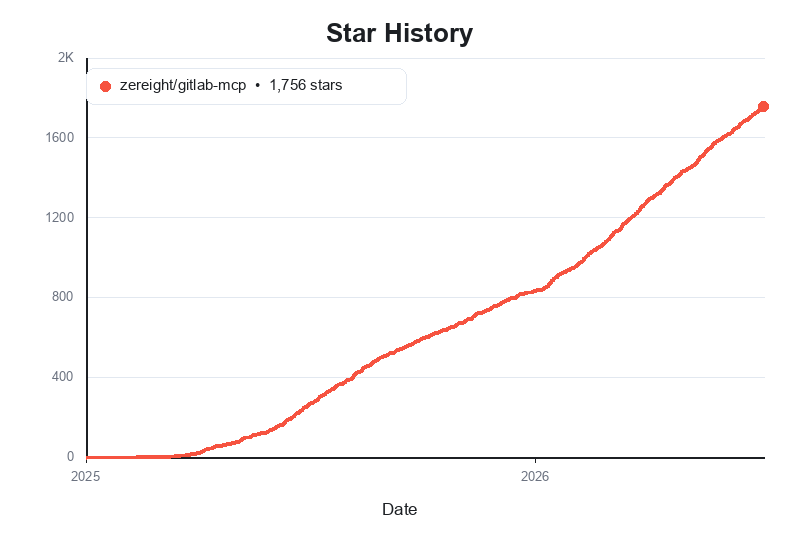
@zereight/mcp-gitlab
Agent-workflow-optimized GitLab MCP — manage projects, merge requests, issues, pipelines, wiki, releases, tags, milestones, and more through stdio, SSE, and Streamable HTTP.
Supports PAT, OAuth, read-only mode, dynamic API URLs, and remote authorization for VS Code, Claude, Cursor, Copilot, and other MCP clients.
Why use this GitLab MCP?
- Default 40 tools (38
core+discover_tools+help); 288 total — start lean; calldiscover_toolsto activate more without CQRS-style grouping.GITLAB_TOOLSETS=allloads ~all schemas (~73k tokens); prefer discover-on-demand or Skill + CLI - MR 2-step review —
list_merge_request_changed_files→ batchedget_merge_request_file_diff - Agent Skill built in — workflow guidance in
skills/gitlab-mcp/ - Flexible auth — Personal Access Token, local OAuth2 browser flow, MCP OAuth proxy, and per-request remote authorization
- Multiple transports — stdio for local clients, SSE for legacy clients, and Streamable HTTP for modern remote deployments
- Client-friendly setup — examples for Claude Code, Codex, Antigravity, OpenCode, Copilot, Cline, Roo Code, Cursor, Kilo Code, and Amp Code
- Self-hosted ready — works with custom GitLab instances, proxy settings, and dynamic API URL routing
- JMESPath result filtering — optional
jmespathon tool calls (seetools/list) shrinks JSON results without changing GitLab API requests; when response masking is enabled, JMESPath runs on masked data.
How we compare
| @zereight/mcp-gitlab | GitLab MCP A (community CQRS-style) | GitLab official MCP server | |
|---|---|---|---|
| Best for | AI agent workflows | Enterprise multi-instance / grouped tools | Built into GitLab, no separate install |
| Tool model | 288 tools: 285 in toolsets + execute_graphql + discover_tools + help |
~50–60 grouped browse_* / manage_* tools |
Toolsets chosen with an HTTP header |
| MR review | 2-step batched diff | Varies | get_merge_request with diffs |
| Node.js | >=20.0.0 | Often >=24 | Node.js 20+ for stdio via mcp-remote |
| License | MIT | Varies | Part of GitLab |
tools/list size (measured 2026-11-05)
A client sends the whole tools/list result to the model at session start. Token estimate is UTF-8 bytes / 4.
| Profile | Tools | JSON bytes | Est. tokens |
|---|---|---|---|
Default (core + discover_tools + help) |
40 | 46,943 | 11,736 |
GITLAB_TOOL_PROFILE=slim |
39 | 45,935 | 11,484 |
GITLAB_TOOLSETS=all |
286 | 293,906 | 73,477 |
Re-measure with npm run build && npm run test:mock (test/tools-list-budget.test.ts) after description or schema changes.
GitLab also ships an official MCP server.
- Free, Premium, and Ultimate. Moved from Premium to Free in GitLab 19.2. Generally available in GitLab 19.5.
- On GitLab.com, a top-level group Owner allows access to the MCP server. On GitLab Self-Managed and GitLab Dedicated, an administrator controls the instance setting. Default rules are on the official page.
- Remote clients use HTTP
https://<gitlab.example.com>/api/v4/mcpwith OAuth 2.0 dynamic client registration. - stdio goes through
mcp-remoteand needs Node.js 20 or later. - Toolsets use the
X-Gitlab-Enabled-Mcp-Server-Toolsetsheader. An optionalX-Gitlab-Mcp-Server-Tool-Name-Prefixheader keeps the first 32 characters of a tool-name prefix.
Full comparison with the official GitLab MCP server →
Quick start: choose either Personal Access Token or OAuth2 setup below, install @zereight/mcp-gitlab, and use zereight-mcp-gitlab in your MCP client configuration.
Client Setup Guides
- Claude Code Setup Guide
- VS Code Setup Guide
- GitHub Copilot Setup Guide
- Codex Setup Guide
- Cursor Setup Guide
- JSON-Based MCP Clients Setup Guide - for Factory AI Droid, OpenClaw, and OpenCode style clients
- OAuth2 Authentication Setup Guide
- Environment Variables Reference
- Stateless Mode — Multi-Pod HPA
- Custom Agents and Multiple PAT Setup
Usage
Setup Overview
Authentication Methods
The server supports four authentication methods:
For local/desktop use (most common):
- Personal Access Token (
GITLAB_PERSONAL_ACCESS_TOKENorGITLAB_PERSONAL_ACCESS_TOKEN_FILE) — simplest setup - OAuth2 — Local Browser (
GITLAB_USE_OAUTH) — recommended for better security
For server/remote deployments:
- OAuth2 — MCP Proxy (
GITLAB_MCP_OAUTH) — for remote MCP clients such as Claude.ai - Remote Authorization (
REMOTE_AUTHORIZATION) — multi-user deployments where each caller provides their own token
Quick setup paths
- Claude Code: see Claude Code Setup Guide
- VS Code: see VS Code Setup Guide
- GitHub Copilot: see GitHub Copilot Setup Guide
- Codex: see Codex Setup Guide
- Cursor: see Cursor Setup Guide
- Factory AI Droid / OpenClaw / OpenCode style clients: see JSON-Based MCP Clients Setup Guide
- OAuth browser flow details: see OAuth2 Authentication Setup Guide
- OAuth without a localhost callback (SSO, remote shell, background clients): run
zereight-mcp-gitlab auth(GitLab 17.9+ device flow; 17.2–17.8 needoauth2_device_grant_flow), then start the server withGITLAB_USE_OAUTH=true. See standalone device-flow command.
For the simplest local setup, start with a Personal Access Token. For browser-based local auth, use OAuth2. For remote or multi-user deployments, continue to the MCP OAuth and Remote Authorization sections later in this README.
Install the server once:
brew tap zereight/gitlab-mcp https://github.com/zereight/gitlab-mcp
brew install zereight/gitlab-mcp/zereight-mcp-gitlab
Or with npm:
npm install -g @zereight/mcp-gitlab
Or with Nix, by adding this flake to your own:
# flake.nix
inputs.gitlab-mcp.url = "github:zereight/gitlab-mcp";

# wherever you configure your MCP client:
command = lib.getExe inputs.gitlab-mcp.packages.${system}.default;
The store path is pinned by your lock file; update it with nix flake update gitlab-mcp.
The examples use zereight-mcp-gitlab, a less collision-prone alias for the legacy mcp-gitlab binary. If your MCP client cannot find it, use the absolute path from which zereight-mcp-gitlab.
No global install? Pin npx to the previous stable release (the version these docs recommend), for example npx -y @zereight/mcp-gitlab@2.3.21. If you always want the newest release, use npx -y @zereight/mcp-gitlab@latest instead. To try a fix merged to main before the next stable release, use npx -y @zereight/mcp-gitlab@next, a pre-release build that is not meant for production. The server prints a notice to stderr on startup when a newer version is available (disable with GITLAB_DISABLE_VERSION_CHECK=true).
Claude Desktop one-click install (MCP Bundle)
Every GitHub release after v2.3.1 ships a gitlab-mcp.mcpb MCP Bundle. Download the latest bundle and open it with Claude Desktop (or drag it into Settings → Extensions). Claude Desktop asks for your Personal Access Token (stored as a sensitive value) and lets you set GITLAB_API_URL, GITLAB_PERMISSION_MODE, GITLAB_TOOLSETS, and GITLAB_MASKING_ENABLED. No separate Node.js or npm install is needed.
To build the bundle from source, run npm run pack:mcpb (writes gitlab-mcp.mcpb).
Using CLI Arguments (for clients with env var issues)
Some MCP clients (like GitHub Copilot CLI) have issues with environment variables. Use CLI arguments instead:
{
  "mcpServers": {
    "gitlab": {
      "command": "zereight-mcp-gitlab",
      "args": ["--token=YOUR_GITLAB_TOKEN", "--api-url=https://gitlab.com/api/v4"],
      "tools": ["*"]
    }
  }
}
Available CLI arguments:
--token- GitLab Personal Access Token (replacesGITLAB_PERSONAL_ACCESS_TOKEN)--api-url- GitLab API URL (replacesGITLAB_API_URL)--read-only=true- Deprecated (removed in next major (v3.0.0)); use--permission-mode=readonlyinstead (replacesGITLAB_READ_ONLY_MODE)--permission-mode- Permission level:readonly,modify(no delete or teardown tools), orfull(replacesGITLAB_PERMISSION_MODE, defaultfull)--toolsets- Named toolsets (replacesGITLAB_TOOLSETS; unset uses the leancoredefault). Do not passallunless you accept ~73k schema tokens.gitlab_api_requestneeds--toolsets=api--tools=list_issues- Add individual tools (replacesGITLAB_TOOLS)--use-wiki=true- Deprecated (removed in next major (v3.0.0)); use--toolsets=core,wikiinstead (replacesUSE_GITLAB_WIKI)--use-milestone=true- Deprecated (removed in next major (v3.0.0)); use--toolsets=core,milestonesinstead (replacesUSE_MILESTONE)--use-pipeline=true- Deprecated (removed in next major (v3.0.0)); use--toolsets=core,pipelinesand appendvalidate_ci_lint,validate_project_ci_lintto the existing--toolslist (or set--tools=validate_ci_lint,validate_project_ci_lintwhen that list is unset) (replacesUSE_PIPELINE)--disable-version-check=true- Disable the startup new-version notice (replacesGITLAB_DISABLE_VERSION_CHECK)--masking-enabled=true- Enable text-response masking (replacesGITLAB_MASKING_ENABLED)--masking-config- Path to a masking configuration file (replacesGITLAB_MASKING_CONFIG)--masking-policy-file- Path to a protected managed-policy file (replacesGITLAB_MASKING_POLICY_FILE)--masking-workspace-dir- Directory used to resolve masking files (replacesGITLAB_MASKING_WORKSPACE_DIR)--download-dir- Directorydownload_attachmentanddownload_job_artifactssave files under (replacesGITLAB_DOWNLOAD_DIR; default.gitlab-mcp-downloads)--compact-results=true- Truncate oversized MCP tool replies and attach a CLI command for the full payload (replacesGITLAB_MCP_COMPACT_RESULTS; default off)--compact-result-chars- Character threshold for compacting (replacesGITLAB_MCP_COMPACT_RESULT_CHARS; default4000)--compact-tools- Comma-separated tool names to compact when oversized, without turning global compact on (replacesGITLAB_MCP_COMPACT_TOOLS)--list-summary-default=true-list_*tools andmr_discussionstreat an omittedsummaryargument astrue;summary: falsestill returns the full JSON (replacesGITLAB_MCP_LIST_SUMMARY_DEFAULT; default off)--tool-profile-full(default) orslim.slimdrops draft notes, emoji reactions, labels, CI catalog tools, andcreate_groupfrom the initial list. Ignored whenGITLAB_TOOLSETSis set (replacesGITLAB_TOOL_PROFILE)
If you already set GITLAB_TOOLSETS or --toolsets, append wiki, milestones, or pipelines to that list instead of replacing it. If you already set GITLAB_TOOLS or --tools, append validate_ci_lint and validate_project_ci_lint to that list instead of replacing it. An explicit list replaces the default core toolset; it does not merge.
CLI arguments take precedence over environment variables.
zereight-mcp-gitlab auth is a subcommand (not an MCP server flag). It runs GitLab device flow and exits. See CLI Arguments.
The same binary is also a gh-style GitLab CLI (tool <name> or curated forms such as mr list). No MCP registration is needed — set a PAT, or run auth and set GITLAB_USE_OAUTH=true: see CLI without MCP. setup --cursor / setup --claude prints client config; doctor checks token, API URL, toolsets, and version. Use it for the full payload in a terminal. MCP replies stay in the chat unless you set GITLAB_MCP_COMPACT_RESULTS=true (or --compact-results), which replaces oversized tool replies with a preview and a CLI command. Human CLI is never compacted. Same permission mode, toolsets, denied-tools regex, and tool-policy filters. Destructive tools and GITLAB_TOOL_POLICY_APPROVE tools need --yes. See Human CLI.
Fine-grained tool filtering: use
GITLAB_PERMISSION_MODE=modifyto allow create/update while blocking every delete tool and the destructive teardown tools (cancel_pipeline,cancel_pipeline_job,stop_environment,stop_stale_environments,unprotect_branch,unprotect_tag) — including destructive mutations (deletion and teardown verbs) throughexecute_graphqlandpush_filesdelete/moveactions — orGITLAB_PERMISSION_MODE=readonlyfor read-only access. You can also enable toolset groups withGITLAB_TOOLSETS=<group,…>, allow-list individual tools withGITLAB_TOOLS=<tool,…>(e.g. read-only groups plus a few specific write tools), and deny-list by pattern withGITLAB_DENIED_TOOLS_REGEX. The legacyUSE_GITLAB_WIKI/USE_MILESTONE/USE_PIPELINEflags are deprecated (removed in next major (v3.0.0)). UseGITLAB_TOOLSETS=core,wiki,core,milestones, orcore,pipelines(USE_PIPELINEalso needsvalidate_ci_lint,validate_project_ci_lintappended to an existingGITLAB_TOOLSlist instead of replacing it). If you already setGITLAB_TOOLSETS, append the toolset to your existing list instead of replacing it. IfGITLAB_TOOLSis unset, setGITLAB_TOOLS=validate_ci_lint,validate_project_ci_lint. If it is already set, appendvalidate_ci_lint,validate_project_ci_lintinstead of replacing that list. See Tools Reference and Environment Variables.
[!CAUTION]
gitlab_api_request(toolsetapi) bypassesGITLAB_ALLOWED_GROUPSand other group restrictions, project allowlists, tool-level restrictions (GITLAB_TOOLS,GITLAB_DENIED_TOOLS_REGEXon other tools), and individual tool safety checks. The full token permission scope is exposed. Prompt injection can drive this tool. Operators who rely on these restrictions must NOT enable it. Enable it only by listingapiinGITLAB_TOOLSETS(GITLAB_TOOLSETS=all,discover_tools,GITLAB_TOOLS, legacyUSE_*flags, andGITLAB_TOOL_PROFILEdo not). WithGITLAB_ALLOWED_PROJECT_IDSor a session project scope, only/projects/:idpaths for an allowed project are accepted. Endpoints such as/search,/users,/groups/:id, and/runnersare rejected. Body and query parameters that name another project are not checked.GITLAB_PROJECT_IDand OAuth group allowlists are not enforced.
- sse
Pass the variable name only. The Docker client copies the exported GITLAB_PERSONAL_ACCESS_TOKEN into the container.
docker run -i --rm \
  -e HOST=0.0.0.0 \
  -e GITLAB_PERSONAL_ACCESS_TOKEN \
  -e GITLAB_API_URL="https://gitlab.com/api/v4" \
  -e GITLAB_PERMISSION_MODE=readonly \
  -e GITLAB_TOOLSETS=core,wiki,milestones,pipelines \
  -e SSE=true \
  -e SSE_AUTH_TOKEN=your_mcp_sse_token \
  -p 3333:3002 \
  zereight050/gitlab-mcp
{
  "mcpServers": {
    "gitlab": {
      "type": "sse",
      "url": "http://localhost:3333/sse",
      "headers": {
        "Authorization": "Bearer your_mcp_sse_token"
      }
    }
  }
}
- streamable-http
docker run -i --rm \
  -e HOST=0.0.0.0 \
  -e REMOTE_AUTHORIZATION=true \
  -e GITLAB_API_URL="https://gitlab.com/api/v4" \
  -e GITLAB_PERMISSION_MODE=readonly \
  -e GITLAB_TOOLSETS=core,wiki,milestones,pipelines \
  -e STREAMABLE_HTTP=true \
  -p 3333:3002 \
  zereight050/gitlab-mcp
{
  "mcpServers": {
    "gitlab": {
      "type": "streamable-http",
      "url": "http://localhost:3333/mcp",
      "headers": {
        "Authorization": "Bearer glpat-..."
      }
    }
  }
}
Using MCP OAuth Proxy (GITLAB_MCP_OAUTH)
For server/remote deployments only. This mode requires the MCP server to be deployed with a publicly accessible HTTPS URL. For local/desktop use, see
GITLAB_USE_OAUTHabove.
For remote MCP clients that support the MCP OAuth specification (e.g. Claude.ai).
The server acts as a full OAuth 2.0 authorization server — unauthenticated requests
receive a 401 + WWW-Authenticate response, which triggers the OAuth browser flow
automatically on the client side.
Remote MCP clients such as OpenCode, MCPJam, and Claude.ai can send their own
callback URL during authorization. If you cannot register every client callback
URL in GitLab, enable GITLAB_OAUTH_CALLBACK_PROXY=true. With callback proxy
mode, GitLab only needs one registered redirect URI: {MCP_SERVER_URL}/callback.
GITLAB_OAUTH_REDIRECT_URI is for local OAuth (GITLAB_USE_OAUTH) only. It does
not override remote MCP OAuth client callback URLs and should not be used to fix
remote Unregistered redirect_uri errors.
This variable exists because the local OAuth flow starts a browser on the same
machine as the MCP server and listens for the callback on a local HTTP server,
for example http://127.0.0.1:8888/callback.
Remote MCP OAuth is different. In GITLAB_MCP_OAUTH=true mode, the MCP client
provides its own callback URL during /authorize. GITLAB_OAUTH_REDIRECT_URI
does not replace that client-provided URL.
| Mode | Enable with | Callback variable | GitLab redirect URI |
|---|---|---|---|
| Local OAuth | GITLAB_USE_OAUTH=true |
GITLAB_OAUTH_REDIRECT_URI |
http://127.0.0.1:8888/callback or your local callback |
| Remote MCP OAuth | GITLAB_MCP_OAUTH=true |
GITLAB_OAUTH_CALLBACK_PROXY=true |
{MCP_SERVER_URL}/callback |
Use GITLAB_OAUTH_REDIRECT_URI only when the MCP server itself owns the local
browser callback. Use GITLAB_OAUTH_CALLBACK_PROXY=true when a remote MCP client
owns the callback URL.
How it works: You deploy this MCP server somewhere with a public HTTPS URL. MCP
clients connect to {MCP_SERVER_URL}/mcp. The server handles the OAuth 2.0 flow,
exchanging credentials with GitLab on behalf of the client.
Prerequisites:
- A publicly accessible HTTPS server URL (
MCP_SERVER_URL) — use ngrok for local testing - A pre-registered GitLab OAuth application with
api(orread_api) scopes — Go toAdmin area→Applications, set Redirect URI to{MCP_SERVER_URL}/callback
| Environment Variable | Required | Description |
|---|---|---|
GITLAB_MCP_OAUTH |
✅ | Set to true to enable |
GITLAB_API_URL |
✅ | GitLab API base URL. Do not embed credentials (user:pass@) in the URL; they are ignored. A comma in a password must be written as %2C. |
GITLAB_OAUTH_APP_ID |
✅ | GitLab OAuth Application ID |
MCP_SERVER_URL |
✅ | Public HTTPS URL of this MCP server |
STREAMABLE_HTTP |
✅ | Must be true |
GITLAB_OAUTH_CALLBACK_PROXY |
optional | Set to true to use the MCP server's fixed /callback URL |
GITLAB_OAUTH_ALLOWED_REDIRECT_URIS |
optional | Client callback URLs that callback proxy mode will redirect to (default: Claude, ChatGPT, Cursor and loopback callbacks; defaults,<url> to add one) |
GITLAB_OAUTH_SCOPES |
optional | Comma-separated scopes (default: api,read_api,read_user) |
GITLAB_OAUTH_ALLOWED_GROUPS |
optional | Comma-separated group full paths — only members (and subgroup members) may use the server (replaces deprecated GITLAB_ALLOWED_GROUPS) |
OAUTH_DISABLE_REFRESH_TOKEN |
optional | Set to true to issue no refresh tokens: users re-authorize in the browser each time the GitLab access token expires (2 h), regardless of the session TTL |
When STREAMABLE_HTTP=true, server-side GitLab credentials (GITLAB_PERSONAL_ACCESS_TOKEN, GITLAB_JOB_TOKEN, GITLAB_AUTH_COOKIE_PATH, or GITLAB_USE_OAUTH) require REMOTE_AUTHORIZATION=true, GITLAB_MCP_OAUTH=true, or STREAMABLE_HTTP_AUTH_TOKEN.
Troubleshooting
Unregistered redirect_uriCheck the
redirect_uriin the browser URL. If it points to a client callback such ashttp://127.0.0.1:xxxxx/.../callback, enable:GITLAB_OAUTH_CALLBACK_PROXY=trueDo not fix remote MCP OAuth by changing
GITLAB_OAUTH_REDIRECT_URI. That variable is for local OAuth (GITLAB_USE_OAUTH) only.
…
Releases