
- Stars
- 2.6k
- This week
- +42
- Forks
- 295
- Open issues
- 42
- Skills inside
- 1
Get started
Add it to your agent
claude mcp add excalidraw --scope user -- npx -y mcp-excalidraw-serverRun in your terminal. Add --scope project to share it with your team through .mcp.json.
codex mcp add excalidraw -- npx -y mcp-excalidraw-serverSaved to ~/.codex/config.toml.
{
  "mcpServers": {
    "excalidraw": {
      "command": "npx",
      "args": [
        "-y",
        "mcp-excalidraw-server"
      ]
    }
  }
}Add to ~/.cursor/mcp.json (or .cursor/mcp.json in a project).
{
  "servers": {
    "excalidraw": {
      "type": "stdio",
      "command": "npx",
      "args": [
        "-y",
        "mcp-excalidraw-server"
      ]
    }
  }
}Add to .vscode/mcp.json, then start it from the MCP view in Copilot Chat.
gemini mcp add excalidraw npx -y mcp-excalidraw-serverSaved to .gemini/settings.json.
Documentation
README
Excalidraw MCP Server, CLI & Agent Skill


mcp-excalidraw-server gives AI agents a live Excalidraw canvas they can draw on, look at, refine, and save into your repo. Your agent creates architecture diagrams and flowcharts programmatically, sees its own work via screenshots, fixes layout problems, and exports .excalidraw files you can commit next to your code.
One canvas, three ways to drive it:
- Agent Skill + CLI — recommended for coding agents (Claude Code, Codex CLI, Cursor, OpenCode):
npx -y mcp-excalidraw-server <command>. Zero config, auto-starts the canvas, composable JSON in/out. - MCP Server — 26 tools over stdio for any Model Context Protocol client (Claude Desktop, Cursor, Codex CLI, Antigravity, ...). Speaks MCP
2026-07-28(server/discover, per-request_metaenvelope, tool calls without a handshake) and stays compatible with 2025-era clients that open withinitialize. - REST API — plain HTTP for LangChain and custom frameworks.
Core drawing runs locally (Node ≥ 20, MIT licensed) — no API keys or accounts. Mermaid conversion runs in the local browser canvas; share is optional and uploads an encrypted scene to excalidraw.com. The canvas page loads Excalidraw's fonts from the esm.sh CDN.
Demo
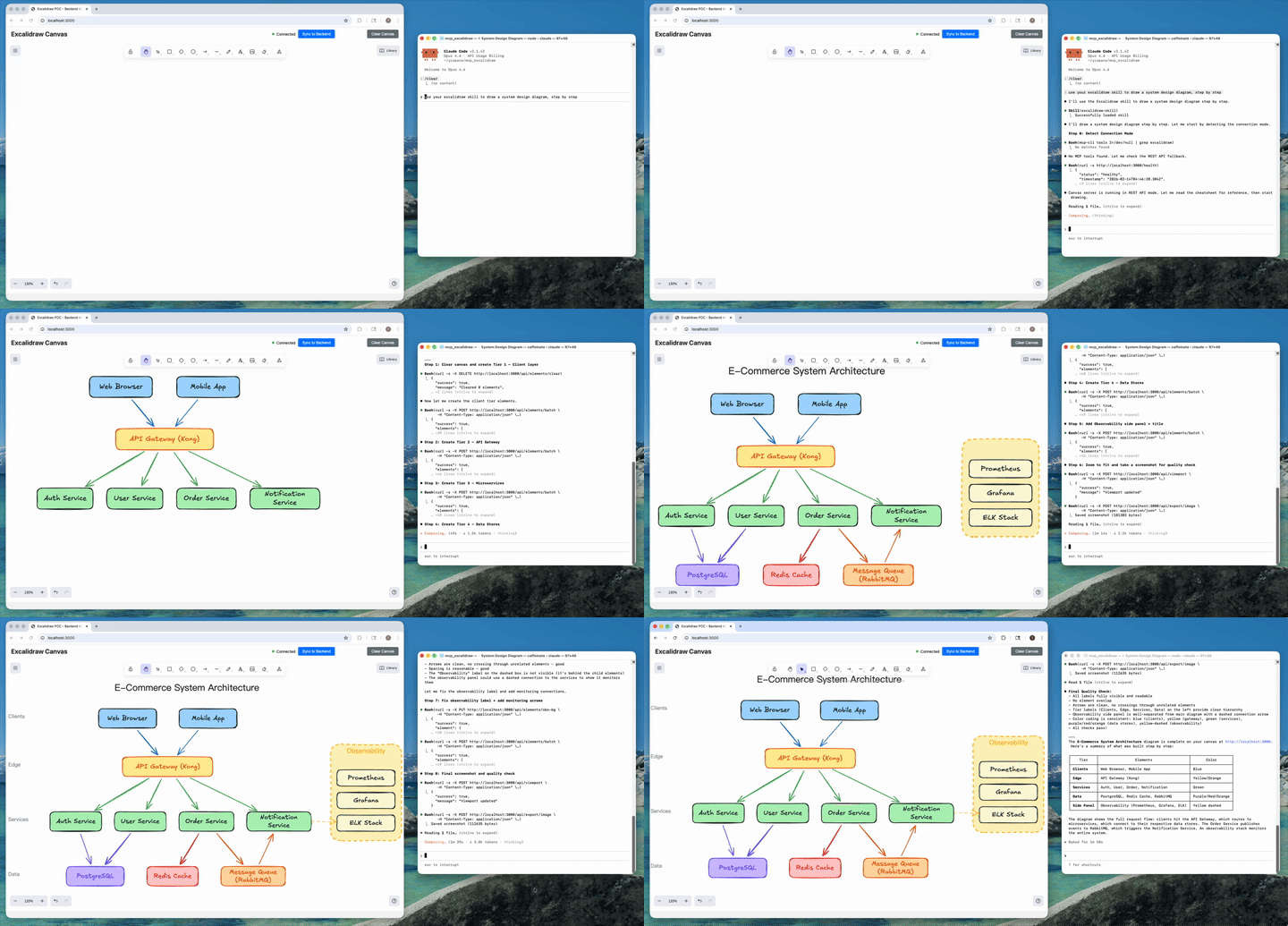
AI agent creates a complete architecture diagram from a single prompt (4x speed). Watch full video on YouTube
Table of Contents
- Demo
- What It Is
- How We Differ from the Official Excalidraw MCP
- What's New
- Installation
- Agent Skill
- CLI Reference
- Headless Rendering
- Configure MCP Clients
- MCP Tools (26 Total)
- Quick Start (From Source / Docker)
- Testing
- FAQ
- Troubleshooting
- Known Issues / TODO
- Development
- License
What It Is
Ask your agent to "draw the architecture of this service" and it produces a real, editable Excalidraw diagram — not a one-shot image. Because the agent can query, screenshot, and update individual elements, it iterates until labels fit, nothing overlaps, and arrows route cleanly; then it exports the result as a .excalidraw file that lives in your repo and gets updated when the code changes.
Under the hood there are two processes, one product:
- Canvas server: Excalidraw web UI + REST API + WebSocket real-time sync (default
http://127.0.0.1:3000) - A thin front-end of your choice: the CLI, the MCP stdio server, or raw HTTP — all drive the same canvas
Since v1.1 the canvas server starts itself: canvas-driving CLI commands (and the MCP server on launch) auto-spawn it if nothing is listening. status only inspects the current server state. Set EXCALIDRAW_NO_AUTOSTART=1 to opt out.
How We Differ from the Official Excalidraw MCP
Excalidraw has an official MCP — a chat widget that streams a diagram inline from a single prompt (the model gets two tools: a format reference and create_view). It's great for "draw me a cat" in Claude or ChatGPT. We solve a different problem: giving coding agents a persistent canvas workbench.
| Official Excalidraw MCP | This Project | |
|---|---|---|
| Approach | Prompt in, diagram out (one-shot widget) | Programmatic element-level control (CLI + 26 MCP tools) |
| State | Checkpoints inside the chat widget | Live canvas with real-time sync and optional restart-safe checkpoints |
| Element CRUD | Declarative re-send with delete markers | Full create / read / update / delete per element |
| AI sees the canvas | No | describe (structured text) + screenshot (image) |
| Iterative refinement | Regenerate from checkpoint | Draw → look → adjust → look again, element by element |
| Layout tools | No | align, distribute, group / ungroup, lock, duplicate |
| File I/O | No model-facing export | .excalidraw export/import — diagrams as repo artifacts |
| Snapshot & rollback | Widget-side checkpoints | Named server-side snapshots |
| Mermaid conversion | No | mermaid / create_from_mermaid |
| Shareable URLs | Widget-only | share / export_to_excalidraw_url |
| Viewport control | Camera animations | set_viewport (zoom-to-fit all or selected elements, center on one element, manual zoom) |
| Works without MCP | No | Yes — CLI + agent skill + REST API |
| Multi-agent | Single chat | Multiple agents on the same canvas concurrently |
TL;DR — The official MCP shows Excalidraw diagrams in your chat. This project gives your coding agent a full Excalidraw workbench: a canvas it can draw on, inspect, refine, and commit to your repo.
What's New
Current package version: 2.1.2. The current release line is v2.1 — Headless Rendering.
v2.1.2 — Fixes
- Snapshot restore no longer wipes the canvas; frames restore and import. (#101, thanks @sanjayy0612; #120)
- One label per shape, even across updates and renames. (#121, thanks @sdrshn-nmbr)
- Dropped images survive reload and show up in exports. (#122, thanks @appdesigngeeks)
- Text is no longer clipped when the font loads late. (#123, #124)
v2.1.1 — Fixes
- Large exports no longer fail with
invalid order key. (#115, thanks @fernandovmacedo) - Text and arrows no longer drift on each canvas sync. (#116, thanks @hidinginabunker)
- Library installs work and persist; labels re-wrap on resize. (#113, thanks @lukemariano)
v2.1 — Headless Rendering
- Screenshots and image exports no longer need a browser tab.
screenshot,export_to_imageandget_canvas_screenshotrender inside the canvas server: Excalidraw's own SVG exporter runs under Node (jsdom) and resvg rasterizes to PNG with bundled Excalifont/Virgil/Cascadia/Liberation fonts. Same output as the tab, deterministic (byte-identical for an unchanged scene), a few milliseconds per render, works in CI and Docker. See Headless Rendering. - New render options on the CLI, REST and MCP:
dark,scale(1–4),padding,elementIds(render a subset),frameId(render one frame),embedFonts.--renderer browserkeeps the old tab path. - New
rendercommand:npx -y mcp-excalidraw-server render docs/arch.excalidraw --out docs/arch.pngrenders a committed file offline — no canvas server at all. - Shapes created without
width/heightnow default to 100×100 in exports and renders (matching the canvas) instead of collapsing to 0×0. - Text stored with
width: 0, height: 0(scenes from pre-2.0 servers) is re-measured on export instead of exporting invisible. (#107)
v2.0 — Interchange-Grade Exports & MCP 2026-07-28
- Breaking: Node >= 20 required (was 18) — the MCP TypeScript SDK v2 sets the floor. Everything else is backward compatible, including existing MCP client configs.
- MCP protocol revision 2026-07-28: modern clients can call tools statelessly without an initialization handshake (
server/discover, per-request_metaenvelopes); legacy initialization-based clients keep working unchanged. (#98, thanks @anxkhn) - Exports render everywhere now:
.excalidraw/.excalidraw.mdfiles contain real Excalidraw elements — shape and arrow labels as bound text, live arrow bindings — so they open correctly on excalidraw.com and in the Obsidian Excalidraw plugin instead of losing labels (or being re-saved empty by the plugin). (#93, #95) - Byte-stable exports: deterministic ids, seeds, and key order — re-exporting an unchanged scene is byte-identical, so committed diagrams and vault files never produce phantom git diffs, and Obsidian block references survive re-exports.
- Obsidian vault fixes: Windows/CRLF
.excalidraw.mdfiles import correctly (#94, thanks @cason-miles);## Text Elementsblock references now cover shape labels too. - Element fields are never silently dropped: unknown Excalidraw properties (
containerId,textAlign,originalText, ...) pass through the server intact — fixes browser-edited text vanishing after sync. (#92, thanks @junuxyz) - Mermaid conversion merges into the existing canvas instead of replacing it, and each browser tab holds exactly one WebSocket connection (no more doubled labels). (#91)
- Viewport control:
set_viewportgainsscrollToElementIds(multi-element zoom-to-fit) andviewportZoomFactor, with strict single-mode validation and real error reporting. (#86, thanks @acercyc) - Dark mode: the canvas page chrome follows the editor theme and persists it across reloads. (#89, thanks @danielsvane)
v1.1 — CLI-First
- First-class CLI: every capability is now a composable command —
npx -y mcp-excalidraw-server add|query|describe|screenshot|export|import|mermaid|snapshot|arrange|share|...— JSON on stdout, meaningful exit codes. Also installed as theexcalidraw-canvasalias. - Zero-setup: canvas-driving CLI commands and the MCP server auto-start the canvas server if it isn't running (closes #66). Opt out with
EXCALIDRAW_NO_AUTOSTART=1. apply: multi-op patches ({"create":[...],"update":[{"id":"a","set":{...}}],"delete":[...]}) in a single invocation.install-skill:npx -y mcp-excalidraw-server install-skill --dir <skills-root>copies the portable agent skill into the directory your agent chooses (project or global), cleanly replacing older versions.- Skill is now CLI-first and no longer needs a cloned repo or configured MCP server to work.
- Typed queries:
query --filter locked=true --filter label.text=API— booleans, numbers, and nested keys work. - Internals: shared core library (
src/core/) behind both the CLI and MCP server; canvasgroupIdsare the source of truth for grouping (ungroup now works across restarts);node-fetchdropped; MCP version metadata derived frompackage.json; canvas server writes a pidfile and shuts down cleanly.
Installation
The only prerequisite is Node.js ≥ 20.
Easiest: let your agent install it
Copy this into your coding agent — it installs the portable skill into the project/global skill directory that agent already knows how to use, then verifies it by drawing a test diagram:
Install the Excalidraw canvas toolkit so you can draw diagrams for me:

1. Choose the right skill directory for this agent and scope (project or global).
2. Run: npx -y mcp-excalidraw-server install-skill --dir <that-skills-directory>
3. Read the installed excalidraw-skill/SKILL.md so you know the drawing workflow.
4. Start the canvas with: npx -y mcp-excalidraw-server start
   then tell me I can open http://127.0.0.1:3000 to watch you draw (optional).
5. Draw a small test diagram — two labeled boxes connected by an arrow — take a
   screenshot, and show me the result to confirm everything works.
Manual install
| You are... | Install with | Then |
|---|---|---|
| Modern coding agent | npx -y mcp-excalidraw-server install-skill --dir <skills-root> |
Let the agent choose project/global scope and its skill root |
| Claude Code shortcut | npx -y mcp-excalidraw-server install-skill |
Installs to ~/.claude/skills for backward compatibility |
| Codex shortcut | npx -y mcp-excalidraw-server install-skill --target codex |
Installs to ~/.codex/skills for backward compatibility |
| MCP client user (Claude Desktop, Cursor, ...) | Add the npx config below | See Configure MCP Clients |
| CLI user / scripting | Nothing — npx -y mcp-excalidraw-server <command> |
See CLI Reference |
| Contributor / from source | git clone + npm ci + npm run build |
See Quick Start (From Source / Docker) |
There is no separate server setup: any drawing command auto-starts the local canvas server on http://127.0.0.1:3000.
60-Second Quick Start (CLI)
No clone, no config:
# start the canvas (drawing commands auto-start it too) and open it
npx -y mcp-excalidraw-server start
open http://127.0.0.1:3000   # optional: watch live (only mermaid needs the tab)

# draw something
echo '[
  {"id":"api","type":"rectangle","x":100,"y":100,"width":160,"height":80,"text":"API Server","backgroundColor":"#a5d8ff"},
  {"id":"db","type":"rectangle","x":400,"y":100,"width":160,"height":80,"text":"Database","backgroundColor":"#99e9f2"},
  {"type":"arrow","x":0,"y":0,"startElementId":"api","endElementId":"db","text":"SQL"}
]' | npx -y mcp-excalidraw-server add

# let your agent see its work
npx -y mcp-excalidraw-server describe
npx -y mcp-excalidraw-server screenshot --out diagram.png

# diagrams as repo artifacts
mkdir -p docs
npx -y mcp-excalidraw-server export --out docs/architecture.excalidraw

# or straight into an Obsidian vault (.md extension → Obsidian Excalidraw plugin format)
npx -y mcp-excalidraw-server export --out ~/vault/diagrams/architecture.excalidraw.md
Give your agent the full playbook:
npx -y mcp-excalidraw-server install-skill --dir <skills-root>
npx -y mcp-excalidraw-server install-skill --print-source  # inspect bundled source path
Security note: The canvas server binds
127.0.0.1only by default. If you expose it on a network interface (HOST=0.0.0.0), put network-level access controls in front — the API has no built-in authentication.
Agent Skill
The skill at skills/excalidraw-skill/ teaches agents the full workflow — layout planning, the screenshot-verify-fix quality loop, arrow routing, anti-patterns, snapshots, and file I/O. It works through the CLI (preferred, zero setup), MCP tools (if configured), or raw REST — in that order.
npx -y mcp-excalidraw-server install-skill --dir <skills-root>
The command copies the bundled excalidraw-skill/ directory into <skills-root>/excalidraw-skill. Let your agent choose whether that root should be project-level or global. Re-running install-skill upgrades in place — it replaces the target directory, so files removed upstream don't linger.
Where the skill shines:
- Diagrams as code artifacts: export
.excalidrawfiles into the repo, commit them, re-import + refine when the architecture changes. - Obsidian vaults: export with a
.excalidraw.mdextension and the file opens natively in the Obsidian Excalidraw plugin — no compatibility-mode warning, block references and sync work;importreads both plain and lz-string-compressed vault files back. - Self-verifying diagrams: the agent screenshots its own work and fixes truncation/overlap before calling it done.
- No-MCP environments: CI jobs, plain shells, and frameworks get the same capabilities through the CLI.
CLI Reference
npx -y mcp-excalidraw-server <command> or (after npm i -g mcp-excalidraw-server) excalidraw-canvas <command>.
Conventions: JSON results on stdout — except describe (plain text by design) and raw-content output when --out is omitted (export prints the scene JSON, screenshot --format svg prints SVG). Diagnostics on stderr. Exit codes: 0 ok, 1 error, 2 usage, 3 canvas unreachable, 4 browser tab required (only mermaid and screenshot --renderer browser). Canvas URL from EXPRESS_SERVER_URL or --url. Canvas-driving commands auto-start the server; status only reports current state. Explicit start overrides the EXCALIDRAW_NO_AUTOSTART=1 opt-out (it's user intent, not auto-start).
| Command | Description |
|---|---|
start / stop / status |
Manage the canvas server (detached; stop identity-checks the live server via /health before signaling) |
add [file|-] |
Batch-create elements from a JSON array (file or stdin); --one '{...}' for a single element |
apply [file|-] |
One-call multi-op patch: {"create":[...],"update":[{"id":"a","set":{...}}],"delete":["id"]} |
get <id> / delete <id...> |
Read / remove elements |
update <id> --set '{...}' |
Update an element |
query |
--type, --bbox x0,y0,x1,y1, --filter k=v (typed, nested keys), --filter-json '{...}' |
describe |
AI-readable scene summary (plain text) |
screenshot |
Render the canvas headless (no browser tab): --out f.png|f.svg, --format png|svg, --scale 1-4, --dark, --padding N, --no-background, --ids a,b, --frame <id>, --no-embed-fonts, --embed-scene (editable PNG); --renderer browser uses an open tab instead |
render [file|-] |
Render a .excalidraw / .excalidraw.md / embedded-scene PNG file to PNG/SVG offline — no canvas server, same flags as screenshot |
export [--out f.excalidraw] [--format json|obsidian] / import [file|-] [--replace] |
Scene file I/O — a .md out path writes Obsidian's .excalidraw.md format; import also reads PNGs with embedded scenes |
mermaid [file|-] |
Mermaid → canvas (browser tab required) |
snapshot save|list|restore <name> |
Named snapshots |
arrange align|distribute|group|ungroup|lock|unlock|duplicate |
Layout ops (--ids a,b,c, --to left|horizontal|...) |
share |
Encrypted upload → shareable excalidraw.com URL |
clear --yes |
Wipe the canvas |
install-skill [--dir <skills-root>] |
Install the portable agent skill |
Labels and arrow bindings use the agent-friendly format everywhere in the CLI: "text" on any shape, "startElementId"/"endElementId" on arrows — normalization is automatic. For a native frame, add a "type":"frame" element with a "name" and set "frameId" on its children.
Headless Rendering
Since v2.1, screenshot, export_to_image and get_canvas_screenshot render without a browser. Inside the canvas server, the scene is prepared with the canvas tab's own code (label sizing, wrapping and centering, defaults) and Excalidraw's own exportToSvg draws it under Node (a small jsdom shim supplies the DOM it expects, and text is measured with the bundled fonts' real glyph widths); resvg rasterizes the SVG to PNG. The output is what the Excalidraw canvas draws — same SVG structure as a browser export, text within half a pixel — and it is deterministic: an unchanged scene renders to byte-identical SVG and PNG, so committed images stay diff-clean.
- Fonts: Excalifont, Virgil, Cascadia Code and Liberation Sans ship as TTFs in
assets/fonts(all SIL OFL 1.1; seeassets/fonts/LICENSES.md). SVGs embed the faces they use, so they look right in browsers, GitHub and editors. Nunito, Lilita One and Comic Shanns render with the closest bundled face for now. Text in other scripts (CJK, emoji) falls back to the machine's fonts, with a warning. - Options (CLI flags / REST body / MCP params):
background,dark,scale1–4 (PNG),padding,elementIdsorframeIdto render a subset,embedFonts,embedScene(PNG only, default false).EXCALIDRAW_RENDER_MAX_DIM(default 8192) caps the PNG's largest side. --renderer browserasks an open canvas tab to render instead (the pre-2.1 path). Useful for a second opinion; it is slower and the tab's unsynced edits are discarded first.- Offline:
render docs/arch.excalidraw --out docs/arch.pngneeds no canvas server at all — a natural fit for CI jobs that keep images next to committed diagrams. - Still browser-bound: Mermaid conversion (
mermaid,create_from_mermaid) andset_viewport.
The renderer bundle is built by npm run build:server (dist/render/excalidraw-node.mjs); npm run test:render exercises it without a browser.
Configure MCP Clients
The MCP server runs over stdio. Since v1.1 the simplest config is npx — no clone, no absolute paths, and the canvas auto-starts. If your MCP client and canvas are on different machines, start with Remote Canvas and HTTP-Only MCP Clients.
Environment Variables
| Variable | Description | Default |
|---|---|---|
EXPRESS_SERVER_URL |
URL of the canvas server | http://127.0.0.1:3000 |
ENABLE_CANVAS_SYNC |
Enable real-time canvas sync | true |
EXCALIDRAW_NO_AUTOSTART |
Set 1 to disable canvas auto-start |
(unset) |
EXCALIDRAW_EXPORT_DIR |
Directory MCP file tools may read and write (symlinks resolved; .excalidraw, .json, .md, .png, .svg files only) |
current working dir |
EXCALIDRAW_RENDER_MAX_DIM |
Largest side of a headless PNG, in pixels | 8192 |
EXCALIDRAW_DATA_DIR |
Optional local durable-state directory | (unset; in-memory) |
EXCALIDRAW_SHARE_UPLOAD_URL |
Where share uploads the encrypted scene (an excalidraw-json POST endpoint) |
https://json.excalidraw.com/api/v2/post/ |
EXCALIDRAW_SHARE_BASE_URL |
Excalidraw app that share links open in | https://excalidraw.com |
PORT / HOST |
Canvas server bind address | 3000 / 127.0.0.1 |
LOG_LEVEL |
Log verbosity (error, warn, info, debug) |
info |
LOG_FILE_PATH |
Log file location | ~/Library/Logs/excalidraw-mcp.log (macOS), $XDG_STATE_HOME/excalidraw-mcp/excalidraw.log (Linux), %LOCALAPPDATA%\Excalidraw-MCP\excalidraw.log (Windows) |
Remote Canvas and HTTP-Only MCP Clients
There are two separate connections:
- MCP client ↔ MCP process: an MCP client that supports local commands launches the stdio MCP process and owns its stdin/stdout.
- MCP process ↔ canvas:
EXPRESS_SERVER_URLpoints to the canvas server's REST API. The browser UI uses a WebSocket on that same server and port.
The canvas HTTP URL is not an MCP HTTP endpoint. This project does not expose MCP at /mcp or /sse; those paths are not part of its transport.
To keep a remote canvas on its default loopback-only binding, run the MCP process on your workstation and tunnel the canvas port to that machine:
# Keep this running. The remote canvas remains bound to remote 127.0.0.1:3000.
ssh -N -L 13000:127.0.0.1:3000 user@canvas-host
Then configure the local MCP process against the local end of the tunnel. The URL port must match the first port in the SSH command:
{
  "mcpServers": {
    "excalidraw": {
      "command": "npx",
      "args": ["-y", "mcp-excalidraw-server"],
      "env": {
        "EXPRESS_SERVER_URL": "http://127.0.0.1:13000",
        "EXCALIDRAW_NO_AUTOSTART": "1"
      }
    }
  }
}
Start the tunnel before the MCP client and leave it open while tools run. In this example the MCP process and browser run on the workstation, so both can use http://127.0.0.1:13000; the WebSocket also follows the page's host and port. 127.0.0.1 always means the machine or container running that process. If the MCP process runs in a container, the workstation's loopback tunnel is not that container's loopback: run the tunnel in the same network namespace as the MCP process, or configure a canvas address that is reachable from the container and protect any listener exposed beyond loopback.
If an Open WebUI, LM Studio, or other MCP client setup accepts only HTTP-based MCP connections, it cannot use the canvas URL in place of MCP. It needs a separately configured stdio-to-HTTP MCP bridge in front of this stdio server; bridge setup and client transport support are outside this project.
As a direct-LAN alternative, run the canvas process with an explicit non-loopback bind, for example from a built source checkout: HOST=0.0.0.0 PORT=3000 node dist/server.js. Then set the MCP process's EXPRESS_SERVER_URL to http://canvas-host:3000. The canvas container already binds HOST=0.0.0.0, and Compose publishes 3000:3000; scope that port mapping or bind it to a trusted interface when possible. The CLI start command only auto-starts a loopback canvas, so it is not the way to create this LAN listener. The source default remains HOST=127.0.0.1.
Direct LAN access exposes the canvas REST and WebSocket APIs, which have no built-in authentication and use permissive CORS middleware. Restrict that port to a trusted network/VPN with firewall or network-level access controls; do not expose it to the public internet.
Durable canvas state
Set EXCALIDRAW_DATA_DIR to recover elements, server-known image files, and named snapshots after a canvas-server restart. From a source checkout after npm run build:
EXCALIDRAW_DATA_DIR=/absolute/private/canvas-data \
  node dist/bin.js start
When the variable is unset, behavior and API semantics remain in-memory and no durable-state directory is created. When enabled, the directory contains a versioned canvas-state-v1.json checkpoint, a blobs/ directory, and a runtime canvas-state.lock/ ownership directory. Image payloads are stored once as immutable file-id blobs at a path-safe SHA-256 of each file ID; checkpoints record a separate content SHA-256 and contain references only. A new blob is flushed and atomically published before any checkpoint is allowed to reference it. Each accepted mutation flushes a temporary checkpoint and atomically renames it before the server broadcasts or acknowledges the mutation. Serialization recursively sorts object keys, preserves scene stacking order, and stores file and named-snapshot metadata in stable ID/name order. Invalid JSON, unsupported schemas, non-regular checkpoint paths, missing blobs, and blob-integrity failures stop startup rather than replacing recoverable state with an empty scene.
Two REST rules are stricter in durable mode, and both return 409: upload an image's file (POST /api/files) before the element that references it, and never re-upload a file ID with different content. The canvas tab and import already work this way.
If the checkpoint has already been renamed into place but the final directory flush fails, the request fails without a success broadcast and further mutations are refused until restart. The published scene stays in memory so it agrees with the file on disk; the failed request may appear in the recovered scene. On Windows, Node.js does not provide directory fsync, so the store flushes file contents and uses atomic publication without claiming the same directory durability barrier.
The data-directory lock grants one process exclusive ownership of that durable state, including when servers use different ports. It stores one token-specific owner file so stale-lock reclamation cannot delete a newer owner's evidence. The existing pidfile has a separate job: it identifies a listening process for start / stop lifecycle commands. Local filesystems and one writer are supported; network filesystems, shared multi-writer access, automatic blob garbage collection, databases, and cloud persistence are out of scope.
Privacy: durable state contains the diagram and embedded image payloads. Keep the directory outside repositories and shared folders, restrict its permissions, and mount it as a private writable volume when using containers.
Claude Desktop
Config location:
- macOS:
~/Library/Application Support/Claude/claude_desktop_config.json - Windows:
%APPDATA%\Claude\claude_desktop_config.json - Linux:
~/.config/Claude/claude_desktop_config.json
npx (recommended)
{
  "mcpServers": {
    "excalidraw": {
      "command": "npx",
      "args": ["-y", "mcp-excalidraw-server"]
    }
  }
}
Local (node)
{
  "mcpServers": {
    "excalidraw": {
      "command": "node",
      "args": ["/absolute/path/to/mcp_excalidraw/dist/index.js"],
      "env": {
        "EXPRESS_SERVER_URL": "http://127.0.0.1:3000",
        "ENABLE_CANVAS_SYNC": "true"
      }
    }
  }
}
Docker
{
  "mcpServers": {
    "excalidraw": {
      "command": "docker",
      "args": [
        "run", "-i", "--rm",
        "-e", "EXPRESS_SERVER_URL=http://host.docker.internal:3000",
        "-e", "ENABLE_CANVAS_SYNC=true",
        "ghcr.io/yctimlin/mcp_excalidraw:latest"
      ]
    }
  }
}
Claude Code
npx (recommended)
claude mcp add excalidraw --scope user -- npx -y mcp-excalidraw-server
Tip: for coding agents, the skill + CLI often beats MCP config entirely — let the agent pick its skill root, then run
npx -y mcp-excalidraw-server install-skill --dir <skills-root>.
Local (node) - User-level (available across all projects):
claude mcp add excalidraw --scope user \
  -e EXPRESS_SERVER_URL=http://127.0.0.1:3000 \
  -e ENABLE_CANVAS_SYNC=true \
  -- node /absolute/path/to/mcp_excalidraw/dist/index.js
Docker
claude mcp add excalidraw --scope user \
  -- docker run -i --rm \
  -e EXPRESS_SERVER_URL=http://host.docker.internal:3000 \
  -e ENABLE_CANVAS_SYNC=true \
  ghcr.io/yctimlin/mcp_excalidraw:latest
Manage servers:
claude mcp list              # List configured servers
claude mcp remove excalidraw # Remove a server
Cursor
Config location: .cursor/mcp.json in your project root (or ~/.cursor/mcp.json for global config)
npx (recommended)
{
  "mcpServers": {
    "excalidraw": {
      "command": "npx",
      "args": ["-y", "mcp-excalidraw-server"]
    }
  }
}
Docker
{
  "mcpServers": {
    "excalidraw": {
      "command": "docker",
      "args": [
        "run", "-i", "--rm",
        "-e", "EXPRESS_SERVER_URL=http://host.docker.internal:3000",
        "-e", "ENABLE_CANVAS_SYNC=true",
        "ghcr.io/yctimlin/mcp_excalidraw:latest"
      ]
    }
  }
}
Codex CLI
npx (recommended)
codex mcp add excalidraw -- npx -y mcp-excalidraw-server
Docker
codex mcp add excalidraw \
  -- docker run -i --rm \
  -e EXPRESS_SERVER_URL=http://host.docker.internal:3000 \
  -e ENABLE_CANVAS_SYNC=true \
  ghcr.io/yctimlin/mcp_excalidraw:latest
Manage servers:
codex mcp list              # List configured servers
codex mcp remove excalidraw # Remove a server
OpenCode
Config location: ~/.config/opencode/opencode.json or project-level opencode.json
{
  "$schema": "https://opencode.ai/config.json",
  "mcp": {
    "excalidraw": {
      "type": "local",
      "command": ["npx", "-y", "mcp-excalidraw-server"],
      "enabled": true
    }
  }
}
Antigravity (Google)
Config location: ~/.gemini/antigravity/mcp_config.json
{
  "mcpServers": {
    "excalidraw": {
      "command": "npx",
      "args": ["-y", "mcp-excalidraw-server"]
    }
  }
}
Notes
- Docker networking: Use
host.docker.internalto reach the canvas server running on your host machine. On Linux, you may need--add-host=host.docker.internal:host-gatewayor use172.17.0.1. The Docker MCP image setsEXCALIDRAW_NO_AUTOSTART=1(it has no frontend build) — run the canvas as its own container. - Canvas persistence: By default, elements and named snapshots are held in memory and are lost on server restart. Set
EXCALIDRAW_DATA_DIRfor restart recovery of elements, server-known image files, and named snapshots (see Durable canvas state). Useexportto save a standalone.excalidrawfile; taking a snapshot alone does not provide restart recovery in the default in-memory mode.
MCP Tools (26 Total)
| Category | Tools |
|---|---|
| Element CRUD | create_element, get_element, update_element, delete_element |
…
Releases