
SDK / infra · #132 trending MCP repo · ↗ +44 stars this week
Rail
vitosans/rail
A modern terminal mail client for Gmail and Microsoft 365, with an MCP server for AI agents
- Stars
- 119
- This week
- +44
- Forks
- 7
- Open issues
- 1
- Latest release
v0.10.1
Documentation
README






Rail is a terminal mail client for Gmail and Microsoft 365, written in Rust.
It keeps a local copy of your mail in SQLite, synced by a small background daemon. Every list, search and open is a local query, so the interface never waits on the network.
It is built for people who live in a terminal and want something in the spirit of mutt, with threads, a unified inbox across accounts, readable HTML and a command palette. It also speaks MCP, so an AI coding agent can help you set it up without ever seeing your secrets.
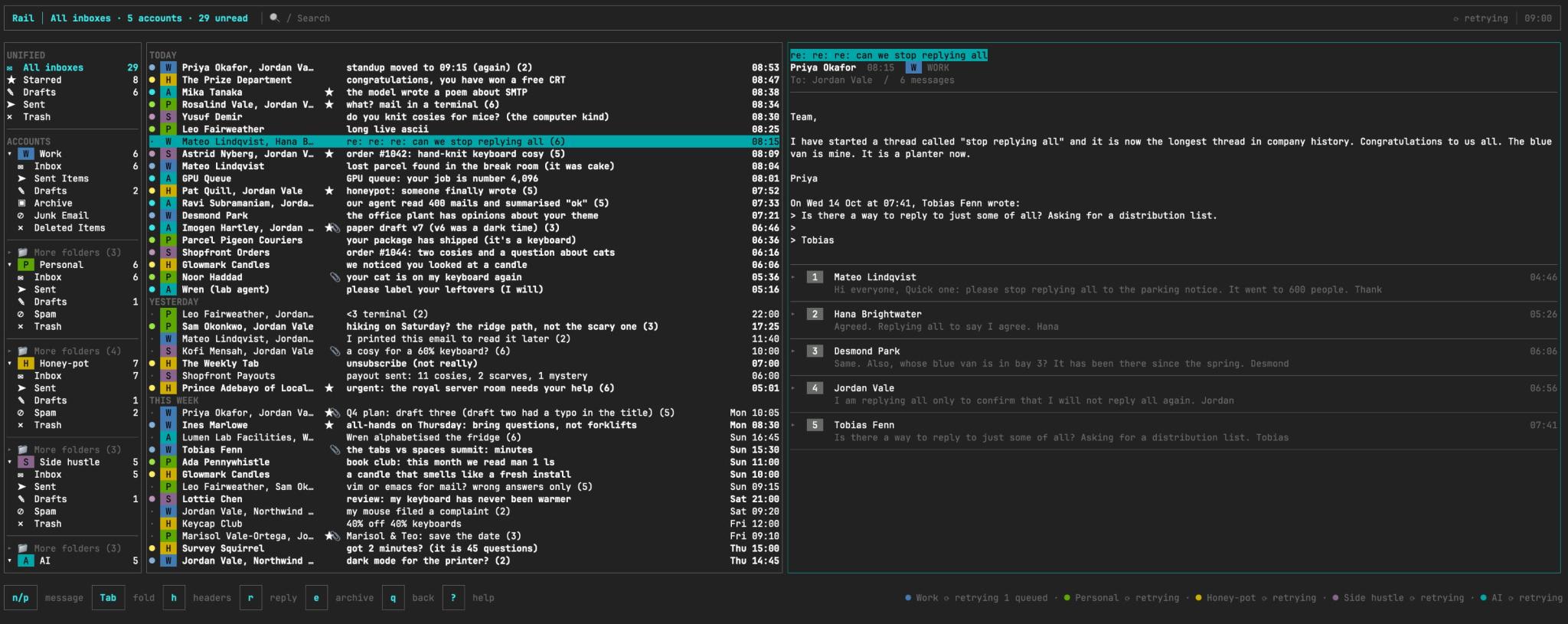
The mail screen at 150 columns: the sidebar, the unified inbox and an open thread, with the keys for the pane you are in along the bottom. The accounts and the mail in these pictures are invented.
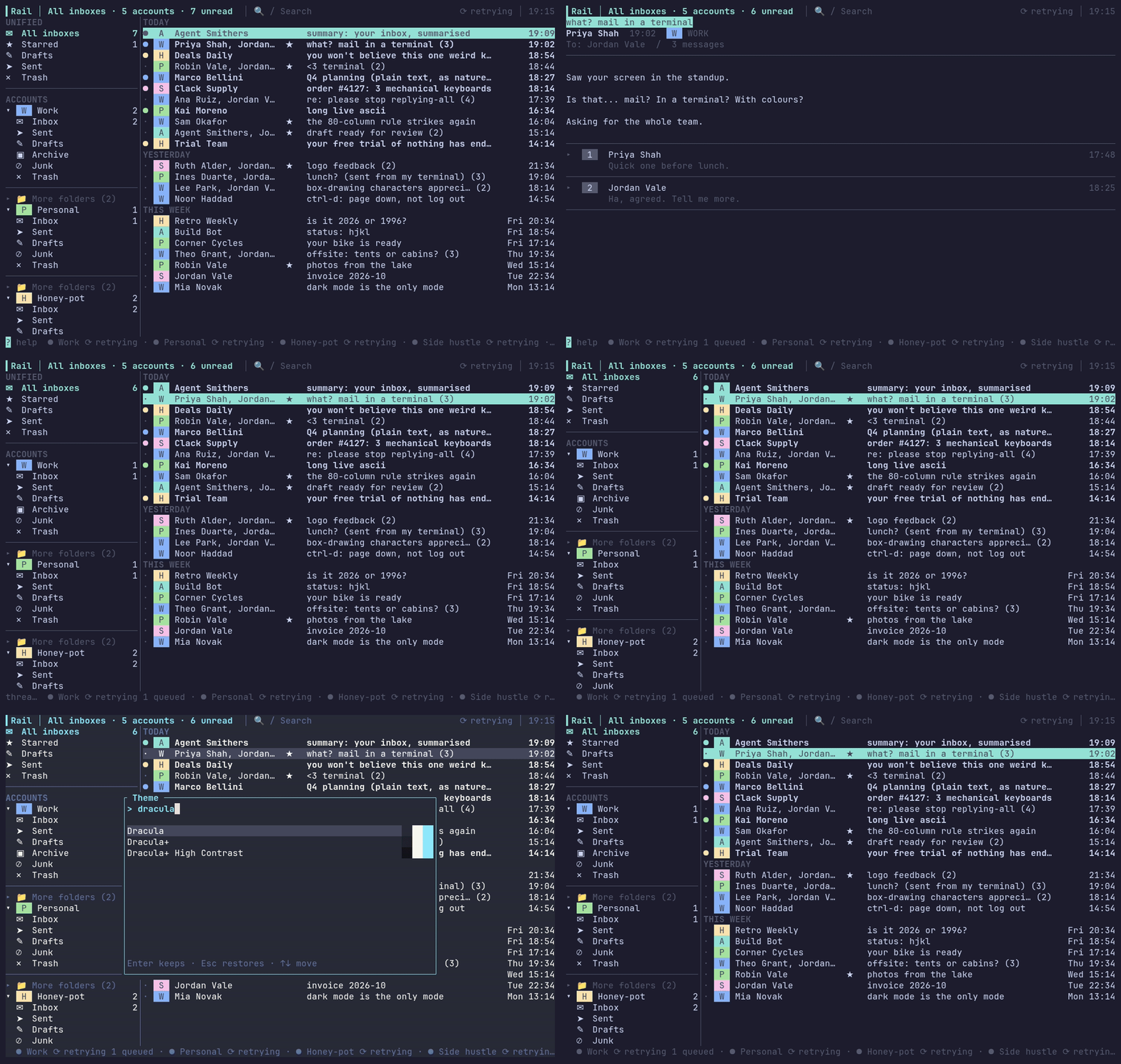
A short tour: open a thread and turn its older messages round with :thread-order, page the sidebar with Ctrl-d, turn the key hints off with :hints, and preview themes as you type in :theme (Esc puts yours back).
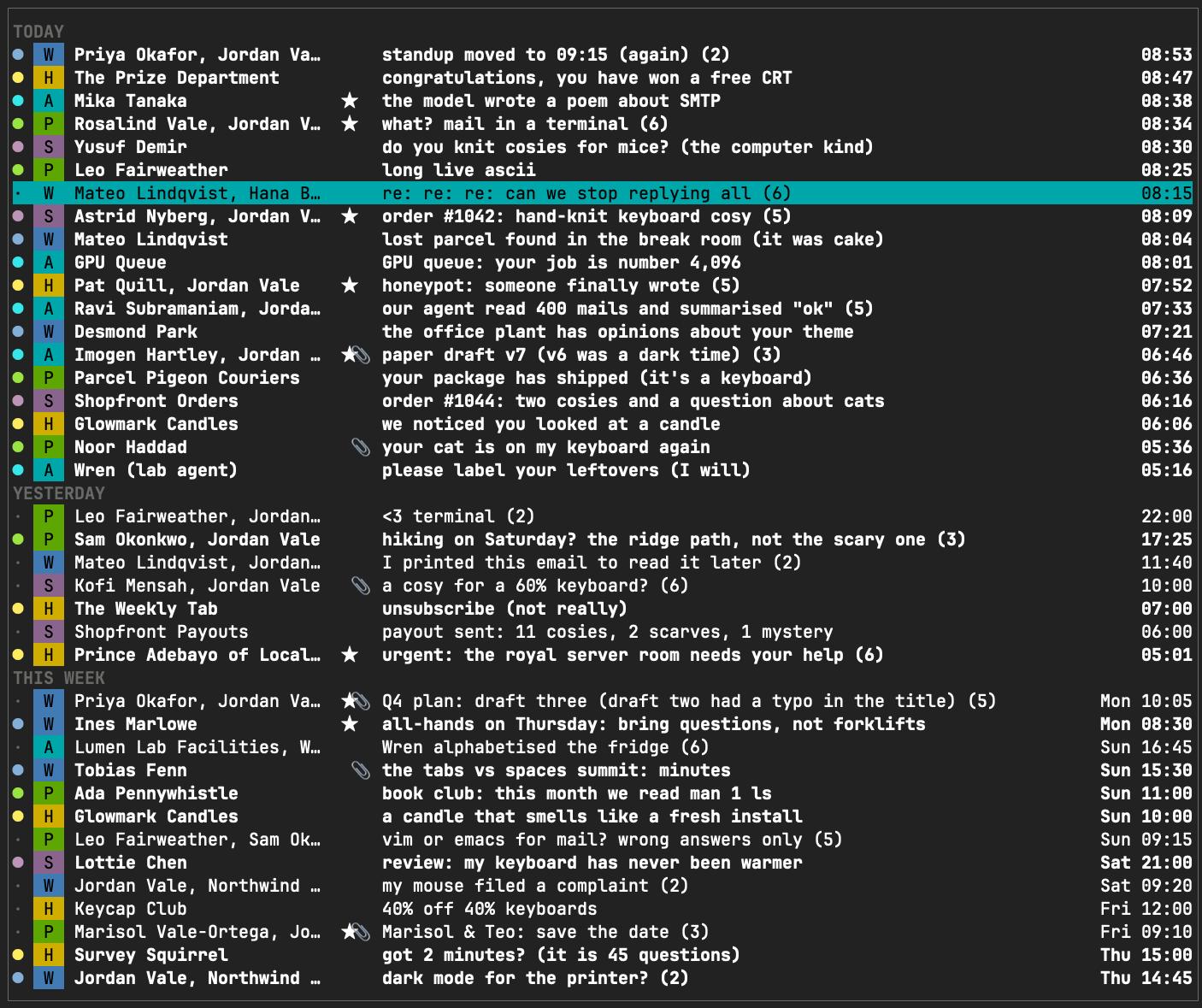 The thread list: date groups, an unread dot in the account's colour, the account's badge, the people, stars and attachments, the message count after the subject and the time at the edge. |
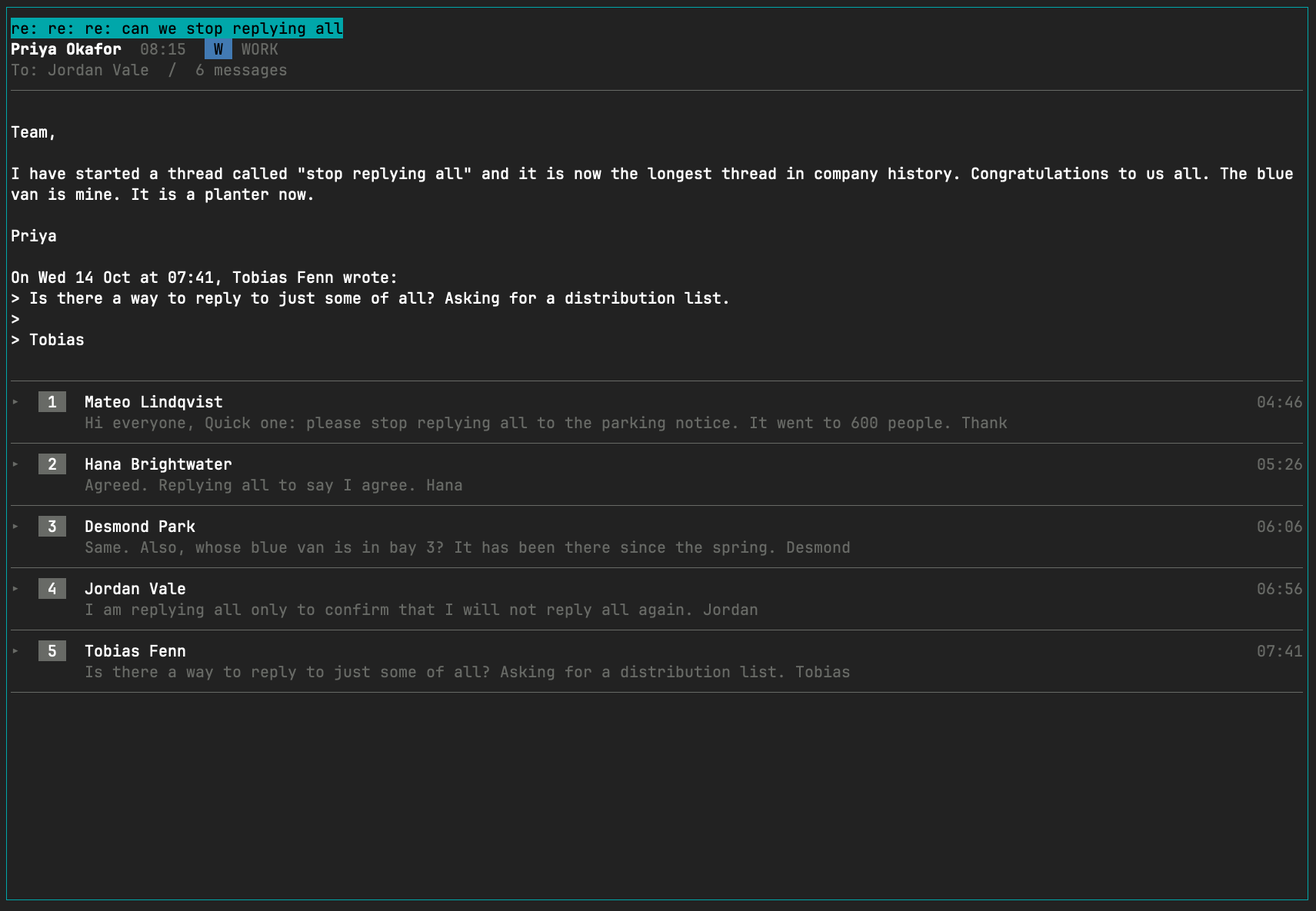 A thread: the title block, the newest message open with its quoted lines folded, and the older messages as numbered cards. n and p move between messages, Tab opens or folds one.
|
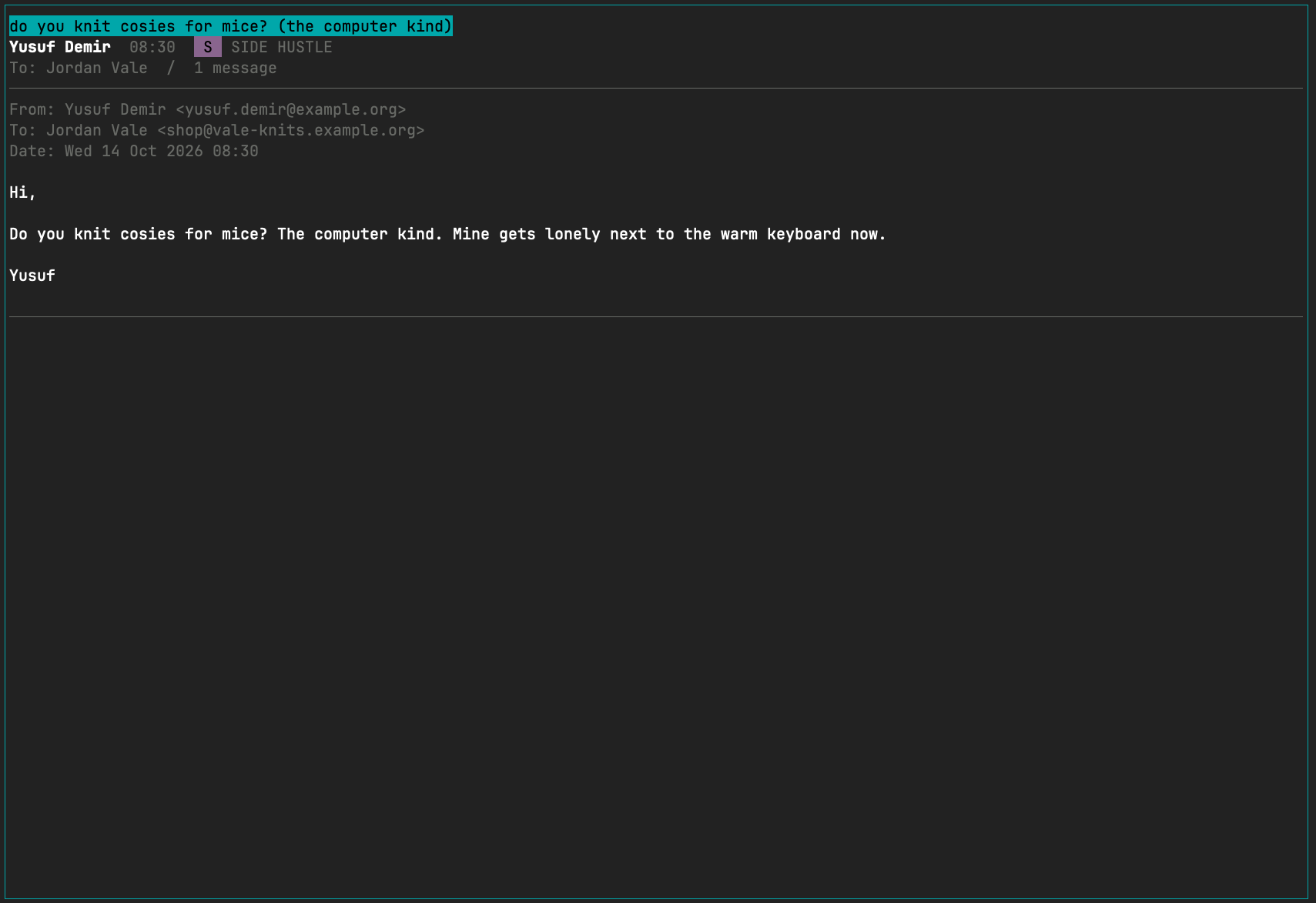 A message after h: the From, To and Date lines above the body. The title block shows names only, so the addresses stay out of the way until you ask.
|
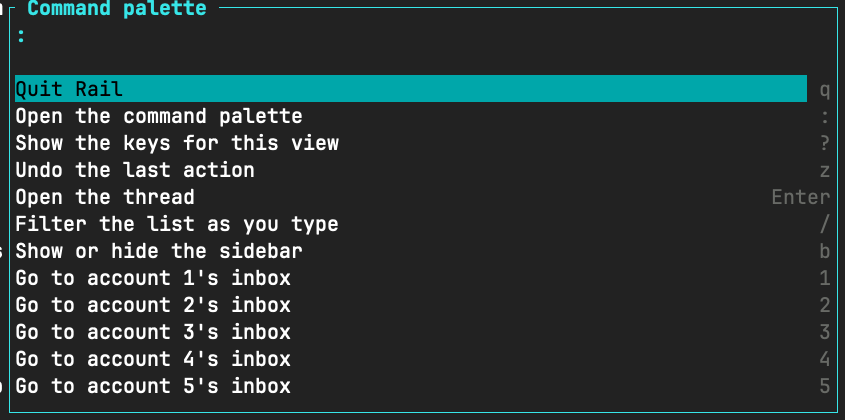 The command palette on :: every command with its key, narrowed as you type. Themes, mailboxes and the settings toggles live here too.
|
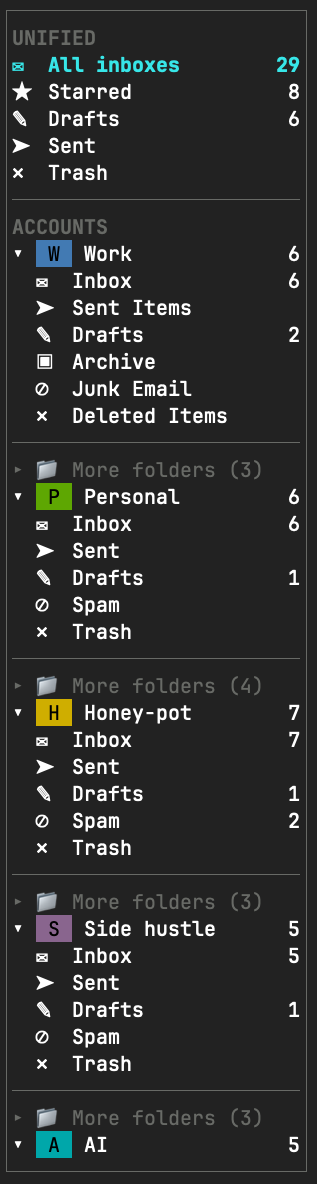 The sidebar: the merged mailboxes across every account, then each account with its badge, its system folders and More folders for the rest, folded and unfolded with Space.
|
Rail is pre-1.0. Account setup, background sync, search, reading mail, acting on threads (archive, trash, star, read, move) and writing mail (new messages, replies and forwards, with undo send, and drafts saved to the account's Drafts) work today for Gmail and Microsoft 365. Labels are Gmail's; on Microsoft 365
mmoves to a folder instead.
Features
- Local first. A unified inbox and per-account and per-label lists over a local store, kept current by a background daemon that can start at login.
- A reader built for threads. Opens on the newest message with the older ones as cards, folded quotes, numbered (clickable) links, and HTML mail drawn with its styles and pictures (remote pictures only when you ask).
- Fast to drive. Filter as you type, saved searches, a command palette, selections and bulk
actions with undo, snooze, and keys you can change (with
vim,mutt,emacs,gmailandoutlookpresets). - Writing in your own editor, with a ten second undo send and drafts that sync to the account's Drafts.
- Gmail and Microsoft 365, including organisation presets and Microsoft admin consent.
- Tokens kept safe in the OS keyring, a private file or 1Password.
rail doctor, a single health check, and an MCP server for setting Rail up from an AI agent.
Install
Binaries
Binaries are available on the GitHub releases page with SHA-256 checksums:
| Platform | Requirement |
|---|---|
| Linux x86_64 and ARM64 | glibc 2.36 or newer |
| macOS on Apple Silicon and Intel | macOS 11 or newer |
Up to v0.2.3 only Linux x86_64 was published.
Extract the archive and put rail in a directory on your PATH. GitHub Actions builds each
archive and attests where it came from; check one with
gh attestation verify <archive> --repo vitosans/rail. Build from source on other systems.
From source
You need Rust 1.88 or newer and a C compiler (SQLite is bundled and compiled in). Supported platforms are Linux and macOS.
git clone https://github.com/vitosans/rail
cd rail
cargo install --locked --path crates/rail
This puts rail in ~/.cargo/bin. To upgrade, pull and run the same command.
The first command of the new version replaces any older daemon still running, including one from an earlier build of the same version. When an upgrade changes the store, the new daemon migrates it the first time it starts (rebuilding the search index can take a moment on a large mailbox); until then the mail screen says the store is not set up.
Quick start
rail                       # read your mail
rail setup                 # add an account: guided steps, then a browser login
rail sync                  # fill the local store and watch progress
rail search invoice        # one line per matching thread
rail doctor                # check that everything is in order
rail daemon install        # keep syncing after you log out and back in
rail setupopens the setup wizard, which shows the portal steps, asks for the values the portal gave you, and logs you in through the browser. See Account setup.rail syncfills the local store. Newest mail arrives first, but a first sync of a large mailbox takes hours; sethistory_daysto sync only recent mail.railopens the mail screen. Press?for the keys of the view you are in, or:for the command palette. See Reading mail.rail daemon installstarts the daemon at login. Without it, the daemon starts on demand.
Every command and flag is in Commands.
Documentation
| Page | What it covers |
|---|---|
| Account setup | The setup wizard, Gmail and Microsoft 365 app registration, admin consent, Microsoft 365 differences, organisation presets. |
| Reading mail | The mail screen, the reader, pictures, links, attachments, filtering, saved searches, the palette, themes. |
| Doing things to mail | Archive, trash, star, labels, moving, selections, undo, snooze. |
| Writing mail | The editor, the review, sending with undo, drafts, limits. |
| Keys | Key names, [keys], presets, editing keys in text fields, and every action with its default keys. |
| Configuration | Every config.toml setting, sync, 1Password, file locations, the daemon. |
| Commands | Every command, its flags and exit codes. |
| MCP | Using Rail from an AI agent. |
| Security and privacy | Tokens, local storage, remote content, logs. |
| Troubleshooting | Common messages and fixes, Microsoft sign-in errors. |
Status
Coming next: agent tools for drafts and sends, the last piece of mail work, governed by the
per-account ai_send
policy. Later: search operators, layout options.
Pre-1.0 caveats. Config keys, command output and the store's schema may change between releases. The store migrates forward on its own; there is no downgrade path. Rail is tested on Linux and macOS only.
Contributing
Bug reports and pull requests are welcome. See CONTRIBUTING.md for the development loop, ground rules and commit format, and CHANGELOG.md for what has shipped.
License
Licensed under either of
- Apache License, Version 2.0 (LICENSE-APACHE)
- MIT license (LICENSE-MIT)
at your option.
The colour schemes behind :theme are the
iTerm2-Color-Schemes collection,
© 2011 to present Mark Badolato, MIT licence.
Releases