
SDK / infra · #406 trending MCP repo
Box-Agent
Raccoon-Office/Box-Agent
AI agent framework with Jupyter sandbox, data analysis, MCP tools, ACP protocol, multi-provider LLM, and standalone runtime packaging
- Stars
- 18
- This week
- +0
- Forks
- 27
- Open issues
- 7
- Skills inside
- 66
Inside this repo
48 of 66 skills
box_agent/skills/artifacts-builderautohot-skill汽车行业每日情报 Skill:基于 AutoHOT 公开接口查询汽车热点、日报、品牌动态、赛道趋势,并生成销售晨会简报、管理层周报和事件影响分析。box_agent/skills/autohot-skillbrowser-useExecute browser tasks after the shared Web Access Routing policy selects a channel. Covers independent managed browser automation and the user browser connector, page interaction, forms, screenshots, browser sessions, visible/background browsing, and recovery. Browser choice, page state, and visibilbox_agent/skills/browser-usecanvas-designCreate beautiful visual art in .png and .pdf documents using design philosophy. You should use this skill when the user asks to create a poster, piece of art, design, or other static piece. Create original visual designs, never copying existing artists' work to avoid copyright violations.box_agent/skills/canvas-designcity-travel-planner为城市、州域/地区、都市圈、海岛、景区和相邻多城市生成可执行旅游攻略。用户提出“去某地旅游/旅行”“X天怎么玩”“行程安排”“旅游攻略”“景点路线”“住哪里”“吃什么”“自驾/公共交通”“亲子/老人/预算/美食/摄影/文化/户外”等半日至14日行程请求时使用。按地理动线组织逐日计划,给出交通耗时、住宿区域、预约与实时核验、预算提示及天气/闭馆备选;不代订,不保证价格、库存、签证、安全或开放状态。box_agent/skills/city-travel-plannercity-travel-skill-developer把一个城市旅行主题开发成可安装、可上架预审的 SkillHub 技能包;适用于创建城市旅行助手、文化深度旅行助手、古都/博物馆/古建/非遗/城市生活方式 Skill,沉淀官方来源 source map、路线分支、实时核验、TRACE/Depth 评分、回归测试和白名单打包;不用于一次性普通行程规划、代订酒店机票、实时库存保证、博彩建议、签证法律咨询、医疗急救或绕过平台限制抓取内容。box_agent/skills/city-travel-skill-developer-1.2.0computer-useOperate native desktop applications through CuaDriver. Use for opening macOS, Windows or Linux apps, desktop UI interactions, system calculator, accessibility trees and desktop screenshots. Web tasks should prefer browser-use.box_agent/skills/computer-usedata-dashboard生成单文件 HTML 数据看板。触发:用户要把数据/分析结果做成网页、dashboard、可视化报告、management demo。box_agent/skills/data-dashboarddocxComprehensive document creation, editing, and analysis with support for tracked changes, comments, formatting preservation, and text extraction. When Claude needs to work with professional documents (.docx files) for: (1) Creating new documents, (2) Modifying or editing content, (3) Working with trabox_agent/skills/document-skills/docxpdfComprehensive PDF manipulation toolkit for extracting text and tables, creating new PDFs, merging/splitting documents, and handling forms. When Claude needs to fill in a PDF form or programmatically process, generate, or analyze PDF documents at scale.box_agent/skills/document-skills/pdfppt-fastCreate, inspect, edit, validate, render, and QA presentation decks. Use when the user mentions PowerPoint, PPT, PPTX, HTML deck, slide deck, presentation, template slides, speaker notes, slide images, or asks to read, generate, create, make, design, or modify a presentation artifact. New decks use cbox_agent/skills/document-skills/pptxxlsxComprehensive spreadsheet creation, editing, and analysis with support for formulas, formatting, data analysis, and visualization. When Claude needs to work with spreadsheets (.xlsx, .xlsm, .csv, .tsv, etc) for: (1) Creating new spreadsheets with formulas and formatting, (2) Reading or analyzing datbox_agent/skills/document-skills/xlsxemail-webmail-playwrightUse when the user asks to send, draft, reply to, forward, search, read, summarize, organize, or triage email through a generic webmail UI when no provider-specific mail tool is available. Uses Playwright/browser automation to open webmail, fill recipients/subject/body, inspect inboxes, and perform ebox_agent/skills/email-webmail-playwrightfilm-tv-license-application-assistant指导中国大陆《电影片公映许可证》(龙标)、《网络剧片发行许可证》(网标)、《国产电视剧发行许可证》及一类《微短剧发行许可证》的申请分诊、主体资质门禁、备案送审材料与取证后合规。用户询问如何申请龙标、网标、电视剧证、微短剧许可、剧本或规划备案、送审材料、补正复审、版本变更或院网渠道转换时使用。亦用于合拍立项与境外演职、敏感题材附加材料、宣发证号检查、制作经营许可证申办、二类三类微短剧路径。不用于剧本创作、宣发策划、过审预测、伪造材料,也不登录政务系统代提交。box_agent/skills/film-tv-license-application-assistanthtml-templatesUse when choosing or applying a visual style to HTML pages, posters, reports, or a slide deck whose authoring workflow is already established. A visual reference library for color, typography and decoration; PPT/PPTX and HTML slide-deck creation starts with the pptx Skill.box_agent/skills/html-templateshyperframes-videoHyperFrames MP4/GIF videos; motion graphics; explainer clips; 视频、短片、动图、动画成片。box_agent/skills/hyperframes-videointernal-commsA set of resources to help me write all kinds of internal communications, using the formats that my company likes to use. Claude should use this skill whenever asked to write some sort of internal communications (status reports, leadership updates, 3P updates, company newsletters, FAQs, incident repbox_agent/skills/internal-commslandscape-drawing-review-skill景观施工图预审专家级 Skill「总工之眼」v3.1。基于李博总工 20 年实战经验,集成中国规范 1500+ 条、12 条经总工终审与五专业外部工程师复核的经验法则库、三级签字判断逻辑。**任何涉及景观图纸审查、施工图预审、图纸会审、规范核查、绿地率/无障碍/坡度/植物配置/海绵设施/雨水花园/景观照明/亭廊架/无障碍流线/竖向标高/铺装做法的场景,都应使用本技能。** 触发关键词包括:图纸审查、施工图审、方案审查、总工审图、签字建议、规范核查、绿地率、无障碍、坡度、种植间距、覆土深度、海绵城市、雨水花园、景观照明、亭廊架基础、跨专业会签、北方公园、冬季结冰、地下室顶板大乔木、设计院预审、设box_agent/skills/landscape-drawing-review-skillmac-cua通过 Box-Agent 的 CUA MCP 工具操作 macOS 应用,使用 AX 元素、窗口截图、键盘和鼠标完成界面交互。box_agent/skills/mac-cuamcp-config管理 MCP 服务器配置(mcp.json):查看、添加、修改、移除、启用和禁用box_agent/skills/mcp-configmemory-guideGuides the agent to proactively save user information to long-term memory and search context when needed. Load this skill to understand when and how to use memory_write, memory_read, and memory_search.box_agent/skills/memory-guidemidu-pinyin使用蜜度接口为中文文本逐字注音,输出 ruby HTML、汉字拼音对照和纯拼音。适用于拼音注音;不用于拼音校对或普通文本校对。box_agent/skills/midu-pinyinmidu-proofread-pinyin使用蜜度接口检查汉字与拼音是否对应并输出拼音勘误结果。适用于拼音校对;不用于普通文本校对、自动注音或简繁转换。box_agent/skills/midu-proofread-pinyinmidu-proofread使用蜜度接口校对中文文本并输出勘误结果。适用于错别字、用词和中文文本校对;不用于拼音校对、拼音注音或简繁转换。box_agent/skills/midu-proofreadmidu-st-convert使用蜜度接口进行中文简体和繁体字形互转。适用于简转繁、繁转简;不修改错别字、用词或拼音。box_agent/skills/midu-st-convertmidu-writing使用蜜度完成公文、通知、讲话稿、新闻稿、总结、报告等中文写作与续写。当用户要求起草、改写或继续完善正式中文材料时使用。不要用于校对、热点查询、时政检索或视频处理。box_agent/skills/midu-writingobsidianUse this skill whenever the user asks to create, export, save, append, prepend, open, or write Markdown notes in Obsidian. It explains when to call the native obsidian_* tools backed by the official Obsidian CLI, and how to avoid unsafe direct bash CLI writes.box_agent/skills/obsidianoffice-gui-basics通过 macOS Office 界面打开、保存和另存文件,在 Word 中编辑文本,在 Excel 中选择单元格范围、设置格式并核对编辑结果。box_agent/skills/office-gui-basicspptxUse when creating, editing, or resuming PPT/PPTX presentations or static/animated HTML slide decks, including HTML-only delivery. PPT、幻灯片和演示文稿的统一制作入口;涵盖课程、画册、汇报、路演、模板套用和动态演示。视觉模板是制作中的辅助素材。box_agent/skills/pptxsn-ppt-dazzle需要把演示 / 幻灯片 / PPT / slides 做成单文件 HTML 动态 deck(动效、跨页过渡、键盘翻页、1280×720)时使用。本 skill 非入口:使用前必须先确认 sn-ppt-entry 与 sn-ppt-story 两个前置 skill 可用,依次执行 entry(建 DECK_DIR / task_pack.json)→ story(生成 outline.md)完成后才可开始;前置缺失或未完成时停止并回报,严禁绕过(如改用生图+手写 HTML 等方式)。box_agent/skills/presentation-suite/skills/sn-ppt-dazzlesn-ppt-doctorUse when diagnosing PPT Skill setup or failures involving source parsing, Playwright or Chromium rendering, HTML-to-PPTX export, dynamic HTML rendering, or bundled search and image-tool configuration.box_agent/skills/presentation-suite/skills/sn-ppt-doctorsn-ppt-entryUse when a user asks to create a presentation, slide deck, PPT, or PPTX from a query and optional files, or to resume an existing SenseNova presentation task.box_agent/skills/presentation-suite/skills/sn-ppt-entrysn-ppt-standard仅在 `sn-ppt-entry` 与 `sn-ppt-story` 已准备绝对 `DECK_DIR` 和 `outline.md` 后使用;生成每页独立 HTML(默认 1600×900;用户指定尺寸优先)、渲染 PNG、逐页讲稿、`present.html`,并按 `static_postprocess` 选择生成由 Standard 自有 exporter 转换的 PPTX。**`present.html` 始终是必交付产物,缺失即技术故障,不得交付;`static_postprocess` 含 `pptx` 时 PPTX 同为必交付产物(缺一即技术故障),且只能由 Standard 自box_agent/skills/presentation-suite/skills/sn-ppt-standardsn-ppt-story当前 PPT 任务已由 sn-ppt-entry 建好 DECK_DIR(task_pack.json 与 info_pack.json 已写入)后,必须由本 skill 将 query、全部用户材料与已完成 Research 编排为唯一可编辑的 outline.md 时使用。本 skill 是 entry → 出口(standard / dazzle)之间的强制中间环节:不允许执行 Agent 跳过本 skill 直接依据 task_pack / info_pack 即兴编写大纲,不允许出口 skill 代写或改写大纲;前置产物缺失时停止并返回 sn-ppt-entry 补齐,不得自行补做研box_agent/skills/presentation-suite/skills/sn-ppt-storysn-ppt-toolsUse when another PPT Skill needs web search, image search or download, or image generation and the host Agent's equivalent native capability is absent or has failed.box_agent/skills/presentation-suite/skills/sn-ppt-toolsresearch-synthesisEvidence-first research synthesis workflow for market research, industry analysis, competitive research, policy or company information synthesis, file-only or file-augmented analysis, technical architecture reviews, risk assessment, and report-ready conclusions. Use when the user asks for comprehensbox_agent/skills/research-synthesisresearch-to-deck-outlineConvert deep research, long-form source text, reports, notes, or collected evidence into a PPT/deck outline that can be progressively expanded. Use when the user wants a standalone outline, page-by-page deck structure, speaking-prompt outline, or full speaker-script outline from research material. Dbox_agent/skills/research-to-deck-outlineroadmapCreate structured project roadmaps and schedule swimlanes from ordinary conversation, tables, images, or an existing RoadmapSpec. Use for multi-lane project schedules with roadmap, planning, swimlane, month-scale, or milestone semantics.box_agent/skills/roadmapscheduled-taskHelps the user create a recurring or one-off scheduled task through conversation. Load this skill whenever the user wants something done on a schedule (every day / every week / a specific time / "remind me" / periodic reports or monitoring). It explains how to confirm requirements first, translate tbox_agent/skills/scheduled-taskself-media-ad-workflow自媒体接广制作与复盘向导。适配办公小浣熊安装使用,带新人博主一步步完成接广内容制作和复盘:收集 brief、拆解需求、校准卖点、联网搜索、生成选题、打磨脚本、拆拍摄发布任务、交付检查、发布后数据复盘。 触发方式:/self-media-ad-workflow、/自媒体接广、「第一次接广」「接广告」「商单脚本」「推广 brief」「帮我做接广流程」「复盘接广内容」box_agent/skills/self-media-ad-workflowskill-architectDesign skill architecture before creation. Use when the user wants to discuss whether an ability should become a single skill, a skill suite, an expert, an expert team, or a hybrid pipeline; produce a structured architecture plan and, when appropriate, an Office Raccoon skill-blueprint handoff for tbox_agent/skills/skill-architectskill-creatorCreate and refine Codex skill files after the skill architecture is clear. Use when writing or editing SKILL.md, references, scripts, templates, trigger wording, or validating that an existing skill package is concise, discoverable, and portable across macOS, Windows, and Linux. For deciding single box_agent/skills/skill-creatorskill-navigation-assistant-sl扫描本地已安装技能,稳定解释技能用途和唤起方式;根据用户任务推荐单技能或多技能组合;本地无匹配时,给出 SkillHub 搜索、筛选、确认安装与启动引导;同时提供健康检查、异常恢复和 FAQ。box_agent/skills/skill-navigation-assistant-slstorymap-generate-person使用 1+5 Agent 协同(Supervisor + Search / Map / Editor / Critic / Deliver)为任意历史人物生成含时间线、地点、教材知识点的 Markdown 档案,并可渲染为 OSM 底图的 HTML 页面。宿主 Agent 用自身的 LLM 能力扮演 6 个角色,无需配置额外 LLM Key。地图默认优先使用国内可访问的高德公开瓦片底图,并保留 OSM 作为备用;坐标数据仍以 WGS84 为准,若使用高德底图,显示坐标需转换为 GCJ-02。触发条件:用户提到\"生成人物档案\"、\"新建历史人物\"、\"1+5 Agent\"、\"故事地图人box_agent/skills/storymap-generate-persondev-branch-isolationPrepare isolated git branches or worktrees for software-development tasks. Use before larger coding work when a clean branch, worktree, baseline verification, or separation from existing user changes is needed.box_agent/skills/superpowers/dev-branch-isolationdev-code-initCreate or update a repository's root AGENTS.md with concise, verified instructions for future coding agents. Use when the user invokes `/init`, asks to initialize repository instructions, create AGENTS.md, or refresh stale agent guidance. Do not use for git init, package initialization, or applicatibox_agent/skills/superpowers/dev-code-initdev-code-reviewReview software changes for correctness, regressions, missing tests, maintainability, security, and behavioral mismatches. Use when asked to review code, before merging, after implementing a major task, or when a fresh risk-focused pass is needed.box_agent/skills/superpowers/dev-code-reviewdev-debugSystematically debug software failures before proposing fixes. Use for test failures, runtime errors, build failures, flaky behavior, performance regressions, integration failures, logs, screenshots, or any unexpected technical behavior where root cause must be established from evidence.box_agent/skills/superpowers/dev-debugDocumentation
README
Box Agent
A general-purpose AI agent with sandboxed code execution, sub-agent parallelism, and multi-provider LLM support.


English | 中文
Get started in 30 seconds:
uv tool install box-agent   # or: pip install box-agent (Python 3.10+)
box-agent setup              # interactive config wizard
box-agent                    # start chatting
Or run a one-shot task:
box-agent --task "Analyze sales.csv — show top 10 products by revenue with a bar chart"
Why Box Agent?
Most agent frameworks are either too simple (no sandbox, no tools) or too complex (massive dependencies, rigid architecture). Box Agent hits the sweet spot:
| Feature | Box Agent | Open Interpreter | Aider |
|---|---|---|---|
| Sandboxed code execution | Jupyter kernel in isolated venv | Runs in host Python | N/A |
| Sub-agent parallelism | Multiple sub-agents run concurrently | No | No |
| Multi-provider LLM | Anthropic, OpenAI, DeepSeek, SiliconFlow, any API | OpenAI + a few others | OpenAI + Anthropic |
| MCP tool integration | Native | No | No |
| ACP protocol (embed in apps) | Full support | No | No |
| Standalone binary | PyInstaller runtime, no Python needed | No | No |
| Context compression | Staged automatic compaction + LLM summary | Manual | Git-based |
Key Features
Local Video Reading
read_video samples timestamped frames through the existing image-understanding
path, transcribes speech with the desktop Volc ASR service, and supports time-range
reads and continuation. It requires ffmpeg/ffprobe and the corresponding vision
and speech-service configuration. See video reading for
runtime setup, sampling limits, partial results and streaming-ASR latency.
Local Email Analysis
read_email decodes local .eml headers, plain/HTML bodies and attachment
metadata offline, without a Python sandbox or additional packages. Prefer it
over read_file for emails. The body supports character pagination; continue
with next_offset and expected_sha256=source_sha256 to detect a changed source.
To inspect an attachment, call the separate extract_email_attachment tool
with its attachment_index and a new output_path inside the workspace, then
use the appropriate document or image tool. Reading creates no files;
extraction checks write permissions and never overwrites a file. Read-only
sub-agents can read emails; delegated extraction requires an explicit write scope.
Messages are limited to 50 MiB, 256 MIME parts, 30 nesting levels and 100
attachments. Encrypted messages are not decrypted.
Sub-Agent Parallelism
Delegate isolated work through a flat task contract with optional tools, Skills,
files, write scope, and hard step/tool-call budgets. Omitted tools resolve only
to trusted local readers; explicit capabilities still pass a fail-closed runtime
policy. Passing known local text paths in files selects the bounded,
completeness-checked batch fast path automatically when read_file is the only
resolved tool; requesting additional tools keeps the general child loop. The parent remains
responsible for conflict handling, the final deliverable, and verification.
You: "Analyze data1.csv, data2.csv, and data3.csv separately, then give me a combined summary"

┌─ Sub-Agent 1 ──────┐  ┌─ Sub-Agent 2 ──────┐  ┌─ Sub-Agent 3 ──────┐
│ Read data1.csv      │  │ Read data2.csv      │  │ Read data3.csv      │
│ Run statistics      │  │ Run statistics      │  │ Run statistics      │
│ Generate charts     │  │ Generate charts     │  │ Generate charts     │
│ → Summary: ...      │  │ → Summary: ...      │  │ → Summary: ...      │
└─────────────────────┘  └─────────────────────┘  └─────────────────────┘
                              ↓ parallel ↓
                    ┌─ Parent Agent ──────────┐
                    │ Combines 3 summaries    │
                    │ Produces final report   │
                    └─────────────────────────┘
Child policy is derived by the runtime: process tools, external side effects, and unknown MCP tools fail closed; path writes require an exact scope. See the sub-agent delegation contract for schemas, limits, compatibility behavior, and host diagnostics.
Sandboxed Code Execution
Python runs in an isolated Jupyter kernel with pre-installed data science packages (pandas, numpy, matplotlib, scikit-learn, openpyxl, xlrd). Generated files (charts, CSVs, PDFs) are automatically detected and surfaced as structured artifacts.
execute_code keeps a bounded 32 KiB head/tail preview of stdout/stderr.
Larger output is streamed in full to an internal file; model replies, UI events,
and traces carry the preview and file reference instead of the full text.
Read that file in bounded pages to recover omitted content. If output persistence
fails, the reply explicitly reports that the full output is unavailable and keeps
the preview, without interrupting the Agent loop or rerunning the code.
Multi-Provider LLM
One config, any provider:
# Anthropic
api_base: "https://api.anthropic.com"
provider: "anthropic"
model: "claude-sonnet-4-20250514"

# DeepSeek
api_base: "https://api.deepseek.com"
provider: "openai"
model: "deepseek-chat"

# Any OpenAI-compatible endpoint
api_base: "https://your-api.example.com/v1"
provider: "openai"
model: "your-model"
Staged Context Compression
read_file preserves its existing line pagination (offset, limit, default
500 lines, maximum 2000). Set byte_offset=0 to read at most 16 KiB of text,
then pass the returned next_byte_offset until it is null. Byte mode seeks
directly, preserves UTF-8 characters and original newlines, and overrides
offset/limit. A line page above 100,000 characters automatically returns
the first byte chunk starting at that page's first line; byte continuation
reads toward EOF. Line scanning uses bounded 64 KiB reads. Fragments report
their byte range without claiming complete-line context coverage. Reads use
the current file, not a snapshot; existing model-context budgets still apply.
- Oversized tool results: Individual results are persisted immediately when needed; fresh parallel results also share a 50k-character pre-request budget. The model receives a stable preview while full text remains on disk. Read results are exempt and stay bounded by Read's own line/character controls.
- Tool output delivery: All tools share a final guard before model history, host events and diagnostic traces. Text above 512 KiB and structured metadata above 64 KiB are externalized; a 1 MiB serialized result budget accounts for combined fields and JSON escaping below the 4 MiB event limit. Valid Read pages and small semantic model projections remain intact. Tools may supply a private
raw_output_previewfor their own host schema: Plan preserves identity, titles and step structure while bounding narrative fields; Todo preserves execution state and prioritizes active work. Both previews are capped at 48 KiB and 64 steps/items. The shared layer validates these previews, saves the complete original JSON, and adds_persisted_outputwithpath,output_truncatedandfile_complete. It does not recursively rewrite unknown business fields; results without a valid tool-owned preview retain only verbatim small fields and the file reference. Output-storage/serialization failures produce an explicit partial/unavailable notice without repeating the tool or stopping the Agent Loop; cancellation and durable session-commit failures retain their existing behavior. This guard cannot prevent memory used to construct the original output inside a tool. - Usage-aware auto-summary: The next request is estimated from the latest real API usage plus subsequent messages. When it reaches the model-derived safety threshold, older history is summarized into a
usermessage while bounded recent messages and todo, plan, and skill state are restored. - Tool-call arguments: Write/edit arguments remain verbatim until a whole-history summary replaces their turn; they are not independently compacted.
- Legacy safety guard: Internal history placeholders from older or externally supplied sessions are rejected if a model tries to reuse them as executable file/code arguments; Box-Agent requests one clean regeneration instead of writing the placeholder to disk.
More
- MCP Tools: Connect to any MCP server — web search, knowledge graphs, databases
- Claude Skills: 12 built-in runtime, Office, and artifact skills, plus on-demand marketplace skill sources
- ACP Protocol: Embed Box Agent in Electron apps, Zed Editor, or any ACP-compatible host via JSON-RPC over stdio
- Standalone Runtime: PyInstaller binary bundles Python + all dependencies. No external Python needed — download and run
- Cross-session Memory: Persistent memory lets the agent retain key information across conversations
- Safety Layer: Dangerous command detection, workspace scope control, auto-backup before file modifications. Interactive permission negotiation for out-of-workspace access (CLI prompts user, ACP sends reverse RPC to host)
- Planning Snapshots: Structured plan tool for rendering objective, scope, steps, verification, and risks in host UIs
- Task Tracking: Built-in todo tool for multi-step task decomposition and progress tracking
Demos
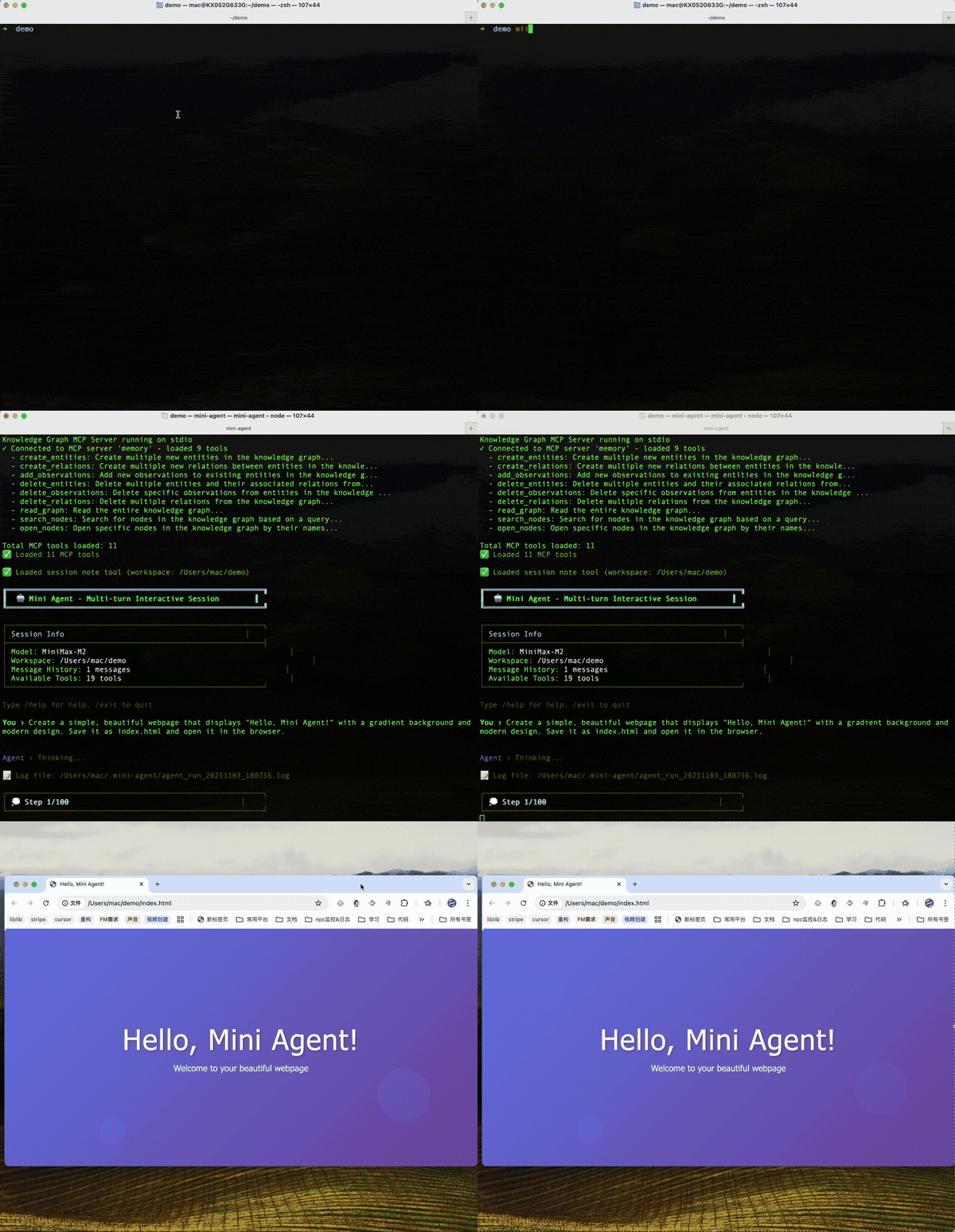
Task Execution
The agent creates a webpage and opens it in the browser.
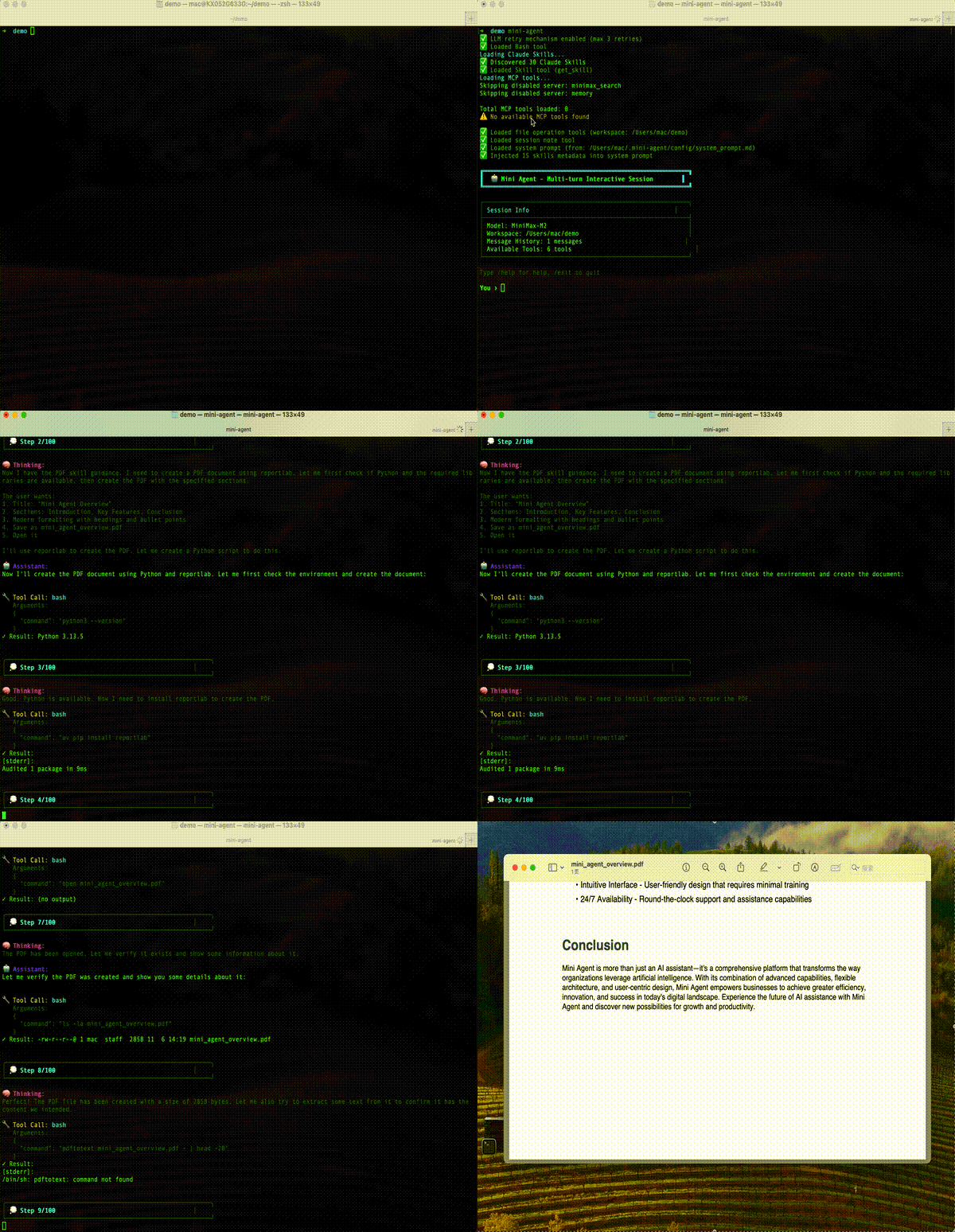
Claude Skill — PDF Generation
The agent uses a skill to create a professional document.
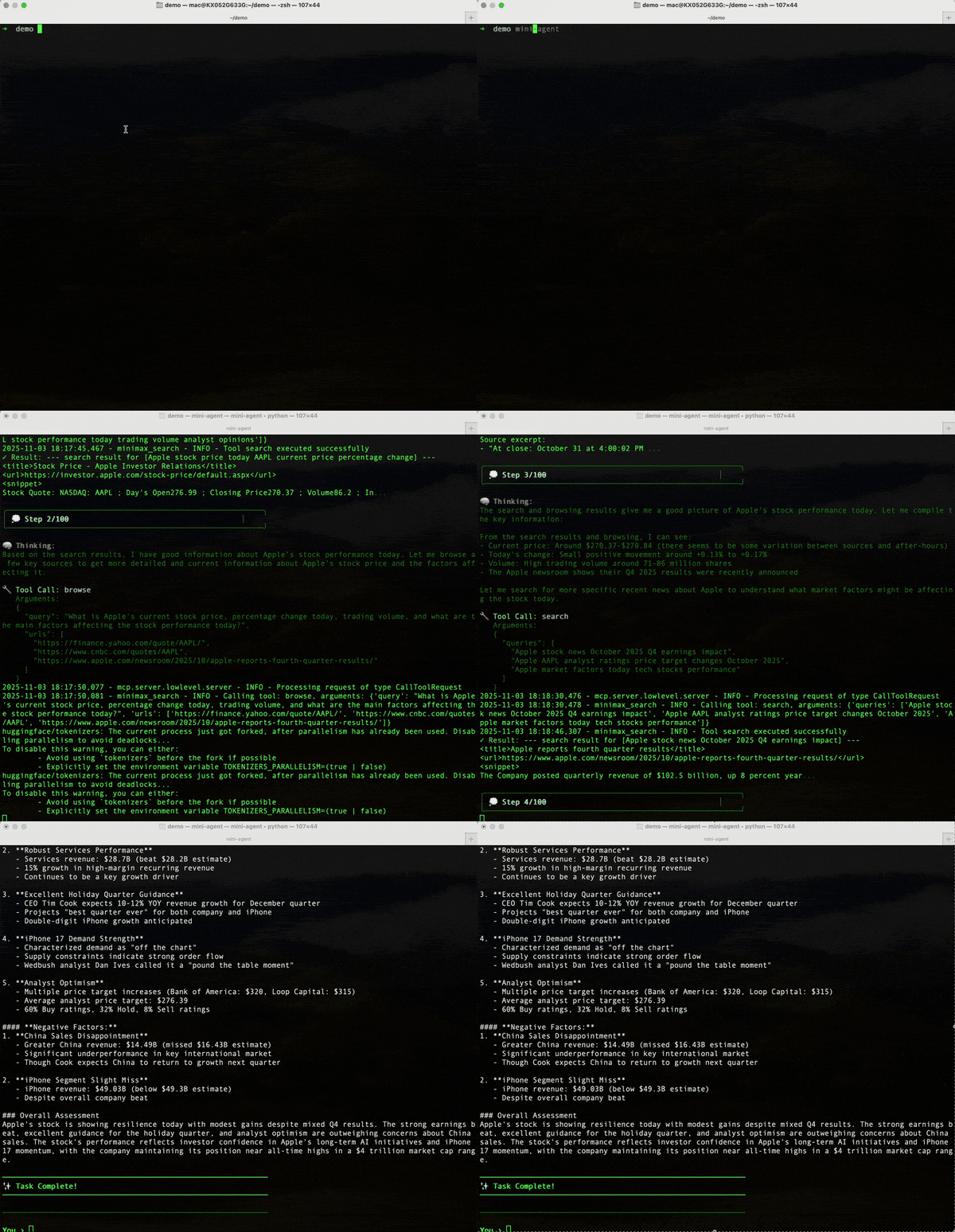
Web Search via MCP
The agent searches the web and summarizes results.
Installation
Requires Python 3.10+. If your system Python is older (e.g. 3.9), use
uv tool install— it manages Python automatically.
Quick Start (uv, recommended)
uv handles Python version management for you — no need to upgrade your system Python:
# Install uv (if not already)
curl -LsSf https://astral.sh/uv/install.sh | sh

# Install box-agent (auto-downloads Python 3.10+ if needed)
uv tool install box-agent
box-agent setup    # interactive config wizard
box-agent          # start chatting

# Upgrade later
uv tool upgrade box-agent
Quick Start (pip)
If you already have Python 3.10+:
pip install box-agent
box-agent setup
box-agent
From Source
git clone https://github.com/Raccoon-Office/Box-Agent.git
cd Box-Agent
uv sync
uv run python -m box_agent.cli
Contributor Quickstart
If you are joining the project as a collaborator, start here before changing code:
git clone https://github.com/Raccoon-Office/Box-Agent.git
cd Box-Agent
git submodule update --init --recursive   # needed for bundled skills
uv sync
uv run python -m box_agent.cli --help
uv run pytest tests/test_core.py -q
Read these files first:
AGENTS.md— repo-local engineering rules and verification expectations.CONTRIBUTING.md— contribution flow, PR checklist, and commit style.docs/REVIEW_GUIDE.md— maintainer review order, blockers, and proof requirements.docs/DEVELOPMENT_GUIDE.md— deeper architecture and development notes.docs/INTEGRATION.md— ACP/runtime integration details for host apps.
Project map:
| Area | Where to start |
|---|---|
| Agent execution loop | box_agent/core.py, box_agent/agent.py, box_agent/events.py |
| CLI and config | box_agent/cli.py, box_agent/config.py, box_agent/config/ |
| LLM providers | box_agent/llm/ |
| Built-in tools | box_agent/tools/ |
| ACP server/runtime embedding | box_agent/acp/, box_agent/build_runtime_cli.py |
| Skills | box_agent/skills/, box_agent/tools/skill_loader.py |
| Tests | tests/test_<area>.py |
Common development loop:
# Run the smallest relevant test while iterating
uv run pytest tests/test_bash_tool.py -q

# Run the full suite when the change's impact or CI gate requires it
bash general_review/ci/test.sh

# Catch whitespace/patch formatting issues
git diff --check
Use focused tests for the area you touched: tools in tests/test_*_tool.py,
LLM behavior in tests/test_llm*.py / tests/test_error_messages.py, ACP in
tests/test_acp*.py, memory in tests/test_memory*.py, and runtime packaging
in tests/test_build_runtime.py / tests/test_cli_runtime.py. Tests that need
real provider credentials are skipped unless the required API keys are present.
When a change affects the standalone runtime used by a host app, source changes are not enough: rebuild the runtime, install it into the host, restart the running ACP process, then probe the installed runtime. For local packaging:
uv run box-agent-build-runtime
Build a versioned runtime and install the resulting archive into the usual officev3 checkout in one command:
uv run box-agent-build-runtime --version 0.8.82 --install-officev3
Pass an explicit checkout path after --install-officev3, or set
BOX_AGENT_OFFICEV3_DIR, when officev3 is stored elsewhere.
Configuration
After running box-agent setup, your config lives at ~/.box-agent/config/config.yaml:
api_key: "your-api-key"
api_base: "https://api.anthropic.com"
model: "claude-sonnet-4-20250514"
provider: "anthropic" # "anthropic" or "openai"
max_steps: 300
max_parallel_tools: 8
parallel_tool_timeout_seconds: 900
provider_stale_seconds: 300
sub_agent_token_limit: 50000
sub_agent_batch_synthesis_timeout_seconds: 600 # 0 disables the extra batch synthesis cap
goal_autopilot_enabled: true
goal_autopilot_max_turns: 3
goal_autopilot_max_seconds: 14400
goal_autopilot_no_progress_turns: 2
Tool limits are omitted by default so runtime upgrades can supply updated
defaults from box_agent/config.py. Add only deliberate overrides under
tool_limits:; inspect the current effective values with
box-agent config --json.
box-agent config                    # show current config summary
box-agent config --get model        # print one config value
box-agent config --set max_steps 300
box-agent config --set goal_autopilot_max_turns 5
box-agent config --set tool_limits.external_skill.max_tool_calls 160
box-agent config --set tool_limits.external_skill.max_delegated_tool_calls 512
box-agent config --set tool_limits.completion.deadline_seconds 1800
box-agent config --set tools.bash_default_timeout_seconds 300
box-agent config --json             # machine-readable config summary
box-agent config --edit             # open in editor
box-agent doctor                    # check environment & API connectivity
box-agent doctor --json             # machine-readable health check
Isolated runtime profiles
Hosts may opt into a dedicated absolute BOX_AGENT_HOME before starting the runtime. This routes Box-Agent-owned configuration and state away from the default user profile without changing the operating-system HOME; unset behavior stays compatible. Explicit profiles require their own config/config.yaml and never fall back to legacy configuration or login-token environment variables.
For endpoints that reject reasoning_effort: "none", see
reasoning configuration for the explicit
reasoning_effort_when_disabled: low compatibility option and child Agent inheritance.
See isolated runtime profiles and the no-background-startup example configuration. This is path/configuration isolation, not an OS sandbox or permission to call a model.
The optional desktop memory backend hands off bounded, redacted evidence from the current canonical Session Log through a native control capability. The host durably records QA and evidence together; missing evidence does not prevent ordinary QA, and unknown results retain the original input for recovery. Once QA is confirmed, a background producer can generate a typed Experience proposal from host-frozen evidence and advance host-validated Fact/Observation persistence using the MemSense 2.2.3.8 name-array and scenario protocol. The default local backend does not require a desktop service. See the desktop memory contract and verification boundary, evidence collection, and producer regression tests. Packaged hosts require a runtime rebuild, installation and restart before using these source changes.
CLI Usage
# Interactive mode
box-agent
box-agent --workspace /path/to/project
box-agent --no-sandbox           # disable Jupyter sandbox

# Non-interactive (CI/CD, scripts)
box-agent --task "analyze data.csv and create a report"
box-agent --task "analyze data.csv" --json          # append execution summary JSON
box-agent --task "local file task" --no-verify-api  # skip startup API probe
box-agent --task "create a PPT" --force-plan-start  # publish a plan before work
box-agent --task "create a PPT" --no-completion-gate
box-agent --goal "Ship CLI parity" --task "finish tests"
box-agent --goal "Ship CLI parity" --task "finish tests" --no-goal-autopilot
box-agent --deep-think --task "review this repo"    # enable thinking mode when supported

# Subcommands
box-agent setup              # config wizard
box-agent config             # show/edit config
box-agent doctor             # health check
box-agent log                # open log directory
box-agent trace-viewer       # open the offline Agent Trace diagnostics page
box-agent goal status        # show persistent workspace goal
box-agent goal complete --evidence "tests passed"
box-agent install-browser   # install Chromium for Playwright MCP (~200MB)
box-agent install-node      # install managed Node.js runtime for skills (macOS)
Code-mode startup context
Code-mode sessions load the workspace-root AGENTS.md into the startup prompt.
They do not run Git commands during prompt assembly; the prompt states that Git
state has not been checked. The agent can inspect Git through tools when needed
and must still protect existing user changes.
Agent Trace diagnostics
Desktop memory sessions omit private payloads from operational diagnostics, including ACP tool arguments/results, raw errors, model debug records, and title/summary utility requests. This applies at every log level and overrides full-payload debug flags. Tool names, call IDs, outcome events and timing metadata remain available. Model inputs, user-visible results and the protected Session Log keep their existing behavior. Historical logs are not rewritten by this protection.
Run box-agent trace-viewer to open the packaged, offline developer viewer. Open ~/.box-agent/log/sessions/ for a newest-first overview of every trace, then select one run to inspect per-turn metrics, LLM/tool waterfalls, raw events, and the complete system → user → assistant/tool → final-response chain. You can still open one .jsonl file directly.
Both ACP and CLI create session traces automatically. Each CLI invocation writes
cli-<unique-id>.jsonl; interactive user turns have distinct turn IDs in that
file. /clear resets conversation history without deleting the diagnostic trace,
and Goal autopilot continuations stay within the originating user turn. Native
CLI traces include input, LLM/tool activity, final output, stop reason and turn
duration; no test-harness writer is required. Startup probes and idle CLI commands
are outside the turn trace. Set BOX_AGENT_SESSION_TRACE_DIR to override the
directory, or BOX_AGENT_SESSION_TRACE_ENABLED=0 to disable tracing. CLI trace
initialization or write failures do not fail the task. These files contain sensitive task data; the same
retention policy below applies to both entrypoints.
Choose Compare sources to compare equivalent runs from any number of sources. The selected root uses source directories directly, without an extra data-directory level:
comparison-traces/
  baseline/*.jsonl
  current/*.jsonl
  candidate-x/*.jsonl
The viewer groups traces by normalized turn.input first and may use a compatible normalized filename when input is missing or non-conflicting. It keeps repeated runs per source selectable, shows each source side by side, and calculates duration, call, token, and error deltas against the selected reference source.
If an embedded browser does not expose the native file picker, run the loopback-only service and enter the trace directory path in the page:
uv run python -m box_agent.trace_viewer.server --port 8766
The offline page reads files in the browser. In ledger mode, the service reads only top-level .jsonl files from the directory you enter. In comparison mode, it reads top-level .jsonl files from each immediate non-symlink source directory and goes no deeper. It checks metadata once per second and refreshes the active view when files are added or changed; trace bodies are transferred over 127.0.0.1 only when that metadata changes. The service rejects requests whose Host or Origin is not its exact loopback authority, preventing a rebinding site from reading local traces. Neither mode makes external network requests. Chromium and Edge can keep following appended records after you grant a file handle; drag/drop and ordinary file inputs load a snapshot. Session traces may contain prompts, tool arguments, outputs, and business data—handle them as sensitive diagnostic artifacts.
Browser automation (optional)
Box-Agent ships with a disabled @playwright/mcp entry. To enable browser tools locally:
box-agent install-browser # downloads Chromium and flips the entry to enabled
Requires Node.js ≥ 18 on PATH. Chromium lands in ~/.box-agent/browsers/ (shared by CLI and ACP runtime) and mcpServers.playwright.disabled in ~/.box-agent/config/mcp.json is set to false.
ACP embedders: no env-var plumbing required — box-agent-acp defaults PLAYWRIGHT_BROWSERS_PATH to the same ~/.box-agent/browsers/ path. To point at a different cache, export PLAYWRIGHT_BROWSERS_PATH=<your path> before spawning box-agent-acp (our setdefault won't override it).
Web access routing is shared by CLI, ACP and child agents through the
capability-gated Web Access Routing prompt. Explicit browser/tab/reader choices
come first, followed by continuation of an existing page, dependencies on the
user's browser state, independent visible/interactive browser work, and public
URL body retrieval. Source discovery uses search before choosing a reader.
For example, “open Baidu” uses the managed browser, while “summarize this public
article URL” prefers web_extract. A request to review a new form does not itself
require the user's system browser; stop before submission when the user owns it.
Skills provide execution and evidence procedures for the selected channel. Unavailable tools must be discovered or reported, never invented. Recovery may select another channel only when it preserves the task and does not replace an explicit target or required browser state; uncertain actions must be verified before any retry. This is a shared model-facing policy, not an unconditional Fetch-to-managed-to-user-browser fallback or a guarantee of model compliance.
In-session commands: /help, /clear, /clear_all, /history, /stats, /sandbox_status, /log, /goal, /memory review, /exit
CLI Skill subprocesses receive the original user requests, including constraints
such as "do not generate images", through the same source-binding contract as
ACP. Interactive requests accumulate until /clear or /clear_all; assistant
output and automatic goal-continuation prompts are not added as source facts.
ACP session traces keep their existing ~/.box-agent/log/sessions/<session-id>.jsonl
name and box-agent-session-trace/v1 record format. Retention removes only whole,
inactive session files: files older than 7 days are eligible, and the directory
has a soft 512 MiB cap. The current append target, files modified within 24
hours, and the newest two sessions are protected. Cleanup runs best-effort at
most once every 6 hours; cleanup failures never interrupt agent execution.
Operators can override the defaults with BOX_AGENT_SESSION_TRACE_RETENTION_DAYS,
BOX_AGENT_SESSION_TRACE_MAX_TOTAL_BYTES, and
BOX_AGENT_SESSION_TRACE_CLEANUP_INTERVAL_SECONDS, or disable cleanup with
BOX_AGENT_SESSION_TRACE_RETENTION_ENABLED=0.
Use /goal <objective> or --goal "<objective>" to keep a durable workspace objective attached to later turns. The CLI persists it under ~/.box-agent/goals/; later turns include that goal until you run /goal pause, /goal resume, /goal block <reason>, /goal complete <evidence>, or /goal clear. Scripted runs can manage it with box-agent goal ....
In non-interactive --task mode and ACP sessions, active goals also use bounded autopilot: when a turn ends naturally but the goal is still active, Box-Agent automatically continues in the same session until the model marks the goal complete, marks it blocked, the user cancels, goal_autopilot_max_turns / goal_autopilot_max_seconds is reached, or goal_autopilot_no_progress_turns consecutive automatic continuations make no recorded goal progress. Use --no-goal-autopilot for one CLI run, or set goal_autopilot_enabled: false in config.
ACP & Editor Integration
ACP session/cancel interrupts a pending primary model stream read without
waiting for the next HTTP chunk or activity heartbeat, then closes the stream
and finishes the turn with stopReason: cancelled. This does not restart the
shared runtime or cancel other sessions. Tool execution retains its existing
cooperative cancellation behavior; cancelling a turn does not roll back tool
side effects that have already occurred.
Box Agent supports the Agent Communication Protocol for embedding in editors and apps.
Zed Editor — add to settings.json:
{
  "agent_servers": {
    "box-agent": {
      "command": "/path/to/box-agent-acp"
    }
  }
}
Standalone Runtime — for Electron apps and other hosts:
# Download pre-built binary (latest release; omit the tag to always get the newest)
gh release download --repo Raccoon-Office/Box-Agent --pattern "box-agent-runtime-*.tar.gz"

# Or build from source (current platform)
uv run box-agent-build-runtime

# Build both macOS architectures from one source snapshot (no upload/host install)
# Requires prepared .venv (ARM) and .venv-x64 (Intel), including PyInstaller.
uv run box-agent-build-runtime --mac-all --version 0.9.13 --dry-run
uv run box-agent-build-runtime --mac-all --version 0.9.13

# Build both archives directly into Lab's desktop dist/runtime (no host runtime replacement).
uv run box-agent-build-runtime --mac-all-lab --version 1.0.0 --dry-run
uv run box-agent-build-runtime --mac-all-lab --version 1.0.0

# Build macOS Intel/x64 runtime from Apple Silicon
# Requires a separate x86_64 venv because PyInstaller cannot bundle arm64 wheels into an x64 binary.
# One-time setup:
#   arch -x86_64 /bin/bash -c 'curl -LsSf https://astral.sh/uv/install.sh | INSTALLER_NO_MODIFY_PATH=1 UV_INSTALL_DIR="$HOME/.local/bin-x64" sh'
#   UV_PROJECT_ENVIRONMENT=.venv-x64 arch -x86_64 ~/.local/bin-x64/uv sync
# Reuse the existing x64 Python without depending on the x64 uv install path.
# Isolate intermediate outputs from ARM builds; add --version X.Y.Z if needed.
.venv-x64/bin/python -m box_agent.build_runtime_cli --target darwin-x64 --output dist/runtime-darwin-x64
The runtime communicates via JSON-RPC over stdio. stdout = protocol only, stderr = diagnostics. macOS runtime archives contain ACP and its internal dependencies. Stable tool Python/Node runtimes are host-managed and must match the target architecture; they are not bundled into this ACP-only archive.
--mac-all checks the actual Python process architectures, uses separate build/cache
directories, and validates every native Mach-O file. Only after both builds pass are
the two archives, SHA-256 sidecars and a box-agent-runtime-v<version>-mac.json report
placed together in dist/runtime/. Existing same-version output is never overwritten.
Use --arm-python PATH / --intel-python PATH for custom environments; both must use
the same Python major/minor and PyInstaller version. --dry-run checks prerequisites
without building. This mode requires an explicit stable version and cannot be combined
with --target, --arch, --install-officev3 or --install-lab.
See the dual-architecture workflow.
--mac-all-lab [DIR] reuses the same dual build and writes to
<Lab>/apps/office-desktop/dist/runtime/ by default. It locates Lab using
BOX_AGENT_LAB_DIR or the neighboring checkout; --output / BOX_AGENT_RUNTIME_OUTPUT
can override the destination. Then run
pnpm desktop:release:mac -- --agent-version 1.0.0 --runtime-dir apps/office-desktop/dist/runtime
from the Lab root to build both clients. Neither command uploads artifacts.
Testing
bash general_review/ci/test.sh       # all tests, up to four workers
uv run pytest tests/test_core.py -v   # core + context compression
uv run pytest --cov              # with coverage
Troubleshooting
Model quota or arrearage: Recognized business error codes such as Arrearage determine the error category before generic message text. HTTP status remains a separate diagnostic and retry signal; unknown codes fall back to the existing text rules. Check the account balance and billing status for the configured model provider before retrying.
SSL Certificate Error: pip install --upgrade certifi or set verify=False for testing.
Module Not Found: Make sure you're in the project directory: cd Box-Agent && uv run python -m box_agent.cli
Contributing
Issues and PRs welcome! See Contributing Guide.
License
Links
If this project helps you, give it a ⭐!
Releases