
Server · #309 trending MCP repo · ↗ +8 stars this week
Blender Agent Studio
ifBars/blender-agent-studio
Free, open-source Blender AI plugin for the tools you already use. Codex and Claude Code installers, local MCP tools, editable .blend files and Python source.
- Stars
- 106
- This week
- +8
- Forks
- 11
- Open issues
- 8
- Skills inside
- 13
Inside this repo
13 skills
/blender-agent-benchmarkBenchmark Blender modeling agents, skills, prompts, scripts, or MCP tools with paired isolated runs. Use for baseline-versus-plugin comparisons, regression suites, skill forward-testing, MCP usefulness evaluation, score calibration, or claims that a Blender workflow improves mesh, visual, structuralplugins/blender-agent-studio/skills/blender-agent-benchmarkblender-animation-workflowAuthor, diagnose, and refine Blender animation for humanoid locomotion, grounded turns, interaction IK, first-person hands, articulated props, mechanical assemblies, and game-ready actions. Use when motion timing, contacts, pivots, critical poses, trajectories, visibility states, or exported actionsplugins/blender-agent-studio/skills/blender-animation-workflowblender-art-direction-intakeClarify a Blender creation request and optionally generate a concept/mockup image before modeling. Use before modeling, procedural scene creation, rendering, simulation, or character work when art style, subject, scale, platform, shot, materials, constraints, or reference direction are unclear.plugins/blender-agent-studio/skills/blender-art-direction-intakeblender-asset-validationInspect and validate Blender assets technically and visually. Use for `.blend`, `.glb`, `.gltf`, `.fbx`, or `.obj` quality checks; topology and export review; evaluated triangle/material/hierarchy metrics; standardized multiview renders; fresh-import verification; or evidence-backed review of an ageplugins/blender-agent-studio/skills/blender-asset-validationblender-character-workflowCreate, repair, rig, skin, animate, and export Blender characters, creatures, avatars, and facial rigs with deformation and runtime validation. Use when a request involves a character mesh, armature, weights, IK/FK, blend shapes, facial animation, humanoid/VRM/game export, or deformation quality.plugins/blender-agent-studio/skills/blender-character-workflowblender-iterative-refinementRun an opt-in evidence-backed second pass on a complete Blender deliverable. Use when the user explicitly asks to critique, improve, repair, iterate, or apply a practice-makes-perfect loop; when a benchmark fixture explicitly requires retained before-and-after evidence; or when a completed candidateplugins/blender-agent-studio/skills/blender-iterative-refinementblender-mcp-integrationChoose, configure, and use Blender MCP integrations for live scene control or deterministic asset evaluation. Use when connecting Codex or Claude Code to an open Blender instance, deciding between Blender Lab MCP and community Blender MCP servers, troubleshooting Blender MCP connectivity, or evaluatplugins/blender-agent-studio/skills/blender-mcp-integrationblender-modeling-workflowBuild or substantially refine reproducible Blender models through Python and the Blender CLI. Use for user requests to create meshes, props, hard-surface assets, stylized objects, assemblies, procedural geometry, game-ready GLB assets, or to iterate on a scripted Blender model from visual feedback.plugins/blender-agent-studio/skills/blender-modeling-workflowblender-procedural-workflowCreate reproducible Blender Geometry Nodes, modifiers, instancing systems, and procedural environments. Use when a request involves Geometry Nodes, scattering, terrain, architecture, repeated assets, parametric generators, non-destructive variation, or scalable scene assembly.plugins/blender-agent-studio/skills/blender-procedural-workflowblender-rendering-workflowBuild, diagnose, and deliver Blender still, turntable, sequence, and animation renders with reproducible lighting, camera, color-management, compositor, and output settings. Use when a request concerns product visualization, cinematic shots, architectural renders, look development, render passes, deplugins/blender-agent-studio/skills/blender-rendering-workflowblender-signage-workflowCreate readable signs, labels, placards, graphic panels, and static display faces for Blender props and environments. Use when surface typography or pictograms need deliberate 2D design, physical integration, and distance-readability review.plugins/blender-agent-studio/skills/blender-signage-workflowblender-simulation-workflowCreate, diagnose, bake, and validate deterministic Blender physics simulations including fluid, smoke, fire, rigid bodies, cloth, soft bodies, particles, and hair. Use when a request involves physical dynamics, collision, cache baking, fluid or volume output, simulation handoff, or rendering a simulplugins/blender-agent-studio/skills/blender-simulation-workflowDocumentation
README
Blender Agent Studio
Describe a model, scene or animation to Codex or Claude Code. Get back an
editable .blend, the Python that built it, and renders your agent has checked.
A free, open-source Blender AI plugin. It runs your local Blender and needs no extra service, API key or subscription beyond the agent you already use.



Docs · Quick start · Examples · How it works · Workflows · Development · Report a bug
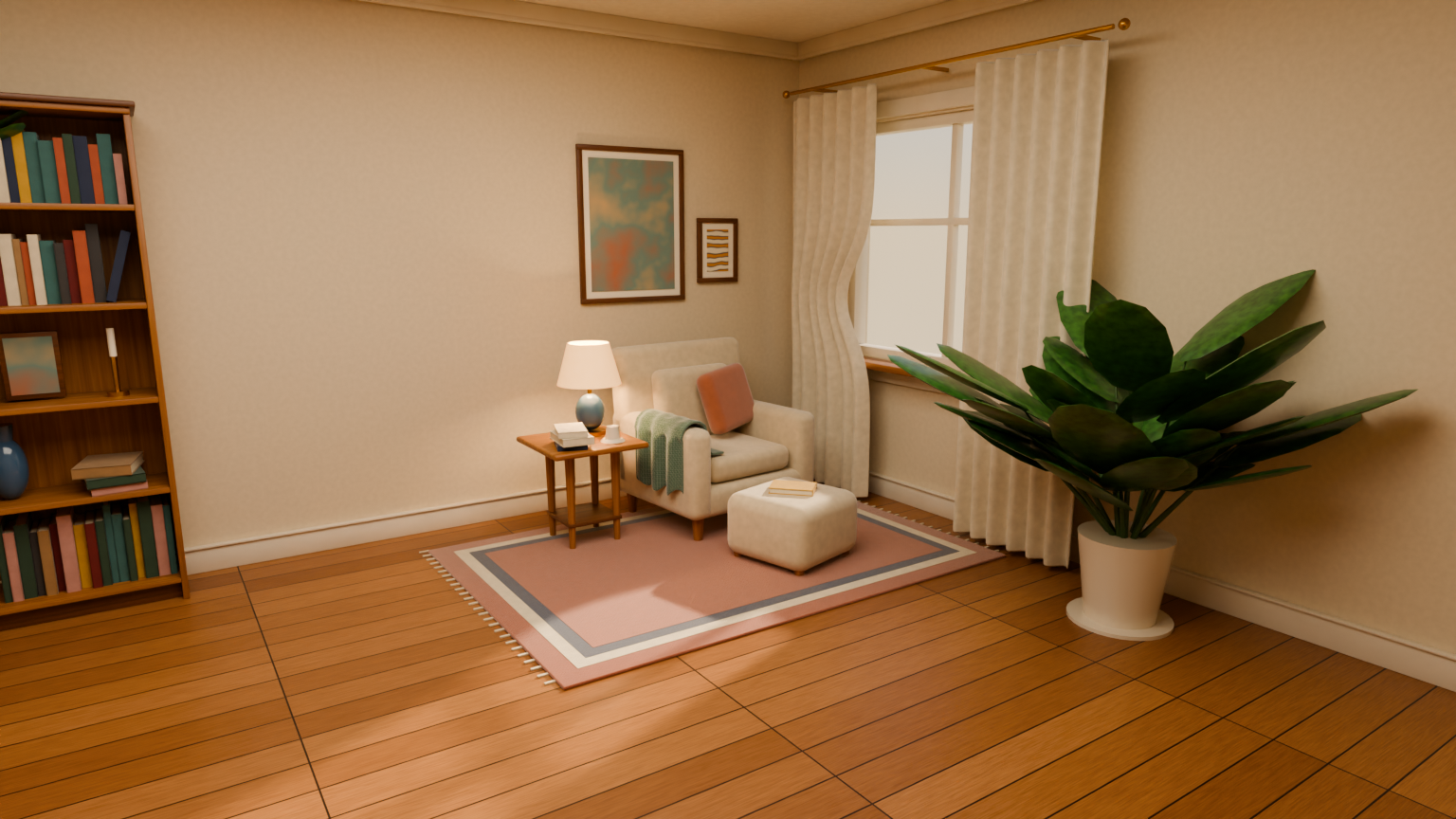
A reading room built with Claude Code and Sonnet 5.5, rendered from the saved scene. It is one selected result, not an average: the paired examples show runs with and without the plugin, including failed checks and mixed visual reviews.
Quick start
You need Claude Code or Codex, Blender (5.2 LTS is the tested version) and Bun 1.3.5 or newer.
1. Install the plugin.
# Claude Code
claude plugin marketplace add ifBars/blender-agent-studio
claude plugin install blender-agent-studio@blender-agent-studio

# Codex
codex plugin marketplace add ifBars/blender-agent-studio
codex plugin add blender-agent-studio@blender-agent-studio
2. Check your setup. Start a new Claude Code session or Codex task and ask:
Check my Blender Agent Studio setup.
The agent runs blender_check_setup. It finds Blender, saves and reopens a tiny
scene, renders a small preview image, and tells you what to fix if a step fails.
It never opens your own files. Usually Blender is found
automatically; if not, see point it at Blender.
3. Make something.
Use Blender Agent Studio to build a walnut desk lamp. Give it warm lighting, render it from two angles, and save the .blend and Python source.
You get an editable .blend, the Python that built it, and two renders. Open
the images and judge the lamp yourself: the automated checks catch broken
geometry and exports, not taste. See more to try for writing
your own requests.
What you can do
- View an open Blender session inline, orbit and zoom, and attach a clicked object to your next message with the optional Studio Live addon.
- Build props, environments, characters, and Geometry Nodes setups.
- Design readable signs, labels and graphic panels as editable 2D artwork, then integrate their materials and supports and review them at the intended distance. See the signage workflow.
- Optionally record real modeling milestones and deliver a timelapse from the empty/default scene to the completed render. Ask before modeling starts; capture guide.
- Gather references from several angles and compare the model's proportions before adding detail.
- Overlay projected geometry on a reference image, with optional silhouette-mask measurements for missing and excess coverage. See reference modeling.
- Rig and animate models, or work with cloth, smoke, and other simulations.
- Render through your scene's cameras with its lighting intact, or use studio views to inspect a model from every side.
- Download CC0 textures and HDRIs from Poly Haven at 1K, 2K, 4K, or 8K.
- Find Mixamo motion through your browser and import downloaded FBX animations into a new
.blend. See the Mixamo workflow for browser requirements and retargeting limits. - Find and preview Pixabay sound effects through a browser handoff. The tool provides a search URL and workflow; it does not return live results or import audio. See the MCP integration guide.
- Check geometry and exported files, review renders, and repair what doesn't work.
- Query scene parts and evaluated dimensions, check explicit geometry and ground constraints, and compare repairs against preserved SceneIR baselines with the optional Rust runtime.
The plugin includes twelve specialist skills and a local MCP server for inspection, rendering, and asset downloads. Generated scenes come with Python source so you can rebuild them and keep making changes. Codex and Claude Code have bundled installers today; other hosts need compatible skill loading and local execution; see portability and host requirements.
How it works
The skills guide the agent through modeling, rendering, animation, and other tasks. Blender runs locally to build or inspect the saved scene; you do not need to keep its interface open. The agent chooses the relevant steps for your request. The workflows and tools help it:
- Turn the brief into parts, proportions, finish goals, and delivery checks. Review a graybox before spending time on materials and small details.
- Check geometry, materials, dimensions, and other scene details. For an export, it can reopen the file in a fresh Blender process to check what survived.
- Render a hero view plus fixed front, back, left, right, and top views. During repairs, it can use two smaller views for faster feedback before the full check.
- Light diagnostic views with a studio setup scaled to the asset. The
autopreset picks a contrasting background from simple material color hints; the agent still needs to inspect the image and adjust it when the choice fails. - Render through the scene's own cameras and lighting for beauty images. The
tool caps resolution, samples, and render time. It offers faster
previewand higher-qualityfinaldenoising policies; by default, it preserves the scene's authored denoising settings. The agent selects the policy for the job.
The .blend is the editable result. The Python source records the build steps,
so you can regenerate it or ask the agent to change it later. The workflow
guide explains which specialist skills apply to
each kind of task. Studio views are for inspection and do not replace your
scene's authored lighting in beauty renders.
Install
The quick start has the install commands. Both hosts install
the same skills, MCP server, and SceneIR tools from this repository. Inside a
Claude Code session, /plugin marketplace add ifBars/blender-agent-studio and
/plugin install blender-agent-studio@blender-agent-studio do the same as the
terminal commands.
Start a new task or session after installing or updating the plugin. Both hosts
pick the relevant skill from a plain request. To name one, use
$blender-agent-studio:blender-modeling-workflow in Codex or
/blender-agent-studio:blender-modeling-workflow in Claude Code.
Point it at Blender
The plugin uses the first Blender it finds:
- A
blenderPathgiven to a tool, or--blenderon the command line. - The
BLENDER_EXECUTABLEenvironment variable. blenderon yourPATH.- Standard install locations: the official installers on macOS
(
/Applications) and Windows (Program Files\Blender Foundation), Steam, and on Linux Snap, Flatpak, and archives unpacked in your home folder or/opt. When several are installed, it prefers 5.2 LTS.
A configured path that is wrong is reported, never silently replaced. For any
other location, set BLENDER_EXECUTABLE to the executable itself, not its folder:
$env:BLENDER_EXECUTABLE = "C:\path\to\Blender\blender.exe"
export BLENDER_EXECUTABLE="/Applications/Blender.app/Contents/MacOS/Blender"
Launch your CLI agent from the terminal where you set the variable, or configure
your desktop host's environment; a new conversation may not inherit shell
changes. blender_version reports which executable was found and how.
Check from a terminal
The same setup check runs without an agent. From a repository checkout or the installed plugin directory:
bun run doctor
It saves and reopens a tiny scene, renders a 128px Cycles preview on CPU, and
tries a 64px EEVEE render. It needs no API key, GPU, downloads, or Rust, and it
keeps the .blend, previews, logs, and a JSON report in a new temporary folder.
A failed check exits nonzero. An EEVEE warning means Cycles works but the studio
inspection views need OpenGL, which headless Linux machines may lack. Use
--blender "/path/to/blender" to override discovery or --output-dir NEW_DIRECTORY
to keep the evidence somewhere specific. See setup troubleshooting
if a check fails.
Optional and alternative installs
For the optional scene-understanding tools, build the Rust runtime in the
installed plugin directory with bun run setup:runtime. See
scene understanding for setup, examples and
measurement limits. The other tools do not require Rust.
Update an existing GitHub installation
Codex:
codex plugin marketplace upgrade blender-agent-studio
codex plugin add blender-agent-studio@blender-agent-studio
Claude Code:
claude plugin marketplace update blender-agent-studio
claude plugin update blender-agent-studio@blender-agent-studio
Prefer skills only? See the alternative installation options and browse the workflows on skills.sh.
More to try
Include the style, dimensions, and intended use when they matter:
Build a 30 cm stylized brass lantern for a mobile game. Export a GLB and check that it imports correctly.
Here is
desk.blend. Inspect it from every side, list what looks wrong, and fix the worst problem without changing anything else.
For a game asset, ask for a GLB export and an import check. For a render, you can specify a camera angle, lighting, or reference image. For a second review, ask the agent to check the result from multiple views.
How well does it work?
In five fresh, matched pairs covering a lantern, lever press, and animated drawbridge, the plugin's guided workflow passed the technical gate five times; the agent without it failed five times. Three blinded visual judges preferred the plugin asset in four of the five pairs. On one lantern repeat, all three preferred the baseline's appearance even though its geometry failed the technical gate. The plugin used more reported tokens. Lantern build time was about even across three pairs; the press and drawbridge plugin runs took about twice as long. See the current paired evidence for scores, controls, and defects.
These results show a quality gain for delivery checks on the tested prompts, with less consistent visual gains. Five pairs cannot give a reliable success rate for arbitrary prompts, models, or art styles. The three judges in each pair reviewed the same two assets; their votes are not separate generations. The comparison used the plugin's skills without its optional MCP tools, so it does not measure the extra benefit of those tools. An earlier four-task comparison also favored the plugin's final runs, but a harder integrated task had mixed results. Plugin revisions have shown both gains and regressions. Review the result yourself, particularly its shape, materials, animation, and exported files.
The five pairs above ran in Codex. The published gallery now retains 31 pairs, including later scene comparisons with Sonnet 5.5 and Opus 5.5 in Claude Code, alongside the Codex models. The scene report records their controls, scores, visual votes, and missing reviews. Those scene results are mixed; the selected reading-room image above does not establish a general visual advantage. Each pair has one generation per condition, so the gallery is evidence to inspect rather than a general success rate.
The earlier Claude Code lantern samples had no baseline and remain separate from those paired scene comparisons. Keep each result tied to its tested host, model, task, and plugin revision.
Support development
If Blender Agent Studio helps you build or inspect scenes, consider supporting its maintainer through GitHub Sponsors or Ko-fi. Contributions help sustain the time spent on Blender and agent compatibility, reproducible examples, bug fixes, and benchmark runs that report failures as well as improvements.
The plugin stays free, MIT-licensed, and runs Blender locally. Sponsorship is optional and does not purchase priority support or feature commitments. Sharing a scene, reporting a reproducible bug, or improving the docs also helps.
Star history
Contributing
Found a bug? Open an issue with your Blender version, what you asked for, and what happened. A render or error log helps.
Made something with the plugin? Share an example with your prompt, agent/model, Blender version, and a render. If you want it featured in the docs, say so and include the build script when you can. Only share files you have permission to publish.
For code changes, see the development guide and repository instructions. Keep generated models and benchmark output out of commits. Review unfamiliar Blender scripts before running them; see security notes.
Credits and license
MIT. Powered by Poly Haven, whose assets are CC0.
This is an independent project, not affiliated with or endorsed by the Blender Foundation or Poly Haven. See third-party notices.
Releases
Recent versions
gallery-scenes-hd-2026-10-04HD scene comparison previews — October 4, 2026gallery-scenes-2026-10-04Scene comparison gallery — October 4, 2026vanilla-plugin-pilot-2026-10-02Vanilla vs plugin modeling pilot — October 2, 2026spatial-pilot-2026-10-02Spatial modeling pilot — October 2, 2026gallery-matrix-2026-10-02Complete benchmark model matrix — October 2, 2026gallery-hd-2026-10-02Expanded HD benchmark gallery — October 2, 2026