
Directory · #421 trending MCP repo
AgentBridge
Graphene-Lab/AgentBridge
Autonomous Personal AI Assistant for office work, exposed as a Model Context Protocol (MCP) server and listed on the Official MCP Registry as io.github.Graphene-Lab/agentbridge. Local-first: drives tools, mail, documents and voice on your machine.
- Stars
- 20
- This week
- +0
- Forks
- 1
- Open issues
- 0
- Latest release
v1.26.11.03
Documentation
README
AgentBridge (codename "AGENT") — AI personal assistant that promises to replace humans in office work
Add agentic power to your work! An AI personal assistant that automates tasks and your work without sacrificing privacy. We're happy to put this powerful tool in your hands to automate your business while reducing staff costs, providing you with the most advanced AI technology in the office automation industry.
AgentBridge is a self-hosted server that runs its own AI agents behind two primary interfaces in a single process: a full-screen chat terminal (TUI) and an HTTP API that speaks the standard OpenAI protocol, so any OpenAI-compatible client drives the same agents.
Chat in the terminal while scripts, bots, and apps use the same agents on the same port: same process, same conversations, no bridges, no synchronization.
To be explicit about what the compatibility is and is not: AgentBridge is OpenAI-standard on the outside, not on the inside. It is a standard OpenAI server to any OpenAI client — SDKs, bots and scripts talk plain POST /v1/chat/completions and reach the same agents. It does not run on a standard agent system: the agent core is our own engine (AIOrchestrator/AgentHarness), and its defining concept is that an agent's abilities are compiled .NET assemblies loaded as plugins from the Tools/ folder and driven in-process — no interpreters, no remote tool servers, no standard agent glue between the agent and its actions. That is the Universal Tool System described below, and it is the architectural difference that sets this product apart.
It is the first agentic harness system for next-generation artificial intelligence that introduces significant innovations, raising the bar for all competitors in the industry. The system encapsulates agentic functions in a well-designed sandbox that prevents companies from suffering damage from an AI that is not properly controlled, while at the same time allowing them to entrust real business tasks to the AI, with a very high level of privacy and confidentiality.
AgentBridge stands apart from the harnesses you are familiar with because it is designed to let even people with no technical skills — your grandma, for example — use it without risking damage: file actions are reversible thanks to versioning, the agent is confined to a space bounded by guardrails built in by design, and no code-agent features are provided, precisely to prevent code from being created or executed. It can also be supplied together with our cloud platform, which synchronizes the file area in real time with a private, encrypted cloud located within your own company. In short, it is a product any employer can make available to their employees to support office work and make business processes more efficient. With traditional harnesses, a badly worded prompt could destroy documents, wipe the work drive, or cause other kinds of damage; our focus, by contrast, has been on creating a safe tool for office use.
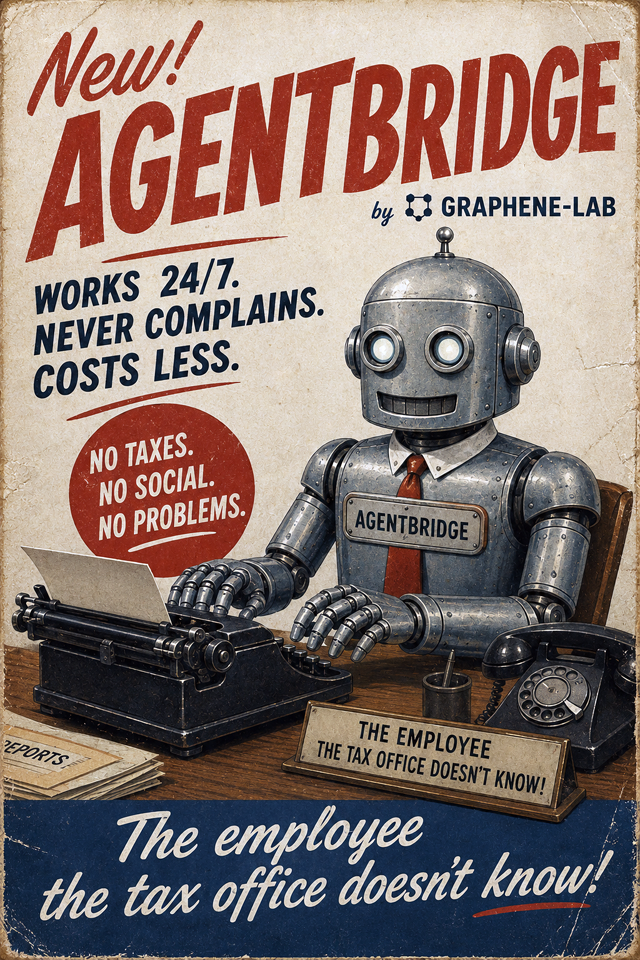
Why teams choose this architecture AgentBridge is built on the AIOrchestrator library model: one runtime, one agent core, and one consistent operational flow across terminal and API. The result is faster execution, lower integration overhead, and stronger control than traditional multi-server MCP setups. Read the white paper: Why the AIOrchestrator Library Model Outperforms Traditional MCP Deployments.
The architecture: one solution, and everything in it is a plugin
AgentBridge is not a single project. It is a solution — a set of .NET projects that form one whole — and the repository you are reading is only the host that assembles it. The other pieces live in repositories of their own, and each one is a plugin: a library that gives the agent one family of abilities.
| Layer | What it does | Where it lives |
|---|---|---|
| AgentBridge — the host | Terminal UI, OpenAI-compatible API, sessions, voice, TTS, Telegram and SIP bridges, OfficeManager | this repository |
| AIOrchestrator / AgentHarness — the core | The agent loop, the deterministic memory, and the tool contract every plugin implements | Graphene-Lab/AIOffice |
| The plugins — the abilities | One compiled library per domain: Word, Excel, PowerPoint, PDF, podcasts, CAD, maps, ERP, Odoo, Power BI, Markdown | one repository each — list below |
| The support libraries | Deterministic code intelligence that reads a compiled assembly and derives its tool interface from it | UISupportGeneric · GiraffeAI |
flowchart TB
    subgraph Host["AgentBridge — the host (this repository)"]
        TUI["Terminal UI · Web GUI · API"]
        LOOP["Agent loop<br/>(AgentHarness)"]
    end
    subgraph Plugins["Tools/ — the plugins folder"]
        DOC["OfficeTool → .docx .xlsx .pptx .pdf"]
        WORD["DocumentTool → Word"]
        SHEET["SpreadsheetTool → Excel"]
        DECK["PresentationTool → PowerPoint"]
        MORE["PodcastTool · MapTool · FreeCADTool<br/>ErpTool · OdooTool · PowerBITool …"]
    end
    TUI --> LOOP
    LOOP -- "direct method call<br/>in-process, no protocol" --> DOC
    LOOP --> WORD
    LOOP --> SHEET
    LOOP --> DECK
    LOOP --> MORE
No project references a plugin at compile time. The host hands the agent tool names; the
plugin host scans the plugins folder (Tools/, next to the executable) at startup, loads the
assemblies and resolves those names to real types at runtime — then hot-adds any plugin that
appears later, 30 seconds after it lands. Adding an ability means dropping a folder in: no
rebuild, no registration, no service to start, no schema to keep in sync.
The idea: the agent calls software, not a protocol
The mainstream way to make an agent agentic is MCP: the model speaks JSON-RPC to a separate process, which does the work and answers. AgentBridge does the opposite, and that is why this product is a solution of libraries instead of a bundle of servers.
The agent uses the library directly. It has to create or modify a Word document? It calls the library that edits Word documents — exactly the way any application calls a low-level library — and gets the result back as a value, in the same process, as a native method call.
Concretely, what changes:
- No protocol hop. No second process, no HTTP round-trip, no serialization between the agent and its action: a tool call is a method call. The failure modes of a protocol — timeouts, transport errors, version skew between client and server — simply do not exist.
- Granular control, not a reduced surface. The agent drives the real API of the library, not the handful of endpoints someone decided to expose: it can style a run of text, set a page break, keep a template's numbering — every parameter the library accepts.
- Deterministic interfaces. The tool interface is derived from the compiled code, so the model is offered the methods that exist and only those: no invented endpoints, no drifting schema.
- Type-safe errors. A failure arrives as a .NET exception that the harness catches and reports back in words the model can act on — not as an opaque protocol error.
- Context economy. Only the plugins that are enabled exist for the agent. A disabled
plugin is absent from the catalog entirely: it costs zero context tokens and cannot be
hallucinated, because for the agent it does not exist. Abilities are not paid for twice — once
in the prompt prefix on every turn, and again when they are unused. The agent cannot switch one
on either: nothing in the tool set writes the tool policy, so what an agent is allowed to do
stays your decision — taken from
/tools, fromtools.json, or from thetoolsfield of an API request. - One artifact, no drift. The tool and the code it calls are the same assembly, built and shipped together.
- A sandbox around every call. Every tool call passes through the harness, which enforces the action perimeter structurally — no plugin method can step outside it.
MCP solved a real problem: reaching software you cannot link against, written by someone else, running somewhere else. As the general architecture of a system you build yourself, though, it puts a protocol where a function call belongs, and pays for that in latency, in configuration and in context window. Here the software is ours, it is compiled, and it sits on disk — so the agent gets the libraries themselves, and the architecture the agent follows is the one programmers already use.
MCP stays in the product as an interoperability channel, not as an internal one: outside clients can drive these agents over MCP (Use AgentBridge as an MCP server), and the agent can reach third-party MCP servers it is given. What it never does is speak MCP to its own abilities — those are assemblies, called directly.
The plugins — each a repository of its own, each a compiled library:
- Documents — OfficeTool (real DOCX/XLSX/PPTX/PDF from a prompt), DocumentTool (Word: paragraphs, tables, headers, charts, images), SpreadsheetTool (Excel: cells, ranges, styles, charts, tables), PresentationTool (slide decks PPTX and HTML), OfficeSupportTool (document workflows from HTML content)
- Media and research — PodcastTool (script, TTS, mixing, RSS), MapTool, AllToMarkdown (any document format → Markdown)
- Engineering and business — FreeCADTool (parametric 3D CAD), ErpTool, OdooTool, PowerBITool
- Always in the front line — WebTool, FileTool, GitTool, TaskSchedulerTool and MalfunctionReporterTool ship inside the host, because every agent needs them on its first turn.
Writing one yourself is the whole integration: derive from BaseAgentTool, build, drop the folder
into Tools/, and the agent can use it. How the pieces fit together — the system tools inside the
engine, the plugins loaded from Tools/, and how a name becomes a type — is described in
AgentBridge → AIOrchestrator → tools.
Install & download



The Download for your OS button detects your platform and starts the right archive (~460 MB, self-contained — no .NET installation needed, Kokoro TTS voices included). Prefer the terminal? One line is enough:
| Platform | One-line install |
|---|---|
| Windows (PowerShell) | irm https://graphenelab.it/AgentBridge/install.ps1 | iex |
| Linux / macOS | curl -fsSL https://graphenelab.it/AgentBridge/install.sh | bash |
The one-liners download the latest release for your platform into ~/.agentbridge
(%LOCALAPPDATA%\AgentBridge on Windows) and print how to start it. Direct links:



Linux also as a desktop app (Flatpak)
AgentBridge is published for Linux as a Flatpak desktop application — the engine plus the bundled Giraffe AI web client in its own window (WebKitGTK), with an application icon in the launcher. Builds are automatic at every release (x86_64 & aarch64):


# one time: add the Flathub remote (shared runtime)
flatpak remote-add --user --if-not-exists flathub https://dl.flathub.org/repo/flathub.flatpakrepo
# install the latest desktop bundle (x86_64; use the -aarch64 asset on ARM64)
flatpak install --user -y \
  https://github.com/Graphene-Lab/AgentBridge-Linux/releases/latest/download/agentbridge-linux-x86_64.flatpak
Launcher entries: AgentBridge (desktop chat window, engine auto-started headless) and AgentBridge (Terminal) (classic TUI). Releases are published automatically in Graphene-Lab/AgentBridge-Linux (dual-arch bundles for x86_64 & ARM64). A listing on the Flathub store is under evaluation.
Built on the AIOffice agent orchestrator
(AIOrchestrator), AgentBridge brings the agents to everything:
- You, in the terminal — a modern chat UI (Terminal.Gui) with streaming replies, a
/command palette, file attachments, voice dictation and in-process neural text-to-speech. - Any OpenAI-compatible client — SDKs, bots and scripts talk plain
POST /v1/chat/completionsto the same agents. No plugin, no custom SDK, no lock-in.
OfficeManager — watch your AI team work (and give the lazy ones a nudge)
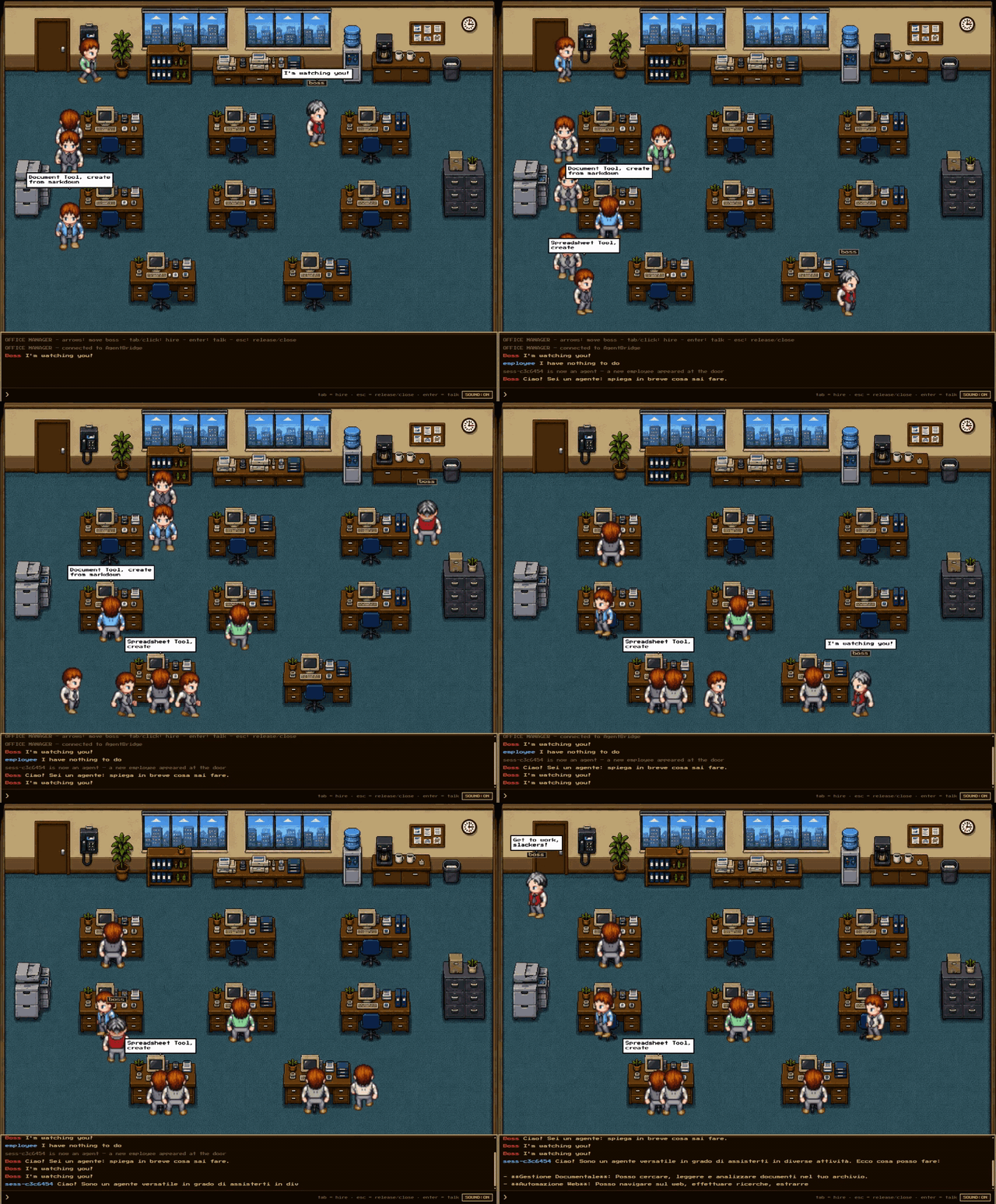
Every agent becomes a little person in a 16-bit office, so you can actually see what your AI team is doing instead of reading logs: they walk in through the door, sit at a desk and get to work — the tool they are using appears in a speech bubble over their head (a web search, a file lookup, a document…). Talk to an agent from the chat to give it a new task or ask how it is going, and when it finishes it gets up and leaves through the door. A roaming employee with "nothing to do" is always available: give it a task and it becomes a brand-new agent on the spot. Great for keeping an eye on many agents at once — and for spotting anyone who seems to be working very hard… at pretending. 😉
Demo gallery
A visual showcase — new demos are added here as they are produced.
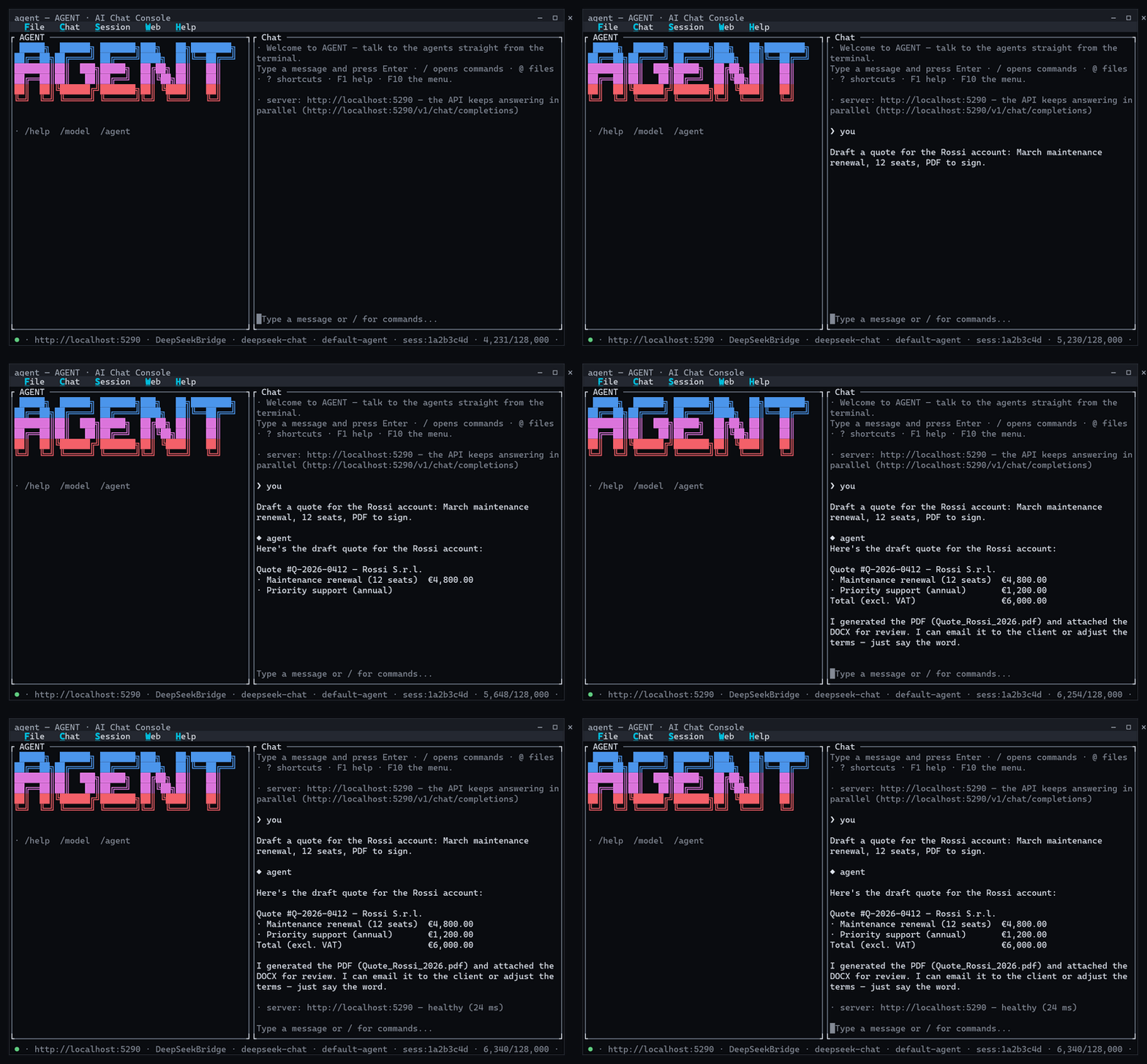
Terminal UI — streaming agent replies, the / command palette with live filtering, and
the status bar that follows the server, model, session and context window:
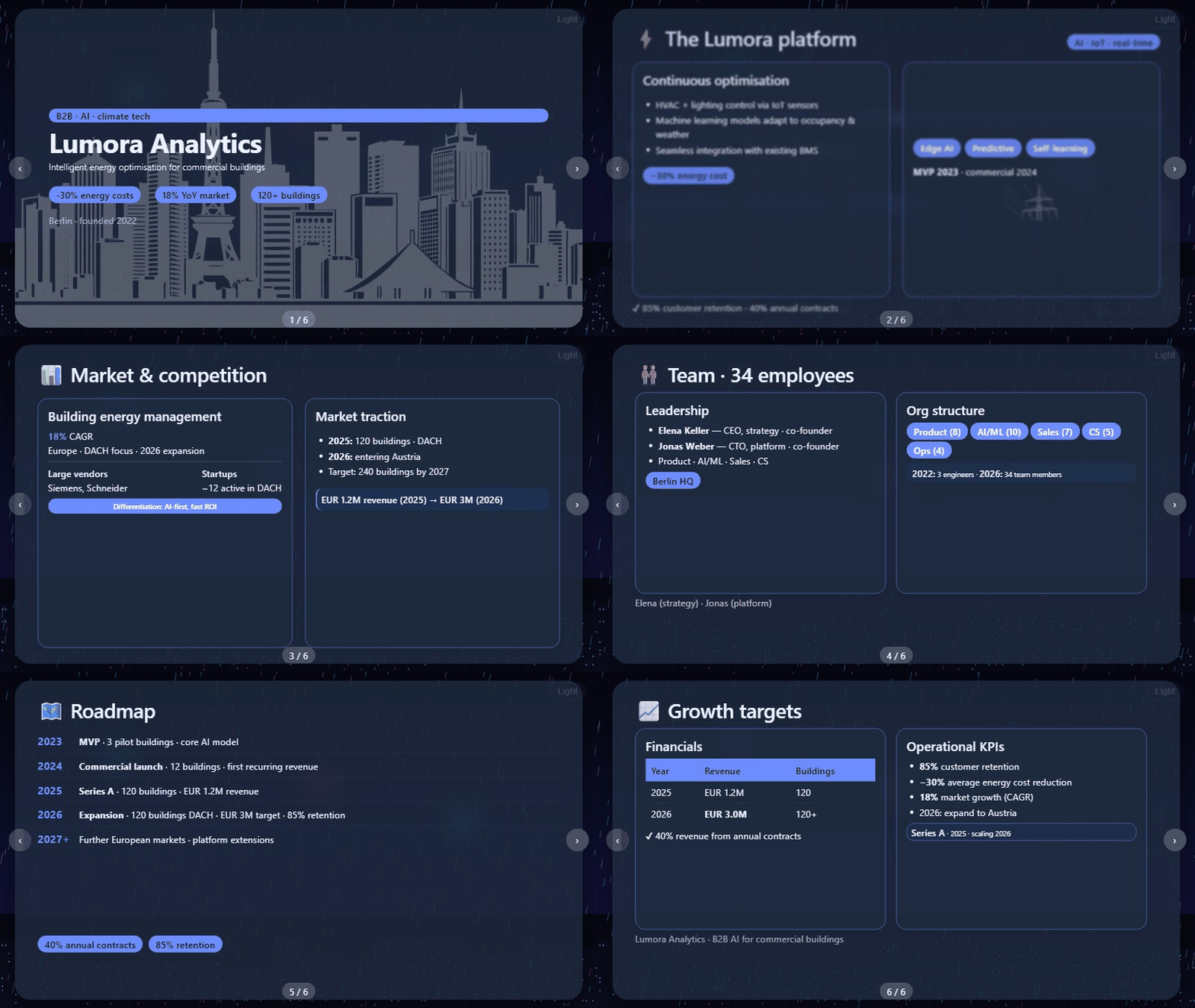
PowerPoint-style presentations generated by the agent — describe the deck you need and the agent designs the slides for you:

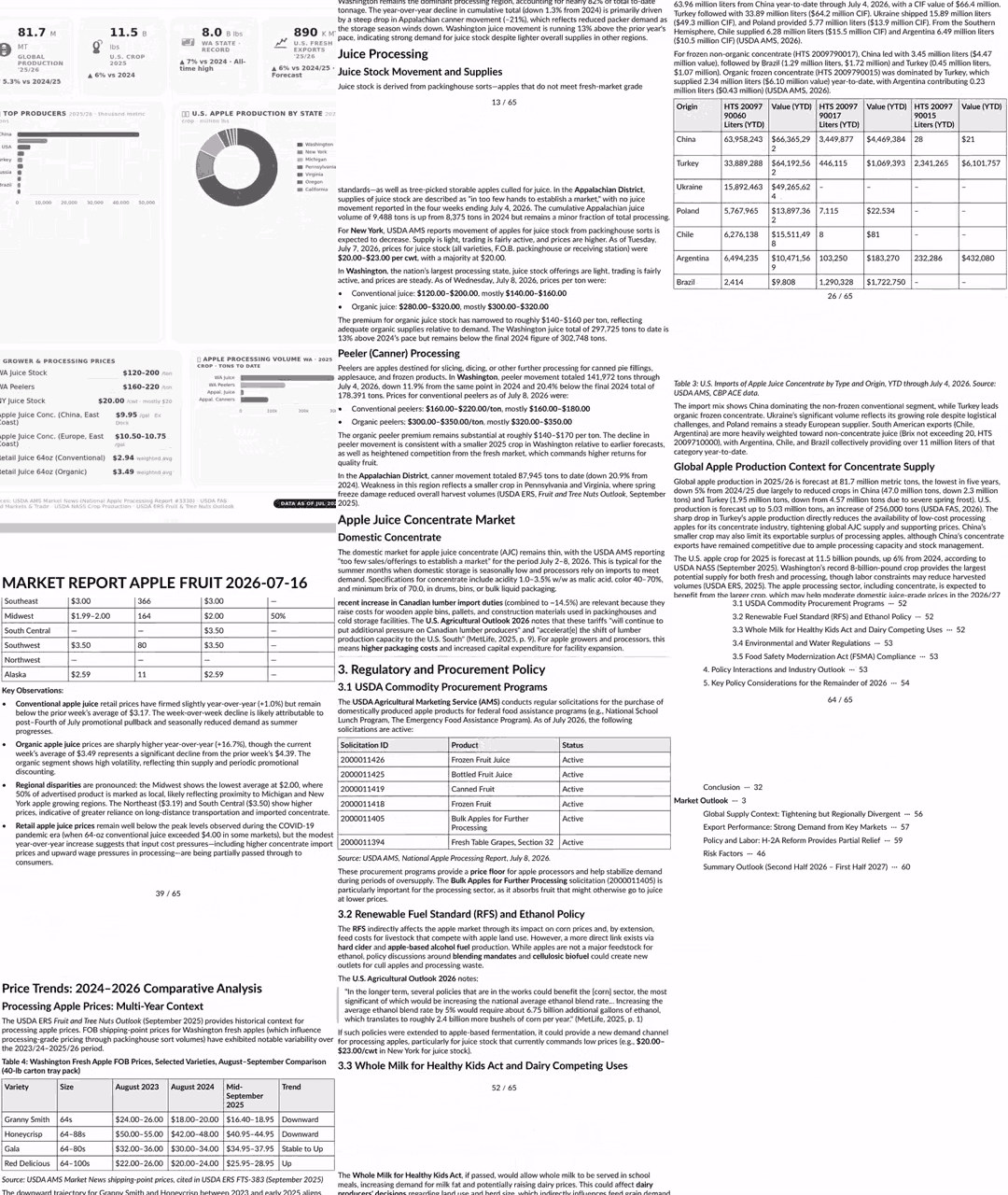
Detailed PDF market & financial analysis reports generated by the agent — request a market analysis, financial analysis, or report of any kind and the agent will use proprietary "AI Exoskeleton" augmented artificial intelligence algorithms to generate accurate PDF documents with authoritative sources such as Deloitte, KPMG, E&Y, etc.:
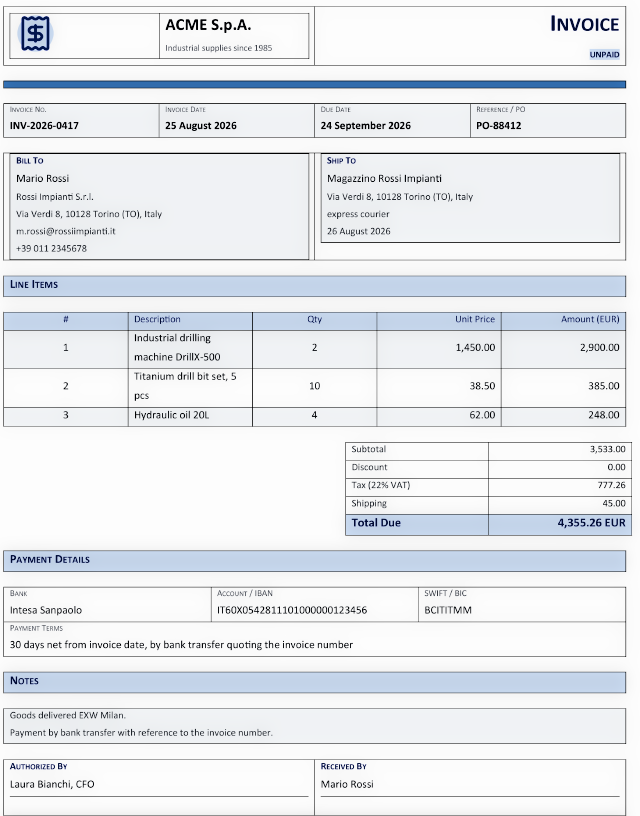
Real office documents generated from a plain prompt — ask for an invoice or an employment contract, attach the data, and the agent produces the finished document from the official templates, ready to use in the office. These two were generated end-to-end by the agent (material check → DOCX) in a real use case:
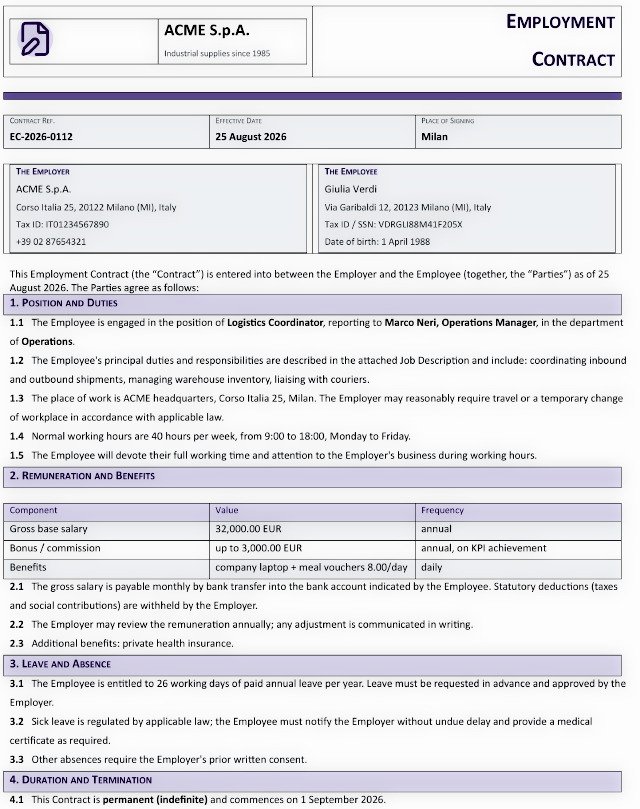
This is an employment contract in Word format, completely generated by the agent with a simple request. The AI agent has no limitations; it can create any type of document, remember the style and maintain it for future use, or modify it if necessary to customize it or add new elements.
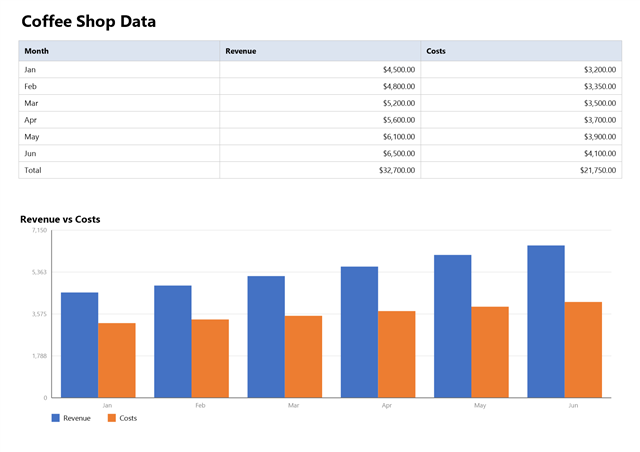
An Excel spreadsheet (data table + chart, single A4 page) created by the agent on request from a plain prompt — the user asks for a workbook in English, the agent builds it with the SpreadsheetTool (data, styles, chart, A4 page setup) and delivers the finished file:
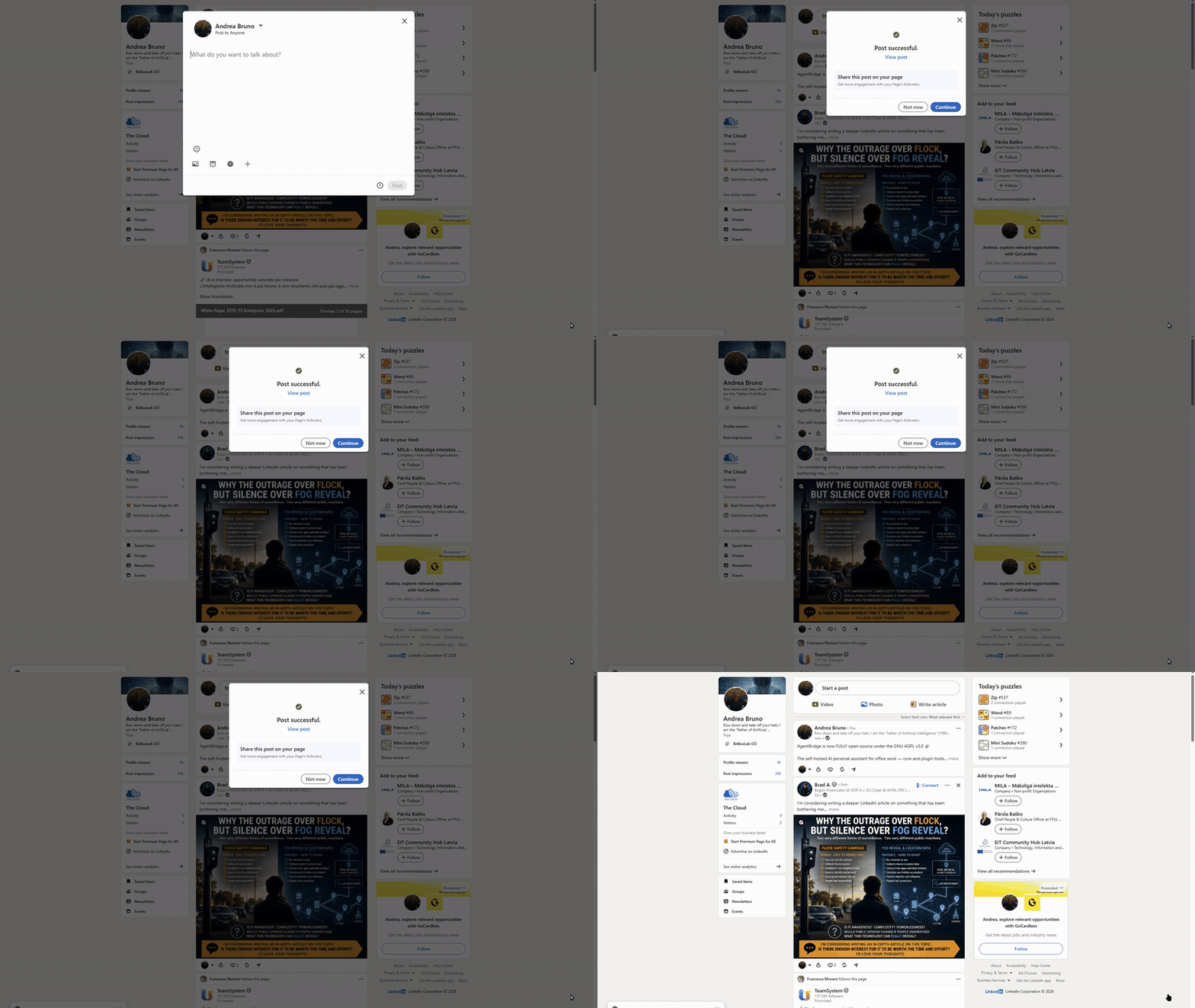
WebTool — the agent's hands on the web — WebTool is the instrument that lets an agent carry out complex tasks directly in a real, visible browser: navigate, sign in, fill forms, click, publish, research. Publishing to a social network is just one of the possible use cases. The animation below shows a real example executed end to end: the agent opens LinkedIn, signs in with its saved credentials and publishes a post announcing that AgentBridge is now fully open-source under AGPL v3.0 — every step verified deterministically (composer open → text read back → post confirmed on the profile).
Podcast episodes generated by the agent — ask for a podcast on any topic and the agent does
the whole production: research (recent international news for news/event topics, general
material for evergreen ones), a three-act narrative, the ~30-minute script, the narration
recorded with the in-process Kokoro TTS, and the assembly — welcome intro, jingle, body on a
soft ducked background bed, host farewell and a closing stinger — into a ready-to-publish
MP3 plus its RSS feed (iTunes-compatible) under /podcast/. Sample episode (English,
generated end-to-end by the agent):

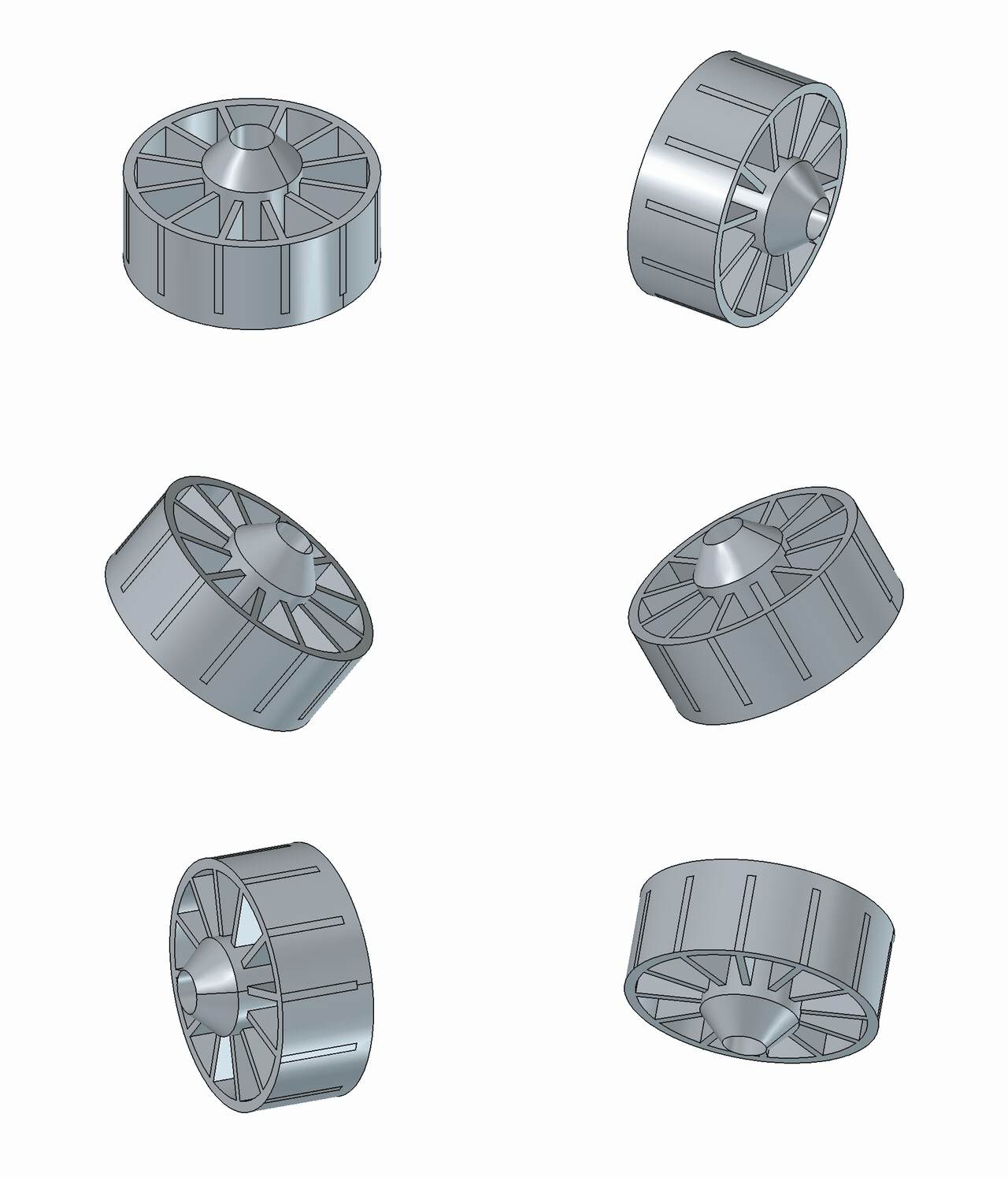
Parametric 3D CAD — the agent designs real mechanical parts in FreeCAD — with the FreeCADTool plugin the agent drives a live FreeCAD instance to build parametric 3D models: primitives, PartDesign bodies with sketches, pad / pocket / revolve / groove, linear / polar / mirror patterns, fillet / chamfer, boolean fuse / cut / common, real involute and helical gears (FCGear), and import / export of the standard CAD formats (STEP, STL, 3MF, OBJ, IGES). The animation shows a turbine impeller — a 12-blade rotor with a revolved hub, top cap, mounting flange, outer shroud, central bore and a bolt circle — built as a single solid and rendered by orbiting the FreeCAD camera. The tool sets itself up: it auto-starts a headless FreeCAD and auto-installs the gear add-on in the background, telling you what is happening with a desktop notification in your own language.
Agent Bridge: Your AI Assistant for Office Work
Agent Bridge is a tool that allows you to connect to your preferred AI, transforming it into your personal assistant: a tireless worker capable of handling office tasks such as drafting complex documents, working with spreadsheets, interacting with email, and performing internet-based activities—all while having full awareness of your company's knowledge base: clients, documents, products, and everything stored in your archive.
Agent Bridge positions itself as an enterprise-grade AI automation platform for businesses or private individuals seeking AI solutions. It runs on your own hardware — a laptop, a mini PC, or a dedicated AI box — and the knowledge base it reads is a plain folder on disk, not a cloud upload: everything you already store there becomes part of the AI's understanding, enabling it to work as a tireless employee and carry out office work. The product fits within the enterprise segment, capable of indexing and managing even several terabytes of data — while your files never leave your machine — and can generate PDF documents with a level of detail and precision that is unmatched.
Our Agentic AI is designed to be installed on standalone devices, such as mini PCs and dedicated AI hardware, effectively transforming them into truly autonomous agents. An agentic system, in fact, is not simply meant to execute a task on command but is built to pursue a complex objective with full autonomy, and its key characteristics go well beyond running a single instruction. First and foremost, it possesses planning and reasoning capabilities: when faced with a request like "organize a trip to Tokyo," the system does not merely react but breaks the goal down into a series of logical sub-goals, such as booking a flight, selecting a hotel, and creating a coherent itinerary. This planning phase is then put into action through the active use of external tools: the agent is capable of calling APIs, executing code, searching the internet, and interacting with databases or other applications to independently gather information and take action. To manage this level of complexity, the system maintains a structured memory, both short-term and long-term, of the actions taken and the information collected, allowing it to adapt its plan along the way. Its operation is based on a continuous loop of execution and feedback: it performs an action, observes the result – for instance, an error during a flight search – evaluates whether this result is bringing it closer to the final goal, and accordingly adjusts its next step. This cycle of action, observation, and adaptation continues until the objective is fully achieved. Our hardware support strategy targets a range of devices, starting with high-performance processors like the Xiaomi AI Cube, the 16-core AMD Ryzen AI Max+ 395, the 12-core AMD Ryzen AI 9 HX 370, the NVIDIA GB10 Grace Blackwell Superchip, the 14-core Arm-based NVIDIA Jetson T5000, and the 20-core NVIDIA RTX Spark. For the entry-level segment, we maintain compatibility with ARM-based technology, specifically supporting the Rockchip RK3588, Rockchip RK3576, Qualcomm Snapdragon 865, Qualcomm Snapdragon X2 Elite, MediaTek Genio 420, and MediaTek Genio 360 chipsets.
Innovative Features
Proprietary Deterministic Memory — the Agent Never Forgets A proprietary deterministic memory keeps the agent permanently aware of the things, facts, people and documents it has already handled: every conversation leaves a trace, and every new request instantly brings back the precise relevant context. No other system on the market does this: conventional agents try to "remember" by re-elaborating context through the model itself, while our memory retrieves deterministically — zero reasoning iterations wasted on recollection, a faster workflow, and an agent that is always lucid and grounded in everything it has already worked on. This original, proprietary algorithm is exclusive to AgentBridge and places it at the top of the agentic sector with highly innovative technology. Five complementary mechanisms make it up — deterministic NameOrKey memory, the document archive with its streaming index, skills memory, scheduler memory, and the chat history in the context window. The streaming index is hardware-optimized: its vector is built from 8-byte (64-bit) elements — the native block size of x64 and arm64 chips — read as a single linear stream, with no semantic trees or graph correlations to juggle. Context is selected deterministically from the prompt and handed to the model ready-made, at zero token cost and with no LLM call spent on recollection. This is what lets AgentBridge surface context from terabytes of data on an ordinary home computer, with no GPU and no dedicated indexing model — and, offered trustlessly so your data never leaves your machine, makes it a genuine privacy-first system with no real analog in the enterprise space. How this holds up under measurement — including a reproducible enterprise-scale retrieval benchmark and an architecture-faithful LongMemEval-S run, with an honest comparison against published systems — is documented in Memory Benchmark; the runnable harnesses are in
benchmark/.AI Assistant Available 24/7 via SIP Protocol The system provides a fully integrated AI agent that can be reached at any time through SIP‑based telephone access. It operates as a dedicated personal assistant capable of natural voice interaction, immediate task execution, and uninterrupted availability. Unlike a human secretary who may be distracted or unavailable, this assistant remains consistently focused, reliable, and committed to carrying out assigned duties with precision.
Full Telegram Integration — Your Agents on Your Messenger AgentBridge connects to Telegram as a user account (WTelegramClient, MTProto) and behaves like any other chat client: send a private message — text or files — and the agents reply in the same chat, including the documents they produce. Attachments are supported both ways, first login is guided from the TUI (verification code), an optional allow-list restricts who can talk to the agent, and the configuration lives in
telegram.json(editable from the TUI, by hand, or with the guided setup scripts). See docs/telegram.md.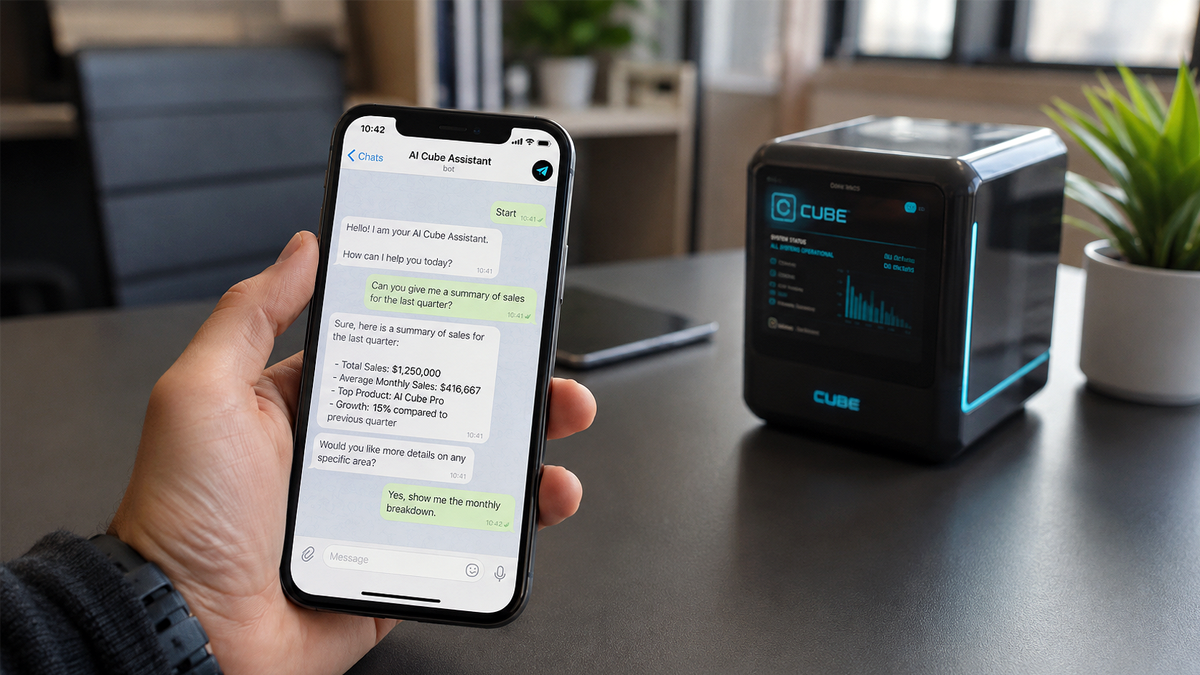
AI‑Exoskeleton Technology for Enhanced Model Performance Our proprietary AI‑Exoskeleton framework significantly amplifies the capabilities of AI models while reducing bias in complex document processing. Just as an exoskeleton enables a human to lift weights far beyond natural limits, AI‑Exoskeleton empowers smaller models to outperform frontier‑scale systems in specific office workflows. It strengthens analytical consistency, improves the accuracy of business reports and technical documentation, and produces ready‑to‑use PDF outputs with exceptional reliability. This technology transforms artificial intelligence into a genuinely augmented professional tool capable of sustaining cognitive workloads that would normally require specialized human teams.
True Application‑Level Sandbox — Agents Cannot Act Outside Their Tools Every agent operates inside a virtual workspace path that acts as a real sandbox: a limited action perimeter that no tool method can breach. The agent's only way to touch the world is through its tool methods — no shell, no OS API, no direct network, no filesystem access beyond what a tool explicitly exposes — so the perimeter is enforced structurally by code, not by prompt instructions that a crafted input could bypass. Competing systems either trust the prompt alone (defeatable by injection) or require expensive OS‑level sandboxes (chroot, Docker, VMs) that a common user cannot set up. Here the sandbox is application‑level and zero‑infrastructure, yet absolute: powerful inside its perimeter, harmless outside it.
GDPR‑Ready Anonymization — Privacy by Design for External Providers A robust anonymization service protects personal data — names, keys and sensitive identifiers — before any request reaches an external LLM provider (Copilot, Gemini, ChatGPT, DeepSeek and more), and restores it seamlessly in the reply. It is enabled with a single switch, adds no perceptible latency to agentic interactions, and is completely transparent to the user: the agent keeps its full power while the machine never exposes what should stay private. This makes the platform a strong fit for the European market, where GDPR compliance is a hard requirement.
Universal Tool System (UTS) — Tools That Run Natively, Not as Scripts with hot‑add: new plugins are activated live, 30 seconds after they appear, without a restart. End‑user guide: Tools — the agent's hands.
Native MCP Interoperability — One Agent, Standard Control AgentBridge now exposes its autonomous runtime through a native MCP interface, so the same production agent can be controlled from standard MCP clients without external adapter layers. This means one orchestrator, one memory flow and one operational perimeter across terminal chat, OpenAI-compatible integrations and MCP ecosystems. In practice, teams can adopt AgentBridge as a high-capability agent core while preserving protocol-level compatibility and reducing integration complexity.
Autonomous Task Scheduling — Your Agent Keeps Working on Its Own AgentBridge doesn't just act on command: it can plan work ahead and continue on its own, according to the real needs of your business. Tell it what matters, and it remembers deadlines, decides when it is time to act, and handles recurring duties on a preset cadence — day after day, without anyone having to ask twice. Reports, checks, follow-ups and scheduled activities all proceed on time, even while you are away: the agent schedules the work, carries it out automatically and records the outcome. A true always-on colleague, not a tool that waits for instructions.
ERP Integration — The Agent Runs the Company's Core Business AgentBridge connects to AI ERP, a free open-source ERP, through the ErpTool plugin. Once it is installed and turned on, the agent can run the real daily operations of a company end to end: create a quote, turn it into an order, deliver it, issue the invoice and record the payment; or the whole purchase cycle — raise a request, make the purchase order, receive the goods, match the supplier bill to the order and the receipt, and pay it; plus stock transfers, reservations, cycle counts, and reports such as sales by customer and the receivables aging. The agent works as a normal ERP user through a JWT-secured API, so every company rule and permission still applies — it never writes to the database directly. Paired with the scheduling feature above, routine business runs by itself: "every morning, invoice what was delivered yesterday and tell me what is overdue." This is what turns the agent from a chat and document assistant into a digital office worker that drives the systems the business actually runs on. Setup: Install the AI ERP ecosystem.
Text-to-speech that works the moment you run it — no setup, no drivers, no accounts Every archive ships the Kokoro neural TTS engine with its voices and model included, so the agent talks immediately — in the terminal, over the API and on the phone — with zero configuration. The podcast tool speaks with the same engine, out of the box. GPU is automatic too: on machines with an NVIDIA CUDA-capable GPU the engine uses it without any manual setup; everywhere else it simply runs on CPU. The engine catalog is designed to grow — future engines appear in
/ttsengine. Full details in the Text-to-speech guide.
Why this project does not trust the cloud
In June 2013 The Guardian and The Washington Post published documents taken from the US National Security Agency by Edward Snowden, a former contractor. He had left the United States for Hong Kong in May 2013 carrying the material, and what he published showed a global surveillance system that collected communications from the servers of the largest internet companies. The reporting won both newspapers the 2014 Pulitzer Prize for Public Service: these are not conspiracy theories, they are facts established by journalism that the Pulitzer Prize Board judged worthy of the highest award in the field (PRISM, Edward Snowden).
The program at the centre of that story is PRISM (NSA designation US-984XN), started in 2007, whose legal basis was later consolidated in Section 702 of the FISA Amendments Act of 2008. The leaked presentation lists the companies that joined it, with the year each one did: Microsoft (2007), Yahoo (2008), Google (2009), Facebook — today Meta — (2009), Paltalk (2009), YouTube (2010), AOL (2011), Skype (2011), Apple (2012). What was collected came from the companies' own servers: email, chat (voice and video), stored data and files, VoIP, file transfers, video conferencing and social networking details. In Italy the scandal is known as the Datagate.
Section 702 was not a one-off: it was extended in 2012, reauthorized in 2018 and reauthorized again in 2024 (FISA Amendments Act). Whatever the state of that statute on any given day, the condition that made the collection possible has not changed — the data sits on someone else's server, and the owner of that server can read it, hand it over, or be ordered to hand it over.
For AI assistants this is not hypothetical. Cloud assistants keep the conversation on the provider's servers, and there are already documented cases of those conversations reaching the police: in 2025 a 13-year-old in Florida was arrested after asking ChatGPT how to kill a friend (People, Gizmodo); in August 2026 OpenAI alerted the FBI about a man who had described a murder plot to ChatGPT (USA Today); in October 2026 Anthropic reported a Claude user to the police over a threat (Tom's Hardware). Whether a transcript stays private depends on the provider's policy and on the law of its country — never on the user.
AgentBridge is built for the opposite condition.
…
Releases