
Server · #54 trending MCP repo · ↗ +133 stars this week
Google Maps Scraper
gosom/google-maps-scraper
Open-source Google Maps scraper for business listings. Export phone numbers, websites, ratings, and reviews to CSV or JSONL. Run it locally with the CLI, web UI, or REST API, or connect your AI agent through the built-in MCP server.
- Stars
- 8.5k
- This week
- +133
- Forks
- 1.4k
- Open issues
- 72
- Skills inside
- 1
Get started
Add it to your agent
claude mcp add --transport stdio --scope user google-maps-scraper -- "$gmaps_bin" -mcpA hosted server: nothing to install. Run /mcp in Claude Code to sign in if it asks.
codex mcp add google-maps-scraper -- "$gmaps_bin" -mcpAdd to ~/.codex/config.toml.
{
  "mcpServers": {
    "google-maps-scraper": {
      "url": "https://learn.chatgpt.com/docs/extend/mcp"
    }
  }
}Add to ~/.cursor/mcp.json.
{
  "servers": {
    "google-maps-scraper": {
      "type": "http",
      "url": "https://learn.chatgpt.com/docs/extend/mcp"
    }
  }
}Add to .vscode/mcp.json.
gemini mcp add --transport http google-maps-scraper https://learn.chatgpt.com/docs/extend/mcpSaved to .gemini/settings.json.
Documentation
README
Google Maps Scraper



Quick start · MCP server · Agent skill · Modes & data · Documentation · Sponsors · Community
Turn Google Maps searches into business data you can use.
Get names, phone numbers, websites, ratings, hours, and locations in CSV or JSON. Add website email extraction and reviews when you need more detail.
Run locally with the CLI, Web UI, REST API, or directly from an AI agent. Free and open source under the MIT license. No Google Maps API key required.
Agent-ready with a local MCP server and an agent skill. Ask Codex or Claude Code to find businesses by city, show a few listed contacts in chat, and save the full list as a CSV. The client starts the scraper itself, so you can leave the Web UI closed. Set up MCP · Get the skill
Featured Sponsor
The most affordable premium proxies across 195 countries & 80+ million IPs, plus a FREE plan for new users.
Use code MAPSSCRAPER20 for 20% off your first purchase.
Quick Start
Use an AI Agent
In Codex or Claude Code, connect Google Maps Scraper once with the setup prompt. Then paste this into chat.
Find up to 10 cafés within 2 km of central Athens, Greece. Show me three with their addresses and ratings, and give me the full CSV.
The agent shows up to three cafés in chat and links a local CSV with every result from the search. You can use MCP on its own. The optional agent skill also supports CLI and Docker. More prompts to copy · Install the skill
Command Line
With Docker installed, paste these commands into a terminal on macOS, Linux, or Windows with WSL. Change cafes in Athens, Greece to your own search.
mkdir -p gmaps-output
printf '%s\n' 'cafes in Athens, Greece' > gmaps-queries.txt

docker run --rm \
  -v gmaps-playwright-cache:/opt \
  -v "$PWD/gmaps-queries.txt:/queries.txt:ro" \
  -v "$PWD/gmaps-output:/out" \
  gosom/google-maps-scraper \
  -input /queries.txt \
  -results /out/results.csv \
  -depth 1 \
  -exit-on-inactivity 3m
Open gmaps-output/results.csv in your spreadsheet app. The first run downloads the image and browser files. The command exits after three minutes without activity.
Add -email to collect emails from business websites. For JSON Lines output (one business per line), replace -results /out/results.csv with -json -results /out/results.jsonl. The file will be saved as gmaps-output/results.jsonl.
Email extraction checks the listed website page first. If it finds no usable email, it follows up to three same-site contact/about links from that page, prioritizing contact pages and stopping at the first page with usable emails. Each email page has a 10-second fetch timeout and a 2 MiB response limit. Failed pages do not discard the business result.
Email pages use HTTP fetching without executing website scripts or loading subresources. Requests are restricted to public IP addresses, and contact-page redirects must stay on the same site. Configured HTTP/HTTPS and SOCKS5 proxies are supported; HTTP/HTTPS proxies must allow CONNECT tunnels to website ports (usually 80 and 443). Sites that require JavaScript to expose their email may return no email.
No Docker? Download a release binary and follow the binary instructions. No Go installation is needed.
Web UI
With Docker installed:
mkdir -p gmapsdata

docker run --rm \
  -v gmaps-playwright-cache:/opt \
  -v "$PWD/gmapsdata:/gmapsdata" \
  -p 8080:8080 \
  gosom/google-maps-scraper \
  -data-folder /gmapsdata
Open http://localhost:8080, create a job, and download its results. Your jobs are saved in gmapsdata.
Use with an MCP Client
The server runs locally over stdio. City names resolve locally and the default search covers a grid around the city center. Results stay on your machine as CSV and JSONL. The agent can show three rows, share the whole file, or reconnect to a running job.
Install with one prompt
Paste this into Codex or Claude Code. If you are trying an unreleased branch, open the client in that checkout first. For manual setup, use the Codex CLI or Claude Code commands below.
Set up Google Maps Scraper for this client. Use the current checkout if available,
or clone https://github.com/gosom/google-maps-scraper.
Follow the manual setup steps in the README and install the skill from the same checkout.
Verify the connection. If I need a new session, tell me how to open it.
Give me the Athens café prompt to paste when setup is complete.
1. Get an MCP-enabled binary
On macOS, Linux, or WSL, build from a checkout that contains this MCP section. Run these commands from the repository root with Go installed.
gmaps_bin="$HOME/.local/bin/google-maps-scraper-mcp"
mkdir -p "$(dirname "$gmaps_bin")"
go build -o "$gmaps_bin" .
"$gmaps_bin" -mcp -help
If you already have a release binary, set gmaps_bin to its absolute path and run the same help check. A compatible binary prints Usage of -mcp: and lists -data-folder. If your release predates MCP, build from the checkout.
For detailed mode, install the browser runtime once. Fast mode and website email lookup work without this step.
PLAYWRIGHT_INSTALL_ONLY=1 "$gmaps_bin"
2. Register the server
Run the block for your client in the same terminal. Both clients launch the binary over stdio.
Codex CLI
codex mcp add google-maps-scraper -- "$gmaps_bin" -mcp
codex mcp list
codex
Claude Code
claude mcp add --transport stdio --scope user google-maps-scraper -- "$gmaps_bin" -mcp
claude mcp list
claude
Claude Code's user scope makes the server available across your local projects. Codex MCP documentation · Claude Code MCP documentation
3. Verify with a search
In the new session, enter /mcp and look for google-maps-scraper. Then paste this into chat.
Find up to 10 cafés within 2 km of central Athens, Greece. Show me three with their addresses and ratings, and give me the full CSV.
Look for a start_scrape call. The agent should report how many cafés it found and link the finished CSV. A search can return fewer than 10. If the job stops early, the agent should tell you and label any saved results as partial.
More prompts to copy
See more of the same results
Show me the next three cafés from that Athens search, with their addresses and ratings.
Get the file in a new chat
Find my most recent café search in Athens, Greece, and give me its CSV when it’s finished.
Start a search with website emails
Find up to 10 cafés in Athens, Greece. Check their websites for public email addresses and give me the CSV.
Start a search in the background
Start a background search for up to 30 cafés in Athens, Greece. Give me the job ID so I can check back later.
Stop the running search
Stop my running Athens café search and give me the results collected so far.
The default search uses fast mode, including for email lookups. Ask for review text to open individual listings in detailed mode.
Other stdio clients
For clients that accept an mcpServers JSON object, use the absolute path to the same binary.
{
  "mcpServers": {
    "google-maps-scraper": {
      "command": "/path/to/google-maps-scraper",
      "args": ["-mcp"]
    }
  }
}
Coverage and results
The city grid covers an approximate area and spreads the result limit across its cells. Ask for a nearby search or specify a radius for a centered search. Provide bounds to grid a specific area. The bundled city index uses GeoNames data under CC BY 4.0 and includes supplemental Cyprus locality names. GeoNames · License · Cyprus locality names · Latsia coordinates
MCP tool arguments for client developers
| What the user wants | How the MCP client can get it |
|---|---|
| A few businesses in chat | Call start_scrape with response: "preview". It waits up to 20 seconds and returns up to three rows, the job status, and available export paths. Use fields to select columns. |
| Only the file | Use response: "export". Counts and paths fit in one response when the job finishes within 20 seconds. |
| Results as they arrive | Use response: "live" for the first rows. Pass next_offset as offset to get_scrape_results with wait_for: "rows" for the next page. |
| A background job | Omit response to get the job ID immediately. You can close the client, reconnect, and find the job with list_scrapes. |
When the user asks for the finished file, pass the same job_id to get_scrape_results while the status is queued or running. Each call waits up to 20 seconds by default. Report result_count and link csv_path when the job completes. For a failed, interrupted, or cancelled job, label any available file as partial. Use view: "export" for paths only, view: "full" for full records within the page size limit, or wait_for: "none" for an immediate snapshot.
To change where jobs and exports are saved, add "-data-folder", "/path/to/jobs" to the client's arguments.
Choose a Mode
The table describes CLI modes. The MCP server selects fast mode by default and can add a separate website email lookup to a fast search.
| What you need | Use | How it works |
|---|---|---|
| Business details, with optional reviews and emails | Default mode | Opens individual Google Maps listings. Add -email to visit business websites or -extra-reviews for more reviews. |
| Business lists without opening a browser | Fast mode | Fetches search results over HTTP. Requires -geo; -depth controls result batches. |
Both modes extract names, categories, addresses, phone numbers, websites, hours, ratings, review totals, coordinates, place IDs, listing links, and CIDs when available.
Fast mode includes descriptions, amenities, and booking or ordering links when available. It includes ratings and review totals, but not individual reviews, star-by-star breakdowns, owner details, or emails. See Fast Mode for an example.
Available fields and results depend on what Google returns. A search is not a complete directory of every business in an area.
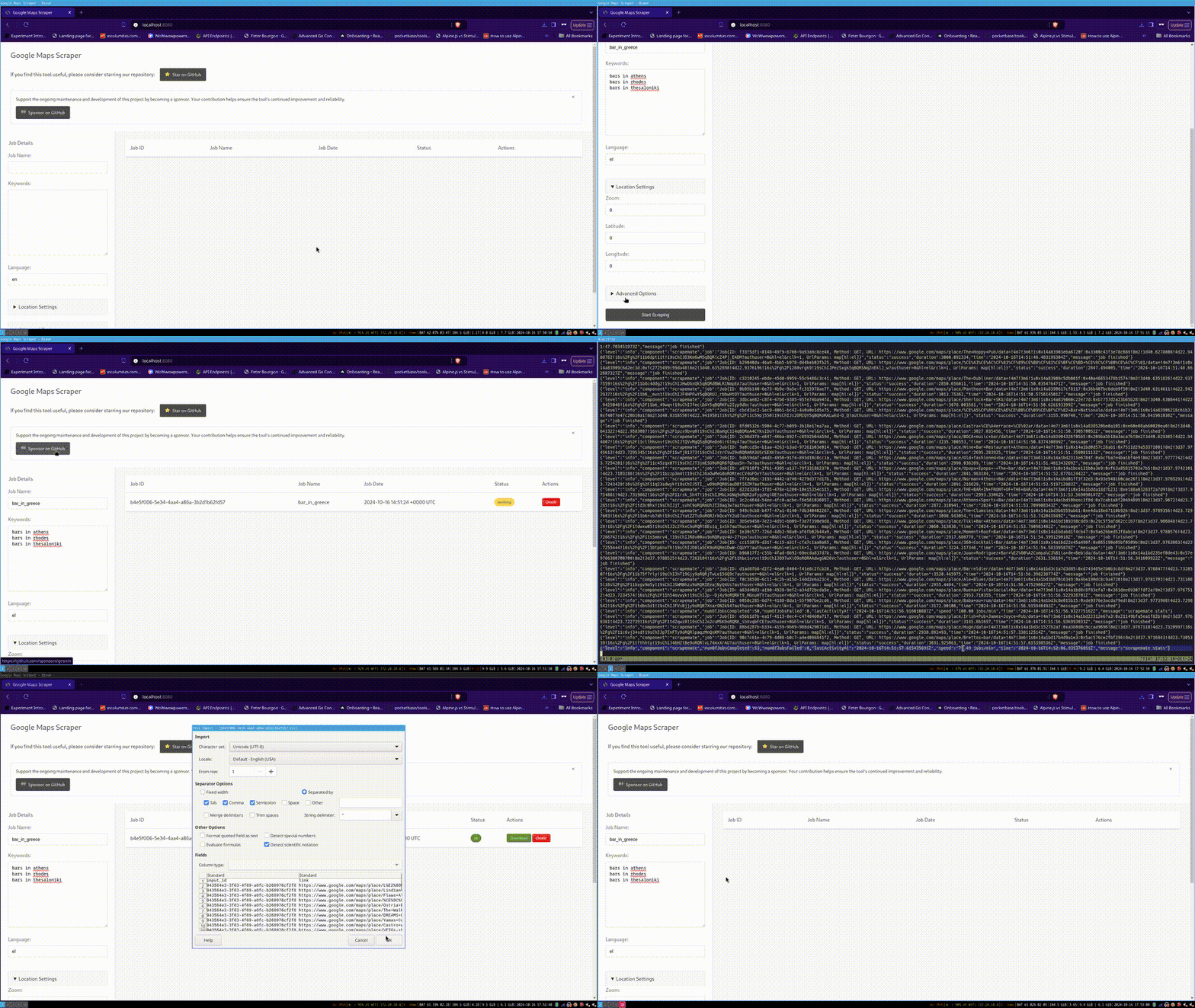
See the scraper in action
Sponsored By
These sponsors help support development and maintenance of Google Maps Scraper.
 Coreclaw |
 Evomi |
 G Maps Extractor |
 HasData |
 NodeMaven |
 RapidProxy |
 Scrap.io |
 SearchApi |
 SerpApi |
 TalorData |
Become a sponsor |
View all sponsors and offers · Become a sponsor
Documentation
Open a topic below, or use the recipes for common workflows.
Installation: native binary, Docker, or source
Download a Binary
- Open the latest release and expand Assets.
- Download the file for your computer from the table below. Choose the executable, not “Source code”.
- Put it in a folder for your scraping work. Rename it to
google-maps-scraperon macOS/Linux orgoogle-maps-scraper.exeon Windows.
| Your computer | Filename ends with |
|---|---|
| macOS — Apple Silicon (M1 or newer) | darwin-arm64 |
| macOS — Intel | darwin-amd64 |
| Linux — Intel/AMD 64-bit | linux-amd64 |
| Linux — ARM64 | linux-arm64 |
| Windows — Intel/AMD 64-bit | windows-amd64.exe |
Open a terminal in that folder. The commands below install the browser runtime and run a small search.
macOS / Linux:
chmod +x google-maps-scraper
PLAYWRIGHT_INSTALL_ONLY=1 ./google-maps-scraper
printf '%s\n' 'cafes in Athens, Greece' > queries.txt
./google-maps-scraper -input queries.txt -results results.csv -depth 1 -exit-on-inactivity 3m
Windows PowerShell:
$env:PLAYWRIGHT_INSTALL_ONLY = "1"
.\google-maps-scraper.exe
Remove-Item Env:PLAYWRIGHT_INSTALL_ONLY
'cafes in Athens, Greece' | Set-Content -Encoding ascii queries.txt
.\google-maps-scraper.exe -input queries.txt -results results.csv -depth 1 -exit-on-inactivity 3m
Open results.csv in your spreadsheet app. To use the Web UI instead, run the executable without arguments and open http://localhost:8080.
Linux may need additional browser system libraries. The AI agent helpers require WSL on Windows; the commands above run the standalone Windows binary.
Automatic Binary Installation (macOS/Linux)
Prefer to let the installer choose the right binary and verify its checksum?
Run these commands in a terminal. You need Bash and curl, plus sha256sum or shasum.
setup_dir=$(mktemp -d)
curl -fsSL https://raw.githubusercontent.com/gosom/google-maps-scraper/main/install.sh -o "$setup_dir/install.sh"
bash "$setup_dir/install.sh"
The installer downloads a compatible release, checks its SHA-256 checksum, and installs the browser runtime. It prints the executable path. Use that path in place of ./google-maps-scraper in the examples below.
To choose a version or install folder, add --version vX.Y.Z or --install-dir DIR to the last command. Releases without matching binaries and checksums are not supported. Linux may need additional browser system libraries. See the installation guide for details.
Using Docker
The published Docker image uses Playwright:
docker pull gosom/google-maps-scraper
Build from Source
Requirements: Go 1.27.4+
git clone https://github.com/gosom/google-maps-scraper.git
cd google-maps-scraper
go mod download

go build
./google-maps-scraper -input example-queries.txt -results results.csv -exit-on-inactivity 3m
First run downloads required browser libraries for Playwright.
REST API
When running the web server, a full REST API is available:
| Endpoint | Method | Description |
|---|---|---|
/api/v1/jobs |
POST | Create a new scraping job |
/api/v1/jobs |
GET | List all jobs |
/api/v1/jobs/{id} |
GET | Get job details |
/api/v1/jobs/{id} |
DELETE | Delete a job |
/api/v1/jobs/{id}/download |
GET | Download results as CSV |
Full OpenAPI 3.0.3 documentation available at http://localhost:8080/api/docs
Self-hosted multi-user platform
Need a multi-user platform with API keys, admin UI, job queue, workers, and cloud provisioning? Use the optional self-hosted SaaS edition:
curl -fsSL https://raw.githubusercontent.com/gosom/google-maps-scraper/main/PROVISION | sh
See SaaS documentation for deployment and operations details. There is also a 5-minute deployment walkthrough and a YouTube video walkthrough.
More examples are available in Recipes. If you need proxies for larger jobs, see Proxy Sponsors.
AI agent skill: setup and workflow
The AI Agent Skill turns a natural-language lead request into a guided local scraping workflow. It is designed for nontechnical users as well as developers and keeps you in control of the search scope, proxy choice, and output.
If you have not installed it yet:
npx skills add gosom/google-maps-scraper
Paste this into chat.
Find up to 10 cafés in Athens, Greece. Check their websites for public email addresses and give me the CSV.
With MCP connected, the agent runs the search directly. For a native CLI or Docker run, the skill walks through these steps.
- Check setup and the latest skill; check the image when using Docker.
- Infer sensible search defaults and ask only for missing essentials.
- Let you use your own proxy, continue without one, or review one randomly selected proxy sponsor.
- Collect proxy credentials through a masked local terminal prompt instead of chat.
- Run a small validation scrape before the full job.
- Start and monitor the native or Docker crawl in the background.
- Present the results with options to save, filter, analyze, or export.
Proxy sponsor recommendations are clearly disclosed. One provider is selected per request: Webshare has a 50% chance, and the other active sponsors share the remaining 50% equally. If Webshare is inactive, active sponsors have equal chances; a sole active sponsor is always selected. Any discount or offer is displayed only when it is configured in the skill's active sponsor registry. You can always use another provider or no proxy.
The agent helpers require Node.js 20+ and either a native binary or Docker on macOS/Linux, or Windows through WSL. The standalone native installer does not require Node.js. See the skill definition for details.
Output fields: 37 CSV columns and JSON differences
The table lists CSV column names. Fields may be empty when Google does not provide the data or the selected mode does not collect it.
With -json, output is JSON Lines: one business object per line, not a JSON array. JSON uses web_site instead of website and description instead of descriptions. It also includes categories and keeps the legacy longtitude key alongside longitude. Lists and objects remain structured JSON values; CSV stores them as text.
| # | CSV column | Description |
|---|---|---|
| 1 | input_id |
Internal identifier for the input query |
| 2 | link |
Direct URL to the Google Maps listing |
| 3 | title |
Business name |
| 4 | category |
Business type (e.g., Restaurant, Hotel) |
| 5 | address |
Street address |
| 6 | open_hours |
Operating hours |
| 7 | popular_times |
Visitor traffic patterns |
| 8 | website |
Official business website |
| 9 | phone |
Contact phone number |
| 10 | plus_code |
Location shortcode |
| 11 | review_count |
Total number of reviews |
| 12 | review_rating |
Average star rating |
| 13 | reviews_per_rating |
Breakdown by star rating |
| 14 | latitude |
GPS latitude |
| 15 | longitude |
GPS longitude |
| 16 | cid |
Google Maps CID identifier |
| 17 | status |
Business status (open/closed/temporary) |
| 18 | descriptions |
Business description |
| 19 | reviews_link |
Direct link to reviews |
| 20 | thumbnail |
Thumbnail image URL |
| 21 | timezone |
Business timezone |
| 22 | price_range |
Price level ($, $$, $$$) |
| 23 | data_id |
Internal Google Maps identifier |
| 24 | street_view_url |
Street View URL |
| 25 | place_id |
Google's unique place id |
| 26 | images |
Associated image URLs |
| 27 | reservations |
Reservation booking link |
| 28 | order_online |
Online ordering link |
| 29 | menu |
Menu link |
| 30 | owner |
Owner profile ID, name, and link, when available |
| 31 | complete_address |
Address parts: street, city, postal code, state, and country |
| 32 | credit_cards_accepted |
Accepted credit card networks |
| 33 | about |
Additional business info |
| 34 | user_reviews |
Customer reviews (text, rating, timestamp) |
| 35 | user_reviews_extended |
Additional anonymously available reviews (requires -extra-reviews) |
| 36 | emails |
Extracted email addresses (requires -email flag) |
| 37 | review_collection |
Collection status, method, collected/expected counts, and stopping reason (with -extra-reviews) |
With -extra-reviews, the scraper observes the anonymous browser's own review responses and uses visible review cards as a fallback. It does not sign in. Google may expose only a small sample; increasing scroll depth or retrying cannot guarantee the full reported review count.
review_collection.status is complete when the collected count reaches the reported total, limited when Google explicitly serves a limited view, and partial for other stopping conditions. The object includes method (browser, dom, or none), collected, expected, and a reason when incomplete. The JSON field is omitted unless extra reviews were requested; the CSV column is appended after emails.
Resuming an older CSV preserves its existing columns. Start a new output file to include review_collection if the older file does not have that column.
Input formats: search queries, Maps URLs, and custom IDs
Use one search query per line, such as cafes in Athens, Greece.
Custom Input IDs: Add your own ID after #!#:
Matsuhisa Athens #!#MyCustomID
Direct Google Maps URLs: Input lines can be regular search queries or direct Google Maps URLs. Supported URL formats include:
https://www.google.com/maps/search/pizza
https://www.google.com/maps/place/Empire+State+Building/@40.7484405,-73.9856632
https://maps.google.com/maps?z=16&q=Empire+State+Building
maps.app.goo.gl/abc123
URLs on google.com subdomains must include a scheme (http:// or https://) and a /maps path. Short maps.app.goo.gl links are also supported without a scheme.
Command Line Options
Usage: google-maps-scraper [options]

Core Options:
  -input string       Path to input file with queries (one per line)
  -results string     Output file path (default: stdout)
  -json              Output JSON Lines (one business per line) instead of CSV
  -resume            Resume a CLI file scrape by appending missing places
  -depth int         Max scrolls or fast-mode batches (default: 10)
  -c int             Concurrency level (default: half of CPU cores)

Email & Reviews:
  -email             Extract emails from business websites
  -extra-reviews     Collect anonymously available extra reviews and report status

Location Settings:
  -lang string       Language code, e.g., 'de' for German (default: "en")
  -geo string        Coordinates for search, e.g., '37.7749,-122.4194'
  -zoom int          Zoom level 0-21; fast mode requires 1-21 (default: 15)
  -radius float      Keep results within this distance in meters; fast mode only (default: 10000)
  -grid-bbox string  Bounding box for grid scraping, format: "minLat,minLon,maxLat,maxLon"
  -grid-cell float   Grid cell size in km (default: 1.0, used with -grid-bbox)
  -grid-strict       Keep only places whose coordinates are inside -grid-bbox

Web Server:
  -web               Run web server mode
  -addr string       Server address (default: ":8080")
  -data-folder       Data folder for web runner (default: "webdata")

Database:
  -dsn string        PostgreSQL connection string
  -produce           Produce seed jobs only (requires -dsn)

Proxy:
  -proxies string    Comma-separated proxy list
                     Format: protocol://user:pass@host:port
  -proxies-file      Path to a file containing one proxy URL per line

Advanced:
  -exit-on-inactivity duration    Exit after inactivity (e.g., '5m')
  -fast-mode                      Fetch search results without opening a browser
  -debug                          Show browser window
  -writer string                  Custom writer plugin (format: 'dir:pluginName')
  -browser-pool-size int          Number of browser processes to launch (default: 0, derived from -c and -pages-per-browser)
  -pages-per-browser int          Max concurrent pages per browser process (default: 1)

Notes:
  -grid-bbox requires a valid zoom level (1-21)
  -fast-mode cannot be used together with -grid-bbox
Run ./google-maps-scraper -h for the complete list.
Resuming Interrupted CLI Runs
Use -resume to continue a CLI file scrape after a crash or manual stop:
./google-maps-scraper \
  -resume \
  -input queries.txt \
  -results results.csv \
  -depth 10
Resume mode reads the existing CSV or JSONL results file, appends new results, and skips places that were already written. It also writes completed input queries to <results>.resume.json; future resume runs use that sidecar file to skip fully completed queries.
-resume is only supported with regular file output. It requires -results to be a file path and does not support stdout, -writer, or -fast-mode. Resume runs should use the same input and scrape options as the original run.
Using Proxies
For larger scraping jobs, proxies help avoid rate limiting. Here's how to configure them:
./google-maps-scraper \
  -input queries.txt \
  -results results.csv \
  -proxies 'socks5://user:pass@host:port,http://host2:port2' \
  -depth 1 -c 2
Supported protocols: socks5, socks5h, http, https
Current proxy sponsors are listed in Proxy Sponsors. Using those links helps fund project maintenance.
Email Extraction
Email extraction is disabled by default. When enabled, the scraper visits each business website to find email addresses.
./google-maps-scraper -input queries.txt -results results.csv -email
Note: Email extraction increases processing time significantly.
Fast Mode
Fast mode gets business data without opening a browser. After installing the native binary, run this example to search for cafés within 2 km of central Athens. Installation
printf '%s\n' 'cafes in Athens, Greece' > queries.txt

./google-maps-scraper \
  -input queries.txt \
  -results results.csv \
  -fast-mode \
  -depth 3 \
  -zoom 15 \
  -radius 2000 \
  -geo '37.98376,23.72784'
-geosets the search center as latitude,longitude. It is required.-radiuskeeps results within the given distance in meters. It applies only to fast mode.-depth 3requests up to three batches of about 20 results each. The default is 10 batches. Google may return fewer results.-zoommust be between 1 and 21. The default is 15.
Fast mode includes ratings and review totals, but not individual reviews, star-by-star breakdowns, owner details, or emails. It does not visit business websites.
When available, it also includes descriptions, amenities, booking and ordering links, and opening-status text. A status such as “Closed · Opens 9 AM” describes opening hours; it does not mean the business has closed permanently.
Repeated businesses are removed within each query. Pagination stops when a batch is short, empty, or contains no new businesses. Each batch is sorted by distance; the full output is not globally sorted by distance.
Grid Scraping (BBox)
Grid mode splits a bounding box into cells and runs one search per cell. This is useful when a single search does not return enough places.
queries.txt example:
cafes in Peristeri, Greece
Command example:
./google-maps-scraper \
  -input queries.txt \
  -results peristeri-cafes.csv \
  -grid-bbox "38.0077,23.6719,38.0257,23.6947" \
  -grid-cell 0.5 \
  -zoom 16 \
  -depth 1 \
  -c 4
Notes:
-grid-bboxguides where searches are launched from, but results are not strictly clipped to the box.- Add
-grid-strict
…
Releases