
Server · #419 trending MCP repo
Gnosis
DOMCHURCH/Gnosis
Terminal coding agent with browser UI, MCP, Obsidian memory, and live office floor. Any model via OpenRouter. MIT.
- Stars
- 31
- This week
- +0
- Forks
- 5
- Open issues
- 3
- Latest release
v1.4.0
Documentation
README
Gnosis
Your AI agents needed an office. So I built one.



npx @dominquechurch/gnosis
Gnosis is a terminal coding agent that runs on any model, switches models mid-session without losing your history, and ships with a browser UI where you watch your agents work as blocky figures moving around a 3D office floor.
Install
One command, in PowerShell:
irm https://raw.githubusercontent.com/DOMCHURCH/Gnosis/master/scripts/install.ps1 | iex
It fetches the latest release, verifies the download, runs the installer, and then tells you what else this machine needs for the optional parts.
Or take the installer directly: Gnosis-Setup.exe (Windows, ~120MB)
Or just the CLI, if you have Node.js:
npm install -g @dominquechurch/gnosis
Passing options to the install script
iex cannot forward parameters to a piped script, so use the scriptblock form:
$s = irm https://raw.githubusercontent.com/DOMCHURCH/Gnosis/master/scripts/install.ps1
& ([scriptblock]::Create($s)) -DownloadOnly   # fetch and verify, don't run it
& ([scriptblock]::Create($s)) -Cli            # install the npm CLI instead
Desktop App
The desktop app includes:
- Three.js 3D office floor showing agents working in real time
- Integrated terminal panel
- Voice mode — say "hey jarvis" to activate (no API key required for wake word,
GROQ_API_KEYfor transcription). "hey jarvis" is openWakeWord's closest available model; a custom "hey gnosis" model is future work. The agent speaks its reply back only for turns you started by voice — typing in the chat never triggers speech - Voice is built around the fact that the model round trip is the whole wait.
Transcription and speech are under a second each; everything else is one
request you are sitting through. So the route to the model is opened on the
wake word, while you are still talking, rather than inside your first
question — and a tool whose success speaks for itself ("open Spotify") is
confirmed the moment the tool returns instead of costing a second round trip
to be told what already happened. Per-turn timings are appended to
~/.dom/voice-timing.logif you want to see where yours go - Voice is only as fast as the model you point it at, and the difference is not subtle: the same turns measured 4-7s per model call on one model and 1.5-2.3s on another, almost independently of how much was generated. If voice feels slow, change the model before anything else
- Local text-to-speech via Kokoro, with Windows SAPI as the fallback. You no longer install this by hand: Settings → Voice → Install voice support fetches the packages and the model weights for you, with progress. The voice diagnostics table reports which engine is actually in use and names what is missing if it is not Kokoro
- Settings panel for API keys and configuration, including the working directory
the app opens into. It defaults to the Gnosis source tree (
~/dom); point it at whichever project you actually work on, or setGNOSIS_CWDto override it for a single launch - System tray with agent status
- Auto-updates when new versions are released
For CLI use:
npm install -g @dominquechurch/gnosis
First run — what you actually need
Run the installer and open Gnosis. It creates ~/.dom (its own state) and
~/Gnosis (where anything the agent writes without a path ends up) on first
launch, and seeds the MCP server registry. Nothing else is required to get a
working agent.
Required — one key. Gnosis is OpenRouter-only. Without a key it opens a "could not start" page with the Settings window already behind it: paste an OpenRouter key there and restart. Get one at openrouter.ai/keys.
Everything below is optional, and Gnosis tells you which piece is missing rather than failing quietly:
| Want | Needs | How |
|---|---|---|
| MCP servers (docs lookup, browser control, desktop control) | Node.js | Install the LTS build from nodejs.org, restart Gnosis. Every bundled MCP server launches through npx, which ships with Node. The app is not a Node app and needs it for nothing else. |
| Voice — wake word and speech | Python 3.9+ with pip | Install from python.org (tick Add python.exe to PATH), then Settings → Voice → Install voice support. That button does the rest: openWakeWord, Kokoro, and ~350MB of model weights. |
| Voice — transcription | GROQ_API_KEY |
Settings → Keys. The wake word and the speech are local and free; only turning your speech into text goes out to a service. |
The desktop app cannot install Node or Python for you and does not try — putting a system runtime on your machine behind a toggle is not its call. It names what is missing, where to get it, and what still works without it.
Say "hey jarvis" once voice is installed. Esc ends the conversation and leaves the wake word listening; the × turns voice off entirely.
See it
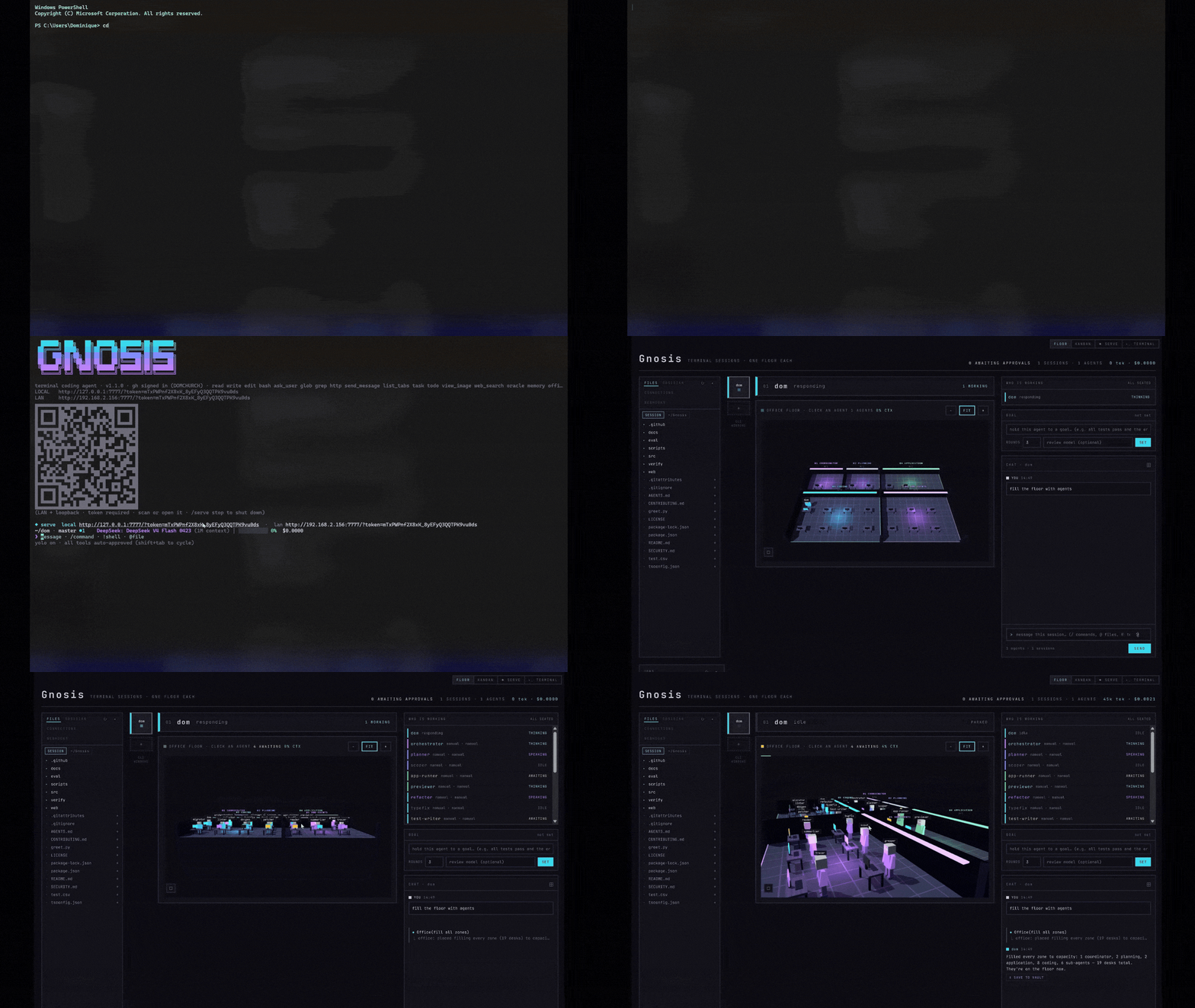
Five lit rooms — coordinator, planning, coding, application, sub-agents. Every agent, background job, and sub-agent is a figure at a desk, and the room lights up when work lands there. Orbit it, zoom it, click a desk to read the session. The floor above was staffed by typing "fill the office" into the chat rail on the right — ask for agents and they walk in.
Why this exists
Every other coding agent picks a model for you and locks the door behind it. I
wanted the opposite: start a session on Sonnet because it reasons well, notice
the task turned into a thousand mechanical edits, drop to DeepSeek mid-session
because it costs a fraction — and keep every message of the conversation. So
that is what Gnosis does. /model, pick a new one, keep going. Nothing
restarts, nothing is lost. The rest of it — the office floor, the phone UI, the
verifier that grades each turn — came from the same impulse: I wanted to see
what the agent was doing instead of scrolling a wall of text and hoping.
What makes it different
| Gnosis | Claude Code | Aider | OpenCode | |
|---|---|---|---|---|
| Run any model you want | ✓ | ✗ | ✓ | ✓ |
| Swap models mid-session, keep history | ✓ | ✗ | ✗ | ✓ |
| Watch your agents work (browser UI) | ✓ | ✗ | ✗ | ✓ |
| Desktop app | ✓ | ✗ | ✗ | ✗ |
| A 3D office floor, because why not | ✓ | ✗ | ✗ | ✗ |
| Scan a QR code, drive it from your phone | ✓ | ✗ | ✗ | ✗ |
| Remembers things in your Obsidian vault | ✓ | ✗ | ✗ | ✗ |
| Plugs into MCP servers | ✓ | ✓ | ✗ | ✓ |
| Built by a 16-year-old | ✓ | ✗ | ✗ | ✗ |
What it does
- Native desktop app — a Windows
.exeinstaller that bundles the whole thing; no Node, no terminal, no setup beyond pasting a key - Built-in settings panel — API keys and configuration from a window,
written to
~/.dom/.envwithout disturbing anything else already in it - System tray with agent status — the icon reports idle or working at a glance, and closing the window leaves the agent running behind it
- Any model via OpenRouter, switched at runtime —
/modelmid-session, no restart, conversation history carries over intact - A 3D office floor — a Three.js scene of five lit rooms you can orbit, replacing the flat SVG floor of 0.1.0. Every agent, background job, and sub-agent is a figure at a desk, in real time
- Staff the floor by asking — "add 5 agents to the coding floor", "fill the office", "clear the floor". Agents are placed on the free desks the floor actually has; you can also drop one on any desk by clicking it
- Prompt caching — 12× cheaper on cached turns, measured live: $0.0252 → $0.0021 on identical tokens via cache breakpoints
- Sub-agents with isolated context budgets — parallel or scoped work on a
restricted tool set, with per-sub-agent cost accounting and explicit tool
grants (a researcher can be handed
web_search; nothing can be handedbash) - A coordinator, not a doer — the system prompt holds the top-level agent to delegating and synthesizing, so independent work fans out instead of queueing
- Goal bar with an automated verifier loop — hold an agent to a goal and a read-only reviewer checks each turn's diff and steers it back on a fail
- Automatic outcome evaluation — after any turn that touched files, a read-only pass grades the diff pass/fail and can feed its own critique back as the next turn
ask_user— the agent stops mid-task and asks, instead of guessing on a fork it cannot infer. Answer from the terminal or the browser; first one wins- Surgical rewind — jump back to any earlier turn (double-Esc or
/rewind), or summarize everything up to it into one block and keep going from there - Session memory that learns — patterns and decisions distilled from past sessions are loaded at the start of the next one, so it walks in knowing what worked. Poisoned notes are refused and stripped, never replayed
- Security scanning on every write — API keys, tokens, and hardcoded passwords block the auto-commit before it happens
- MCP client — ships with Context7 (live library docs), Playwright (browser automation), and Chrome DevTools (live inspection); add any other server
- Obsidian vault memory — a vault panel in the browser, and auto-save that
routes a turn worth keeping into
Code/,Decisions/, orResearch/by intent - Phone-first task assignment — scan the QR code, tap Code it or Research it, lock your screen, get a push notification when it needs you
- QR code LAN access, no flag —
gnosis servealways prints a LOCAL and a LAN URL with a scannable code; the token is the gate, not a setting - Web PTY terminal — a real ConPTY shell in the browser, multiple tabs, each in the active session's cwd
- File browser with
.domignore— browse the session's tree, attach a file to your next message, and keep noise out with gitignore syntax - Webhook inspector —
POST /webhook/:labelis captured and shown in its own panel, so you can point a service at it and read what actually arrived - Kanban view — every session as a card across ACTIVE / REVIEW / PARKED / DONE; moving a card changes the session (REVIEW puts it in plan mode)
- Mobile responsive — a real one-handed layout under 640px: bottom nav, bottom sheets for approvals, the floor as a tappable zone strip
- Tree-sitter repo map, PageRank-ranked — the most central files first, so edits are grounded in the real shape of the codebase
- Streaming diffs — a large edit writes progressively into a live diff viewer and only lands on disk at commit
- 151 automated test suites — offline, isolated, green on Windows CI every push
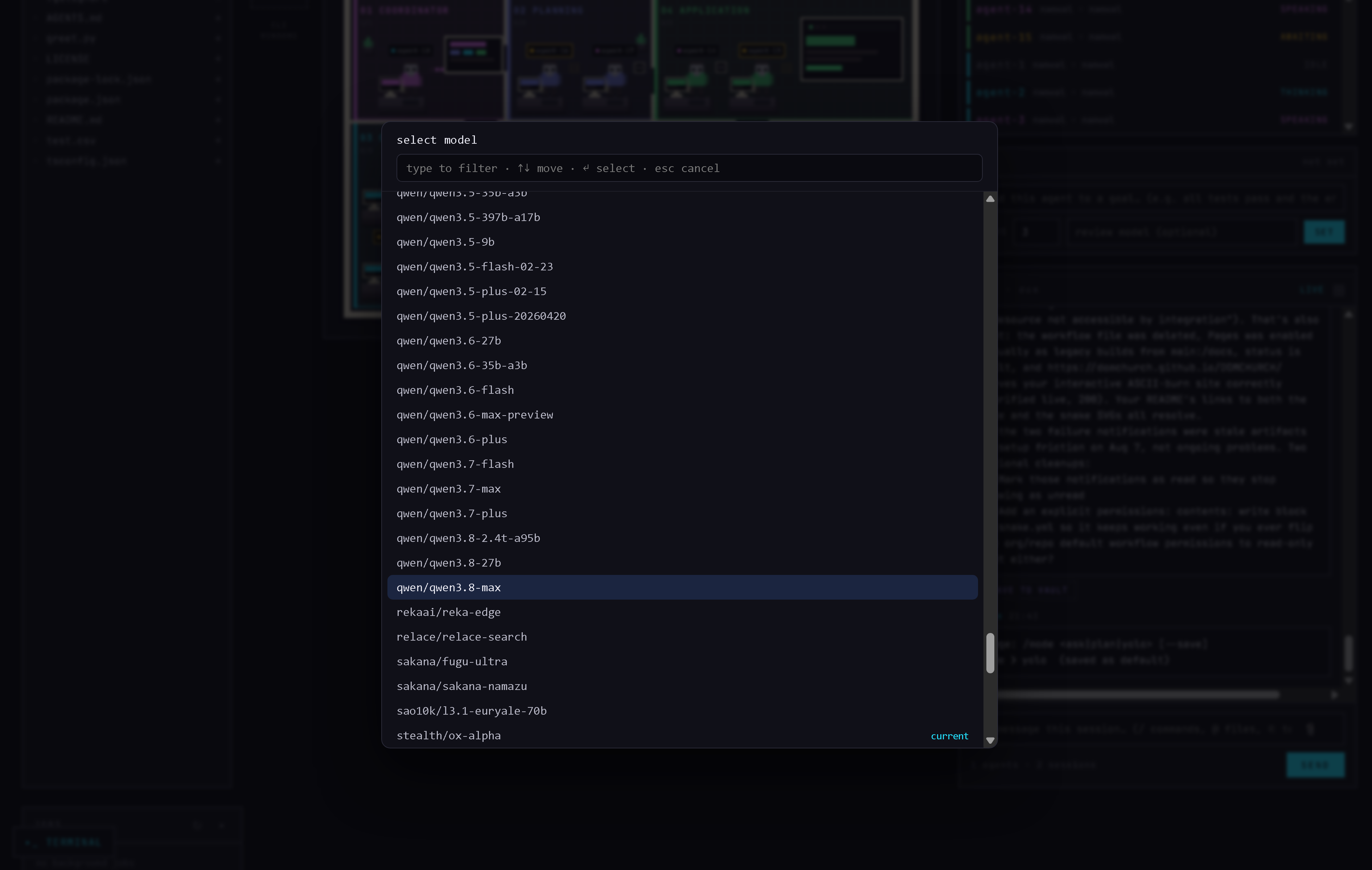
Runtime model switching — the full OpenRouter catalog, in the browser
The story
I'm Dominique Church, I'm 16, and I built Gnosis over the summer before Grade 12 in Ottawa. I wanted Claude Code without the vendor lock-in, and a browser UI I could actually watch while agents worked. The office floor started as a joke and turned into the thing everybody notices first.
CLI / Advanced
Try it, no install needed:
npx @dominquechurch/gnosis
Keep it around:
npm install -g @dominquechurch/gnosis
echo "OPENROUTER_API_KEY=sk-or-..." >> ~/.dom/.env
gnosis
Then:
gnosis                       # the TUI
gnosis serve                 # the web UI — office floor, terminal, file browser
gnosis -p "prompt"           # one turn, answer to stdout, exit
gnosis serve prints a LOCAL and a LAN URL with a scannable QR code for the LAN
one. Point your phone's camera at it and you are driving the same session from
the couch.
Most models are served by several providers at the same price and very
different speeds, and the default order is not the fastest one. Gnosis asks
OpenRouter for the quick one; set "routing": "price" in ~/.dom/config.json
if you would rather weight the bill than the wait ("latency" and
"throughput" are the other options, and "throughput" is the default).
Useful in-session: /model to switch models, /serve to open the web UI,
/plan to propose before editing, /cost for spend, /undo to revert the last
agent commit, /rewind (or double-Esc) to jump back a turn, /map for the repo
map. Type @ to attach files, / to autocomplete.
Keys
Your key never leaves your machine, and Gnosis does not phone home — no
telemetry, ever. Keys live in ~/.dom/.env, are read at request time, and only
go to the service they belong to: OPENROUTER_API_KEY for model calls,
BRAVE_API_KEY for the web_search tool (optional), and groqApiKey in
~/.dom/config.json to route groq/-prefixed models natively (optional). The
http tool refuses loopback, private-network, and cloud-metadata addresses, and
secrets are referenced as ${VAR_NAME} rather than inlined. Full details in
SECURITY.md.
Development
Want to contribute? The codebase is well-tested — 151 suites, all offline and isolated — and the architecture is documented in CONTRIBUTING.md, along with test conventions and how to add a skill.
git clone https://github.com/DOMCHURCH/Gnosis.git
cd Gnosis
npm install
npm run build
npm link
npm run verify      # 151 test suites
npm run eval        # 10-task eval harness
Gnosis was formerly released as dom. The
domcommand still works as an alias, andwindow.domOfficeis still there in the web UI.
MIT © 2026 Dominique Church · Built in Ottawa before Grade 12
Releases