
Server · #391 trending MCP repo · ↗ +1 stars this week
ParVu
AzizNadirov/ParVu
Fast desktop viewer and editor for large Parquet, CSV, JSON and Excel files. Built with Rust, Tauri and DuckDB: lazy SQL over multi-GB files without loading them into memory. Filter, group, pivot and convert without SQL, charts, smart column types, and AI assistants through MCP or your own API key.
- Stars
- 12
- This week
- +1
- Forks
- 2
- Open issues
- 1
- Latest release
v1.0.0-alpha.9
Get started
Add it to your agent
claude mcp add -s user parvu-app -- parvu mcp --attachFrom the project README.
Documentation
README
ParVu - Parquet Viewer

Overview
A fast desktop application for viewing and querying large Parquet, CSV, JSON and Excel files. Built with Rust, Tauri, React and DuckDB.
Version 1.0 is a rewrite of the earlier Python/PyQt6 app. It reads the same ~/.ParVu settings, recent files and themes, so upgrading needs no migration. The rewrite is described in plans/RUST_REWRITE_PLAN.md.
Screenshots
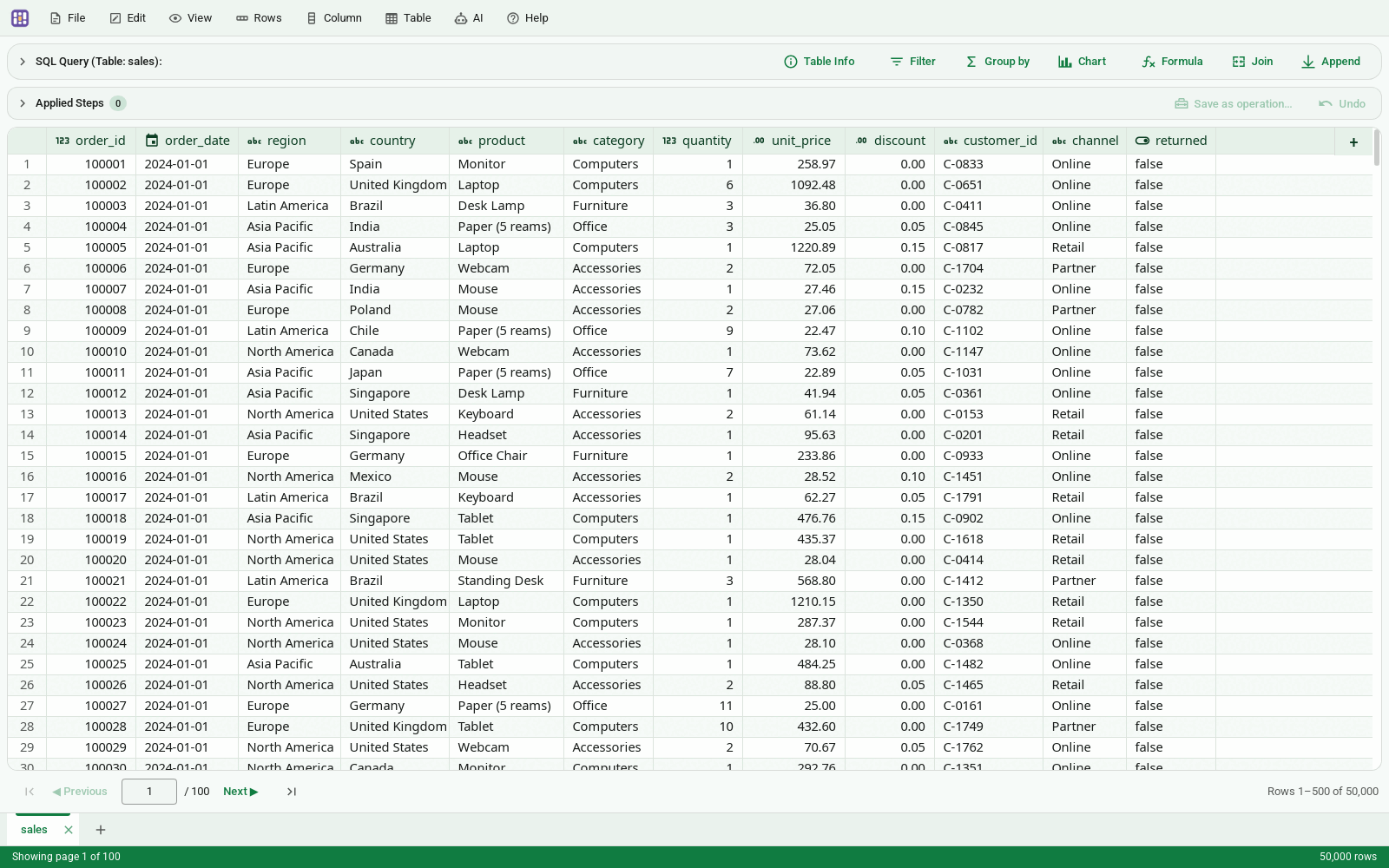
 |
 |
 |
| SQL with syntax highlighting and completion | The AI assistant, with the queries it ran | Charts from any column |
Features
File Support
- Parquet (
.parquet,.pq), CSV (.csv,.tsv), JSON (.json,.jsonl,.ndjson) and Excel (.xlsx,.xls) - Lazy loading - Parquet, CSV and JSON are queried in place, never loaded into memory
- Huge files (8GB+) with pagination; only the visible page is fetched
SQL Querying
- Full DuckDB SQL
- Syntax highlighting and auto-completion for keywords, tables and columns
- Errors are reported before anything changes
Expression Language (DSL)
- Two editor modes - switch between SQL and expression mode
- Column assignment -
data[new_col] = data[old_col] * 2adds or overwrites a column - Built-in functions - text (
UPPER,SPLIT_PART,LEFT,LPAD,REGEX_EXTRACT…), dates (YEAR,QUARTER,DATE_TRUNC,STRFTIME…), math (ROUND,LN,MOD…), conditionals (IF,IFNULL,GREATEST), and table functionsDROP_DUPLICATES,DROP_NULL,REPLACE - Auto-completion for tables, columns, functions and methods, with function documentation
- Live SQL preview of what the expression compiles to
Table Operations
- Pagination with a configurable page size and a go-to-page box
- Cell editing - type into any cell of the unmodified file; invalid values are rejected
- Applied steps - every query, transform and cell edit is listed, and undo reverts the last one (
Ctrl+Z) - Save (
Ctrl+S) writes edits and transforms back to the file; Save As writes Parquet, CSV, JSON or Excel - Sort by clicking a column header (toggles ascending/descending)
- Drop duplicates, drop null values (or a sentinel such as
-1), replace values (text or regex) - Join and append with other open tabs, using each tab's current result
- Math operations - add a column computed by an expression
- Column statistics - rows, non-null, null %, distinct, min, max, mean, std
- Unique values filter - pick values from a searchable list
- Copy - selection as TSV (
Ctrl+C), CSV, Markdown, or with headers; column values as a tuple - Drag and drop files onto the window to open them as tabs
- Large dataset warning before expensive operations
Reshape and Analyse (pandas-style)
- Group by with count, sum, mean, median, min, max, std, var, first, last, most frequent, distinct count or list (
Ctrl+G) - Pivot table (one column per value, or a crosstab of counts), unpivot (melt) and transpose
- Value counts and describe (min, max, mean, std, quartiles and nulls of every column)
- Filter rows by conditions joined with AND or OR: =, ≠, <, >, between, contains, starts/ends with, regex, one of, is null or blank (
Ctrl+Shift+L) - Fill missing values with a value, the previous or next value, or the column's mean, median or most frequent value
- Sort by several columns, choose and reorder columns, keep the first, last or a random sample of rows
- Split a column by a separator (Text to Columns) and bin values into equal-width, equal-count or custom intervals (
cut/qcut) - Running totals, ranks and rolling values: cumulative sum/min/max/mean/count, shift, diff, percent change, rank (5 tie methods), rolling mean/sum/min/max/std, per group or overall
Custom Tools
- Your own functions and operations in the Column, Rows and Table menus: a typed signature, a SQL body and examples that must pass before it's saved
- Seven samples ready to use: clean phone numbers, title case, percent of total, weighted average, top N per group, outliers (IQR rule), running total
- Share them as
.jsonfiles: imported tools are checked the same way and can't read files or other tables - See docs/CUSTOM.md
Spreadsheet Features
- Charts - bar, line, area, scatter and histogram, calculated by DuckDB so they work on huge files (
Ctrl+Shift+C): a suggested chart for the selected column, dates grouped by day to year, top N with the rest as "Other", series split by a category, tooltips, a table view, and PNG/SVG export - Conditional formatting - colour scales and highlight rules per column
- Freeze columns, remembered column widths, and fill down (
Ctrl+D)
Search
- Search (
Ctrl+F) finds matches across every page, not just the visible one. Search one column or all, with match case, whole cell and regex options.F3/Shift+F3step through matches, and the table jumps to the right page and cell.
Export
- CSV, TSV, Parquet, JSON, JSON Lines and Excel
- Pick columns, cast types, and format dates
- CSV delimiter, header and quoting; Parquet compression
- Progress bar and cancel for large exports
AI
- AI assistant panel (
Ctrl+Shift+A): ask about your tables in plain language with your own API key (Anthropic, OpenAI, Gemini, OpenRouter, Groq) or a local model (Ollama, LM Studio). It queries the data itself; changes appear as cards you approve. Keys stay in your system keychain. See docs/AI.md. - Use your Claude subscription with ParVu. AI → Connect an AI client lets Claude Desktop, Claude Code or VS Code work with the tables open in your window:
The client can query freely, but every change appears as a card in ParVu with a preview, and is applied only when you approve it.claude mcp add -s user parvu-app -- parvu mcp --attach parvu mcp --allow-dir <folder>runs a standalone MCP server without a window. Only allowed folders are reachable, queries are read-only, and nothing is written unless you add--allow-write.- See docs/MCP.md.
User Interface
- Themes - Material Design 3 interface with 6 built-in themes (Material Light, Material Dark, ParVu Light, Excel Material, Jupyter, ParVu Black), plus custom themes you can import and export
- Languages - English, Russian and Azerbaijani, switchable at any time
- Multiple tabs and windows (
Ctrl+Nopens a new window) - Shortcut cheatsheet -
Ctrl+/ - Exit warning for unsaved edits and transforms
- Recent files and a crash reporter
Installation
For End Users
- Linux (Ubuntu/Debian, 64-bit): install from ParVu's APT repository, so
sudo apt upgradekeeps it up to date
(sudo install -d -m 0755 /etc/apt/keyrings curl -fsSL https://aziznadirov.github.io/ParVu/apt/parvu-archive-keyring.gpg | sudo tee /etc/apt/keyrings/parvu-archive-keyring.gpg >/dev/null echo "Types: deb URIs: https://aziznadirov.github.io/ParVu/apt Suites: stable Components: main Architectures: amd64 Signed-By: /etc/apt/keyrings/parvu-archive-keyring.gpg" | sudo tee /etc/apt/sources.list.d/parvu.sources >/dev/null sudo apt update && sudo apt install parvuSuites: betafor pre-releases). Or download the.debfrom Releases and install it
or let the installer script set up the repository, download thesudo apt install ./parvu_<version>_amd64.deb parvu.deb, or build it from source with every dependency:curl -fsSL https://raw.githubusercontent.com/AzizNadirov/ParVu/main/install.sh | bash -s -- --apt # APT repository curl -fsSL https://raw.githubusercontent.com/AzizNadirov/ParVu/main/install.sh | bash -s -- --prebuilt # latest release curl -fsSL https://raw.githubusercontent.com/AzizNadirov/ParVu/main/install.sh | bash # build from source - Ubuntu and other Linux with snaps: install ParVu from the App Center, or
The snap keeps its settings apart from the deb and opens files in your home folder; see RELEASES.md.sudo snap install parvu - Windows:
winget install AzizNadirov.ParVu, or download and runParVu_<version>_x64-setup.exe. It adds a Start menu entry and file associations.
See RELEASES.md for details.
For Developers
Requirements: Rust 1.89 or newer and Node.js 22.12 or newer. On Debian/Ubuntu also:
sudo apt install build-essential libwebkit2gtk-4.1-dev libsoup-3.0-dev \
     libjavascriptcoregtk-4.1-dev libgtk-3-dev librsvg2-dev libayatana-appindicator3-dev
./install.sh installs all of these (Rust and Node.js only if missing or too old), builds the .deb and installs it; ./install.sh --beta does the same for parvu-next.
Run from source:
git clone https://github.com/AzizNadirov/ParVu.git
cd ParVu
npm --prefix ui ci
cd crates/parvu-app && npx --prefix ../../ui tauri dev
Build the installer (.deb on Linux, setup.exe on Windows):
./build.sh           # package "parvu"
./build.sh --beta    # package "parvu-next", installs next to "parvu"
Run the tests:
cargo test -p parvu-core -p parvu-dsl -p parvu-config --features parvu-core/schema
cargo test -p parvu-ai -p parvu-app   # AI assistant and MCP server
npm --prefix ui test
Tests and development builds use the prebuilt DuckDB library. Installer builds compile DuckDB in from C++ source, which takes several minutes the first time; build.sh limits parallel jobs to fit the free memory.
| Path | Contents |
|---|---|
crates/parvu-core |
DuckDB engine: tabs, cell edits, operations, charts, export, statistics, search, read-only access for AI tools |
crates/parvu-dsl |
Expression language parser and compiler |
crates/parvu-config |
Settings, recent files, translations, themes |
crates/parvu-ai |
AI assistant: model providers (Anthropic, OpenAI-compatible), agent loop, pricing |
crates/parvu-app |
Tauri app: windows and commands; the parvu mcp server; the assistant's keys and tools |
ui/ |
React UI |
See docs/BUILDING.md and docs/ARCHITECTURE.md for more.
How to Use
Launch
parvu
parvu path/to/file.parquet another.csv
parvu mcp --allow-dir ~/data      # MCP server for AI clients, no window
Basic Workflow
- Open a file - drop it onto the window, use File → Open (
Ctrl+O), or paste a path - Browse - use the pagination bar or type a page number
- Query - write SQL in the editor and press Execute or
Ctrl+Enter. The table is named after the file (sales.parquet→sales) - Expression mode - switch the editor to Expression and write, for example:
sales[discount] = sales[price] * 0.1to add a computed columnDROP_DUPLICATES(sales[id], sales[name], 'first')to deduplicate
- Rows, Column and Table menus - Rows: filter, sort, drop or mark duplicates; Column: formulas, types, text and date functions, replace, fill, set values on matching rows, split, bin, running totals; Table: group by, pivot, unpivot, value counts, describe, join, append - each table operation opens its result in a new tab
- Header menu - right-click a header for the same column groups plus sort, filter, new tables from the column, freeze and conditional formatting
- Cell menu - right-click cells to copy them (Copy As: CSV, Markdown), filter by a value or a condition, fill down, or set a value to NULL
- Edit - type into a cell; edits are highlighted and listed as steps
- Undo -
Ctrl+Zor the Undo button in Applied Steps - Save -
Ctrl+Swrites edits and transforms to the file; Applied Steps clears afterwards - Export - File → Export (
Ctrl+E) - Search -
Ctrl+Fsearches every row on every page - Charts - View → Chart (
Ctrl+Shift+C) - Theme and language - View → Theme / Language
Expression Language Examples
-- Add a computed column
sales[total] = sales[price] * sales[quantity]

-- Remove duplicates keeping the first occurrence
DROP_DUPLICATES(sales[id], sales[category], 'first')

-- Drop rows where a column is NULL (or matches a sentinel)
DROP_NULL(sales[email])
DROP_NULL(sales[score], -1)

-- String and math functions
sales[full_name] = CONCAT(UPPER(sales[first_name]), ' ', UPPER(sales[last_name]))
sales[abs_diff] = ABS(sales[price] - sales[avg_price])
See docs/DSL.md for the full language guide.
Example SQL Queries
-- Filter rows
SELECT * FROM sales WHERE age > 25

-- Aggregate
SELECT category, COUNT(*) AS count, AVG(price) AS avg_price
FROM sales
GROUP BY category
ORDER BY count DESC

-- Join two open files
SELECT * FROM sales JOIN customers USING (customer_id)
Configuration
Settings are stored in ~/.ParVu/settings/settings.json and can be changed in File → Settings. Logs are in ~/.ParVu/logs.
Memory. Queries may use up to 1 GB of working memory by default (File → Settings → Performance). Larger sorts, joins and groupings spill to a temporary folder on disk instead of using more RAM, so even multi-gigabyte files stay within that budget. The PARVU_MEMORY_LIMIT_MB environment variable overrides the setting.
Themes
- Material Light - Material Design 3 light colours with Roboto
- Material Dark - Material Design 3 dark colours
- ParVu Light - the original light theme
- Excel Material - default; Excel green in Material Design 3, with dense rows
- Jupyter - the look of JupyterLab: white surfaces, its blue and orange, its code colours
- ParVu Black - dark theme
Every theme uses the same Material components (buttons, fields, dialogs, menus), drawn in the theme's colours. Custom themes live in ~/.ParVu/themes. See docs/THEMES.md.
Languages
- 🇬🇧 English - default
- 🇷🇺 Russian (Русский)
- 🇦🇿 Azerbaijani (Azərbaycan)
Change the language in View → Language. See docs/I18N.md to add a translation.
FAQ
Q: What SQL is supported? A: All of DuckDB's SQL, including joins, aggregations and window functions. See the DuckDB documentation.
Q: Does editing change the file?
A: Only when you save. Edits are kept as pending steps until you press Ctrl+S or use Save As.
Q: How large a file can it handle? A: Parquet, CSV and JSON files are queried in place by DuckDB, and only the visible page is loaded, so files of 8GB and more work. Excel files are read into memory when opened.
Q: What changed from the Python version? A: The app is about six times smaller (82 MB installed instead of 483 MB), opens files faster, and switches pages in milliseconds. It also opens Excel files, writes Excel on export, and fixes several bugs in the expression language and in join and append.
Q: Can I use it with AI?
A: Yes, in two ways. The AI assistant panel (Ctrl+Shift+A) works with your API key or a local model. AI → Connect an AI client lets Claude Desktop or Claude Code use your Claude subscription on the tables in your window. Either way you approve every change in ParVu. See docs/AI.md.
Q: Can I create my own themes? A: Yes. Export a theme as a template, edit the JSON, and import it back. See docs/THEMES.md.
License
ParVu is free for personal and other noncommercial use under the PolyForm Noncommercial License 1.0.0. Use at work, in paid projects or in commercial products needs a commercial license: see COMMERCIAL.md.
Contact
It has bugs
Yes, it has. Please open an issue and let's solve it.
Releases