
Server · #295 trending MCP repo · ↗ +13 stars this week
Nomi
aqm857886159/Nomi
Open-source AI video workbench. Bring any model or your local ComfyUI, and let Claude Code / Codex / Cursor direct it over MCP — storyboard, references, generation, editable first cut on a real timeline. Local-first: projects, prompts, and keys stay on your machine. No account, no telemetry.
- Stars
- 633
- This week
- +13
- Forks
- 140
- Open issues
- 20
- Skills inside
- 97
Inside this repo
48 of 97 skills
.agents/skills/root-cause-remediationnomi-add-model把一个生成模型(文本 / 图片 / 视频 / 音频 / 3D)接进本机 Nomi,并真跑一次验证。当用户说「帮我把 X 接进 Nomi」「在 Nomi 里加个模型」「给 Nomi 接一下这家中转站」时使用。需要宿主已连上 Nomi 的 MCP server(工具名 nomi_read / nomi_model_setup / nomi_try_model)。agent-skills/nomi-add-modelnomi-competitive-radar为 Nomi 执行周期性竞品学习,覆盖真实产品交互、设计、用户引导、社区与视频营销;对标名单与全部产出都在私有仓,公开主仓不留。用于三日雷达、专题对标和研究成果转入设计流程。agent-skills/nomi-competitive-radarnomi-intake-radar每次 Nomi 会话开始自动跑用户反馈雷达——先跑 `pnpm run intake:radar` 抓 Cloudflare 上的反馈/用量事件/Agent 轨迹并汇总,再对汇总结果做分诊:真 bug / 配置问题 / 体验问题 / 数据上报问题,挂私有待办,给用户今天最该看的 1-2 件事。agent-skills/nomi-intake-radarbrand-promo做产品/品牌宣传片。当用户要把产品文案、卖点或品牌介绍做成一条短宣传视频,或提到「宣传片 / 产品视频 / 品牌短片 / promo / 广告片」时用我。skills/brand-promocreation-editDirect creation-area document editing: read current content, append or replace text, and maintain the shot-list format.skills/creation-editcurated-candle-mood用点火、暖光与烟雾营造安静氛围。 用户要求烛光氛围短片时使用。skills/curated-candle-moodcurated-coffee-pour把注入、油脂和蒸汽拆成清楚的镜头节拍。 用户要求咖啡倾注特写时使用。skills/curated-coffee-pourcurated-cross-view把参考画面转成另一机位,核对空间关系。 用户要求跨视角构图时使用。skills/curated-cross-viewcurated-expression-reference参考第二张图的表情,保留第一张图的人物。 用户要求参考表情迁移时使用。skills/curated-expression-referencecurated-expression-sheet按姿势参考生成同一角色的多种表情。 用户要求表情设定表时使用。skills/curated-expression-sheetcurated-eyewear-light用移动光线表现镜片与镜架材质。 用户要求眼镜光轨广告时使用。skills/curated-eyewear-lightcurated-film-storyboard把用户提供的剧本文字整理成宽屏分镜。 用户要求电影分镜时使用。skills/curated-film-storyboardcurated-multi-view把同一主体整理成一致的多面设定。 用户要求多视图设定时使用。skills/curated-multi-viewcurated-outpaint补齐边缘空白,核对纹理与透视衔接。 用户要求自然扩图时使用。skills/curated-outpaintcurated-product-before-after通过擦镜转场展示同一产品的清洁变化。 用户要求清洁前后对比时使用。skills/curated-product-before-aftercurated-product-condensation用微距、水滴和环绕镜头展示产品质感。 用户要求凝露产品广告时使用。skills/curated-product-condensationcurated-product-exploded-view让部件分离展示后归位,保持产品结构。 用户要求产品爆炸视图时使用。skills/curated-product-exploded-viewcurated-product-turntable保持鞋型和细节,完成转台环绕展示。 用户要求转台产品广告时使用。skills/curated-product-turntablecurated-product-unboxing按揭盖、取出和定格组织一次开箱。 用户要求产品开箱时使用。skills/curated-product-unboxingcurated-restore-image重新诠释旧图细节;结果可能改变原纹理。 用户要求旧图重新绘制时使用。skills/curated-restore-imagedirector-3dbox3D-BOX 导演预演工作流——一句话搭出白盒场景、走位和多镜机位,按实测景别 / 运镜对照用户的话,聊着按名字改,用户满意后把整段预演当参考视频交给生成环节。skills/director-3dboxdirector-action非对抗性动作场景(跑酷/追逐/攀爬/特技/坠落)的动作编排知识——专业动作词汇、环境交互、动作节奏、FPV 追拍、身体力学约束、怎么把动作精确物理化地描述进视频提示词;Nomi 写动作戏 shot 时参考。skills/director-actiondirector-art-design服化道——设计「人物设定图」与「场景环境图」的生图提示词,含顶部「风格前缀块」(摄影机/胶片/调色/画幅等烧进画面的统一风格)+ 生图 avoid(多指/文字水印/穿帮等)+ identity DNA(角色跨图一致的关键特征锁定)。Nomi 为角色/场景等视觉 anchor(`carrier: visual`)生成参考图、写它的生图 prompt 时参考。skills/director-art-designdirector-cinematography镜头语言与摄影技法方法论——统一景别体系/构图规则/运镜的情绪语言/打光方案/景深控制/色温光源/镜头特性,以及这些怎么翻译成视频提示词该怎么写。Nomi 拆镜头或写视频 shot 的 prompt 时参考。skills/director-cinematographydirector-consistency治 AI 视频多镜头「同角色换脸 / 同道具换形 / 同场景换景」三大顽疾的方法论——五维一致性检查、参考图锚定、场内状态表、段间承接。Nomi 拆镜头与跨镜生成时参考:把每个跨镜元素落成画布 anchor 节点(角色/场景/道具/风格),镜头用 anchorIds 引用、系统连参考边,段间用首尾帧承接。skills/director-consistencydirector-guzhuang中国古装题材形制知识——服饰造型(朝代/身份/发冠/妆容/色彩等级)、建筑形制(屋顶等级/开间/斗拱/院落/衙门公堂)、礼仪调度、穿帮自检,以及古装参考图/视频提示词要点(古匾汉字放开、现代穿帮 avoid);Nomi 做古装短片/微短剧时参考。skills/director-guzhuangdirector-keyframe-review参考图(角色/场景设定图)的 Go/No-Go 审图清单——逐项检查 + 判定规则 + 反馈模板,帮用户快速识别设定图是否合格、不合格时怎么反馈调整重抽;Nomi 生成参考图后审核时用。skills/director-keyframe-reviewdirector-performance非武打文戏的表演指导——微表情/肢体语言/视线设计/沉默表演/角色行为模式。AI 不会自己「演」,情绪必须在 prompt 里精确物理化成可拍的身体信号(眉/眼/嘴/手/肩/呼吸/停顿)。Nomi 写文戏 shot 的 prompt 时参考,让画面演得出「情绪」而不是只写情绪词。skills/director-performancedirector-shot-translation把「镜头意图」翻译成视频提示词的手册——运镜翻译表(推/拉/摇/跟/环绕…→提示词措辞)、焦点翻译、复合镜头(多 clip)模式、污染词替换铁律、把抽象动作/情绪换成物理动作。Nomi 写视频 shot 的 `prompt` 字段时参考。skills/director-shot-translationdirector-sound声音设计知识——环境音/音效/配乐情绪/沉默设计/听觉记号(leitmotif)/声画对位,仅供叙事规划与后期剪辑参考;⚠️视频生成提示词不含音频,这些内容不写进 shot 的 prompt,是给 Nomi 时间轴后期配音/配乐用的。skills/director-sounddirector-staging多角色调度方法论——3 人以上同框的站位设计/视线网络/注意力引导/前后景分层/AI 生成中的多角色一致性控制;Nomi 写多人 shot 的 prompt(谁站哪/朝向/视线/谁是焦点)时参考,走应用内 Seedance/可灵生成。skills/director-stagingdirector-style-otomo-wright导演风格融合招式·大友启史 × 埃德加·赖特(时尚动作怪盗 DNA)——按情节类型(飙车/打斗/跑酷/盗窃潜入/文戏温情/时尚换装登场)分别配运镜 + 剪辑节奏 + 声画卡点;Nomi 做高燃动作 / 时尚怪盗戏、想要这种质感时套用。运镜写进镜头 prompt,卡点节奏当时间轴剪辑参考,经应用内 Seedance / 可灵生成。skills/director-style-otomo-wrightdirector-transitions创意转场方法论。AI 视频逐条生成、帧天然对不齐,硬切会露缝——用遮挡/甩镜/入暗/匹配剪辑/物体擦过镜头等创意转场把相邻两条缝合成一气呵成,同时把转场当叙事工具用(场景切换/时间跳转/角色替换/情绪转折)。Nomi 里设计跨镜衔接、给相邻 shot 写首尾帧提示词时参考。skills/director-transitionsdrama-short做剧情类短剧/短片。当用户要把一个故事、梗概、小说片段或「深夜便利店发生了什么」这类情境做成有人物、有转折的短剧,或提到「短剧 / 微短剧 / 剧情短片 / 小说改编」时用我。skills/drama-shorteffect-camera-01用具体的机位与运动描述控制镜头节奏。 用户要求空镜转场时使用。skills/effect-camera-01effect-camera-02用具体的机位与运动描述控制镜头节奏。 用户要求过肩对话时使用。skills/effect-camera-02effect-camera-03用具体的机位与运动描述控制镜头节奏。 用户要求特写情绪时使用。skills/effect-camera-03effect-camera-04用具体的机位与运动描述控制镜头节奏。 用户要求推轨跟拍时使用。skills/effect-camera-04effect-camera-05用具体的机位与运动描述控制镜头节奏。 用户要求仰拍起势时使用。skills/effect-camera-05effect-camera-06用具体的机位与运动描述控制镜头节奏。 用户要求俯拍众生时使用。skills/effect-camera-06effect-camera-07用具体的机位与运动描述控制镜头节奏。 用户要求摇镜扫景时使用。skills/effect-camera-07effect-camera-08用具体的机位与运动描述控制镜头节奏。 用户要求移轴虚化时使用。skills/effect-camera-08effect-camera-09用具体的机位与运动描述控制镜头节奏。 用户要求逆光剪影时使用。skills/effect-camera-09effect-camera-10用具体的机位与运动描述控制镜头节奏。 用户要求手持跟拍时使用。skills/effect-camera-10effect-camera-11用具体的机位与运动描述控制镜头节奏。 用户要求慢动作升格时使用。skills/effect-camera-11effect-camera-12用具体的机位与运动描述控制镜头节奏。 用户要求快动作降格时使用。skills/effect-camera-12effect-camera-13用具体的机位与运动描述控制镜头节奏。 用户要求焦点转换时使用。skills/effect-camera-13Documentation
README
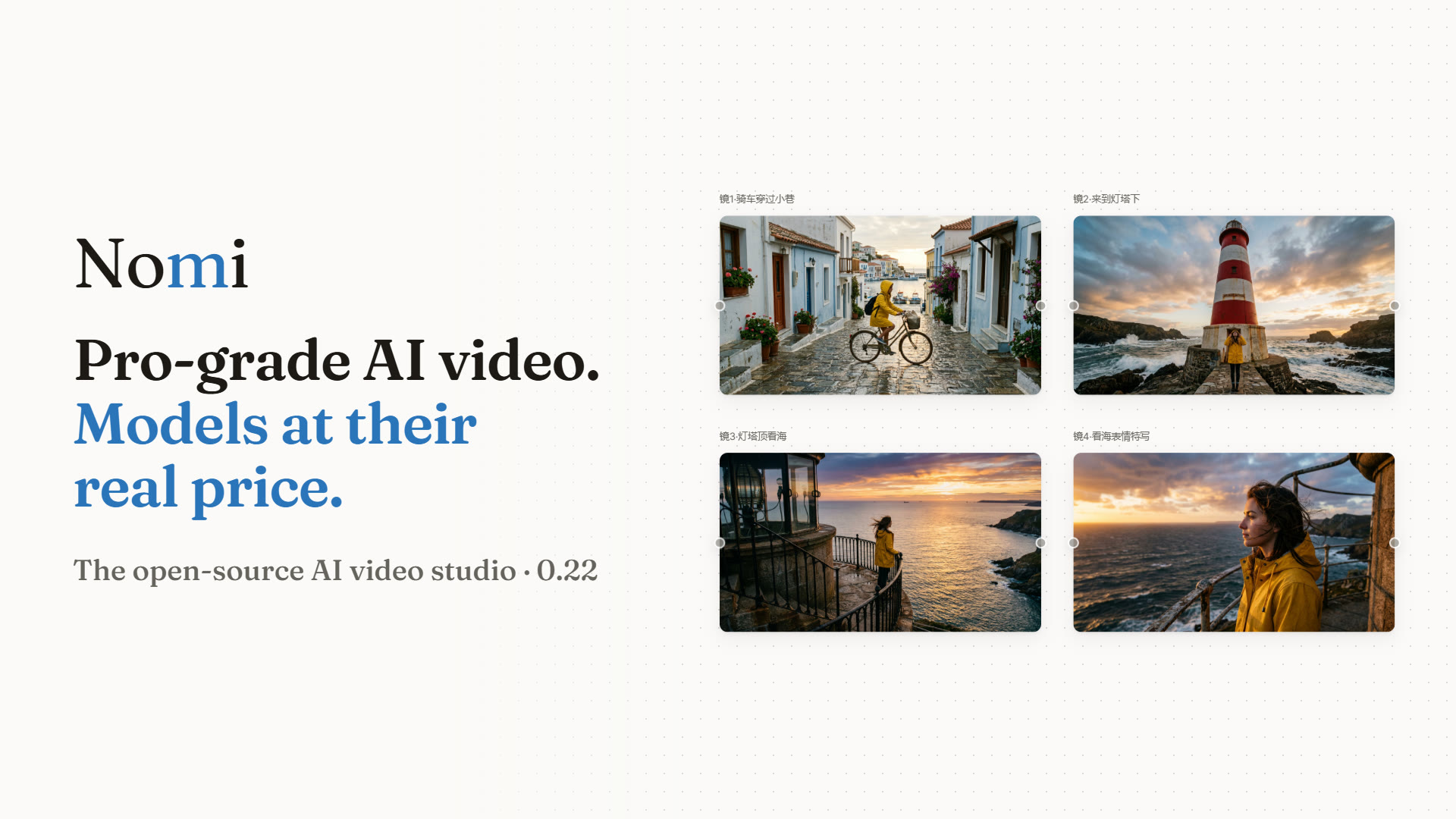
Nomi is an open-source, local-first AI video studio.
Tell its agent what you want to make. It plans the shots, generates keyframes and video, and lays them on your timeline —
with the models you connect, at the price your provider charges.
Download · Website · AtomGit mirror · Watch the 90-second film · Quick start · Let your AI connect it · Community · 简体中文


Sponsors
Sponsors help keep Nomi free and open source. A sponsor never becomes a default or a built-in route: you connect only what you choose, with your own key, and pay them directly at their price. Want to appear here?
 |
Gway — an API platform focused on AI video and multi-image reference generation: Seedance 2.0 / 2.5, Wan 3, MiniMax and other mainstream models, OpenAI-compatible, pay-as-you-go. Nomi has no built-in preset for it yet; click Let AI connect it for me and Claude Code or Codex wires it in with your key. Thanks to Gway for sponsoring Nomi! (The Gway links carry a referral code.) |
Why Nomi
Relays, official APIs, ComfyUI, and local models are cheap. Commercial AI video products often run the very same models and charge several times more.
Nomi gives you a pro-grade workflow on top of your own models. You pay your provider directly, at their price. Even the agent runs on the model you pick — no subscription, no markup.
Watch the film
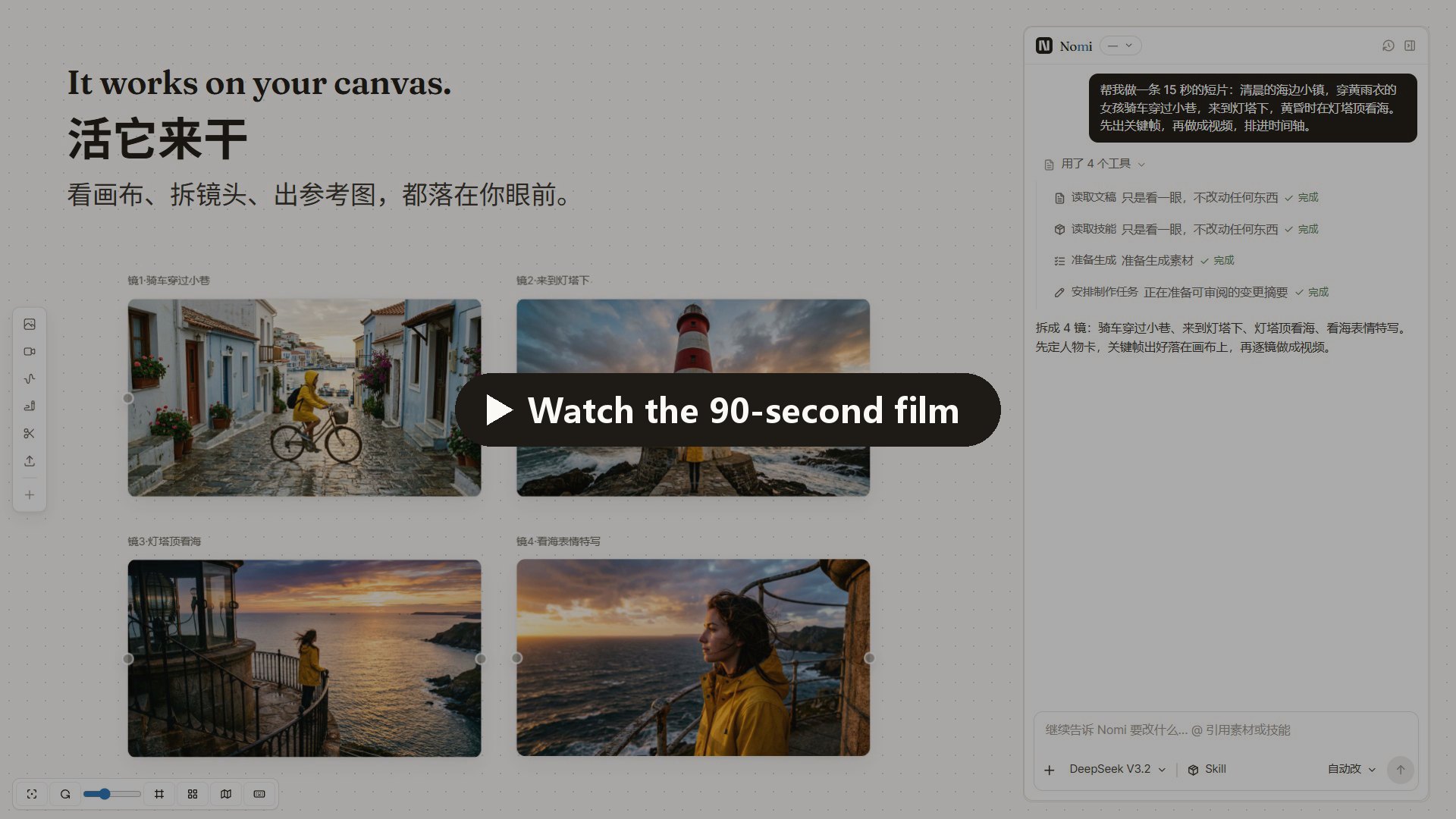
Every screen in the film is Nomi's real UI, and every image and clip in it was generated with Nomi.
What you can do
Just ask — the agent works on your canvas
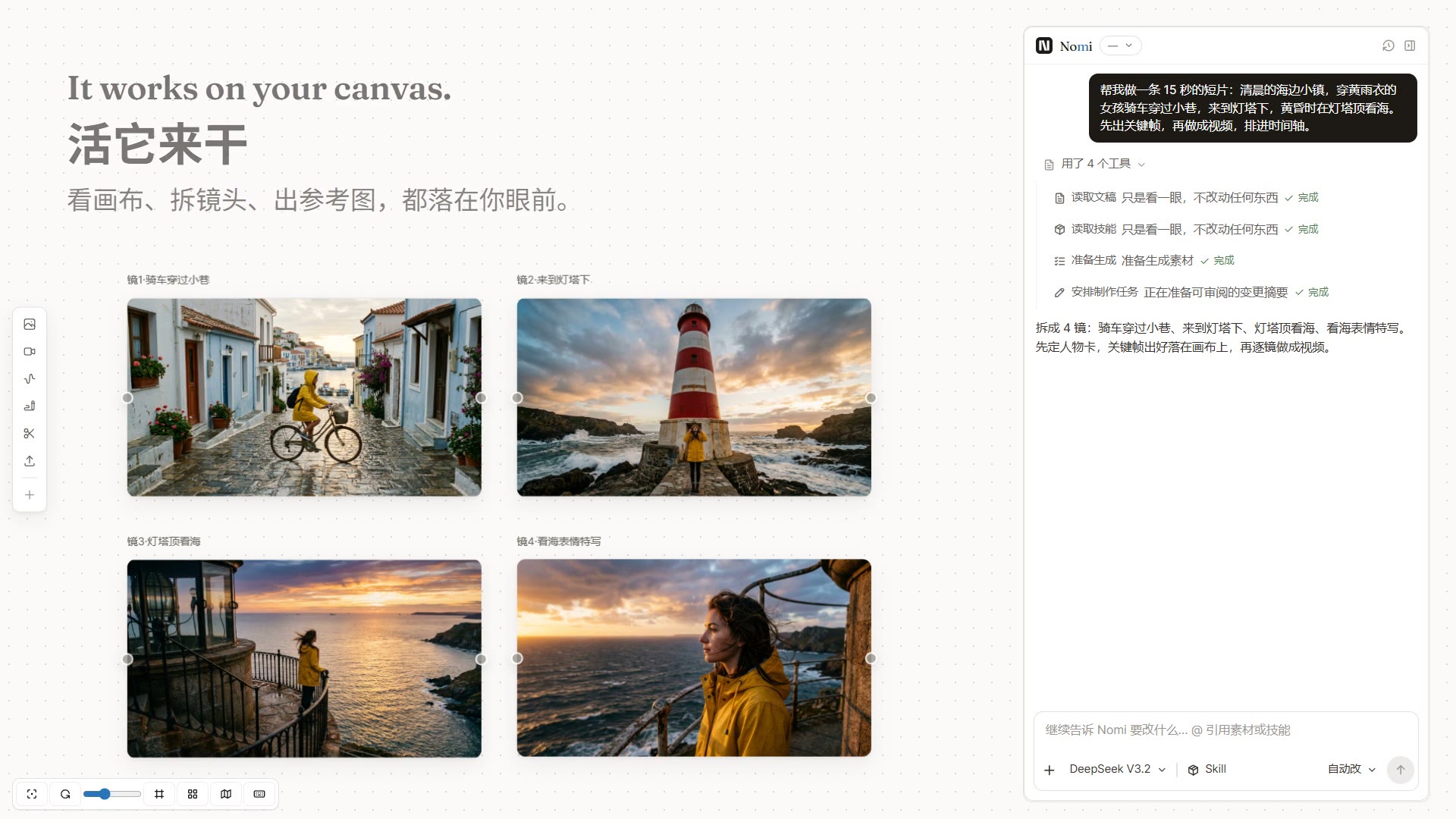
Describe the film you want. The agent reads your canvas, splits the story into shots, generates keyframes, turns them into video, and arranges the timeline. Everything it makes lands on the canvas, where you can see it and change it.
You decide how much it asks: Ask each step, Auto-edit (paid generation still asks), or Full auto.
Direct every shot
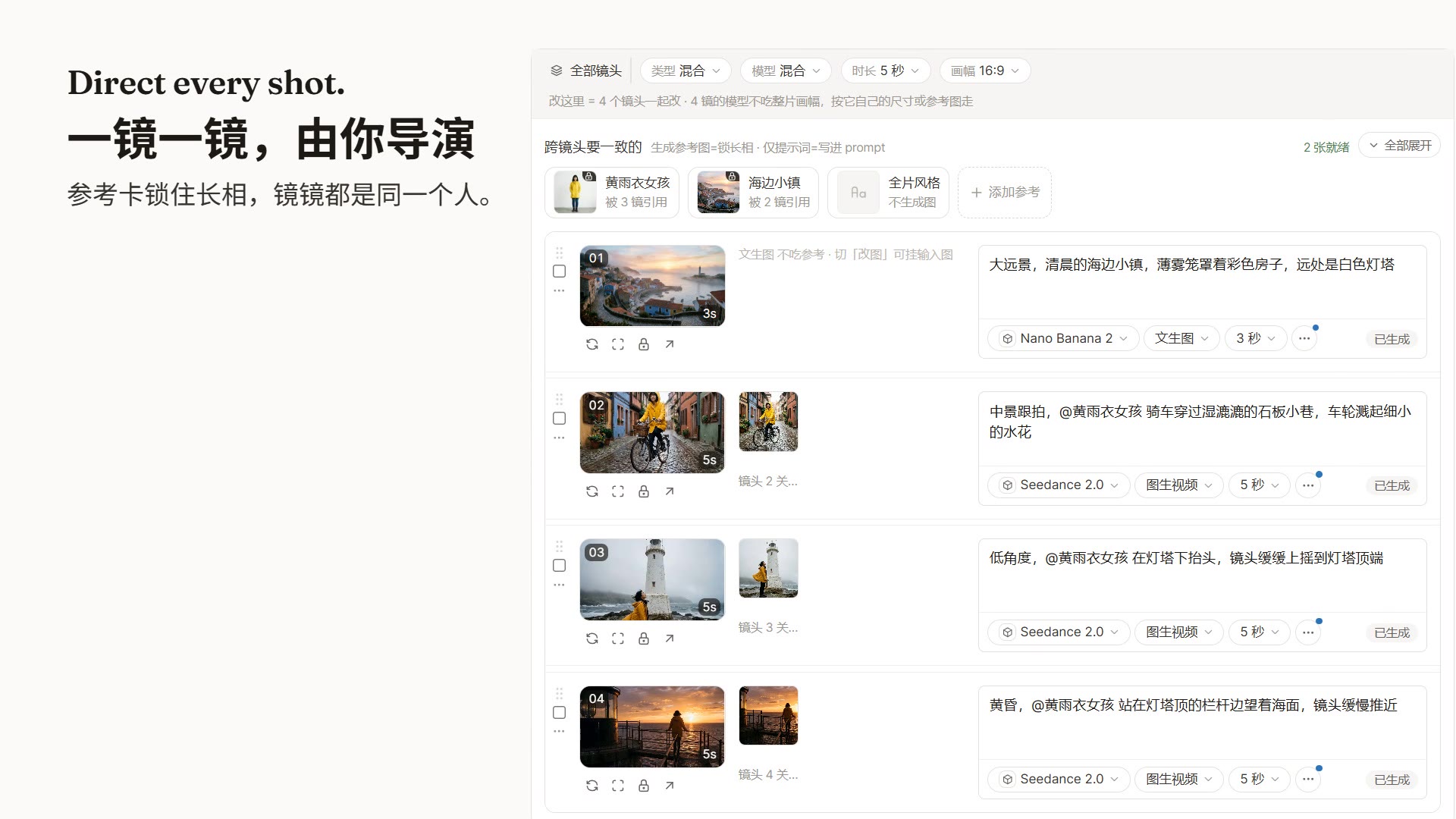
The storyboard puts each shot on one row — prompt, first frame, model, duration. Lock a reference card for a character or a place, and every shot that uses it keeps the same face.
A 3D director you can hold in your hand
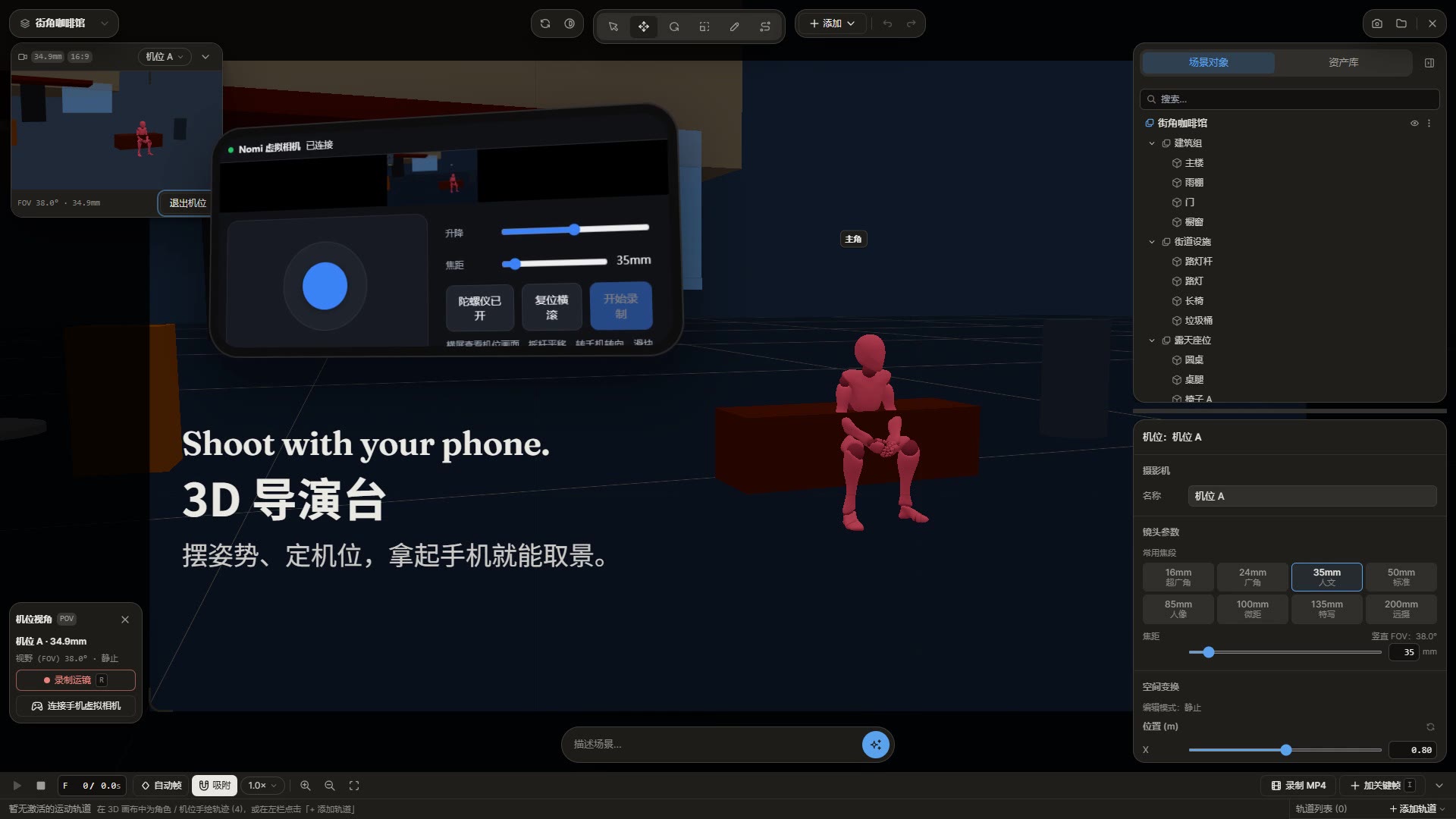
Pose characters, place cameras, and use your phone as the viewfinder. The frames you capture go straight back onto the canvas.
Any model, per shot
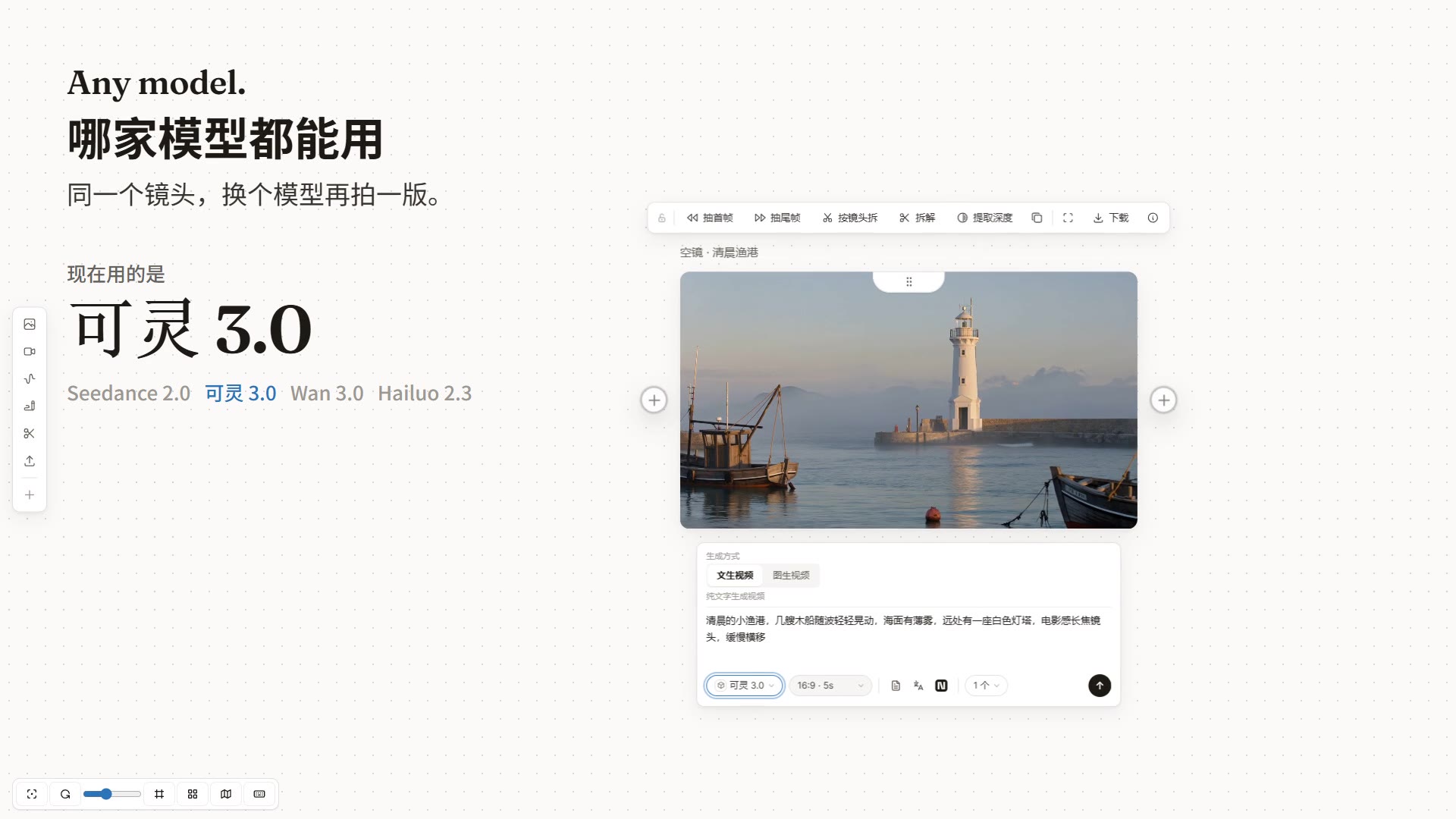
Seedance, Kling, Wan, Hailuo, Nano Banana, GPT Image and more — through APIMart, Kie.ai, Volcengine, ModelScope, a Dreamina membership, any OpenAI-compatible relay, or your local ComfyUI. Swap the model on a single shot and generate another take.
New model today, in Nomi today
When a new model ships, click Let AI connect it for me and let Claude Code or Codex wire it in. It looks up the endpoint, parameters and model IDs, has you paste your key on Nomi's own page (the assistant never sees it), runs one real test, and lists the model once it works.
Yours
A project is a plain folder on your disk: canvas, storyboard, timeline, every generated file, and the exported film. No account. Nothing is sent by default; anonymous usage statistics are opt-in (Settings → Privacy & diagnostics) and can be turned off any time. The code is AGPL-3.0.
Next up: AI editing. Nomi is heading toward one studio for everything you make with AI — come build it with us.
Download
| System | Build | Download |
|---|---|---|
| macOS | Apple Silicon | Nomi-mac-arm64.dmg |
| macOS | Intel | Nomi-mac-intel.dmg |
| Windows | Windows 10 / 11 x64 | Nomi-windows-setup.exe |
Supported release targets are macOS arm64/x64 and Windows x64. Linux, Windows arm64, and macOS universal installers are not currently published.
First launch on macOS
The current macOS build is not Apple Developer ID signed or notarized, so macOS may block it on first launch. Only use the direct downloads above or links from the official Nomi website and GitHub repository.
- Download the matching DMG, open it, and drag Nomi onto Applications in the window.
- Open Nomi from Applications. If macOS says “Nomi” Not Opened, click Done, then open System Settings → Privacy & Security, scroll down to Security, click Open Anyway next to the Nomi message, and confirm. Since macOS 15, right-clicking the app and choosing Open no longer gets past this prompt; on macOS 14 and earlier it still works.
Only if macOS says Nomi is “damaged”, first confirm the installer came from an official Nomi link, then run:
xattr -dr com.apple.quarantine "/Applications/Nomi.app"
Do not disable Gatekeeper globally. To update, download the matching DMG, quit Nomi, then drag the new Nomi onto Applications and choose Replace.
First launch on Windows
The installer has no Authenticode signature. In the SmartScreen prompt, choose More info → Run anyway.
Quick start
- Connect a model. Pick APIMart or Kie.ai and paste one key — or add your own relay, OpenAI-compatible endpoint, or local ComfyUI. Rather not do it yourself? Hand Let your AI connect Nomi to Claude Code or Codex.
- Say what you want to make. Type it into the agent panel, or start from a story in the storyboard.
- Direct and export. Keep the takes you like, arrange the timeline, export MP4.
Disclosure: the APIMart link carries a referral code. You always pay providers directly with your own key at their price. Nomi never proxies or resells inference, and every provider can be swapped for your own endpoint.
More: quick start · connect your first model (English) · user guide · providers · CLI + MCP
Use Nomi from your own agent
Nomi ships an MCP server with 24 MCP tools, so Claude Code, Codex, or Cursor can drive it — generate, arrange, and edit — while reusing the credits that come with your agent subscription. See Let your AI connect Nomi.
Community
- Questions, workflows, what's next: GitHub Discussions
- Bugs and feature requests: GitHub Issues
- Release notes and short demos: X / Twitter · Bilibili
WeChat users can scan to join the user group (left). If the group code has expired, add the maintainer (right) at TZ857886159.


Hit a bug? The code is open — send the error and the issue-fix prompt to Claude Code or Codex, and it can often patch it for you. Anything everyone runs into, tell us and it goes into the mainline.
For Teams
Custom builds, Integrations, AGPL-compliant deployment, and Ongoing iteration for teams that want Nomi inside a real production workflow. Discuss a project — the form is public, so share only a non-confidential summary and never post credentials, private contact details, budget details, or NDA-protected information.
Developers
Requires Node.js 20+ and pnpm.
git clone https://github.com/aqm857886159/Nomi.git
cd Nomi
corepack enable
pnpm install
pnpm dev
electron/    Electron main process, local runtime, storage, and model calls
src/         React + Vite + Tailwind workbench
skills/      Skill Pack v2; see docs/skill-pack-format.md
Useful checks: pnpm run test · pnpm run typecheck · pnpm run gates
Research tooling (searching what creators say on Douyin / Xiaohongshu / Bilibili / X) reads its key only from the TIKHUB_API_KEY environment variable — see docs/research/tikhub-api-notes.md.
Contributing
Bug reports, feature proposals, documentation, and code contributions are welcome. Contributors do not need to sign a CLA; contributions are accepted under AGPL-3.0-only.
License
Current releases are licensed under AGPL-3.0-only; historical releases published under Apache-2.0 keep their original license.
See LICENSE. Paid services can include AGPL-compliant custom development, integration, deployment, training, and ongoing iteration. Nomi does not offer a closed-source distribution that withholds the corresponding source code.
Releases