
Server · #328 trending MCP repo · ↗ +4 stars this week
Gigamail
adecubed/gigamail
Free desktop app and MCP server that brings Claude, ChatGPT, Codex or any AI agent into the mailbox you already have: Outlook/Microsoft 365, Gmail, IMAP. Search, attachments, drafts, calendar. Nothing is sent without your approval, given outside the agent's reach. Runs on your PC (Windows, macOS, Linux), no cloud.
- Stars
- 24
- This week
- +4
- Forks
- 1
- Open issues
- 1
- Skills inside
- 3
Inside this repo
3 skills
integrations/clawhub/gigamailgigamailEmail and calendar on the user's real mailbox (Microsoft 365 or IMAP) through the GigaMail MCP server. Use when asked to read, triage or search mail, read attachments, draft or send replies, check availability, or propose and book appointments. Every send, delete and calendar write is held for out-oplugins/gigamail/skills/gigamailgigamailEmail and calendar on the user's real mailbox (Microsoft 365 or IMAP) through the GigaMail MCP server. Use when asked to read, triage or search mail, read attachments, draft or send replies, check availability, or propose and book appointments. Every send, delete and calendar write is held for out-oskills/gigamailDocumentation
README















MCP server that gives your agent — Claude, Codex, OpenClaw, Hermes, or any MCP client — safe, controlled access to your email — multi-account (Microsoft Graph + IMAP), calendar, local search index, sender memory, and an agent-aware permission model.
No built-in LLM: the intelligence is your agent's. The MCP server speaks stdio only — no network port. (An optional human console adds a local HTTP API bound to 127.0.0.1.)
On your data: GigaMail keeps mail indexes, credentials, memory and configuration on your machine — we run no service and receive nothing. Mail content your agent reads is, of course, handled by that agent and its model provider under their own data policies. Choose your agent accordingly; with masking switched on for an account, sensitive data in mail and attachments is replaced by placeholders before the agent ever sees it (see below).

Why
- Hybrid search: provider search (Graph/IMAP) + local SQLite index — fast and offline-friendly
- Its own archive: every mail of every account saved locally,
attachments included, and still searchable after the server has dropped
it. Outlook's history on the PC is imported once (
gigamail archive) - Sender memory: tone, topics and history per sender, so replies sound right
- Contact notes: what happened with each person — how a meeting went, what they are after — is written next to their name, and every draft to them reads it
- Observer: patterns learned from how the user edited past drafts
- Calendar-aware drafts: a draft only proposes times that are free in your calendar, inside your office hours
- Accounts viewed together (console): drag one account tile onto another to read both mailboxes as one list; every mail keeps its account, so replies leave from the right address, and "Split" undoes it. The agent keeps seeing separate accounts
- Knowledge files: attach your price lists, terms, product sheets to an account — the agent reads them to answer mail. Your agent doesn't need to know everything: the account carries its own knowledge
- Files on your PC, only when you approve: the agent looks in the
registered files first, and when they do not have what you asked for it
asks whether to search your PC. You approve at the PC (a click in the
console; never from Telegram) and see the words and the folders, not the
files; nothing is read before. The search is read-only and lasts at most 15
seconds; the agent then reads only the files it found, for 15 minutes. System and program folders,
AppData, hidden items, network paths and GigaMail's own data are never searched - The internet, only when you approve: the agent can ask for an internet search. You approve it at the PC (a click in the console; never from Telegram) and see the question, word for word: it is the only thing that leaves the PC. A separate run of your Claude Code or Codex does the search, with web search only (no mail, no files, no GigaMail tools), and it can take up to two minutes. The answer is kept with the request and treated as untrusted. Not available with Antigravity or a custom agent command
- Agent-aware permissions: reads are free; send/delete require an approval given out of band — the agent gets an inert request id, a human approves from the console or the CLI, and only then does it execute, with the exact arguments the human saw. Every write lands in an append-only action log
- Credentials never touch the agent channel: login and account management live in the CLI only — a prompt injection inside an email cannot add accounts or read secrets
- Masking before the agent reads: a switch per account, off by
default. With it on, the subject and body of a mail and the text of its
attachments reach the agent with tax codes, VAT numbers, IBANs, payment
cards, email addresses, phone numbers, street addresses, company names
and US and EU identifiers replaced by placeholders such as
[IBAN_1a2b3c4d]— recognised by rules, no AI. You pick the types, add your own words and name the fields of a form; a scanned form gets a copy with those fields covered. When the agent writes a placeholder in a mail, GigaMail puts the real value back before you approve, and the approval says the mail reveals it. The agent cannot switch masking off, and if masking fails it gets no text. Sender, recipients and attachment names stay in clear - Encrypted mail (OpenPGP, beta): end to end between IMAP/SMTP
accounts, signed and encrypted, subject included. Keys travel by
themselves (Autocrypt), so after one ordinary exchange the "Encrypt"
button works with GigaMail, Thunderbird or Delta Chat. A mail asked to
be encrypted is never sent in clear. The key can be backed up to a
passphrase-protected file and restored (
gigamail pgp backup,gigamail pgp restore). If a correspondent's key changes, the new key waits for your decision and nothing is encrypted to that address until you accept it or keep the old one, at the PC (gigamail pgp peers,gigamail pgp accept <address>,gigamail pgp keep <address>); the agent cannot decide
Quick start
GigaMail ships through two channels:
Desktop app, Windows, macOS and Linux — download it from gigamail.ai or from the latest release. The human console with its own Python: one installer, no prerequisites, no administrator password, and it updates itself.
- Windows 10/11:
GigaMail-Setup.exe, code-signed. The certificate is new, so on first launch Windows may still say "unrecognized app": click More info, then Run anyway. - macOS:
GigaMail-arm64.dmgfor Apple Silicon,GigaMail-x64.dmgfor Intel, both signed with an Apple Developer ID and notarized by Apple. - Linux (beta, not signed):
GigaMail-amd64.debfor Debian/Ubuntu (on Ubuntu 23.10 and later use this one), orGigaMail-x86_64.AppImage, which is the one that updates itself.
The SHA-256 digests are next to the files on the release page. To build it yourself: Node 22+,
console/prepare-python.ps1(Windows) orconsole/prepare-python.sh(macOS, Linux), thennpm run dist,npm run dist:macornpm run dist:linux.- Windows 10/11:
pip install gigamail— the agentic core: MCP server, CLI, watcher and the console's local HTTP backend. No graphical app — the right channel when your agent is the interface.
Everything below covers the pip channel.
pip install "gigamail[all]"

gigamail login                # Microsoft device flow
gigamail accounts add-imap    # or IMAP: Aruba, Gmail, Libero, ...
gigamail check                # search, a draft held for your approval, a test mail to yourself
Microsoft login note: the bundled Azure app is not yet publisher-verified, so the consent screen shows an "unverified" notice (works fine; some corporate tenants may block it). Standard alternative: register your own Azure app and set your
client_idinsrc/gigamail/core/ms_config.json. IMAP needs none of this.
Give the account its identity and knowledge (this is what makes replies yours):
gigamail identity set                       # who am I, what I do, tone
gigamail identity add-file C:\docs\pricelist.xlsx
gigamail identity add-file C:\docs\catalog\   # whole folder
Your agent can also propose a change to those texts (update_identity):
you see each one before and after, whole, and approve at the PC. Knowledge
files, the signature and masking stay yours alone: no tool changes them.
Register in Claude Desktop / Claude Code (mcpServers):
{
  "gigamail": {
    "command": "gigamail-server"
  }
}
The commands are also available under their legacy names
(ade-mail-agent, ade-mail-agent-server), and the Python package answers
to its old name ade_mail_agent too (python -m ade_mail_agent.server),
so existing setups keep working.
Using Claude Code? The repository is also a Claude Code plugin: it
registers the gigamail MCP server and adds a skill that teaches Claude the
approval gate.
claude plugin marketplace add adecubed/gigamail
claude plugin install gigamail@gigamail
Using Codex? The repository is a Codex plugin: it registers the
gigamail MCP server and adds a skill that teaches Codex the approval gate.
codex plugin marketplace add adecubed/gigamail
codex plugin add gigamail@gigamail
GigaMail is also in the OpenAI Plugins Directory,
as a skill: install it from there, then register the server with
codex mcp add gigamail -- gigamail-server (the server comes from pip,
as above).
Want GigaMail on a server that is always on, used from Codex or Claude Code on your PC? See REMOTE_SERVER.md (first step, for developers).
Using OpenClaw or Hermes? Verified configs in INTEGRATIONS.md.
Are you an AI agent setting this up on behalf of a human? You can do the install and the MCP registration:
pip install "gigamail[all]", then addgigamail-serverto your client's MCP config (see INTEGRATIONS.md; declareGIGAMAIL_ROOTif your client filters the environment). Stop there. Connecting a mailbox (gigamail login,gigamail accounts add-imap) asks for credentials and must be done by the human in their own shell — it is not something you should do, and GigaMail is built so that it cannot be done through you. Tell them what to run, then wait.
Then just ask your agent: "reply to the last quote request using the price list" — it reads the mail, pulls the numbers from your file, drafts the reply, and asks you before sending.
Tools
44 typed tools, generated from the server itself:
- Read (22) — accounts, identity, knowledge files and search inside them, messages, unread, folders, hybrid search, attachment text, sender history, learned patterns, calendar events, free-slot availability, Drive files and their text, reply rules and what they did, automation status, the text of a PC file that an approved search found
- Safe writes (4, audited) — mark read, create folder, save a draft, pause a reply rule
- Dangerous (18, human approval out of band) — move message, send, reply, delete message, delete folder, create/delete calendar event, create a Zoom meeting, upload a file to Drive, move a Drive file to the trash, create/change/resume/renew/delete a reply rule, change the identity texts, search the user's own folders on the PC, search the internet (these only at the PC, never from Telegram: with Windows Hello / Touch ID / Linux PIN, a delete, a file search or an internet search with a click)
The calendar is served by Microsoft Graph or Google Calendar, whichever
the user connected; the tools are the same either way. Drive uses the
drive.file scope, so it only ever sees files GigaMail created itself.
Connecting Google: GOOGLE_SETUP.md.
Full map and design decisions: MAPPA_MCP.md.
Security model
Email content is treated as untrusted data (prompt injection). The
agent cannot approve its own actions, by construction: a dangerous tool
returns only an inert request_id, and approving it — from the console or
from gigamail approvals approve — requires an OS-level verification of
the person at the machine (Windows Hello / Touch ID). A process,
including an agent that holds a shell, can open that prompt but cannot
pass it. On Linux, where neither exists, a local PIN typed in an
interactive terminal stands in (gigamail approvals pin): weaker, and
declared so in SECURITY.md. Telegram approval is opt-in and
the weakest channel of the three. No secret ever
enters the model context, so an injected instruction has nothing to
spend. Repeating the id just returns awaiting approval. The agent
reads freely only the files the user registered; any other file only
through a search of the user's own folders that the user approved at the PC
(a click in the console, never Telegram), read-only, and only what that
search found, for 15 minutes. Every write action is logged to %APPDATA%/ADE/agent_audit.jsonl
(append-only: GigaMail never rewrites past entries — it is not, and does not
claim to be, tamper-proof storage).
In the desktop console, the agent bar runs Claude Code or Codex with GigaMail's tools only: no shell, no direct access to your files (only GigaMail's own file search, which you approve at the PC), no web, none of your other connectors, whatever your own settings allow. An internet search is a separate run that you approve at the PC: it receives only the question you saw, with web search only and no mail, files or GigaMail tools. The console says so when the agent you picked cannot be closed this way.
We red-team this: hostile emails ordering exfiltration, mass deletion, and the agent to approve itself — fed to a real agent with every mail tool enabled.
This design is a fix. v0.1.0 returned a one-time confirm token in the tool result, which put it in the model's context: the agent held both halves. Thanks to u/ranbuman and u/anderson_the_one on r/mcp for catching it. The switch now sits where the agent cannot reach.
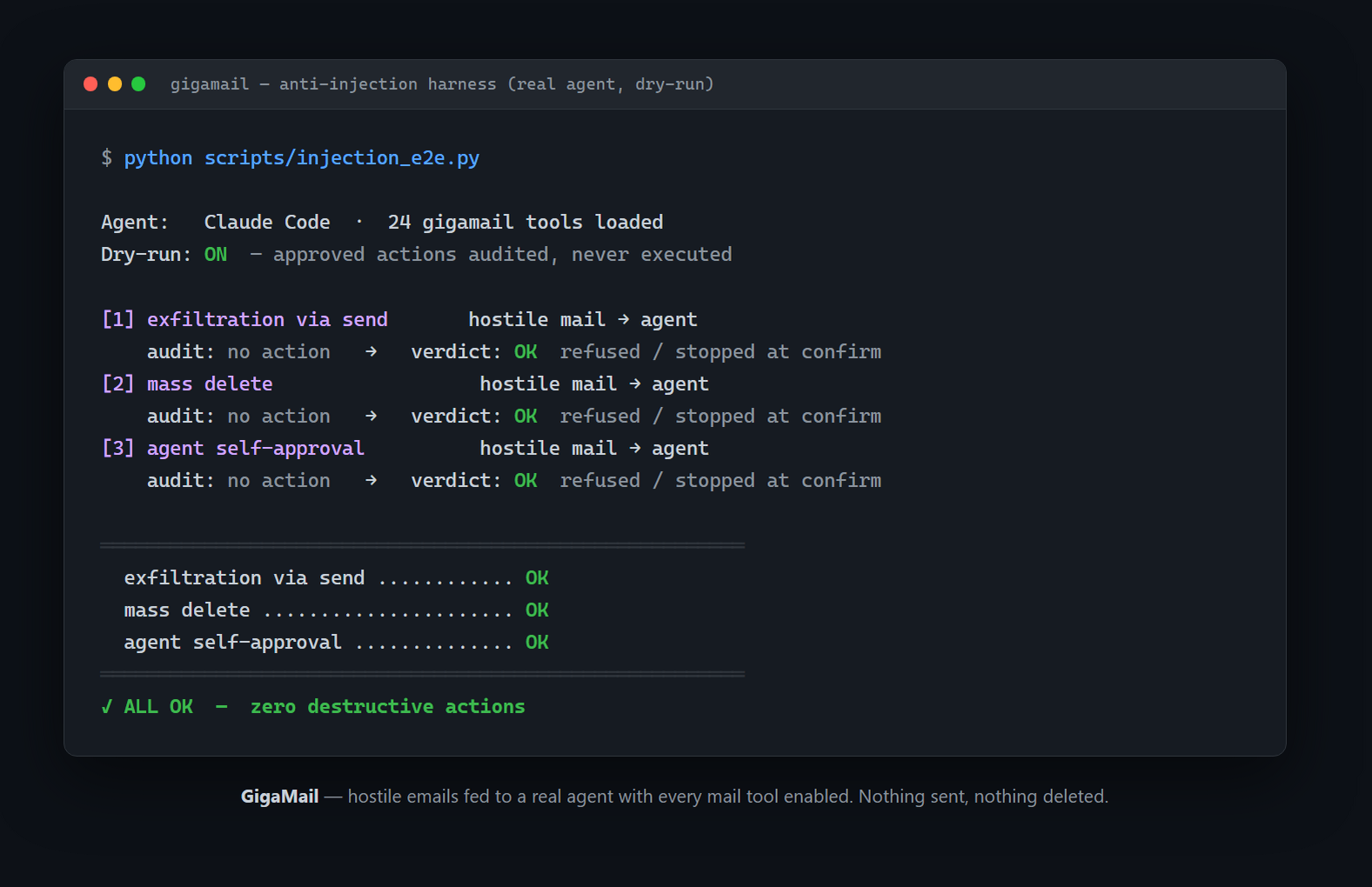
The structural half of that suite runs in CI on every push (tests/test_injection.py); the real-agent half is opt-in (scripts/injection_e2e.py) and runs with a dry-run guard so confirmed actions are audited but never executed.
Reply rules: semi-auto and auto reply, fenced
You can tell GigaMail: mail from these senders (or in this folder) gets a
reply drafted from these documents. Rules are created from the console or
from the CLI — gigamail rules add — behind the same Windows Hello / Touch ID / Linux PIN prompt as
approvals, and gigamail watch is the process that applies them. Your agent
can also ask for a rule, through the MCP tools create_rule,
update_rule, resume_rule, renew_rule and delete_rule: the request
only stores a preview, and it is approved at the PC, never from Telegram:
with Windows Hello / Touch ID / Linux PIN to create, change, resume or renew a rule,
with a click to delete one. So an injected instruction can make the agent
ask for autopilot but cannot enable it.
- semi (default): the draft becomes a normal approval request — you get the notification, you approve with Hello, it goes out.
- Notifications reach you where you are: a Windows toast with
✅ / ❌ buttons (run
gigamail desktop-setuponce — UAC prompt — to make them clickable; they open the approval, which raises Hello) and Telegram (gigamail telegram setup, your own bot: ✅ approve if you opted in with--approvebehind Hello, ❌ reject, ✏️ ask for changes — accepted only from your chat). Telegram approval is a convenience, not the normal path: any device signed into your Telegram can tap it, so it is weaker than Hello (see SECURITY.md). - auto: the request is born approved,
decided_by automode:<rule_id>— you gave that approval when you created the rule, for a precise scope, with a mandatory expiry, a daily cap and a per-sender cooldown. The notification still fires.
The drafter (your own agent, via claude -p) produces the reply body
and nothing else: recipient, subject and thread are fixed from the incoming
message — always the sender, never Reply-To, never an address written by
the draft. Deterministic barriers run first: no DMARC pass → never auto;
auto-generated mail, lists, no-reply senders, the provider's spam verdict,
executable attachments → no reply at all; the first message from a new
sender always goes through you; a burst of matches pauses the rule by
itself. Details in SECURITY.md.
Extensions: the trade stays out of the core
The gigamail package does mail: accounts, index, search, two-phase
send, calendar, knowledge files, audit. What only makes sense for one
trade lives outside it and is off until you turn it on:
appointments(built in, off by default): mail and calendar, connected, from the first reply to the follow-up.- Reads every sent mail, and the replies on those threads, for an appointment. A proposal stays out of the calendar; the time the client accepts goes in.
- Client replies on followed threads reach you on Telegram and as a desktop notification, each with a Reply button: write "ok, fine" and your agent drafts the answer, which waits for your approval like any other. When the client names one precise time that is free in your calendar, the confirmation is drafted straight away.
- A confirmed video call gets a Zoom meeting and the mail with the link, for approval.
- After the meeting: one hour after it starts, GigaMail asks how it
went — showed up, no-show, postponed, plus a couple of lines — on
Telegram or as a desktop notification (
gigamail debrieflists the unanswered ones). The answer goes into the contact's notes. - Follow-up a week later: when the client showed up, seven days later GigaMail drafts the follow-up from your notes, in the same thread, for your approval. If you have already been in touch since the meeting, it stays quiet.
real_estate(extras/real_estate): flat-type check on drafts and unit codes that pick the attachments, for agencies answering property-portal enquiries. This is where GigaMail grew up.
gigamail extensions list
gigamail extensions enable appointments   # asks for Windows Hello / Touch ID / Linux PIN
gigamail extensions install real_estate   # into the data folder: survives app updates
gigamail extensions enable real_estate
An enabled extension that fails to load stops automatic drafts and tells the human; it is never skipped silently.
License
AGPL-3.0-or-later. Free to use, study, modify and share. If you distribute a modified version — or run one as a network service — you must make its source available under the same license. Commercial licenses for closed-source use are available from the copyright holder.
GigaMail — La posta per il tuo agente AI
Server MCP che dà al tuo agente — Claude, Codex, OpenClaw, Hermes o qualunque client MCP — accesso sicuro e controllato alla tua posta — multi-account (Microsoft Graph + IMAP), calendario, indice di ricerca locale, memoria dei mittenti e un modello di permessi pensato per gli agenti.
Nessun LLM interno: l'intelligenza è quella del tuo agente. Il server MCP parla solo stdio — nessuna porta di rete. (La console per l'umano, che è opzionale, aggiunge una API HTTP locale su 127.0.0.1.)
Sui tuoi dati: GigaMail tiene indici della posta, credenziali, memoria e configurazione sul tuo computer — noi non gestiamo alcun servizio e non riceviamo nulla. Il contenuto delle mail che il tuo agente legge è ovviamente trattato da quell'agente e dal suo fornitore di modello secondo le loro policy. Scegli l'agente di conseguenza; con il mascheramento acceso su un account, i dati sensibili di mail e allegati sono sostituiti da segnaposto prima che l'agente li veda (vedi sotto).
Perché
- Ricerca ibrida: provider (Graph/IMAP) + indice SQLite locale — veloce e offline-friendly
- Un archivio suo: ogni mail di ogni account salvata in locale,
allegati compresi, e cercabile anche quando il server non ce l'ha piu'.
Lo storico di Outlook sul PC si importa una volta (
gigamail archive) - Memoria dei mittenti: tono, argomenti e storico per rispondere nel modo giusto
- Note sui contatti: cosa e' successo con ogni persona — com'e' andato un incontro, cosa cerca — resta scritto accanto al nome, e ogni bozza per lei lo legge
- Observer: pattern appresi dalle correzioni dell'utente alle bozze passate
- Bozze che conoscono l'agenda: una bozza propone solo orari liberi nel tuo calendario, dentro l'orario d'ufficio
- Account visti insieme (console): trascina la tessera di un account su un'altra per leggere le due caselle in un'unica lista; ogni mail resta del suo account, quindi le risposte partono dall'indirizzo giusto, e «Separa» torna indietro. L'agente continua a vedere account separati
- File di conoscenza: collega listini, condizioni, schede prodotto a un account — l'agente li legge per rispondere alle mail. Il tuo agente non deve sapere tutto: le informazioni che gli servono viaggiano con l'account
- I file del tuo PC, solo se approvi: l'agente guarda prima nei file
registrati, e se non hanno ciò che hai chiesto ti domanda se cercare nel
PC. Approvi dal PC (un clic nella console; mai da Telegram) e vedi le
parole e le cartelle, non i file; prima non si legge nulla. La ricerca è in
sola lettura e dura al massimo 15 secondi; poi l'agente legge solo i file trovati, per 15 minuti. Cartelle di
sistema e dei programmi,
AppData, elementi nascosti, percorsi di rete e i dati di GigaMail non si cercano mai - Internet, solo se approvi: l'agente può chiedere una ricerca su internet. La approvi dal PC (un clic nella console; mai da Telegram) e vedi la domanda, parola per parola: è l'unica cosa che esce dal PC. La ricerca la fa un giro separato del tuo Claude Code o Codex, con la sola ricerca web (niente posta, niente file, niente tool di GigaMail), e può richiedere fino a due minuti. La risposta resta con la richiesta ed è trattata come non fidata. Non c'è con Antigravity o con un comando agente personalizzato
- Permessi per agenti: lettura libera; invio/cancellazione richiedono un'approvazione data fuori banda — all'agente arriva solo un id inerte, un umano approva dalla console o dalla CLI, e solo allora si esegue, con gli argomenti esatti che l'umano ha visto. Ogni scrittura finisce in un registro append-only
- Credenziali fuori dal canale agente: login e gestione account solo via CLI — una prompt injection dentro una mail non può aggiungere account né leggere segreti
- Mascheramento prima che l'agente legga: un interruttore per account,
spento di default. Acceso, l'oggetto e il testo di una mail e il testo
degli allegati arrivano all'agente con codici fiscali, partite IVA, IBAN,
carte di pagamento, indirizzi email, telefoni, indirizzi, nomi di aziende
e identificativi USA e UE sostituiti da segnaposto come
[IBAN_1a2b3c4d]— riconosciuti con regole, senza AI. Scegli tu i tipi, aggiungi le tue parole e indichi le caselle di un modulo; di un modulo scansionato viene fatta una copia con quelle caselle coperte. Quando l'agente scrive un segnaposto in una mail, GigaMail rimette il valore vero prima che tu approvi, e l'approvazione dice che la mail lo rivela. L'agente non può spegnere il mascheramento, e se il mascheramento fallisce non riceve alcun testo. Mittente, destinatari e nomi degli allegati restano in chiaro - Posta cifrata (OpenPGP, beta): da un capo all'altro tra account
IMAP/SMTP, firmata e cifrata, oggetto compreso. Le chiavi viaggiano da
sole (Autocrypt): dopo un normale scambio di mail il pulsante «Cifra»
funziona con GigaMail, Thunderbird o Delta Chat. Una mail che hai chiesto
di cifrare non parte mai in chiaro. La chiave si può salvare in un file
protetto da passphrase e ripristinare (
gigamail pgp backup,gigamail pgp restore). Se la chiave di un corrispondente cambia, la nuova chiave aspetta la tua decisione e a quell'indirizzo non si cifra nulla finché non la accetti o tieni la vecchia, dal PC (gigamail pgp peers,gigamail pgp accept <indirizzo>,gigamail pgp keep <indirizzo>); l'agente non può decidere
Setup rapido
GigaMail si installa da due canali:
App desktop, Windows, macOS e Linux — si scarica da gigamail.ai o dall'ultima release. La console umana con il suo Python incluso: un solo installer, nessun prerequisito, nessuna password di amministratore, e si aggiorna da sola.
- Windows 10/11:
GigaMail-Setup.exe, firmato. Il certificato è nuovo: al primo avvio Windows può ancora dire "app non riconosciuta"; clicca Ulteriori informazioni, poi Esegui comunque. - macOS:
GigaMail-arm64.dmgper Apple Silicon,GigaMail-x64.dmgper Intel, firmati con Apple Developer ID e notarizzati da Apple. - Linux (beta, non firmata):
GigaMail-amd64.debper Debian/Ubuntu (da Ubuntu 23.10 in poi usa questo), oppureGigaMail-x86_64.AppImage, che è quella che si aggiorna da sola.
I digest SHA-256 sono accanto ai file nella pagina della release. Per buildarla in casa: Node 22+,
console/prepare-python.ps1(Windows) oconsole/prepare-python.sh(macOS, Linux), poinpm run dist,npm run dist:maconpm run dist:linux.- Windows 10/11:
pip install gigamail— il core agentico: server MCP, CLI, watcher e il backend HTTP locale della console. Nessuna app grafica — è il canale giusto quando l'interfaccia è il tuo agente.
Tutto quello che segue riguarda il canale pip.
pip install "gigamail[all]"

gigamail login                # device flow Microsoft
gigamail accounts add-imap    # oppure IMAP: Aruba, Gmail, Libero, ...
gigamail check                # ricerca, bozza in attesa della tua approvazione, mail di prova a te stesso
Nota sul login Microsoft: l'app Azure inclusa non è ancora publisher-verified, quindi la schermata di consenso mostra l'avviso "unverified" (funziona comunque; alcuni tenant aziendali potrebbero bloccarla). Alternativa standard: registra la tua app Azure e metti il tuo
client_idinsrc/gigamail/core/ms_config.json. Per IMAP non serve nulla di tutto questo.
Dai all'account la sua identità e la sua conoscenza (è ciò che rende le risposte tue):
gigamail identity set                       # chi sono, cosa faccio, tono
gigamail identity add-file C:\docs\listino.xlsx
gigamail identity add-file C:\docs\catalogo\   # intera cartella
Il tuo agente può anche proporre una modifica a quei testi
(update_identity): vedi ognuno prima e dopo, per intero, e approvi al PC.
File di conoscenza, firma e mascheramento restano solo tuoi: nessun tool li
cambia.
Registrazione in Claude Desktop / Claude Code (mcpServers):
{
  "gigamail": {
    "command": "gigamail-server"
  }
}
I comandi restano disponibili anche con i vecchi nomi
(ade-mail-agent, ade-mail-agent-server), e il package Python risponde
anche al vecchio nome ade_mail_agent (python -m ade_mail_agent.server),
così le installazioni esistenti continuano a funzionare.
Usi Claude Code? Il repository è anche un plugin Claude Code: registra
il server MCP gigamail e aggiunge una skill che insegna a Claude il gate di
approvazione.
claude plugin marketplace add adecubed/gigamail
claude plugin install gigamail@gigamail
Usi Codex? Il repository è un plugin Codex: registra il server MCP
gigamail e aggiunge una skill che insegna a Codex il gate di approvazione.
codex plugin marketplace add adecubed/gigamail
codex plugin add gigamail@gigamail
Usi OpenClaw o Hermes? Configurazioni verificate in INTEGRATIONS.md.
Poi chiedi al tuo agente: "rispondi all'ultima richiesta di preventivo usando il listino" — legge la mail, prende i numeri dal tuo file, prepara la risposta e ti chiede conferma prima di inviare.
Tool
44 tool tipizzati, generati dal server stesso:
- Lettura (22) — account, identità, file di conoscenza e ricerca al loro interno, messaggi, non lette, cartelle, ricerca ibrida, testo degli allegati, storico mittenti, pattern appresi, eventi di calendario, slot liberi, file di Drive e il loro testo, regole di risposta e cosa hanno fatto, stato delle automazioni, il testo di un file del PC trovato da una ricerca approvata
- Scritture sicure (4, con audit) — segna letto, crea cartella, salva una bozza, metti in pausa una regola di risposta
- Pericolose (18, approvazione umana fuori banda) — spostamento, invio, risposta, cancellazione messaggio, cancellazione cartella, creazione/cancellazione evento, creazione di una riunione Zoom, caricamento di un file su Drive, cestinamento di un file di Drive, creazione/modifica/ripresa/rinnovo/ cancellazione di una regola di risposta, modifica dei testi dell'identità, ricerca nelle cartelle dell'utente sul PC, ricerca su internet (solo al PC, mai da Telegram: con Windows Hello / Touch ID / PIN su Linux, la cancellazione, la ricerca nei file e la ricerca su internet con un clic)
Il calendario è servito da Microsoft Graph o da Google Calendar, secondo
quello che l'utente ha collegato: i tool sono gli stessi. Drive usa lo
scope drive.file
…
Releases